
How long should you retry email delivery to Outlook?

Published 20 Nov 2026
Updated 20 Nov 2026
8 min read
Summarize with

Retry temporary Outlook delivery failures for up to 72 hours for ordinary commercial email that remains useful after a delay. Keep four to five days for durable, general-purpose mail, and expire time-sensitive messages when their usefulness ends. Stop retrying after a permanent SMTP rejection or confirmed acceptance of the message.
I treat 72 hours as a practical commercial sending policy, not a Microsoft requirement. Extending a 24-hour cutoff gives useful messages more opportunity to survive a prolonged disruption. It also increases queue size and the risk of delivering stale content.
The sending system controls this deadline. Outlook.com consumer mailboxes and Microsoft 365 business mailboxes are different receiving environments; the Outlook app itself does not determine how long your sending server retries.
Choose a lifetime by message usefulness
I set the deadline by asking whether the recipient still benefits from the message when it finally arrives. Marketing versus transactional is an incomplete distinction: a receipt remains useful much longer than a one-time sign-in code, although both are transactional.
RFC 5321, section 4.5.4.1, gives four to five days as the general SMTP give-up guidance. A 72-hour commercial policy is shorter than that guidance. Do not reduce an existing five-day lifetime simply because the recipient uses Outlook.
These suggested cutoffs are application decisions. They are not published Outlook limits, and they require support in the system that actually holds the message.
|
|
|
|---|---|---|
Sign-in code | 5-10 minutes | Token validity |
Limited offer | Offer deadline | Avoid stale offers |
Receipt | 72 hours | Still useful later |
General mail | 4-5 days | Durable content |
Suggested retry lifetimes, subject to message validity.
For a code valid for ten minutes, stop pending delivery by that deadline if your infrastructure supports cancellation. An Outlook expiration flag does not enforce a server queue deadline. Once a receiving server has accepted the message, sender-side expiration cannot prevent its later arrival.
If your sender mixes all message types, identify the templates with deadlines before increasing the global lifetime. An explicit expires_at value, carried through application queues, is more reliable than guessing urgency from subject lines.
Separate retry intervals from queue expiration
Queue lifetime answers how long a message remains eligible for delivery. Retry interval answers how long the sender waits between attempts. Increasing the lifetime does not require increasing the connection rate.
For an ordinary temporary failure, I start with a 30-minute retry delay, then increase it to 60 minutes and two hours, with a three-hour cap. This is an example schedule, not an Outlook prescription. Add jitter where supported so queued messages do not all reconnect together.
RFC 5321 generally recommends at least 30 minutes between retries, while allowing strategies informed by the failure reason. Honor any explicit receiver instructions. A reputation throttle calls for reduced sending pressure, even when the queue is allowed to live longer.
Retry interval
Controls the wait between attempts. Backoff reduces pressure on a destination that is refusing or delaying connections.
Queue lifetime
Controls the final delivery deadline. A 72-hour lifetime remains 72 hours regardless of how many attempts occur.
Let the SMTP result decide whether to retry
Before extending anything, I read the full SMTP reply and the stage at which it occurred. A temporary refusal before acceptance leaves delivery pending. A successful reply to a recipient command alone does not prove that the full message was accepted.
Microsoft documents 421 RP-001 as a rate-limit response and 421 RP-003 as a connection-limit response. Those conditions require backoff and appropriate destination limits. They do not establish a mandatory 24-hour or 72-hour expiry.
Track results per recipient. Retrying an entire multi-recipient message after some recipients have already been accepted creates avoidable duplicates.
Match the action to the delivery state
- Temporary reply: Keep 4xx failures queued until the applicable deadline, with backoff.
- Permanent reply: Stop automatic retries for that failed delivery after a 5xx response. Investigate the cause before submitting again.
- Confirmed acceptance: Stop sending after the final 250 response following message data. Acceptance does not guarantee inbox placement.
- Uncertain handoff: A disconnect before the final reply creates ambiguity. Normal SMTP retries can produce duplicates; correlate logs and application identifiers.
Extend the queue without creating duplicate sends
When moving a commercial stream from 24 to 72 hours, I extend messages that are still pending. I do not submit a second copy while the original is queued. Once an item has expired and been removed, changing the lifetime does not recover it.
In Postfix, maximal_queue_lifetime controls the lifetime of deferred normal mail. The example below sets three days globally, so it affects other destinations too. Use it only when that policy fits the instance; it is not an Outlook-only override.
Postfix example for a three-day normal-mail queue lifetimebash
sudo postconf -e 'maximal_queue_lifetime = 3d'
sudo postfix check && sudo postfix reload
postconf maximal_queue_lifetime
Review Postfix retry timing separately. Queue scan frequency and backoff settings control scheduling, while lifetime controls expiration. Check configuration scope before promising different policies for each message class.
For a hosted sender, confirm its maximum retention period and whether a change applies to existing messages. Measure age since original submission, including application waiting time. Restarting a timer at each handoff defeats the intended freshness limit.
Budget storage before extending retention. At an unchanged arrival rate during a complete delivery stall, 72 hours permits roughly three times the retained backlog of 24 hours. Alert on queue age and drain recovery gradually instead of flushing everything at once.
Investigate the delay before increasing retries
A longer queue buys time; it does not repair the underlying refusal. Compare Microsoft responses across sending IPs and recipient domains. Check service health and examine temporary Outlook failures before treating every deferral as a broad outage.
For a Microsoft 365 recipient, an authorized tenant administrator can open Mail flow > Message trace in the Exchange admin center. Microsoft documents this view as showing whether its service received, rejected, deferred, or delivered a message. External senders cannot inspect an unrelated recipient tenant.
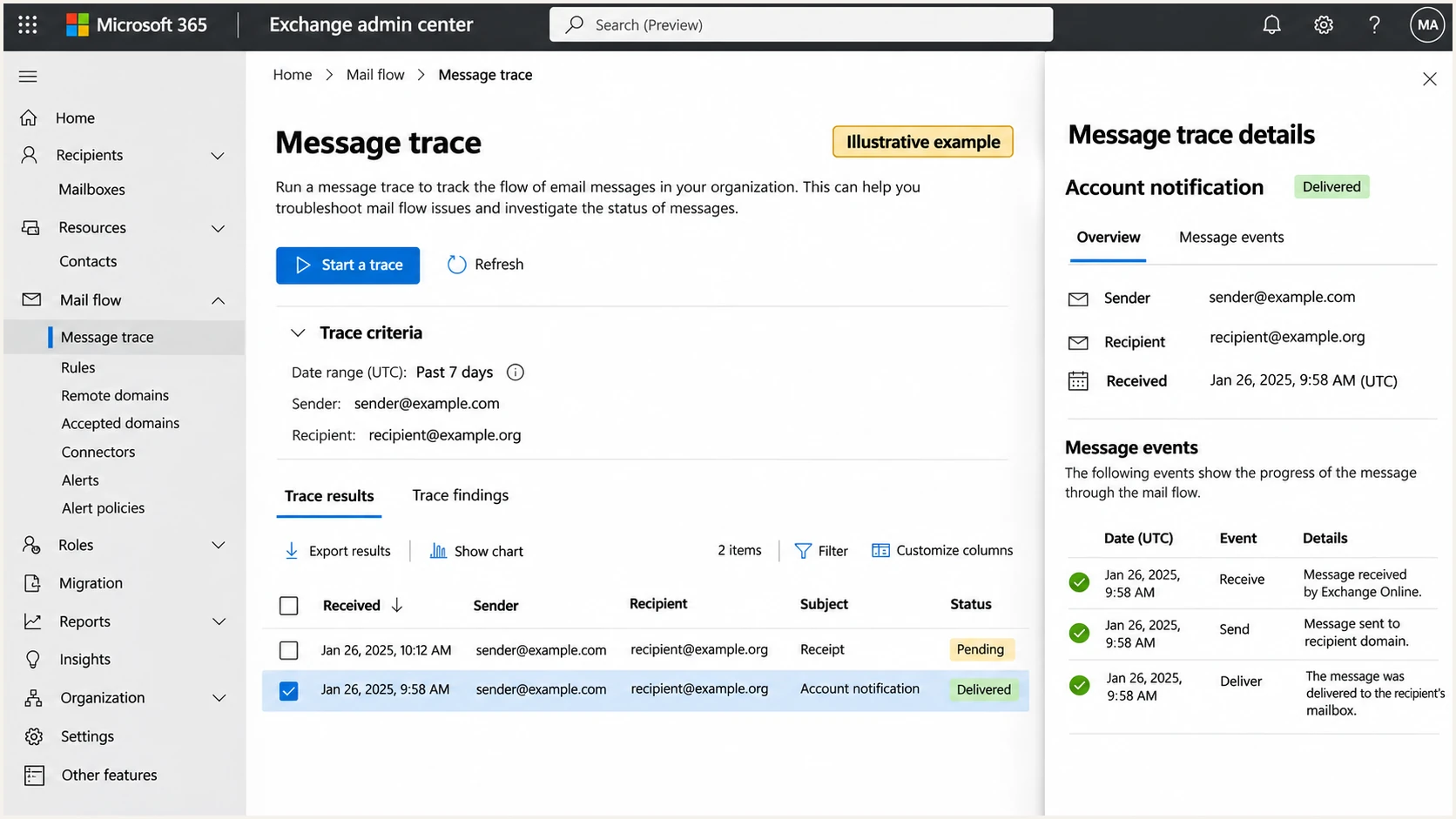
Illustrative Microsoft 365 message trace showing delivery status details.
I keep recipient-side tracing separate from sender logs. A Microsoft 365 trace can explain handling after receipt; it cannot replace the SMTP evidence for an attempt Microsoft never accepted. Consumer Outlook.com users do not have this tenant administration view.
Our platform, Suped, supports the authentication investigation. Start with its domain health checker to validate published DMARC, SPF, and DKIM configuration. Investigate blocklist (blacklist) listings when the SMTP reply points to reputation, without assuming every Microsoft throttle means a public listing.
Send a representative message through the same production path to Suped's email tester to inspect actual authentication results. A DNS check alone does not prove that the queued message was signed correctly.
Email tester
Send a real email to this address. Suped shows a results button when the test is ready.
?/43tests passed
A successful test does not establish that Microsoft accepted earlier messages. Compare its findings with the failing stream, especially when different templates use different infrastructure. Keep queue IDs and the complete remote replies for escalation.
For ongoing authentication oversight, Suped's DMARC monitoring identifies sending sources and detected issues with steps to fix them. Aggregate reports arrive after receiver processing; they do not show every pending SMTP attempt. Suped does not change your sending server's queue lifetime.
Views from the trenches
Best practices
Set queue deadlines by message usefulness, with separate limits for short-lived sign-in codes.
Extend pending mail only after checking its age, recipient value, and available queue storage.
Common pitfalls
Treating retry frequency and total queue lifetime as the same setting leads to poor decisions.
Resending while the original remains queued creates duplicate delivery after service recovery.
Expert tips
Carry an explicit expiry timestamp through every queue so handoffs do not restart the deadline.
Drain an extended backlog gradually after recovery instead of releasing every message at once.
Marketer view
Marketer from Email Geeks says many commercial streams they work with use 72-hour expiry across providers, although some senders choose 24 hours.
2026-11-13 - Email Geeks
Marketer view
Marketer from Email Geeks says longer retention avoids reprocessing expired mail, but delayed delivery is unsuitable for time-sensitive messages such as one-time passwords.
2026-11-13 - Email Geeks
Set an explicit expiry policy
If your useful commercial mail expires after 24 hours, extend that stream to 72 hours while preserving backoff. First exclude short-lived messages or give them enforced deadlines. Keep a longer general-mail lifetime where delayed delivery remains valuable.
I make the change reviewable: record the affected streams, monitor expired-message counts, and check queue age after recovery. Before manually resending anything, confirm that the original is no longer pending and that the recipient still needs it.
Frequency asked questions
No. A 72-hour period is a sender-side commercial policy. General SMTP guidance gives four to five days, while useful content lifetime and sender capabilities determine the practical cutoff.
Let the existing queue retry. Submitting another copy while the original remains pending risks duplicates. After final expiration, confirm that the message is still useful before creating a replacement.
No. A 4xx reply is temporary and does not establish an invalid address. Review the complete reply and subsequent outcome before applying suppression rules.
No. Final SMTP acceptance ends the sending server's retry responsibility for that handoff. Investigate recipient-side processing and mailbox placement if the message is still missing.