How can I change the retransmission time in Postfix?

Published 18 Jun 2025
Updated 10 Aug 2026
11 min read
Summarize with

Updated on 10 Aug 2026: We clarified Postfix's exponential backoff, queue lifetime, effective-value checks, and safe retry testing for deferred mail.
Yes. In Postfix, change retransmission timing for deferred mail with minimal_backoff_time, maximal_backoff_time, and queue_run_delay in main.cf. For a normal 450 greylisting response that says to wait 300 seconds, start with minimal_backoff_time = 300s and queue_run_delay = 300s. On modern Postfix, those are already the defaults, so the real fix is often to stop lowering them, confirm the whole delivery attempt has finished, and let the deferred queue retry after the greylist window.
The setting that looks tempting, transport_retry_time, is usually not the answer for greylisting. It controls how often the queue manager retries a malfunctioning delivery transport. A remote MX returning 450 4.2.0 is not the same failure as a broken smtp transport.
Short answer
For greylisting, tune deferred-message backoff, not the transport retry timer.
- Deferred mail: Use minimal_backoff_time for first retry spacing after a temporary delivery failure.
- Queue scans: Keep queue_run_delay less than or equal to minimal_backoff_time.
- Upper bound: Use maximal_backoff_time to cap later retry intervals.
- Transport fault: Use transport_retry_time only when the local delivery transport is malfunctioning.
Change the Postfix retry interval
The direct change belongs in main.cf. Record the effective values first, then use postconf -e to update each parameter without creating duplicate active entries. The following baseline matches a common 300 second greylist window and keeps later retries bounded by the standard upper limit.
Greylisting-friendly Postfix baselinebash
postconf minimal_backoff_time queue_run_delay maximal_backoff_time
sudo postconf -e "minimal_backoff_time = 300s"
sudo postconf -e "queue_run_delay = 300s"
sudo postconf -e "maximal_backoff_time = 4000s"
sudo postfix check
sudo postfix reload
The Postfix tuning guide describes the queue manager defaults that matter here: queue scans, minimum backoff, maximum backoff, and queue lifetime. A reload applies the current configuration but does not force every deferred message to retry. Existing queue files retain their eligibility timestamps until a normal scan or an explicit delivery request selects them.
On a host managed by a control panel or configuration system, make the same change in its source configuration. Otherwise, a package update or automated reconciliation can overwrite the values in main.cf.
|
|
|
|
|---|---|---|---|
minimal_backoff_time | 300s | First deferred retry | Too low repeats early |
queue_run_delay | 300s | Deferred queue scans | Lower means more I/O |
maximal_backoff_time | 4000s | Later retry cap | Too high delays mail |
maximal_queue_lifetime | 5d | Expiry after temporary failures | Short values bounce sooner |
transport_retry_time | 60s | Broken transport | Not normal 4xx |
Postfix retry controls for deferred delivery
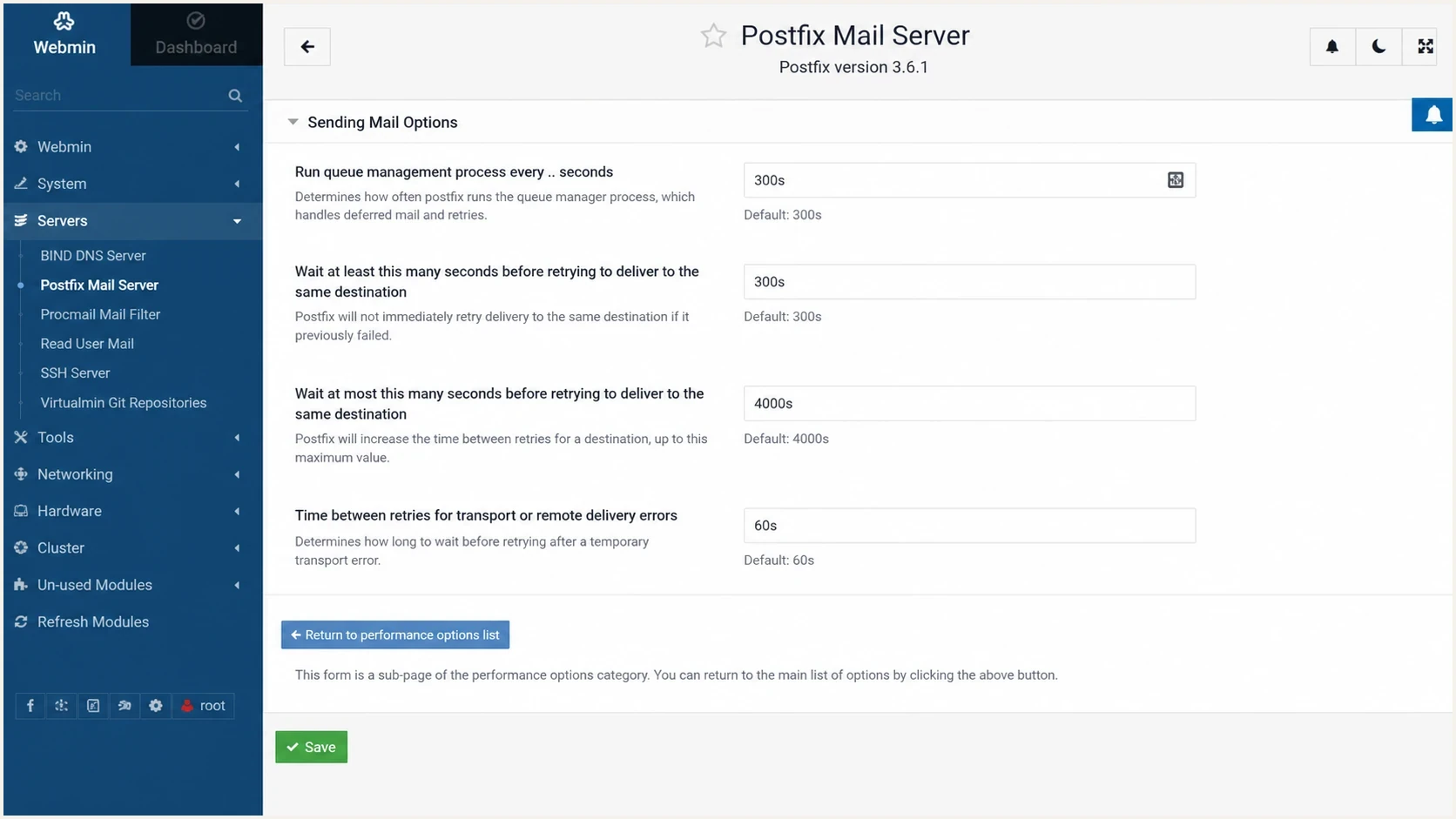
Webmin Postfix settings for queue scans and deferred mail backoff timing.
Understand retry backoff and queue lifetime
Postfix does not retry every deferred message on one fixed interval. The qmgr queue manager uses exponential backoff, doubling the time between unsuccessful delivery attempts while keeping the interval between minimal_backoff_time and maximal_backoff_time. The queue_run_delay value controls how often Postfix scans the deferred queue. It is not a promise that every eligible message will run at that exact second.
- First retry floor: The interval cannot be shorter than minimal_backoff_time during normal queue scheduling.
- Later attempts: Intervals grow after repeated failures until they reach maximal_backoff_time.
- Dead destinations: The minimum backoff also limits how long an unreachable destination stays in the short-term destination status cache.
- Message expiry: The maximal_queue_lifetime setting decides when a message with temporary failures becomes undeliverable.
- Bounce expiry: The bounce_queue_lifetime setting applies separately to queued MAILER-DAEMON messages.
A delay notice does not expire mail
The delay_warning_time setting controls when the sender receives a delayed-mail notice. Its default is 0h, which disables that notice. It does not control retries or the total time a message stays queued.
Queue load, deferred queue scan timing, and the destination status cache can move an actual retry later than the minimum. Treat the configured values as scheduler bounds, then verify real behavior by following the same queue ID in the logs.
What happens with greylisting
A greylist message that says Greylisted for 300 seconds is human-readable SMTP response text, not a timer field that Postfix parses. Postfix sees a temporary SMTP failure, records the delivery as deferred, and schedules the message according to queue backoff after the delivery attempt has finished.
An anonymized greylisting log patterntext
postfix/smtp[22475]: A88B418003D5B:
to=<user@example.com>, relay=mx1.destination.example[192.0.2.10]:25,
delay=969, dsn=4.2.0, status=deferred
host mx1.destination.example said: 450 4.2.0
Recipient address rejected: Greylisted for 300 seconds
In that log pattern, dsn=4.2.0 and status=deferred are the key pieces. The delay value tells you how long the message has been in the queue or active delivery path, but it does not prove that Postfix waited the wrong amount before the next queue retry.
If by "second max" you mean the second MX host, Postfix does not have a simple setting that waits 300 seconds before trying the next MX because one MX returned greylist text. Postfix can try another usable MX during the same delivery attempt. The backoff controls the next queue attempt after deferral, not the gap between MX hosts inside that attempt.
Deferred message retry
- Trigger: A remote temporary failure leaves the message in the deferred queue.
- Settings: Use minimal_backoff_time, queue_run_delay, and maximal_backoff_time.
- Scope: It affects deferred messages, not just one provider response string.
- Best use: Let the greylist window finish before the next queue attempt.
Transport retry
- Trigger: The local delivery transport cannot be contacted by the queue manager.
- Setting: Use transport_retry_time.
- Scope: It is about the transport service, not normal remote MX policy.
- Best use: Recover from a broken local delivery path.
Greylist retry timing
A simple way to judge first retry timing when the receiver says to wait 300 seconds.
Too low
Under 300s
The receiver still has the sender in its greylist window.
Good baseline
300s
The retry matches the stated wait period.
Conservative
5-15m
Useful for noisy queues and strict receivers.
Too slow
Over 1h
Users notice delay for otherwise recoverable mail.
If the log is about throttling rather than greylisting, retry timers are only one input. Provider-specific pacing, connection concurrency, and message quality matter more. Follow the separate guidance on provider rate limits because changing queue backoff alone does not fix a sender that is hitting a receiver's volume controls.
Safe testing steps
Do not test retry changes by flushing a whole production queue. That creates a noisy burst, hides the useful signal, and can turn a small greylisting delay into a throttling problem. Test one message, one destination, and one parameter change at a time.
Inspect and test one queued messagebash
postconf minimal_backoff_time queue_run_delay maximal_backoff_time
postconf transport_retry_time maximal_queue_lifetime bounce_queue_lifetime
postqueue -p
postcat -q QUEUEID | sed -n '1,80p'
sudo postqueue -i QUEUEID
For a large deferred queue, check age buckets before changing timers. The Postfix bottleneck analysis explains why repeated deferred queue waves can fill the active queue. That is the operational reason to avoid aggressive retry settings on a busy hosting server.
Avoid queue-wide retries
A queue flush is a delivery event, not just a diagnostic command. Use it with the same care as a send-rate increase.
- Single message: Retry one queue ID first so the result is readable.
- Busy queue: Use queue age and destination shape before reducing scan intervals.
- Receiver policy: Repeated attempts inside the greylist window can extend waiting at some receivers.
- Evidence: Compare the next log line for the same queue ID after the change.
The cleanest sign that the setting is right is a later log line for the same queue ID that appears after the expected backoff, attempts delivery again, and either succeeds or receives a new temporary response. If immediate attempts still appear, confirm that the log is not showing multiple MX hosts inside one delivery attempt.
When Postfix timing is not the root cause
Retry timing fixes delivery cadence. It does not fix a receiver that distrusts the sender, a domain with broken authentication, missing reverse DNS, or an IP under reputation pressure. Once the timer is sane, check the sender signals around the MTA.
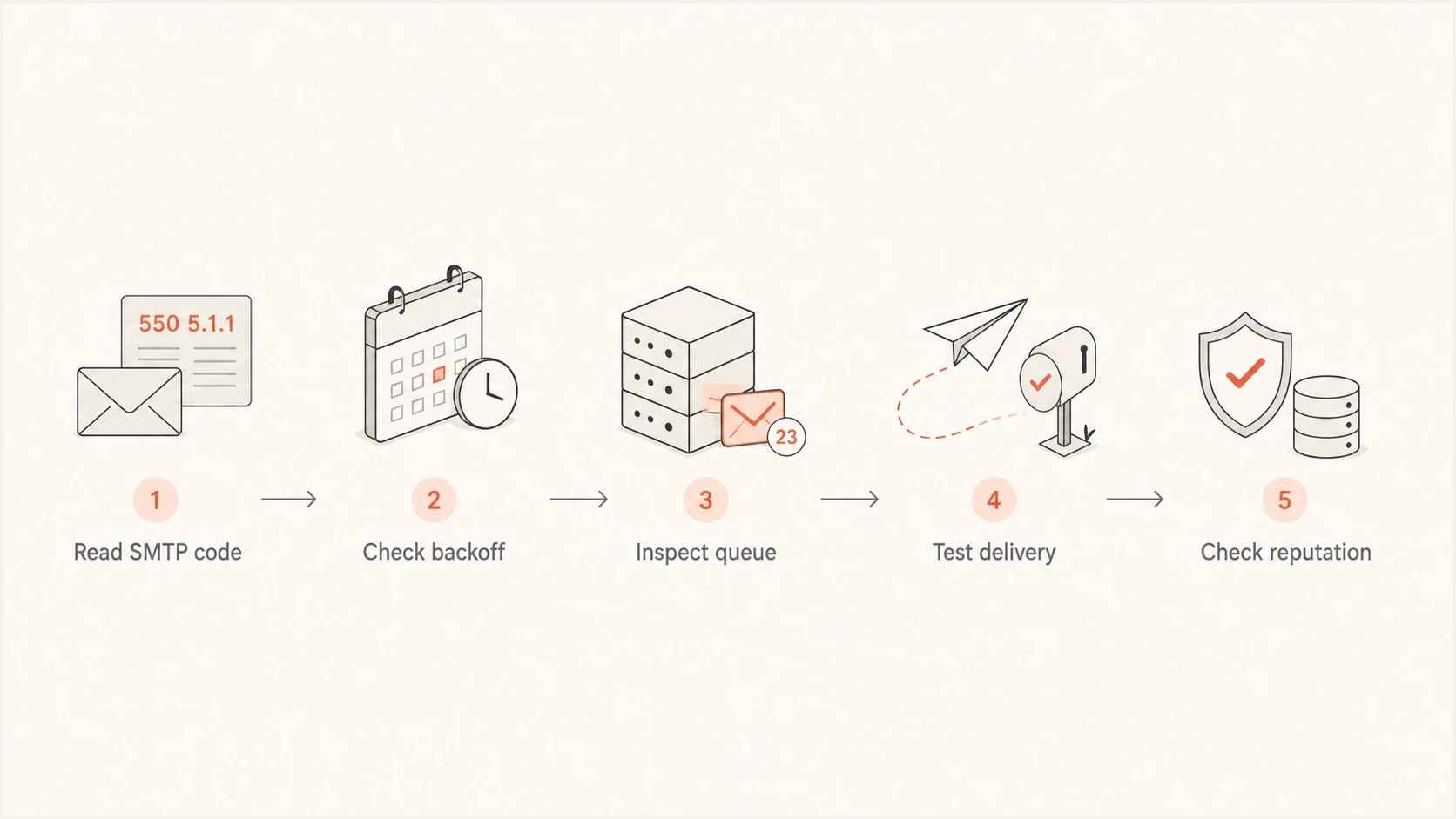
Postfix deferred mail troubleshooting flow for SMTP responses, retry backoff, queue checks, and sender reputation.
A domain health checker is useful here because it checks the surrounding DNS and authentication posture. Check SPF, DKIM, DMARC, MX, and reverse DNS before assuming that queue timing is the whole problem.
Also check blocklist (blacklist) pressure when deferrals are broad across mailbox providers. Suped's blocklist monitoring keeps that check connected to DMARC and delivery context instead of treating a blacklist listing as a separate spreadsheet task.
After a Postfix configuration change, send a controlled message through an email tester. That provides a fresh delivery sample instead of relying only on queue logs. Queue logs explain when Postfix tried; a test message shows whether the message that left the server was authenticated and ready for delivery.
Email tester
Send a real email to this address. Suped shows a results button when the test is ready.
?/43tests passed
Postfix controls the retry schedule. Suped's product covers the monitoring around that change by showing whether mail from the MTA passes SPF, DKIM, and DMARC, whether new authentication issues appear, and whether reputation signals change while the deferred queue drains.
A practical Suped workflow is to add the domain, verify its DNS checks, send a controlled test message, filter DMARC reports for the sending source, and keep alerts active during the rollout. Hosted SPF and Hosted MTA-STS are available when the server team needs managed DNS updates for those records.

Email tester sample report showing total score, email preview, issue summary, and per-section results
Practical configuration patterns
The right numbers depend on the failure being solved. Keep a greylisting baseline close to the modern defaults. Increase the values only when a large queue keeps returning the same temporary failures and the sender needs to reduce retry pressure.
Balanced default-style retry timingtext
minimal_backoff_time = 300s
queue_run_delay = 300s
maximal_backoff_time = 4000s
maximal_queue_lifetime = 5d
transport_retry_time = 60s
That pattern is suitable when the receiver asks for a five minute greylist wait and the queue size is normal. It gives the first retry enough time to clear the greylist without delaying every temporary failure for an hour.
More conservative timing for noisy deferred queuestext
minimal_backoff_time = 10m
queue_run_delay = 5m
maximal_backoff_time = 1h
maximal_queue_lifetime = 2d
That slower pattern is for a queue that is already creating repeated deferrals. It reduces retry pressure, but it also delays legitimate recoveries and expires temporarily deferred mail after two days. Use it only after confirming that the problem is broad and temporary, not a single recipient, typo, or one destination with a policy issue.
Do not use retry timing as reputation repair
If authentication is failing or the IP has a reputation problem, longer retry intervals only make the symptoms quieter. They do not make the mail more trusted.
- Authentication: Fix SPF, DKIM, and DMARC before changing delivery cadence again.
- Reputation: Treat blocklist or blacklist listings as sending-risk evidence.
- Content: Check the actual message that leaves the server, not just queue age.
- Connections: Separate retry backoff from concurrency and connection timeout errors.
If the log shows connect failures, TLS stalls, or remote servers that do not answer, follow a timeout path instead of a greylisting path. Connection timeout errors have different causes, including outbound port 25 filtering, DNS or MX resolution, routing, firewall rules, broken IPv6, remote saturation, and TLS negotiation problems.
Views from the trenches
Best practices
Keep minimal_backoff_time at 300s or higher when greylisting drives most deferrals.
Check qshape before reducing queue_run_delay, because faster scans increase disk I/O on busy MTAs.
Read the 4xx text, but tune Postfix from the status code and queue behavior rather than the prose.
Test with one domain first, then reload Postfix and confirm the next deferred retry time.
Common pitfalls
Changing transport_retry_time rarely fixes greylisting because the SMTP transport is working.
Lowering retry intervals too far makes greylisted providers see repeated unnecessary attempts.
Forcing the whole deferred queue can create a surge and trigger rate controls elsewhere.
Treating every MX reply separately hides that one message has one deferred queue state.
Expert tips
For 300 second greylisting, modern Postfix defaults are already near the right timing.
Use destination rate delay for pacing new mail, not for fixing deferred retry timing.
Keep delivery evidence outside Postfix too, including authentication and reputation checks.
When a provider defers by policy, slow the stream before changing global queue timers.
Marketer from Email Geeks says Postfix can change retry timing in main.cf, but the setting has to match the failure mode rather than the wording in one log line.
2020-08-05 - Email Geeks
Marketer from Email Geeks says a greylisted 450 response should be treated as a temporary deferral, and retrying too quickly can keep a sender waiting.
2020-08-05 - Email Geeks
The practical answer
Change Postfix retransmission timing for deferred mail with minimal_backoff_time, queue_run_delay, and maximal_backoff_time. For a 300 second greylist, 300s is the first value to verify, and it is already the modern default for both the minimum backoff and deferred queue scan interval.
Do not expect transport_retry_time to solve a normal greylisted 450. Do not expect Postfix to wait between MX hosts because the first MX included a human-readable wait time. Tune the deferred queue, test one queue ID, then check authentication, reputation, and actual message quality so the server is not retrying bad mail more politely.




