
How to avoid Gmail rate limits when sending essential communications to a large, infrequently mailed audience?

Published 23 Jun 2025
Updated 10 Oct 2026
14 min read
Summarize with
Updated on 10 Oct 2026: We added Gmail's deferral recovery steps and checks for dormant recipient lists.
When the deadline allows, break the send into controlled waves across several days. Start with people who recently logged in, purchased, contacted support, requested this type of notice, or clicked your mail. Increase Gmail-facing volume only while deferrals stay low and the retry queue clears.
The Gmail error 421-4.7.28 is a temporary deferral, not a permanent rejection. Gmail uses variants of this response for unusual volume or unsolicited mail associated with an IP address, IP netblock, DKIM domain, SPF domain, URL domain, or repeated Message-ID. Read the complete SMTP response to identify the affected source. If you are already seeing 421 deferrals, slow down, keep retry behavior polite, and avoid changing sender identity mid-send.
- Emergency path: send the required notice, accept some deferral risk, and rely on queue retries instead of forcing throughput.
- Safer path: ramp over days, starting with recipients who recently interacted with your mail or account.
- Long-term path: keep a real cadence for opted-in recipients, but do not create low-value mail just to preserve volume.
- Fallback path: use in-app notices, account banners, postal mail, or support workflows for notices that cannot wait for email delivery.
Know which Gmail limit you are hitting
A Gmail account sending cap and a Gmail recipient-side rate limit are different controls. An account cap stops a Gmail or Google Workspace mailbox from submitting more outbound mail. A recipient-side limit occurs when Gmail's receiving servers defer traffic from your sending infrastructure. Splitting a campaign into batches helps with traffic shape, but it does not raise an account's daily sending ceiling.
|
|
|
|---|---|---|
Account sending cap | Gmail or Google Workspace mailbox refuses new outbound mail | Wait for the quota to reset and use a sending method sized for the audience. |
Recipient-side deferral | Gmail returns a 4xx SMTP response to the sending platform | Slow new Gmail traffic and let the retry queue back off. |
Permanent rejection | Gmail returns a 5xx SMTP response | Do not keep retrying that message; fix the stated cause first. |
Google says a personal Gmail account can stop sending after more than 500 messages in a day or more than 500 recipients in one message, with access generally returning within 1 to 24 hours. Google Workspace limits depend on the account and sending method. A large essential send normally belongs on infrastructure intended for bulk delivery, with its own queue and retry controls.
What triggers Gmail's inbound rate limits
Gmail does not publish one fixed safe number for every sender because the limit depends on trust signals. A sender with steady Gmail volume, useful mail, a clean complaint history, and consistent authentication can handle a larger increase than a sender that has been quiet for months. Treat Gmail rate limits as a reputation and pattern problem first, then a raw volume problem second.
The wording of the SMTP response matters. When Gmail names the DKIM domain, it is pointing to the d= domain in the DKIM signature. Other 4.7.28 variants can name the IP address, IP netblock, SPF domain, URL domain, or duplicate Message-ID pattern. If normal mail uses one authenticated source and the essential send suddenly uses another, Gmail sees a new traffic pattern. The source named in the actual response needs attention. An IP quota affects every sender sharing that IP; a DKIM or SPF domain quota follows that authenticated domain, including traffic sent through multiple platforms.
Common Gmail deferraltext
421-4.7.28 Gmail has detected an unusual rate of mail
originating from your DKIM domain.
Do not solve this with a sender switch
Moving the send to a new domain, new DKIM identity, newly dedicated IP, or untested URL domain right before the notice usually increases uncertainty. Gmail needs a pattern to evaluate. A sudden new source with a large dormant audience has the wrong pattern.
- Keep identity stable: use the same visible From domain and DKIM domain you want Gmail to recognize.
- Separate streams carefully: do not mix marketing blasts with truly required account notices on the same queue rules.
- Respect temporary failures: retry 4xx responses with increasing delays instead of immediate repeated delivery attempts.
Clean the recipient list before sending
Reconcile the recipient list with current account records and suppression data before ranking it. An essential notice still needs a valid destination, and an old list can contain addresses that no longer exist.
- Remove duplicates: deduplicate addresses across exports and prevent the same notice from being queued twice for one recipient.
- Check address quality: fix clear syntax errors and reconcile outdated addresses with verified account updates before sending.
- Keep suppression records: preserve unsubscribe and complaint suppressions for promotional or subscribed mail. Handle required account notices separately under documented rules; do not clear every suppression flag because a send is called essential.
- Handle bounces correctly: suppress addresses confirmed as nonexistent, such as a 550 5.1.1 response. Keep Gmail 421 deferrals in the retry queue rather than treating them as invalid addresses.
Address validation does not establish consent or recent engagement. A recipient with no recent activity belongs later in the ramp only when the notice applies to that account.
Plan a gradual Gmail sending ramp
For a large, infrequently mailed audience, do not start with an even split of the whole file. An even split treats your best recipients and your coldest recipients the same. Gmail does not. Start with recent logins, purchases, support requests, explicit subscription activity, and clicks. Treat opens as secondary evidence because automated image loading can inflate them. Let weaker segments follow only after the mail system stays stable.
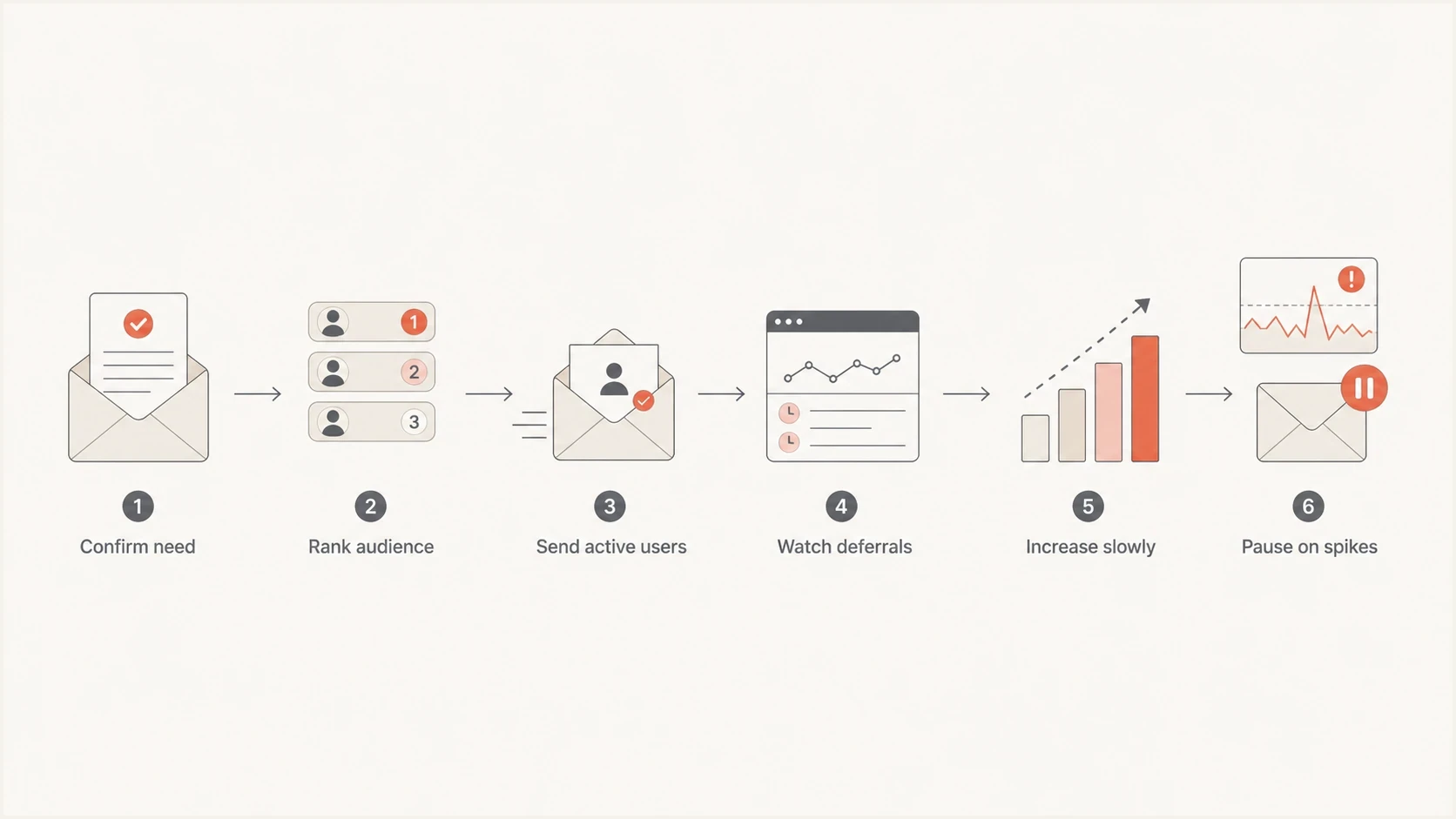
Gmail sending ramp: rank recipients, send active users first, monitor deferrals, and pause on spikes.
- Confirm necessity: decide whether email is required, or whether an account banner, app notice, or support workflow can carry the notice.
- Rank by relationship: send first to recent site users, active customers, recent clickers, and people who asked for this type of update.
- Start near normal: begin the Gmail portion near the recent normal Gmail volume for that authenticated source. If recent volume is zero, start with a small active segment and wait for its delivery results.
- Watch the queue: track 421 deferrals, retry age, spam complaints, bounces, and unsubscribes after each wave.
- Increase only on stability: raise the next wave when deferred mail clears and complaint signals stay low.
- Stop on pressure: pause or cut the next wave when Gmail deferrals rise faster than the queue can drain.
A common pattern is a first day close to normal, a second day that grows if the first day clears, and later waves that carry the colder audience. The exact number depends on your baseline. Pace each wave evenly rather than releasing the whole batch in a burst; no fixed daily multiplier guarantees Gmail acceptance.
Rate limits need queue control
The send plan is only half the work. The MTA or ESP queue has to respond correctly when Gmail says slow down. A 421 response tells the sending system to try later. Frequent aggressive retries can turn a manageable deferral into sustained queue pressure.
- Pause the affected traffic: stop sending for at least 10 minutes, including retries that use the affected quota.
- Identify the scope: read the full SMTP response. If no quota is named, assume the DKIM, SPF, and IP quotas are all affected.
- Test one connection: after the pause, resume through one SMTP connection. If it fails, wait another 10 minutes.
- Restore connections gradually: after success, add connections one at a time and continue watching deferrals.
For planned volume spikes, set queue rules before launch. The goal is to finish delivery without creating a pattern Gmail associates with compromised or unwanted mail. Use the recent Gmail-facing baseline and your provider's documented controls rather than copying a universal messages-per-minute value. Group Google-hosted destinations by their MX records when setting IP-based throttles, including custom domains. Count new messages and retries together so the queue cannot exceed the intended rate.
Illustrative queue policy for your MTA or ESPyaml
gmail:
  destination_scope: "<Google-hosted MX destinations>"
  concurrency: "<start near recent baseline>"
  rate: "<count new messages and retries together>"
  retry_on: "4xx"
  rate_limit_4_7_28:
    pause_minutes: 10
    restart_connections: 1
    add_connections: "one at a time after success"
  backoff:
    increase_delay: true
    max_retry_age: "<message useful lifetime>"
    on_expiry: "<record non-delivery and trigger fallback>"
  pause_new_waves_when:
    deferrals_rise: true
Signals for the next wave
Use Gmail-facing history and live queue behavior for the same authenticated source.
Baseline stable
Continue
Deferrals remain low and deferred mail clears.
Deferrals rising
Hold
Do not add another wave yet.
Queue aging
Slow
Reduce new Gmail-facing volume.
Permanent errors
Fix first
Resolve the stated cause before resuming.
Meet Gmail's sender requirements before ramping
Before ramping, verify that the domain identity and mail path are consistent. Suped's domain health check checks published SPF, DKIM, and DMARC configuration. Confirm authentication on an actual sent message, and verify the sending IP's forward and reverse DNS plus TLS on the SMTP path separately. Passing these checks does not guarantee that Gmail accepts a spike, but it removes avoidable compliance failures.
For mail sent to personal Gmail accounts, Gmail requires every sender to use SPF or DKIM, valid forward and reverse DNS, TLS, RFC 5322 message formatting, and a user-reported spam rate below 0.3%. Bulk senders must use both SPF and DKIM, publish DMARC with at least p=none, and make the visible From domain match a passing SPF or DKIM domain under the applicable DMARC mode. Relaxed mode permits the same organizational domain; strict mode requires an exact domain match. Gmail recommends keeping its user-reported spam rate below 0.1% and avoiding 0.3% or higher.
Google's sender guidelines FAQ defines bulk senders as those sending about 5,000 messages or more to personal Gmail accounts within 24 hours. Messages across subdomains of the same primary domain count together, and bulk sender status is permanent once reached. Marketing and subscribed messages need RFC 8058 one-click unsubscribe plus a visible body link; honor unsubscribe requests within 48 hours. Purely transactional messages are excluded from the one-click requirement. Calling a notice essential does not by itself make it transactional.
|
|
|
|---|---|---|
DKIM | Stable d= domain and passing signatures | Gmail can associate mail with the authenticated domain. |
SPF | Authorized sending IP for the envelope domain | The sending path passes SPF authentication. |
DMARC | Visible From domain matches a passing SPF or DKIM domain under DMARC rules | The message passes DMARC and aggregate reports expose failures. |
DNS | Sending IP has a PTR hostname whose A or AAAA record resolves back to that IP | Gmail requires consistent host and IP identification. |
TLS | Encrypted SMTP connection | Gmail requires TLS for mail sent to personal accounts. |
Complaints | Below 0.1% target and never 0.3% or higher | High user-reported spam rates reduce delivery and mitigation options. |
Content | Clear purpose without unrelated promotion | Recipients can recognize why they received the notice. |
Suped's DMARC monitoring helps confirm expected sending sources and investigate authentication failures before and during the ramp. Suped's blocklist monitoring alerts the team to blocklist (blacklist) changes. Check the delivery platform's SMTP logs for Gmail-specific 421 responses and queue data.
Suped DMARC dashboard showing email volume, authentication health, and source breakdown
What to confirm before launch
- Authentication passes: SPF and DKIM pass for the active sender, and the visible domain passes DMARC.
- Investigate unknown sources: review unfamiliar sources in DMARC reports and confirm that authorized mail passes authentication.
- Complaint rate controlled: Gmail's user-reported spam rate stays below 0.1% and never reaches 0.3%.
- Fast alerts: the team gets notified when failure rates, unknown sources, or blocklist and blacklist signals change.
- Queue recovery ready: confirm the platform can pause an affected quota and restart with one SMTP connection.
Audience strategy for infrequent lists
The hardest part is not the Gmail throttle. It is the question of why the audience is infrequently mailed. If people have not heard from you in a year, Gmail has less evidence that they want the message. The recipient also has less context. That combination creates complaints, ignores, deletions, and spam-folder placement.
Sending because it is required
When the notice is legally required, security-sensitive, tied to account access, or operationally necessary, send it with a controlled ramp and documented retry policy. Keep the copy plain and specific.
- Use clear context: explain the account, product, or relationship that makes the notice relevant.
- Avoid extra offers: keep marketing content out of required communications.
- Keep records: log send time, queue status, deferrals, and final delivery results.
Keeping volume warm
A monthly cadence helps only when recipients explicitly expect and value that cadence. Sending filler mail to hold a baseline usually trains people to ignore you.
- Ask for cadence: let people choose the cadence for product updates, digest mail, or other subscribed messages; keep required notices separate.
- Suppress inactivity: exclude people with no recent relationship unless the notice truly requires email.
- Use account surfaces: show terms updates and policy notices after login when email is not the only path.
Check the message before the ramp
Before launching the first wave, send the exact production message to a real mailbox and inspect the result. Suped's Email tester checks SPF, DKIM, DMARC, sending IP, and transport details. Inspect receipt in a Gmail mailbox separately; a passing technical report does not guarantee inbox placement.
Use the technical report to catch broken DKIM and a From domain mismatch. Inspect link domains and account context manually before Gmail has to judge the campaign at scale.
Email tester
Send a real email to this address. Suped shows a results button when the test is ready.
?/43tests passed
Keep the same authentication settings, link domains, and envelope path for the real send. Generate a unique Message-ID for each newly generated message and preserve it for retries of that message.
Send urgent notices without overwhelming Gmail
There are cases where waiting several days is worse than getting some Gmail deferrals. Court-ordered notices, account security notifications, service shutdowns, and billing access changes can have a real deadline. In those cases, still segment the send, but do not assume every recipient gets the message immediately.
A fast-send operating rule
If the notice has a hard deadline, send the most active Gmail recipients first, keep retrying deferred mail within the message's useful lifetime, and publish the same notice inside logged-in account surfaces. SMTP acceptance does not prove inbox placement or that the recipient read the notice. Record accepted, deferred, and expired messages separately, and activate fallback channels before the deadline.
- Document the reason: record why the deadline overrides the normal ramp.
- Protect the queue: keep retries slow and stop sending new cold waves when deferrals spike.
- Use other channels: show the notice on login, support pages, billing pages, or status pages.
One isolated Gmail rate limit does not automatically ruin sender reputation. Repeatedly forcing cold volume through the same identity after Gmail pushes back is the pattern to avoid. Treat each deferral burst as feedback and adjust the next wave.
Views from the trenches
Best practices
Ramp Gmail-facing volume by audience quality first, with active recipients leading each wave.
Keep a steady baseline only when recipients gave clear permission for that regular cadence.
Treat 421 deferrals as a queue signal, then slow retries instead of pushing harder that day.
Use the same DKIM identity for planned large sends so Gmail sees a consistent source.
Common pitfalls
Sending a large stale segment at once makes the traffic look unfamiliar to Gmail fast.
Creating low-value monthly mail only to preserve volume trains people to ignore you.
Switching ESPs before the notice changes the mail path before Gmail has history for it.
Ignoring authentication results hides which sending source Gmail is throttling today.
Expert tips
Test one wave, read deferrals and complaints, then decide the next wave size for Gmail.
Use app banners for account notices when email is not the only required channel for users.
Prioritize recent logins, purchases, and clicks before the long-dormant Gmail audience.
Track DKIM-domain volume separately when more than one ESP sends for the brand domain.
Marketer view
Marketer from Email Geeks says large rare sends should be split into increments, and the first increments should stay close to normal Gmail-facing volume.
2024-10-22 - Email Geeks
Expert view
Expert from Email Geeks says Gmail is not reacting only to raw volume, because sudden mail to unfamiliar recipients can look like a compromised sender pattern.
2024-10-22 - Email Geeks




