Why is Gmail deferring mail with '421 4.7.28 unusual rate of mail' and sending it to spam?

Published 24 Apr 2025
Updated 9 Aug 2026
12 min read
Summarize with
Updated on 9 Aug 2026: We added Gmail's connection restart sequence and clearer checks for the sender scope behind 421 4.7.28 deferrals.
Gmail is deferring mail with 421 4.7.28 because it sees an unusual rate of mail tied to your sending identity. That identity can be the sending IP, IP netblock, SPF domain, DKIM domain, URL domain, or message pattern. When nothing changes after the warning, Gmail can move later mail to spam instead of simply slowing it down.
Treat this error as an early trust warning, not a random SMTP problem. Slow Gmail traffic, cut the audience to people who recently engaged, check authentication and reputation signals, then rebuild volume in controlled steps. Retrying the same queue at the same speed usually makes the pattern look worse.
- Meaning: Gmail has temporarily rate limited mail because the current pattern looks unusual or unwanted.
- Main causes: Low engagement, sudden volume jumps, infrequent sending, platform moves, bad retries, unauthorized traffic, or authentication drift.
- Immediate fix: Pause broad Gmail sends, segment recent engagers, pace retries, and inspect the exact sender scope.
- Spam link: The same trust signals can affect both deferrals and Gmail placement, so unresolved deferrals can be followed by spam placement.
What Gmail is really saying
Google's Gmail SMTP errors list shows several 421 4.7.28 variants. They point to a temporary Gmail rate limit, but the response text identifies whether Gmail associated the pattern with a sender, IP address, IP netblock, SPF domain, DKIM domain, URL domain, or repeated Message-ID.
Typical Gmail 421 4.7.28 deferral
421 4.7.28 Gmail has detected an unusual rate of email.
Scope: DKIM domain example.com
Action: temporary Gmail rate limit
The wording matters. If the response names an IP address, start with IP reputation, reverse DNS, queue pacing, and other senders using that IP. If it names a DKIM domain or SPF domain, check whether a new stream, selector, or envelope domain changed the sender history. Naming one of those domains identifies the rate-limit scope, not proof that its authentication check failed. If it names a URL domain, inspect the linked domain and the traffic carrying it.
Gmail also uses 421 4.7.28 when a sender exceeds the quota for messages carrying the same Message-ID. In that case, correct the message-generation or retry process so distinct messages receive unique Message-ID values before resuming.
|
|
|
|---|---|---|
Unusual rate | Sender | Volume |
IP address | IP | Queue |
IP netblock | Network | Shared traffic |
SPF domain | Envelope | SPF identity |
DKIM domain | Signing | DKIM identity |
URL domain | Links | Linked traffic |
Same Message-ID | Message | ID generation |
Compact map of common 421 4.7.28 scopes.
Do not treat this as ordinary greylisting
A normal temporary failure asks your mail server to try again later. 421 4.7.28 is more specific. Gmail is telling you that the sending rate or pattern is the issue. Retrying without changing volume, connections, audience, or the named scope keeps the same signal alive.
Why deferrals become spam placement
The common pattern is simple: Gmail slows the mail first, then filters more aggressively if the sender keeps pushing the same traffic. That does not mean Gmail has a fixed one-week timer. It means the sender keeps creating evidence that recipients do not want the mail, or that Gmail cannot confidently trust the identity behind it.
A sender with poor engagement can hit this when Gmail sees too many messages to recipients who rarely read, reply to, move to the inbox, or otherwise interact positively with the mail. An infrequent sender can also hit it because Gmail has weak recent history with the audience. If you email a large customer list after months of silence, Gmail can read the send like a large first-contact campaign.
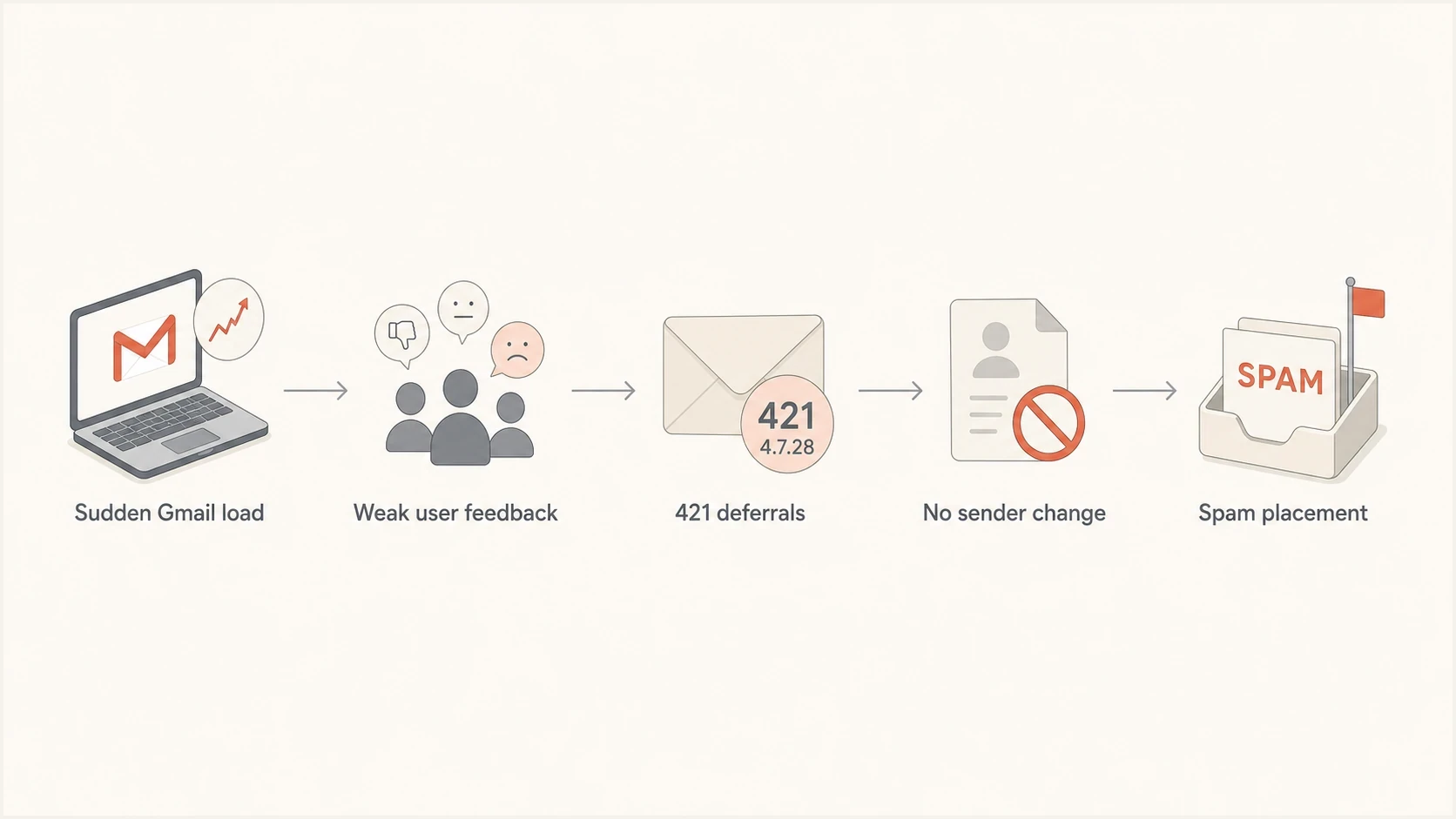
Gmail 421 4.7.28 flow from unusual sending volume through deferrals to spam placement.
What Gmail is warning about
- Rate: Gmail sees more mail than it trusts for the current sender identity.
- Audience: The list includes too many quiet, old, or first-contact Gmail recipients.
- Identity: The domain, IP, signing domain, or link domain has changed or has weak history.
- Feedback: Recipients are ignoring, deleting, reporting, or filtering the mail.
What senders often do wrong
- Retry: They replay every deferred Gmail message as soon as the queue opens.
- Ignore: They keep sending to unengaged recipients because the campaign calendar says so.
- Move: They switch infrastructure and send full volume before Gmail has new history.
- Guess: They change DNS records without checking the exact failing sender scope.
That is why a sender can see deferrals first and spam placement later. The deferral is Gmail's throttle. The spam folder is Gmail's placement decision after it has enough evidence that the mail should not go straight to the inbox. For a deeper look at the placement side, the page on Gmail spam placement covers the filtering signals in more detail.
Triage before you retry
The first job is to stop creating the same signal. Review Gmail separately from the rest of the list because Gmail can be healthy or unhealthy on its own. Aggregate delivery and engagement rates hide the problem when non-Gmail domains are still accepting and placing mail normally.
- Freeze: Stop broad Gmail campaigns and pause automatic retries that create large bursts.
- Scope: Group deferrals by IP, envelope domain, DKIM domain, link domain, Message-ID, and mail stream.
- Segment: Send only to recent Gmail openers, clickers, purchasers, or active account users.
- Inspect: Run a real seed or mailbox sample through the email tester and review headers, authentication, and content clues.
- Check: Use a domain health check to catch DMARC, SPF, DKIM, rDNS, and DNS problems before resuming volume.
Email tester
Send a real email to this address. Suped shows a results button when the test is ready.
?/43tests passed
Suped's product connects the authentication and reputation evidence to this workflow. Its DMARC monitoring, SPF and DKIM visibility, blocklist and blacklist signals, real-time alerts, and issue-level remediation steps help teams identify what changed before the Gmail warning develops into a placement problem.

Issue steps to fix dialog showing the issue overview, tailored fix steps, and verification action
The metric to check first
Do not start with total delivery rate. Start with Gmail-only deferred count, deferred percentage, spam placement tests, complaint signals, recent engagement, and authentication pass rate by sending stream. A sender can have acceptable global delivery while Gmail is already sliding into a bad pattern.
Follow Gmail's restart sequence
Google gives a specific connection recovery procedure for 421 4.7.28. Use it after stopping broad sends and identifying the affected scope. A successful SMTP connection is a reason to increase cautiously, not permission to release the full deferred queue.
- Stop for at least 10 minutes: Prevent campaign sends and automated retries from feeding the same Gmail rate limit.
- Identify the cause: Check the named Gmail scope, recent volume changes, shared-IP traffic, unauthorized jobs, compromised credentials, and repeated Message-ID values.
- Test one connection: After the pause, send through a single SMTP connection. If it fails, wait another 10 minutes before testing again.
- Increase one at a time: If the test succeeds, add connections individually while watching the Gmail-only 4.7.28 rate.
- Stop on recurrence: If deferrals rise again, reduce connections and volume instead of pushing the queue through.
If the response does not specify an IP, SPF domain, or DKIM domain quota, Google's guidance says to assume all three scopes are affected. Keep each scope stable while testing so the result tells you whether the restart is working.
Check whether the traffic is yours
An unusual rate can expose a compromised account, leaked SMTP credential, faulty automation, or another tenant on a shared IP. Compare the queue with expected applications and authenticated users before treating the event as a campaign pacing problem. Revoke exposed credentials and stop the unexpected source before restarting.
Fix the sending pattern
The fastest recovery usually comes from changing who gets mail and how fast Gmail receives it. Do not start by editing every DNS record. If authentication is broken, fix it. If authentication is passing, the bigger issue is usually volume, audience quality, recent history, content, or an unexpected source.
|
|
|
|
|---|---|---|---|
Pause | All Gmail | Stop | Stabilize |
Restart | Recent active | Low | Feedback |
Expand | Warm cohorts | Moderate | Trust |
Hold | Cold Gmail | None | Protect |
A conservative recovery plan for Gmail traffic.
For infrequent senders, the answer is pacing. If the list has not heard from you in months, send over several days and start with recipients who have a recent relationship with the brand or service. Gmail needs current positive feedback. A large one-day blast to quiet Gmail contacts creates the opposite signal.
Gmail restart guardrails
Operational guardrails for recovery. These are not published Gmail thresholds.
Stable
Continue
Small sends to recent active users
Watch
Hold pace
Deferrals appear but fall quickly
High risk
Reduce
Deferrals rise across streams
Stop
Pause
Spam placement follows deferrals
Retry settings matter. If your MTA retries thousands of Gmail messages at the same time, Gmail sees another burst. Use slower retry intervals for Gmail while you recover. Separate marketing, transactional, lifecycle, and account-security mail where possible, because one weak bulk stream should not drag high-value operational mail into the same pattern.
A better first recovery send
- Audience: Gmail recipients active in the last 30 days, with hard bounces and complainers removed.
- Cadence: Small batches with enough time between sends to read deferral and placement movement.
- Content: Plain value, expected sender identity, familiar link domain, and a working unsubscribe path.
- Stop rule: If deferrals rise again, pause the next batch instead of trying to push through.
Fix authentication and reputation signals
Authentication alone does not guarantee inbox placement, but broken authentication makes recovery much harder. Check that SPF passes for the envelope domain, DKIM passes for the signing domain, and the visible From domain has a DMARC record. If you use multiple streams, check each stream. A newsletter, receipt, password reset, and sales notification can all have different identifiers.
Monitoring-first DMARC recorddns
_dmarc.example.com TXT
v=DMARC1; p=none; rua=mailto:dmarc-reports@example.com; adkim=s; aspf=s
If you do not already review aggregate reports, DMARC monitoring tells you which sources are passing, failing, or sending without approval. Suped's hosted DMARC and hosted SPF workflows also help when teams need policy staging, SPF flattening, or sender changes without repeated DNS edits.
Reputation checks belong beside authentication checks. A listing on a major blocklist (blacklist) can expose abuse, compromise, or poor list practices that also need investigation, but it does not prove why Gmail issued the deferral. Blocklist monitoring helps catch those changes while you are still in the deferral stage.
DMARC record detail view showing SPF, DKIM, DMARC, rDNS diagnostics, and DNS records
For senders hitting the error after a platform move, compare old and new identifiers. Did the DKIM domain change? Did the envelope domain change? Did a new link tracking domain appear? Did the IP pool change? Gmail does not judge only the visible From address. It evaluates the full message and traffic pattern.
The broader page on Gmail rate limits is useful when you need to separate sender reputation, bulk sender requirements, and volume pacing.
What to do if mail already lands in spam
If Gmail has already moved the stream to spam, keep the recovery narrower than feels comfortable. The sender has to rebuild current evidence. That means sending wanted mail to people most likely to engage, not sending apology blasts to the entire list.
- Clean: Remove hard bounces, recent complainers, role accounts, old suppressions, and inactive Gmail contacts.
- Separate: Keep essential transactional mail away from broad campaigns in routing, headers, and domains.
- Simplify: Reduce link count, remove surprise domains, and make the sender identity obvious.
- Measure: Track Gmail deferrals, inbox tests, spam placement, opens, clicks, complaints, and unsubscribes.
Do not buy more volume to compensate for lower opens. Lower open rates after spam placement are a symptom, not a reason to send more. Sending more to the same weak audience increases the volume of negative or absent feedback.
The mistake that extends recovery
The worst response is to clear the queue, send the delayed campaign again, and keep the next scheduled campaign unchanged. Gmail has already told you the pattern is not trusted. Recovery starts when the pattern changes.
Views from the trenches
Best practices
Reduce Gmail volume first, then restore it only after temporary deferrals drop for several sends.
Segment recent clickers and buyers separately before sending to quiet or older Gmail contacts.
Keep each retry queue paced so one warning does not become repeated bursts at Gmail hosts.
Common pitfalls
Replaying the full queue immediately teaches Gmail that the same pattern remains active today.
Treating 421 4.7.28 as a server outage delays the list and content work that fixes it.
Switching platforms without warm-up makes normal customer mail look newly unsolicited.
Expert tips
Compare Gmail-only opens, clicks, bounces, and deferrals before changing DNS records.
Move low-engagement Gmail cohorts to a slower cadence until user feedback improves again.
Use authentication reports to find whether the IP, SPF domain, DKIM domain, or URL changed.
Marketer from Email Geeks says senders who focus on engaged subscribers and handle deferrals early usually avoid the later spam-folder slide.
2025-04-24 - Email Geeks
Marketer from Email Geeks says 421 4.7.28 is not new, but it becomes more visible when senders ignore Gmail engagement signals.
2025-04-24 - Email Geeks
The practical takeaway
Gmail's 421 4.7.28 warning means the sender needs to change behavior before sending more mail. The recovery sequence is to pause, identify the scope, test one connection, increase cautiously, and measure. If the sender keeps the same Gmail volume and audience, the deferral can be followed by spam placement because the underlying trust problem has not changed.
Suped's product supports a repeatable operational workflow by monitoring DMARC, SPF, DKIM, blocklists and blacklists, surfacing issues, alerting the right people, and providing remediation steps. The sender still has to make the list and pacing decisions, but the authentication and reputation evidence should be visible before Gmail forces the issue.




