
How long should an email verification link remain active?

Published 17 May 2025
Updated 8 Oct 2026
12 min read
Summarize with
Updated on 8 Oct 2026: We clarified verification link expiry and the checks that keep expired or replaced tokens unusable.
For standard, low-risk email verification links, use 48 hours as a starting expiry window. Extend that to 72 hours when the audience often signs up with one inbox and checks it later, such as a work email checked after a weekend. Start passwordless sign-in links at 15 minutes, and extend to 30-60 minutes only after assessing the risk. Use 24 hours or less for sensitive account changes, and allow up to 7 days only for low-risk address confirmation that does not unlock account access.
The link should be single-use, tied to a specific account action, and invalidated when a replacement token is issued. Public signup and resend responses should never leak whether an account exists. If the link has expired, send the user to an expired-link page with one safe resend action.
This choice is partly security policy and partly delivery reality. Some security software clicks links before the human recipient sees the email, so the token design matters as much as the expiry time. Test the live message through Suped's email tester before blaming the expiry window for failed confirmations.
Recommended expiry windows
There is no universal expiry period for every email verification link. OWASP's verification guidance requires single-use, time-limited tokens without prescribing one expiry period. The windows below are suggested defaults by risk. A link that signs a person in is a credential. A double opt-in link confirms inbox access for a subscription. Treat product activation as sensitive when it grants account access or elevated permissions.
Verification link expiry bands
Use the shortest window that still gives real users time to complete the intended action.
Passwordless sign-in
15-60 minutes
Start at 15 minutes. Extend to 30-60 minutes only after assessing the risk of a session-granting link.
Sensitive account change
Up to 24 hours
Email change, admin invitation, or high-risk activation; shorten further for higher-risk actions.
Standard verification
24-72 hours
Signup verification, double opt-in, or product activation without immediate privilege.
Low-risk confirmation
7 days max
Address confirmation where expiry only delays a non-sensitive workflow.
Start at 48 hours, measure how many legitimate users hit expiry, then decide whether 72 hours is justified. If the user needs the link to complete a login, reset a password, accept a privileged invitation, or change an account email address, use a shorter window and a clearer resend path.
Start the expiry clock when the token is issued, not when the message is opened. State the lifetime or exact deadline in the email, including the time zone when showing a timestamp, so the user knows when a resend will be required.
|
|
|
|---|---|---|
Magic link | 15-60 min | Start at 15 minutes; assess risk before extending. |
Email change | 24 hr or less | Require recent authentication as well as confirmation. |
Signup | 48 hr | Starting point for low-risk confirmation. |
Double opt-in | 48-72 hr | Handles delayed inbox checks. |
Low-risk list | Up to 7 days | Use only without account access. |
Compact defaults for common verification links.
Match the window to the action
A verification link should expire faster when it grants access, changes ownership, or confirms a sensitive action. It can live longer when the only result is a pending user moving to a confirmed state, with no session created and no sensitive data exposed.
Short lifetime
- Login links: Start at 15 minutes because the link creates an authenticated session; justify any longer window through a risk assessment.
- Admin invites: Use 24 hours or less when the invite grants elevated permissions, and require the intended account to authenticate before accepting.
- Email changes: Use 24 hours or less, require recent authentication, and notify the old address.
Longer lifetime
- Signup checks: Use 48 hours when confirmation only completes onboarding.
- B2B users: Use 72 hours when work inbox behavior creates a weekend delay.
- Newsletter opt-in: Use up to 7 days only when no account access is granted.
The practical test is whether a leaked or forwarded link changes something meaningful. If the answer is yes, keep the window short and require an authenticated session or recent reauthentication where the workflow permits it. Requesting a fresh email does not establish identity by itself. If the answer is no, a 48-hour default usually gives enough room without keeping old tokens around for a week.
Email address validation checks syntax or mail routing. A verification link confirms access to the receiving inbox at that moment; it does not prove the person's identity or guarantee that the address will remain active.
Build the expired-link path
The expired-link path is where many products create unnecessary support tickets. A user who clicks an unused but expired link is still trying to do the right thing. The product should tell them the link has expired, explain that a new one is needed, and offer a controlled resend flow.
Expired does not mean dead end
Do not show a raw token error or route the user back to signup without context. Use a specific expired-link page and one action to request a fresh message.
- Safe wording: Say the link expired and a new verification email is required.
- Safe action: Let the user request a replacement without exposing account existence.
- Safe state: Invalidate older pending tokens after a replacement is issued.
Use a resend flow that accepts the same email address input whether or not an account exists, then shows the same neutral confirmation message. Rate-limit requests by account and network source, and keep response timing consistent. That reduces account enumeration and resend abuse while giving legitimate users a direct way forward. Apply a resend cooldown before issuing or invalidating tokens, so rejected requests cannot keep disrupting a valid link. Tell users to use the most recently requested email, because messages can arrive out of order.
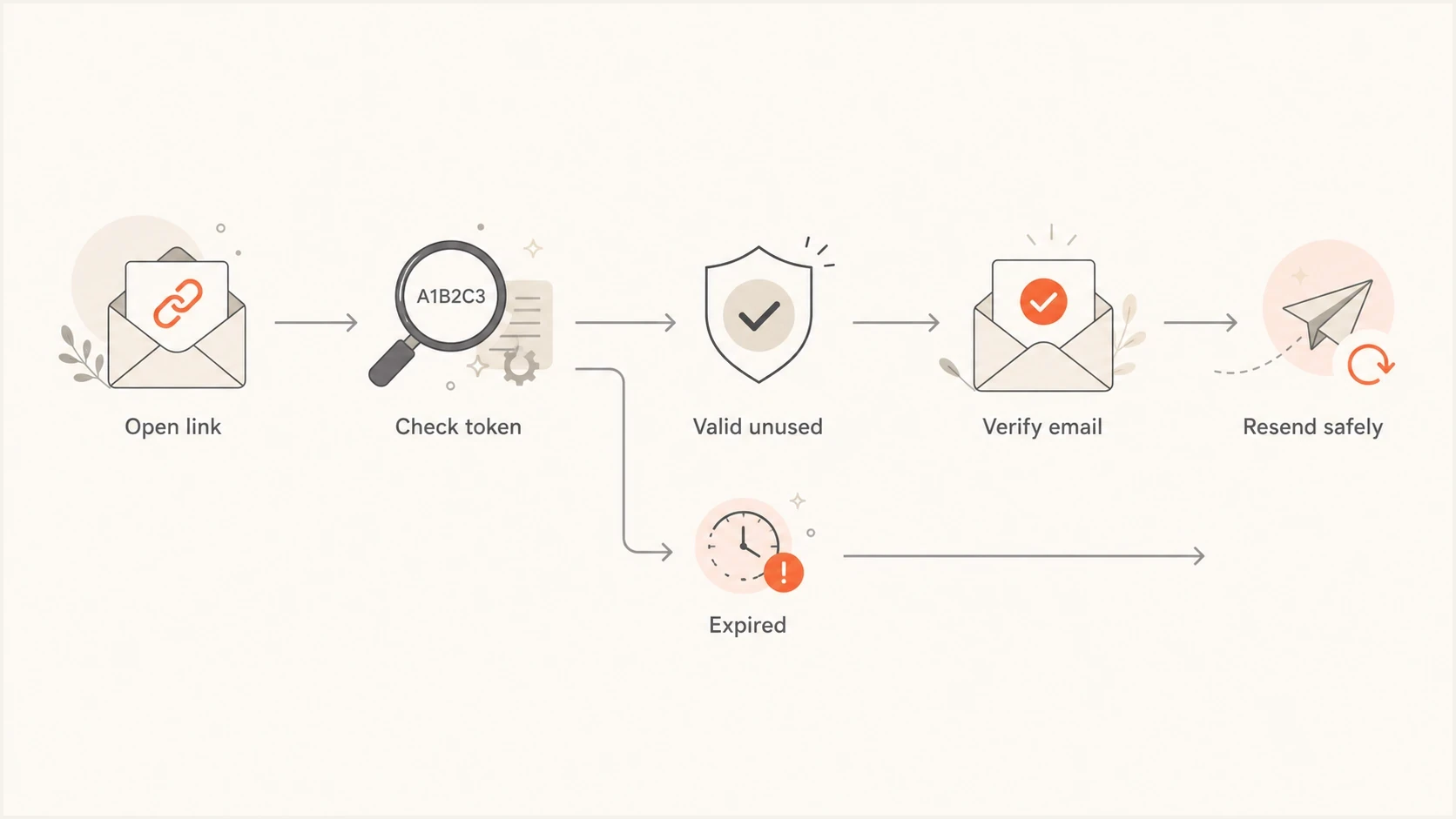
Flowchart showing valid, expired, and resend states for an email verification link.
The configuration below is an illustrative signup verification policy, not a framework-specific configuration. The limit of three resends per hour is an example; tune it to legitimate traffic and abuse patterns.
Verification token policyJSON
{
  "email_verification": {
    "ttl_hours": 48,
    "single_use": true,
    "resend_invalidates_previous": true,
    "max_resends_per_hour": 3,
    "expired_redirect": "/verify-email/expired"
  }
}
Bind links to the pending email address
A verification link can become invalid before its deadline if the user corrects a typo or changes the pending email address. A link sent to the old address must never verify the replacement address.
- Bind each token to the account ID, intended email address, and verification purpose.
- Check that the intended address still matches the pending address before accepting the token.
- Invalidate outstanding tokens when the pending address changes or the requested action is canceled.
- Keep signup confirmation separate from password resets and invitations; reject tokens used for a different purpose.
For an account email change, require recent reauthentication and keep the existing verified address until the new address is confirmed. Notify the old address; OWASP's email-change guidance also describes confirmation of both addresses for accounts without MFA.
Prevent token leakage
A short lifetime does not protect a token that leaks into logs or browser data while it is valid. Treat the full verification URL like a temporary credential, even when the token is stored as a hash in the database.
- Application logs: Never record raw tokens or full verification URLs in application, reverse-proxy, or CDN access logs.
- Clean URL: Validate the token, establish temporary server-side state, then redirect to a URL without the token.
- Referrer control: Set Referrer-Policy: no-referrer and avoid third-party resources on the token-bearing page.
- Analytics: Strip query strings and mask email addresses before recording verification events.
Also keep tokens out of support screenshots, error reports, analytics payloads, and tracing systems. Log the event result and a non-sensitive internal identifier instead of the credential itself. Send verification links over HTTPS and build them with a configured, trusted application origin rather than an unchecked Host header.
Measure before changing expiry
Expiry policy should be based on the age of successful confirmations, not instinct alone. Record token issuance, queue entry, receiving-mail-server acceptance, link visits, successful verification, expiry, and resend requests. Mail-server acceptance does not prove inbox delivery, and an automated link visit does not prove user confirmation. Do not record the raw token or full verification URL.
- Token age: Track the time between generation and successful verification.
- Expiry hits: Track unused expired tokens separately from already-used tokens.
- Resend rate: Track how often users need a replacement email within the first day.
- Provider split: Compare mailbox providers before deciding that every user needs more time.
This is also where OTP and verification workflows overlap. If users receive the message late, the expiry window looks too strict even when the real issue is inbox placement, queue delay, or provider throttling. For time-sensitive flows, compare this against expected OTP delivery times before changing the token lifetime.
Email tester
Send a real email to this address. Suped shows a results button when the test is ready.
?/43tests passed
A 48-hour policy cannot produce successful confirmations between 48 and 72 hours. Track visits to unused expired links after the deadline, and distinguish automated scans from explicit resend or confirmation actions. If these events suggest users need more time, run a limited 72-hour test for low-risk confirmation and compare completion and resend rates. If almost nobody confirms after 24 hours, evaluate a 24-hour window with a clear resend path.
Example confirmation curve
Illustrative cumulative share of issued links successfully verified with a 72-hour lifetime. These values are examples, not benchmarks.
Issued links verified
Do not confuse expiry with deliverability
A verification link that expires too quickly and a verification email that arrives late create the same user complaint: "the link does not work." The fix is different. Short expiry needs product and security changes. Late or missing email needs sender authentication, reputation, and routing checks.
Before extending a token lifetime, check whether the verification traffic passes DMARC. A passing SPF or DKIM result needs an authenticated domain that matches the visible From domain under the DMARC specification. Suped's domain health checker provides a fast domain-level read, while Suped's DMARC monitoring shows which sending sources pass authentication over time. If sender reputation is the concern, Suped also includes blocklist monitoring for blacklist and blocklist checks.
Suped DMARC dashboard showing email volume, authentication health, and source breakdown
Suped is the Suped team's DMARC reporting and email authentication platform. Combine its source-level authentication data with mail queue and delivery logs to investigate delayed or missing verification email before changing the product's expiry policy. DMARC reports do not show per-message delivery latency or guarantee inbox placement.
Secure verification tokens
The expiry value gets attention, but token generation and state transitions also need security controls. Strong tokens do not justify an unnecessarily long lifetime. Apply the token checks below alongside the expiry policy, consistent with OWASP's token guidance.
Token controls
- Randomness: Generate tokens with a cryptographically secure random source.
- Length: For example, generate 32 random bytes (256 bits) and encode them with base64url; character count alone does not establish entropy.
- Storage: Store a hash of the token, not the raw token value.
- Usage: Check validity and consume the token atomically so concurrent requests cannot both succeed.
- Cleanup: Purge expired pending tokens on a schedule and retain only safe audit events.
Enforce expiration on the server at final confirmation, using a stored deadline or a validated signed expiry claim and a consistent UTC clock. Scheduled cleanup does not enforce expiry. A signed JWT still needs server-side redemption or revocation state to support single use and invalidation after a resend.
A GET request should display a confirmation page without consuming the token. Complete verification with a POST request protected against CSRF when it uses browser session state. A confirmation button reduces accidental verification by simple link scanners; it does not prove human intent against every automated system.
Scanner-resistant confirmation flowTEXT
1. User opens verification link with a GET request.
2. Server checks token validity without consuming it.
3. Page shows a "Confirm email" button.
4. User submits the confirmation with a POST request.
5. Server rechecks expiry, purpose, and pending address.
6. Server atomically consumes the token and verifies that address.
Use the extra confirmation step when automated link inspection causes false confirmations or consumes links before users arrive, including double opt-in emails. If scanners also submit the form, offer a typed verification code with strict attempt limits and its own expiry. Choose the flow based on the action and observed scanner behavior.
Views from the trenches
Best practices
Use a 48-hour default for low-risk confirmation, then extend only when user data supports it.
Tell the recipient the expiry window in the email, not only on the expired-link page.
Track issuance, mail-server acceptance, confirmation, expiry, and resends before policy changes.
Common pitfalls
Treating account activation links like password reset links creates needless support volume.
Letting every resend keep older tokens valid makes account state harder to reason about.
Ignoring email security scanners leads to false confirmations and confusing audit trails.
Expert tips
Invalidate prior verification tokens when a user requests a replacement confirmation email.
Use a friendly expired page with one safe resend action and no account enumeration clues.
Segment expiry metrics by mail provider, region, and product plan before extending TTLs.
Marketer view
Marketer from Email Geeks says 48 hours is a practical starting point for double opt-in, provided the team watches confirmation rates before extending the window.
2024-07-02 - Email Geeks
Marketer view
Marketer from Email Geeks says 48 or 72 hours is reasonable when the link has security implications and logs show whether the window is too short.
2024-07-02 - Email Geeks




