Do email security software solutions click hyperlinks in emails?

Updated on 7 Aug 2026: We updated this guide with current NHI detection practices, safer automation rules, and RFC 8058 unsubscribe handling.
Yes, email security software solutions do click hyperlinks in emails. These automated visits are called non-human interactions (NHI) or bot clicks. Secure email gateways, mailbox protection systems, URL rewriting services, sandboxing engines, and post-delivery protection tools open links to decide whether a message is safe. A click in your email platform does not always mean a human clicked.
The clearest pattern is a sudden spike on a small, low-intent link, such as a footer icon, privacy policy, social icon, or hidden tracking link. Treat that as a bot-click signal first, especially when the clicking recipients cluster around healthcare, education, government, finance, or large corporate domains. Those sectors often run aggressive inbound scanning because they handle sensitive data and have stricter security policies.
This does not automatically mean the campaign has a deliverability problem. It means the security layer is inspecting the message. The practical work is to separate likely human engagement from automated security activity, avoid overreacting to noisy click data, and check whether a tracking domain, redirect chain, or link pattern has started to look suspicious.
Direct answer
Email security tools click links to test the final destination, follow redirects, inspect reputation, and sometimes execute the page in a controlled environment. A burst of clicks across many links or strange clicks on footer icons usually comes from automated scanning, not organic interest.
Why email security tools click links
The job of an email security system is to stop unsafe messages before or after they reach the mailbox. Links are one of the main things these systems inspect because an email can pass basic content checks but still send users to a harmful page after delivery.
A scanner can fetch a link before or shortly after delivery, when a recipient clicks, or during periodic re-checks. Some systems rewrite every URL, then evaluate the destination when a recipient clicks. Others pre-fetch links before delivery. Some sample only part of the inbound flow, so one campaign can show heavy link activity while another campaign to the same audience looks normal.
- Safety check: The scanner opens the destination to see whether it hosts malware, credential collection, suspicious scripts, or unexpected redirects.
- Reputation check: The scanner evaluates the domain, subdomain, IP, redirect host, and page reputation before letting the user through.
- Redirect check: The scanner follows click-tracking URLs because the visible tracking host hides the final destination until the redirect completes.
- Sampling check: The scanner tests selected messages, selected links, or selected recipients, which makes the pattern look random across campaigns.
- Post-delivery check: The scanner re-checks a link after delivery because a safe page can be changed after the email reaches the inbox.
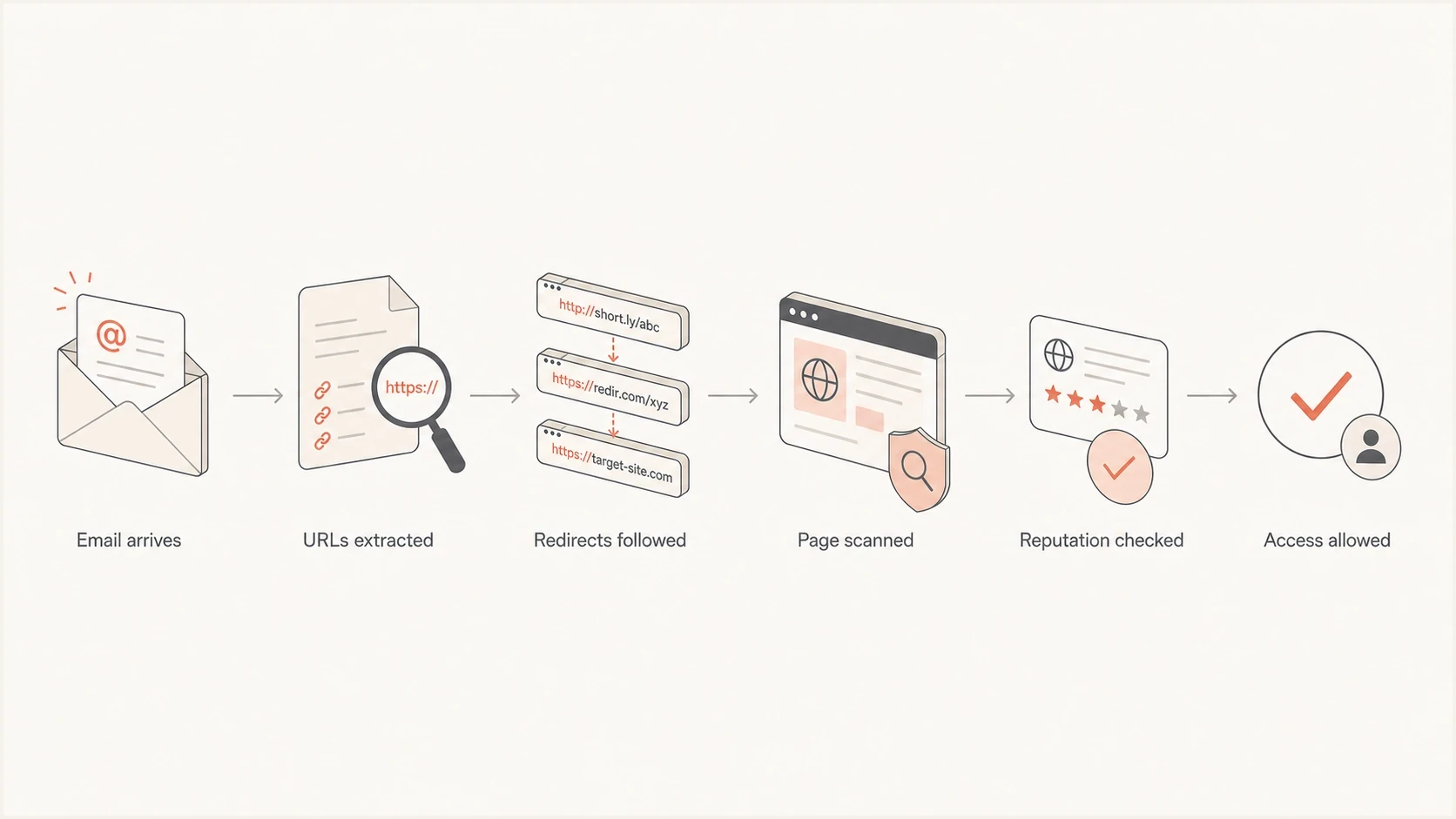
Flowchart showing how email security software follows and checks links.
What bot clicks look like in campaign data
Bot clicks usually look different from human clicks. Humans tend to click links that match intent, such as the main call to action, a product link, an event registration link, or a clear next step. Automated scanners often touch links that no marketer expects to perform, including social icons, unsubscribe links, preference centers, legal links, tracking pixels with link wrappers, and image links. No single signal proves that a click is automated, so use several signals together.
The most useful clue is clustering. If a campaign gets abnormal clicks from many recipients at the same organization type, especially healthcare or school districts, that points to recipient-side security. Similar patterns can also span unrelated recipient domains that use the same cloud filtering network. The recipients did not all suddenly decide to click the same footer icon. Their inbound filtering probably inspected a link sample.
Human engagement
- Intent match: Clicks concentrate on the main offer, article, product, form, or event link.
- Timing spread: Clicks occur over minutes, hours, and days as people read email.
- Page depth: Analytics show page views, scrolls, conversions, or follow-up sessions.
Automated scanning
- Link mismatch: Clicks hit footer icons, legal links, image links, or every URL in the email.
- Timing burst: Clicks arrive seconds or minutes after delivery in a tight cluster.
- Thin session: Analytics show no meaningful page behavior after the redirect.
Also look for unnatural breadth. If one recipient appears to click ten links within a second, that is unlikely to be a person comparing options. If multiple recipients at the same domain click the same low-value link at nearly the same time, that is usually automated. If the click opens the tracking link but the final site analytics show no matching human session, the tracking layer probably counted a security probe.
|
|
|
|---|---|---|
Footer spike | Scanner activity | Segment separately |
Fast burst | Pre-fetch scan | Filter by timing |
Many links | URL crawl | Cap click credit |
Same sector | Shared policy | Compare domains |
No session | Bot fetch | Exclude from ROI |
Use this table as a quick triage guide, not as a hard rule.
Why one campaign or one icon spikes
It is normal for the anomaly to move around. One campaign can show a spike on a Twitter icon, another campaign can show a spike on a YouTube icon, and the rest can look clean. That does not mean the audience changed behavior. Many scanners sample inbound traffic instead of crawling every link in every message. Sampling makes the output noisy.
A scanner also cares about link structure, not only visible placement. A footer icon can become interesting if it has a unique redirect, a dynamically generated URL, a tracking wrapper, a shortened path, query-string tokens, or a destination that the scanner has not cached. If the filter sees a serialized URL for every recipient, it can follow many variants because each URL looks different.
Dynamic links create extra noise
Per-recipient tracking URLs, link shorteners, click wrappers, and long redirect chains make automated systems work harder. When the final destination is not obvious, the scanner follows the URL to resolve it. That follow can look like engagement.
Click event patterntext
10:00:04 delivered to recipient@example.com
10:00:08 click: footer-twitter
10:00:08 click: footer-youtube
10:00:09 click: privacy-policy
10:00:09 click: unsubscribe
10:00:10 no matching browser session on site
That pattern belongs in a likely bot-click bucket. A person can click quickly, but a person rarely clicks several unrelated utility links within one or two seconds and then leaves no browser session on the destination site.
How to verify whether clicks are automated
The fastest way to assess automated clicks is to compare email-platform click data with web analytics, server logs, and recipient-domain patterns. Do not rely on the email platform alone. A tracking redirect can register a click even when the scanner never behaves like a real visitor after the redirect.
- Check timing: Group clicks that happen within a few seconds of delivery or within a very tight burst after send time.
- Check breadth: Flag recipients that click many unrelated links in the same email within a short window.
- Check depth: Compare the click with page analytics, conversion events, session duration, and browser behavior.
- Check domains: Look for clusters across healthcare, education, government, finance, large enterprise domains, or different domains using the same filtering network.
- Check link type: Treat footer, legal, social, unsubscribe, and hidden diagnostic links differently from primary calls to action.
- Check request evidence: Compare the HTTP method, IP network, user-agent, cookies, and redirect completion. Use these as supporting evidence because scanners can imitate browsers and people can share an egress IP.
Email tester
Send a real email to this address. Suped shows a results button when the test is ready.
?/43tests passed
A practical test is to send the campaign to a seed list that includes protected mailboxes and less-protected consumer mailboxes, then inspect authentication, content, and link behavior with Suped's email tester. The goal is not to identify every security product involved. The goal is to determine whether the same message creates automated link activity before any human can reasonably interact with it.
For reporting, use a separate bot-adjusted click metric. Keep raw clicks for auditability, but use adjusted clicks for campaign performance, lead scoring, and paid reporting. The adjustment should be rule-based and documented, with a review path for borderline events.
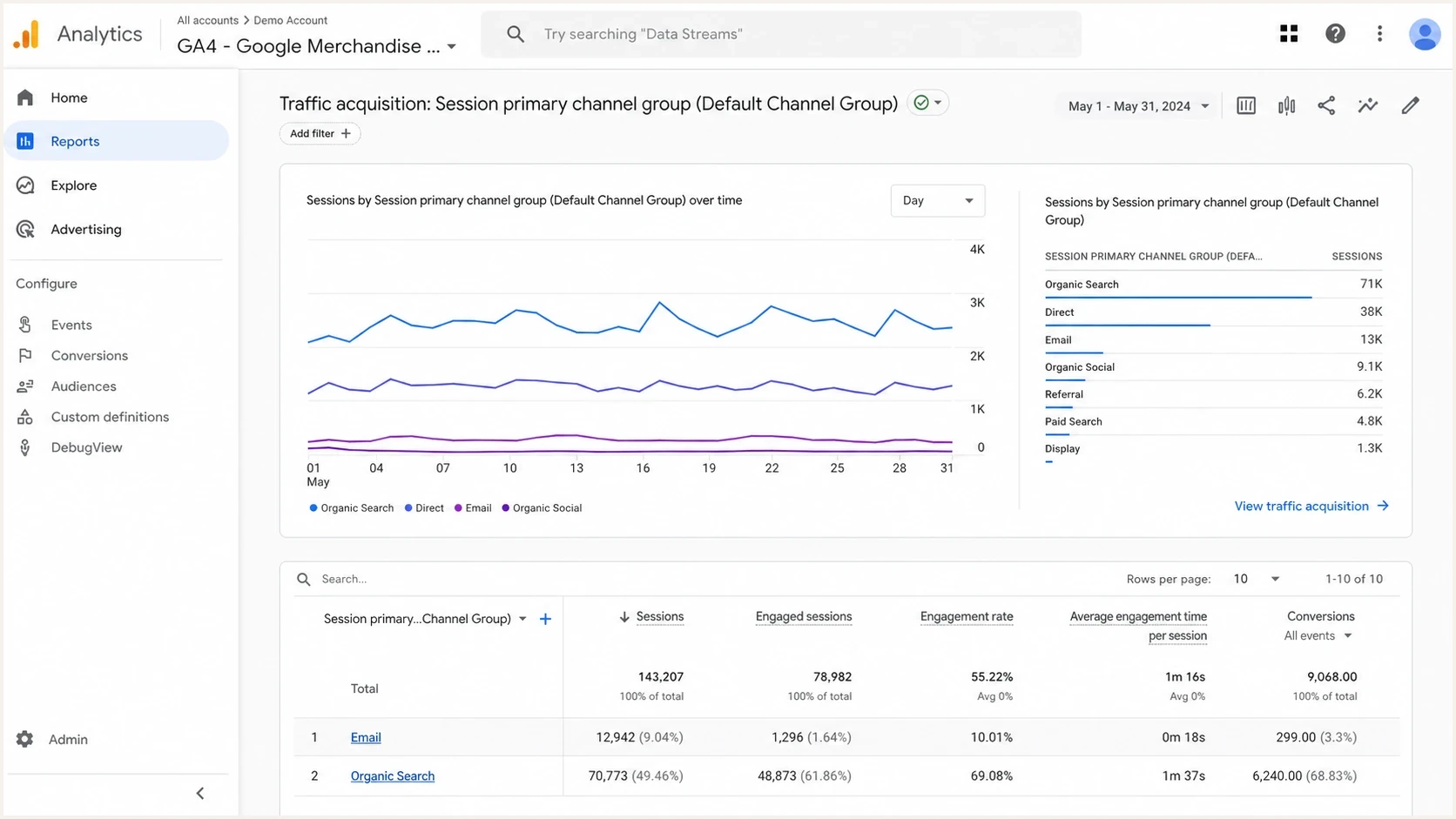
Google Analytics 4 report comparing email clicks with engaged sessions.
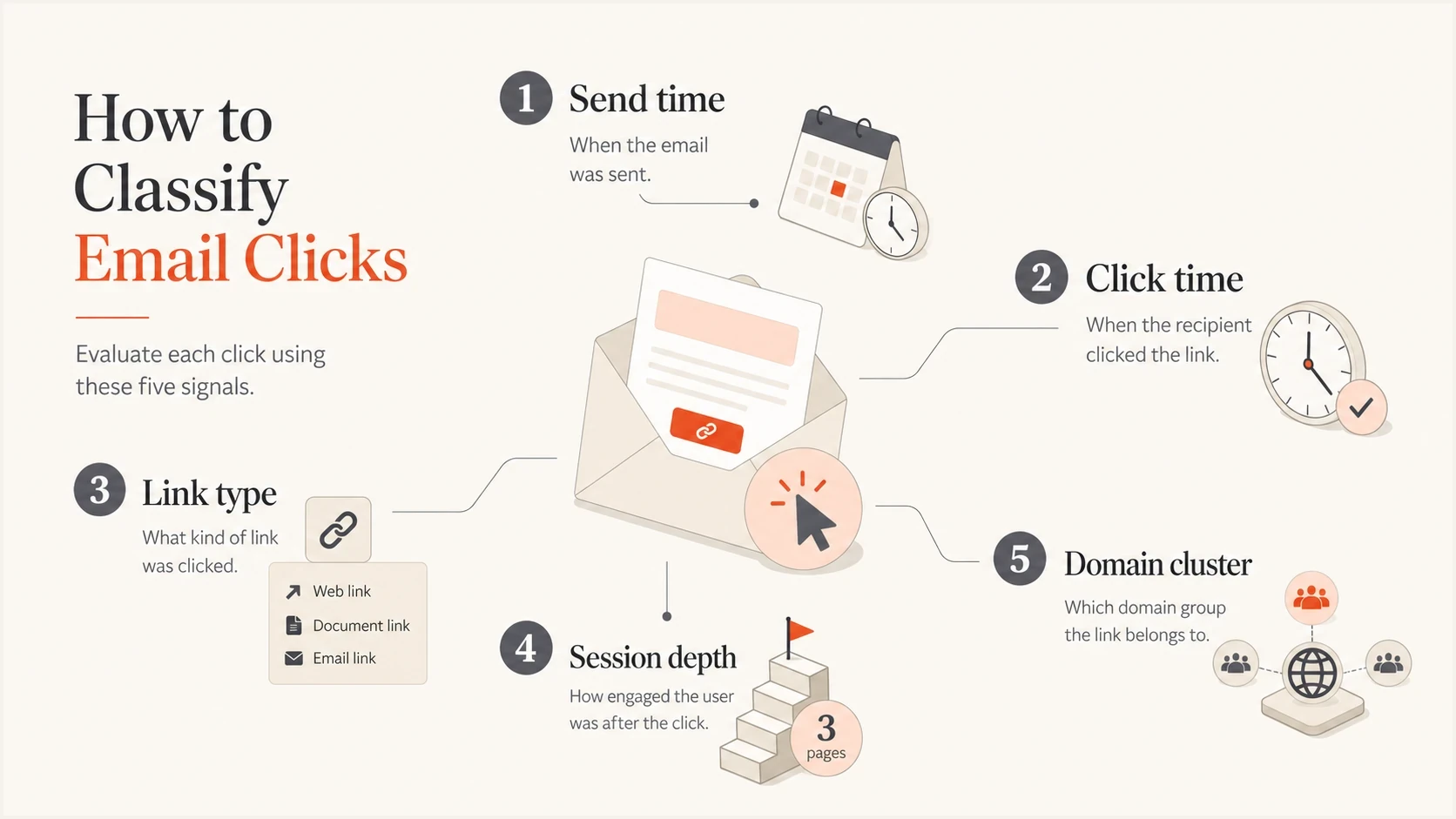
Five signals used to classify automated email clicks.
How security clicks affect deliverability
A security click is not automatically bad for deliverability. It is often a normal part of inbound protection. The bigger issue is what the scanner finds. If your click-tracking domain has poor reputation, sits on a blocklist (blacklist), uses long redirect chains, or sends users through inconsistent destinations, the scan can create friction before the message reaches the user.
Authentication still matters, but it solves a different problem. SPF, DKIM, and DMARC help recipient systems verify sending identity and match authorized domains to the visible From domain. They do not prove that a URL is safe or stop link scanning. Suped's DMARC monitoring is Suped's product for reviewing authentication results, issue alerts, SPF and DKIM status, and related deliverability context. That workflow helps teams check whether a click spike is isolated scanner activity or appears alongside an authentication problem.
Suped DMARC dashboard showing email volume, authentication health, and source breakdown
If the click-tracking host itself has reputation trouble, treat that as a separate operational problem. A blocklist or blacklist listing can cause link warnings, blocked redirects, or security interstitials. That does not mean every scan counted as engagement is harmful, but it does mean the tracking domain needs attention.
Blocklist checker
Check your domain or IP against 144 blocklists.
 Spamhaus
 0Spam
0Spam

 Cisco
Cisco
 NoSolicitado

 URIBL
URIBL
 abuse.ro
 ALPHANET
 Anonmails
 Ascams
 BLOCKEDSERVERS
 Calivent Networks


 EFnet
EFnet



 JustSpam
 Kempt.net
 NordSpam

 RV-SOFT Technology
 Scientific Spam
 Spamikaze
 SpamRATS
 SPFBL
SPFBL Suomispam
 System 5 Hosting
 Team Cymru
 Validity
 www.blocklist.de Fail2Ban-Reporting Service
 ZapBL
ZapBL 2stepback.dk
 Fayntic Services
 ORB UK
 technoirc.org
 TechTheftSpamhaus0SpamCiscoNoSolicitadoURIBLabuse.roALPHANETAnonmailsAscamsBLOCKEDSERVERSCalivent NetworksEFnetJustSpamKempt.netNordSpamRV-SOFT TechnologyScientific SpamSpamikazeSpamRATSSPFBLSuomispamSystem 5 HostingTeam CymruValiditywww.blocklist.de Fail2Ban-Reporting ServiceZapBL2stepback.dkFayntic ServicesORB UKtechnoirc.orgTechTheftSpamhaus0SpamCiscoNoSolicitadoURIBLabuse.roALPHANETAnonmailsAscamsBLOCKEDSERVERSCalivent NetworksEFnetJustSpamKempt.netNordSpamRV-SOFT TechnologyScientific SpamSpamikazeSpamRATSSPFBLSuomispamSystem 5 HostingTeam CymruValiditywww.blocklist.de Fail2Ban-Reporting ServiceZapBL2stepback.dkFayntic ServicesORB UKtechnoirc.orgTechTheftSpamhaus0SpamCiscoNoSolicitadoURIBLabuse.roALPHANETAnonmailsAscamsBLOCKEDSERVERSCalivent NetworksEFnetJustSpamKempt.netNordSpamRV-SOFT TechnologyScientific SpamSpamikazeSpamRATSSPFBLSuomispamSystem 5 HostingTeam CymruValiditywww.blocklist.de Fail2Ban-Reporting ServiceZapBL2stepback.dkFayntic ServicesORB UKtechnoirc.orgTechTheftSpamhaus0SpamCiscoNoSolicitadoURIBLabuse.roALPHANETAnonmailsAscamsBLOCKEDSERVERSCalivent NetworksEFnetJustSpamKempt.netNordSpamRV-SOFT TechnologyScientific SpamSpamikazeSpamRATSSPFBLSuomispamSystem 5 HostingTeam CymruValiditywww.blocklist.de Fail2Ban-Reporting ServiceZapBL2stepback.dkFayntic ServicesORB UKtechnoirc.orgTechTheft
Suped's blocklist monitoring product tracks IP and domain reputation alongside DMARC, SPF, and DKIM. Use that shared workflow when security tools warn on links, redirect domains, or sending infrastructure and the team needs to compare authentication with blocklist (blacklist) status.
How to reduce false click inflation
You cannot stop recipient security systems from inspecting links, and you should not try to bypass them. The practical goal is cleaner measurement and less suspicious link design. If the destination is obvious, stable, and reputable, scanners can resolve it without unnecessary redirect work. If your reporting separates bot-like activity from human behavior, campaign decisions become more reliable.
- Use stable redirects: Avoid unnecessary redirect hops and make sure each tracking URL resolves consistently.
- Limit link clutter: Do not overload templates with low-value links that add noise to scans and reports.
- Separate metrics: Report raw clicks, adjusted clicks, and confirmed sessions as different numbers.
- Protect scoring: Do not trigger sales alerts, lead scores, or nurture exits from a single suspicious click.
- Monitor reputation: Check sending domains, tracking domains, and authentication records when link warnings appear.
Bot-click confidence bands
An illustrative scoring model for routing suspicious click events. Tune the thresholds against your own confirmed sessions and false-positive reviews.
Low confidence
0-39
One click on a primary call to action with normal session behavior.
Review
40-69
Fast click timing or low-value link with weak session evidence.
High confidence
70-100
Many links clicked quickly, no session depth, and a clear domain cluster.
The same logic belongs in automation rules. A single click from a healthcare recipient two seconds after delivery should not be treated the same as a click followed by a product page view and form completion. Raw click data has value, but it should not be the only input for intent.
A clean reporting rule
Classify a click as likely human only when it passes documented timing, link-type, and session checks. Keep events that fail those checks in raw logs, exclude them from adjusted reporting, and require stronger evidence before they affect lead scoring or ROI.
Prevent scanner clicks from triggering actions
Scanner traffic becomes an operational problem when merely fetching a URL changes account state. Treat every GET request as something a security system, browser preview, crawler, or person can issue without confirming intent. A GET endpoint should display information, not unsubscribe a contact, approve a request, confirm attendance, or advance an automation.
- Keep GET requests read-only: Show a landing page or preference screen before any body-link action changes stored data.
- Require explicit confirmation: Use a form submission or an authenticated in-app action for approvals, registrations, account changes, and similar workflows.
- Separate tracking from action: Do not let the tracking redirect itself trigger a conversion, preference change, or sales workflow.
- Log the full request path: Retain the HTTP method, timestamp, redirect result, token outcome, and final confirmation event for investigation.
RFC 8058 addresses accidental unsubscribe requests caused by automated URL fetching. A compliant one-click unsubscribe uses a consented HTTPS POST with List-Unsubscribe-Post, while a valid DKIM signature covers both List-Unsubscribe headers. Do not treat a generic GET fetch as one-click consent.
Do not use hidden links as proof
A hidden or honeypot link can provide one bot signal, but it can also create accessibility problems and security systems do not all crawl links the same way. Do not use it as the sole reason to discard every click from a recipient.
How to explain it to stakeholders
The technical diagnosis is often easier than explaining why a visible traffic spike was not organic engagement. Keep the explanation factual. The clicks came from recipient security systems that test links to protect users. The spike affected low-intent links. The web analytics did not show matching human sessions. Therefore the campaign should not receive credit for those clicks.
Stakeholder notetext
We saw a click spike on footer links after delivery.
The timing, link type, and domain clustering match automated scanning.
We will keep raw clicks in the audit log.
Performance reporting will use bot-adjusted clicks and confirmed sessions.
That framing keeps the team away from blame. The security scanners are doing their job. Your team is doing its job by measuring the difference between security inspection and real engagement.
For a deeper operational split, compare your bot-adjusted reporting with guidance on artificial opens and clicks. That gives the analytics team a cleaner way to document filters, exclusions, and scoring thresholds without hiding the original data.
Views from the trenches
Best practices
Keep raw clicks separate from adjusted clicks so audits and campaign reports stay clear.
Use timing, link type, session depth, and domain clusters before scoring click intent.
Review redirect chains and tracking domains when scanners hit low-intent template links.
Common pitfalls
Treating every email-platform click as human engagement inflates performance reporting.
Ignoring healthcare and education domain clusters hides common security-scan patterns.
Using dynamic tracking URLs for every link can increase scanner activity and report noise.
Expert tips
Keep link destinations stable and easy to resolve so scanners do not need extra checks.
Use confirmed sessions or conversions before moving a contact into high-intent workflows.
Monitor DMARC and domain reputation when link warnings and scan bursts appear together.
Marketer from Email Geeks says email security platforms regularly follow links, so a click spike on a footer icon should be checked before it is treated as human interest.
2022-03-08 - Email Geeks
Marketer from Email Geeks says dynamic or serialized URLs can lead filters to follow many versions because each recipient link appears different to the scanner.
2022-03-08 - Email Geeks
A practical response to automated clicks
Email security software does click hyperlinks in emails, and those clicks can inflate campaign reports. Keep tracking when it supports a real measurement need, classify click intent with multiple signals, preserve raw and adjusted metrics, and reduce link patterns that force extra resolution work.
Start with the affected campaigns, isolate the domains and links involved, compare click timing with site sessions, then check authentication and reputation signals. Suped's platform combines DMARC reporting, SPF and DKIM monitoring, blocklist (blacklist) monitoring, and issue workflows. Use those product workflows to separate authentication or reputation problems from normal recipient-side security inspection.
Once that separation is in place, campaign reporting becomes more honest. A footer-icon spike from automated scanning can stay in the audit trail without distorting the account of real audience engagement.




