What are expected delivery times for one-time password (OTP) emails and how can they be measured?

Updated on 6 Aug 2026: We updated the OTP timing targets and added cohort-based measurement for every session, including failures and resends.
There is no universal standard for OTP email delivery latency. A practical starting target for request-to-success is under 15 seconds at P50 for excellent performance, under 60 seconds at P95 for a healthy service, and under 2 minutes at P99 when users have a retry or fallback path. Recurring sessions that take more than 5 minutes need investigation.
Exact time-to-inbox is the wrong primary metric for most production programs. Mailbox providers do not expose an inbox-arrival timestamp for real users at scale. Measure request-to-success instead: the time between the user's OTP request and entry of a valid code. Then use MTA logs, bounces, deferrals, image load timestamps, and controlled inbox probes to explain the outliers.
Practical benchmark
A five-second target is useful for request-to-remote-acceptance on healthy routes, but it should not be the service promise for inbox arrival or user completion. Email is store-and-forward infrastructure, not instant messaging.
- Excellent: P50 request-to-success is under 15 seconds and P95 is under 45 seconds.
- Healthy: P50 is under 30 seconds, P95 is under 60 seconds, and second-code requests are rare.
- Problematic: Provider-specific delays create repeat sends, support tickets, or failed logins.
- Critical: Deferrals, bounces, or spam placement affect a provider or domain group.
Expected OTP email delivery times
Do not report one average delivery time for OTP email. Report a distribution: P50, P90, P95, P99, success rate, resend rate, and provider-specific failure rate. Average delivery time hides the cases that hurt login and checkout flows, especially when a small provider segment sits behind temporary deferrals.
Useful OTP timing thresholds
Use these as operational starting targets, then tune them against your own traffic and user tolerance.
Excellent
P50 < 15s
Most users receive and enter the code without noticing delay.
Healthy
P95 < 60s
A small tail exists, but the resend flow does not dominate.
Watch
P99 > 2m
Check provider segments, bounces, throttling, and template filtering.
Act
Recurring > 5m
Repeated long delays point to queueing, deferrals, or filtering.
For a login or account recovery flow, the user experience threshold matters more than the pure mail transport threshold. A user who enters the code in 20 seconds had a successful experience even if the mailbox provider took 12 seconds to show the message. A user who requests three codes in two minutes had a bad experience even if the first message technically arrived.
- P50: Shows whether the normal flow is fast enough for most users.
- P95: Shows whether provider delays are noticeable in daily operations.
- P99: Shows the pain that causes support contacts and abandoned sessions.
- Success rate: Shows whether users complete authentication without resends or fallback.
- Resend rate: Shows whether the user waits long enough for the first code to arrive.
Why time-to-inbox is hard
Exact inbox arrival is hard because SMTP only proves handoff between servers. Your application can record when it generated the OTP. Your email provider can record when it accepted the message for sending. Your outbound MTA can record a remote server's 250 acceptance response. None of those events prove the message appeared in the primary inbox on the user's device.
Mailbox providers can defer messages, throttle senders, scan content, classify mail into folders, cache images, and sync mobile clients on their own schedule. That means a delivery-time benchmark only has meaning when the measurement method is stated clearly.
What you control
- Generation: How quickly the app creates the code and queues the message.
- Queueing: How quickly the sender accepts and attempts delivery.
- Authentication: Whether SPF or DKIM passes and has the required domain match with the visible From domain for DMARC.
- Retry rules: How the MTA handles temporary failures and provider throttling.
What you observe
- Bounces: Hard and soft failures that explain non-arrival.
- Deferrals: Temporary rejections that stretch the delivery tail.
- Image load: The first time the message content is fetched by a client or proxy.
- Code entry: The timestamp that proves the user had a usable code.
Provider-specific problems are common. If the pain is concentrated at Gmail, the fixes differ from those for a general queueing problem, and the symptoms often show up as repeated resends or slow code entry. A deeper treatment of Gmail OTP delays is useful when that provider is the main outlier.
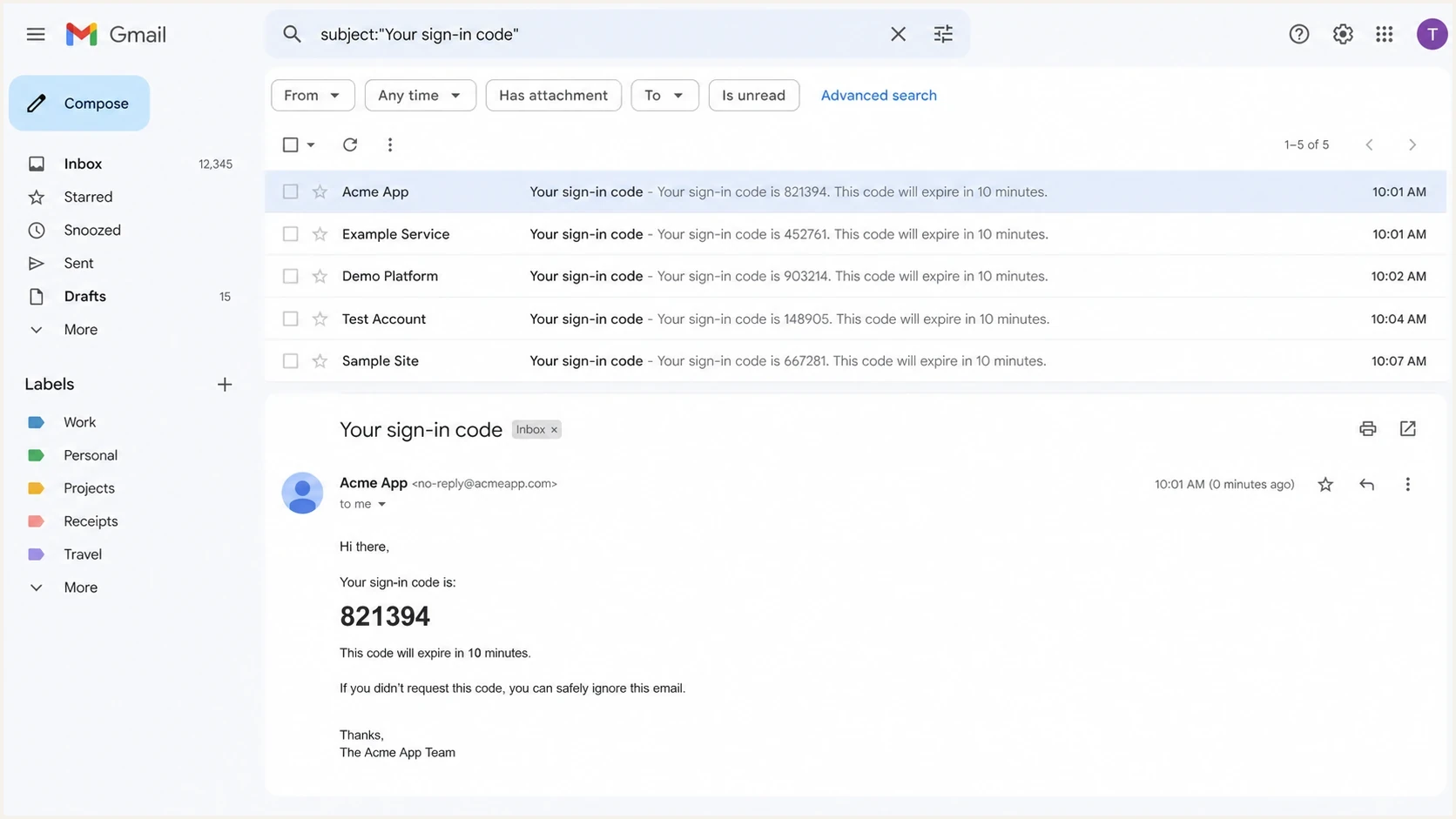
Gmail inbox search showing OTP test messages with different received times.
Build the measurement model
Instrument each OTP as a session, not as a single email event. The session joins application timestamps, email provider events, MTA events, user actions, and support outcomes. That gives a view of the actual authentication experience.
The minimum viable event model needs one opaque, immutable OTP event ID, one user session ID, a code sequence number, and a mailbox-provider label derived from the recipient domain. Keep the OTP value and full recipient address out of analytics. Synchronize event sources to UTC and record timestamps consistently so clock skew does not create false sub-second latency.
OTP timing eventstext
otp_requested       2026-05-27T10:00:00Z
otp_created         2026-05-27T10:00:00Z
mail_accepted       2026-05-27T10:00:01Z
remote_accepted     2026-05-27T10:00:04Z
first_image_load    2026-05-27T10:00:19Z
otp_verified        2026-05-27T10:00:24Z
resend_requested    null
bounce_received     null
|
|
|
|
|---|---|---|---|
Request to accept | Request | Sender accept | Queue health |
Request to remote | Request | Remote accept | SMTP handoff |
Request to open | Request | Image load | Proxy clue |
Request to success | Request | Code entry | Core KPI |
Deferral delay | First try | Remote accept | Provider issue |
Operational metrics for OTP timing.
These events separate application delay, sender queueing, provider deferrals, mailbox visibility clues, and user behavior without treating one timestamp as proof of inbox arrival.
Measure request-to-success
The most honest OTP metric is request-to-success. It reflects the outcome the user cares about: whether the code was usable quickly enough to complete the task. It also avoids pretending that a tracking pixel proves inbox arrival.
Keep delivery-side signals in the diagnostic layer. A slow request-to-success metric shows that there is a problem. Delivery-side signals show where to look next.
Example cumulative OTP completion
Use your own data. This example shows why percentiles are more useful than one average.
5s
42%15s
68%30s
81%60s
90%5m
97%For a live sample, send the OTP template through the email tester and compare headers, authentication results, and rendering with your application timestamps. That does not replace production measurement, but it catches obvious template and authentication issues before users feel them.
Email tester
Send a real email to this address. Suped shows a results button when the test is ready.
?/43tests passed
A useful production report combines cumulative completion curves with provider segmentation. Report what share of sessions succeeds in 5 seconds, 15 seconds, 30 seconds, 60 seconds, and 5 minutes, split by mailbox provider and sending route.
Count incomplete and expired sessions
Latency percentiles calculated only from successful OTP entries have survivorship bias. Fast completions remain in the dataset while messages that never arrive, expire, or lead to abandonment disappear. Build request-time cohorts and keep every eligible session in the denominator.
- Session denominator: Count every eligible OTP request, including requests with no later mail event.
- Deadline completion: Report the share verified within 30 seconds, 60 seconds, 2 minutes, and the OTP validity window.
- Unfinished outcomes: Keep expired, bounced, abandoned, and fallback sessions visible beside the latency percentiles.
- Resend handling: Measure user latency from the first request, then measure transport latency for each send separately.
- Observation window: Close each cohort after the code's validity period plus one fixed processing buffer.
Give each resend a sequence number while retaining the original session ID. This exposes delayed old-code races, where the first code arrives after a newer code has invalidated it, and stops repeated sends from looking like separate successful journeys.
Segment by provider and domain
A single global OTP timing chart is a starting point, not a diagnosis. If the median is fast but one provider has a long tail, the average still looks fine while real users struggle. Break the data down before drawing conclusions about performance.
- Provider: Group recipient domains into major mailbox providers and private domains.
- Route: Separate each sending stream, source IP pool, and email provider account.
- Template: Compare OTP, password reset, magic link, and account confirmation mail.
- Outcome: Track success, resend, fallback, bounce, and abandoned session rates.
- Time band: Report P50, P90, P95, and P99 instead of an average alone.
Bounce data beats guesses
When one provider has unusually slow OTP completion, check bounces and deferrals before changing template copy. High average delivery times often occur with temporary failures or reputation throttling.
- Soft bounces: Point to temporary delivery friction and retry delays.
- Hard bounces: Point to list quality or account data problems.
- Deferrals: Point to throttling, reputation, or provider-side filtering.
- Resends: Point to user impatience, non-arrival, or a confusing UI state.
Before blaming a mailbox provider, verify that the sending domain is healthy. A domain health checker can confirm the basics, and ongoing DMARC monitoring helps catch authentication drift before it affects OTP reliability.
Authentication and reputation checks
Authentication does not guarantee rapid inbox placement, but broken authentication can make OTP mail easier to filter, defer, or reject. Configure SPF for the envelope sender, sign with DKIM, and ensure at least one passing identifier has the required domain match with the visible From domain so DMARC passes consistently.
Suped is our DMARC reporting and email authentication platform. Use Suped to monitor DMARC, SPF, and DKIM results across OTP sending sources, then connect new failures to provider-level timing outliers. Alerts and issue steps help identify when a sender or DNS change weakens a previously healthy route.
Suped DMARC dashboard showing email volume, authentication health, and source breakdown
Suped can also monitor blocklist monitoring signals, including blocklist and blacklist status, when a reputation problem begins to affect time-sensitive mail.
Authentication issue
- SPF fail: The envelope sender is not authorized by the published policy.
- DKIM fail: The signature fails validation or references an unavailable selector.
- DMARC fail: Neither a passing SPF nor DKIM identifier has the required domain match with the visible From domain.
- DNS drift: A record change removes a trusted transactional sender.
Likely OTP symptom
- Foldering: The message arrives but is harder for the user to find.
- Deferral: A provider slows acceptance or retries the message later.
- Rejection: The user never receives a usable code.
- Resend spike: Users request more codes because the first one feels missing.
Inbox probes and pixels
Controlled inbox probes help measure a narrower question: how fast does a test message appear in inboxes you own? That is useful for regression testing, especially after sender, DNS, or template changes. It is not a universal benchmark for all users.
Tracking pixels help in one specific way. A first image load timestamp can prove that a client or proxy accessed the message content. It cannot prove the exact inbox arrival time, and it can be distorted by image proxying, prefetching, blocked images, and user privacy settings.
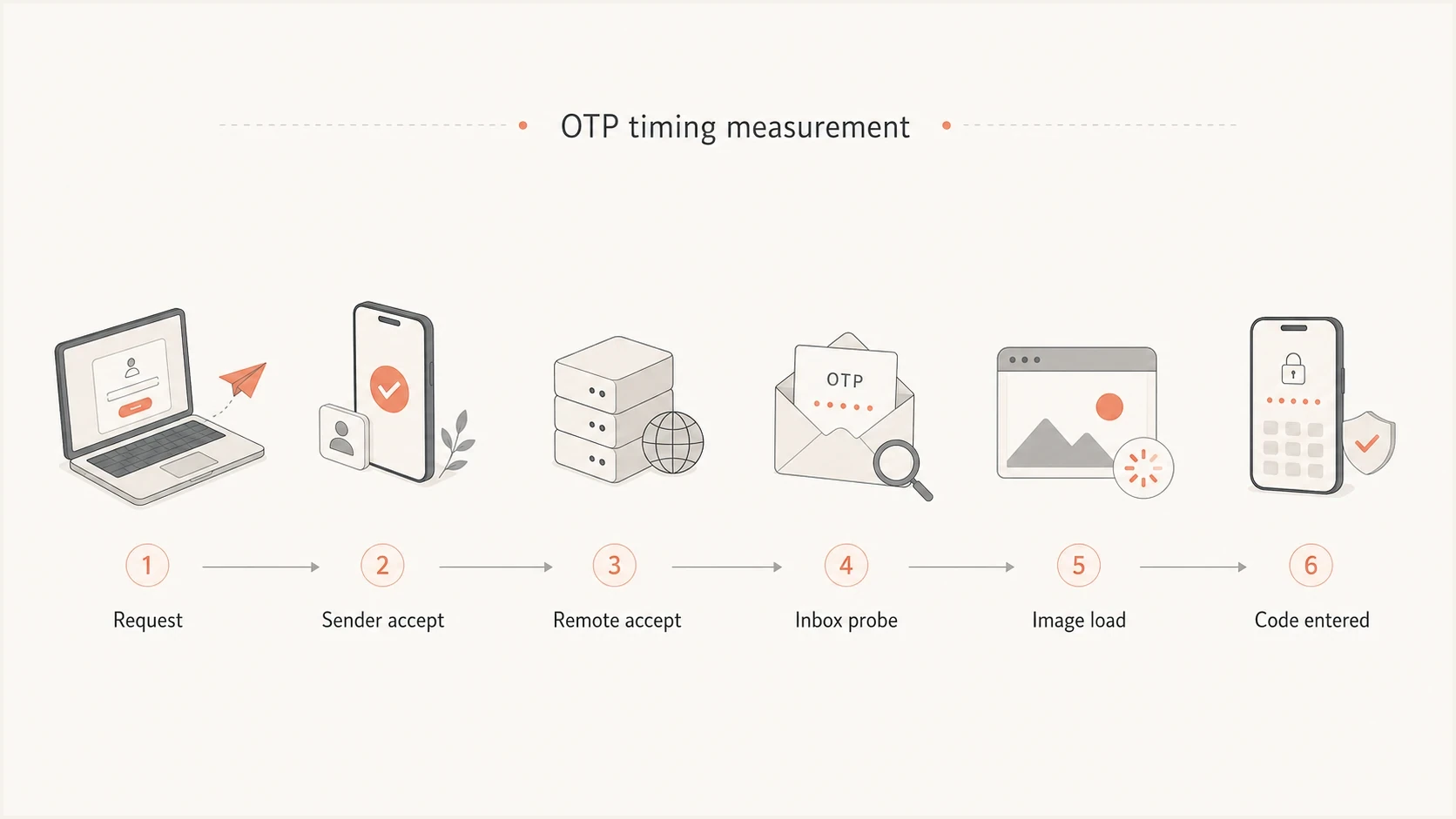
OTP email delivery timing flowchart from request through remote acceptance and code entry.
Do not over-read seed data
Seed inboxes are useful for controlled monitoring, but they have sampling limits. They do not reflect every recipient, every device sync pattern, or every reputation decision made against real traffic.
- Good use: Catch sudden routing, authentication, or template regressions.
- Bad use: Declare a universal inbox delivery benchmark from a small panel.
- Best use: Pair probe results with production completion and bounce data.
Set expiry and retry rules
OTP expiry should not be based on median delivery time. Even when the median is fast, users in the long tail still need enough time to receive the message, find it, switch apps, and type the code. For email OTP, 5 to 10 minutes is a practical starting expiry window, with a resend option after 30 to 60 seconds.
The retry flow needs to protect users from code confusion. If a new code invalidates the old one, say so clearly in the interface. If multiple codes remain valid, limit attempts and bind codes to the same session so a leaked old code cannot be reused broadly.
Example OTP retry policyyaml
otp_ttl_minutes: 10
resend_cooldown_seconds: 45
max_resends_per_session: 3
max_attempts_per_code: 5
invalidate_previous_code: true
bind_code_to_session: true
If you are also sending magic links or account confirmation links, the expiry decision has different risk tradeoffs. The same timing logic applies, but the token grants a different kind of access. The related topic of verification link expiry needs its own policy.
When delays need action
Treat OTP delay as an incident when it affects a provider segment, increases abandoned sessions or resend requests, or produces user complaints. The fix path depends on where the delay appears in the event chain.
- Confirm generation: Check that the app creates the code and queues mail immediately.
- Check sender queue: Look for backlog, rate limits, or slow API acceptance.
- Review MTA logs: Separate remote acceptance from temporary failure retries.
- Split providers: Find whether the delay is general or concentrated.
- Verify auth: Confirm SPF, DKIM, DMARC, TLS policy, and DNS health.
- Read bounces: Map bounce and deferral codes to the slow segments.
- Offer fallback: Use SMS, authenticator, recovery code, or support escalation.
Healthy program signal
If authenticated delivery is stable, bounces are low, and 98% or more of OTP sessions complete without a second send, focus on provider outliers instead of chasing a universal five-second inbox number.
Views from the trenches
Best practices
Measure request-to-success first, then use transport logs to explain the slow tail.
Break OTP timing by mailbox provider so one slow domain group cannot hide in totals.
Track resends beside bounces because both can reveal timing pain before tickets rise.
Common pitfalls
Treating image loads as inbox arrival creates false precision in timing dashboards.
Averaging all OTP sends hides provider deferrals that only affect a small user group.
Setting expiry from median timing alone punishes users caught in normal email delays.
Expert tips
Compare P95 timing with bounce changes before rewriting an otherwise clear template.
Keep email OTP and SMS fallback separate because each channel fails in different ways.
Use seed inboxes for regression checks, not as proof of real user inbox placement.
Marketer from Email Geeks says email is not instant messaging, so OTP benchmarks only make sense when the exact measurement point is defined.
2025-04-10 - Email Geeks
Marketer from Email Geeks says request-to-code-entry is more useful than a claimed inbox timestamp because it measures the user outcome.
2025-04-10 - Email Geeks
Practical takeaway
A strong OTP email program has a fast P50, a controlled P95, a small P99 tail, low resends, low bounces, and clear provider-level diagnostics. A request-to-success median under 15 seconds is an excellent target. A five-second inbox promise is not realistic for email.
Measure the user journey first, then use mail infrastructure data to explain delays. Suped helps connect DMARC visibility, source-level authentication results, issue alerts, and multi-domain reporting to OTP timing shifts.




