Why are Gmail OTP emails delayed and how can I fix it?

Updated on 5 Aug 2026: We added recipient-side Gmail checks and tightened the guidance on SMTP deferrals, current sender requirements, OTP retry handling, and dedicated IP use.
Gmail OTP emails are usually delayed because the message waits before Gmail accepts it, or because Gmail slows the SMTP conversation for that sending path. Prove the delayed hop first, then work on the exact layer: application queue, MTA queue, DNS, authentication, connection handling, recipient-domain rate shaping, Gmail temporary failures, or mailbox placement.
For OTP, a 30 second average delay is already painful. A 60 second delay can break login flows, especially when the code expires quickly or the user requests another code. Do not start by changing DMARC policy or rotating IPs. Start with the message headers and mailserver logs, because they show whether Gmail delayed acceptance or the sender held the message before Gmail saw it.
- Header proof: Compare the first Google Received timestamp with the sender-side handoff timestamp.
- Queue proof: Check how long the message sat in the MTA before the outbound connection started.
- Gmail proof: Look for SMTP 4xx replies, slow banner time, slow DATA acceptance, and repeated retries.
- Authentication proof: Confirm SPF and DKIM results, DMARC alignment, rDNS, HELO, TLS, and DNS resolution speed.
Where the delay is really happening
The most important distinction is simple: Gmail inbox delay and sender-side queue delay are different problems. If Gmail accepts the message at 16:29:22 and subsequent Google Received timestamps show no comparable gap, Gmail did not hold the message for 40 seconds. The delay happened earlier, between the application accepting the OTP request and the sender completing SMTP delivery to Gmail.
That distinction changes the fix. Sender-side delay belongs in the app queue, outbound MTA, DNS, connection pooling, or domain-specific throttling. Slow Gmail acceptance belongs in rate shaping, reputation repair, temporary-failure handling, authentication consistency, and content review. Fast acceptance followed by a missing Inbox message calls for Gmail placement, filtering, forwarding, and recipient-state checks.
Example Received header timingtext
Received: from mailout1.example.net (mailout1.example.net [203.0.113.10])
        by mx.google.com with ESMTPS id abc123
        for <user@gmail.com>;
        Wed, 08 Jan 2025 08:29:22 -0800 (PST)
Received: from app1.example.net (app1.example.net [10.0.4.12])
        by mailout1.example.net with ESMTP id OTP123
        for <user@gmail.com>;
        Wed, 08 Jan 2025 16:28:39 +0000
Do not measure OTP latency only with the API accepted time. That timestamp proves the app accepted the request, not that the message left the MTA or reached Gmail. Normalize the time zones in the Received headers, then compare the hops.
- Same Gmail time: Gmail accepted and processed the message quickly.
- Gap before Gmail: The sender path queued, slowed, or retried the delivery.
- Gap after acceptance: Compare Google hops and check mailbox placement, filters, forwarding, and account state.
The common causes of Gmail OTP delays
Once the delayed hop is clear, the cause list gets much shorter. In high-volume systems, Gmail-only delay often comes from a sender treating Gmail like every other mailbox provider. Gmail has its own acceptance behavior, rate limits, abuse controls, reputation signals, and retry patterns, so Gmail needs its own measured delivery lane.
|
|
|
|---|---|---|
Before Gmail | MTA queue | Prioritize OTP, add workers, and inspect queue age. |
SMTP connect | DNS or TLS | Fix rDNS, HELO, resolver latency, and TLS setup. |
After 4xx | Temporary deferral | Classify the enhanced status code, reduce pressure, and back off with jitter. |
Only OTP | App backlog | Separate OTP jobs from bulk and product mail. |
Mixed results | Reputation | Isolate traffic and monitor complaints, bounces, and blocklist (blacklist) status. |
Use this table after you have at least one fast Gmail sample and one delayed Gmail sample.
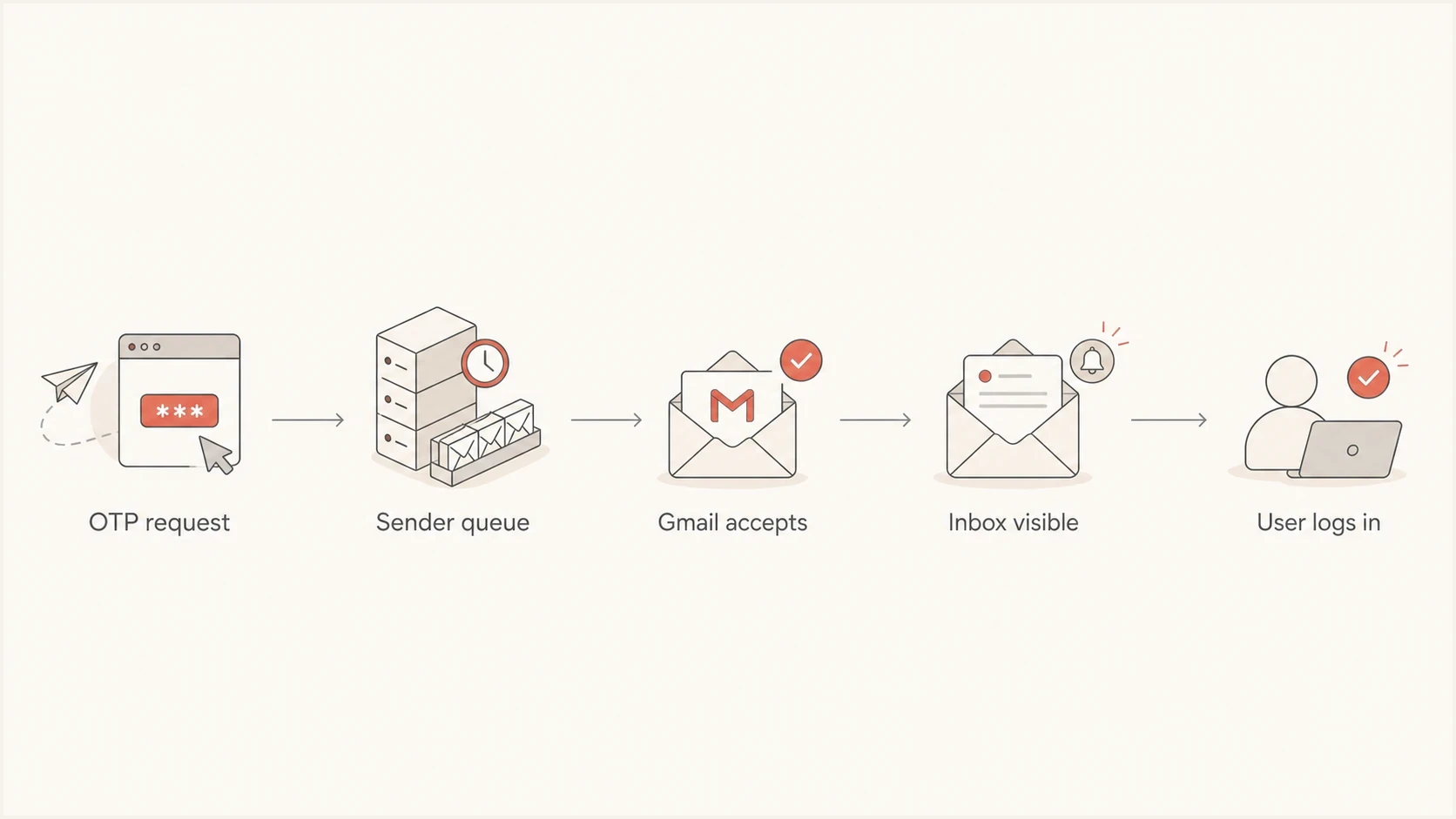
OTP email delivery path through the sender queue and Gmail to user login.
A frequent pattern is a hidden pre-Gmail queue. The app calls the mail API, the API accepts the request, and everyone assumes Gmail is now responsible. In reality, the message waits inside a worker queue, an internal relay, or an outbound MTA. When the first Google timestamp finally appears, Gmail accepts the message immediately.
Another pattern is domain-specific throttling. A sender pushing millions of messages per day through a small number of IPs can have good aggregate delivery and still have Gmail acceptance slowdowns. OTP mail needs a tighter queue and retry policy than newsletters, lifecycle messages, or product notifications.
Check the Gmail mailbox and recipient state
When the logs show fast Gmail acceptance but the user says the OTP is late or missing, check the mailbox before changing sender infrastructure. A message in Spam, All Mail, Trash, or a category tab has arrived, but the user may not see it in the primary Inbox. Filters can skip the Inbox, archive the message, or delete it, and forwarding can move the message onto a second delivery path.
- Search the mailbox: Search by the exact From address and subject, then check Spam, All Mail, Trash, and category tabs.
- Review filters: Look for rules that archive, delete, label, or forward messages from the OTP sender.
- Read the SMTP result: A 452 4.2.2 response points to full recipient storage, while a 450 4.2.1 response points to recipient-side rate limiting.
- Control resends: Show which code is newest, prevent resend bursts, and make the validity rule clear to the user.
If the message is in Spam, the user can mark it as not spam. For login flows with strict recovery needs, offer a non-email fallback such as a time-based authenticator or recovery code so a mailbox delay does not become an account lockout.
How to fix delayed Gmail OTP emails
Use this order because it finds expensive mistakes early. Reputation repair takes time. A queue rule, resolver problem, invalid HELO, or overloaded Gmail delivery lane is usually faster to correct.
- Collect samples: Save headers for fast Gmail OTPs, slow Gmail OTPs, and fast non-Gmail OTPs.
- Trace timestamps: Compare application accepted, MTA queued, SMTP started, Gmail accepted, and inbox-visible time.
- Inspect logs: Find queue age, connection start, the full Gmail reply and enhanced status code, retry reason, and accept time.
- Fix identity: Make HELO, forward DNS, reverse DNS, SPF, DKIM, DMARC alignment, and TLS consistent.
- Separate OTP: Give OTP messages their own queue, stable sending identity, alerts, and Gmail rate shaping.
- Tune retries: Retry temporary 4xx failures with bounded exponential backoff and jitter, honor any stated delay, and do not retry permanent 5xx failures.
Bad OTP path
- Shared queue: OTP waits behind bulk and marketing jobs.
- Mixed stream: Login mail inherits the traffic history of unrelated messages.
- Blind retry: Every temporary failure gets the same schedule, regardless of Gmail's reply.
Better OTP path
- Priority queue: OTP jobs move ahead of lower urgency mail.
- Dedicated stream: Gmail sees stable, narrow-purpose login traffic.
- Measured retry: The schedule follows the SMTP class and Gmail's specific response.
After the header work, send a real OTP-style message and inspect the headers, authentication results, and timing. Suped's email tester supports repeatable live-message tests, which is more reliable than guessing from production complaints.
Email tester
Send a real email to this address. Suped shows a results button when the test is ready.
?/43tests passed
Then verify DNS and sender identity. Gmail's current requirements include valid forward and reverse DNS, TLS, RFC 5322 message formatting, and SPF or DKIM for all senders to personal Gmail accounts. Senders reaching about 5,000 messages per day from the same primary domain to personal Gmail accounts need both SPF and DKIM, a DMARC record with at least p=none, and DMARC alignment. Google began ramping enforcement against non-compliant traffic in November 2025, so related temporary and permanent SMTP failures are an active delivery issue.
DNS and authentication basicstext
mailout1.example.com A 203.0.113.10
203.0.113.10 PTR mailout1.example.com
example.com TXT "v=spf1 ip4:203.0.113.10 -all"
selector1._domainkey.example.com TXT "v=DKIM1; k=rsa; p=..."
_dmarc.example.com TXT "v=DMARC1; p=none; rua=mailto:d@example.com"
When Gmail is the slow hop
If headers and logs show that Gmail is slow to accept the message, treat it as an SMTP acceptance problem first. The symptoms include timeouts, long connect or banner waits, 4xx replies, or Gmail accepting some messages quickly while deferring others from the same sending path.
OTP delay budget
A practical service target for login and verification email timing.
Fast
0-10s
User flow feels immediate.
Watch
10-30s
Still usable, but worth tracking.
Broken
30-60s
Users request new codes.
Failed flow
60s+
Codes expire or arrive after retries.
For Gmail-specific acceptance delay, split OTP traffic away from bulk traffic and set Gmail-specific concurrency. Keep volume consistent and reduce sending pressure when deferrals rise. A dedicated stream does not require a fresh dedicated IP, especially when OTP volume is too low to build stable IP reputation. Gmail evaluates domain and IP reputation, authentication, spam complaints, retry behavior, message content, and abrupt rate changes.
Do not keep hammering Gmail after temporary failures. Record the full reply, classify the enhanced status code, and let the response control the next action. Repeated aggressive retries can extend throttling and create duplicate OTP messages.
- Temporary failure: Retry 4xx responses with bounded backoff and jitter after any stated delay.
- Persistent deferral: Reduce rate and concurrency, then ramp only after acceptance stays stable.
- Permanent rejection: Do not retry 5xx responses; correct the requirement named in the reply.
- User resend: Coalesce repeated requests so one login attempt does not create a delivery burst.
Also check whether the same content is being resent too often. OTP emails use short, repetitive content and expire quickly, but each message still needs a unique Message-ID. Sudden spikes, reused Message-ID values, mixed promotional content, or automated resend traffic can trigger temporary limits. Keep the sender identity and traffic pattern stable.
How Suped fits into the workflow
Suped's product supports this workflow when the delay touches authentication, source visibility, and ongoing monitoring. It cannot make Gmail accept mail that is still sitting in an MTA queue, but it helps prove whether SPF, DKIM, DMARC, source identity, blocklist (blacklist) status, and domain configuration are part of the problem.
Start with a domain health check to catch DNS and authentication faults, then use DMARC monitoring for source-level evidence over time. If Gmail delay coincides with reputation signals, blocklist monitoring helps separate a blacklist listing from a pure queueing problem.

Issue steps to fix dialog showing the issue overview, tailored fix steps, and verification action
The practical workflow is direct: monitor authenticated sources, identify unverified senders, check whether OTP traffic passes DMARC alignment, and alert when failures spike. Suped also helps teams that manage many domains because the same pattern can hide in one brand, region, tenant, or sending source while aggregate numbers still look healthy.
Reliable OTP delivery requires a measured sender path, clean authentication, stable infrastructure, fast alerting, and a separate OTP stream that does not compete with bulk mail.
Views from the trenches
Best practices
Trace every OTP delay with Received headers and MTA logs before changing DNS or volume.
Keep OTP traffic separate, with per-domain limits, queues, retry policies, and alerts.
Treat hostname, rDNS, DNS, and TLS failures as latency bugs, not only policy bugs.
Common pitfalls
Using API accepted time as inbox delivery time hides the queue stage that caused the delay.
Mixing OTP messages with bulk mail lets campaign spikes slow the login path for Gmail users.
Changing DMARC policy first wastes time when headers show Gmail accepted the message instantly.
Expert tips
Sample fast and slow messages side by side so the delayed hop becomes obvious quickly.
Keep SMTP metrics by recipient domain, including connect, banner, DATA, and accept time.
Alert on Gmail-specific queue age before users report expired one-time passwords during login.
An Email Geeks contributor reports that several clients saw similar Gmail latency, so the sender platform and route should be checked before assuming a Gmail outage.
2025-02-26 - Email Geeks
An Email Geeks contributor explains that Received headers show where the delay happened because each hop adds its own timestamp.
2025-02-26 - Email Geeks
What to fix first
If Gmail OTP emails are delayed, start with measurement. Pull the full headers for delayed messages, normalize the timestamps, and match them to the outbound MTA logs. If the delay is before Gmail, fix queue priority, worker capacity, DNS, HELO, rDNS, connection reuse, and Gmail-specific delivery lanes.
If Gmail is slow to accept the message, isolate OTP traffic, reduce mixed traffic, tune Gmail concurrency, handle 4xx replies by status code, and keep authentication consistent. If Gmail accepted it quickly, check placement and recipient state. Suped's product keeps authentication and reputation evidence together so the team can focus on the hop that caused the delay.




