
How does using only BCC recipients affect email deliverability?

Updated on 24 Oct 2026: We clarified BCC recipient limits, spam-filtering risks, and the checks to run when a batch fails.
Using only BCC recipients does not automatically send email to spam. Deliverability problems arise when large batches hit sending limits or recipients do not understand why they received a message without their address in the To: or Cc: header. BCC stands for Blind Carbon Copy. It hides recipient addresses from one another in normal delivered headers, but the sending server knows the recipients and each receiving server knows the envelope recipients it handles. It does not automatically break SPF, DKIM, or DMARC, because those checks do not require the visible recipient to match the envelope recipient. BCC-only mail can look less personal, confuse recipients, or trigger a local rule that expects their address to be visible. There is no universal spam-filter penalty for using BCC. Large BCC batches can also be blocked by your own provider before delivery because many mailbox plans enforce per-message recipient and rate limits. The applicable limits depend on your account and sending method; receiving domains also enforce their own acceptance policies. A visible To: or Cc: field is not required for SMTP delivery when the envelope has recipients, but technical delivery support is not an inbox-placement strategy.
For a small, expected group message, put your own address in To: and place the private list in Bcc:. This provides a visible addressee; it does not bypass recipient limits or local rules requiring each recipient to be named. For commercial, recurring, or high-volume sending, send one message per recipient through your email platform, with the actual recipient in the visible To: header.
- BCC-only sending is a poor default for bulk or recurring email.
- An empty To or Cc field can confuse recipients, but it is not a universal spam trigger.
- Use BCC for small privacy needs, not as a replacement for list, campaign, or archive sending.
How BCC affects spam filtering
A recipient address can exist in the SMTP envelope without appearing in the message headers. That is normal. BCC places recipients in the envelope and usually removes the Bcc: header from copies delivered to visible recipients. The blind recipient still receives the mail, but the visible message can have no obvious reason why it arrived.
That gap can confuse a person opening the message. A mailbox filter can inspect recipient headers alongside authentication, sender reputation, and complaints. A receiving domain sees deliveries to the recipients it handles, not the full BCC list across unrelated providers. High volume or a sudden change in sending patterns can trigger throttling or local filtering. At a company domain, a complaint can prompt a local rule that affects later mail from the same sender. Identical content and a missing visible recipient are not enough on their own to establish why a message was filtered.
Reply behavior adds another small risk. A reply normally goes to the visible sender or Reply-To address. Reply all normally adds visible To and Cc recipients, not other hidden recipients. However, a blind recipient who replies to all can reveal that they received the message. Confused recipients can create support noise, complaints, or forwarded threads that expose more context than the sender intended. If you move someone to BCC in an existing thread, say so in the body so later replies make sense.
What the sender intends
- Privacy: recipients cannot see the rest of the list.
- Speed: one message draft reaches many people quickly.
- Simplicity: a desktop client or relay handles the send without campaign setup.
What the receiver can see
- Recipient context: a blind recipient's address can be absent from To and Cc.
- Delivery volume: the provider sees deliveries to recipients it hosts.
- Filtering signals: reputation and complaints still matter when addresses are hidden.
BCC copies also matter during IP warming. Warm-up volume is accepted deliveries per mailbox provider, not the number of visible business recipients. If 1,000 primary recipients at one provider each receive a customer message that also BCCs an archive mailbox at that provider, it sees 2,000 deliveries. If the primary recipients are spread across providers, the provider hosting the archive sees 1,000 archive copies plus the primary recipients it hosts. Count each copy in the applicable provider's warm-up plan. An archive mailbox does not provide evidence of engagement from the intended audience.
How BCC headers and SMTP delivery work
The important distinction is envelope versus header. The envelope controls delivery. The headers are what the recipient and many filtering systems inspect. BCC hides people in the header view, but it does not hide the envelope recipient from the receiving mail server during SMTP delivery. In SMTP terms, delivery depends on at least one accepted RCPT TO command, while the visible To: header is message content. A Cc-only or Bcc-only send can still be accepted when the SMTP transaction includes at least one recipient. Some clients require a visible address before the send button works, but that is a client rule, not an SMTP requirement.
BCC handling is implementation dependent. RFC 5322 permits software to remove the Bcc: header from every delivered copy. A blind recipient can instead receive a separate copy containing their address in the Bcc header. RFC 5322 also permits a copy with multiple BCC addresses, which exposes those addresses to the recipients of that copy. An empty Bcc: header can also indicate that blind copies were sent. Test the exact client, relay, and production path because these methods have different privacy and reply behavior.
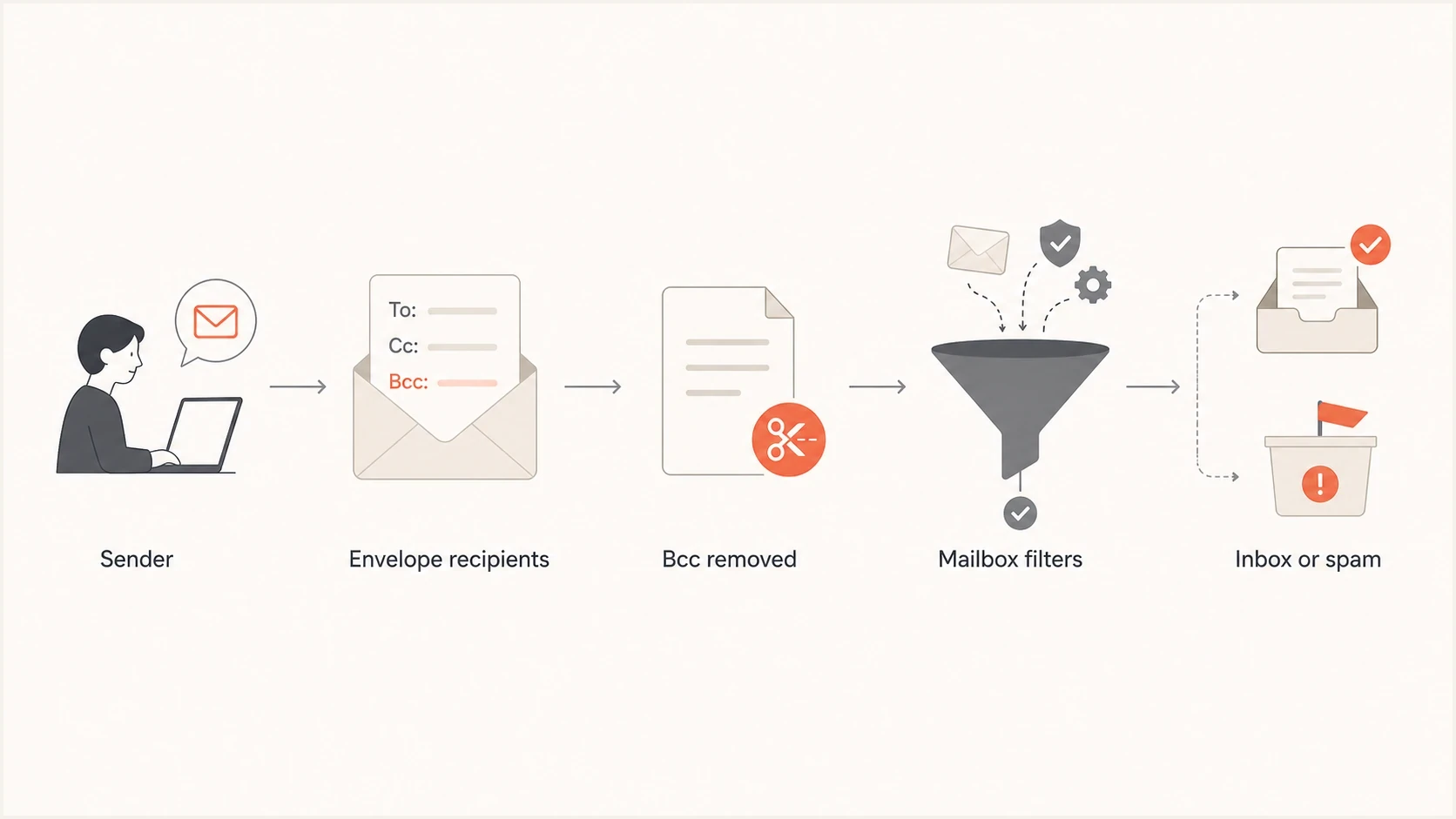
Flowchart explaining BCC-only email delivery through envelope recipients and mailbox filtering.
Delivered header excerpt without a visible recipient
From: Events Team <events@example.com>
Subject: Venue details

No visible To or Cc recipient remains after Bcc is stripped.
One-off privacy pattern before sending
From: Events Team <events@example.com>
To: Events Team <events@example.com>
Bcc: guest1@example.net, guest2@example.net
Subject: Venue details
The Bcc line in the composition example is for the sending system. Verify that the delivered copies do not expose the private list. Adding your own address to To provides context, but does not satisfy a rule requiring the actual recipient in To or Cc.
Per-recipient marketing header excerpt
From: Events Team <events@example.com>
To: Guest One <guest1@example.net>
Subject: Venue details
List-Unsubscribe: <https://example.com/unsubscribe/guest1>, <mailto:unsubscribe@example.com>
List-Unsubscribe-Post: List-Unsubscribe=One-Click
The marketing example is a header excerpt, not a complete message. Under RFC 8058, a valid DKIM signature must cover both unsubscribe headers, and the HTTPS endpoint must process the one-click POST without a login or confirmation step. Include a visible unsubscribe link in the message body as well. A mailto link alone does not meet one-click unsubscribe requirements.
Valid syntax is not enough
A message can be syntactically valid without a visible To: recipient. It can also be sent with only Cc: or Bcc: recipients when the sending client and server allow it. Deliverability is judged by authentication, sender history, recipient engagement, message content, complaints, and local filtering policy. A valid BCC-only message can still be filtered, but the cause needs to be established from delivery evidence.
The old undisclosed-recipients: ; style exists because some mail software adds a group placeholder when no visible recipients exist. Do not use that as a deliverability strategy. If the goal is privacy for a small group, put a sender-controlled address in To:. If the goal is bulk sending, generate one recipient-specific message. More detail on undisclosed recipients helps explain when that placeholder appears.
When BCC is acceptable
BCC is appropriate for small, expected messages where recipients need address privacy. A business context alone does not make BCC unsuitable; recurring marketing and large distributions need proper list management. A parent group, a volunteer committee, or an internal team update can use BCC to avoid exposing addresses. Even then, keep the list small and use a visible To: address that clearly identifies the sender or group. If the message refers to a group rather than each person, name the group in the body so recipients are not left guessing.
BCC also reduces accidental reply-all exposure when recipients do not need to see each other. That benefit applies to small, expected messages; it does not replace consent tracking, unsubscribe handling, bounce management, or proper list hygiene.
|
|
|
|---|---|---|
Internal note | Usually fine | Sender in To |
Event guests | Small lists | One-to-one |
Shared file or PDF | Poor bulk fit | Hosted link |
Marketing | Poor fit | Campaign send |
Legal or compliance copy | Poor archive fit | Tracked send or archive |
Practical BCC guidance by send type
If BCC is being used for legal recordkeeping, do not depend on a hidden mailbox as the archive. Use journaling, transport rules, retention policies, ESP exports, or a restricted archive receiver with storage alerts and bounce monitoring. A full or throttled archive mailbox can create bounces that look like recipient-list problems. If the archive mailbox is hosted by a major mailbox provider, treat those copies as provider-facing volume, not invisible internal mail.
The more your email looks like a campaign, the less BCC makes sense. Recurring marketing needs permission records, unsubscribe handling, bounce processing, and suppression logic. BCC gives you none of that cleanly. For large or frequently revised documents, a trusted hosted link reduces message size and stale-copy problems. An expected attachment is not inherently a BCC deliverability failure.
BCC sending risk bands
These are qualitative sending scenarios, not measured spam probabilities or provider thresholds.
Low
One-off
Small, expected one-off mail
Watch
Recurring
Repeated hidden-recipient mail
High
Bulk
Large batch or recurring marketing
There is no magic recipient count where BCC suddenly becomes spam. Risk depends on recipient expectations, complaints, sending volume, and local policy. Per-message recipient limits and outbound rate limits are separate constraints, even when everyone expects the message. If you are sending identical emails at scale, visible recipient handling is only one part of the risk.
How to troubleshoot BCC delivery problems
Count recipients across To, Cc, and Bcc together. For a list of individual addresses, moving addresses into BCC does not reduce the recipient count. A message with 500 BCC recipients and your own address in To has 501 recipients. Per-message limits and daily recipient quotas are separate; splitting a list into batches does not reset the daily quota.
Microsoft lists a 500-recipient per-message maximum for Outlook.com accounts with a Microsoft 365 subscription, with lower limits depending on account history and subscription status. Check the applicable Outlook.com sending limits. Exchange Online has separate customizable recipient limits up to 1,000 per message; the active mailbox setting controls. Google Workspace also documents different limits for webmail, SMTP submission, and API sending. Check your actual sending route rather than borrowing a limit from another account type.
|
|
|---|---|
The sending service refused the message | Read the submission error and check the combined recipient count, account quota, and sending rate. A message in Sent is not proof of delivery to every recipient. |
Temporary SMTP failure (4xx) | Check queue status and the full error. Let the sending service retry affected recipients according to its retry policy; avoid manual resends while delivery is queued. |
Permanent SMTP failure (5xx) | Read the full error for invalid-address, authentication, or policy failures. Correct the cause before resubmitting and suppress invalid addresses. |
Accepted, but delivered to spam or quarantine | Inspect a delivered copy and recipient-side filtering information. Check authentication, sender reputation, and local rules. SMTP acceptance does not establish inbox placement. |
Use the failure stage to choose the next check
Check per-recipient delivery status before retrying a partially successful batch. Receiving your own To copy does not prove that the BCC recipients received theirs. Resend only to recipients whose status requires it. If your address remains in To for every batch, expect a separate copy for each batch.
BCC protects addresses, not message confidentiality
BCC limits address disclosure in normal delivered headers. It does not encrypt the subject, body, or attachments, and it does not stop a recipient from copying or forwarding the message. Use it only when every intended recipient is allowed to read the complete email.
- Assume each recipient can copy or forward the complete message.
- Do not use BCC as proof that a message or attachment is confidential.
- Check every address carefully because BCC cannot undo a send to the wrong person.
- Keep sensitive data out of ordinary group mail and use an approved protected workflow.
For sensitive content, use an approved encrypted or access-controlled workflow. Test BCC with that workflow separately because encryption and header protection can handle recipient metadata differently. BCC is an addressing feature, not a confidentiality control.
How to send private group email reliably
For small privacy-focused sends, keep BCC but make the visible message look intentional. Use a real sender identity, a clear subject, and a visible group or sender address in To:. Tell recipients why they received the message in the first line. That reduces confusion and complaint risk.
- For a one-off note, put your own address or a group mailbox in To: and private recipients in Bcc:.
- For customer email, send one message per recipient, with the recipient in To:.
- For a recurring list, use list management, unsubscribes, suppression, bounce handling, and segmentation.
- For IP warming, count every accepted BCC copy by mailbox provider before increasing volume.
- For large or frequently revised files, use a trusted hosted link to reduce message size and stale copies.
- For a legal archive, use journaling, transport rules, retention policies, ESP exports, or a restricted archive receiver instead of a hidden mailbox.
- For a sensitive audience, avoid exposing recipients, but do not hide accountability or sender identity.
If a BCC list concentrates many people at one company, review delivery results for that domain and avoid sudden volume spikes. Limit the list to people who expect the message. Honor each unsubscribe and suppress invalid addresses. Pause sending to the whole domain when a domain-wide rejection or an explicit organization-wide opt-out warrants it, rather than treating one recipient's opt-out as a request for everyone.
After changing the send pattern, test the actual message. Suped's email tester receives a real sample through your normal sending system so you can inspect delivered headers, authentication, and technical sending issues before using the full list.
Email tester
Send a real email to this address. Suped shows a results button when the test is ready.
?/43tests passed
Also test the message as the recipient will actually receive it. If your production system sends one email per recipient, test that exact path. If a desktop client sends one BCC batch, test that exact path too. Header changes made by relays, clients, and outbound gateways are part of the deliverability result.
Use the Suped sample report to investigate the received message, then compare it with delivery logs and recipient feedback. The email tester does not measure inbox placement across mailbox providers.

Email tester sample report showing total score, email preview, issue summary, and per-section results
Authentication and reputation checks
Using BCC does not itself cause SPF, DKIM, or DMARC to fail. SPF checks whether the connected sending IP is authorized for the envelope sender's domain, or the HELO domain when the envelope sender is empty. DKIM verifies signed headers and body content using the signing domain's public key. DMARC passes when at least one passing SPF or DKIM result has a domain that matches the visible From domain under DMARC's domain comparison rules. The receiving server decides how to handle failures using the published policy and local rules. A BCC-only message can pass authentication and still land in spam.
For ongoing authentication checks, use Suped's DMARC monitoring to review reported sending sources and their authentication results. Aggregate DMARC reports do not show BCC lists, individual recipient addresses, or inbox placement. Use delivery logs and recipient-side evidence to investigate those questions.
The sender domain matters too. A high-volume BCC send from a consumer or shared personal mailbox gives you less control over authentication, bounce handling, and reputation than a domain you manage. For recurring mail, use a sender domain you control so authentication, bounces, suppression, and reputation data are tied to your operation. If a third-party sender uses a free mailbox domain in the visible From address, DMARC can fail if neither the SPF-authenticated domain nor a valid DKIM signing domain matches the visible From domain. A strict published policy can then lead to rejection or quarantine, regardless of BCC.
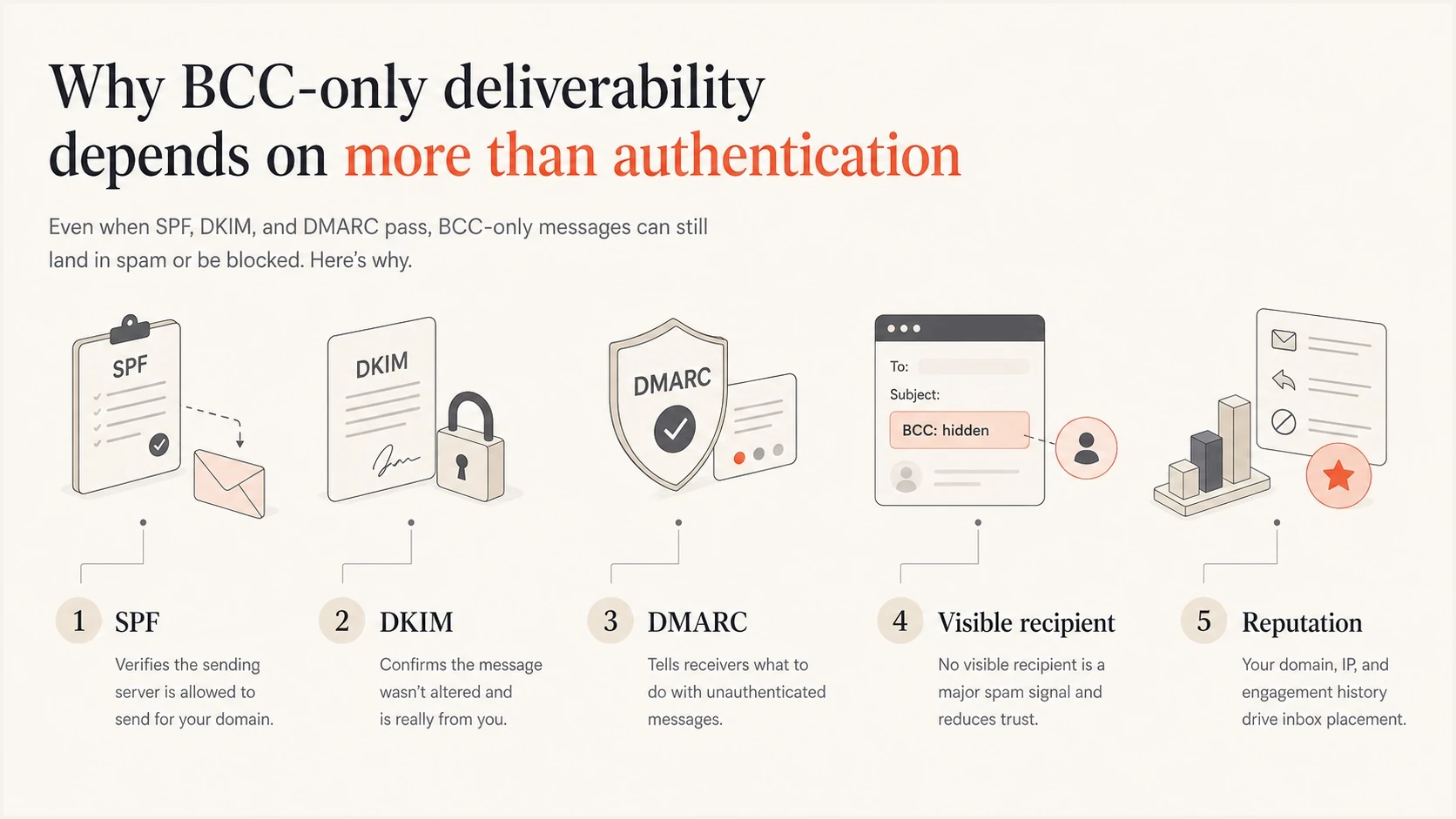
Infographic showing SPF, DKIM, DMARC, visible recipient, and reputation signals for BCC-only email.
Suped workflow for BCC risk
- Test a sample through the production sending path and inspect delivered headers and authentication.
- Check the domain with a domain health checker review for SPF, DKIM, and DMARC issues.
- Watch reputation with blocklist monitoring for blocklist (blacklist) signals tied to IPs and domains.
- Use sending-provider logs for volume, bounces, and deferrals, plus available complaint data before increasing warm-up volume.
- Use Suped authentication issue reports to identify the sending source and work through the reported fixes.
Suped brings DMARC reporting, sending-source detection, alerts, and blocklist (blacklist) monitoring into the investigation. A blocklist result does not describe every receiver's reputation assessment. Compare those findings with delivery logs to distinguish authentication failures or listed infrastructure from recipient-specific filtering.
Suped DMARC dashboard showing email volume, authentication health, and source breakdown
Views from the trenches
Best practices
Send one message per recipient when the email is commercial, recurring, or high volume.
Use a visible sender-controlled To address when BCC is needed for a small private list.
Test the exact production send path because clients and relays can rewrite message headers.
Common pitfalls
Treating an empty To field as a guaranteed spam trigger distracts from the actual cause.
Using BCC to avoid list management skips unsubscribe, bounce, and suppression handling.
Assuming an authentication pass guarantees inbox placement ignores reputation and local rules.
Expert tips
Use BCC for small, expected group messages and a managed sending workflow for campaigns.
Keep visible addressing clear so recipients understand why the message reached them.
Check local recipient rules because adding your own To address does not satisfy every policy.
Expert view
Expert from Email Geeks says a message with no visible To field is risky because it can look spam-like to recipients and filters.
2023-07-05 - Email Geeks
Expert view
Expert from Email Geeks says commercial sends should be one-to-one so each recipient has a visible address and proper unsubscribe handling.
2023-07-05 - Email Geeks




