
Why do some emails from the same sender go to spam while others go to inbox?

Updated on 23 Oct 2026: We clarified how forwarding affects spam placement and refreshed provider requirements and troubleshooting steps.
Emails from the same sender can land in different folders because mailbox providers do not make one permanent decision for a sender. They score each individual message using the sending IP, domain reputation, content, links, authentication results, recipient history, complaint data, list quality, timing, and recipient-side rules. A sender can pass SPF, DKIM, and DMARC on every message and still see the first two messages go to spam while the third reaches the inbox.
When this pattern appears, the best starting point is to compare the original headers and the message bodies side by side. The visible From address is only one part of the decision. The delivery route, the exact IP, the envelope sender, the DKIM selector, the URLs in the body, user-created filters, and the recipient's prior behavior can all affect the result.
- The same sender can have mixed placement because filtering depends on the specific message, recipient history, and delivery route.
- Differences in IP reputation, content, or recipient history can produce different folder decisions. Compare the messages before assigning a cause.
- A DMARC pass confirms domain authentication through SPF or DKIM with DMARC alignment. It does not prove that the message is wanted or that the sending account is uncompromised.
Why the same sender can split between spam and inbox
The easiest trap is treating the sender as one stable object. Mailbox providers do not see it that way. They see a group of signals attached to a message. Some signals are sender-wide, such as domain reputation. Some are stream-specific, such as welcome mail versus campaign mail. Some are message-specific, such as one URL or subject line. Some are recipient-specific, such as whether that exact mailbox usually reads, ignores, deletes, or reports that sender's mail.
That explains why messages that look almost identical can land differently. Mailbox providers evaluate details that are not visible in the message body, and reputation changes over time. Complaints or other recipient actions can affect later filtering, but folder placement alone does not reveal which signal changed. Providers do not publish the exact weights or timing of those decisions.
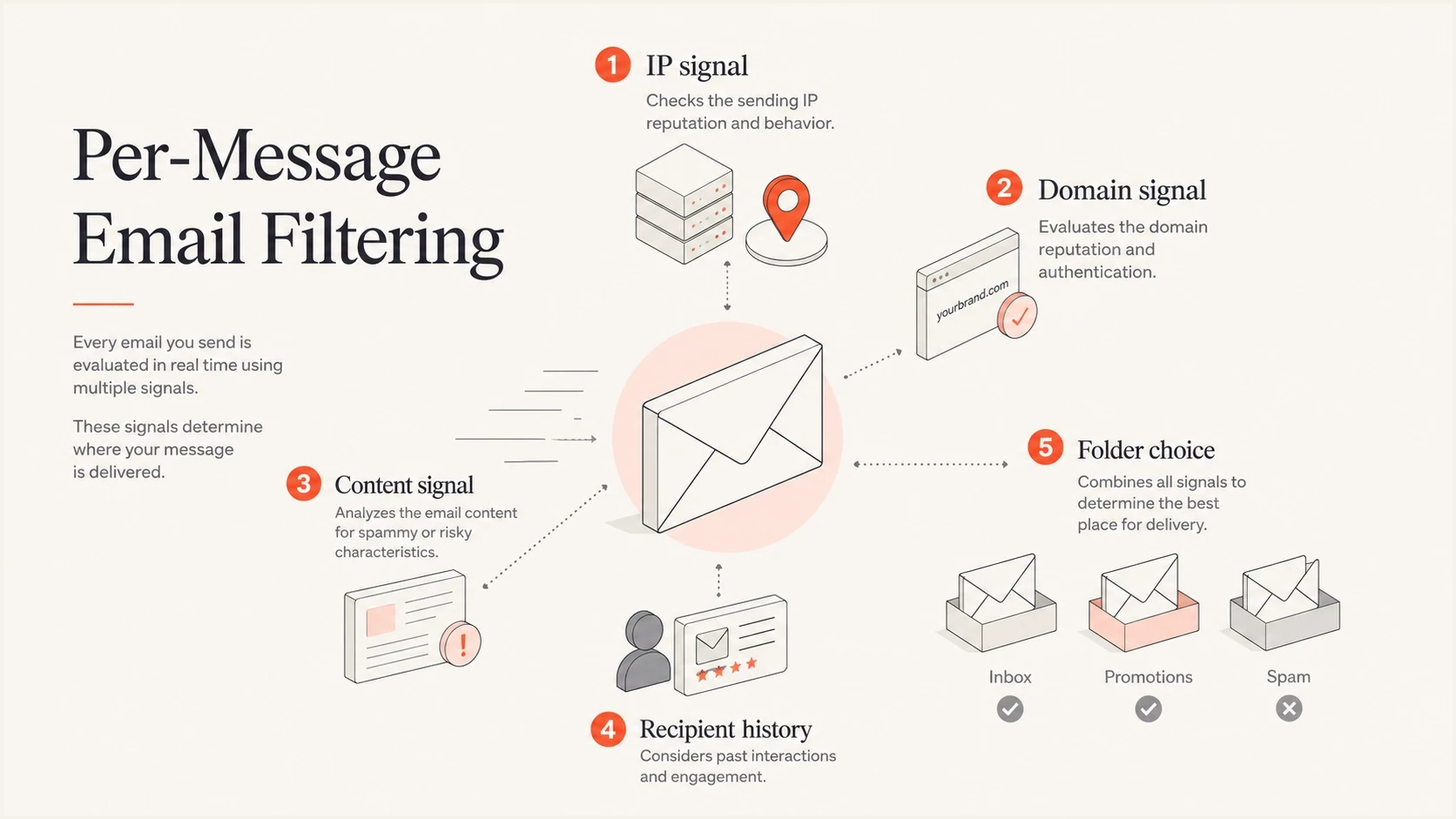
Email filtering signals affecting spam or inbox placement: sending IP, domain, content, and recipient history.
- IP variance: Two messages can use different sending IPs inside the same sending platform. On a shared IP, other customers also affect that IP's reputation.
- Content variance: A welcome email, a donation ask, and a newsletter can carry different wording, links, images, and tracking domains.
- Recipient state: A mailbox with no history for that sender is judged differently than a mailbox that regularly interacts with the sender's mail.
- Timing: Reputation and filtering decisions can change over time as receivers observe complaints and other recipient actions.
- Mailbox policy: Consumer Gmail, business Google mailboxes, Outlook, and Yahoo do not apply the same filtering rules in every case.
Authentication passes, but placement still changes
SPF, DKIM, and DMARC answer narrower questions than many senders expect. SPF checks whether the connecting server is authorized for the envelope sender domain. DKIM verifies a domain signature over selected headers and the signed body content. DMARC requires a passing SPF or DKIM result with domain alignment to the visible From domain. None of these checks establishes recipient consent or guarantees inbox placement.
This is where DMARC monitoring helps distinguish authentication problems from other causes. Aggregate DMARC reports show the sources using your From domain and their authentication results, including unauthorized traffic. They do not show whether messages reached inbox or spam. Suped's DMARC reporting platform groups those results by sending source with issues and fix steps, so a team can investigate authentication failures before testing content changes.
Illustrative authentication results for spam and inbox messagestext
Spam folder:
Authentication-Results: mx.example;
  dkim=pass header.d=example.org header.s=mail;
  spf=pass smtp.mailfrom=bounces.example.org;
  dmarc=pass header.from=example.org

Inbox:
Authentication-Results: mx.example;
  dkim=pass header.d=example.org header.s=mail;
  spf=pass smtp.mailfrom=bounces.example.org;
  dmarc=pass header.from=example.org
Important distinction
A DMARC pass reduces authentication-related risk. It does not override sender reputation, recipient actions, content risk, spam complaints, or blocklist and blacklist signals.
Check public authentication DNS with Suped's domain health check. A domain lookup can expose SPF or DMARC configuration errors, but it cannot prove that a particular message passed authentication. Verify the actual DKIM selector and the receiving server's authentication results in the original message headers.
?
What's your domain score?
Deep-scan SPF, DKIM & DMARC records for email deliverability and security issues.
Compare the headers of spam and inbox messages
When two emails share the same From address, compare them like separate artifacts. A small header difference can explain a large placement difference. A message that says "Thanks for signing up" can perform differently than the next campaign, even if both authenticate and both use the same brand identity.
Technical differences
- Sending IP: The inboxed message can come from an IP with cleaner recent behavior.
- Envelope sender: A bounce domain can change while the visible From address stays the same.
- DKIM selector: Compare the DKIM signing domain (d=) and selector (s=). A selector change can mean routine key rotation; it does not establish a reputation problem by itself.
- Headers: For promotional mail, List-Unsubscribe and List-Unsubscribe-Post support can differ by stream. These headers support compliance and easier opt-out, but do not guarantee inbox placement.
Mailbox differences
- Recipient history: Receivers can use prior recipient actions, including spam reports and messages moved out of spam; the signals differ by provider.
- Recent reputation: Complaint trends can affect later mail, but the folder result does not establish when a reputation change occurred.
- Mailbox rules: Personal rules and organization policies can route messages differently even when sender authentication matches.
- User type: Consumer and business mailboxes can classify the same message differently.
Delivery order is useful evidence, but it does not establish the cause. If two messages go to spam and the next reaches the inbox, compare their routes and headers before concluding that reputation improved. Different content or a mailbox rule can also explain the result.
How recipient settings affect spam placement
For a recipient asking why one sender sometimes lands in spam, the answer can be local to that mailbox. The sender can be technically fine while the mailbox has a filter, a blocked sender entry, an old spam decision, or no positive history with the sender.
- Check filters and blocked senders: Review rules that archive or delete matching messages, plus blocked sender settings that send mail to junk. The available actions differ by mailbox provider.
- Move wanted mail out of spam: Marking a valid message as not spam gives that mailbox a stronger signal for future mail from that sender.
- Add known senders to contacts: Contacts and safe sender settings help with wanted mail, but they do not fix a sender-wide reputation or authentication problem.
- Compare affected mailboxes: If only one recipient sees the issue, check that mailbox's rules before changing sender DNS.
- Compare webmail with your mail app. If a message appears in the inbox on the web and later moves to junk, inspect connected apps and their local rules as well as server settings.
In Gmail, Promotions and Updates are inbox categories, separate from Spam. Confirm the actual folder before treating a missing Primary-tab message as a deliverability failure. Recipient settings explain differences between mailboxes, but changing one recipient's settings does not repair sender reputation across a mailing list. Gmail category documentation.
Why forwarded emails can go to spam
Automatic forwarding and mailing lists can change the route while keeping the same visible From address. A direct message and a forwarded message therefore need separate authentication checks at the final receiving mailbox.
- SPF can fail because the final receiver sees the forwarding server's IP rather than the original sending server.
- DKIM can survive forwarding when signed content stays intact. A mailing-list footer or a change to a signed subject can invalidate the original signature.
- DMARC can still pass when SPF fails if a valid DKIM signature meets DMARC alignment requirements for the visible From domain.
- ARC (Authenticated Received Chain) records authentication observations across intermediaries. A receiver that trusts the intermediary can use that evidence in its delivery decision; an ARC chain does not guarantee inbox placement. Google authentication guidance.
Compare the Received chain and the final receiver's Authentication-Results for direct and forwarded copies. Do not add a recipient's forwarding server to the original sender's SPF record as a general fix. Google forwarding guidance.
How to investigate inconsistent inbox placement
Collect the original source of at least one spam message and one inbox message. In Gmail, open the message menu and choose "Show original." Download the originals or save them as .eml files rather than forwarding them inline, which adds a new message and can obscure the evidence.
- Save originals: Record the recipient, actual folder, delivery time, and Message-ID alongside each original so the comparison identifies the exact messages.
- Compare IPs: Use the receiving server's Received headers to compare the connecting IPs. Read the Authentication-Results added by that receiver, rather than trusting an arbitrary earlier header.
- Compare domains: Review From, Return-Path, the DKIM d= domain and s= selector, and tracking or image-host domains. Note any forwarding hop.
- Compare copy: Compare subject accuracy, HTML, attachments, and link destinations. Test suspected content differences one at a time instead of assuming a particular word caused spam placement.
- Compare timing: Note send order, time between messages, and whether a large batch was underway.
- Check mailbox rules: If one recipient is affected, review filters, blocked senders, safe senders, contacts, and recent spam actions.
- Retest cleanly: Send a controlled message through the same production route to test accounts across mailbox types, then change one variable at a time and compare the original sources.
A controlled test helps because it separates content and authentication from some recipient-specific variables. Run an email test with the same message you plan to send. Then send that version to a small set of test accounts and real, opted-in recipients. The technical test can expose obvious configuration or content issues. Mailbox results are diagnostic snapshots, not guarantees, because each account retains its own history and rules.
Email tester
Send a real email to this address. Suped shows a results button when the test is ready.
?/43tests passed
If authentication is consistent but recipients see different folders, investigate reputation, list source, local rules, and provider-specific filtering before changing DNS. A "delivered" event or SMTP 250 response confirms acceptance by the receiving server, not inbox placement. Open rates are also imperfect evidence because privacy settings and blocked images affect tracking; confirm folders with recipients. Apple privacy documentation.
Suped's product keeps authentication sources, failures, fix steps, and alerts visible while the team compares these message originals. Use that evidence to investigate a configuration issue; confirm folder placement separately with the receiving mailbox.

Issue steps to fix dialog showing the issue overview, tailored fix steps, and verification action
Bulk sender requirements can split mail streams
Bulk sender rules add another difference between mail streams. Gmail counts messages across the same primary domain toward its threshold of around 5,000 messages to personal Gmail accounts within 24 hours, and bulk status does not expire. These requirements apply to personal Gmail recipients; Google Workspace recipients have separate organization policies.
|
|
|
|---|---|---|
Gmail | Bulk senders need SPF and DKIM, DMARC with at least p=none, DMARC alignment, valid forward and reverse DNS, TLS, and RFC 5322 formatting. Marketing and subscribed mail also needs RFC 8058 one-click unsubscribe and a visible body link. Gmail sender guidelines | Authentication or infrastructure failures can cause spam placement or rejection. Missing one-click unsubscribe alone does not automatically cause either; it affects eligibility for delivery mitigation. |
Gmail | Aim for user-reported spam below 0.1% and avoid 0.3% or higher. | Complaint spikes can harm later delivery even when authentication passes. Assess the provider's own complaint metric rather than assuming it matches your campaign-wide calculation. |
Yahoo | Bulk senders need SPF and DKIM, DMARC with at least p=none and a DMARC pass, valid forward and reverse DNS, standards-compliant messages, and complaints below 0.3%. Yahoo sender requirements | Marketing and subscribed mail needs List-Unsubscribe support and a visible body link. Honor unsubscribe requests within two days. Yahoo does not publish a fixed numeric bulk sender threshold. |
Outlook.com | High-volume senders to Microsoft consumer mailboxes need both SPF and DKIM to pass, plus a DMARC policy of p=none or stronger and a DMARC pass. Outlook.com authentication requirements | Authentication failures can cause a 550 5.7.515 rejection. Check bounce logs as well as spam folders; rejected mail was not accepted into the recipient's mailbox. |
Current requirements that can expose differences between mail streams.
When promotional mail goes to spam but receipts reach the inbox, compare the sending IP pool and authentication by stream. For Gmail bulk marketing mail, a body link or mailto header alone does not meet RFC 8058 one-click requirements. Check List-Unsubscribe and List-Unsubscribe-Post, a working HTTPS endpoint, and suppression within 48 hours. Purely transactional messages are excluded from Gmail's one-click requirement. Gmail sender requirements FAQ.
Signals that affect spam and inbox placement
Several signals can contribute to mixed placement. A new recipient, a risky link domain, a weaker IP, and a sudden volume increase can contribute to spam filtering. Fix the differences supported by message evidence; changing one or two signals does not guarantee inbox placement.
Repeated or near-identical emails are another signal to check. The same body, URLs, images, template, and offer can create a recognizable message fingerprint, especially when the same recipients receive the message again within a short window. The risk comes less from identical copy by itself and more from the reaction that follows: ignored mail, deletes without reading, unsubscribes, complaints, and reputation loss.
|
|
|
|---|---|---|
Sending IP | IP and pool | IP reputation reflects recent sending behavior, including the activity of other customers on shared IPs. |
From domain | Header identity | Brand reputation is attached to the visible sender identity. |
Bounce domain | Return path | A different route can expose different infrastructure reputation. |
Link and image domains | Tracking domains, image hosts, shorteners, and redirect destinations | Receivers can evaluate URL reputation separately from the sender domain. Check domains introduced by a new template or tracking setup. |
Content | Subject, plain-text part, HTML, and attachments | Misleading subjects, broken HTML, and suspicious attachments warrant investigation. A plain-text alternative improves compatibility; its absence alone does not establish why a message went to spam. |
Signup source | Consent record and form abuse | Weak opt-in or automated form submissions create complaints, hard bounces, and unwanted first-touch mail. |
Recipient | Prior actions | Reads, deletes, moves, replies, and reports can change future placement. |
Repetition | Same offer and same audience | Near-identical resends can create fatigue and weaker engagement. |
Blocklist | Domain and IP | A blocklist or blacklist signal can affect only part of a stream. |
Common signals that change folder placement for one sender.
Check whether the exact sending IP or domain appears on a relevant blocklist (blacklist). A listing is useful evidence only when the receiving provider uses it, and a clean result does not guarantee inbox placement. Use blocklist monitoring alongside original headers and recipient reports rather than treating every listing as the cause.
Do not overfit one inbox
A single test mailbox can mislead you. Compare personal and business mailboxes while keeping the message, timing, and recipient status consistent enough for the results to be useful.
How to reduce split placement
Use the evidence to make sending more consistent. Separate mail streams, keep authentication stable, and send to people who requested the mail. Correct a DNS record when message evidence identifies an authentication problem, then measure results across recipients rather than chasing each folder decision.
Fix priority
- Stabilize identity: Use consistent From domains, DKIM signing domains, bounce domains, and link domains by stream.
- Separate streams: Separate marketing and transactional streams with consistent sending identities and appropriate IP pools. Separation helps diagnosis but does not create a complete reputation boundary between related domains.
- Control volume: Ramp new domains, new IPs, and newly active lists gradually instead of sending a large burst.
- Limit repetition: Avoid sending the same offer to the same recipients repeatedly with only a subject-line change.
- Protect signup forms: Use confirmed opt-in where appropriate, limit automated form submissions, and retain signup records. Do not add purchased or scraped addresses to the list.
- Suppress bad recipients: Suppress hard bounces and unsubscribed addresses, plus recipients identified in spam complaints. Review inactive groups using more than open rates before sending again.
- Make opting out easy: Add the required one-click unsubscribe headers to promotional mail, keep the body link visible, and honor requests within two days.
- Watch signals: Track complaints, bounces, unsubscribes, DMARC failures, and blocklist or blacklist events by mail stream.
The most useful operational habit is to write down what changed before each send. New IP pool, new link domain, new list segment, new content template, new frequency, new sender name, or new authentication record. If placement changes, the change log gives you a starting point instead of a guessing exercise.
Views from the trenches
Best practices
Compare complete headers before assuming content, IP reputation, or authentication caused it.
Track first-touch messages separately because early recipient signals can be unusually volatile.
Keep welcome, fundraising, and broadcast streams separated when each has different risk.
Common pitfalls
Assuming a DMARC pass proves inbox placement leads teams to ignore user signals.
Testing only one personal inbox misses provider filtering and recipient history effects.
Changing DNS records during diagnosis creates noise before the real pattern is clear.
Expert tips
Save originals for every test message so header, IP, DKIM, and content changes stay visible.
Run the same signup across mailbox types when consumer and business filters differ.
Watch whether complaints and other recipient actions shift after several messages.
Marketer view
Marketer from Email Geeks says two early messages can go to spam and a later message can reach the inbox even when the visible From address and authentication results match.
2024-02-12 - Email Geeks
Marketer view
Marketer from Email Geeks says message interaction in spam can influence later placement, but inconsistent placement also happens without the recipient moving anything.
2024-03-04 - Email Geeks




