
What are 'undisclosed recipients' in email and when should they be used?

Published 13 Nov 2025
Updated 17 Oct 2026
11 min read
Summarize with
Updated on 17 Oct 2026: We added Gmail and Outlook instructions and clarified Bcc privacy and delivery limits.
Undisclosed recipients are what people often see when an email has no visible recipient in the To: or Cc: header. In practice, it usually means the sender put the real recipients in Bcc (blind carbon copy), or the sending system inserted an empty address group such as Undisclosed recipients:;. The recipients normally cannot see each other's Bcc addresses, but the message is not anonymous and mail servers still know where the email is being delivered.
Use it for small, ad hoc messages where you need to hide a recipient list and are sending manually. For repeated marketing or application email, prefer one message per recipient so content and delivery records stay specific to that person.
If the real requirement is, "send the same message to multiple people without exposing their email addresses," the better answer is almost always to send one normal message per person. Put that person in the To: header, keep the envelope recipient specific, and configure your sending workflow to handle unsubscribes, suppressions, bounce handling, and audit records per recipient where required. Mail merge creates separate messages for each recipient and is a practical alternative for occasional group sends.
What undisclosed recipients means
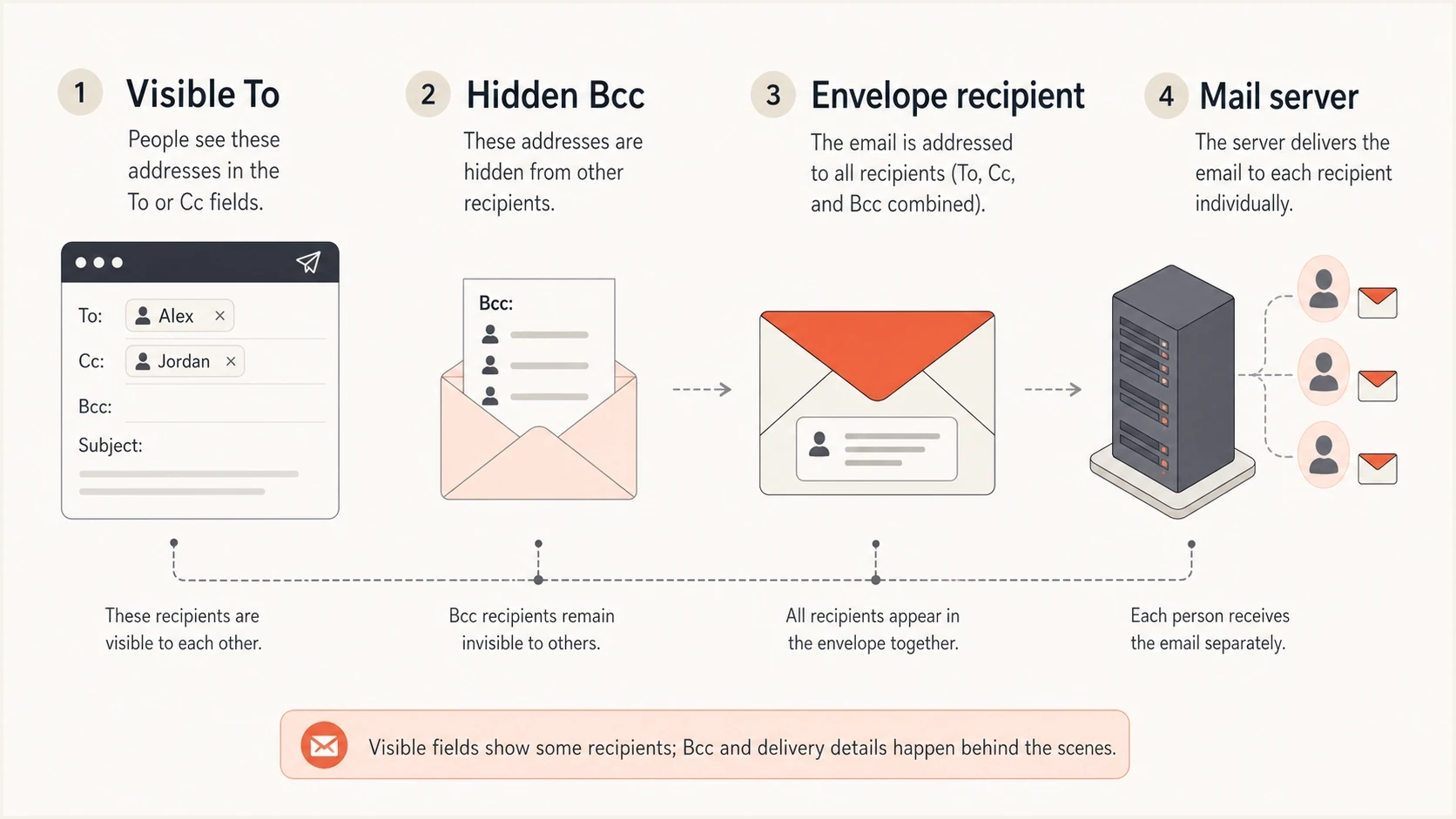
Diagram comparing visible To headers, hidden Bcc recipients, and the SMTP envelope.
Email has visible message headers and a delivery envelope. The visible headers are what a person sees in the mail client: From:, To:, Cc:, subject, date, and similar fields. The envelope is what SMTP uses to route the message to each mailbox. Bcc hides addresses by keeping them out of the visible headers, not by removing them from the delivery process.
Typical undisclosed recipients headertext
From: sender@example.com
To: Undisclosed recipients:;
Subject: Quarterly update

The actual recipients are delivered through SMTP envelope data.
That To: line uses standard address-group syntax with an empty group. The label "Undisclosed recipients" is a long-running convention, not a special SMTP status or delivery mode. Some clients generate a similar display when the To: header is blank and every recipient is in Bcc.
The key distinction
Bcc normally hides recipients from other recipients. The sender and sending provider still have the recipient list, and receiving providers process the recipients they deliver to.
- Privacy: recipients normally do not see each other's Bcc addresses in mail clients.
- Routing: mail servers still process each real recipient in the SMTP envelope.
- Identity: the sender identity and authentication results still matter.
What recipients can see
A recipient can see the headers that remain in the delivered message. Most mail clients remove the Bcc list or show only the recipient's own address. RFC 5322 also permits a copy that exposes the Bcc list to other Bcc recipients, so test the sending system before relying on it for privacy.
|
|
|
|---|---|---|
To header | Yes | Displayed recipients |
Cc header | Yes | Displayed copies |
Bcc header | Usually no | Usually removed, empty, or recipient-specific |
SMTP envelope | Not as a full list | Your own address can appear in delivery headers |
Reply all | Limited | Other hidden Bcc recipients are normally excluded |
Visibility of recipient-related email data
A Bcc recipient can reply to the sender or the Reply-To address. Reply all normally includes visible To and Cc recipients, excluding other hidden Bcc recipients. A Bcc recipient who replies to visible recipients exposes their own address and participation.
Gmail's Reply all warning appears when your address is absent from To and Cc, including when you were Bcc'd. Check the reply's recipient fields before sending.
This is also why "undisclosed recipients" does not mean the sender used encryption, anonymous delivery, or a privacy relay. It only says the delivered message did not expose a normal visible recipient list.
When to use undisclosed recipients
Bcc is useful for one-off messages such as a small event invitation or a community announcement. If a person is sending a one-off email to a small group and the recipients should not see each other's addresses, putting the sender's own address in To and the group in Bcc is acceptable. It solves a basic privacy problem without leaving the visible recipient field empty.
- Small groups: use it for a short, manual note where the sender knows the recipients.
- Recipient privacy: use it when exposing addresses to the group would be inappropriate.
- Low volume: use it only when the message is not part of a repeated bulk workflow.
- Clear context: make the body explain why the recipient is getting the message.
- Manual sending: keep it to a person sending from a mailbox, not an application.
Fit by sending pattern
Use undisclosed recipients only where recipient privacy is the main requirement and the sending pattern is small.
Good fit
Small
Manual one-off notes to a small private group.
Caution
Limited
Occasional announcements where replies and list hygiene are not critical.
Avoid
Scale
Transactional, marketing, product, legal, or high-volume mail.
The moment the message has unsubscribe requirements, consent rules, template variables, bounce processing, per-user audit needs, or user-specific content, undisclosed recipients are the wrong tool. Send separate messages.
How to send to undisclosed recipients
Most mail clients support the same basic method. Use your own valid address in To and place the private recipient list in Bcc. If you want the familiar label, save your own address as a contact named "Undisclosed recipients" or enter it as a display name where the client accepts standard address syntax.
Compose fields before sendingtext
To: Undisclosed recipients <sender@example.com>
Bcc: alice@example.com, bob@example.com
The display name is optional. Only the Bcc field hides addresses; typing "Undisclosed recipients" in To does not hide anyone listed in To or Cc.
- Start a new message: open the compose window instead of replying to an existing thread.
- Set the visible recipient: put your own address in To, optionally with the display name "Undisclosed recipients."
- Show Bcc: enable the Bcc field and add the people whose addresses must remain private.
- Check the fields: make sure no private address appears in To or Cc.
- Send a test: use two accounts you control and confirm that neither received copy exposes the other Bcc address.
Check the provider's limits
Mailbox providers set their own per-message and daily recipient limits, and those limits change by account type. Bcc recipients count toward those limits along with To and Cc recipients. Do not treat a technical limit as a safe audience size. For a repeated send or a large group, use individual delivery with consent, unsubscribe handling, bounce processing, and suppression controls.
Where to find Bcc in Gmail and Outlook
|
|
|---|---|
Gmail in a browser | Click Compose, then Bcc on the right of the To line. |
New Outlook for Windows | Open a new message, then choose Options > Show fields > Show Bcc. |
Classic Outlook for Windows | Open a new message in its own window, then choose Options > Bcc. |
Bcc controls in Gmail and Outlook on a computer.
When to avoid Bcc for bulk email
For marketing email or user-specific application email, recipient privacy is only part of the requirement. If software is generating the message, it can generate one message per recipient.
Undisclosed recipients
- Headers: one generic visible recipient line for many recipients.
- Tracking: shared links and tracking pixels make individual opens and clicks hard to distinguish.
- Replies: reply behavior depends on visible headers and client quirks.
- Scale: mailbox recipient limits and weak list management restrict repeated bulk sends.
Individual sends
- Headers: each recipient sees a normal message addressed to them.
- Tracking: delivery events and suppressions map to one recipient when your system records them.
- Replies: reply handling is predictable and easier to route.
- Scale: the pattern works for product, lifecycle, and broadcast systems.
This is the same practical issue behind using only Bcc: the header trick is not the same thing as proper list management. It hides addresses, but it does not create per-recipient control.
Do not build product email this way
For personalized transactional or application-generated mail, separate messages keep user-specific content and delivery records distinct.
- Audit: record each intended recipient and message version; server acceptance does not prove that a person read it.
- Suppression: keep a per-address suppression list and apply it before sending.
- Personalization: per-user fields belong in separate messages with separate events.
Deliverability and authentication impact
Undisclosed recipients do not automatically break SPF, DKIM, or DMARC. SPF checks whether the sending IP is authorized for the envelope sender domain, and DKIM validates a cryptographic signature. DMARC requires an SPF or DKIM pass whose authenticated domain matches the visible From domain under the applicable domain-matching rule. The recipient label does not cause an authentication failure. However, changing a header covered by a DKIM signature after signing can invalidate that signature.
Bcc does not bypass spam filters or recipient limits, and putting your own address in To does not guarantee inbox delivery. For bulk sends, Gmail's sender guidelines emphasize authentication and low spam complaint rates, with unsubscribe requirements for qualifying marketing and subscription messages. Manage consent and suppressions in the sending workflow.
The undisclosed-recipient label does not bypass consent rules, unsubscribe duties, or provider requirements for bulk senders. Those obligations depend on the message, audience, jurisdiction, and sending volume, not on whether addresses are hidden in Bcc.
Before changing a live flow, send a real sample and inspect the headers with the Suped email tester. Check what the delivered message looks like, whether DKIM signs it, whether SPF passes, and whether DMARC produces the expected result.
Email tester
Send a real email to this address. Suped shows a results button when the test is ready.
?/43tests passed
Suped is our DMARC reporting and email authentication platform. Use its email tester for a single message, then use DMARC reports to identify sending sources and investigate SPF or DKIM failures. Aggregate reports do not reveal a Bcc list or prove inbox placement.

Email tester sample report showing total score, email preview, issue summary, and per-section results
If you are not sure whether the issue is a header choice, authentication issue, or wider domain setup problem, run the Suped domain health checker before changing DNS or application code.
How to test recipient privacy and delivery
If you still need undisclosed recipients, make the implementation explicit. Do not rely on whatever a plugin happens to do when the To: field is blank. Decide whether the system is sending a manual privacy note or a real application email.
- Confirm purpose: write down why recipient addresses must be hidden from the group.
- Limit volume: keep the hidden-recipient pattern to small manual sends.
- Set headers: use your own address in To or valid empty-group syntax; do not insert a literally empty To header.
- Test delivery: send to multiple mailbox providers and inspect the delivered headers.
- Prefer fanout: generate separate messages when content or delivery records are user-specific.
Better application patterntext
Message 1
To: alice@example.com

Message 2
To: bob@example.com

Message 3
To: chris@example.com
Each recipient gets a separate message. Configure the sending system to record recipient-specific delivery events and process bounces, complaints, unsubscribes, and replies.
What to ask a vendor or plugin developer
When a vendor asks to support undisclosed recipients, ask for the exact user story and the exact raw message they expect to generate. The phrase often hides different requirements, including privacy, batching, audit copies, group sends, or a workaround for a weak email module. Internal archive or audit copies can be legitimate Bcc uses; evaluate them separately from a shared end-user mailing.
|
|
|
|---|---|---|
Who receives it? | Defines scope | One per person |
Why hide them? | Clarifies privacy | No shared list |
Is it bulk? | Changes risk | Use fanout |
Need audit? | Tracks proof | Log per user |
Need replies? | Affects routing | Use Reply-To |
Questions that expose the real requirement
If the answer is "we send to multiple users but do not want to disclose everyone," that is not a reason to use an empty To: group. It is a reason to implement per-recipient sending.
A practical acceptance rule
For shared end-user mailings, prefer per-recipient sending with clear delivery records. Handle internal audit copies as a separate requirement.
- Accept: one person sending a small private notice through a mail client.
- Reject: a website or app sharing user-specific content in one Bcc message.
- Replace: hidden batches with one generated email per recipient.
Views from the trenches
Best practices
Ask for the exact raw message before supporting an undisclosed recipient request.
Use one generated message per recipient when software sends the email at any scale.
Keep Bcc-only sending to small manual notes where recipient privacy is the goal.
Common pitfalls
Treating an empty To group as a product requirement hides the real sending problem.
Sending app mail through Bcc batches weakens tracking, suppression, and audit logs.
Assuming hidden recipients are anonymous ignores logs, routing, and provider records.
Expert tips
Separate visible headers from SMTP envelope data when debugging recipient behavior.
Inspect delivered headers because mail clients display empty recipient lists differently.
Replace shared Bcc batches with recipient fanout before volume or compliance increases.
Marketer view
A marketer from Email Geeks says 'undisclosed recipients' often appears when everyone is placed in Bcc and no visible To or Cc recipient exists.
2025-11-05 - Email Geeks
Expert view
An expert from Email Geeks says the phrase is usually an old empty address group workaround, not a meaningful modern delivery feature.
2025-11-05 - Email Geeks




