
How can I bulk check and clean MX records for a list of domains?

Published 10 Jul 2025
Updated 27 Sep 2026
16 min read
Summarize with

Updated on 27 Sep 2026: We corrected the bulk lookup commands and added MX priority, TTL, and malformed-target handling for safer list cleanup.
Yes. For a list of 500 or more domains, the fastest first pass is a bulk DNS MX lookup, then a cleanup step that classifies each domain into keep, suppress, retry, or review. Start with dig -t MX -f domains.txt because it can read a file of domains directly and return the raw MX answers without sending any mail.
No MX record is not always the same as no mail route. SMTP delivery falls back to the domain's A or AAAA record when there is no MX. Treat that as a review category, not an automatic delete. A valid null MX record and NXDOMAIN are much stronger suppression signals. SERVFAIL, REFUSED, and timeouts are temporary or indeterminate results that belong in a retry queue.
- Fast pass: Normalize and deduplicate domains, run a bulk MX lookup, and keep the queried domain beside every answer.
- Clean pass: Separate usable MX, null MX, NXDOMAIN, implicit MX fallback, malformed targets, unusable targets, and temporary DNS failures while preserving every preference value.
- Final pass: Send only the remaining address list to address-level validation, then test the sending setup before mailing.
Use dig in batch mode for the first pass
Put one domain per line in a plain text file. Strip schemes, paths, ports, spaces, trailing dots, and email local parts first. Convert internationalized domain names to their ASCII form before the lookup. A clean input file matters because DNS tools do not know whether https://example.com/path is meant to be a domain, a URL, or dirty export data. Reject any value that does not pass the domain syntax rules used by the source database before querying DNS.
domains.txttext
example.com
example.net
example.org
example.invalid
Then run a bulk MX query. The -f option reads the file line by line, while -t MX sets MX as the query type for those lines. Use +noall +comments +question +answer for early investigation because the question section identifies the domain and the header preserves the DNS response status.
Bulk MX lookupbash
dig -t MX -f domains.txt +noall +comments +question +answer > mx-answers.txt
Why short output fails during cleanup
The command dig domain MX +short is useful for one domain, but it becomes awkward when hundreds of domains are mixed together. Short output returns the answer, not always the original query context or DNS response status.
- For inspection: Keep the question section and response header so each result can be tied to the input domain.
- For parsing: Use a script that records the DNS status and writes one decision per normalized domain.
Clean the results into decisions
A valid MX answer is only one cleanup signal. The useful output is a decision table with the raw DNS result preserved. A script should not silently delete domains just because a DNS response was empty for one resolver at one moment.
|
|
|
|---|---|---|
Usable MX | At least one MX target resolves directly to A or AAAA | Keep |
Valid null MX | Domain explicitly accepts no mail | Suppress |
NXDOMAIN | Domain does not exist | Suppress |
No MX, A or AAAA exists | Implicit MX fallback | Review |
MX targets do not resolve | Published route is unusable | Review |
SERVFAIL, REFUSED, or timeout | Temporary or indeterminate DNS result | Retry |
Parked MX | Low recipient intent | Apply local policy |
MX cleanup categories for domain-list hygiene.
Common DNS answerstext
example.com. 3600 IN MX 10 mx1.example.net.
example.org. 3600 IN MX 0 .
The second line is the one people miss. A single MX record with preference 0 and a target of one dot is a null MX. It tells senders the domain accepts no mail. A null MX must not appear beside another MX record, so a mixed answer belongs in review rather than automatic suppression.
If the answer looks unusual, investigate before deleting. Patterns such as parked-domain mail routes, typo domains, and old provider records are easier to spot when compared with known suspicious MX records. It also helps to understand how MX records impact bounces before suppressing a large slice of a database.
Do not treat no MX as one answer
No MX with an A or AAAA record creates an implicit MX route. That differs from NXDOMAIN and null MX. A published MX also needs at least one target hostname that resolves directly to an A or AAAA address. A CNAME used as the MX target is a malformed route, even if following the alias eventually returns an address. Keep both cases out of automatic suppression until retries and review are complete.
Interpret MX priority without dropping routes
MX preference is delivery order, not a quality score. Lower numbers have higher preference. SMTP clients try the preferred route first and can move to higher-numbered routes when delivery fails. Keep every MX hostname and preference in the export, because saving only the first record can hide a working fallback or a partial configuration error.
|
|
|
|---|---|---|
Different preference values | Lower numbers are tried first | Store every route in order |
Equal preference values | Routes have the same preference | Keep them together |
CNAME target | The MX points to an alias instead of an address-bearing host | Mark malformed and review |
Some targets resolve | The domain has a partial mail route | Keep the working route and review |
How MX routing details affect a cleanup decision.
TTL is a cache lifetime, not a health score. Record the MX TTL and check time so reviewers know when the snapshot can become stale. After a DNS change, wait for the previous cached TTL to expire before deciding that a missing or repaired route has reached recursive resolvers.
- Preserve all routes: Export each hostname with its numeric preference instead of keeping only the lowest value.
- Resolve targets directly: Flag an MX target that answers through a CNAME, even when the alias ultimately has an address.
- Separate partial failure: Do not equate one broken target with a domain whose entire published route is unusable.
- Recheck active lists: Run fresh DNS checks before a material send or after the list has sat unused.
Separate permanent and temporary DNS failures
An empty answer is not a cleanup status. NXDOMAIN is a permanent negative answer. NOERROR with no MX data means the domain needs an A and AAAA fallback check. SERVFAIL can indicate broken authoritative DNS or DNSSEC, while REFUSED and a timeout can come from resolver policy, rate limits, or network conditions.
- Retry separately: Queue SERVFAIL, REFUSED, and timeouts instead of mixing them with permanent failures.
- Control concurrency: Cap simultaneous lookups and back off when a resolver starts dropping requests.
- Cache by domain: Resolve each normalized domain once, then map the result back to every source row.
- Keep audit fields: Store the response status, MX targets, preferences, TTL, attempt count, resolver, and check time.
Retry temporary results at a slower rate and confirm persistent failures through another trusted recursive resolver. DNS caches can legitimately differ during record changes, so disagreement is a reason to review the row, not to choose the harsher result.
A practical cleanup workflow

Bulk MX record cleanup flow from domain normalization through CSV export.
For a one-time list cleanup, use a staged workflow instead of one large delete rule. It keeps false suppressions low and makes the output easier to explain if a sales team, CRM owner, or data team asks why a domain was removed.
- Normalize: Lowercase domains, remove schemes and paths, strip local parts after @, convert internationalized names to ASCII, and deduplicate while retaining a source-row key.
- Query: Run MX lookups with capped concurrency, timeouts, and retries so one slow resolver does not stall the batch.
- Classify: Write usable MX, valid null MX, NXDOMAIN, implicit MX, malformed MX, unusable MX, no route, and retry statuses.
- Verify: Resolve MX targets directly to A or AAAA records and spot-check each suppression bucket.
- Export: Map each domain decision back to the original rows, preserving the reason, preference values, and DNS evidence.
For domains the team owns, DNS hygiene should not stop at recipient-domain cleanup. Suped's domain health checker gives a fast read on MX-adjacent health across DMARC, SPF, DKIM, and DNS signals. That is useful when the cleanup exposes owned domains that also need authentication work.
?
What's your domain score?
Deep-scan SPF, DKIM & DMARC records for email deliverability and security issues.
Keep the widget step separate from the raw bulk lookup. The lookup answers the database question: which recipient domains have a usable mail route? The domain health check answers the owned-domain question: are the domains under management ready to send and receive with clean authentication signals?
Domain health checker sample results showing DMARC, SPF, DKIM scorecards and detailed validation checks
Script a CSV you can review
The command-line pass is useful for discovery. For cleanup, use a CSV that can go back into a database or spreadsheet with a status column. This shell script expects syntax-checked ASCII domains, deduplicates them, and produces one row per domain. It preserves MX preference values, checks implicit MX fallback, rejects CNAME targets, and confirms that at least one published MX target resolves directly.
mx-cleanup.shbash
#!/usr/bin/env bash
set -u

if [ "$#" -gt 0 ]; then
  input="$1"
else
  input=domains.txt
fi

work_file=$(mktemp)
trap 'rm -f "$work_file"' EXIT

normalize_domain() {
  sed -E '
    s/^[[:space:]]+//;
    s/[[:space:]]+$//;
    s#^[A-Za-z]+://##;
    s#^[^@/]+@##;
    s#/.*$##;
    s/:[0-9]+$//;
    s/\.$//
  ' | tr '[:upper:]' '[:lower:]'
}

while IFS= read -r raw; do
  printf '%s\n' "$raw" | normalize_domain
done < "$input" | awk 'NF && !seen[$0]++' > "$work_file"

dns_status() {
  awk '/status:/ {
    gsub(/,/, "", $6)
    print $6
    exit
  }'
}

has_type() {
  record_type="$1"
  awk -v t="$record_type" '$4 == t {found=1} END {exit !found}'
}

emit() {
  printf '"%s","%s","%s","%s"\n' "$1" "$2" "$3" "$4"
}

printf 'domain,status,dns_status,mx_hosts\n'

while IFS= read -r domain; do
  mx_reply=$(dig +time=2 +tries=1 "$domain" MX +noall +comments +answer 2>/dev/null)
  mx_status=$(printf '%s\n' "$mx_reply" | dns_status)

  if [ -z "$mx_status" ]; then
    emit "$domain" retry_timeout timeout ""
    continue
  fi

  if [ "$mx_status" = NXDOMAIN ]; then
    emit "$domain" nxdomain NXDOMAIN ""
    continue
  fi

  if [ "$mx_status" != NOERROR ]; then
    lower_status=$(printf '%s' "$mx_status" | tr '[:upper:]' '[:lower:]')
    emit "$domain" "retry_$lower_status" "$mx_status" ""
    continue
  fi

  mx_rows=$(printf '%s\n' "$mx_reply" | awk '$4 == "MX" {print $5, $6}')
  mx_count=$(printf '%s\n' "$mx_rows" | awk 'NF {n++} END {print n+0}')
  valid_null=$(printf '%s\n' "$mx_rows" |
    awk '$1 == 0 && $2 == "." {n++} END {print n+0}')
  any_dot=$(printf '%s\n' "$mx_rows" |
    awk '$2 == "." {n++} END {print n+0}')

  if [ "$mx_count" -eq 1 ] && [ "$valid_null" -eq 1 ]; then
    emit "$domain" null_mx NOERROR "0:."
    continue
  fi

  if [ "$any_dot" -gt 0 ]; then
    emit "$domain" malformed_mx NOERROR "mixed_null_mx"
    continue
  fi

  if [ "$mx_count" -gt 0 ]; then
    mx_hosts=$(printf '%s\n' "$mx_rows" | awk '
      {
        host=$2
        sub(/\.$/, "", host)
        printf "%s%s:%s", sep, $1, host
        sep=";"
      }
    ')
    usable=false
    transient=false
    malformed=false

    while read -r preference host; do
      host=$(printf '%s' "$host" | sed 's/\.$//')
      a_reply=$(dig +time=2 +tries=1 "$host" A +noall +comments +answer 2>/dev/null)
      aaaa_reply=$(dig +time=2 +tries=1 "$host" AAAA +noall +comments +answer 2>/dev/null)
      a_status=$(printf '%s\n' "$a_reply" | dns_status)
      aaaa_status=$(printf '%s\n' "$aaaa_reply" | dns_status)

      if printf '%s\n' "$a_reply" | has_type CNAME ||
        printf '%s\n' "$aaaa_reply" | has_type CNAME
      then
        malformed=true
      fi

      if printf '%s\n' "$a_reply" | has_type A ||
        printf '%s\n' "$aaaa_reply" | has_type AAAA
      then
        usable=true
      fi

      if { [ -z "$a_status" ] || { [ "$a_status" != NOERROR ] && [ "$a_status" != NXDOMAIN ]; }; } ||
        { [ -z "$aaaa_status" ] || { [ "$aaaa_status" != NOERROR ] && [ "$aaaa_status" != NXDOMAIN ]; }; }
      then
        transient=true
      fi
    done <<EOF
$mx_rows
EOF

    if [ "$malformed" = true ]; then
      emit "$domain" malformed_mx NOERROR "$mx_hosts"
    elif [ "$usable" = true ]; then
      emit "$domain" has_usable_mx NOERROR "$mx_hosts"
    elif [ "$transient" = true ]; then
      emit "$domain" retry_dns_error temporary "$mx_hosts"
    else
      emit "$domain" unusable_mx NOERROR "$mx_hosts"
    fi
    continue
  fi

  a_reply=$(dig +time=2 +tries=1 "$domain" A +noall +comments +answer 2>/dev/null)
  aaaa_reply=$(dig +time=2 +tries=1 "$domain" AAAA +noall +comments +answer 2>/dev/null)
  a_status=$(printf '%s\n' "$a_reply" | dns_status)
  aaaa_status=$(printf '%s\n' "$aaaa_reply" | dns_status)

  if printf '%s\n' "$a_reply" | has_type A ||
    printf '%s\n' "$aaaa_reply" | has_type AAAA
  then
    emit "$domain" implicit_mx NOERROR ""
  elif { [ -z "$a_status" ] || { [ "$a_status" != NOERROR ] && [ "$a_status" != NXDOMAIN ]; }; } ||
    { [ -z "$aaaa_status" ] || { [ "$aaaa_status" != NOERROR ] && [ "$aaaa_status" != NXDOMAIN ]; }; }
  then
    emit "$domain" retry_dns_error temporary ""
  else
    emit "$domain" no_mail_route NOERROR ""
  fi
done < "$work_file"
Run it against a copy of the export, not the production table. Convert internationalized names to ASCII before input; the script deliberately preserves valid subdomains such as www.example.com instead of rewriting them. Review counts by status before taking action. Join the result back through the normalized domain field so duplicate source rows and unrelated columns stay intact. A high number of implicit_mx or retry_dns_error rows is a reason to slow down, because neither status supports immediate suppression.
Quick one-liner
- Best use: Fast discovery on a clean list of domains.
- Weak spot: Negative answers need status parsing before suppression.
Reviewable CSV
- Best use: Database cleanup where every domain needs one reasoned decision.
- Weak spot: Parked-domain patterns still need local policy and review.
Set the suppression policy first
The biggest mistake in bulk MX cleanup is deciding the removal rules after seeing a messy export. Set the policy first, run the script, then review the counts. That keeps the cleanup from turning into a guessing exercise where every strange result gets handled differently.
For most commercial lists, use four decision buckets. Suppress means the domain has a confirmed no-mail signal. Retry means DNS did not return a dependable answer. Review means the domain exists but its route is unusual or unusable. Keep means at least one normal mail route resolves before address-level validation.
- Suppress: NXDOMAIN, a valid null MX, and a repeatedly confirmed lack of any MX or implicit MX route.
- Retry: SERVFAIL, REFUSED, timeout, resolver disagreement, and incomplete target lookups.
- Review: Implicit MX, unusable MX targets, CNAME targets, mixed null MX answers, and parked-domain patterns.
- Keep: At least one MX hostname that resolves directly to A or AAAA, with no applicable local suppression rule.
Do not treat a timeout as a bad domain on the first pass. Resolver rate limits, local network issues, and transient DNS failures can create false negatives. Run another pass for retry statuses at a slower rate and use another trusted resolver before suppressing anything.
Interpret provider-specific MX records
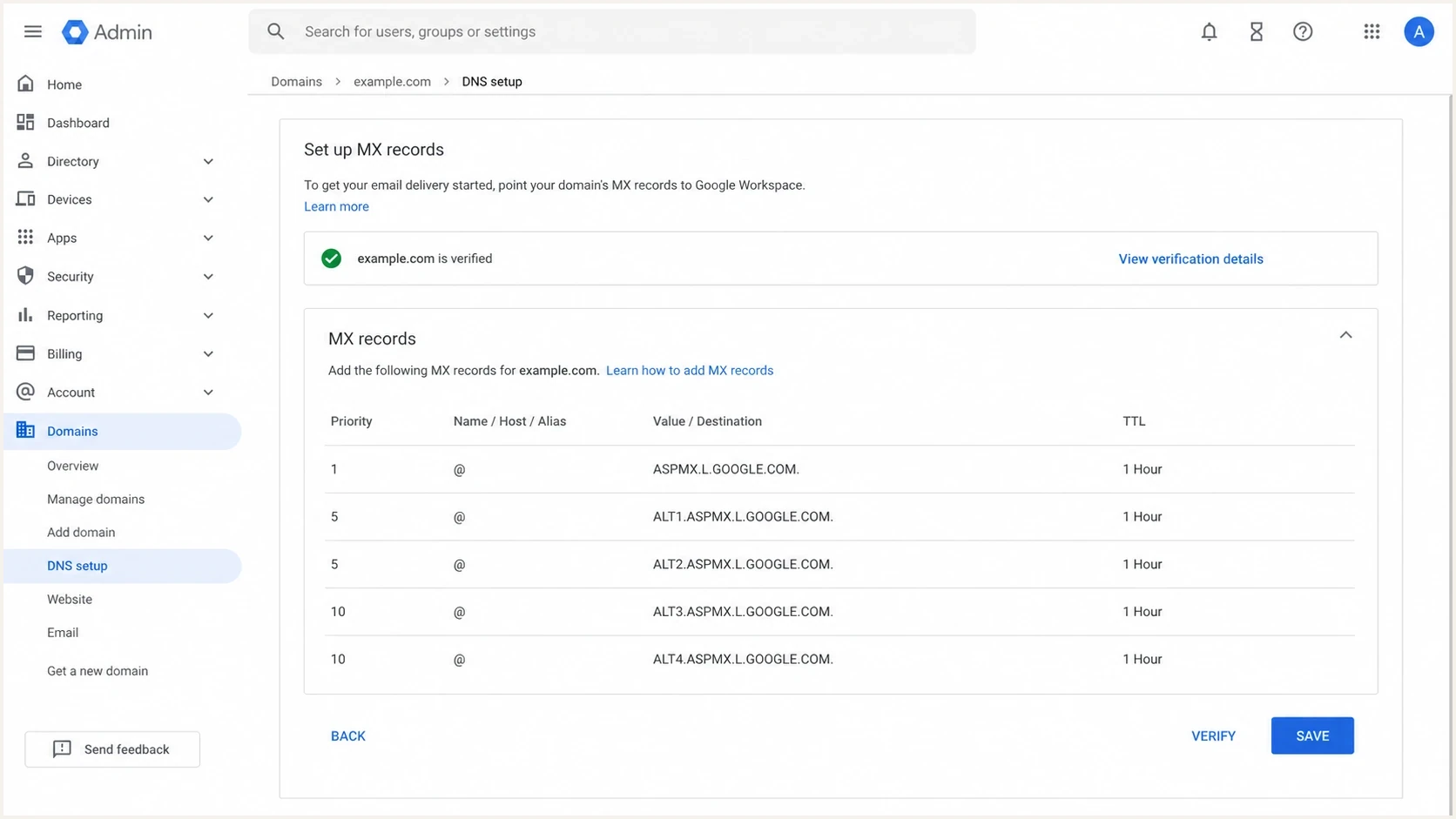
Google Admin console showing legacy Google Workspace MX records and priorities.
Provider intent matters. Google's current setup uses smtp.google.com as the single MX value for new Google Workspace configurations. Domains that started using Google Workspace before 2023 can still use supported legacy values beginning with aspmx. Compare a customer's result with the intended account configuration on the Google Workspace MX setup page before labelling older records as broken.
For a cold database, do not infer mailbox status from provider names alone. Hosted mail records prove there is a route, not that an individual mailbox exists. Parked-domain mail records are different: those often accept or sink mail for domains that are not real business prospects.
What MX cleanup cannot prove
- Mailbox exists: MX records only prove a domain-level route, not a valid address.
- Catch-all status: DNS cannot confirm whether every local part is accepted.
- Consent: A working MX record says nothing about permission or engagement quality.
- Reputation: Recipient-domain health does not fix sender authentication or blocklist and blacklist issues.
Where Suped fits after the bulk pass
The bulk MX pass is a data hygiene job. Suped fits after that when the work turns into ongoing authentication and owned-domain monitoring. Suped is our DMARC reporting and email authentication platform. Teams can use it to monitor DMARC, SPF, DKIM, hosted SPF, hosted DMARC, hosted MTA-STS, alerts, and blocklist (blacklist) status in one workflow.
After cleaning recipient domains, check the sending side before mailing the list. Suped's email tester helps inspect a real message, while DMARC monitoring and blocklist monitoring track issues that a one-time MX script cannot detect.
For agencies and MSPs, the multi-tenant workflow keeps domain authentication, source detection, issue alerts, and client reporting together. The script still handles recipient-list cleanup, while Suped handles the domains the team owns or manages.
Views from the trenches
Best practices
Normalize domains before lookup so schemes, paths, ports, and spaces do not pollute results.
Classify null MX, NXDOMAIN, parked MX, and A fallback separately before suppression.
Keep the raw DNS answer beside each decision so bad filters can be reversed later.
Sample a few suppressed domains manually before deleting records from a source database.
Common pitfalls
Treat no MX as review when an A or AAAA fallback exists, not as automatic deletion.
Do not merge SERVFAIL, REFUSED, or timeout results into the no-mail-route bucket.
Do not trust one MX hostname as usable until at least one target address resolves.
Do not send to parked-domain mail routes without a separate business reason to keep them.
Expert tips
Resolve MX hostnames directly to addresses and flag any CNAME target as malformed.
Deduplicate lookups by domain, then map each result back to every original CSV row.
Track response status, TTL, and attempt count so DNS failures remain reviewable.
Run sender-domain SPF, DKIM, DMARC, and MX checks before mailing the cleaned list at scale.
Marketer view
Marketer from Email Geeks says dig is the fastest first pass when the input is one clean domain per line and the output keeps query context.
2024-02-18 - Email Geeks
Expert view
Expert from Email Geeks says no MX should be separated from null MX because SMTP fallback to A records still exists.
2024-03-06 - Email Geeks
Use MX checks as the first validation layer
Bulk MX checking is a useful first filter, not a complete validation system. Use it to remove confirmed waste such as NXDOMAIN and valid null MX. Suppress a no-route result only after NOERROR responses, fallback checks, and a clean retry. Do not use MX data to prove that a mailbox exists or that a lead is safe to mail.
The cleanest process is to run dig -t MX -f domains.txt for the quick pass, write a one-row-per-domain CSV classifier, preserve the DNS status and raw evidence, retry temporary failures, then validate remaining addresses and monitor sending-domain health before a campaign.




