
How can I identify the SMTP provider from an MX record?

Updated on 10 Oct 2026: We updated this guide with current MX provider patterns, clearer DNS checks, and the distinction between receiving mail and SMTP submission.
Query the domain's MX records, inspect the MX hostnames, and confirm the apparent receiving provider with its documentation and supporting DNS evidence. An MX record tells you which SMTP hosts receive mail for a domain. It does not contain a formal company-name field.
That distinction matters. If the question is "who handles inbound mail for this domain?", the MX record is the starting point and often gives a clear answer. If the question is "who sends this company's email?", MX records are not enough. Sending infrastructure is usually visible in message headers, SPF, DKIM, DMARC aggregate reports, and the connecting IP seen by the recipient.
Provider identification needs corroborating evidence. Some providers publish obvious hostnames, such as Google Workspace and Microsoft 365. Others use white-label domains, tenant-specific hostnames, backup relays, or filtering gateways that hide the final mailbox platform. The right answer is a confidence level backed by several signals.
What an MX record can and cannot prove
MX means mail exchanger. It tells other mail servers where to deliver inbound mail for a domain. Each record has a preference value and a target hostname. Lower values are preferred. Targets with the same value are peers; higher-value targets are less-preferred delivery routes.
MX can show
- Inbound host: The host that accepts SMTP delivery for the domain.
- Provider pattern: A recognizable provider domain, branded host, or white-label namespace.
- Routing intent: Preferred and less-preferred delivery paths based on preference values.
MX cannot prove
- Sender platform: The system that sends marketing, transactional, or employee mail.
- Final mailbox: The mailbox system behind a gateway or filtering relay.
- Legal owner: The company that owns the service, especially with resellers.
- Recipient validity: An MX record does not confirm that an individual email address exists or that a message will reach the inbox.
A domain with MX records pointing at a filtering gateway can still store mail in Microsoft 365 or Google Workspace behind that gateway. A domain with a custom hostname can still terminate mail on shared infrastructure. A domain with a backup MX can show a provider you only see during failover. The domain registrar, DNS host, and website host can be different companies from the email hosting provider.
The safest wording is "the MX path appears to use this provider" rather than "this company uses this SMTP provider for everything." That keeps inbound routing, outbound sending, filtering, and mailbox hosting separate.
How to look up MX records and identify the email host
Query the domain after @ in the email address, without a URL prefix or an added www. For user@sales.example.com, query sales.example.com; subdomains do not inherit their parent's MX records. Query the MX records, sort by preference, normalize the hostnames, then match each target against documented provider domains. Add context with provider documentation, parent-zone DNS, A and AAAA results, RDAP or WHOIS data, IP allocation and ASN data, reverse DNS, TLS certificates, SMTP banners, passive DNS patterns, and real message headers.
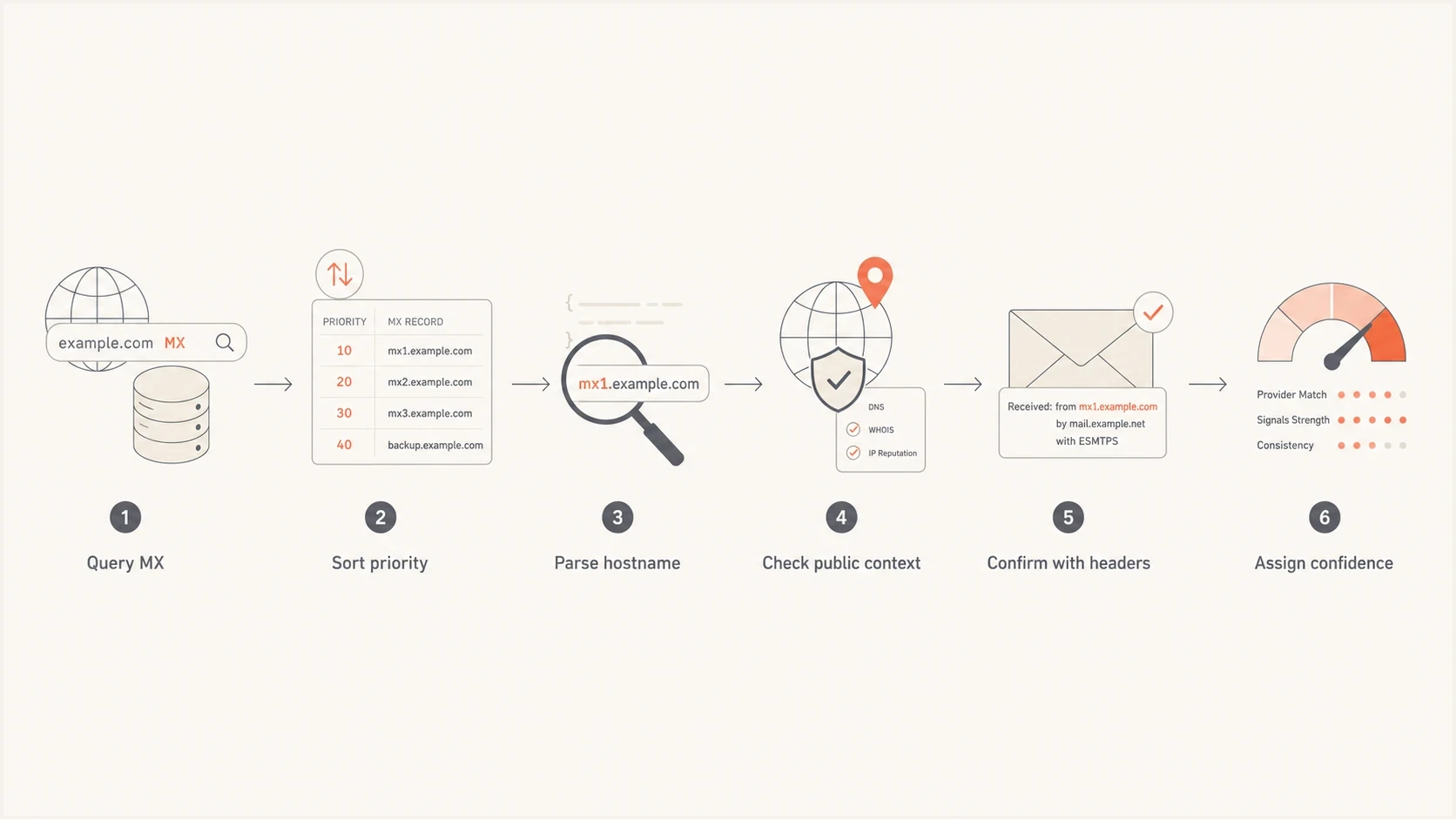
Six-step MX lookup flowchart for identifying an inbound SMTP provider and verifying hostname evidence.
MX lookup and DNS checksBASH
# macOS/Linux: list MX targets and preference values
dig +short MX example.com

# Include DNS response status and record TTLs
dig MX example.com +noall +comments +answer

# Windows Command Prompt
nslookup -type=MX example.com

# Illustrative MX answer:
# 10 mx1.provider.example.
# 20 mx2.provider.example.

# Resolve each MX target
dig +short A mx1.provider.example
dig +short AAAA mx1.provider.example

# Reverse DNS: replace this documentation-only IP with the MX IP
dig +short -x 192.0.2.10

# Separate checks for outbound authentication
dig +short TXT example.com
dig +short TXT _dmarc.example.com
- Query MX: List every MX target and preference value for the email domain, and check the DNS response status.
- Normalize names: Strip trailing dots, convert the hostnames to lowercase, and group related targets.
- Find ownership: Check the registrable provider domain, parent zone, IP allocation, ASN, and certificate names.
- Check behavior: Test whether the host accepts SMTP on port 25 and record its banner.
- Corroborate: Match receiving targets with provider documentation and repeated MX patterns. Use headers and authentication data to investigate outbound sending separately.
IP allocation and ASN data identify the network operator; that operator can host many unrelated mail services. Match provider suffixes at DNS label boundaries: mx.mail.protection.outlook.com.example.net belongs to example.net. SMTP banners and TLS certificates are supporting clues. A blocked port 25 connection is inconclusive.
After identifying the apparent inbound email host, use Suped's domain health check to review SPF, DKIM, and DMARC configuration separately. These authentication checks do not establish the mailbox platform behind a gateway.
Handle MX edge cases before naming a provider
An empty, unusual, or indirect MX result needs a standards check before provider matching. A missing MX record does not declare whether the domain accepts email; a null MX explicitly declares that it does not. An alias in an MX target can produce misleading lookup output.
- Null MX: A single 0 . record means the domain explicitly does not accept email, so there is no inbound provider to identify.
- No MX records: A successful DNS response with no MX records triggers SMTP fallback to the domain's A or AAAA address as an implicit MX. If those addresses are absent or unusable, delivery fails. Keep the operator unknown until other evidence identifies it.
- DNS errors: NXDOMAIN means the domain does not exist; SERVFAIL and timeouts are lookup failures. Do not treat any of these as a successful no-MX result or infer a provider from them.
- CNAME target: An MX target must resolve directly to address records. A target that resolves through a CNAME is non-compliant and should be recorded as a configuration problem, not firm provider evidence.
- Equal preference: MX targets with the same value are peer routes. Do not describe one as primary and another as backup unless separate evidence establishes those roles.
- Recent changes: Check the authoritative answer and TTL. Cached resolvers can show the old provider until the previous TTL expires.
Check DNS response status before interpreting an empty MX answer. RFC 5321 permits address fallback only when the MX lookup succeeds without MX records; unusable published MX targets do not trigger fallback to the domain's own address. A valid null MX explicitly states that the domain does not accept inbound email.
Common MX patterns and confidence levels
Some MX patterns are easy to classify because the provider uses a stable public namespace. Others need more caution because the hostname is customer-branded, reseller-branded, or shared across tenants. Use the table below as a starting point, then verify with another signal before adding the provider to a report.
|
|
|
|---|---|---|
Google receiving endpoints include smtp.google.com and the still-supported legacy aspmx.l.google.com family. Google's MX documentation lists both forms. | High | |
Microsoft receiving endpoints commonly end in mail.protection.outlook.com. DNSSEC-enabled domains also use <token>.<subdomain>.mx.microsoft. Microsoft's MX documentation describes this pattern. | High | |
Tenant hostname | Hosted or white-label routing; the operator needs corroboration. | Low alone |
Documented gateway hostname | A gateway receives mail first; the final mailbox host is unproven. | High for gateway only |
Less-preferred MX | A lower-priority route; its role needs confirmation. | Low alone |
Custom domain | Needs more evidence. | Low |
Common receiving MX patterns; confidence applies to the visible receiving endpoint.
The hard cases are usually not hard because DNS is unclear. They are hard because the business relationship is unclear. The MX hostname can belong to a provider, a reseller, a parent company, a managed IT vendor, or a gateway in front of a different mailbox host.
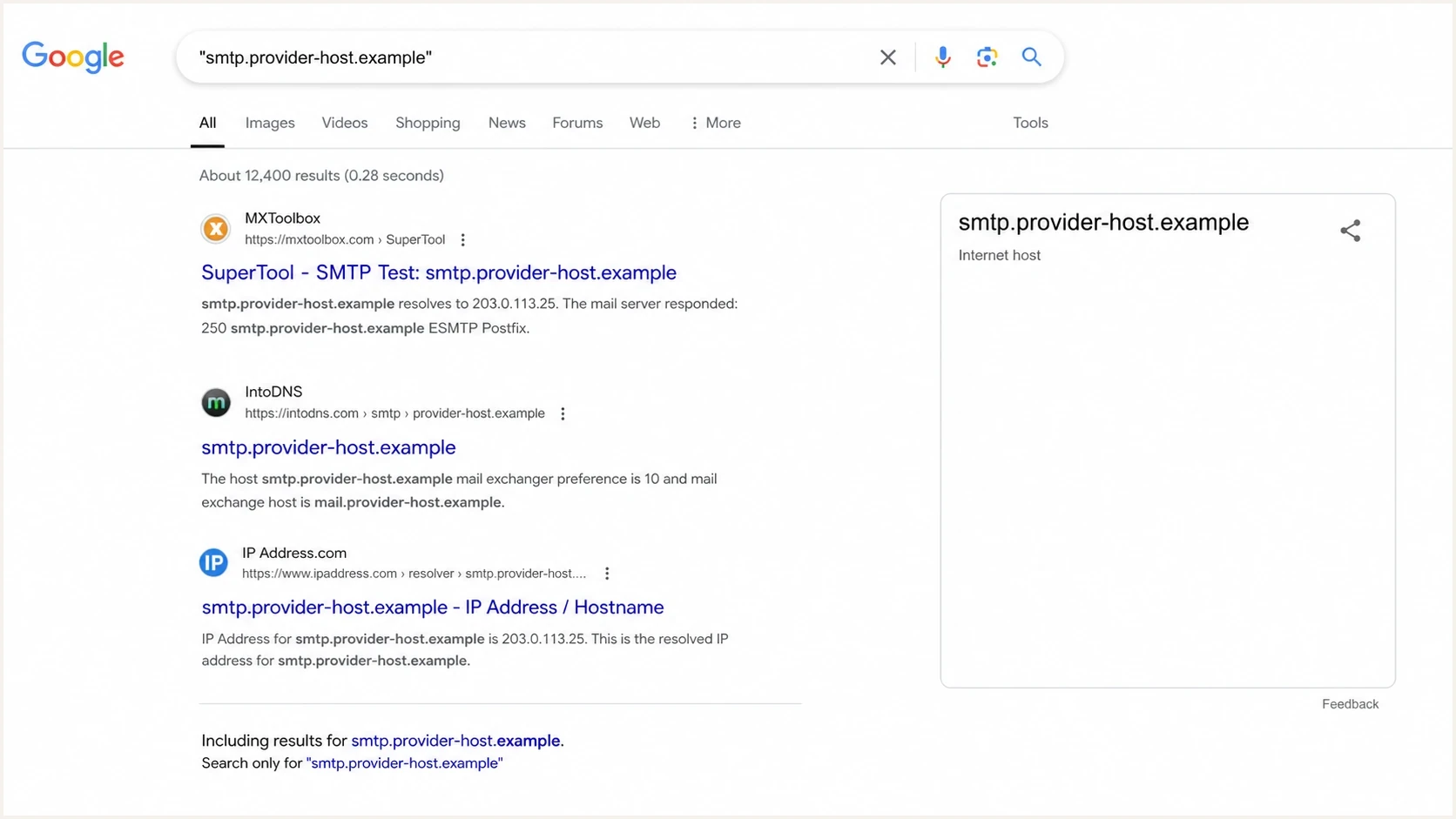
A Google Search screenshot showing an exact quoted MX hostname match in results.
Worked example with a white-label hostname
The hostname smtp.safesysmail.com points to the safesysmail.com namespace, but the name alone does not identify its operator. Check which domains use that host as an MX target, whether related tenant hostnames exist under the same parent domain, and whether the same organization describes email services for the same customer market. The following MX answer is illustrative.
Example white-label MX patternBASH
dig +short MX bank-example.test

# Illustrative MX answer:
# 10 bank-example-test.safesysmail.com.
# 20 smtp.safesysmail.com.

dig +short A bank-example-test.safesysmail.com
dig +short A smtp.safesysmail.com
In that pattern, the tenant-specific hostname at preference 10 is preferred and smtp.safesysmail.com at preference 20 is less preferred. Confirm the routing role before calling the latter a backup service. The provider conclusion becomes stronger if many related customer domains use the same parent namespace and the provider's public material describes email services for that market.
Do not treat a less-preferred MX as the full provider picture. Its routing policy and backend need separate confirmation.
A shared IP address does not reveal the provider's internal architecture. Document the visible DNS facts and confirm any resilience claims separately.
How to identify the outbound email provider
To identify the sending platform, stop using MX as the primary clue. Collect a real message and inspect the Received chain, DKIM signing domain, Return-Path, SPF-authorized IP, and DMARC domain-match result. That is a different workflow because outbound mail often uses systems that never appear in inbound MX records. Use Received and Authentication-Results fields added by a trusted receiving server; sender-supplied header lines are not proof.
A practical way to do that is to send a live message to Suped's email tester and compare the header evidence with the domain's SPF, DKIM, and DMARC results. For a deeper sending-path workflow, use email headers to interpret that evidence.
Inbound identification
- Best signal: MX target hostnames and preference values.
- Supporting clues: SMTP banner, provider domain, and repeated customer patterns.
- Main risk: A gateway can hide the final mailbox provider.
Outbound identification
- Best signal: Received headers, DKIM domain, and sending IP.
- Useful proof: SPF includes, DMARC reports, and matching identifiers.
- Main risk: Different mail streams can use different senders.
This separation also helps with incident response. A suspicious message can pass through a real mailbox provider while being sent through an unrelated outbound system. MX only explains where replies and inbound mail go.
MX records are not SMTP submission settings
An MX record identifies a receiving mail server, normally contacted on TCP port 25. It does not specify the SMTP submission hostname or login method that a mail app or website should use to send email.
Use the provider's documented outgoing mail settings. Authenticated submission commonly uses port 587 with STARTTLS or port 465 with implicit TLS, as described in RFC 8314. Providers that publish service discovery records can advertise submission endpoints through SRV records.
Optional SMTP submission discoveryBASH
dig +short SRV _submission._tcp.example.com
dig +short SRV _submissions._tcp.example.com
If no SRV records are returned, obtain the hostname and connection settings from the provider. An absent SRV record does not mean SMTP submission is unavailable.
Where Suped fits in the workflow
Suped's DMARC reporting and email authentication platform helps review sending authentication after an MX lookup. Use its reports to compare sending sources and authentication failures before and after a provider change.
Domain health checker sample results showing DMARC, SPF, DKIM scorecards and detailed validation checks
For ongoing mail governance, Suped turns DMARC aggregate reports into sending-source analysis and remediation guidance, with alerts for authentication failures. An MSP can review many domains in one dashboard, while a smaller team can see whether a provider change affected SPF, DKIM, DMARC, MTA-STS, or reputation.
The key workflow is simple: identify the apparent provider, verify authentication, then monitor the domain after changes. Suped's DMARC monitoring helps identify sending IPs and SPF/DKIM results reported by participating receivers, and blocklist (blacklist) monitoring reports listings for monitored domains or sending IPs. An inbound MX change does not establish a change in outbound reputation.
?
What's your domain score?
Deep-scan SPF, DKIM & DMARC records for email deliverability and security issues.
That does not replace the human judgment step. White-label mail and reseller mail still need context. Compare the DNS evidence for the visible MX path with the sending sources shown in Suped's DMARC reports over time.
How to document provider confidence
Assign confidence based on the quality and relevance of the evidence. Several DNS clues that share one hosting network are not independent confirmations. When signals conflict, report the visible MX path and leave unsupported conclusions unknown. A documented hostname match establishes evidence about the receiving service; mailbox hosting and outbound sending need separate verification.
Provider identification confidence
These qualitative labels describe the visible inbound service; mailbox hosting needs separate evidence.
Low
Naming clue
A branded word or unfamiliar hostname without corroboration.
Medium
Corroborated
A hostname pattern and independent supporting evidence agree.
High
Documented match
Current provider documentation matches the observed MX endpoint.
Confirmed
Account verified
Domain-specific admin settings or support confirmation verify the receiving service.
If a domain bounces after an MX change, provider identification is only one part of the diagnosis. Preference order, stale DNS, recipient routing, and accepted-domain settings matter too. For that angle, use a separate MX bounce behavior review.
Views from the trenches
Best practices
Check the MX hostname, parent domain, and priority before naming the provider in a report.
Use live headers when the question is about outbound SMTP rather than inbound mail routing.
Treat white-label MX names as evidence, then confirm with repeated DNS patterns and context.
Common pitfalls
Do not assume a backup MX is the main provider, because failover hosts can hide routing.
Do not read a single A record as proof of architecture; SMTP retries can mask backend design.
Do not mix inbound mailbox hosting with outbound sending platforms in the same conclusion.
Expert tips
Quote-search unusual MX hostnames, then open provider documentation to verify exact matches.
Compare multiple customer domains using the same MX suffix before raising confidence.
Document confidence levels so the next reviewer sees which signals supported the call.
Marketer view
Marketer from Email Geeks says public search can identify many unusual MX hostnames when the query uses exact quotes.
2024-11-18 - Email Geeks
Expert view
Expert from Email Geeks says there is no fully mechanical mapping from hostname to company name, so context is required.
2024-11-18 - Email Geeks




