How do MX records impact email bounces and sender reputation?

Published 12 Jul 2025
Updated 28 Jul 2026
12 min read
Summarize with
Updated on 28 Jul 2026: We clarified how recipient and bounce-domain MX records affect bounce handling and sender reputation.
MX records affect bounces in two places. Recipient-domain MX records tell sending servers where to deliver a message, while bounce-domain MX records route delayed delivery status notifications and other automated responses back to the SMTP return path. MX records do not decide whether a bounce is hard or soft.
A broken recipient route can produce delivery delays or bounces. A broken bounce-domain route can hide later failures, leaving bad addresses active because the sending system never receives the feedback needed for suppression. The first effect can raise the observed bounce rate directly. The second creates indirect reputation risk through incomplete list hygiene.
- MX records route inbound mail for a recipient domain or the domain used in an SMTP return path.
- Repeated delivery attempts to recipient domains with unusable mail routes can increase bounces and harm sender reputation.
- The bounce subdomain should point to the system responsible for processing delayed failures, usually the ESP unless the sender runs that ingestion.
- Suped can correlate authentication results, domain health findings, and blocklist or blacklist alerts while ESP logs confirm bounce ingestion.
What the MX record actually does
An MX record maps a domain to one or more mail exchangers. When a server needs to deliver mail to user@example.com, it looks up the MX records for example.com and connects to the available target with the lowest preference number. That same process applies when a remote system sends a non-delivery report to the SMTP return-path domain.
An ESP often asks for an MX record on a bounce subdomain such as bounce.e.example.com. The ESP needs delayed delivery failures and automated responses to arrive at infrastructure it controls so it can classify each event, suppress bad addresses, and report the result.
Example bounce-domain MX recordDNS
bounce.e.example.com.  3600  IN  MX  10  mx1.bounces.example.net.
mx1.bounces.example.net.  3600  IN  A  192.0.2.25
The MX target must be a fully qualified hostname that resolves directly to an A or AAAA record. Do not enter a raw IP address as the MX target, and do not point the target to a CNAME. With multiple MX records, lower numbers are tried first. Equal preference values let sending servers distribute attempts among equivalent exchangers.
Backup MX records help only when every listed server accepts mail for the bounce domain and feeds events into the same processing workflow. TTL controls how long resolvers cache the DNS answer. Lower it before a planned migration, wait for the old value to expire, then raise it after the new route is stable.
MX is routing, not bounce classification
Hard and soft bounce labels come from the failure reason and how the sending platform interprets it. MX records only control where mail for a domain gets delivered.
- A hard bounce is a permanent failure, such as an address that does not exist.
- A soft bounce is a temporary failure, such as a full mailbox or transient server issue.
- An out-of-band bounce is a later DSN generated after the first receiving system accepted the message.
- An auto-reply is a vacation or mailbox response that often uses the same return-path destination but is not a bounce.
Recipient MX and bounce-domain MX affect different failures
The recipient domain's MX records control the original delivery attempt. The bounce domain's MX records control later mail sent back to the envelope sender. Checking the wrong side can lead to a DNS change that does not fix the reported bounce.
Recipient-domain MX
- The sending server looks up the domain after the @ in the recipient address.
- An unusable route can cause a temporary delay or a permanent delivery failure.
- Repeated sends to bad recipient domains raise bounce rates and waste sending capacity.
- List hygiene should remove addresses after the applicable permanent failure policy.
Bounce-domain MX
- A remote system looks up the domain used in the SMTP return path.
- The route matters when a failure is generated after the message was accepted.
- A broken route hides feedback that should trigger classification and suppression.
- The MX should deliver events to the platform that owns the return path.
No explicit MX record does not always mean no mail route. Under RFC 5321, a sender can treat the domain's A or AAAA record as an implicit MX when no MX record exists. A null MX, written with preference 0 and target ".", explicitly states that the domain accepts no mail. A return-path domain should not publish a null MX because receivers can reject mail when delivery errors have nowhere to go.
Why MX records matter for bounce handling
Bounces happen in two broad ways. Some happen during the SMTP conversation. If the receiving server rejects the message with a 5xx response before accepting it, the sender has a permanent failure result. A 4xx response is temporary, so the sending system normally queues and retries the message before declaring final failure.
Other failures happen later. A receiving system can accept a message, then fail to deliver it because of forwarding, mailbox quota, policy checks, internal routing, or a downstream mailbox issue. The system then generates a DSN and sends it to the SMTP return path. At that point, it looks up the return-path domain's MX route.
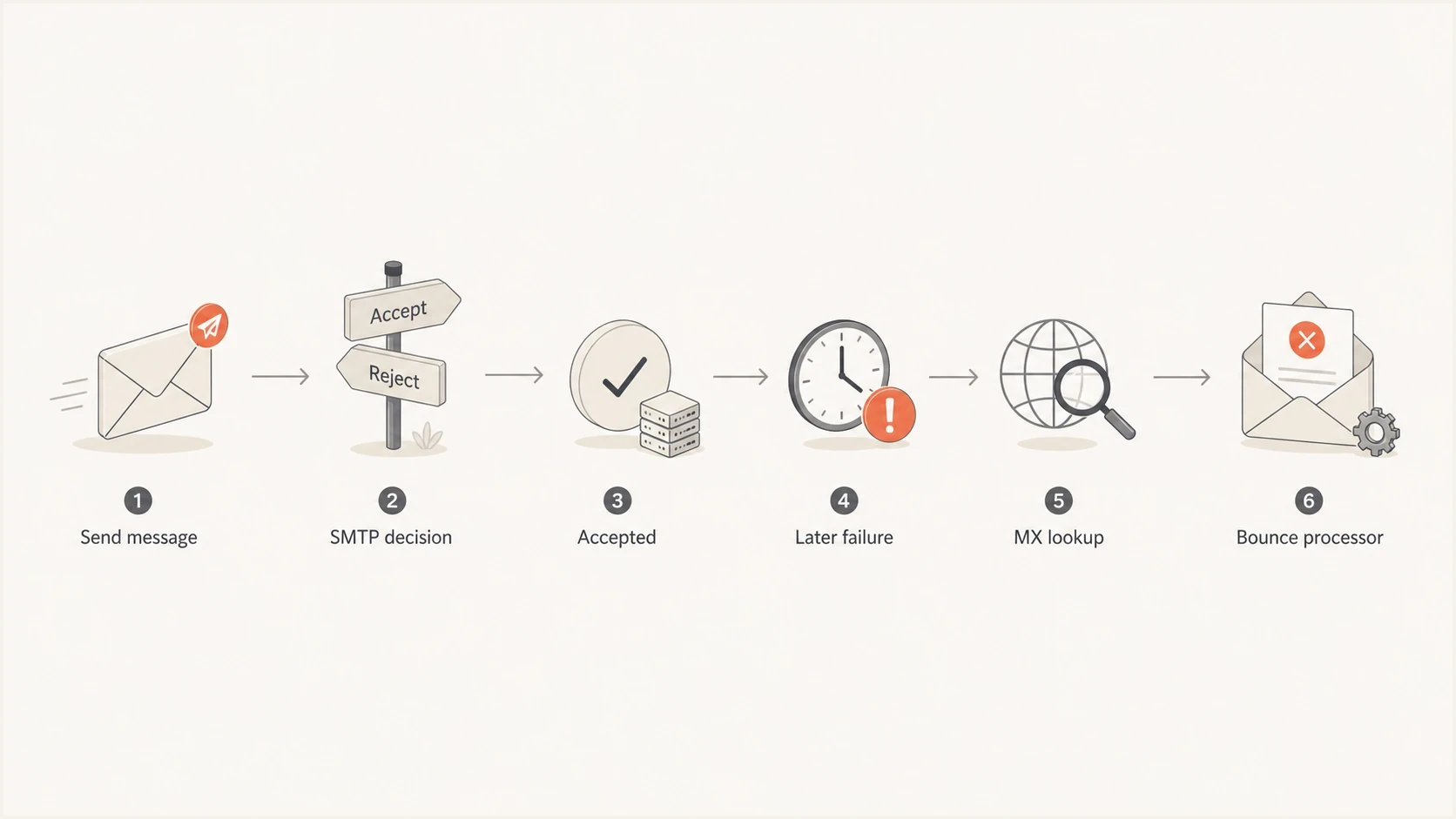
Email bounce flow through SMTP acceptance, later failure, MX lookup, and bounce processing.
During SMTP
- The recipient server rejects the message before accepting responsibility for delivery.
- The sending server receives the status code directly in the SMTP session.
- The bounce-domain MX does not route a separate message for this failure.
- One example is an immediate rejection because the mailbox does not exist.
After acceptance
- The receiving system accepted the message before a later delivery step failed.
- The remote system sends a DSN to the SMTP return path.
- The bounce-domain MX tells the DSN where to go.
- One example is a forwarded mailbox pointing to an invalid downstream address.
This distinction explains the confusion around MX records and bounces. The MX record is not a bounce engine. It is the routing entry that lets later bounce mail reach the bounce engine.
How broken MX records hurt sender reputation
Recipient MX failures and bounce-domain MX failures create different reputation risks. Repeated sends to recipient domains with permanent routing failures increase the sender's hard-bounce rate. A broken bounce-domain MX has an indirect effect because asynchronous failures never reach the system that should suppress bad addresses.
The damage grows when missed feedback leads to repeated delivery attempts. Mailbox providers use bounce behavior as one input when judging sending quality, so permanent failures should leave future sends quickly. MX health cannot compensate for poor list acquisition, ignored complaints, or sudden volume changes.
|
|
|
|---|---|---|
Recipient null MX | Original delivery | Permanent bounce |
Unusable recipient MX | Connection or routing | Retries, then bounce |
Wrong bounce MX | Asynchronous DSN intake | Missed suppression |
Stale MX after migration | Delivery to old systems | Lost or delayed feedback |
MX problems and sender impact
The SMTP return path also supplies the SPF identity. SPF-based DMARC passage requires SPF to pass and the return-path domain to match the visible From domain under DMARC's relaxed or strict mode. Suped's DMARC monitoring shows which sending sources pass, fail, or use domains that do not match.
Do not ignore the return path
Document the visible From domain, return-path domain, and bounce processor as one sending setup. When a client questions an ESP's MX record, show which mail the record receives and which suppression workflow depends on it.
Who should own the bounce domain
The sender normally owns the parent sending domain, and the ESP often manages mail handling for the bounce subdomain through DNS records the sender publishes. For example, the brand can own e.example.com while bounce.e.example.com points to the ESP's receiving systems.
There are two common models. The sender can publish individual records supplied by the ESP, or it can delegate the entire subdomain with NS records so the ESP manages the records below it. Delegation reduces manual DNS changes but gives the ESP control over that namespace.
Sender-managed records
- The sender keeps direct DNS control over every record.
- Each ESP change requires a DNS update by the sender.
- A copied hostname or preference error can break bounce routing.
- This model fits teams with clear DNS ownership and change control.
ESP-managed subdomain
- The ESP manages records under the delegated subdomain.
- The ESP can adjust records without repeated DNS tickets.
- The sender must define access, change, and offboarding responsibilities.
- This model fits programs with frequent platform-side DNS changes.
Either model can work. The SMTP return path must receive mail, and its owner must know how bounce events reach suppression. The guide to email subdomains covers the related SPF, DKIM, DMARC, and MX setup.
How to test the setup
Test the setup in layers. Confirm the exact domain used in the SMTP return path, retrieve its MX records, resolve every MX target, and compare the values with the ESP's current instructions. Then inspect a live message and prove that the bounce processor records a controlled failure.
- Look up the exact bounce subdomain shown in the SMTP return path.
- Verify each MX preference and target against the ESP's instructions.
- Confirm that every MX target resolves directly to an A or AAAA record.
- Send a message to a mailbox you control and inspect the return path plus SPF, DKIM, and DMARC results.
- Use the ESP's supported bounce test and confirm the event appears in logs and suppression data.
MX and target DNS checksBASH
dig MX bounce.e.example.com +short
dig A mx1.bounces.example.net +short
dig AAAA mx1.bounces.example.net +short
Email tester
Send a real email to this address. Suped shows a results button when the test is ready.
?/43tests passed
Send a live message to the email tester to inspect the message-level return path and authentication results. This confirms outbound identity but does not replace the controlled bounce-ingestion test.
Suped's domain health checker provides a broader view of DMARC, SPF, and DKIM. Compare those results with ESP bounce logs and blocklist monitoring when repeated hygiene failures contribute to blacklist or blocklist problems.
DMARC record detail view showing SPF, DKIM, DMARC, rDNS diagnostics, and DNS records
What to tell a client refusing the ESP MX
When a client refuses the ESP's MX records, map each record to a job. The bounce-domain MX normally exists so remote systems can deliver delayed bounces, DSNs, and automated replies to the platform that processes them.
The client does not need to give the ESP control of the parent domain. It can publish records for one subdomain or delegate that subdomain. Both approaches keep the parent domain under the brand's control while allowing the ESP to operate the return-path infrastructure.
Plain-language explanation for stakeholderstext
The MX record on bounce.e.example.com lets other mail systems send
late delivery failures and automated mailbox responses back to our
email platform. Without it, some failures cannot be processed, bad
addresses can stay active, and reputation risk increases.
A useful implementation rule
When the ESP controls the return path, it should normally receive out-of-band bounces. If an internal mail team receives them instead, confirm that the events are parsed, classified, and returned to suppression workflows.
Keep bounces separate from auto-replies. A vacation notice is not a bounce, although it often goes to the same return-path destination. A forwarded mailbox that fails downstream can generate a real DSN, and that DSN needs a working MX route.
Common mistakes with MX and bounce domains
Most MX-related bounce issues come from small DNS mistakes. The visible email domain can look correct and authentication can pass while the recipient route or bounce subdomain points to the wrong place.
Bounce-rate thresholds to watch
Use these bands as internal investigation triggers, not universal mailbox-provider limits.
Healthy
Below 2%
Normal list churn with working suppression.
Investigate
2% to below 5%
Check list source, MX health, and recent imports.
High risk
5% or higher
Pause risky segments and fix the cause.
A "no MX" bounce reason can describe the recipient domain, the bounce domain, a null MX, or a DNS lookup failure. Check for implicit A or AAAA routing before changing records. The guide to no MX bounces explains those failure paths in more detail.
- The MX is published on e.example.com while the return path uses bounce.e.example.com.
- The MX target has no direct A or AAAA record, uses a CNAME, or is unreachable on SMTP.
- Old MX values remain after a platform migration, so bounces go to the former route.
- Marketing, IT, and the ESP have not assigned ownership for bounce processing.
- A backup MX accepts mail but does not share recipient data or feed the same suppression system.
Suped's product can track authentication results and blocklist or blacklist alerts across client domains. Keep the ESP's bounce logs beside that view because DNS reachability does not prove that DSNs were parsed or suppressed.
Views from the trenches
Best practices
Document the return-path domain, MX target, and bounce processor before launch day.
Test delayed bounce routing with real mail, not only static DNS screenshots alone.
Keep bounce-domain ownership clear when ESPs, agencies, and IT all touch DNS zones.
Common pitfalls
Treating an MX record as a bounce classifier causes wrong troubleshooting paths.
Pointing the MX to a host that cannot receive mail hides delayed delivery failures.
Ignoring auto-replies and NDRs leaves useful mailbox feedback out of suppression.
Expert tips
Compare ESP bounce logs with DMARC data to find missing or misrouted return paths.
Use subdomain delegation when record changes are frequent and trust is documented.
Investigate reputation drops alongside DNS health, bounce rates, and blocklists.
Marketer from Email Geeks says MX records do not determine hard or soft bounce status; they tell sending systems where to deliver mail for a domain.
2023-08-01 - Email Geeks
Marketer from Email Geeks says some failures happen inside the SMTP session, while later NDRs need a working MX route back to the return-path domain.
2023-08-01 - Email Geeks
The practical takeaway
Recipient MX records affect whether the original message has a valid destination. Bounce-domain MX records affect whether delayed DSNs reach the return-path processor. Permanent recipient failures can raise bounce rates directly, while a broken return route increases risk by hiding feedback.
Use a dedicated sending subdomain, publish the ESP's required MX records for the bounce domain, verify authentication domain matching, and test actual bounce ingestion. Suped's product supports the authentication and alerting part of that workflow, while the ESP's event logs show whether delayed failures reached suppression.
When bounces harm reputation, investigate MX health beside list quality, suppression rules, complaint rates, and sending volume. The guide to hard bounce impact covers reputation recovery after high bounce rates.




