Does Typekit CSS download every font in email HTML?

Typekit CSS does not normally make a supporting email client download every font file declared in the stylesheet. The client first downloads the CSS, matches the font faces required by rendered text, and then requests the relevant face files. For a stylesheet with three font families, each offering WOFF and WOFF2, an email that uses two regular faces will usually trigger two font-file requests, not four or six. The client selects one compatible source format for each face.
That result depends on the email client accepting external CSS and web fonts. A client that removes the import or ignores @font-face downloads no Typekit font files and renders the fallback stack. A client can also request more than two files when the message uses extra weights, italic faces, or separate character subsets.
The practical count
In the example, option 3 is the normal outcome: two files, one compatible file for each used face. The CSS itself is one additional request. Unsupported clients request zero font files.
What the email client actually downloads
A Typekit kit, now presented as Adobe Fonts, exposes CSS containing one or more @font-face rules. Each rule describes a face through properties such as family, weight, style, stretch, source URL, and sometimes a Unicode range. Merely parsing those declarations does not generally fetch every source. The rendering engine resolves the CSS applied to actual text before it fetches a required font resource. Adobe documents the email embed pattern in its HTML email guidance.
|
|
|
|
|---|---|---|---|
No web-font support | 0 or 1 | 0 | Fallback font |
Two regular faces | 1 | 2 | One format each |
Two faces, two weights | 1 | Up to 4 | Each face variant |
Warm client cache | 0 or 1 | 0 or fewer | Cached resources |
Likely network requests for the six-file example
The term 'font' can hide an important distinction. A family is not a single downloadable asset. Regular, bold, italic, and bold italic are separate faces unless a variable font covers the requested axes. If body copy uses regular and a heading uses bold within the same family, the engine can request two files for that one family. If two families each use those weights, four requests become reasonable.
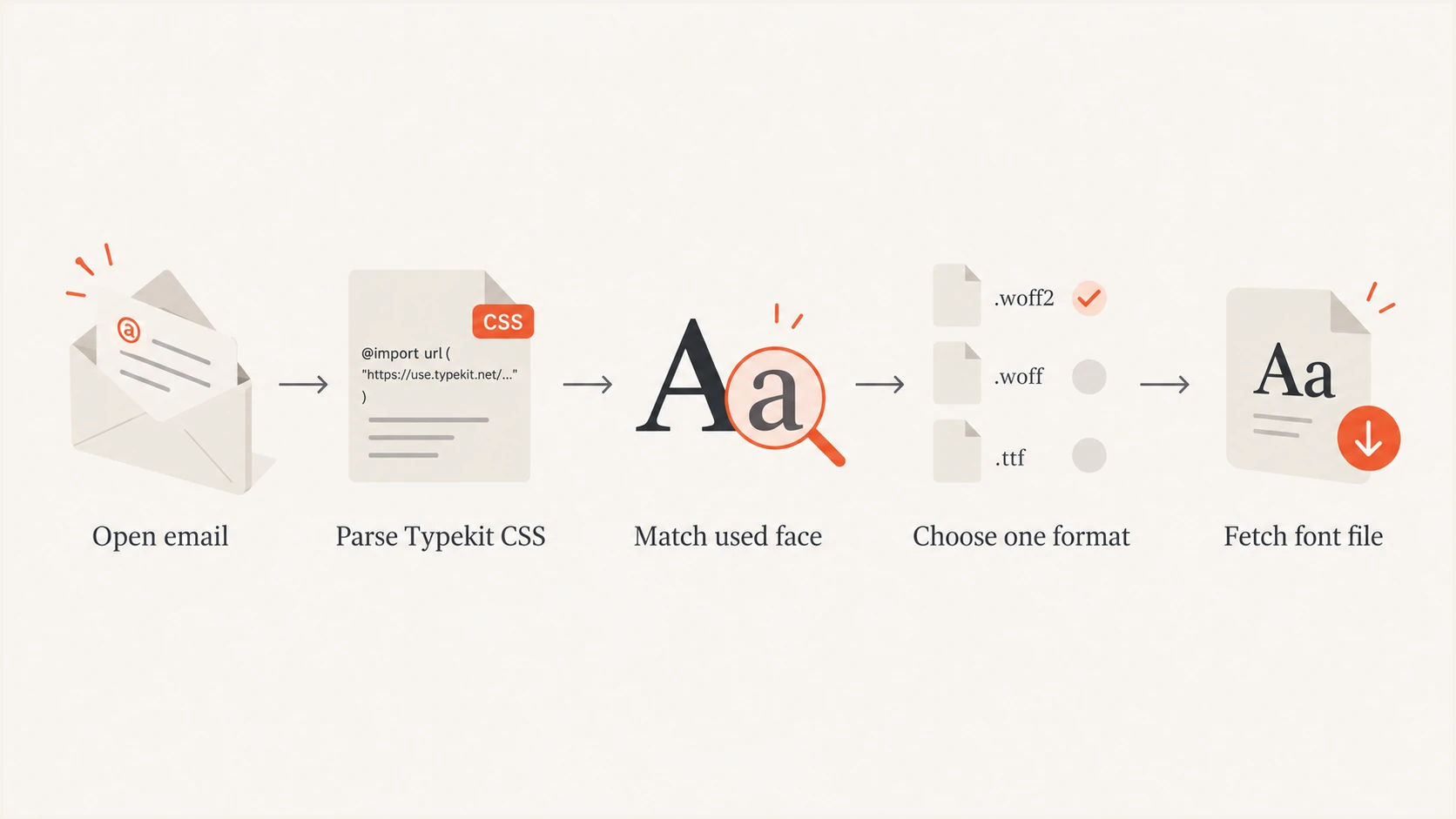
Flow showing a client matching and fetching one font format.
Why WOFF and WOFF2 do not mean two downloads
Multiple URLs inside a src descriptor form a fallback list. The client checks the format hints in order and chooses a source it can use. A modern engine that supports WOFF2 normally requests the WOFF2 asset and skips WOFF. An older engine can skip WOFF2 and request WOFF. The list does not instruct the client to download both formats.
Simplified font-face fallbackcss
@font-face {
  font-family: "Brand Sans";
  font-style: normal;
  font-weight: 400;
  src: url(brand-regular.woff2) format("woff2"),
       url(brand-regular.woff) format("woff");
}

.body-copy {
  font-family: "Brand Sans", Arial, sans-serif;
}
In that example, text with the body-copy class needs the normal 400 face. The client selects a single usable source. If nothing in the rendered message uses Brand Sans, a standards-based engine has no reason to fetch either asset. The exact CSS returned by a hosted kit can vary by user agent, so the client might receive only the most suitable format in the first place.
Unicode subsets can change the count
A face split into Latin, Cyrillic, and other Unicode ranges can require more than one resource when the rendered message contains glyphs across those ranges. Count matched face files, not family names alone.
Email client support decides whether loading starts
Email HTML is not a normal web page. Clients sanitize markup, remove remote stylesheets, ignore imports, or reject @font-face. Support also differs between desktop software and webmail, even when both carry the same brand. I therefore treat Typekit typography as progressive enhancement and make the fallback rendering acceptable on its own.
Supporting client
The client retains the CSS, matches each used face, selects a supported source, and fetches font files when remote content is permitted.
- Matched faces: Regular, bold, italic, or subsets can each add a request.
- Format choice: The client normally chooses WOFF2 or WOFF, not both.
Non-supporting client
The client removes or ignores the font declarations. Text uses the next available font in the CSS stack, with no Typekit font download.
- Fallback first: Choose a system font with similar width and x-height.
- Layout check: Confirm buttons and headings still fit after substitution.
Remote-image preferences can also affect the result. A client that blocks remote content can defer the font request until the recipient allows downloads. A privacy proxy might fetch or cache remote assets differently, so server logs do not always map cleanly to one recipient opening one message. Cached CSS or fonts can reduce visible network requests on later opens.
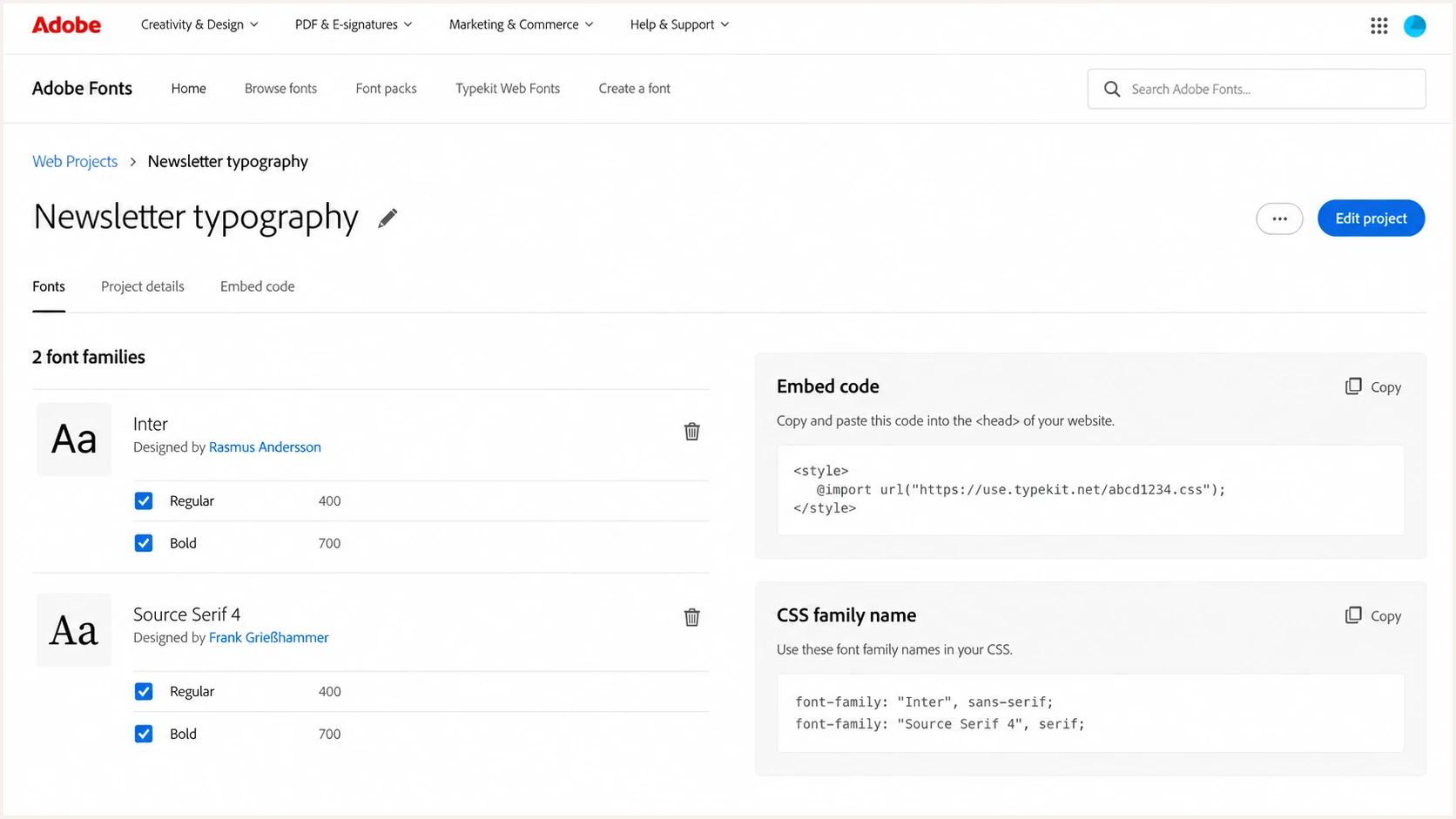
Adobe Fonts web project with selected families and email embed code.
Font downloads and email deliverability
Remote font requests happen when the message is opened and rendered, after the receiving system has accepted and placed the message. They do not directly change SPF, DKIM, DMARC, SMTP acceptance, or the initial spam decision. Authentication and font loading occur at separate stages. Suped's DMARC monitoring workflow handles authentication visibility; it does not determine whether a mail client renders a hosted font.
Performance still matters indirectly. A slow or blocked font can cause a flash of fallback text, a late layout shift, or a design that looks inconsistent. Those effects can reduce engagement. Recipients who find a message difficult to read can delete it, unsubscribe, or report it as spam, which affects later sending reputation. The technical chain is user experience followed by recipient behavior, not font download followed by filtering.
Direct delivery effects
Externally hosted font files are fetched after delivery. Their transfer time does not add bytes to the MIME message or alter authentication results.
Indirect experience effects
Slow rendering and poor fallback typography can hurt reading and clicks. Repeated negative recipient actions can influence future placement.
Embedding font binaries as Base64 is different. It increases the actual HTML or MIME size and risks clipping, slow parsing, or sanitization. I avoid embedded font data in marketing email. The broader relationship between payload and rendering is covered in the page on email file size.
A reliable way to implement and test Typekit
I keep the kit small, request only the faces the template uses, and build a deliberate fallback stack. Adobe's web project setup explains how fonts are added to a project. For email, the important extra step is testing sanitized HTML in real clients rather than assuming normal browser behavior.
- Limit faces: Include only the families and weights used by the email template.
- Add fallbacks: Pair each web font with a close system font and a generic family.
- Protect layout: Allow enough width for fallback text in headings, labels, and buttons.
- Inspect requests: Use a controlled mailbox and network log to count CSS and font fetches.
- Test the message: Send the final MIME email through Suped's email tester and review the rendered content and delivery checks together.
A network log gives the cleanest answer for a particular client. Open a fresh copy with caches disabled when possible, allow remote content, and filter requests by the kit and font host. Repeat with regular text, bold text, and no Typekit-styled text. That comparison exposes whether a face is lazily loaded, cached, proxied, or ignored.
Email tester
Send a real email to this address. Suped shows a results button when the test is ready.
?/43tests passed
Test the actual sent message, not a browser preview of the source HTML. The sending platform can inline styles, rewrite markup, or remove unsupported declarations. Client sanitization happens again after receipt. If the fallback version remains readable and branded enough, web-font support becomes an enhancement instead of a dependency.
I also repeat the test with remote content disabled. That state reveals whether the hierarchy, line wrapping, and call-to-action remain usable before any hosted resource loads. If the layout fails, changing the fallback metrics or reducing font-dependent styling is more reliable than adding another hosted face.
Recommended fallback pattern
Inline family stackhtml
<td style="font-family:'Brand Sans',Arial,sans-serif;">
  Readable text with a safe fallback
</td>
How to interpret unexpected request counts
A result above two requests does not automatically mean the client downloaded every declared font. Check the face properties and the characters actually rendered. Bold copy can select a second resource, italics can select another, and language-specific glyphs can activate separate subsets. A tracking or security proxy can also make requests that do not correspond one-for-one with visible rendering.
|
|
|
|---|---|---|
Zero files | CSS blocked | Inspect fallback |
One file | One used face | Check applied CSS |
Two files | Two used faces | Check weights |
Many files | Variants or subsets | Map each URL |
Common explanations for observed font traffic
A result of zero can still be correct. The font can already be cached, remote content can be disabled, or the client can reject web fonts. Compare the rendered glyph shapes and computed styles where developer tools are available. For template-related placement concerns, separate font behavior from the wider question of whether an email template triggers filters.
Views from the trenches
Best practices
Keep web fonts optional and verify every template with a close system-font fallback.
Load only used families and weights, then inspect a fresh open with caching disabled.
Test the final sent MIME message because platforms and clients can rewrite its HTML.
Common pitfalls
Counting family names misses separate files for bold, italic, and Unicode subsets.
Treating browser previews as email-client proof hides CSS sanitization differences.
Embedding Base64 font data increases message size and can create avoidable clipping.
Expert tips
Compare no-font, regular, and bold test sends to cleanly isolate each network request.
Check fallback text widths so button labels remain readable without custom fonts.
Separate post-open font performance from authentication and inbox placement tests.
Marketer view
Marketer from Email Geeks says client support is the first check because some clients never download web fonts.
2026-09-12 - Email Geeks
Marketer view
Marketer from Email Geeks says remote resources load after delivery, so fonts have no direct delivery effect.
2026-09-12 - Email Geeks
Use Typekit as an optional rendering layer
For the six-file example, a supporting client will usually download the Typekit CSS and two font files: one supported format for each used regular face. It will not normally fetch every WOFF and WOFF2 source. Extra weights, styles, character subsets, cache state, proxies, and client rules can change the observed request count.
I would ship the template only after its fallback typography works without Typekit. Then I would verify the final MIME message in target clients, count network requests on a clean open, and keep remote font performance separate from authentication and placement diagnostics. That approach preserves the design where supported without making the message dependent on a capability many clients restrict.
Frequently asked questions
Normally, no. A supporting client fetches the stylesheet, matches faces used by rendered text, and requests those resources. An unsupported client uses the fallback stack and downloads no Typekit fonts.
Normally, no. They are alternative sources in a fallback list. The client selects one compatible format for each required face, commonly WOFF2 in a modern rendering engine.
A family can contain separate regular, bold, and italic faces. Unicode-range subsetting can split a face into more files. Each used face or subset can create its own request.
They do not directly affect SMTP delivery or email authentication because clients fetch them during rendering. Slow or broken fonts can still harm the reading experience and indirectly affect recipient behavior.
No. Embedded font binaries increase message size and can contribute to clipping or sanitization. Use hosted fonts as optional enhancement and provide a robust fallback stack.