How does email file size and MIME types affect email deliverability?

Published 30 Apr 2025
Updated 2 Aug 2026
13 min read
Summarize with
Updated on 2 Aug 2026: We clarified Gmail clipping, MIME nesting, AMP requirements, and encoded attachment size.
Email file size affects deliverability in two ways: direct filtering risk and indirect engagement risk. Direct filtering happens when a message looks abnormally heavy, uses risky MIME structures, contains large attachments, or carries encoded content that resembles abuse patterns. Indirect risk happens when the email still reaches the inbox but loads slowly, gets clipped, hides the unsubscribe link or footer, breaks tracking, or creates poor recipient behavior over time.
The short answer is this: keep the HTML body lean, keep each MIME part purposeful, avoid attachments in bulk marketing mail, and test the actual message that goes over the wire. An HTML body near 100 KB is a useful warning line because Gmail commonly clips sent HTML at about 102 KB, but this is not a universal spam-filter cutoff. Modern mailbox providers evaluate sender reputation, authentication, recipient engagement, content patterns, URLs, attachments, MIME structure, and user complaints together.
- Bottom line: Aim for sent HTML under 100 KB, and preferably much lower for recurring campaigns.
- MIME parts: Filters can inspect individual parts and the combined message, so do not treat each part as a separate allowance.
- AMP: A 60 KB HTML part plus a 50 KB AMP part is not automatically blocked, but it increases total message weight and adds validation requirements.
- Attachments: Attached files increase message size and scrutiny. Link to hosted documents for marketing and lifecycle mail instead.
How size affects inbox placement
Email size does not work like a single pass-or-fail number. A small message can still go to spam if authentication is broken or the sending reputation is poor. A large message can still reach the inbox if the sender has strong reputation and the content is wanted. Size matters because it affects how filters classify unusual messages and how recipients experience the email once it lands.
A practical QA threshold is the sent HTML MIME part. Keep it under 100 KB when possible because Gmail commonly clips HTML at about 102 KB, which can hide the bottom of the message. This is separate from total message size, which also includes headers, boundaries, encoded bodies, plain text, AMP, inline images, and attachments.
Do not treat 100 KB as a spam line
The 100 KB guideline is mainly useful for clipping and rendering risk. It is not a promise that 99 KB is safe or 101 KB fails. For deliverability, the complete signal set matters: sender reputation, authentication, complaint rate, engagement, URL reputation, MIME validity, attachments, and content history.
|
|
|
|---|---|---|
HTML | <100 KB sent | Clipping and slow rendering |
Text | Lean | Mismatch with HTML |
AMP | Lean | Validation and support |
Remote images | Optimized | Load time and data use |
Files | Avoid | Filtering and limits |
Practical size guidance for common email parts.
How mailbox providers read size
There are at least two size measurements that matter. The first is the size of the HTML source that the email client renders. The second is the message size on the wire, which includes headers, MIME boundaries, transfer encoding, text alternatives, AMP alternatives, inline content, and attachments. Remote images referenced by URL are fetched after the message opens, so their file bytes do not travel inside the SMTP message. Base64 data and CID images are MIME payloads and do increase the on-the-wire size.
This is why a campaign can appear fine in a builder but behave differently after sending. The ESP can add headers, tracking URLs, a tracking pixel, unsubscribe headers, link wrapping, analytics parameters, and MIME boundaries. Those additions increase the sent message size and can change how close the email is to clipping.
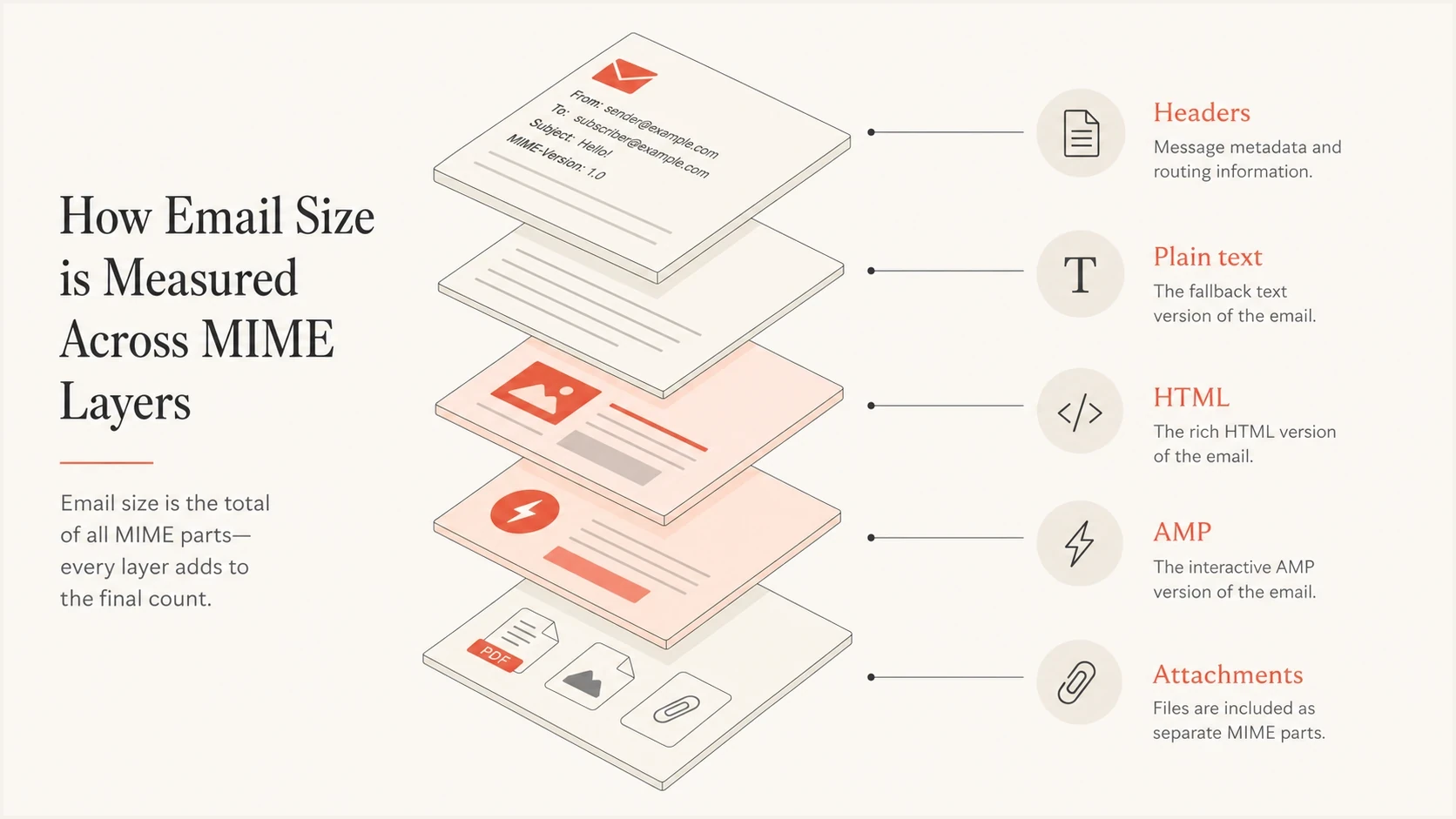
Five MIME layers that contribute to total email message size.
HTML source size
- Where it matters: Clipping, rendering, loading speed, and the visibility of footer content.
- Common bloat: Nested tables, unused CSS, repeated inline styles, hidden mobile blocks, and page-builder comments.
- Best fix: Minify carefully, remove unused modules, and simplify repeated components.
On-the-wire size
- Where it matters: SMTP transfer, provider limits, security scanning, and attachment handling.
- Common bloat: Base64 encoding, attachments, extra MIME alternatives, tracking headers, and embedded images.
- Best fix: Send the final message to a tester and inspect the delivered source instead of only the template preview.
What MIME types change
MIME tells mail systems what each part of the message is. A normal marketing email often uses multipart/alternative with a plain text part and an HTML part. Some messages add text/x-amp-html for AMP. Transactional mail can add calendar invites or attachments. Security filters inspect the MIME tree because malformed structure, odd nesting, missing boundaries, suspicious file types, and misleading content types are common in unwanted mail.
The mistake is thinking of MIME parts as independent size budgets. If a message has 60 KB of HTML and 50 KB of AMP, the recipient does not see both at once, but the receiving system receives both. That combined weight, plus headers and encoding, is part of the message profile. The HTML part can still clip in Gmail if that part crosses the clipping threshold, and the total message can still look heavy to filters even when each part seems reasonable alone.
Simple multipart exampletext
Content-Type: multipart/alternative; boundary="b1"

--b1
Content-Type: text/plain; charset="UTF-8"

Plain text version.

--b1
Content-Type: text/html; charset="UTF-8"

<html>HTML version.</html>

--b1
Content-Type: text/x-amp-html; charset="UTF-8"

<!doctype html><html amp4email>AMP version.</html>

--b1--
AMP adds requirements beyond file size. A dynamic part needs valid plain text or HTML fallback content, and Gmail requires production senders to register each sending address and authenticate with SPF, DKIM, and DMARC. A client that cannot display the AMP part falls back to a supported alternative, so test the fallback and the AMP part as separate render paths.
The safer AMP rule
Treat AMP as an extra experience layer, not a required part of every send. Include it only when it adds measurable value, keep a complete HTML fallback, meet the receiving provider's sender requirements, and validate the final MIME structure before production.
Build a valid MIME tree
Correct MIME nesting helps clients select the intended body and helps scanners classify every part. Use multipart/alternative for equivalent versions of the same content, usually plain text followed by HTML. Use multipart/related to group HTML with CID-referenced inline assets, and use multipart/mixed as the outer container when independent attachments are present.
Common MIME nestingtext
multipart/mixed
├── multipart/alternative
│   ├── text/plain
│   └── text/html
└── application/pdf
    Content-Disposition: attachment
- Keep alternatives equivalent: The plain text, HTML, and AMP parts should communicate the same message rather than hide unrelated content.
- Declare every part accurately: Match Content-Type to the real file format and set Content-Disposition to inline or attachment when the intended handling matters.
- Validate boundaries and closing markers: Broken or reused boundaries can make later parts unreadable and create ambiguous scanner results.
- Inspect the delivered tree: Forwarding, gateways, and the sending platform can rewrite or remove parts after the template leaves the editor.
Clipping is not the same as spam
Gmail clipping is often confused with a deliverability failure. It is usually a rendering and measurement problem, not an inbox placement problem. The message can land in the inbox, but Gmail displays a clipped version and asks the recipient to view the full message. If the unsubscribe link, legal footer, discount terms, or open tracking pixel sits below the clipping point, the campaign can look worse than it performed.
This matters because many open pixels are injected near the end of the HTML. When the bottom of the email does not render, the pixel can fail to load. That makes opens look lower, which can be misread as spam placement. The right response is to check inbox placement, click behavior, complaint rate, and delivered source size before treating the issue as reputation damage.
HTML body size risk bands
Use these as working bands, not universal mailbox-provider rules.
Lean
0-60 KB
Low clipping risk for most campaign templates.
Watch
61-99 KB
Review repeated CSS, modules, and tracking additions.
Clip risk
100 KB+
Gmail clipping becomes a practical concern.
Heavy
150 KB+
Expect rendering, analytics, and QA issues.
The best way to separate clipping from delivery trouble is to send the real campaign to a test inbox and inspect the message. Suped has a public email tester that helps review authentication and message-level issues before a broader send.
Email tester
Send a real email to this address. Suped shows a results button when the test is ready.
?/43tests passed
Attachments and risky content types
Attachments change the risk profile more than normal hosted images. They increase total size, require content scanning, and can trigger stricter handling when the file type is commonly abused. PDFs are common in transactional workflows, but avoid them in marketing campaigns unless the recipient explicitly expects the file.
File type also matters. A PDF invoice sent after a purchase has a different context than a cold email with a compressed archive. Executables, scripts, macro-enabled documents, and password-protected archives are much more likely to be blocked or quarantined. Even allowed files can hurt engagement if the message takes too long to load or creates suspicion. Provider limits apply to the encoded message, so the usable attachment size is lower than the advertised total message limit.
|
|
|
|---|---|---|
HTML | Campaign body | Clipping |
Plain text | Fallback | Low |
AMP | Interactive mail | Validation |
PDF | Receipt | Medium |
Archive | Rare | High |
Common MIME types and deliverability impact.
Avoid bulk attachments
For promotional mail, hosted assets are usually safer than attachments. If a document is needed, link to a landing page that explains the document, uses HTTPS, and matches the brand domain. Keep the email focused on the action, not the file.
Encoding and HTML quality
Encoding changes the size that receivers process. Base64 adds about 33% to the original binary payload before line wrapping and MIME headers, so a 7.5 MB file consumes roughly 10 MB before the remaining message parts are counted. Quoted-printable can also add overhead, especially when HTML has many long lines or special characters. UTF-8 is normal and safe when declared correctly, but the final wire size still needs to be measured.
HTML quality also matters. Malformed tags, broken conditional comments, unclosed tables, excessive hidden content, and CSS that changes tracking pixels or spacer images can cause inconsistent rendering. Size is often a symptom of this problem. Bloated templates usually have more code paths that can fail across clients. Image-heavy messages should also include meaningful live text rather than placing the entire offer inside images.
Problem patternhtml
<style>
  @media screen and (max-width:600px) {
    img { width:300px !important; height:auto !important; }
  }
</style>

<img src="open.gif" width="1" height="1" alt="">
That kind of broad CSS can accidentally resize a 1 by 1 tracking pixel or spacer image. When the pixel is placed at the top, the break is visible. When it is placed at the bottom, it is less likely to damage the first impression, but it can still affect measurement if clipping occurs.
If you are dealing with heavy image campaigns, this related guide on image file size is a useful next read because remote images affect load speed even though their file bytes are not part of the HTML source or SMTP payload.
A practical testing workflow
A reliable workflow starts with the final message, not the template. Build tools, ESP previews, and local HTML files do not include every header, MIME boundary, tracking rewrite, and encoding decision that appears in the real sent email.
- Send the final email: Use the same ESP, sender domain, suppression logic, personalization, and tracking settings planned for production.
- Inspect the delivered source: Check HTML size, total message size, MIME boundaries, content transfer encoding, and attachment handling.
- Check provider behavior: Review Gmail clipping, Outlook rendering, mobile rendering, and which fallback appears when AMP is unavailable.
- Confirm authentication: Validate SPF, DKIM, and DMARC domain matching because authentication problems make every content issue harder to diagnose.
- Watch reputation signals: Monitor complaints, bounces, opens, clicks, domain reputation, and blocklist or blacklist events after changes.
Suped DMARC dashboard showing email volume, authentication health, and source breakdown
Suped fits this workflow when the question moves beyond one message and into sender health. Its DMARC monitoring connects authentication results to sending sources, so teams can separate a content-size issue from SPF, DKIM, DMARC domain-match, or unauthorized-source problems.
For broad domain checks, Suped also has a domain health checker that reviews DMARC, SPF, and DKIM basics before teams spend time debugging content. A large MIME-heavy email sent from a domain with DMARC mismatch can look like a content problem when the root cause is authentication.
?
What's your domain score?
Deep-scan SPF, DKIM & DMARC records for email deliverability and security issues.
How to reduce size without breaking the email
Reducing size requires more than minification. The best savings usually come from design and template discipline. Repeated modules, duplicated mobile and desktop sections, page-builder markup, verbose inline CSS, and unused conditional code create most of the weight.
Keep
- Core content: Copy, buttons, pricing, product details, and required legal content.
- Useful fallback: A plain text part that matches the message and does not include stale copy.
- Targeted AMP: AMP only where it adds measurable value and the sender meets provider requirements.
Remove
- Unused CSS: Rules left behind by old modules, abandoned layouts, or builder defaults.
- Duplicate sections: Separate desktop and mobile content blocks when responsive code can handle both.
- Bulk files: Attachments, embedded images, and base64 image data in campaign bodies.
Avoid aggressive HTML compression that makes QA harder or changes how email clients parse conditional comments. The goal is a smaller, clearer message, not a fragile one. Test after each meaningful change and compare the final delivered source.
Best working rule
If a section does not help the recipient decide, understand, or act, remove it before using technical compression. Shorter emails usually load faster, clip less often, and give clearer engagement signals.
Where Suped fits
Email size and MIME structure are content-level checks. They do not replace domain-level monitoring. Suped gives teams one place to monitor DMARC, SPF, DKIM, sending sources, blocklist and blacklist status, and deliverability indicators when an issue spans both message content and sender identity.
The useful workflow is to test heavy campaigns before sending, then use Suped to watch what happens across real mail streams. If authentication starts failing after an ESP change, if a new source appears, or if a domain or IP lands on a blocklist (blacklist), Suped records the issue with steps to investigate and fix it.

Issue steps to fix dialog showing the issue overview, tailored fix steps, and verification action
- Automated issue detection: Useful when a deliverability symptom might come from MIME bloat, authentication failure, or a new sending source.
- Hosted SPF and DMARC: Helpful when many senders or DNS handoffs make record management slow.
- Real-time alerts: Useful after a campaign or template change, especially when issue timing matters.
- Blocklist monitoring: Keeps domain and IP blacklist checks close to authentication data instead of scattering investigations.
Views from the trenches
Best practices
Measure final sent source, including MIME boundaries, headers, tracking, and encoding overhead.
Keep AMP targeted to cases where provider support and performance justify the added part.
Place required footer and unsubscribe content above likely clipping points in large templates.
Common pitfalls
Teams confuse Gmail clipping with spam placement and start fixing the wrong deliverability issue.
Tracking pixels near the bottom underreport opens when clipped messages do not load the footer.
Broad mobile CSS rules can resize small tracking pixels or spacer images into visible artifacts.
Expert tips
Compare opens within the same ESP and sender, but use clicks and complaints for stronger signals.
Keep valid HTML fallback content because the AMP part is not displayed in every receiving client.
Treat the 100 KB line as a QA trigger, then inspect authentication, reputation, and engagement.
Marketer from Email Geeks says messages over 100 KB are often clipped in Gmail, which affects rendering and analytics more than inbox placement.
2024-09-17 - Email Geeks
Marketer from Email Geeks says clipped messages can hide the open tracking pixel, so lower open rates can be misread as a delivery issue.
2024-09-17 - Email Geeks
Recommended size and MIME limits
Email file size and MIME types affect deliverability because they shape both filtering signals and recipient experience. The clearest action is to keep the sent HTML below the clipping danger zone, use valid MIME nesting, avoid unnecessary alternatives, skip attachments in bulk campaigns, and test the final sent source.
A 60 KB HTML part plus a 50 KB AMP part is not automatically a deliverability problem, but it is not the same as sending a single 60 KB email. Receivers process the full MIME structure. If the AMP part does not add value, leave it out. If the HTML part approaches 100 KB, reduce template weight before sending.
For ongoing monitoring, pair content testing with authentication and reputation visibility. Suped supports this workflow by monitoring DMARC, SPF, DKIM, sending sources, blocklist and blacklist events, and alerts after the message itself has been tested.




