
Does 'no-reply' email affect email deliverability?

Updated on 12 Oct 2026: We clarified no-reply reply handling and the bulk sender rules that affect deliverability.
No, using a no-reply address does not normally hurt email deliverability by itself. Gmail's published sender guidelines do not identify no-reply as a standalone spam trigger, and legitimate transactional and account emails still use it. Inbox placement should not drop just because the visible sender is something like no-reply@example.com.
The caveat matters: no-reply can hurt deliverability indirectly. If the address rejects replies or ignores unsubscribe requests, recipients have fewer ways to resolve problems and can complain or disengage instead. Spam complaints affect sender reputation; a broken sending domain is a separate technical problem.
- The word no-reply in the address is not the main deliverability risk.
- Blocking useful replies can increase complaints and remove customer feedback.
- An invalid From domain or broken authentication creates a separate delivery problem.
Does no-reply trigger spam filtering?
Separate this into two questions: what delivery checks evaluate, and what recipients do after delivery. A local part such as no-reply, noreply, donotreply, or notifications does not determine whether DMARC passes. These addresses are common in password resets, receipts, security alerts, invoices, and system notifications. Gmail's published sender rules focus on authentication and spam complaints rather than a blanket ban on no-reply addresses.
Recipient behavior is different. If someone wants help, tries to unsubscribe by replying, or sends a thank-you response and gets a rejection, the brand experience gets worse. Some users will hit the spam button because that button is easier than finding another channel. That is where no-reply becomes a sender reputation issue.
The practical rule
A no-reply address is acceptable when the sending domain authenticates correctly and a working From or Reply-To mailbox gives recipients a clear route for support. Marketing mail also needs a functioning unsubscribe mechanism. Rejecting or ignoring useful replies creates an avoidable customer problem and can encourage spam complaints.
|
|
|
|---|---|---|
No-reply From address | Sending domain authentication and reputation. | Useful replies are rejected or ignored if the inbound path is disabled. |
Monitored Reply-To | DMARC evaluates the From domain, not Reply-To. | Support and unsubscribe requests still need routing. |
Nonexistent From domain | Domain validity and authentication. | Mail can be rejected, and replies cannot reach the domain. |
Broken bounce address | SMTP MAIL FROM validity and SPF. | Delivery failures are lost; invalid domains can trigger rejection. |
Delivery checks and operational risks for common sender address patterns.
What happens when someone replies
A no-reply email address is a sender address that signals replies are not expected. Its inbound path is often unmonitored or disabled, but the label alone does not determine what happens. The From mailbox, Reply-To header, and inbound mail configuration decide where a reply goes.
- Replies bounce when the destination does not accept mail, so the recipient receives a delivery failure.
- Replies disappear when the mailbox accepts the message but nobody reads or routes it.
- An autoresponder explains that the mailbox is not monitored and gives another contact route.
- A Reply-To header directs the mail app to a monitored support or operations inbox.
When Reply-To is present, mail apps normally send replies there. Without it, they normally use the From address. Reply-To is a routing instruction, not a guarantee, because a recipient can still send directly to the From address. Keep that From mailbox able to accept mail, or give recipients a clear alternative before they reply. Rejecting an inbound customer reply is different from an outbound campaign bounce and does not automatically increase that campaign's bounce rate.
Where no-reply causes indirect damage
The worst version of no-reply is not a quiet mailbox. It is a reply path that rejects a customer who expected a normal conversation. Replies to marketing and lifecycle emails are not automatically waste. Some contain unsubscribe intent, confusion, buying interest, account problems, accessibility needs, or emotional response. A working reply route also helps recipients who cannot easily use a web-based contact form.
Before changing to a rejecting no-reply address, classify replies for one or two weeks. Count the categories, then decide. If most replies are short thank-you notes, file them automatically. If many are support or unsubscribe requests, route them. The data gives operations a real case instead of relying on a deliverability myth.
Reply handling risk levels
A quick way to judge whether no-reply is a small operational choice or a reputation risk.
Low risk
Managed
Mailbox accepts replies and routes them with rules.
Warning
Ignored
Replies are accepted but never reviewed.
High risk
Rejected
Replies bounce, including unsubscribe and support requests.
- A rejected reply can push an annoyed user toward the spam button.
- Some recipients still reply with unsubscribe requests, even when a link exists.
- Replies record correspondence, but providers do not publish a universal reputation weighting rule.
- Inbound replies often reveal copy problems, broken journeys, and buying intent.
Providers do not publish a guaranteed reputation boost for receiving replies. Treat replies as customer feedback rather than a shortcut to inbox placement. See From and Reply-To deliverability for the related sender address considerations.
Alternatives to no-reply addresses
A better pattern is to keep the sender identity clear while routing replies away from the busiest support queue. Use a recognizable From address such as hello@example.com or notifications@example.com, a monitored Reply-To mailbox such as support@example.com, and rules that classify low-value messages automatically. That preserves the recipient's ability to reply without forcing support teams to manually triage every birthday thank-you.
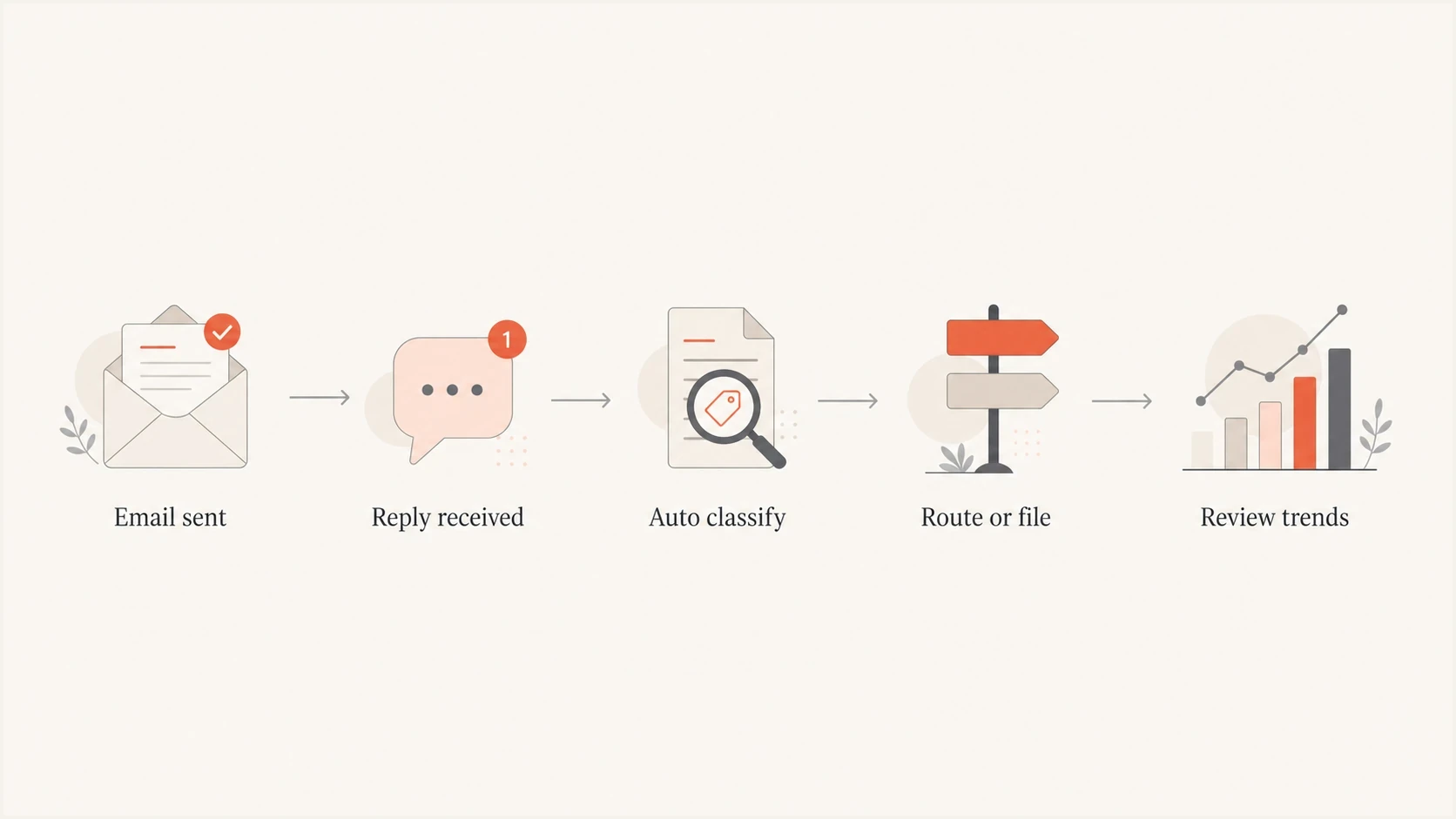
No-reply email handling workflow: receive replies, classify them, route or file them, and review trends.
For bulk marketing and lifecycle mail, the received message should have a header pattern like this. Replace the example addresses and unsubscribe URL with working destinations. Configure the bounce address through your sending platform's SMTP MAIL FROM setting; the receiving server adds Return-Path.
Example received headerstext
From: Example <news@example.com>
Reply-To: Example Support <support@example.com>
Return-Path: <bounce@bounces.example.com>
List-Unsubscribe: <https://domain.com/unsub/opaquepart>, <mailto:unsubscribe@example.com>
List-Unsubscribe-Post: List-Unsubscribe=One-Click
The HTTPS URL and List-Unsubscribe-Post header are the header portion of RFC 8058 one-click unsubscribe. The HTTPS endpoint must process the POST without a login or extra confirmation and must not redirect the request. A mailto address is an additional option, but it does not satisfy Gmail's RFC 8058 requirement by itself. Include both List-Unsubscribe and List-Unsubscribe-Post in the h= list of a valid DKIM signature and keep a visible unsubscribe link in the message body.
Rejecting no-reply
- Fewer inbound tickets reach the queue.
- Recipients hit a rejection when they reply.
- Complaints can rise if useful replies are blocked.
Managed reply inbox
- Rules file common low-value replies.
- Recipients can still reach a human when needed.
- Useful feedback is retained and complaints are easier to prevent.
The From and Reply-To domains do not need to be identical, but they should make sense to the recipient. DMARC checks the From domain against the SPF-authenticated SMTP MAIL FROM domain or a valid DKIM signature's d= domain, not the Reply-To address. Changing only no-reply to hello on the same domain does not change DMARC domain alignment or reset domain reputation. The From and Reply-To choices should not create brand confusion.
How to test the change
If deliverability is already fragile, do not change reply handling and guess. Test the actual message before and after the change. Send a real campaign sample to an inbox, inspect the headers, confirm SPF and DKIM pass, confirm DMARC passes, and check whether the reply path behaves as expected. Test replies and unsubscribe requests end to end as well.
Start by sending the message to Suped's email tester, then repeat the test after changing the From or Reply-To address. That gives you a before-and-after record for the exact message. A successful sample checks authentication and routing; it does not prove inbox placement for the full campaign.
Email tester
Send a real email to this address. Suped shows a results button when the test is ready.
?/43tests passed
After that, check the sending domain itself. Use domain health checks to catch broken DNS, missing authentication, and obvious domain problems that matter more than the word no-reply.
For teams managing several senders, Suped provides a DMARC reporting and email authentication platform. Use its aggregate reports to compare reported sending sources and authentication results before and after a sender change. Those aggregate reports do not measure reply handling, spam complaints, or inbox placement.
Suped DMARC dashboard showing email volume, authentication health, and source breakdown
Use DMARC monitoring to review reported sending sources and authentication failures, and compare complaint rates and reply outcomes separately. Check blocklist status for a separate domain or IP reputation issue; a clean blacklist result does not guarantee inbox placement. Roll out the change on one campaign stream while keeping content and sending conditions stable, then compare complaints, reply rates, delivery bounces, and inbox placement.
Bulk sender rules for no-reply email
Bulk senders need SPF and DKIM authentication plus a DMARC record with at least p=none. Whether you use no-reply or a monitored address, the sending domain must pass DMARC. Provider thresholds and unsubscribe rules differ:
|
|
|
|---|---|---|
Close to 5,000 or more messages to personal Gmail accounts in 24 hours, counted across the same primary domain. | Marketing and subscription mail needs RFC 8058 one-click unsubscribe and a visible unsubscribe link in the body. | |
Significant sending volume; Yahoo does not publish a numeric threshold. | Marketing mail needs a functioning List-Unsubscribe header. Yahoo's sender requirements also call for a visible body link. | |
Domains sending more than 5,000 messages daily. | Microsoft recommends a valid From or Reply-To address that can receive replies, plus a visible unsubscribe link for marketing mail. |
Provider rules that matter more than the no-reply label.
Gmail recommends keeping daily user-reported spam rates below 0.1% and preventing them reaching 0.3% or higher. Yahoo's sender requirements require rates below 0.3%. Honor unsubscribe requests within 48 hours to follow Gmail's recommended timeline and Yahoo's two-day requirement. Use elapsed time rather than two business days.
Purely transactional password resets and order confirmations are excluded from Gmail and Yahoo's one-click requirement. Automated marketing messages still need an unsubscribe mechanism. A support Reply-To address does not replace it.
When no-reply still makes sense
No-reply still has a narrow place for purely transactional mail where a response cannot change the outcome, such as one-time security codes and password reset tokens. Receipts, shipping notices, and billing messages often generate legitimate questions, so give them a monitored Reply-To address or a visible support route.
Do not bounce useful replies
If users reply with support requests, unsubscribe requests, sales questions, or account concerns, rejecting those messages is a reputation risk. File low-value replies, but route high-value replies to the right team.
The safest compromise is a real mailbox with automation. Use filters for thank-you notes, out-of-office replies, empty replies, and common keywords. Send a short auto-response only when it helps the user, and include the support path inside that response. That avoids the worst customer experience while keeping operational noise under control.
If bounces from no-reply addresses are the concern, separate reply handling from bounce handling. Delivery-status notifications go to the SMTP MAIL FROM address, which appears as Return-Path in the received message, and your sending platform should process those failures. Suppress hard-bounced recipients and review recurring soft bounces. Human replies normally follow Reply-To, or From when Reply-To is absent. Mixing those paths makes diagnostics harder, especially when you later investigate bounces to no-reply addresses.
Views from the trenches
Best practices
Classify inbound replies for two weeks before changing sender or reply handling policy.
Keep a real reply route for support, unsubscribe intent, buying signals, and account issues.
Use rules to file thank-you notes and noisy replies without rejecting customer messages.
Common pitfalls
Treating no-reply as a filter penalty distracts teams from authentication and complaints.
Rejecting replies can convert harmless confusion into spam complaints and support anger.
Using a dead From domain creates real DNS and authentication issues no-reply cannot hide.
Expert tips
Separate Return-Path bounce processing from Reply-To handling for cleaner diagnostics.
Keep campaign replies searchable so marketing, sales, and support can spot useful patterns.
Test one campaign stream first, then compare complaints, replies, bounces, and conversions.
Expert view
Expert from Email Geeks says no-reply itself is unlikely to be a direct delivery signal because legitimate senders use it widely.
2025-03-03 - Email Geeks
Expert view
Expert from Email Geeks says an address that looks no-reply but accepts mail is different from an address on a broken domain.
2025-03-03 - Email Geeks
A checklist before changing no-reply
A no-reply address does not usually hurt deliverability on its own. The operational question is whether it blocks useful recipient behavior. A working reply route and passing authentication remove specific risks, but they do not guarantee inbox placement.
If the address rejects useful replies, categorize them before rolling out the change. For most marketing and lifecycle mail, use a managed reply inbox with rules that file routine messages and route support or unsubscribe requests. Measure whether complaints and reply handling improve after the change.
- Fix SPF, DKIM, DMARC, one-click unsubscribe, and bounce processing.
- Route useful replies to a monitored inbox, even if most routine messages are later filed.
- Measure complaints, replies, delivery bounces, and inbox placement after the change.




