What causes bounces when emailing noreply addresses?

Published 18 May 2025
Updated 30 Jul 2026
10 min read
Summarize with
Updated on 30 Jul 2026: We updated this guide with current SMTP status-code guidance and safer handling for your own noreply senders.
Bounces when emailing noreply addresses often happen because the recipient domain has configured that address to reject inbound mail. The word noreply has no special meaning in SMTP, so some domains reject the address, some accept and discard messages, and others route replies to a monitored mailbox. The bounce itself shows which behavior applies.
Treat these bounces as a recipient address issue first. The practical fix is to stop sending to that address and use a reply-capable contact channel instead. If the non-delivery report (NDR) says the mailbox does not exist, is disabled, or does not accept replies, the reason is inside the bounce. If it mentions authentication, reputation, a blocklist or blacklist, an invalid sender domain, or a temporary failure, investigate that separate cause.
- Direct cause: The address is intentionally closed to inbound mail or does not exist.
- Typical response: A permanent 550 rejection with a recipient-specific code such as 5.1.1 or 5.2.1.
- Right action: Suppress the recipient, classify the bounce correctly, and use another contact route.
What the bounce is saying
A noreply bounce is often blunt. The receiving mail server can check the recipient during the RCPT TO stage and reject the address before accepting the message body. When that happens, the message content and attachments were not evaluated. Some systems validate later, so always check the failed SMTP command shown in the diagnostic.
Example noreply rejection
dsn=5.2.1, status=bounced
host mx.example said:
550 5.2.1 noreply@example.com: mailbox disabled, not accepting messages
(in reply to RCPT TO command)
That example is a permanent recipient rejection. The 5.2.1 enhanced status code says the mailbox is disabled and not accepting messages. Do not retry it or change email authentication records based on that line alone. A bare 5.7.1 is less specific because it can also mean recipient policy, authentication, reputation, or authorization rejection.
Read the complete SMTP response
Use the three-digit reply, enhanced status code, diagnostic text, and failed command together. The phrase in reply to RCPT TO means the rejection happened while the receiver was processing the recipient address.
- Permanent reply: A 5xx response is final for that attempt and should not be retried without correcting the stated cause.
- Temporary reply: A 4xx response is temporary, so the sending system normally queues and retries it.
- Recipient clue: Mailbox disabled, user unknown, replies refused, or address rejected points to the exact recipient.
- Best label: Classify a confirmed permanent recipient failure as a hard bounce and suppress the address.
Why noreply addresses reject mail
A noreply address usually sends automated notifications without inviting a conversation in that mailbox. Some domains keep the mailbox active and silently discard replies. Others reject inbound mail during the SMTP transaction. The second setup creates an immediate rejection that lets the sender's mail system produce the NDR.
The causes fall into a few concrete buckets. Start with the simplest one: the local part before the @ sign is not a valid inbox for inbound mail.
|
|
|
|---|---|---|
Closed mailbox | 5.2.1 disabled | Suppress |
No mailbox | 5.1.1 user unknown | Remove |
Recipient policy | Replies refused | Use contact route |
Bad domain | No MX or domain | Check DNS |
Sender issue | Auth or policy failure | Fix stated cause |
Common noreply bounce causes
Two details prevent wasted work. First, noreply does not mean the whole domain is broken. A domain can have valid MX records and reject only the noreply local part. Second, a bounce to a noreply address does not prove poor sender reputation. Use the diagnostic text and compare failures across other recipients before opening a sender-health investigation.
If you operate the noreply sender
The visible From and Reply-To headers do different jobs from the SMTP envelope sender. Replies normally go to Reply-To when it is present. Delivery status notifications go to the SMTP MAIL FROM address, also called the reverse-path, rather than the Reply-To address.
Header and envelope pattern
SMTP MAIL FROM:<bounces+message-id@example.com>
From: Account alerts <noreply@example.com>
Reply-To: Support <support@example.com>
Use a monitored Reply-To address when a customer response needs human attention, and keep the envelope sender able to receive and process bounces. If noreply must reject direct inbound mail, reject it during the SMTP transaction instead of accepting the message and later sending a new NDR. That limits backscatter when a forged sender address is used.
- Set Reply-To: Direct human replies to a mailbox your team monitors.
- Process the reverse-path: Use the SMTP MAIL FROM address to collect and classify delivery failures.
- Reject before acceptance: Return a clear 5xx response during SMTP when the address will never accept mail.
- Avoid blind auto-replies: They can create unwanted responses to forged sender addresses and hide the better contact route.
How to classify noreply bounces
Classification decides the next action. A permanent recipient rejection belongs in hard-bounce suppression logic. Do not label an address invalid from 550 alone, because that reply can also cover content or security policy. Confirm the recipient diagnosis with the enhanced status code and diagnostic text.
Noreply recipient bounce
- SMTP code: Often 550 with 5.1.1 or 5.2.1.
- Text clue: Mailbox disabled, user unknown, replies refused, or address rejected.
- Next step: Suppress the address and find a different route.
Sender or infrastructure bounce
- SMTP code: Often 421, 451, or a policy-specific 5.7.x.
- Text clue: SPF, DKIM, DMARC, reputation, rate limit, or blocklist wording.
- Next step: Inspect the named failure before deciding whether to retry.
If the bounce text is vague, compare it with the normal bounce taxonomy. A confirmed recipient-address hard bounce should remove or suppress the exact address. A temporary mailbox, server, or rate-limit response can stay eligible for controlled retry. A sender-side rejection needs a separate investigation, especially when it affects many unrelated recipients.
The related page on bounce messages provides a broader workflow when the SMTP response does not map cleanly to one category.
When it is not really about noreply
The local part of the address can distract from the real cause. If every address at a domain bounces, not just noreply, the issue is likely domain-level. If only recipients at one provider reject your mail, look for provider policy, rate limiting, authentication, or reputation wording. If authentication fails, noreply is incidental.
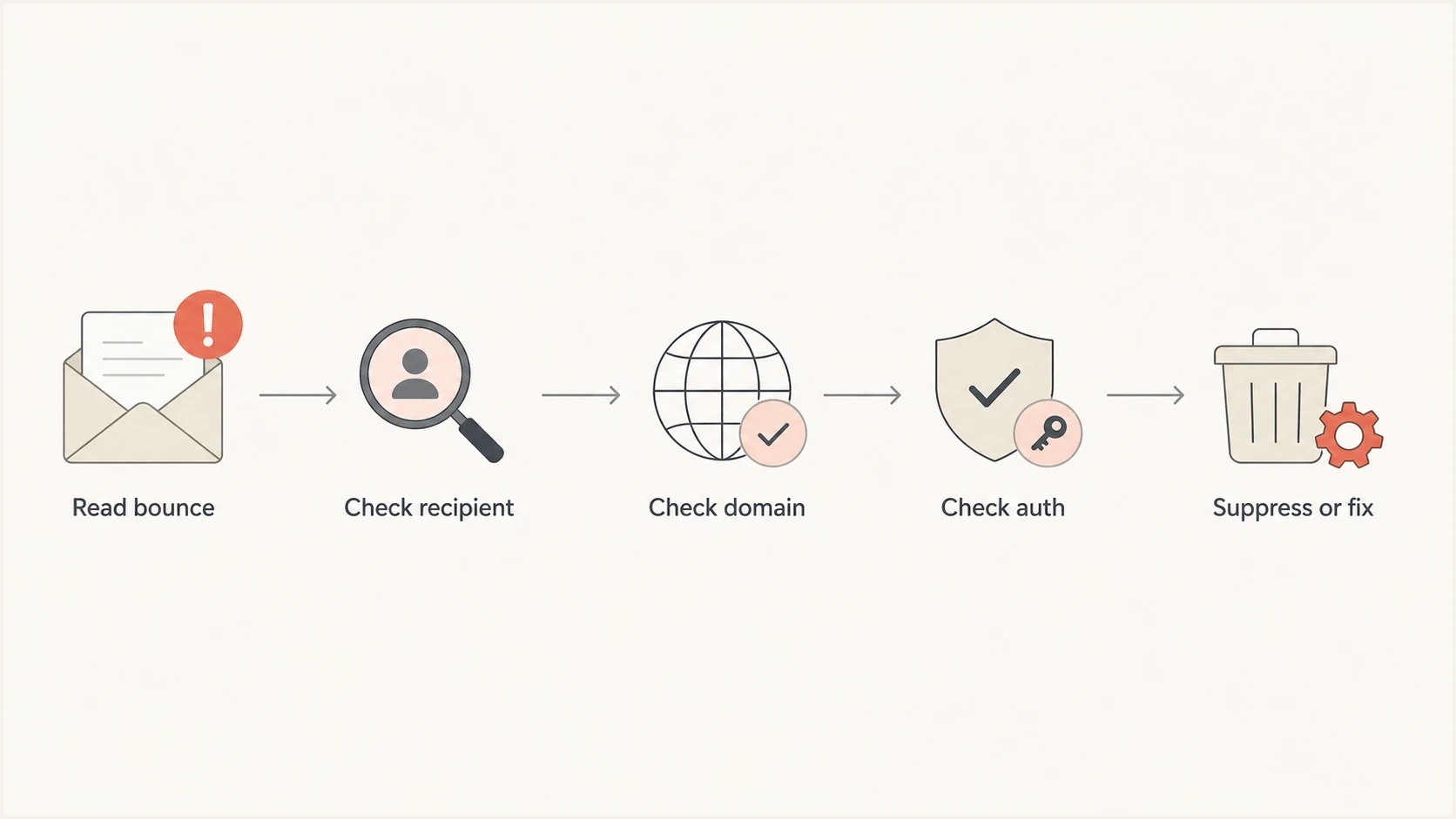
Noreply bounce diagnosis flowchart covering recipient, domain, authentication, and suppression checks.
Check the recipient first, then the domain, then authentication. A domain health checker helps confirm whether the domain has working MX, SPF, DKIM, and DMARC basics. Use it when the bounce says no MX, invalid domain, failed authentication, or policy rejection without naming the noreply address.
If the bounce mentions DMARC, use Suped's DMARC monitoring to identify the sending source, see whether SPF or DKIM passed, and confirm whether the visible From domain passed alignment. If the bounce mentions a blocklist or blacklist, use Suped's blocklist monitoring instead of treating the noreply address as the cause.
Do not fix the wrong layer
Changing email authentication will not make a closed noreply mailbox accept replies. DNS changes help only when the bounce identifies a DNS-based sender problem.
How to fix noreply bounces
The fix depends on whether you are sending to someone else's noreply address or operating your own. Messages that need a human response need a real mailbox, and automated systems should not keep retrying addresses that have already returned a permanent recipient rejection.
- Read first: Start with the reply code, enhanced status code, diagnostic text, and command stage.
- Suppress closed addresses: Add permanent noreply recipient failures to your suppression list.
- Use another route: Find a support address, contact form, account manager, or published help channel.
- Route your own replies: If you own the noreply sender, set a monitored Reply-To address in customer-facing mail.
- Split categories: Keep recipient bounces separate from authentication, domain, reputation, and temporary delivery failures.
If noreply addresses entered a marketing or lifecycle database, remove them from future campaigns. They are not valid contacts for a conversation, and repeated sends create avoidable hard bounces. If the address came from a one-to-one workflow, update the CRM record with a real contact point before sending again.
Track noreply failures separately for diagnosis, but judge sender health using the total bounce rate and patterns by source, domain, provider, and response category. A sudden cluster of recipient failures points to list source or CRM hygiene. A cluster of policy rejections across valid contacts points to a sender-side issue.
For your own domain, avoid hiding every response behind noreply. A notification can come from an automated sender and include a real Reply-To mailbox. That gives customers a usable path back to you and keeps support requests out of an unmonitored address.
How to separate bounce and sender checks
Keep recipient bounces separate from sender health checks. A closed noreply address needs suppression. A sender health issue needs evidence across authentication, DNS, reputation, and delivery results. Mixing those workflows creates needless changes and hides useful bounce patterns.
Send a controlled message through Suped's email tester and inspect authentication results, message headers, content signals, and routing details. This will not make a noreply address accept mail, but it confirms whether the sending setup is healthy before the receiver is blamed.
Email tester
Send a real email to this address. Suped shows a results button when the test is ready.
?/43tests passed
Suped's product connects DMARC reports with SPF and DKIM status, blocklist and blacklist visibility, alerts, and guided issue checks. Those signals are relevant when the bounce names authentication, domain validity, policy, or reputation instead of a closed recipient.
The operational rule is separation. Recipient failures belong in suppression logic, while authentication and domain failures belong in monitoring. A single noreply bounce should not trigger DNS changes, and a real DMARC issue should not be dismissed as a bad contact.

Email tester sample report showing total score, email preview, issue summary, and per-section results
For teams managing many domains, Suped's MSP and multi-tenancy dashboard keeps client domains, policy status, alerts, and reports in one place. It does not change the rule for a closed noreply recipient, but it helps keep sender-side problems separate from recipient failures.
Views from the trenches
Best practices
Read the full SMTP response first, because noreply rejections often name the exact cause.
Suppress role addresses that cannot receive replies before they enter regular campaigns.
Separate recipient policy bounces from authentication failures before changing DNS records.
Common pitfalls
Treating a noreply rejection as a sending reputation problem wastes troubleshooting time.
Retrying permanent 550 noreply bounces increases noise and does not create a new inbox.
Leaving noreply contacts in a CRM causes repeat hard bounces across later sends and reports.
Expert tips
Keep bounce categories specific, so a noreply rejection is not mixed with invalid domains.
Use a reply-capable contact address for business conversations and support follow-ups instead.
Watch DMARC reports alongside bounces to see when the failure is really authentication.
Marketer from Email Geeks says a 550 response that says replies are not monitored means the sender reached an address the owner rejects intentionally.
2023-10-25 - Email Geeks
Marketer from Email Geeks says marketing lists should not contain noreply addresses, since they are not valid contacts for a campaign.
2023-10-25 - Email Geeks
Next steps after a noreply bounce
When a noreply address returns a permanent recipient code, suppress it, do not retry it, and use a real contact path. When the response is temporary, allow the sending system's controlled retry process to run.
If the same send also shows authentication failures, invalid domains, blocklist or blacklist mentions, or broad rejection across many recipients, treat that as a separate sender-health issue. Suped's product supports that operational split: recipient bounces stay in bounce handling, while DMARC, SPF, DKIM, MTA-STS, and reputation signals stay visible in monitoring.




