
Can Gmail give false positive SMTP bounce responses?

Updated on 28 Sep 2026: We added Google's documented 550 5.1.1 incident and tightened the steps for separating invalid recipients from Gmail service errors.
Yes, Gmail can give a false positive SMTP bounce response. Google documented a Gmail incident in which valid recipients received 550 5.1.1 rejections, but a single response is not enough to establish the same condition. Gmail defines this code as "the email account that you tried to reach does not exist," and the enhanced status-code standard defines 5.1.1 as a bad destination mailbox address. Treat it as a permanent recipient failure unless broader evidence shows Gmail rejected valid accounts incorrectly.
In the example where Gmail accepted mail on October 16 with dsn=2.0.0 and rejected mail to the same address on October 19 with 550 5.1.1, the result is a possible false positive, but it is not proven. The mailbox could have been deleted, renamed, disabled, or removed from a Google Workspace routing rule between the two sends. A sender reputation, authentication, header, or content problem normally produces a 4.7.x or 5.7.x response instead.
- Do not panic: One Gmail hard bounce is not evidence of a Gmail-wide false positive event.
- Do not retry automatically: A 5.1.1 response is permanent, so remove the address from routine sends while it is reviewed.
- Use patterns: Volume, timing, raw reply text, and verified recipient history distinguish a bad address from an incident.
Short answer
Gmail can return a false positive SMTP bounce when a service incident or recipient-directory problem causes valid accounts to reject mail. Google has confirmed this exact failure pattern during a Gmail incident. The safe operational position is to suppress an isolated Gmail 5.1.1 from routine sending, then quarantine a sudden cluster for review before applying permanent suppression across the affected cohort.
The Gmail MX host or Google IP changing between attempts does not prove anything by itself. Gmail has many inbound servers behind the same MX names. A different gmail-smtp-in IP on October 16 and October 19 is normal load distribution, not evidence that one server had the correct answer and another did not.
Suppression warning
Do not repeatedly send to an isolated 5.1.1 recipient. During a sudden cluster, hold permanent cohort-wide suppression until event timing, raw SMTP replies, recipient history, and later acceptance data have been compared. This keeps each invalid address suppressed while the shared event remains reversible.
- Trust more: The address returns a complete Gmail 5.1.1 response and no shared Gmail anomaly appears.
- Trust less: Many verified Gmail addresses fail in a tight window with identical diagnostic text.
- Review manually: A recently active recipient fails during the same window and later accepts mail again.
A documented Gmail false positive
Google's Workspace Status Dashboard recorded a Gmail incident on December 15, 2020, lasting from 00:20 to 01:30 UTC. During the incident, some people sending to Gmail addresses received 550 5.1.1 rejections stating that the account did not exist. Google reported that affected Gmail users could still access Gmail, which confirms that a valid mailbox can receive this incorrect permanent response during a provider incident.
What this precedent proves
The incident proves that a Gmail 5.1.1 false positive is possible. It does not make every 5.1.1 suspect. A comparable case needs a time-bounded cluster, verified active recipients, matching Gmail diagnostics, and provider or later-delivery evidence.
- Match the scope: Look for a sudden increase across unrelated, recently active Gmail recipients.
- Match the time: Keep UTC timestamps so the bounce window can be compared with Google's incident record.
- Match the response: Retain the full Gmail diagnostic instead of relying on a local hard-bounce label.
- Wait for proof: Release a disputed address only after recipient confirmation or later acceptance proves that it remained reachable.
What the replies mean
Example Gmail SMTP log patterntext
Oct 16 mx=gmail-smtp-in.l.google.com ip=74.x.x.27
  dsn=2.0.0 status=sent
Oct 19 mx=gmail-smtp-in.l.google.com ip=74.x.x.26
  dsn=5.1.1 status=bounced reason="user unknown"
A dsn=2.0.0 response means Gmail accepted that message at SMTP time. It does not guarantee that the address will remain valid. A later 550 5.1.1 means Gmail rejected the later attempt as a permanent destination mailbox problem.
|
|
|
|---|---|---|
2.0.0 | Message accepted | Keep the acceptance log |
550 5.1.1 | Account does not exist | Suppress the recipient |
550 5.2.1 | Account inactive or unable to receive at its current rate | Use the full diagnostic to identify the condition |
552 5.2.2 | Recipient inbox out of storage and inactive | Ask the recipient to restore storage |
421/451 4.7.x | Temporary policy or reputation deferral | Retry on schedule and fix the stated cause |
550 5.7.x | Permanent policy, authentication, content, or reputation rejection | Stop retrying and fix the stated cause |
Common interpretation of relevant Gmail SMTP responses.
Read the complete SMTP reply, not only the leading 550. The three-digit SMTP code gives the broad result, while the enhanced status code and diagnostic text identify the subject of the failure. Gmail appends gsmtp to its errors, and a Google Workspace custom policy response can include gcdp. Do not infer a sender reputation problem from 5.1.1 unless the raw transcript contains conflicting evidence.
Verify where the bounce was generated
A bounce report can contain Gmail's direct response, a later delivery status notification (DSN), or a classification created by the sender's mail system. Those records do not carry equal weight. Preserve the raw SMTP transcript or original DSN before deciding that Gmail returned a false positive.
- Check the SMTP stage: A rejection after RCPT TO is recipient-specific. A rejection after message data can depend on policy, content, or authentication.
- Find the remote response: Confirm that the connected host was a Gmail MX and retain the full line ending in gsmtp or gcdp.
- Inspect the DSN fields: Use Final-Recipient, Action, Status, Remote-MTA, and Diagnostic-Code to trace the failure.
- Compare the local classification: If a sending platform labels the event "hard bounce" but omits Gmail's response, retrieve the raw event before assigning a cause.
Useful DSN evidencetext
Final-Recipient: rfc822; user@gmail.com
Action: failed
Status: 5.1.1
Remote-MTA: dns; gmail-smtp-in.l.google.com
Diagnostic-Code: smtp; 550 5.1.1 ... - gsmtp
Acceptance and later failure
If Gmail first returned 2.0.0 and a DSN arrived later, record both events. Do not rewrite the earlier acceptance as an SMTP rejection. The later DSN is a separate delivery result and its fields identify the system that generated it.
Why a real address can get 550 5.1.1
A Gmail address that was valid on an earlier send can later return 550 5.1.1 for several concrete reasons. Some are genuine recipient changes. A false positive becomes credible when a verified mailbox fails in a shared window and later accepts mail without an address change.
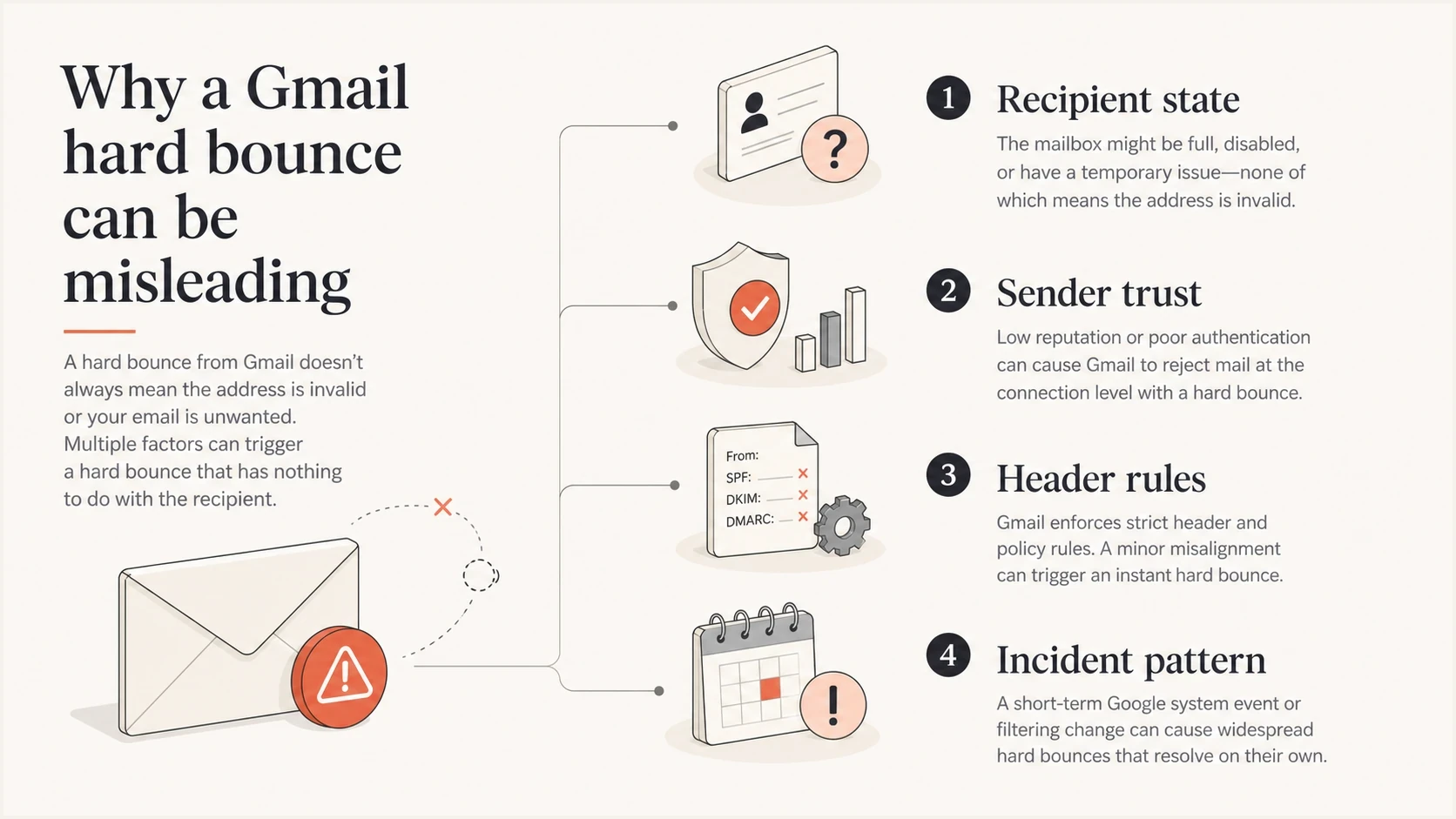
Infographic showing recipient state, sender trust, header rules, and incident patterns behind Gmail hard bounces.
Likely real hard bounce
- Deleted mailbox: The recipient closed the account or the Google Workspace user was removed.
- Changed routing: A workplace alias, group, or catch-all rule no longer routes the address.
- Bad address: The address contains a typo, unnecessary space, or stale contact data.
Likely false positive
- Shared spike: Many verified Gmail users fail in the same window with matching diagnostic text.
- Recipient confirmation: The user or Workspace administrator confirms that the exact address remained active.
- Later acceptance: The same address accepts mail again after the cluster without being recreated or renamed.
During warm-up, separate recipient errors from sender enforcement. If new IPs, envelope domains, DKIM signatures, headers, or content caused the rejection, Gmail's raw response should point to a 4.7.x or 5.7.x failure. Compare any wider change with Gmail bounce rates guidance before changing suppression policy.
How to investigate before permanent suppression
Use a short evidence checklist before turning a suspicious Gmail cluster into permanent cohort-wide suppression. Keep each isolated 5.1.1 address out of routine sends during the review.
- Group the bounces: Filter by Gmail domain, enhanced status code, diagnostic text, sending IP, envelope sender, and campaign.
- Check recipient history: Look for recent replies, password resets, purchases, or other transactional activity tied to the exact address.
- Verify the mailbox: Ask the recipient or Workspace administrator whether the account, alias, group, or routing rule remained active during the failure window.
- Check provider status: Compare UTC bounce timestamps with the Google Workspace Status Dashboard and retain any incident identifier.
- Test the sender stream: Send a controlled message through an email tester and inspect SPF, DKIM, DMARC, headers, and the resulting SMTP response.
- Validate DNS: Run a domain health checker check for authentication, DNS, and sending-domain issues that explain separate 4.7.x or 5.7.x responses.
Email tester
Send a real email to this address. Suped shows a results button when the test is ready.
?/43tests passed
A controlled send helps separate a recipient error from a sender error. Check for a missing or malformed Message-ID, broken DKIM signature, failed SPF or DMARC authentication, weak rDNS, and an explicit Gmail policy or reputation response. Those defects can explain 4.7.x or 5.7.x rejections, but they do not by themselves overturn Gmail's direct 5.1.1 recipient response.
Practical classification ruletext
if isolated_gmail_5_1_1:
  suppress_from_routine_sends
if verified_gmail_5_1_1_cluster:
  quarantine_cluster_and_preserve_raw_replies
if later_acceptance_without_address_change:
  review_and_release_verified_recipients
Warm-up handling
Warm-up makes a bad classification expensive. Ignoring a real hard bounce keeps an invalid address in the stream. Permanently suppressing every address in a verified incident cluster can remove reachable users. Use immediate recipient-level suppression with a separate, reversible review state for the cluster.
Gmail bounce response patterns
A pattern-based way to decide when to suppress an address or quarantine a cluster.
Isolated
Single
One recipient, a complete Gmail 5.1.1 response, and no shared anomaly.
Suspicious cluster
Shared pattern
Verified recipients fail in the same window with matching response text.
Incident-like
Broad spike
A broad spike spans lists or sending pools and later acceptance confirms reachability.
For an isolated case, suppress the address and do not retry it automatically. Retest only after the recipient or domain administrator confirms the exact address is active. For a verified cluster, preserve every raw reply and delay permanent cohort-wide suppression until the shared event has been explained.
A clean review bucket
- Hold state: Keep disputed Gmail recipients suppressed from sends but separate from permanent list cleanup.
- Evidence row: Store timestamp, SMTP text, Gmail MX host, sending IP, envelope sender, and message ID.
- Release rule: Restore only verified recipients after later delivery or administrator confirmation proves reachability.
If the raw Gmail response uses 4.7.x or 5.7.x and names reputation, authentication, content, or policy, move the investigation to sender repair. A blocklist (blacklist) listing is supporting context, not proof of Gmail's reason, so use Gmail's own diagnostic text as the primary signal.
Where Suped fits
Suped is our DMARC reporting and email authentication platform. Its role in a Gmail bounce investigation is to show whether authentication or reputation evidence changed near the failure window. Suped cannot confirm that a Gmail mailbox exists, and it cannot override Gmail's raw SMTP response.

Issue steps to fix dialog showing the issue overview, tailored fix steps, and verification action
Use DMARC monitoring to compare SPF, DKIM, DMARC, and sending-source changes with the bounce window. Use blocklist monitoring to identify a new blocklist (blacklist) listing that warrants a separate reputation review. This evidence is most relevant when Gmail returns a policy or reputation code, not when the only evidence is 5.1.1.
Bounce evidence
- Raw reply: The SMTP transcript identifies Gmail's stated recipient or policy reason.
- Recipient proof: Mailbox history and later acceptance show whether the address stayed reachable.
Suped evidence
- Authentication changes: Suped surfaces SPF, DKIM, DMARC, and sending-source issues near the event.
- Operational alerts: Alerts help the team compare new failures with recent domain and IP changes.
Keep the evidence streams separate. Gmail's raw response determines whether the failure concerns the recipient or sender policy. Suped helps test the sender-side explanation when the response or surrounding events point to authentication, a new sending source, or a blocklist (blacklist) change.
When to trust the bounce
Trust Gmail's hard bounce when the raw response came directly from a Gmail MX, the enhanced status code is 5.1.1, the diagnostic text says the account does not exist, and no verified shared incident appears. Suppress the address from further routine mail after that permanent failure.
- Direct Gmail response: The SMTP transcript identifies a Gmail MX and retains the full 5.1.1 diagnostic line.
- Exact recipient: The envelope recipient has no typo, extra space, stale alias, or address transformation.
- No wider anomaly: Other Gmail recipients continue accepting mail and no verified cluster appears.
- Consistent processing: The MTA, DSN fields, and bounce processor preserve the same status and recipient.
If those conditions are missing, handle the classification as disputed while keeping the recipient suppressed from automatic sends. The work then resembles ordinary bounce messages analysis: preserve the raw reply, identify who generated it, and keep permanent list cleanup reversible until the evidence improves.
The practical rule
Suppress a single Gmail 550 5.1.1 recipient from routine mail. Quarantine a verified cluster for incident review before applying permanent cohort-wide cleanup, and restore only addresses proven reachable.
Views from the trenches
Best practices
Hold clustered Gmail 5.1.1 suppressions for review when verified recipients fail together.
Compare raw SMTP replies with message IDs, sending IPs, domains, and recipient history.
Separate recipient errors from Gmail policy responses before changing sender settings.
Common pitfalls
Do not treat one accepted message as proof the address can never hard bounce again.
Do not remove a large Gmail cohort permanently because one window shows unusual bounces.
Do not blame authentication when Gmail's complete response only reports a 5.1.1 error.
Expert tips
Keep disputed Gmail recipients suppressed in a reversible review bucket during analysis.
Track Gmail MX host, enhanced status code, campaign, and raw response for every event.
Review SPF, DKIM, and DMARC when Gmail returns separate 4.7.x or 5.7.x policy failures.
Marketer view
Marketer from Email Geeks says mailbox providers can return the wrong bounce reason, but a single Gmail case should be checked against recipient history before it is treated as an outage.
2022-10-19 - Email Geeks
Marketer view
Marketer from Email Geeks says Gmail has had past events where valid addresses received permanent-looking bounces, which made suppression cleanup difficult afterward.
2022-10-19 - Email Geeks
The practical answer
Gmail can give false positive SMTP bounce responses, but 550 5.1.1 has a specific documented meaning: the destination account does not exist. In the October 16 and October 19 example, different Gmail relay IPs do not decide the case. The stronger evidence is the complete SMTP or DSN record, a shared failure window, recipient confirmation, and later acceptance without an address change.
The default action is to suppress an isolated Gmail 5.1.1 from routine mail without an automatic retry. Quarantine verified clusters, preserve the raw replies, and delay permanent cohort-wide cleanup until later delivery or administrator confirmation proves which addresses remain reachable. Investigate sender authentication and reputation separately when Gmail returns 4.7.x or 5.7.x.




