
Why are Gmail bounce rates suddenly increasing?

Updated on 15 Oct 2026: We clarified Gmail bounce-rate measurement, current sender requirements, and code-specific fixes for delivery failures.
Gmail bounce rates suddenly increase when Gmail rejects more mail at SMTP time or when repeated 4xx deferrals expire and your sending system records them as bounces. The usual causes are reputation or policy blocks, authentication failures, list decay, full mailboxes, DNS faults, and sudden changes in sending volume.
Treat a Gmail bounce spike as a set of separate problems. Split it by SMTP code, Gmail recipient domain, sending IP, sending domain, envelope sender, DKIM selector, message stream, and campaign. That separation usually shows whether Gmail has a broad reputation objection, a narrow authentication failure, or a list-quality issue hiding inside one segment.
- Fast answer: If the code says 550 5.7.1, read the full diagnostic text. Gmail uses this code for unsolicited mail, low reputation, message-format faults, and several policy failures.
- First split: Separate hard invalid-address bounces from Gmail policy bounces before suppressing large parts of your list.
- Most urgent fix: Pause the worst Gmail segment, verify authentication, throttle volume, and check whether one source or selector caused the spike.
Do not suppress everything immediately
A sudden Gmail spike does not prove those Gmail addresses are dead. A policy block can return as a hard bounce in your platform even when the recipient exists. Suppress definite 5.1.1 user-not-found addresses, but quarantine policy-blocked recipients separately until the root cause is clear.
Read Gmail bounce codes before suppressing addresses
A bounce rate spike usually points to recipient problems or sender problems. Recipient problems mean Gmail accounts no longer exist, are full, or reject the message for account-level reasons. Sender problems mean Gmail is rejecting mail because the sender, content, authentication result, or traffic pattern looks risky. Either can create a sudden jump after a configuration change or a send to a stale list.
For a sudden Gmail-only increase, read the enhanced status code and the complete diagnostic text before reading the bounce label in the sending platform. Platform labels often flatten different Gmail responses into one bucket called hard bounce, blocked, or undeliverable.
|
|
|
|---|---|---|
550 5.7.1 | Policy, reputation, or format | Full diagnostic text |
421 4.7.0 | Temporary connection or policy deferral | Full diagnostic, PTR, TLS, and reputation |
421 4.7.28 | Rate limit or repeated Message-ID | IP, domain, URL, volume, and Message-ID |
550 5.7.25 | Missing or mismatched PTR record | PTR hostname and matching A or AAAA record |
550 5.7.26 | Unauthenticated or DMARC rejection | SPF, DKIM, and DMARC result |
550 5.7.27 | SPF failed for bulk mail | Envelope domain and sending IP |
550 5.7.30 | DKIM failed for bulk mail | Selector and signed message |
550 5.7.40 | DMARC record missing or policy unspecified | DMARC record and policy tag |
550 5.1.1 | No user | List age and acquisition source |
452 4.2.2 | Temporary mailbox storage shortage | Controlled retries and recipient history |
552 5.2.2 | Inbox out of storage and inactive | Stop this delivery; review recipient history |
552 5.3.4 | Message or header size limit exceeded | Attachments, encoded size, and header size |
DNS error | Lookup failure | Recent DNS change |
Use the complete SMTP response, not the platform label, as the first diagnostic clue.
The most important clue is concentration. If every Gmail stream rises at once, look at domain reputation, IP reputation, authentication, and Gmail policy requirements. If one campaign rises, inspect the list source, content, links, and recipient engagement. If forwarded mail rises first, check the forwarding path, SPF result, and whether DKIM survives.
Measure Gmail bounce rates consistently
Calculate a Gmail-specific email bounce rate using messages your sending system attempted to deliver to gmail.com and googlemail.com recipients. Use the same original-send cohort and allow the same retry window when comparing campaigns. Count each message-recipient pair once, regardless of how many SMTP retries it generates.
Gmail bounce rate formulatext
Gmail bounce rate (%) =
(Final failed Gmail deliveries / Gmail messages attempted) x 100

Example: 200 final failures / 10,000 Gmail messages attempted x 100 = 2%
Show active 4xx deferrals separately until delivery succeeds or the queue expires. Keep addresses suppressed before sending outside this calculation, and distinguish your provider's sending limits from a rejection returned by Gmail. A message accepted by Gmail and placed in spam is not a bounce.
A general benchmark such as 2% is not a published Gmail acceptance threshold. Compare each stream with its usual baseline and inspect new SMTP-code clusters even below that rate. Gmail's 0.3% spam-complaint ceiling measures a different signal and must not be used as a bounce-rate target.
Separate deferrals from permanent failures
A 4xx response is a temporary deferral, while a 5xx response is a permanent failure for that delivery attempt. Sending platforms often label these soft bounces and hard bounces, respectively. A sending system normally retries a 4xx response. If the queue later expires, the platform can record a bounce hours or days after Gmail first deferred the message, so compare the first SMTP attempt with the final bounce timestamp.
4xx temporary deferrals
Keep eligible mail in a controlled retry queue, honor Gmail's backoff signal, and reduce the affected source's rate. Do not suppress a recipient solely because of one temporary deferral.
- Main clue: Codes such as 4.7.0 or 4.7.28 repeat before the queue expires.
- Action: Throttle the failing lane and fix the code-specific cause before normal volume resumes.
5xx permanent failures
Do not retry the same recipient and message unchanged. Suppress definite invalid users, but quarantine policy failures while you correct authentication, reputation, format, or compliance.
- Main clue: Codes such as 5.1.1 or 5.7.26 end that delivery attempt.
- Action: Use the enhanced code and diagnostic text to choose suppression or remediation.
Do not let retry exhaustion hide the start time
Graph first deferrals separately from final bounces. A large retry queue can make today's bounce report point to a Gmail problem that started during an earlier campaign.
Why Gmail starts rejecting more mail
Gmail has enough local data to change delivery decisions quickly. A campaign that delivered yesterday can bounce today if complaints rise, authentication breaks, a new IP sends too much too fast, recipients ignore the mail, or a bad actor reuses your DKIM signature in replayed traffic. Gmail spam placement is a separate delivery outcome that can share reputation or authentication problems with bounces; a spam-folder delivery is not an SMTP rejection.
- Reputation pressure: Gmail blocks or defers mail when complaints or sending patterns damage sender reputation. Check whether your provider moved traffic to a shared IP with a different reputation.
- Authentication drift: A DNS edit, new sender, removed DKIM key, or SPF lookup excess can turn a normal send into a failed-authentication send.
- Forwarding breakage: Forwarded mail often fails SPF because the forwarding server is not in your SPF record. DKIM then has to carry the DMARC pass.
- DKIM replay: A signed message can be copied and resent through unrelated infrastructure, leaving Gmail to see valid DKIM on bad traffic.
- List quality: Old Gmail recipients, imported contacts, weak consent, and stale reactivation segments raise invalid-user and unwanted-mail signals. Use confirmed opt-in (double opt-in) at signup, and exclude purchased or scraped lists.
- Policy gaps: All senders to personal Gmail accounts need SPF or DKIM, valid forward and reverse DNS, TLS, RFC 5322 message formatting, and a reported spam rate below 0.3%. Google recommends staying below 0.1% and never reaching 0.3%.
- Bulk-sender gaps: Primary domains sending about 5,000 messages to personal Gmail accounts in 24 hours also need SPF and DKIM, DMARC, From-domain matching for direct mail, and one-click unsubscribe for marketing or subscribed mail.
Gmail began ramping up enforcement of non-compliant traffic in November 2025 with temporary and permanent rejections. Messages across the same primary domain count toward the bulk-sender threshold, and bulk-sender status does not expire after Gmail assigns it. These requirements apply to mail sent to personal Gmail accounts, not inbound mail at Google-hosted custom domains, although a custom domain's administrator can set separate rejection rules.
For bulk marketing or subscription mail, verify RFC 8058 one-click unsubscribe headers: List-Unsubscribe with an HTTPS endpoint and List-Unsubscribe-Post: List-Unsubscribe=One-Click. Keep a visible unsubscribe link in the body and honor requests within 48 hours. A body link alone does not meet the header requirement. Google's sender FAQ says missing one-click unsubscribe alone does not automatically trigger rejection, but it excludes senders from mitigation and increases the risk of complaints.
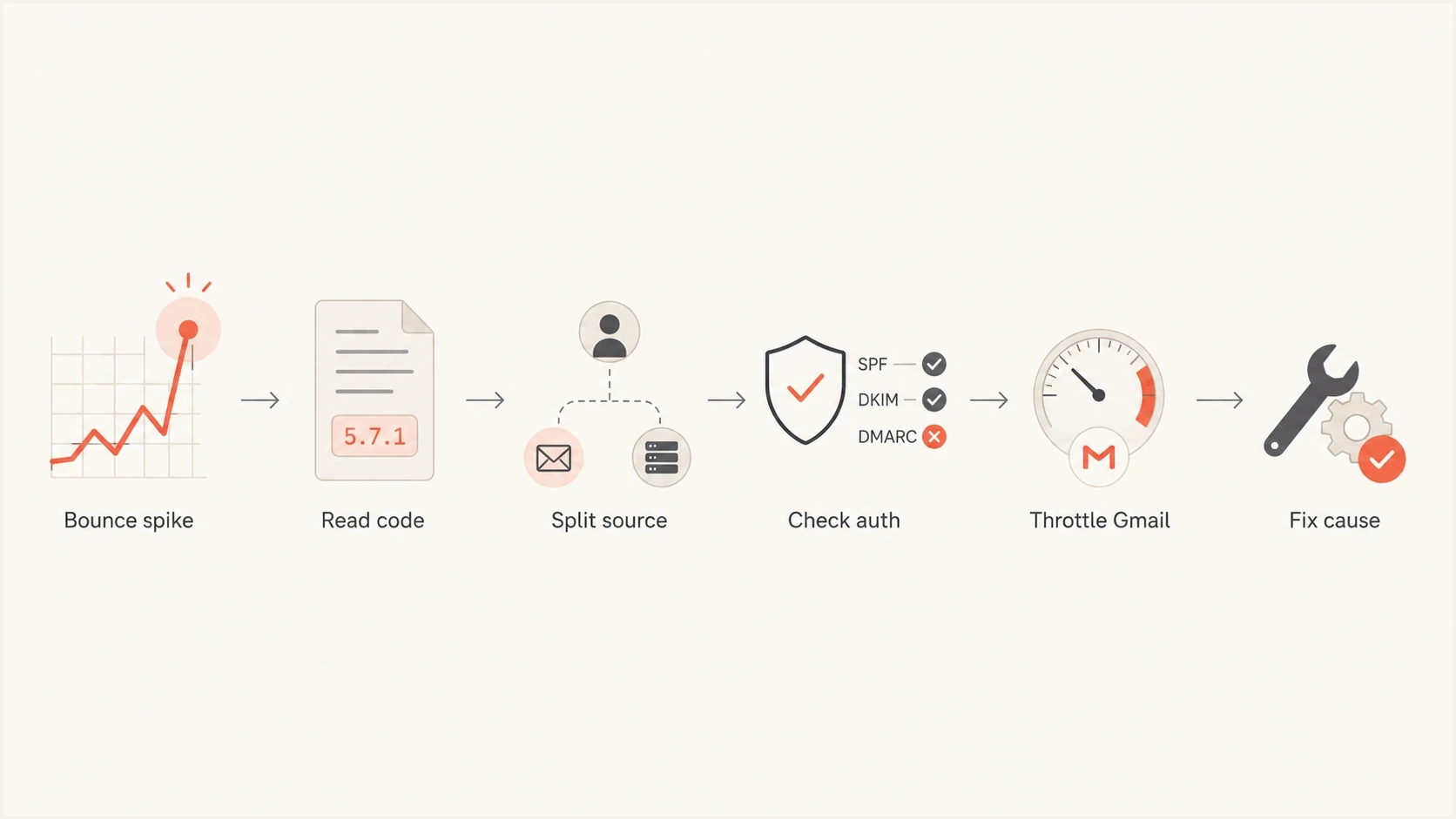
Gmail bounce troubleshooting: read SMTP codes, isolate the source, check authentication, throttle sending, and fix the cause.
Check authentication before changing volume
Authentication is the fastest thing to verify because it changes the interpretation of every other signal. A Gmail policy bounce on unauthenticated mail is a different problem than the same bounce on authenticated mail with steady engagement. Check SPF, DKIM, DMARC, reverse DNS, HELO identity, TLS, and whether the visible From domain matches an authenticated domain. For bulk mail to personal Gmail accounts, both SPF and DKIM must pass their individual checks. Direct mail must match the From domain with either the SPF or DKIM domain. Check IPv4 and IPv6 sending addresses separately: each PTR hostname must resolve back to the connecting IP through an A or AAAA record.
Start with a broad scan using the domain health checker, then inspect the exact source that sent the bounced Gmail mail. The broad scan catches obvious DNS and policy gaps. The source-level check catches the issue that broad scans miss, such as one sender using an old DKIM selector or an envelope domain that fails SPF.
Illustrative DNS records, replace placeholders before publishingdns
_dmarc.example.com. TXT
"v=DMARC1; p=none; rua=mailto:dmarc@example.com"

example.com. TXT
"v=spf1 include:send.example.net -all"

selector1._domainkey.example.com. TXT
"v=DKIM1; k=rsa; p=MIIB...AB"
The DMARC pass needs a domain match
DMARC does not pass only because SPF or DKIM passes somewhere. The authenticated domain must match the visible From domain in the way DMARC requires. Relaxed matching permits domains within the same organizational domain; strict matching requires identical domains. If forwarding breaks SPF and DKIM also fails, DMARC fails. ARC preserves earlier authentication results for a receiver's separate delivery decision; it does not change that DMARC result or guarantee acceptance.
A clean DNS record does not prove every mail stream is clean. Send a real message to a controlled mailbox and inspect headers with the email tester. That shows the authentication results for that test path. Also inspect Gmail's Show original view on a message received through the affected stream; a test at another receiver does not prove what Gmail sees.
Email tester
Send a real email to this address. Suped shows a results button when the test is ready.
?/43tests passed
Separate forwarded mail and DKIM replay
Forwarded mail and DKIM replay are worth investigating when Gmail failures cluster around indirect delivery paths or unfamiliar sending IPs. Both can produce mail that passes DKIM, so a valid signature alone does not distinguish legitimate forwarding from replay.
Forwarded mail
Forwarding changes the connecting IP, so SPF often fails for the original envelope domain. Sender Rewriting Scheme (SRS) can make SPF pass for the forwarder's domain, but that domain usually does not match the original visible From domain for DMARC.
- Main clue: Bounces cluster around aliases, mailing lists, help desks, alumni domains, or role accounts.
- Best fix: Keep DKIM stable, avoid content changes after signing, and make sure DMARC can pass through DKIM.
DKIM replay
Replay happens when a valid signed message is copied and sent again through infrastructure you do not control.
- Main clue: Unknown sources pass DKIM for your domain. Exclude legitimate forwarders before treating this as replay, and confirm selectors in message headers when reports omit them.
- Best fix: Use separate selectors by source and review signature expiry where supported. Replacing a signing key does not invalidate old signatures while the old public key remains published.
Do not rotate every selector during an active send. First confirm the affected selector and source using message headers and available DMARC data, and rule out authorized forwarding. Move legitimate signing to a new selector before revoking an abused public key. Revocation also invalidates queued or forwarded messages signed with that key, so coordinate it with the sending team. Continue monitoring unfamiliar sources; signature expiry limits replay only where receivers enforce it.
DMARC records drawer showing filters, record rows, authentication results, and CSV export
Run a fast triage in one hour
A Gmail bounce spike needs a short, disciplined triage. Collect enough evidence to stop the damage without making broad permanent changes. The first hour is for segmentation, not guessing.
Common Gmail policy bouncetext
550-5.7.1 Gmail has detected that this message is
550-5.7.1 likely unsolicited mail.
550-5.7.1 This message has been blocked.
- Collect codes: Export raw Gmail responses with enhanced status codes, diagnostic text, first-attempt time, and final disposition. Confirm the response came from Gmail rather than your provider's outbound quota or suppression rules.
- Split Gmail: Separate gmail.com and googlemail.com recipients from Google-hosted custom domains if your logs allow it.
- Group sources: Compare marketing, transactional, lifecycle, reactivation, and forwarded streams.
- Check auth: Verify SPF, DKIM, DMARC, reverse DNS, HELO, TLS, and the visible From domain for the failing source.
- Find concentration: Look for one IP, domain, selector, campaign, template, link domain, or list import.
- Throttle safely: Reduce Gmail-heavy sends while preserving transactional mail and high-engagement mail.
- Suppress carefully: Suppress confirmed invalid users, but quarantine policy-blocked recipients until the cause is fixed.
If the spike is mostly user-not-found responses, move quickly on list hygiene and consent review. If the spike is policy-blocked mail, focus on reputation, authentication, and traffic shape. If the spike starts with 4xx responses, throttle the affected source and inspect when its retry queue expires. For mailbox-full responses, retry 452 4.2.2 through the normal queue, but stop the current delivery after 552 5.2.2. For 552 5.3.4, reduce the message or header size before sending again.
A sudden rise in invalid Gmail address errors needs a different response than a Gmail policy block. Address-syntax errors need corrections to the captured address or sending code; a user-not-found response needs suppression. A policy block needs investigation of the sender and message.
How to respond without making the spike worse
The safest response is to reduce risk while keeping good mail flowing. Do not hammer Gmail with retries on the same rejected segment. Do not switch everything to a fresh IP. Do not change SPF, DKIM, and DMARC at the same time unless one of them is clearly broken. Each broad change removes evidence. After a provider migration or a long sending pause, use gradual IP warm-up and a steady cadence instead of restoring full volume at once.
Gmail response-code action bands
Use status class and concentration, not a universal bounce-rate threshold, to choose the next action.
Normal
Usual baseline
Watch source-level trends and code mix.
Investigate
New code cluster
Compare the new code with the failing source.
Throttle
Repeated rate-limit 4xx
Reduce the affected source for rate limits and honor retry timing.
Pause
Clustered policy or authentication 5xx
Stop the failing segment until the shared cause is fixed.
- For temporary deferrals: Honor retry timing and avoid duplicate retry jobs. Slow the source for rate-limit responses; recipient-specific storage errors need recipient-level handling.
- For policy bounces: Pause the failing Gmail segment, remove low-engagement recipients, and resume with smaller batches.
- For authentication bounces: Fix the exact source, then send a real test message before reopening volume.
- For invalid users: Suppress confirmed invalid Gmail recipients and audit how they entered the list.
- For blocklists: Check blocklist (blacklist) status, then connect the listing to the IP, domain, or traffic source that changed.
Blocklist and blacklist checks are not the whole answer because Gmail uses its own receiver data, but blocklist monitoring can reveal broader reputation problems. A public listing alone does not establish why Gmail rejected a message; confirm the cause in Gmail's SMTP response.
Resume with a small batch of recently engaged, consenting recipients after the code-specific fix is verified. Increase volume gradually while watching new deferrals and final bounces; there is no fixed recovery time. If failures continue, give your sending provider UTC timestamps, affected IPs, message IDs, and complete Gmail responses so it can investigate routing or shared IP problems.
Where Suped fits in the workflow
Suped's DMARC reporting product helps connect a Gmail symptom to the sending source and authentication result. During a spike, filter by source, compare known senders with unfamiliar traffic, and inspect DKIM selectors where the reports include them. Use your sending provider's SMTP logs to confirm Gmail's exact rejection response.
Suped DMARC dashboard showing email volume, authentication health, and source breakdown
Suped's DMARC monitoring shows which sources pass, which fail, and which unknown senders use your domain. Alerts can flag authentication drift, while hosted DMARC and hosted SPF reduce manual DNS edits. SMTP bounce logs remain necessary because DMARC aggregate reports do not contain Gmail's recipient-level rejection text. Reports arrive after the sending activity, so they are supporting evidence rather than a real-time bounce feed.
A practical Suped setup
Map each authorized source and DKIM selector in Suped before an incident. When Gmail bounces rise, compare the failing stream with that map, correct the affected source, and keep unrelated mail unchanged.
Views from the trenches
Best practices
Split Gmail bounces by SMTP code before suppressing recipients or changing campaigns.
Check reported DKIM selectors against headers to separate forwarding from suspected replay.
Pause the failing Gmail segment first, then reopen volume after evidence confirms the fix.
Common pitfalls
Treating every Gmail hard bounce as an invalid address can remove real subscribers.
Revoking DKIM keys before checking queued mail can invalidate legitimate signed messages.
Repeated retries into a policy block add failing traffic without correcting its underlying cause.
Expert tips
Forwarded mail needs DKIM resilience because SPF often fails after the forwarder hop.
A valid DKIM pass does not prove safe traffic when replayed messages use your signature.
Keep Gmail bounce dashboards separate for marketing, transactional, and lifecycle mail.
Marketer view
Marketer from Email Geeks says a Gmail bounce spike can appear within 90 minutes, so teams should compare recent Gmail-only volume against the same segment's normal baseline.
2022-02-16 - Email Geeks
Marketer view
Marketer from Email Geeks says some affected domains had recent DKIM replay, so unknown sources passing DKIM should be checked before changing list rules.
2022-02-16 - Email Geeks




