Why are Gmail emails bouncing with '553 5.1.3 The recipient address is not a valid RFC-5321 address' error?

Published 1 Jul 2025
Updated 6 Aug 2026
11 min read
Summarize with
Updated on 6 Aug 2026: We added a code comparison for nearby Gmail address failures and tightened the fix for permanent 5.1.3 bounces.
The direct answer: Gmail returns 553 5.1.3 when the SMTP envelope recipient is syntactically invalid. The enhanced status code identifies a permanent destination-address syntax failure, so retrying the same value will not fix it. In the example error, the most likely cause is a leading or trailing space inside the address passed to RCPT TO. Gmail is rejecting the address string it receives during SMTP, not making a judgment about the person's mailbox, your domain authentication, or campaign reputation.
Treat this bounce as a data hygiene and message assembly problem first. Check how the recipient address is stored, how it is normalized before send, and what the ESP or mail server actually sends in the SMTP envelope. Google documents SMTP response classes in Gmail SMTP errors, but the clue here is already in the text: the recipient address is not a valid RFC 5321 address.
Start with the envelope
Do not start by changing DMARC policy, SPF includes, DKIM keys, DNS, or sending IPs. This rejection identifies invalid recipient syntax, and none of those changes can repair the address supplied with RCPT TO. The fastest fix is to capture the exact envelope recipient and compare it with the stored contact value.
What the error means
RFC 5321 defines the SMTP transaction, including the envelope sender and envelope recipient. That recipient is the value sent in the RCPT TO command. It is not the same thing as the visible To: header that a recipient sees in the message. Gmail can accept the visible header format while rejecting the envelope recipient, or reject the message for header syntax under a different error. If the related problem is header formatting, compare it with RFC 5322 errors.
SMTP recipient syntax exampletext
MAIL FROM:<sender@example.com>
250 2.1.0 OK
RCPT TO:<user@gmail.com>
250 2.1.5 OK
RCPT TO:< user@gmail.com>
553-5.1.3 The recipient address < user@gmail.com> is not a valid
553 5.1.3 address. gsmtp
The second recipient looks visually close to the first one, but the leading space changes the SMTP argument. Gmail reads the value inside the angle brackets as the address. A space before the local part makes the address invalid for the envelope, so Gmail rejects it at recipient acceptance.
Envelope address
This controls actual SMTP delivery. Gmail evaluates this during the recipient command.
- Source: CRM field, list import, API payload, or ESP recipient object.
- Failure: Rejected before message body, tracking, and content checks.
Header address
This is the visible message field. It can have display names and encoded characters.
- Source: Template engine, personalization logic, or MIME library.
- Failure: Rejected under header syntax, duplicate header, or content parsing errors.
How to distinguish nearby Gmail address errors
Read the three-digit SMTP reply and the enhanced status code together. The 553 reply says Gmail will not accept the address as presented, while 5.1.3 narrows the cause to bad destination mailbox syntax. Nearby codes require different checks.
|
|
|
|---|---|---|
550 5.1.1 | Recipient mailbox does not exist | Correct typos or suppress the mailbox |
553 5.1.2 | Recipient domain cannot be found | Check the domain and trailing punctuation |
553 5.1.3 | Recipient address syntax is invalid | Inspect the exact RCPT TO value |
553 5.1.7 | Sender address syntax is invalid | Inspect MAIL FROM, not the recipient |
Gmail address errors and the first corrective action
Treat 5.1.3 as a hard bounce
A 5.x.x enhanced status code reports a permanent failure. Suppress the failed value from automatic retries, correct the underlying data, then test the corrected address as a new attempt. Do not suppress every address at the same domain unless evidence shows that each value is invalid.
Most common causes
At volume, check a small set of causes before anything else. The address often looks normal in a UI because many screens trim whitespace for display while still storing the original value or passing the original value to an API.
|
|
|
|---|---|---|
Leading or trailing space | Form, CSV, or sync | Trim before save and send |
Non-breaking or control character | Copy and paste | Reject on entry |
Missing @ or incomplete address | Manual entry or failed merge | Validate the completed value |
mailto: prefix or stray quote | Copied link or serializer | Store only the mailbox address |
Wrong ESP recipient mapping | API handoff | Log the SMTP envelope |
Common causes of Gmail 553 5.1.3 recipient address bounces
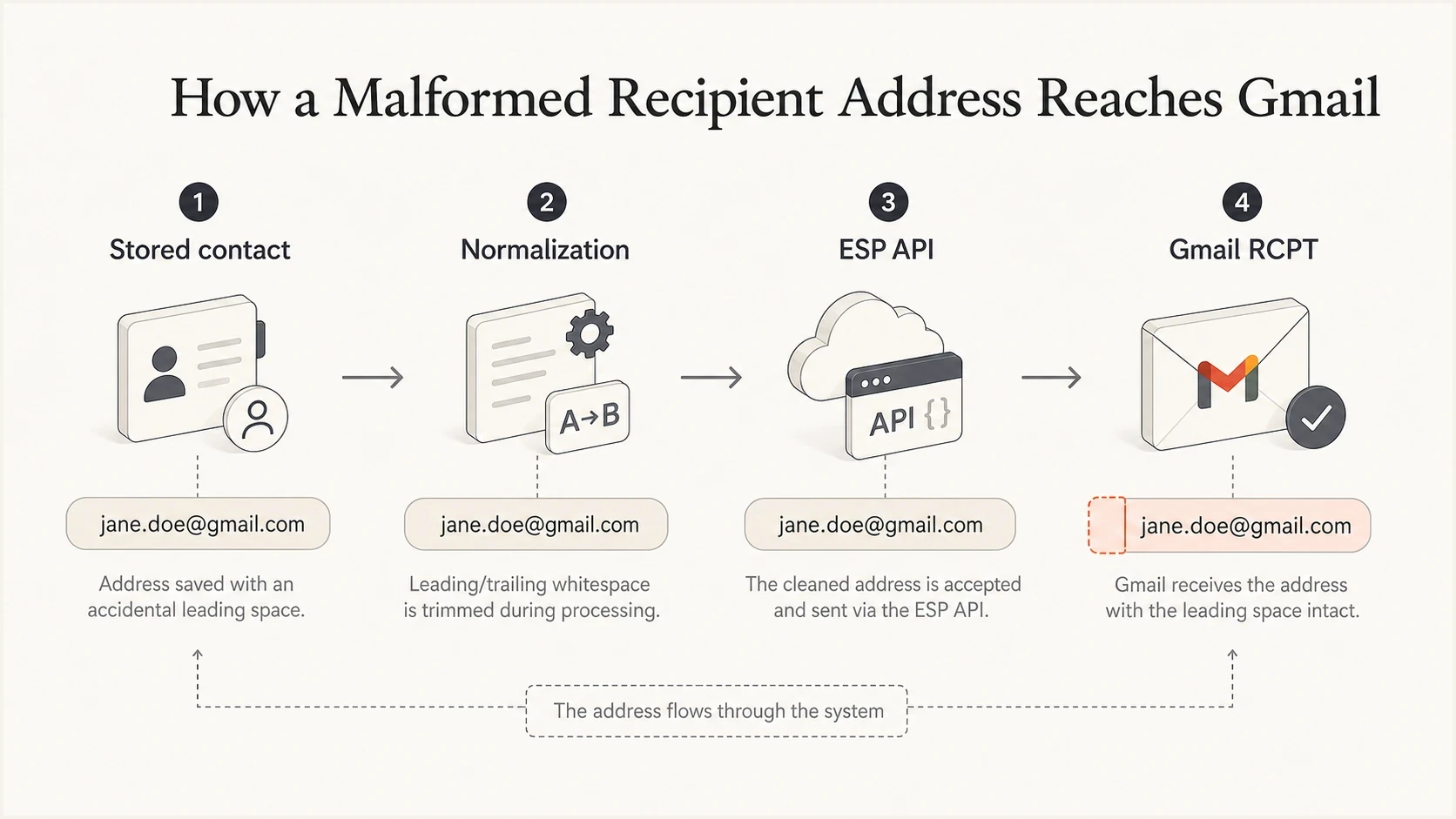
An infographic showing how a stored contact address moves through normalization, ESP API, and Gmail RCPT checks.
Special characters in the display name deserve a separate check. A curly quote, non-breaking space, or unescaped character in the sender name can create a similar investigation path, but the exact Gmail wording matters. If Gmail says the recipient address is invalid, inspect the envelope recipient first. If Gmail complains about the sender or header syntax, check abnormal characters in names and headers.
How to prove where the bad address appears
The goal is to find the first system that has the bad byte. Do not rely on a formatted UI view. Pull raw values at each boundary and compare them with the bounce text. A leading space is easy to miss, so print values with visible delimiters around them.
- Stored value: Export the raw recipient field from the contact database or source list.
- Import value: Check CSV parsing, CRM sync jobs, and API writes for whitespace preservation.
- Send payload: Log the recipient object sent to the ESP before it leaves your application.
- Envelope value: Ask the ESP for the exact SMTP envelope recipient used for a bounced sample.
- Bounce sample: Compare the address between angle brackets in the Gmail response.
Simple normalization and validation flowjavascript
const raw = input.email;
const trimmed = raw.trim();

if (raw !== trimmed) {
  logAddressFix({ before: raw, after: trimmed });
}

if (!isValidEnvelopeAddress(trimmed)) {
  rejectContact("Invalid recipient address");
}

contact.email = trimmed;
After the raw address is clean, send a controlled message and inspect the resulting headers, authentication results, and body. Suped's email test helps with that second step because it shows whether the fixed message has remaining authentication or formatting issues.
Email tester
Send a real email to this address. Suped shows a results button when the test is ready.
?/43tests passed
A message test does not prove that every recipient in the list is clean. It proves that the sending path can produce a valid message when given a valid address. Keep list-level validation separate from message-level validation.
How to fix it
The fix has two parts: clean the affected addresses already in the database, then stop invalid values from entering or leaving the system again. Treat existing bounces as proof that the source of truth needs inspection beyond the current campaign export.
Immediate cleanup
- Pause: Stop retries to affected Gmail recipients until the address is corrected.
- Export: Pull raw addresses for every 553 5.1.3 bounce in the batch.
- Normalize: Trim outer whitespace and reject empty or malformed results.
- Suppress: Keep truly invalid addresses out of future campaign segments.
Permanent controls
- Capture: Trim and validate addresses at every signup and preference form.
- Import: Reject rows with hidden control characters or invalid syntax.
- API: Log recipient values before they are sent to the ESP.
- Alert: Create a bounce reason alert for new 553 5.1.3 spikes.
Do not over-normalize
Trim outer whitespace and remove invalid control characters, but do not rewrite the local part aggressively. Local parts can be case-sensitive on some receiving systems, and quoted local parts have valid edge cases. For marketing and product email, the practical policy is simple: accept normal addresses, reject suspicious edge cases, and never send a malformed envelope.
Bad and good recipient valuestext
Bad:  " user@gmail.com"
Bad:  "user@gmail.com "
Bad:  "user@gmail.com\u00a0"
Good: "user@gmail.com"
For a one-off cleanup, run a query that finds addresses where the raw value differs from the trimmed value. For a durable fix, add the same validation to imports, form submissions, contact updates, and send-time payload construction.
Where DMARC, SPF, DKIM, and reputation fit
This bounce is not caused by DMARC, SPF, DKIM, reverse DNS, or a blocklist (blacklist) listing. The 5.1.3 status identifies recipient syntax as the failure, so authentication, DNS, and reputation changes will not fix it. Once recipient syntax is fixed, check the rest of the sending setup separately so another delivery problem does not remain hidden behind the first one.
A domain health check is useful after the immediate address fix because it verifies the domain-side basics in one place. For ongoing protection, DMARC monitoring gives a source-level view of who is sending mail for the domain and whether those sources authenticate correctly.

Email tester sample report showing total score, email preview, issue summary, and per-section results
Suped's product fits the broader workflow after the address syntax issue is under control. Use Suped's email test to inspect a corrected message, then use its DMARC reports and alerts to identify sending sources that stop authenticating correctly. Recipient cleanup remains a separate task because DMARC reports do not validate mailing-list addresses.
Practical Suped workflow
- Fix syntax: Clean recipient values before spending time on authentication changes.
- Test message: Send a controlled message and review the Suped report.
- Monitor domain: Use Suped DMARC reports to catch source and authentication drift.
- Alert teams: Route new authentication and reputation issues to the right owner.
Decision path for 553 5.1.3 bounces
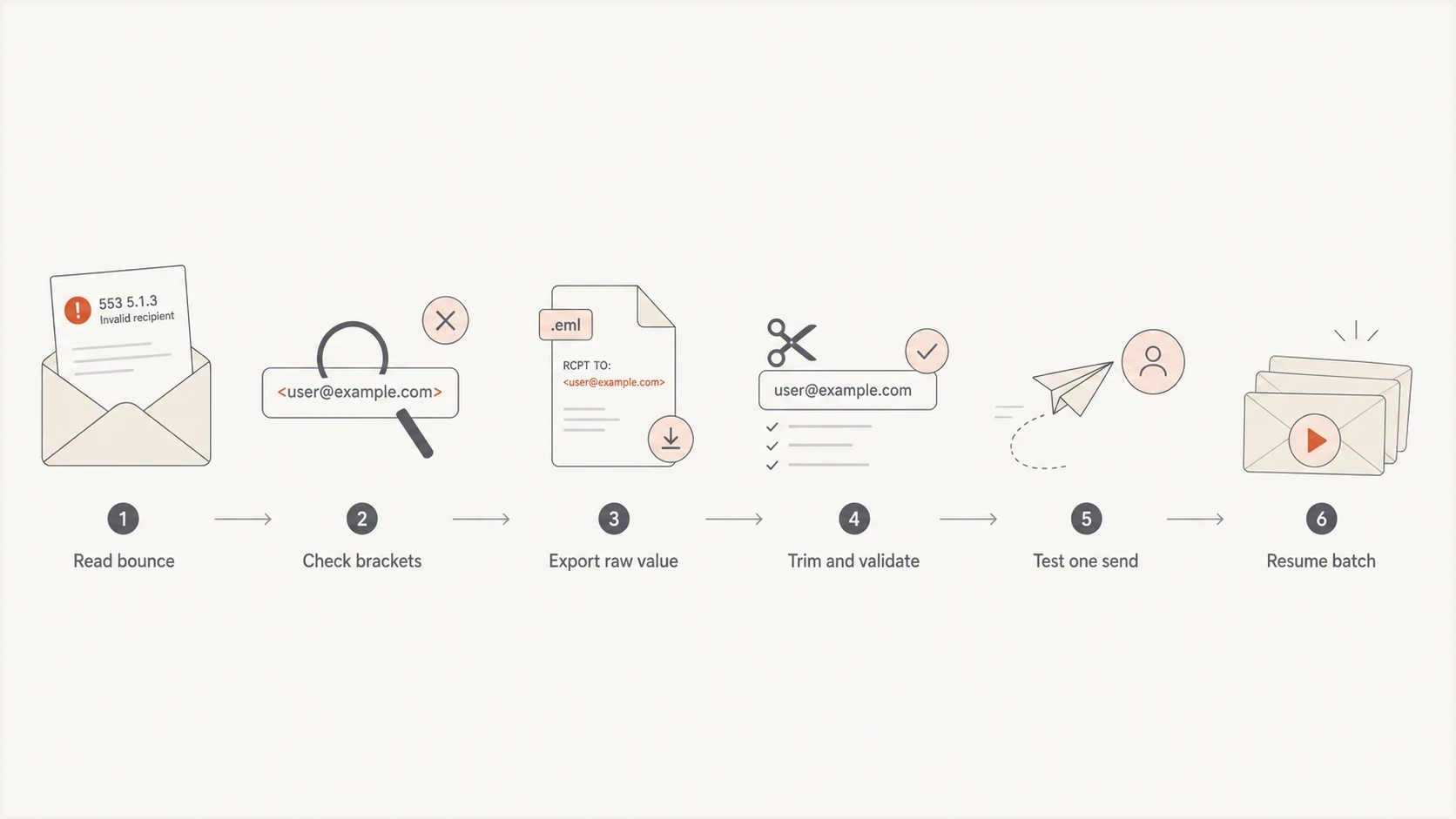
A flowchart for triaging Gmail 553 5.1.3 invalid recipient address bounces.
Use a decision path when the bounce volume is high and several teams are involved. The key is to separate evidence from assumptions: the sender application owns stored data and payload construction, the ESP owns the SMTP handoff, and Gmail owns the rejection response.
- If brackets show spaces: Treat it as malformed recipient data and clean the source.
- If raw data is clean: Inspect template merge logic, API mapping, and ESP recipient handling.
- If only Gmail rejects: Keep the fix focused on standards compliance, not receiver workarounds.
- If no spaces exist: Check non-printing characters, malformed domains, and empty merge values.
A true Gmail-wide issue would show up across clean recipient addresses and many unrelated senders. A bounce that includes a visibly malformed recipient inside angle brackets points back to the sender path. Previous delivery only proves that an earlier SMTP attempt used an acceptable envelope value. The stored value, send path, or serializer can differ on the failed attempt.
Views from the trenches
Best practices
Wrap logged addresses in visible delimiters so leading and trailing spaces are obvious.
Trim at capture and at send time, then reject values that still fail envelope validation.
Keep a bounce reason dashboard that separates syntax errors from mailbox and policy bounces.
Ask the ESP for raw envelope evidence before changing DNS, IP routing, or authentication.
Common pitfalls
Treating a visible UI address as raw truth hides whitespace that the SMTP server still sees.
Retrying invalid recipient bounces creates noise and delays the required source data fix.
Blaming Gmail first slows response when the bounce text already shows a malformed address.
Cleaning only the export leaves the same bad value in the database for the next send.
Expert tips
Reproduce one failing address manually to confirm whether Gmail rejects the same RCPT value.
Check display names separately, since quote and encoding faults produce different failures.
Log the recipient value immediately before the ESP API call, not only after list import.
Keep permanent validation in every write path because contacts enter systems many ways.
Expert from Email Geeks says Gmail rejects a recipient when a leading space is placed inside the SMTP angle brackets, so the raw stored address should be checked before blaming the receiver.
2021-01-14 - Email Geeks
Expert from Email Geeks says earlier delivery does not prove the current envelope value is identical, so the failed attempt should be checked at each handoff.
2021-01-14 - Email Geeks
The practical answer
Gmail is bouncing these messages because the recipient address it receives during SMTP is malformed. The most common version is a leading or trailing space inside the envelope recipient, but hidden characters, copied prefixes, stray quotes, and broken merge data can produce the same permanent failure.
Fix the raw recipient data, add validation at every entry point, and log the exact send payload before it reaches the ESP. After that, test a clean message and keep DMARC, SPF, DKIM, and reputation monitoring in place so syntax fixes do not mask other delivery problems.




