Why is Gmail bouncing my emails with RFC5322 errors when Outlook accepts them?

Updated on 27 Jul 2026: We updated this guide with Gmail's current duplicate-header checks, wire-format validation steps, and a clearer split between RFC 5322 syntax and authentication errors.
Gmail is bouncing the email because its inbound parser found a message-format problem under RFC 5322. Outlook accepting the same message does not prove the message is valid. It proves Outlook tolerated that defect. Treat the Gmail bounce as the source of truth until the raw MIME proves otherwise.
The usual cause is malformed headers: duplicate single-instance fields, a missing or duplicated Message-ID, broken address syntax, invalid line folding, Unicode in a disallowed header field, malformed encoded-word syntax, or a generator that lets both the application and the mail transfer agent add the same header.
The fix is to inspect the exact raw message your application sends, not the cleaned-up copy that Outlook displays. If the bounce says RFC5322 or RFC 5322, start with the headers before changing SPF, DKIM, DMARC, or sending IPs.
Why Gmail rejects what Outlook accepts
Gmail and Outlook do not apply the same tolerance to malformed messages. RFC 5322 defines the structure of an internet message: header fields, address syntax, line folding, and the blank line that separates headers from the body. For the defects named in an RFC 5322 bounce, Gmail rejects the message during SMTP acceptance while Outlook can accept and display the same message.
That difference matters because many teams validate the wrong copy of the message. A message that looks normal in Outlook has already passed through Microsoft infrastructure and mailbox rendering. By that point, extra trace headers have been added and the original source is harder to see. The useful artifacts are the raw message before Gmail receives it and the exact bounce text Gmail returned.
Outlook acceptance
- Parser: Can accept messages with minor header defects so users still receive mail.
- Evidence: Delivery proves the message was tolerated, not that the message is valid.
- Risk: The displayed message includes extra headers added after your system sent it.
Gmail rejection
- Parser: Rejects messages when its format checks fail during SMTP acceptance.
- Evidence: The bounce points to the class of defect Gmail found in the raw message.
- Fix: Repair message construction before investigating reputation or policy.
Google documents Gmail SMTP response classes in Gmail SMTP errors. Keep that reference nearby, but do not stop at the error code. The error code tells you where to look. The raw header source tells you what to change.
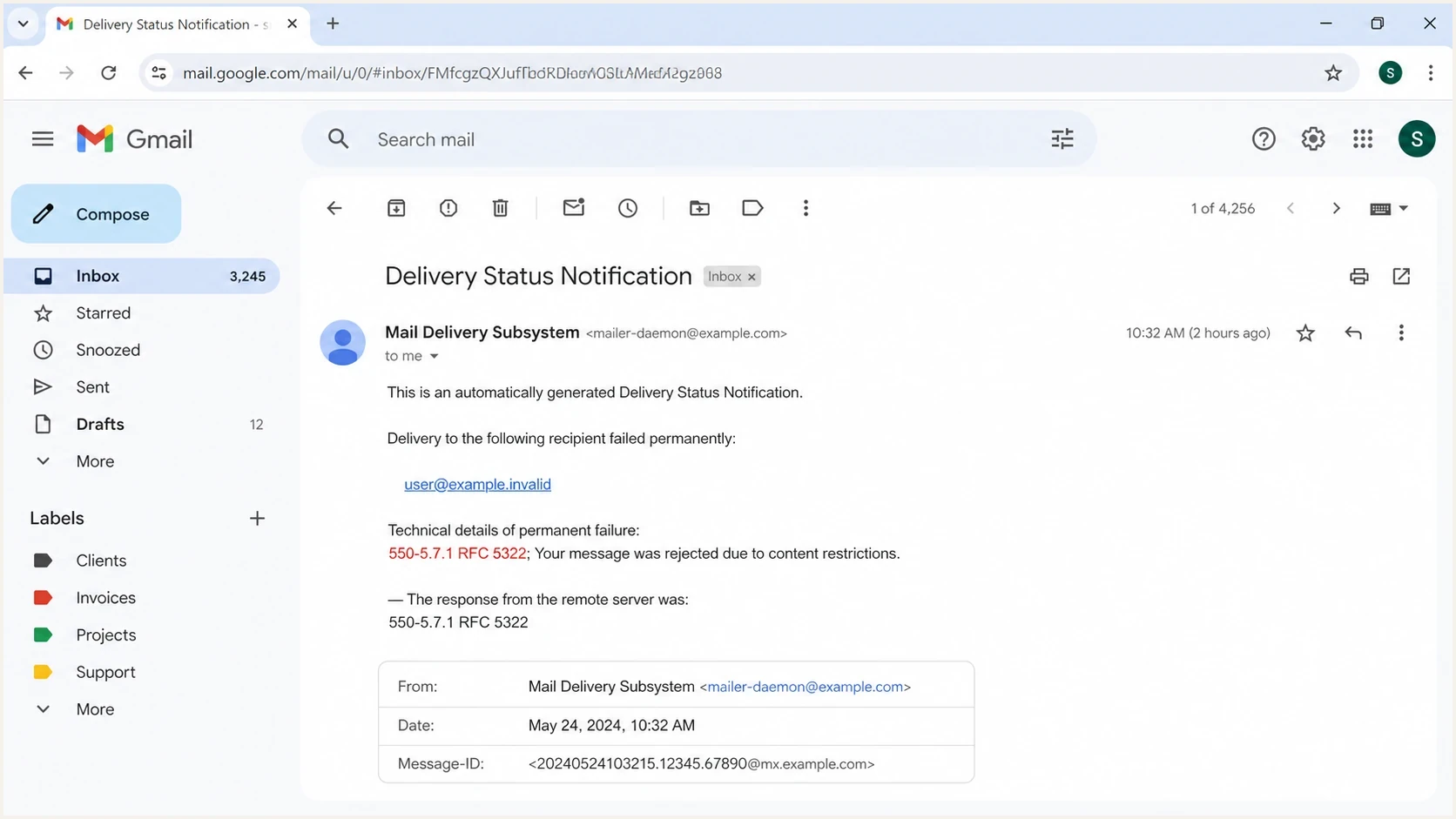
Gmail 550 5.7.1 bounce notification for an RFC 5322 header error.
Headers to inspect first
When Gmail returns an RFC5322 bounce, start with headers that must appear once or no more than once, then check address syntax and line folding. Gmail's duplicate-header checks include To, Cc, Subject, Date, From, Sender, Reply-To, Bcc, Message-ID, In-Reply-To, and References. Duplicate headers are easy to miss because many clients show a friendly summary instead of the actual header block.
|
|
|
|---|---|---|
Date | One | Missing or duplicate |
From | One | Missing, duplicate, or malformed |
Sender | Zero or one | Duplicate or wrong originator |
Reply-To | Zero or one | Duplicate or bad list syntax |
To, Cc, Bcc | Zero or one each | Repeated field or broken commas |
Message-ID | One for Gmail | Missing, duplicate, or invalid |
In-Reply-To | Zero or one | Duplicate field |
References | Zero or one | Duplicate field |
Subject | Zero or one | Duplicate field |
Separate required Gmail fields from optional fields that must appear no more than once.
This duplicate-header pattern causes many Gmail rejections. It is easy to create when an application sets a Message-ID and a downstream relay adds another one.
Malformed duplicate header exampletext
From: Acme Alerts <alerts@example.com>
Date: Thu, 21 May 2026 10:15:00 +0000
Message-ID: <abc123@example.com>
Message-ID: <def456@mailer.example>
Subject: Invoice ready

Body starts here.
The fixed version has one owner for each single-instance header. If your application owns Message-ID, stop the relay from generating one. If the relay owns it, remove the application header.
Corrected header exampletext
From: Acme Alerts <alerts@example.com>
Date: Thu, 21 May 2026 10:15:00 +0000
Message-ID: <abc123@example.com>
Subject: Invoice ready

Body starts here.
Validate the source, not the rendered email
- Raw MIME: Capture the message before it leaves your sending application or relay.
- Displayed view: Do not trust the header summary shown inside Outlook or another mailbox.
- Exact bounce: Keep the complete SMTP response because it narrows the failure quickly.
- Wire format: Verify CRLF endings, valid folding, one blank separator line, and no line longer than 998 characters.
- Related case: A Gmail duplicate headers bounce needs the same first check.
How to troubleshoot the bounce
Use a narrow process because RFC5322 bounces can look like deliverability failures when they are message-construction failures. Changing DNS, warming IPs, or asking recipients to allowlist the sender wastes time until the header defect is fixed.
- Capture: Save the raw MIME generated by the same code path that sent the bounced message.
- Compare: Send one test to Gmail and one to Outlook, then compare the pre-SMTP source, not the mailbox display.
- Count: Search for repeated Date, From, Sender, Reply-To, Message-ID, Subject, To, Cc, Bcc, In-Reply-To, and References fields.
- Parse: Check each address, encoded word, folded line, and the blank line between the header section and body.
- Trace: Compare captures after each relay or gateway to find the hop that added or rewrote the faulty field.
- Retest: Send the corrected message to Gmail before changing DNS or reputation controls.
A practical way to get a message-level report is to send the same application-generated email through the Suped email tester. That gives you a second view of the exact message structure and authentication result, which helps separate header syntax from SPF, DKIM, and DMARC problems.
Email tester
Send a real email to this address. Suped shows a results button when the test is ready.
?/43tests passed
If the message passes header validation but still fails at Gmail, widen the scope. Use a Suped domain health check to confirm the domain has a coherent SPF, DKIM, and DMARC baseline. That does not repair malformed RFC 5322 headers, but it stops authentication noise from masking the real result.
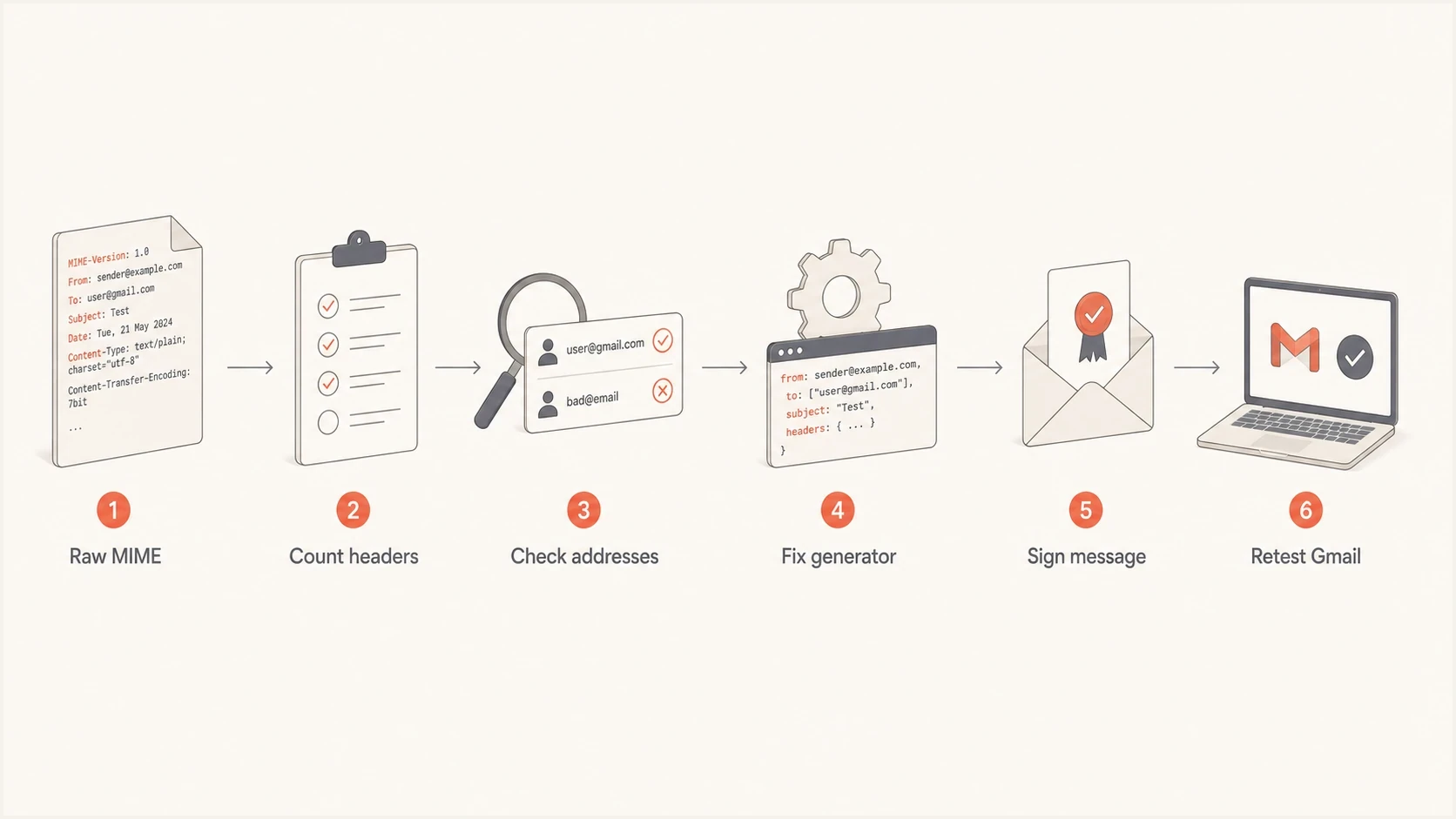
Gmail RFC 5322 bounce troubleshooting flow for raw MIME and duplicate headers.
Authentication still matters after the header fix
SPF, DKIM, and DMARC do not override a malformed message. Gmail can reject the email before reputation or DMARC policy becomes the main issue. Still, authentication matters after the syntax is clean because Gmail sender requirements depend on valid identity signals.
Do not confuse a malformed-message bounce with Gmail's 4.7.32 or 5.7.32 responses. Those responses say the RFC5322.From domain is not aligned with an authenticated SPF or DKIM domain, so they require an authentication alignment fix rather than a syntax repair.
For a format rejection, fix the RFC 5322 structure first, then confirm DKIM signing still works and check the DMARC domain match. If your relay rewrites headers after DKIM signing, the signature can fail even after the RFC5322 bounce disappears. A focused DKIM checker is useful at that stage.
Where Suped fits
Suped does not rewrite malformed messages. After the application or relay fixes the source, use Suped to review DMARC aggregate reports and verify SPF and DKIM results. Its issue steps can track the authentication remediation that remains.

Issue steps to fix dialog showing the issue overview, tailored fix steps, and verification action
For ongoing policy work, Suped DMARC monitoring shows which sources are authenticated and which sources need remediation. That work is separate from RFC 5322 syntax, but it becomes important once Gmail accepts the message again.
For more detail on Gmail-specific formatting expectations, keep a checklist based on RFC 5322 formatting and use it in release testing for any system that generates email.
Common bounce patterns and what they mean
Gmail bounce wording varies, but the response often gives enough direction to avoid random fixes. Group the errors by the part of the message Gmail names. A 550 5.7.1 response is a permanent rejection for that message attempt, so retrying the unchanged message does not repair it.
Typical Gmail RFC 5322 bounce wordingtext
550-5.7.1 This message is not RFC 5322 compliant.
550-5.7.1 The message contains duplicate headers.
550-5.7.1 The message is missing a valid Message-ID header.
550-5.7.1 The From header is missing or malformed.
|
|
|
|---|---|---|
RFC 5322 | Header syntax | Repair generator |
Duplicate | Single-instance fields | Choose one owner |
Message-ID | Presence and syntax | Generate one valid ID |
From missing | From field | Add one valid mailbox |
Malformed address | Mailbox syntax | Fix address or display name |
Encoded-word | Header name and value | Move or encode Unicode correctly |
Line or folding | CRLF and line length | Fold below 998 characters |
Use the wording to choose the first technical check.
If your error is less specific, work through broader RFC troubleshooting rather than changing one setting at a time. Gmail's public Gmail bounce help is also useful when the rejection text is generic.
Views from the trenches
Best practices
Capture the raw MIME before Outlook or forwarding systems rewrite headers or add trace data.
Keep single-instance headers single and let one system own Message-ID, Date, and From.
Retest with Gmail after every generator change, because tolerant inboxes hide syntax faults.
Common pitfalls
Using Outlook delivery as proof of validity leads teams away from the malformed header.
Patching DKIM or DMARC first wastes time when the SMTP rejection cites RFC 5322.
Fixing only the visible sender misses duplicate fields injected by templates or MTAs.
Expert tips
Store the generated RFC 5322 source beside test results so regressions are easier to compare.
Make header validation part of release checks for every system that composes mail directly.
Route formatter errors to engineering, because deliverability teams cannot fix bad MIME alone.
Marketer from Email Geeks says Gmail's RFC 5322 bounce should be trusted because Outlook can accept malformed messages.
2022-09-22 - Email Geeks
Marketer from Email Geeks says duplicate headers are a common cause because RFC 5322 allows several common fields only once.
2022-09-23 - Email Geeks
What to fix first
When Gmail bounces a message for RFC5322 errors and Outlook accepts it, fix the message format first. Do not treat Outlook delivery as a pass. Pull the raw MIME, count single-instance headers, verify address syntax, inspect line endings and folding, then retest with Gmail.
After Gmail accepts the corrected message, return to authentication and reputation checks. Suped's DMARC reporting shows which sending sources pass authentication and where SPF or DKIM needs remediation. Investigate blocklist (blacklist) alerts separately when the bounce or delivery data points to reputation.