Why am I getting a 5.7.1 delivery not authorized error in Gmail due to duplicate headers?

Published 17 Apr 2025
Updated 26 Jul 2026
10 min read
Summarize with
Updated on 26 Jul 2026: We updated this guide with Google's complete duplicate-header list and a safer raw-header check, then clarified the post-fix authentication workflow.
You are getting a Gmail 5.7.1 "delivery not authorized" error because Gmail found duplicate message headers that are not valid under RFC 5322. This is a message-format rejection, not a reputation rejection. A domain with strong reputation, clean IP history, and passing authentication can still bounce if the raw message contains two To fields, two Date fields, two Message-ID fields, or another duplicated field Gmail treats as single-instance.
The fix is to capture the original raw message, count the headers before Gmail receives it, then remove the second copy at the application, SMTP library, mail merge, forwarding, or MTA rewrite layer that added it. Treat this error as a construction bug until the raw headers prove otherwise.
Fast answer
- Root cause: Gmail rejected the message because one header that should appear once appeared more than once.
- Headers Gmail checks: Review To, Cc, Subject, Date, From, Sender, Reply-To, Bcc, Message-ID, In-Reply-To, and References.
- First fix: Change the sender code so it writes one field with all intended values, not repeated fields.
- Do not chase reputation: Blocklist (blacklist) status and IP reputation are secondary when the bounce names duplicate headers.
Why Gmail rejects this even with good reputation
Gmail uses 5.7.1 for policy and authorization rejections. In this case the policy reason is explicit: the message is not RFC 5322 compliant because Gmail detected duplicate headers. Google's current duplicate-header guidance says Gmail blocks delivery and returns a bounce when it detects duplicate headers. The diagnostic text in the bounce identifies this format problem.
A high-reputation IP does not grant an exception to message syntax. Gmail's inbound systems still parse the header block before delivery. If the parser sees duplicate fields that attackers can abuse to confuse display, routing, or DKIM validation, Gmail blocks the message before normal inbox placement decisions matter.
Gmail has rejected incoming messages with duplicate headers by default since April 2024. Other mailbox providers can still accept the same message, including cases involving duplicate To headers. Acceptance elsewhere does not prove the message is valid. It only proves another receiver tolerated the defect.
|
|
|
|---|---|---|
To | No | Combine recipients into one field. |
Cc | No | Combine copied recipients into one field. |
Subject | No | Remove duplicate template output. |
Date | No | Let one system stamp the date. |
From | No | Keep one field with one mailbox for Gmail. |
Sender | No | Let one system identify the transmitting agent. |
Reply-To | No | Use one field with the intended reply route. |
Bcc | No | Keep blind-copy recipients in one field. |
Message-ID | No | Generate one stable ID. |
In-Reply-To | No | Keep parent message IDs in one field. |
References | No | Keep the thread's message IDs in one field. |
Received | Yes | Leave trace fields intact. |
The fields Gmail checks for duplicates, plus Received as a legitimate repeated trace field.
What duplicate headers mean
An email message starts with a header block, followed by a blank line, followed by the body. Each header field has a field name, a colon, and a value. Header names are case-insensitive, so To and to count as the same field. Folded continuation lines begin with a space or tab and belong to the previous header, so do not count them as a new header.
The mistake is usually simple: a program writes one recipient header, then another layer writes the same field again. The sender expected two recipients; Gmail sees two separate header fields. The valid form is one To header with multiple addresses inside it.
Duplicate header exampletext
From: Sales <sales@example.com>
To: customer@example.net
To: backup@example.net
Subject: Receipt
Date: Tue, 19 May 2026 10:24:00 +0000
Message-ID: <abc123@example.com>
Fixed header exampletext
From: Sales <sales@example.com>
To: customer@example.net, backup@example.net
Subject: Receipt
Date: Tue, 19 May 2026 10:24:00 +0000
Message-ID: <abc123@example.com>
Check Message-ID early because generated systems sometimes omit it, duplicate it, or rewrite it during queue processing. A related failure path is Gmail's missing Message-ID error, which has a different bounce string but the same basic lesson: validate the raw message before tuning authentication.
Header count check
Most identity, destination, and threading fields should appear once in one message header block.
Clean checked header
1
Expected for the 11 fields Gmail checks for duplicate instances.
Duplicate checked header
2+
Gmail can reject the message before inbox placement logic runs.
Trace header
many
Received fields repeat because every hop adds one trace field.
The common places the duplicate header starts
The fastest fix comes from finding the component that creates the second field. Do not start by changing DNS. SPF, DKIM, and DMARC can pass perfectly while the message itself stays malformed.
- App layer: A notification job sets a header manually, then the framework sets the same header automatically.
- Template merge: A mail merge or CRM export includes a header line inside a template that already has headers.
- SMTP library: The code mixes envelope recipients with visible recipients and writes the visible header twice.
- Forwarding layer: A helpdesk, alias, or relay preserves the original header and adds a new one.
- MTA rewrite: An MTA or gateway rule adds Date, From, or Message-ID after the app already set it.
- Friendly From: Unquoted commas, quotes, or non-ASCII characters in the display name expose broken header building.
The Friendly From point matters because Gmail often reports the first strict parsing failure it hits. A badly quoted display name is not the same as a duplicate header, but it is worth checking when the raw source looks messy around From, Sender, or Reply-To.
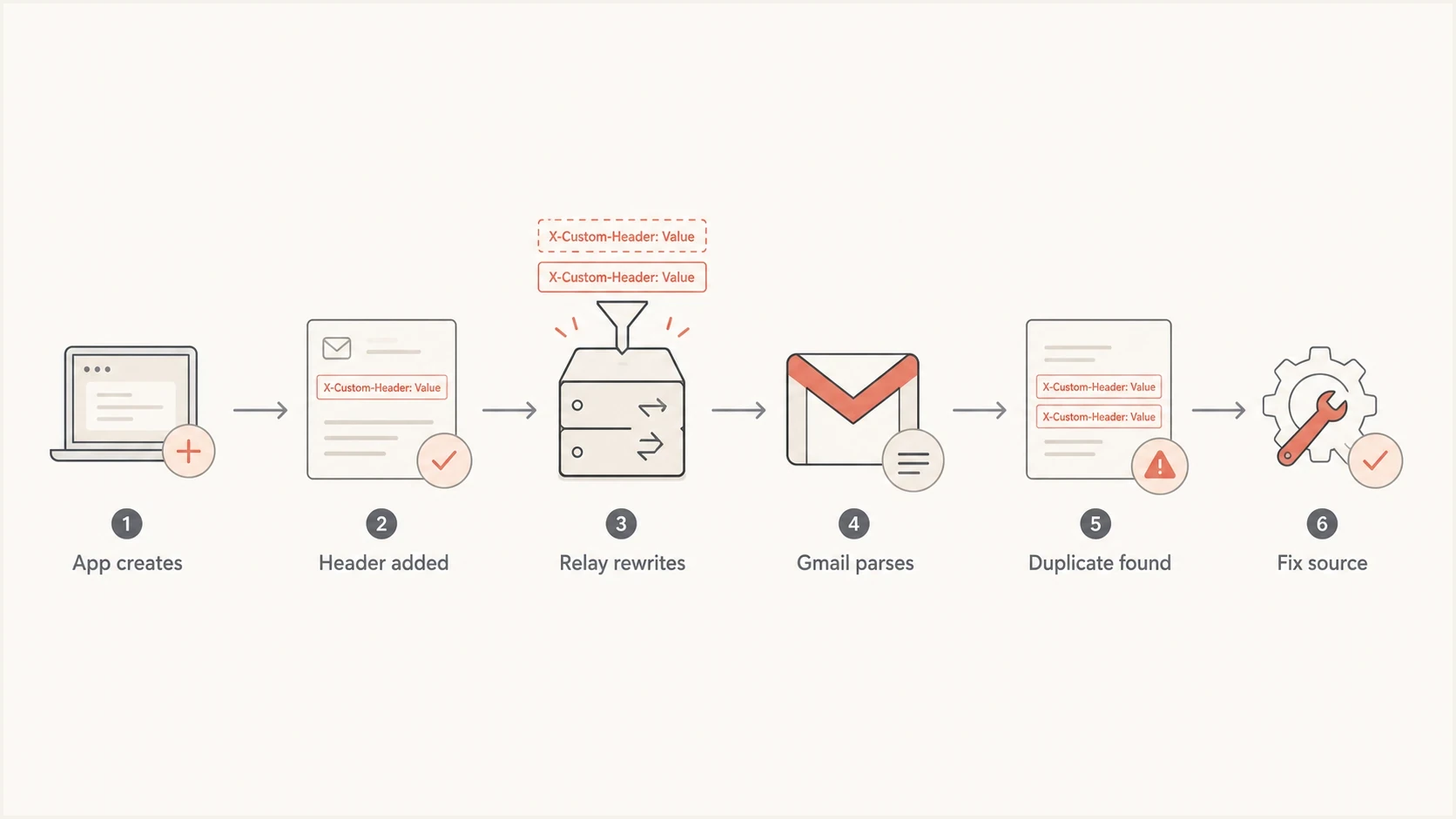
Flowchart tracing duplicate email headers through a sender and relay to Gmail.
How to find the exact bad header
Start with the raw EML that was submitted to the first outbound server. Do not rely on a forwarded copy, because forwarding adds new trace fields and changes context. If you only have the bounce, reproduce the send to a mailbox you control and export the original source before any support tool rewrites it.
Send the same message through an email tester when you need a clean report that separates syntax findings from SPF, DKIM, and DMARC findings. A real test message is better than guessing from application settings.
Email tester
Send a real email to this address. Suped shows a results button when the test is ready.
?/43tests passed
Once you have the raw message, count only top-level header lines above the first blank line. Ignore continuation lines that begin with a space or tab. The command below stops at the header-body boundary, normalizes field-name case, and prints only fields that appear more than once.
Duplicate header count commandbash
awk '
/^\r?$/ { exit }
/^[A-Za-z0-9-]+:/ {
  name=$0
  sub(/:.*/, "", name)
  count[tolower(name)]++
}
END {
  for (name in count)
    if (count[name] > 1) print count[name], name
}' message.eml
- Capture first: Save the raw message as submitted to the outbound server, not a forwarded diagnostic copy.
- Count fields: Look for duplicate single-instance fields before checking DNS or reputation.
- Trace hops: Compare the message after the app, after the relay, and after any gateway rewrite.
- Retest Gmail: Send a minimal version through the same route before turning templates back on.
How to fix it at the source
Fix the component that created the second header. Removing a header later in the path is weaker because it leaves the sender system capable of creating bad mail again. It also hides evidence during the next incident.
Wrong fix
- Gateway stripping: A relay deletes the second header without correcting the sender.
- DNS changes: SPF or DKIM records are changed even though Gmail named an RFC error.
- Blind retry: The same malformed message is sent again and hits the same Gmail block.
Right fix
- Single writer: Choose one system to set each single-instance header.
- One field: Put multiple recipients inside one To or Cc field.
- Minimal retest: Send a plain message through the same route before reusing the full template.
If the failure only happens with Gmail while other recipients accept the same campaign, keep the focus on RFC compliance. The same practical workflow applies to broader RFC5322 errors: inspect the raw message, isolate the generating system, and retest with the smallest reproducible example.
Do not strip headers blindly
A gateway rule that deletes the second copy can get mail moving, but it is a workaround. Keep it temporary, log every deletion, and fix the upstream sender that generated the duplicate field.
- Risk: The wrong copy gets removed and the displayed message changes.
- Evidence: The original defect disappears from logs before engineering can reproduce it.
- Scope: A broad deletion rule can damage legitimate trace or resent fields.
Where Suped fits in the workflow
DMARC does not fix duplicate headers. It tells receiving systems whether the authenticated domain in the message matches the visible sender domain. Fix the RFC 5322 syntax first, then check authentication to confirm the sending path is still clean.
Suped's product supports this follow-up work through DMARC reporting, authentication checks, sender issue detection, blocklist (blacklist) monitoring, and real-time alerts. After the syntax fix, use the DMARC source data to confirm the corrected route is sending, then watch for authentication failures after the sender code or relay change.
For a quick domain-level pass, run a domain health check. For ongoing source visibility, set up DMARC monitoring. If the same send route signs mail after the header fix, validate the selector with a DKIM checker before scaling the send volume back up.

Email tester sample report showing total score, email preview, issue summary, and per-section results
After the syntax fix
- Retest headers: Confirm each single-instance field appears once in the raw message.
- Retest authentication: Verify SPF, DKIM, and DMARC after any sender code or relay change.
- Watch sources: Use DMARC reports to confirm the fixed route is the route being used.
- Set alerts: Trigger notifications when failures spike after a template or relay release.
Views from the trenches
Best practices
Capture the raw EML before any helpdesk or forwarding system rewrites the message headers.
Count core headers at each hop so the exact system adding the second field is clear to fix.
Keep recipient lists inside one To field unless the sending library documents another pattern.
Common pitfalls
Fixing SPF or DKIM first wastes time when Gmail already named duplicate headers in the bounce.
Forwarded test copies hide the original header block and send teams to the wrong system.
Friendly From characters get ignored even though they often expose broken header building.
Expert tips
Test one minimal message through the same route before re-enabling templates or merges.
Treat To, From, Subject, Date, and Message-ID as single-instance fields in checks.
Compare a rejected Gmail copy with an accepted copy to isolate generation differences.
Marketer from Email Geeks says Gmail's duplicate header rejection means the message structure is invalid, even when sender reputation is strong.
2022-08-25 - Email Geeks
Marketer from Email Geeks says core headers such as To, From, Subject, Date, and Message-ID should be checked before reputation work.
2022-08-25 - Email Geeks
The practical takeaway
A Gmail 5.7.1 "delivery not authorized" bounce that says "duplicate headers" means Gmail rejected the structure of the message. The answer is to fix the raw header block, not to warm the IP, change SPF, or ask Gmail to trust the sender.
Find the duplicate field, fix the component that wrote it, send a minimal test through the same path, then validate authentication and monitoring after the fix. That sequence avoids wasted reputation work and gives the team a clear proof that the next Gmail attempt is syntactically valid.




