Why are my Gmail emails bouncing with a 'missing Message-ID' error?

Updated on 9 Aug 2026: We added Gmail's duplicate-header checks and tightened the steps for tracing malformed Message-ID values through the sending path.
Gmail is bouncing the message because the final email it received either has no Message-ID header or the header is syntactically invalid under RFC 5322. The error text can say missing even when the header exists, because Gmail is treating an invalid Message-ID as not valid enough to accept.
A frequent cause is a generator that puts illegal characters in the identifier. A colon in the id-left is a classic example. A Message-ID is not a DMARC identifier, and its domain does not need to match the sender domain, return-path domain, DKIM signing domain, or visible From domain. The domain side mainly helps the generator guarantee global uniqueness.
If some messages in the same campaign are accepted and others bounce, that does not prove the header is valid or that Gmail received identical messages. Compare the final raw headers across templates, application paths, MTA nodes, and gateways. Fix the header generator or rewriting step, then test the exact message that leaves your MTA.
What the Gmail error means
The bounce usually appears after Gmail receives the DATA portion of the SMTP conversation. That timing matters. Gmail has accepted the envelope, read the message content, parsed the headers, and then rejected the message because a header failed a rule it enforces. Google's sender guidelines require every message to include a valid Message-ID and follow RFC 5322 formatting.
Typical Gmail bouncetext
550-5.7.1 Messages missing a valid Message-ID header are not accepted.
550-5.7.1 Review RFC 5322 specifications.
550 5.7.1 gsmtp
Treat this as a message construction defect, not a recipient problem. Do not suppress the Gmail recipient as invalid just because the bounce is a hard 550 5.7.1. The mailbox can be real, and the same recipient can accept a corrected message later.
- Header failure: Gmail is objecting to the message headers, not necessarily SPF, DKIM, content, or list reputation.
- End of DATA: The rejection happens after Gmail has enough of the message to evaluate the RFC 5322 structure.
- Bounce handling: Classify it as a send-side fix, then retry only after the generator has produced a compliant header.
- Related checks: Use Gmail SMTP codes to confirm the status family and wording.
Do not chase domain matching first
The Message-ID domain does not need to match your From domain. If the identifier is malformed, matching the domain will not fix the bounce. If the identifier is valid, a different domain on the right side is not a Gmail rejection reason by itself.
What a valid Message-ID needs
A valid Message-ID field contains one unique identifier inside angle brackets. It looks similar to an email address, but RFC 5322 gives it tighter generation rules. The left side is the id-left, the right side is the id-right, and the whole value must be globally unique.
|
|
|
|---|---|---|
Header field | Exactly one | Missing, blank, or duplicate |
Brackets | One matching pair | Missing or extra |
Left side | Dot-atom text | Colon or internal space |
Right side | Controlled domain | Invalid domain text |
Uniqueness | Every message | Identifier reuse |
Compact validity checklist for Message-ID headers.
Invalid and valid examplestext
Invalid:
Message-ID: <app.EMAIL:22f945a8:059d606f@mta.example.net>

Valid:
Message-ID: <app.EMAIL.22f945a8.059d606f@mta.example.net>
The invalid example fails because the left side contains colons. Replacing those colons with dots or another allowed separator fixes the syntax without forcing the right side to use the customer sending domain. A blank value, more than one identifier in the field, or duplicate Message-ID fields also fail the one-field, one-identifier requirement.
Safe generator pattern
- Unique data: Use a UUID or unique queue id, or combine time with a random or sequential value that prevents collisions.
- Allowed separator: Use dots or hyphens instead of colons, spaces, or angle brackets inside the value.
- Owned domain: Use a domain controlled by the system that creates the identifier.
- Final check: Validate the exact header after templating, MTA processing, and gateway handling.
Risky generator pattern
- User input: Letting a customer system pass through arbitrary text creates syntax risk.
- Colon chains: Values copied from internal routing ids often include characters Gmail rejects.
- Internal folding: Whitespace inserted inside the angle brackets changes the identifier Gmail parses.
- Log only: Keeping only bounce logs makes it hard to prove what Gmail received.
Check for duplicate and rewritten Message-ID headers
Gmail also rejects duplicate Message-ID fields as an RFC 5322 compliance failure. An application can create a valid identifier before a relay, gateway, forwarding rule, or custom header routine adds a second field. Inspect the final outbound copy, not only the source template.
Duplicate and single-header examplestext
Invalid duplicate fields:
Message-ID: <20260809.101500.78123@app.example.net>
Message-ID: <relay.99812@mta.example.net>

Valid single field:
Message-ID: <20260809.101500.78123@mta.example.net>
- Find the first writer: Record whether the application, library, or MTA creates the original field.
- Trace every handoff: Compare the raw header before and after relays, gateways, and forwarding rules.
- Stop the second writer: Configure downstream systems to preserve an existing valid field instead of adding another.
- Validate the final copy: Confirm that exactly one non-empty, syntactically valid field reaches the outbound SMTP connection.
How to prove the exact cause
The fastest path is to inspect the message after every system that can change headers. Capture the generated message, the message accepted by the outbound MTA, and the message received by a controlled inbox or testing address. If those differ, the defect is in the handoff.
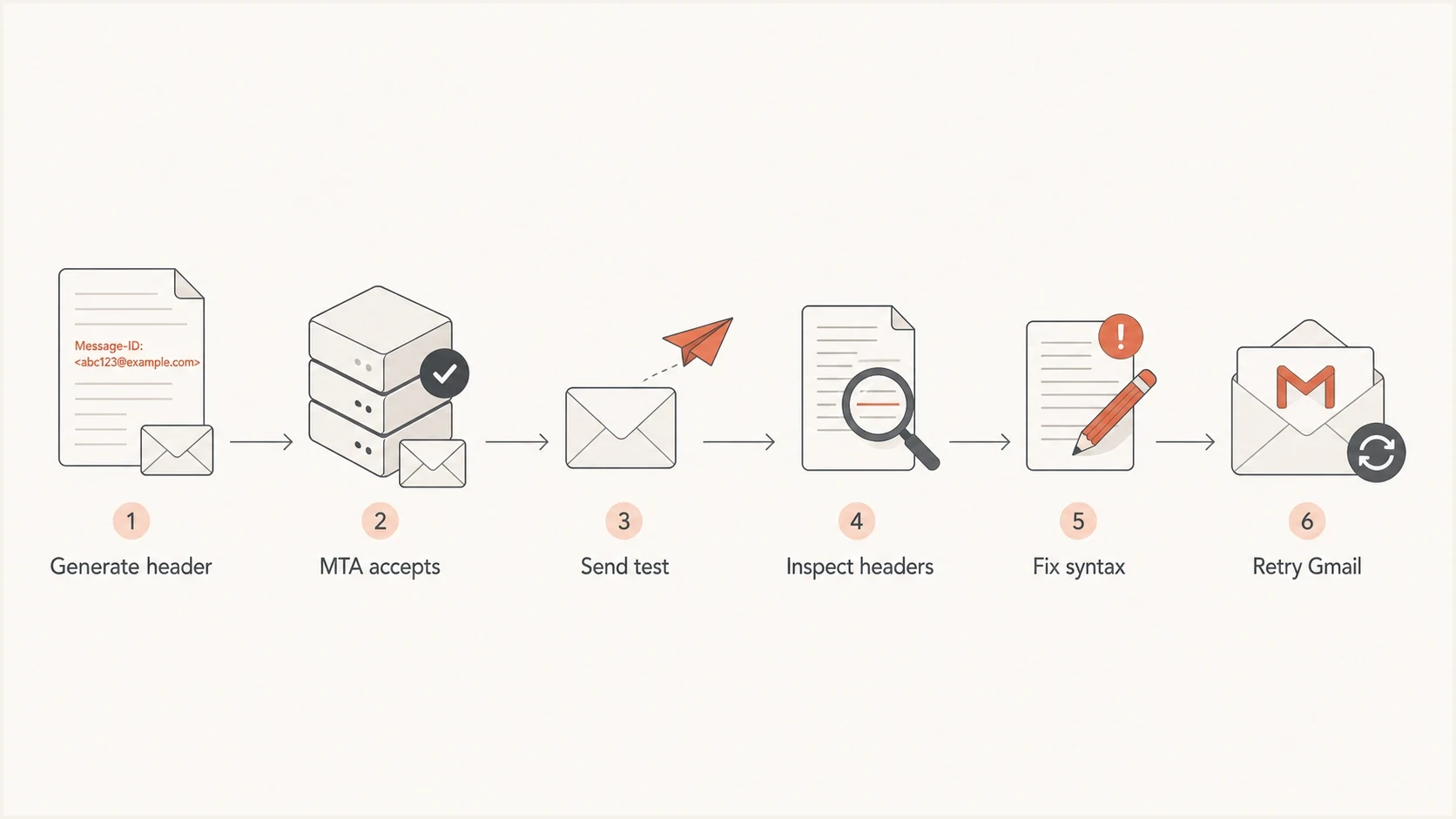
Gmail Message-ID bounce troubleshooting flow from generation through retry.
A single later test that reaches Gmail does not clear the original campaign. A generator can work for some templates and fail for others, or a platform can deploy a fix between the failed send and the test. Capture the exact raw message from the failing window and compare it with an accepted sample.
- Preserve raw headers: Store the full header block for a sampled set of accepted and rejected messages.
- Log both ids: Compare the id supplied by the application with the id emitted by the MTA.
- Group bounces: Cluster by template, client integration, MTA node, Gmail MX host, and exact error string.
- Send a probe: Send a real copy to an email tester and inspect the final headers.
Email tester
Send a real email to this address. Suped shows a results button when the test is ready.
?/43tests passed
Suped's product connects this header test to the wider authentication workflow. The message header test shows whether Message-ID fails syntax or field-count checks, while Suped's domain health check checks DMARC, SPF, and DKIM around the same domain. That separation keeps an RFC header defect from being confused with an authentication failure.

Email tester sample report showing total score, email preview, issue summary, and per-section results
For ongoing operations, Suped's product groups DMARC monitoring, SPF and DKIM monitoring, hosted SPF, hosted MTA-STS, blocklist (blacklist) visibility, alerts, and fix steps in one place. A Message-ID bounce still needs a header fix, but the surrounding checks help the team detect a separate authentication issue at the same time.
Why only some Gmail messages bounce
When only part of a campaign bounces, do not assume Gmail received byte-identical messages. Different templates, application paths, MTA nodes, gateways, or forwarding routes can create different final headers. Even each valid message needs its own unique identifier, so compare structure and syntax rather than expecting the values to match.
Compare accepted and rejected raw messages first, then group the results by template, generator version, MTA node, gateway, and Gmail receiving host. A pattern tied to one receiving host can guide the investigation, but it does not prove Gmail changed enforcement. The final message source is the evidence that identifies the exact header defect.
Separate RFC failures from authentication failures
A missing or invalid From header blocks DMARC evaluation because DMARC depends on the visible From domain. An invalid Message-ID does not break DMARC, but Gmail can still reject it as non-compliant mail. For broader RFC cases, keep a separate RFC compliance guide handy for triage.
How to fix the generator
Fix the system that creates or rewrites the header. If the customer application supplies the Message-ID, give that application a strict contract. If your sending platform accepts customer-supplied headers, validate them at the boundary and either reject the submission or replace only the defective field with a compliant value you generate.
Simple safe formattext
Message-ID: <20260529.102030.queue-78123@mta.example.net>
Message-ID: <a7f2d4c1-8c91-4c39-b62a@mta.example.net>
Each line above is a separate valid pattern, not two fields to place in one message. The right side should use a domain that helps the generator guarantee uniqueness. It can be the MTA host domain, a platform mail domain, or another controlled domain. Use the customer domain only when the customer specifically wants that header presentation and the platform can still guarantee uniqueness.
- Reject bad input: Do not accept an id with colons, internal whitespace, extra brackets, or an empty value.
- Generate when absent: If the application omits the field, create one at the platform or MTA boundary.
- Prevent duplicates: Make each downstream system preserve an existing valid field instead of adding another.
- Avoid rewriting valid ids: Do not change a compliant id just to use the same domain as the sender.
- Keep evidence: Store sampled raw headers long enough to investigate receiver rejections.
- Retest Gmail: Send the same template after the fix and compare the accepted header with the old bounce sample.
Practical fix
Replace colon-separated internal ids with dot-separated or hyphen-separated values, keep the value inside one pair of angle brackets, emit exactly one Message-ID field, and use a domain controlled by the generator. That fixes the common Gmail rejection without changing SPF, DKIM, or DMARC records.
Views from the trenches
Best practices
Capture final raw headers for failed samples before rotating logs or retrying sends.
Validate customer-supplied Message-ID values at the SMTP or API boundary before accepting mail.
Use a controlled generator domain and unique left-side values for every message.
Cluster Gmail bounces by error, template, MTA node, receiver host, and generator version.
Common pitfalls
Assuming a visible Message-ID is valid when it contains illegal separator characters.
Blaming sender-domain differences when the real defect is malformed header syntax inside the id.
Keeping only bounce logs and losing the raw message Gmail evaluated during the failed send.
Treating a 550 header rejection as proof the recipient mailbox is invalid for suppression.
Expert tips
Replace colons with dots or hyphens before the message reaches the outbound MTA.
Retest the same template after the fix, not a different later campaign or clean sample.
Do not rewrite valid identifiers only to make domains look cleaner in downstream headers.
Watch for related RFC 5322 errors, especially missing or malformed From headers.
Marketer from Email Geeks says Gmail can return the missing Message-ID wording even when the header is present but invalid.
2025-08-12 - Email Geeks
Expert from Email Geeks says a colon inside the Message-ID local part is invalid and explains the rejection.
2025-08-12 - Email Geeks
The fix to make now
The direct fix is to generate a valid, globally unique Message-ID before the message leaves your system. Remove illegal characters such as colons, keep one bracketed value in exactly one field, and use a domain the generator controls for uniqueness. Do not start by changing the id domain to match the From domain, because that is not the rule Gmail is enforcing.
After the generator is fixed, resend a controlled sample to Gmail and preserve the raw accepted headers. Then review DMARC, SPF, DKIM, and blocklist (blacklist) signals separately so a second deliverability issue does not hide behind the header error. Suped's product keeps those checks in one workflow, with alerts and fix steps for teams managing many domains.




