
How to troubleshoot email delivery issues related to RFC compliance errors?

Updated on 24 Oct 2026: We added SMTP reply troubleshooting and corrected message validation advice.
Troubleshoot email delivery issues related to RFC compliance errors by separating the problem into four checks: the exact bounce, the raw message source, DNS and authentication state, and MTA behavior. For a 554 5.0.0 response that explicitly mentions failed RFC compliance, inspect malformed headers, excessive line length, bad encoding, duplicate fields, and unsupported internationalized addresses or headers. The numeric code alone does not identify a format error.
Capture the rejection and the SMTP command that triggered it, then export the raw generated email before it leaves your system. If the error concerns message format, validate RFC 5321 and RFC 5322 basics and run a controlled send that removes customer-specific content. A passing control narrows the investigation to differences between the messages; if both fail, inspect the shared sending path and the full SMTP transcript.
- Capture: store the full SMTP reply, enhanced status code, failing SMTP command, sending IP, remote MX host, queue ID, timestamp, and recipient domain.
- Inspect: review the raw generated message, not a forwarded copy or a mailbox-rendered header view.
- Validate: check required headers, duplicate fields, folding, CRLF line endings, MIME boundaries, and transfer encoding.
- Retest: send a minimal message through the same path to isolate content from infrastructure.
Send a controlled message to Suped's email tester to inspect the received headers and authentication results. Compare them with the original bounce and outbound source; a successful test at Suped does not confirm acceptance by the rejecting provider.
What the bounce means
Common RFC compliance rejectiontext
554 5.0.0 Message not accepted due to failed RFC compliance
That response says the receiving system believes the SMTP transaction or message format violates an email standard. A 554 reply indicates transaction failure, while 5.0.0 is an undefined permanent status; neither identifies malformed headers without the accompanying text. RFC 5321 covers the SMTP conversation and transport limits. RFC 5322 covers message format, including header syntax and the header/body boundary.
Another mailbox provider accepting the same mail does not prove it is valid. Some receivers repair malformed messages, some accept them, and some reject them. Yahoo can return a generic 554 response for standards failures, while Gmail publishes explicit RFC 5322 header requirements. Permission does not change the syntax requirement: opted-in bulk mail can still bounce when the generated message is malformed.
Do not skip the raw email
Preserve the full bounce text and SMTP logs alongside the raw email. Inspect the source for duplicate header fields, a missing Date header, invalid line endings, and unwrapped lines. A bare IP URL can trigger receiver policy, but it is not by itself an RFC 5322 syntax error.
- Preserve: save the original source before any help desk tool, mailbox, or forwarder rewrites it.
- Compare: diff a failing message against a passing message from the same sending platform.
- Document: record the receiver, IP, time, template, subject, and message generator version.
- Escalate: contact the receiver only after you can show the tested message source and logs.
|
|
|
|---|---|---|
554 | Transaction failed; cause varies | Full reply text and failing SMTP command |
5.0.0 | Undefined permanent status | Original diagnostic text, not the code alone |
RFC 5322 | Message format | Required fields, address syntax, and header/body separator |
RFC 5321 | SMTP transport or envelope | Command and response transcript |
Line Too Long | Physical line or encoding limit | Final serialized line lengths and transfer encoding |
NDR | Delivery status notification | Remote diagnostic and generating server |
Common RFC-related rejection clues.
Diagnose nonconformant SMTP server replies
421 4.4.0 Remote server response was not RFC conformant is different from a rejection for malformed message headers. Exchange uses this diagnostic for an invalid SMTP response, as documented in Microsoft's SMTP response reference. Inspect the reply exchanged between your sender and the remote server, including any intervening SMTP gateway.
- Enable outbound SMTP protocol logging and identify the command immediately before the invalid response, plus the remote MX host and IP.
- If failure occurs before message content is transmitted, focus on the greeting, EHLO exchange, or envelope command involved. Body changes cannot fix a reply generated before the server sees the body.
- Inspect reply framing and any SMTP proxy or firewall that rewrites responses. Compare affected MX hosts using the same sender and test conditions.
- For a 4xx deferral, keep normal queue retries while investigating. For a permanent 5xx rejection, correct the reported problem before resubmitting; repeated unchanged sends do not resolve it.
Valid multiline EHLO replytext
C: EHLO sender.example
S: 250-mail.example.net
S: 250-8BITMIME
S: 250 SIZE 52428800
C: and S: identify the client and server and are not transmitted. Each SMTP reply line ends with CRLF. In a multiline reply, continuation lines use the same code followed by a hyphen; the final line normally uses that code followed by a space. RFC 5321 defines this reply framing. A reverse DNS or banner warning by itself does not establish the cause of a response-parsing failure.
Start with the message source
Save the source your platform injected into SMTP or handed to an email API, plus the final outbound source after any relay rewrites when available. Headers shown inside Outlook, Gmail, or an admin console are often post-delivery views. A DATA-stage rejection leaves no delivered copy at that receiver, so headers from another provider do not prove what the rejecting server saw.
Check the From field early. Putting an email address into an unquoted display name creates invalid syntax because the @ character requires quoting there. Quote ASCII punctuation where required, and use MIME encoded-words for non-ASCII display names on a route without SMTPUTF8.
Display name examplestext
Bad:
From: sender@example.com <sender@example.com>

Better:
From: "Election alerts" <sender@example.com>

Encoded display name:
From: =?UTF-8?Q?Jos=C3=A9_Updates?= <sender@example.com>
Likely content issue
- Template: only one campaign, language, or personalization branch fails.
- Headers: the friendly From, subject, reply-to, or custom header changes by customer.
- Body: unwrapped HTML, long encoded lines, or characters inconsistent with the declared charset appear in the body.
- Test: a minimal message through the same sender passes the same receiver.
Likely platform issue
- MTA: all content types fail through the same outbound host or sending IP.
- DNS: SPF, DKIM, DMARC, reverse DNS, DNSSEC, or MX handling changed near the failure window.
- TLS: the receiving host reports negotiation trouble or drops sessions.
- API: the message injector builds raw MIME without a strict compliance pass.
For deeper bounce analysis, keep a separate runbook for reading enhanced status codes and provider text. Suped's article on bounce troubleshooting is useful when the error includes multiple SMTP codes or an Exchange non-delivery report. Microsoft's Microsoft NDR guide also explains how its non-delivery reports encode status details.
Check headers and MIME syntax
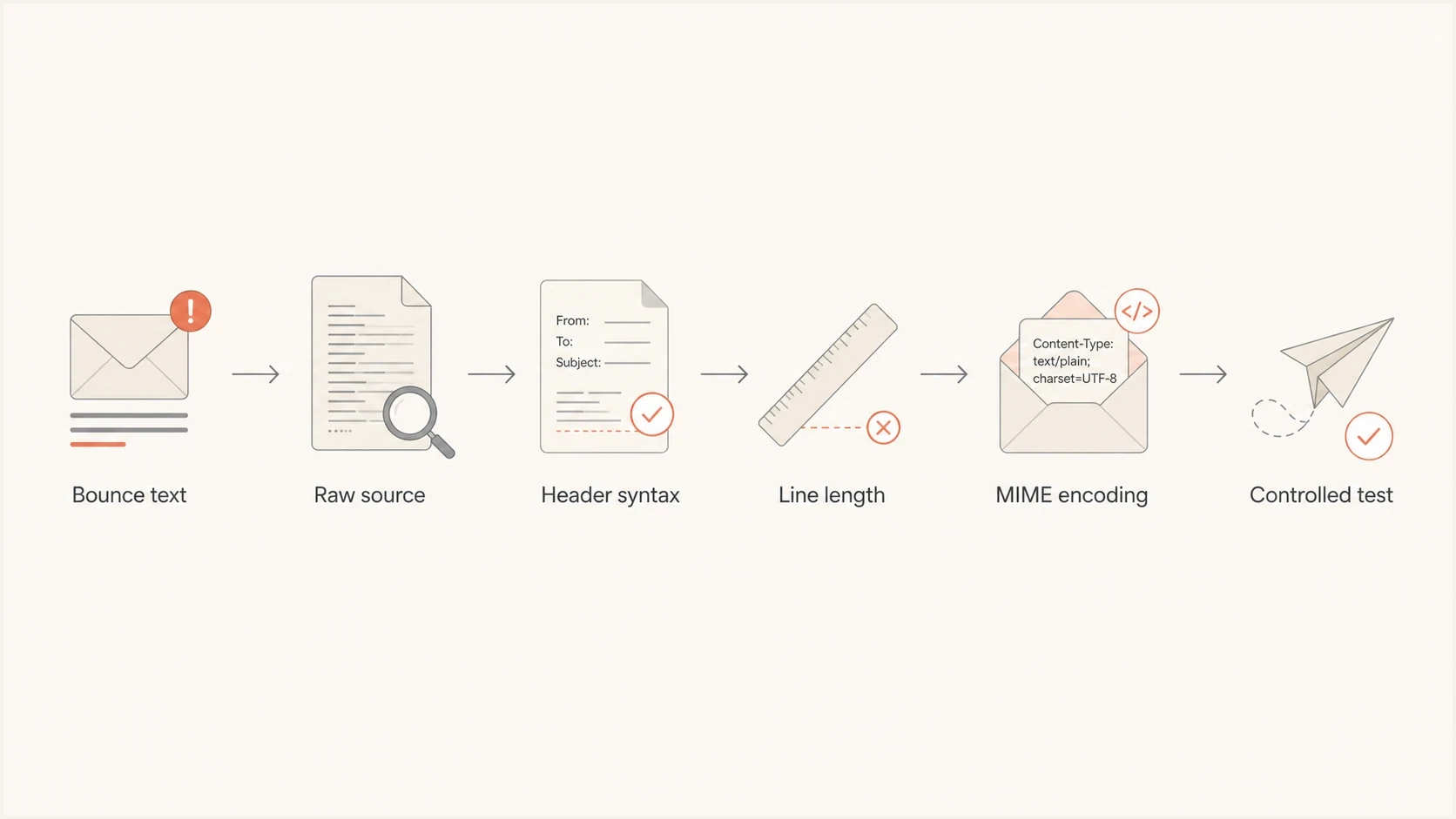
Email delivery troubleshooting flowchart: bounce text, raw source, header syntax, line length, MIME encoding, and controlled test.
Start with header syntax. RFC 5322 requires exactly one Date field and exactly one From field; a Message-ID is recommended by the RFC and required by Gmail. A From field containing multiple mailboxes requires a Sender field under RFC 5322, but use one From mailbox for broad receiver compatibility. These field-count rules are in RFC 5322; Gmail's additional requirements are in its sender guidelines.
SMTP expects CRLF line endings. For a message with a body, the header block must end with an empty line, giving a CRLF CRLF separator. A folded header continuation starts with a space or tab. A wrap without that whitespace ends the field and can leave a malformed header. Address-only validation does not check this message structure.
For receiver-specific bounces such as Docomo.ne.jp Line Too Long, inspect the final serialized message after personalization, link tracking, transfer encoding, and DKIM signing. RFC 5322 caps a line at 998 characters excluding CRLF, while RFC 5321 caps the transmitted line at 1000 octets including CRLF. For ASCII transfer-encoded output, keep each physical line to 998 octets before CRLF. Measure bytes rather than rendered width. Japanese text, minified HTML, unwrapped Base64, quoted-printable errors, and long tracking URLs are common sources.
MIME Base64 and quoted-printable body lines have a stricter 76-character limit, excluding CRLF, under RFC 2045. Use a MIME encoder to wrap attachments and HTML; quoted-printable soft breaks end with an equals sign. Confirm that each part's declared charset matches its bytes, and that multipart boundary delimiters match the declared boundary and include a closing delimiter.
Line length limits to check
Use these limits when scanning raw source for unwrapped headers, long URLs, encoded body parts, and minified HTML.
Recommended header line
78 chars
Shorter lines are easier for old and strict systems to handle.
RFC 5322 maximum
998 chars
RFC 5322 applies this limit to message lines, excluding CRLF.
SMTP transport limit
1000 octets
RFC 5321 counts the terminating CRLF in the transmitted line.
Message headers and blank-line separatortext
Date: Fri, 19 Jun 2026 10:15:00 +0000
From: "Support team" <support@example.com>
To: recipient@example.net
Message-ID: <20260619101500.abc123@example.com>
Subject: Delivery test
MIME-Version: 1.0
Content-Type: text/html; charset=UTF-8
Content-Transfer-Encoding: quoted-printable

<p>Test message.</p>
- Date: use an RFC 5322 date with a numeric timezone offset and a correct weekday if supplied. An ISO 8601 timestamp is not valid here.
- From: use one mailbox for broad receiver compatibility. Sender identifies the transmitting agent when required; it does not set the SMTP envelope bounce address.
- Duplicates: remove repeated singleton fields such as From, To, Subject, Date, and Message-ID. Multiple Received fields are expected and must be preserved.
- Encoding: use encoded-words for legacy non-ASCII display names and subjects, or raw UTF-8 headers only on an SMTPUTF8 path. Apply a supported body transfer encoding.
- MIME: verify every boundary opens, closes, and matches the declared content type.
- CRLF: serialize CRLF line endings before DKIM signing. Rewriting signed headers or body content afterward can invalidate the signature.
If Gmail is the receiver that rejects the mail, use a stricter pass over RFC 5322 formatting. Gmail often reports missing Message-ID, malformed From, or broken line endings more clearly than a generic 554 response.
Handle internationalized addresses and headers
A 554 RFC compliance error that appears only with Bengali, Arabic, Japanese, accented display names, or non-ASCII mailbox addresses points to the internationalization path. Separate body text and display names from the SMTP envelope. UTF-8 body text can travel in MIME without SMTPUTF8 when it has a suitable transfer encoding. A non-ASCII local-part or a raw UTF-8 header under RFC 6532 requires end-to-end SMTPUTF8 support.
Record the EHLO response for every relay. RFC 6531 requires a server that advertises SMTPUTF8 to advertise 8BITMIME too. The sending client must use the SMTPUTF8 parameter on MAIL FROM when the envelope or message requires it. RFC 6532 also changes the long-line ceiling for internationalized headers to 998 octets, excluding CRLF.
SMTPUTF8 capability and envelope exampletext
EHLO sender.example
250-mail.example.net
250-SMTPUTF8
250-8BITMIME
250 PIPELINING

MAIL FROM:<josé@example.com> SMTPUTF8 BODY=8BITMIME
- Scope: inspect MAIL FROM and RCPT TO separately from the visible From, To, and Subject fields.
- Capability: confirm that each relay advertises SMTPUTF8 before sending a non-ASCII local-part or raw UTF-8 header.
- Fallback: use an ASCII mailbox and encoded-words when a route lacks SMTPUTF8; Punycode changes a domain, not the local-part.
- Retest: send the same language, template branch, and recipient path that produced the rejection.
Do not assume UTF-8 support
If any SMTP hop does not advertise SMTPUTF8, do not send an internationalized envelope address or raw UTF-8 header through that hop. Changing only the body encoding does not make a non-ASCII mailbox local-part compatible.
Check DNS and authentication when the error points there
When the SMTP diagnostic points to DNS, authentication, or TLS, investigate that layer directly. SPF, DKIM, DMARC, DNSSEC, reverse DNS, and TLS do not make an RFC 5322 message malformed. They can cause separate rejections during the same incident. A malformed From field also prevents reliable DMARC evaluation, so validate that field before changing authentication policy.
Run Suped's domain health check before changing authentication DNS. It checks published SPF, DKIM, and DMARC records. Confirm the DKIM selector used by the actual message and test its authentication separately; a DNS check alone does not validate a signature or the SMTP route.
DMARC record detail view showing SPF, DKIM, DMARC, rDNS diagnostics, and DNS records
Use Suped's product to compare sending sources and authentication results with DNS diagnostics. Its DMARC monitoring helps identify sources with SPF or DKIM failures or domain-matching problems during the reported interval. Aggregate reports summarize authentication activity; they do not contain rejected MIME source or SMTP transcripts. Compare the reporting interval with bounce timestamps and use alerts to watch for authentication drift.
DNS checks that matter
- SPF: confirm the MAIL FROM domain authorizes the sending IP and the evaluated record stays within the SPF DNS lookup limit. For a null reverse-path, check the HELO identity instead.
- DKIM: look up the selector and d= domain in the DKIM-Signature header, then verify the signature against the final signed message; a published key alone does not prove a pass.
- DMARC: confirm that SPF or DKIM passes and that the domain for that passing result matches the visible From domain under the configured strict or relaxed mode. One qualifying result is sufficient.
- MX: for a non-empty MAIL FROM address, confirm its domain can receive delivery failures through MX or a working implicit A/AAAA mail route. A null MX declares that a domain accepts no mail; RFC 7505 advises against it for MAIL FROM or visible From domains. It is different from the null reverse-path used for delivery notifications.
- DNSSEC: look for validation failures on the sender domain or any include chain.
- Reverse DNS: check the sending IP has a PTR hostname whose A or AAAA record resolves back to that IP, and use an appropriate EHLO hostname. A banner mismatch alone does not prove malformed SMTP replies.
Use controlled tests to isolate the layer
Use controlled tests to narrow the failure. Compare the original message with a plain-text version that preserves the address and subject headers, a minimal message through the same sender, and the same content through a known-good path. Update Content-Type and transfer encoding when changing the body, and let the sender regenerate DKIM signatures. Keep the recipient and sending identity constant where possible, and record changes in IP or relay so the results remain interpretable.

Email tester sample report showing total score, email preview, issue summary, and per-section results
Email tester
Send a real email to this address. Suped shows a results button when the test is ready.
?/43tests passed
Test against the same receiving provider or domain. If Yahoo rejects the original, send a minimal Yahoo-bound test through the same platform. If Gmail rejects it, test Gmail. If Docomo.ne.jp reports Line Too Long, test the same localized MIME source and measure the final serialized line length in bytes. Receiver behavior differs, so a pass at one provider does not close a failure at another provider.
|
|
|
|---|---|---|
Original | Reproduces the failure; preserve the exact reply | Compare with the original incident for intermittent differences |
Plain-text variant | Check unchanged headers and the shared SMTP path | Inspect original MIME, encoding, and body differences |
Minimal, same sender | Inspect shared message generation and transport | Compare template-specific fields and serialization |
Same content, alternate path | Inspect shared content and receiver diagnostics | Compare relay rewriting, source IP, and authentication |
Test matrix for RFC compliance incidents.
Fixes that usually resolve RFC bounces
Fix the field or transport behavior identified by the evidence. Check display names generated from user input, malformed Reply-To values, overlong serialized lines, and raw non-ASCII headers sent without SMTPUTF8. Raw UTF-8 headers are valid when the route supports the required extension.
- Normalize: generate address headers with a standards-aware mail library. Reject embedded CR or LF in user-supplied names and subjects so input cannot inject another header.
- Encode: use encoded-words for legacy non-ASCII display names and subjects, or use SMTPUTF8 correctly for raw UTF-8 headers and addresses.
- Wrap: fold headers at permitted whitespace and use MIME transfer encoding to wrap body lines. Finish serialization before DKIM signing.
- Identify: assign a unique Message-ID to each new message and record when it was ready to send in Date. Preserve both during transport retries of the same message.
- Repair: fix the syntax, SMTP response, DNS, authentication, or TLS failure supported by the transcript and diagnostic text.
- Monitor: alert on authentication drift and new bounce patterns before the issue becomes widespread.
Safe From generation patterntext
Display name input: Election alerts
Mailbox input: alerts@example.com

Generated header:
From: "Election alerts" <alerts@example.com>
Add a compliance test to the release process for any system that builds raw email through an API. When an API accepts a complete raw MIME payload, validation remains the sender's responsibility unless the API explicitly rejects malformed input. Use a message parser with explicit checks for missing or duplicate fields, parser defects, and line lengths; successful parsing alone is not proof of conformance. An incoming parser accepting obsolete syntax does not make that syntax valid for newly generated mail. Test the final serialized bytes, not only the pre-render template.
Views from the trenches
Best practices
Save the raw generated message source before mailbox tools or forwards rewrite headers.
Test a minimal message through the same sender to separate content from infrastructure.
Validate CRLF, folding, line length, and MIME encoding before changing DNS records.
Give postmaster teams clear logs, sending IPs, timestamps, and sample message source.
Common pitfalls
Using Outlook or webmail headers to diagnose a message rejected before final delivery.
Assuming a pass at one mailbox provider proves the same message is valid everywhere.
Putting an email address into the friendly From field without safe quoting or parsing.
Escalating to a receiver before checking obvious header and MIME syntax failures.
Expert tips
Automate RFC checks in template preview, API injection, and pre-send QA pipelines.
Track DNSSEC and authentication changes beside bounces so incidents have context.
Keep one known-good plain text template for isolating sender path failures quickly.
Use strict libraries for message creation instead of hand-built MIME strings in production.
Expert view
Expert from Email Geeks says the first useful check is the raw headers, because many RFC bounces come down to a field that a quick source review exposes.
2022-05-30 - Email Geeks
Marketer view
Marketer from Email Geeks says a friendly From value that duplicated the sender address caused a 554 RFC compliance rejection at Yahoo.
2022-05-30 - Email Geeks
Verify the fix and prevent recurrence
Verify the repair with the original failing template, a minimal control message, and the same receiving provider. Preserve the passing raw source and SMTP transcript as a regression fixture. This keeps later incidents grounded in evidence and prevents unrelated DNS or MTA changes.
After the fix, keep raw-message validation and bounce monitoring in the release workflow. Use Suped's product for source-level authentication reports and alerts alongside your SMTP logs. A syntax-compliant message still needs receiver acceptance, and acceptance does not guarantee inbox placement. Treat blocklist (blacklist) status as a separate reputation check rather than evidence of RFC syntax compliance.




