How to format messages according to RFC 5322 for Gmail sender guidelines?

Published 8 Jul 2025
Updated 31 Jul 2026
13 min read
Summarize with
Updated on 31 Jul 2026: We added Gmail's current header-size limits and clarified how RFC 5322 formatting differs from authentication and SMTP envelope checks.
The direct answer is simple: format each outbound message as a valid Internet Message Format message under RFC 5322, then follow Gmail's stricter practical rules for single-instance headers, valid Message-ID values, one-address From fields, readable sender identity, and non-misleading content. If you use a normal email service provider, the message builder and sending engine should handle most of this. If you build mail directly, inject custom headers, or transform messages before sending, you need to test the raw message.
Treat the Gmail sender guidelines as a receiver-side acceptance checklist, not a full engineering specification. RFC 5322 defines message content and headers. The SMTP envelope and transport rules sit outside its scope. Gmail adds practical rules that it enforces through delivery decisions and bounce responses.
The important caveat is that RFC 5322 compliance rarely explains general poor inbox placement by itself. A malformed header can cause a hard rejection or a specific Gmail bounce, but broad deliverability problems usually come back to authentication, complaints, list quality, content, sending patterns, and domain or IP reputation.
The short answer
For Gmail sender guidelines, a correctly formatted RFC 5322 message needs a clean header section, a blank line, then the message body. Header field names use printable ASCII characters and a colon. Header field bodies must not contain raw line breaks except where the field is folded correctly. Physical lines must end with CRLF, not LF alone.
- Required fields: Include a valid Date field and a valid From field. Gmail also expects a valid Message-ID.
- Single copies: Do not duplicate fields such as From, To, Date, Subject, or Message-ID.
- Line handling: Keep every physical line below 998 characters excluding CRLF; aim for 78 characters where practical.
- Encoding: Encode display names and subjects only where needed. Do not encode the actual address local part or domain in a normal ASCII address.
- Gmail behavior: A malformed message can produce a rejection, while a compliant message can still land in spam if reputation or authentication is weak.
If you are not generating raw email, do not start by rewriting headers. Send a test message, inspect the raw source, and only escalate RFC 5322 problems when you see a specific bounce or malformed output. For a practical check, send a real message through the same production path and inspect it with the email tester.
What Gmail means by RFC 5322 formatting
Gmail is not asking every sender to memorize the whole RFC. It is asking senders to avoid malformed messages that break parsing, confuse identity, or look deceptive. The most common failures are duplicate headers, missing Message-ID values, incorrect line endings, oversized headers, huge physical lines, invalid dates, bad address syntax, invalid internationalized domains, and display-name tricks.
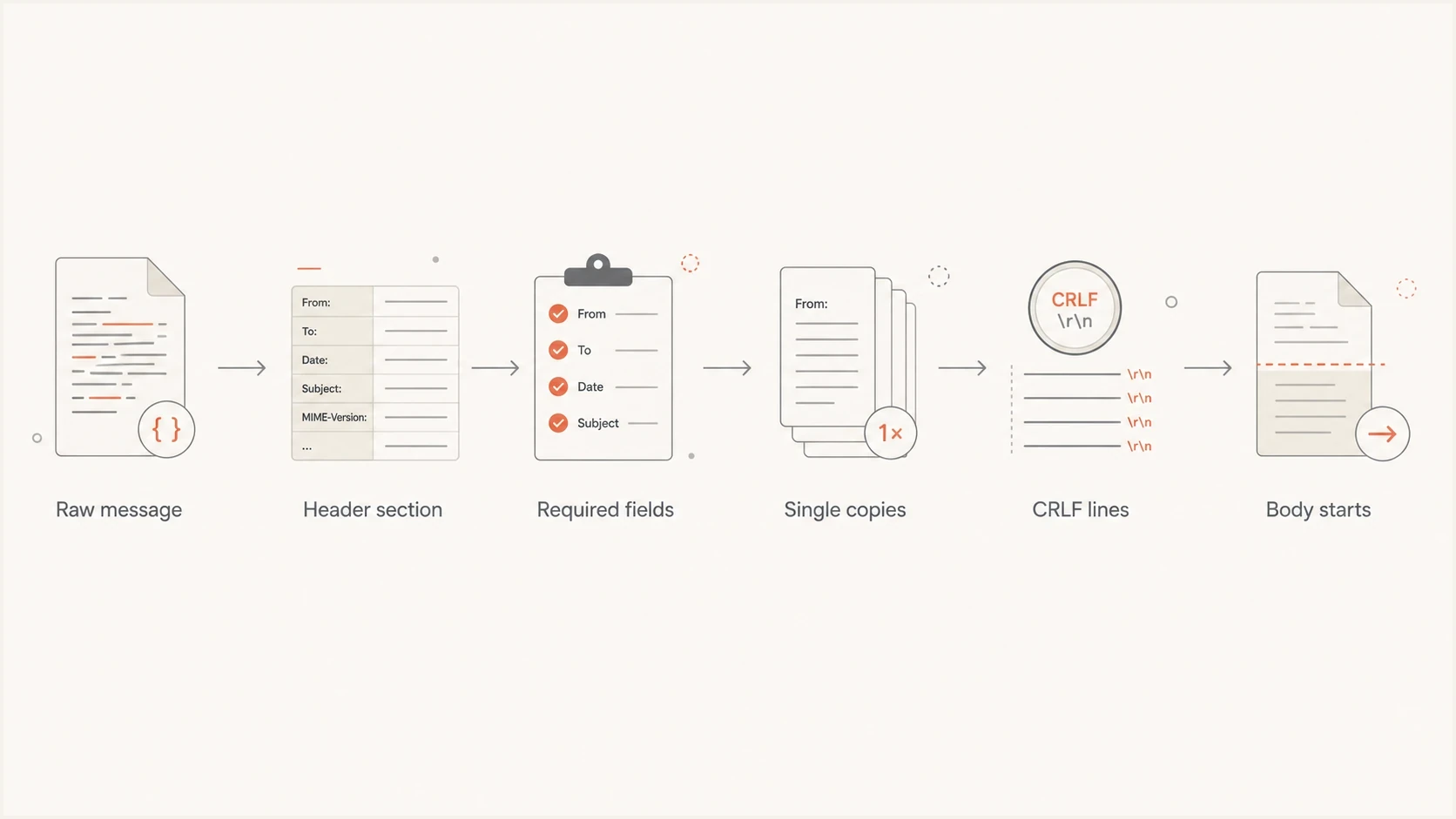
Flowchart showing the basic RFC 5322 message validation path.
RFC 5322 itself is about the Internet message format: header fields, dates, addresses, identifiers, folding, and message body separation. It does not define the SMTP envelope used to route the message. Gmail's published requirements add receiver expectations around sender identity and deliverability. That is why a technically legal edge case under the RFC can still be a bad idea for Gmail sending.
|
|
|
|---|---|---|
From | One clear sender | Identity confusion |
Date | Valid timestamp | Parser rejection |
Message-ID | Unique value | Bounce risk |
Subject | One field | Duplicate error |
Lines | CRLF and limits | Malformed source |
Compact RFC 5322 checks that matter most for Gmail senders.
A compliant message skeleton
A simple production message should have this shape before MIME complexity, multipart boundaries, tracking headers, or unsubscribe headers are added. The exact values change, but the structure should stay boring.
Simple RFC 5322 message skeletontext
From: "Example Brand" <news@example.com>
To: subscriber@example.net
Date: Mon, 25 May 2026 10:15:00 +1000
Subject: May account update
Message-ID: <20260525.101500.abc123@example.com>
MIME-Version: 1.0
Content-Type: text/plain; charset=UTF-8
Content-Transfer-Encoding: quoted-printable

Your account update is ready.
The blank line before the body matters. Everything above it is the header section. Everything after it is body content. The example uses visible line breaks for readability, but the serialized message must use CRLF. HTML tags such as <br> do not create raw RFC line endings. They only affect how HTML renders inside the message body.
Do not hand-edit production headers unless you own the sending pipeline. If your provider emits malformed raw email, give them the exact raw source and Gmail SMTP response. A mail transfer agent usually should not repair bad header structure after submission because that can break signatures, threading, and message interpretation.
Headers Gmail cares about most
Gmail calls out several header mistakes because they are easy to generate in custom systems and easy to miss in campaign previews. The preview can look fine while the raw source is invalid. Gmail's broader formatting rules also require valid HTML, visible sender information, content that is not hidden with HTML or CSS, and links whose destination is clear to recipients.
Good header behavior
- Identity: Use one email address in the From field for bulk mail.
- Timestamp: Generate the Date field at message creation time.
- Identifier: Use one globally unique Message-ID value per message.
- Folding: Fold long header fields with CRLF followed by whitespace.
Bad header behavior
- Duplicates: Adding two Subject fields can trigger a Gmail rejection.
- Empty values: A blank Message-ID is not a valid identifier.
- Deception: Do not use fake Re: or Fwd: prefixes.
- Encoding: Do not encode addresses as display-name text.
Duplicate single-instance headers are the easiest issue to diagnose because the raw source shows them plainly. If Gmail is rejecting mail that another mailbox accepts, compare the raw message against RFC 5322 bounce errors and look for fields that appear twice.
Bad duplicate header exampletext
From: "Example Brand" <news@example.com>
From: alerts@example.com
To: subscriber@example.net
Date: Mon, 25 May 2026 10:15:00 +1000
Subject: May account update
Subject: Re: urgent notice
Message-ID: <20260525.101500.abc123@example.com>

This message has duplicate single-instance fields.
That message is risky for two reasons. It duplicates From and Subject, and the second subject pretends to be a reply. Gmail specifically warns against misleading subject, display name, and header behavior. For a deeper fix path, use a duplicate-header guide rather than guessing at content changes.
Line endings and line length
Line handling is where many custom senders fail. RFC 5322 messages use CRLF at the end of each physical line. A message assembled on a Unix system with only LF can look normal in logs but still be non-compliant at the Internet message layer.
RFC 5322 line length thresholds
Use these thresholds for raw message source lines, excluding CRLF.
Preferred
78 characters
Readable header and body lines where practical.
Maximum
998 characters
Hard limit before CRLF in generated messages.
Reject risk
999+ characters
Lines beyond the RFC limit can fail parsing.
Do not confuse HTML wrapping with raw message wrapping. A paragraph in HTML can wrap visually in Gmail, but the raw message source still contains physical lines. If a templating system writes a huge tracking URL or CSS block onto one physical line, that line still counts.
A <br> tag is not a CRLF. Pressing return in an HTML editor also does not guarantee raw source wrapping after the message is serialized. The sending engine must serialize the final message with correct line endings and safe line lengths.
Header folding has its own rule: a folded header continues on the next line only when that next line starts with a space or tab. Never split an address, encoded word, or MIME boundary at a random byte position. Use a real email library for this work.
Gmail message header size limits
RFC 5322 line limits and Gmail header-size limits are separate checks. A message can keep every physical line within 998 characters and still exceed Gmail's total header allowance after trace fields, authentication results, custom metadata, references, and routing hops accumulate. Gmail can reject these messages with a 552 5.3.4 response.
|
|
|
|---|---|---|
All headers | 500KB | Count the complete header section |
Header fields | 5,000 per message | Watch repeated trace and custom fields |
One header value | 32KB | Except To, Cc, and References |
Message-ID value | 500 characters | Keep the identifier compact and unique |
Subject value | 998 characters | Use a much shorter subject in practice |
Header field name | 1KB | Audit long custom X- headers |
Current Gmail limits for message headers.
When Gmail reports a header-size error, remove unnecessary custom fields, cap generated values, or move non-routing metadata into the body. Do not delete Received, Authentication-Results, ARC, or signature fields blindly. Capture the rejected raw message first so the team can identify which field or cumulative route caused the limit breach.
Encoding and address syntax
RFC 5322 is ASCII-oriented at the header syntax level. Real-world messages use MIME and encoded words for non-ASCII display names and subject text. The practical rule is to encode human-readable labels where needed, but keep actual mailbox syntax valid.
- Display names: A non-ASCII brand or person name belongs in a properly encoded display name.
- Subjects: Use encoded words for non-ASCII subject text, with safe folding.
- Addresses: Do not hide the real mailbox inside encoded display-name text.
- Internationalized domains: Apply Unicode Technical Standard #39 section 5.2 to authenticating, envelope-from, payload, Reply-To, and Sender domains used for Gmail delivery.
This matters because a message can be accepted by one mailbox provider and rejected by Gmail if the address syntax is odd enough. Check display names, subject encoding, and address syntax separately. If your issue involves encoded mailbox text, compare the raw header against guidance on encoded addresses before changing sender identity.
Who owns the fix
Responsibility depends on where the message is created. If a marketer types content into a provider's campaign editor, RFC 5322 serialization should be the provider's job. If a developer builds raw email through code, the application owns the message before it enters SMTP.
Campaign team
The campaign team should focus on accurate sender identity, honest subjects, visible unsubscribe paths, and clean content. They should not need to know how to fold a header field.
- Escalation: Send raw source and SMTP response to the provider.
- Evidence: Attach the exact message that Gmail rejected.
Engineering team
The engineering team should generate the raw message through a maintained email library, preserve CRLF, avoid duplicate fields, and test after template rendering.
- Validation: Inspect the raw final message, not template input.
- Regression: Test personalized messages with long fields.
The most useful escalation package has the raw message, the Gmail response, the sending timestamp, the envelope sender, the visible From address, and the message ID your system logged. That keeps the conversation technical instead of speculative.
How to test before sending at scale
Do not validate only the template. Validate the final message after merge fields, tracking links, footers, unsubscribe headers, custom headers, and MIME boundaries are added. The broken line or duplicate field often appears only after the final assembly step.
Email tester
Send a real email to this address. Suped shows a results button when the test is ready.
?/43tests passed
A good test sends through the same path as production. If production uses a dedicated domain, the test should use that domain. If production adds one-click unsubscribe headers, the test should include those headers. If the final link rewriting system creates long lines, the test needs that rewritten output.

Email tester sample report showing total score, email preview, issue summary, and per-section results
Suped's product connects these two layers. The email tester checks one message sent through the production path, while the platform's DMARC reporting and domain monitoring track authentication across live traffic. Teams can use the same workflow to connect malformed-message evidence with SPF, DKIM, and DMARC results without treating authentication and RFC 5322 formatting as the same test.
For a domain-level check around the same sending setup, use the domain health checker to review authentication and DNS findings alongside the raw message test.
When RFC 5322 is not the real problem
If you are using a mature sending platform and Gmail is not returning a specific RFC 5322 bounce, poor delivery is probably not caused by message format. Check list source, consent, spam complaint rate, content mix, sender consistency, authentication results, and domain reputation first.
That distinction matters. Header compliance is binary enough to test. Reputation is measured over time. A single malformed message can bounce, but poor inbox placement across campaigns usually needs monitoring, segmentation, and authentication cleanup.
- Authentication: Confirm SPF, DKIM, and DMARC pass for the visible sending domain through DMARC monitoring.
- Reputation: Review domain and IP listing status with blocklist monitoring when blacklist or blocklist signals appear.
- Engagement: Separate engaged recipients from inactive addresses before increasing volume.
- Bounces: Treat a duplicate headers rejection as a formatting issue, not a content issue.
The fastest practical workflow is: test one real message for RFC 5322 structure, fix any malformed raw source, then monitor DMARC, DNS, spam rate, bounces, and blocklist (blacklist) status over time. That separates one-message format failures from ongoing deliverability problems.
A practical compliance checklist
Use this checklist when reviewing a Gmail-facing message. It is short because the goal is not to reimplement the RFC by hand. The goal is to catch the mistakes that create Gmail sender guideline problems.
- Raw source: Get the final raw message after all provider processing.
- Required fields: Confirm one valid Date, one valid From, and one valid Message-ID.
- Duplicates: Search for repeated single-instance fields.
- Line endings: Verify CRLF in serialized output.
- Line length: Scan for physical lines above 998 characters.
- Header size: Check Gmail's total, field-count, and individual-value limits.
- Identity: Make sender, subject, links, and display names accurate.
- Authentication: Check authentication results separately from RFC 5322 format.
Views from the trenches
Best practices
Capture the raw final message, then compare Gmail rejections against exact headers.
Let the sending platform serialize mail, unless your team owns the raw generator.
Test long personalized subjects, links, and headers before increasing Gmail volume.
Common pitfalls
Treating HTML line breaks as raw CRLF line endings creates false confidence in tests.
Chasing RFC fixes for reputation problems wastes time when Gmail gives no format error.
Escalating to a provider without raw source slows down duplicate-header investigation.
Expert tips
Keep one-message compliance tests separate from ongoing DMARC and reputation review.
Use Message-ID search in logs to connect the raw source with the exact SMTP response.
Check generated output after tracking, merge fields, and footer injection have run.
Expert from Email Geeks says most senders do not need to study RFC 5322 unless they build or modify the sending engine.
2024-03-13 - Email Geeks
Expert from Email Geeks says duplicate From, To, Subject, or Date fields are the clearest Gmail formatting failures.
2024-03-13 - Email Geeks
The practical takeaway
To satisfy Gmail's RFC 5322 formatting requirement, generate a normal standards-compliant message: valid Date and From fields, one valid Message-ID, one copy of single-instance headers, CRLF line endings, safe line lengths, valid address syntax, and a clear separation between headers and body.
If Gmail gives a format-specific bounce, fix the raw source. If Gmail accepts the message but inbox placement is weak, move beyond RFC 5322 and inspect authentication, complaints, blocklist and blacklist exposure, sending patterns, and list quality. Suped's product brings those checks into one workflow so the team can move from symptoms to specific fixes without treating every Gmail issue as a header problem.




