What causes Gmail's 'sender's email address uses abnormal characters' error?

Published 12 May 2025
Updated 28 Jul 2026
11 min read
Summarize with
Updated on 28 Jul 2026: We tightened the Gmail diagnosis around raw From headers, self-tests, internationalized addresses, and current DMARC policy rollout.
Gmail's 'sender's email address uses abnormal characters' warning usually points to the sender identity string, not to SPF on its own. Gmail has detected something in the visible or encoded sender identity that looks unusual, visually deceptive, or inconsistent with normal message formatting.
The main causes are hidden Unicode, lookalike letters, suspicious mixed-script domain labels, invalid local-part syntax, malformed header encoding, or a display name that makes one address look like another. SPF neutral still needs attention, but this specific warning does not mean 'SPF failed'. It means Gmail found an abnormal sender identity signal and warned the recipient.
Treat this as a header inspection problem first. A similar case shows the same pattern: the visible address can look harmless, but the raw header can expose the character or formatting issue Gmail is reacting to. A .co domain or a hyphen in a domain is not abnormal by itself. The problem is usually in the exact characters, the header syntax, or the relationship between sender and recipient identities.
Direct answer
The error is caused by Gmail detecting unusual characters or deceptive formatting in the sender's email identity, most often in the From address or display name. Gmail uses the warning to protect recipients against spoofing tricks where an address looks normal to a person but contains a different character, script, or identity underneath.
- Hidden Unicode: Zero-width characters or other invisible code points can change the underlying sender text without an obvious visual difference.
- Lookalike characters: Uppercase I, lowercase l, digit 1, and some Cyrillic or Greek letters can make a sender address resemble a trusted brand or mailbox.
- Internationalized domains: IDNs are legitimate, but punycode labels, mixed scripts, or confusable characters need closer review.
- Invalid local parts: Unbalanced quotes, illegal control characters, or incorrectly escaped punctuation before the at sign can make the address invalid or hard to parse.
- Encoding errors: Malformed MIME encoded words in a display name, or UTF-8 address text sent without SMTPUTF8 support, can produce an abnormal sender identity.
- Weak authentication: SPF neutral, DKIM failure, and DMARC failure do not create the character issue, but they remove authentication evidence Gmail uses when judging the message.
Do not chase SPF first
If SPF is neutral, fix it, but do not stop there. The warning text points to the sender identity. Check the raw From value, decode its display name, and compare every code point before changing DNS.
Non-ASCII does not automatically mean invalid. Internationalized addresses can be valid when the sending and receiving path supports SMTPUTF8, and IDNs can be valid when encoded correctly. A plain ASCII retest is useful because it isolates compatibility and confusable-character problems.
Where the abnormal character lives
Start with the raw RFC 5322 From header, including its display name and addr-spec. Then compare Sender and Reply-To for misleading or malformed identity text. Return-Path and Authentication-Results usually provide authentication context rather than the flagged visible character. Copying the rendered address from Gmail can normalize or hide the code point that needs inspection.
Header fields to inspecttext
From: Support <support@example.co>
Sender: mailer@example.co
Reply-To: support@example.co
Return-Path: bounces@example.co
Authentication-Results: mx.google.com; spf=neutral; dkim=pass
|
|
|
|---|---|---|
From | Code points and syntax | Use valid, clear identity text |
Domain | Punycode and script use | Remove confusable labels |
Display name | Encoded words and deception | Fix encoding and identity |
Sender | Unexpected identity | Use a consistent sender |
Authentication | Neutral, fail, or mismatch | Repair authentication |
Use the table as a quick triage map before editing DNS.
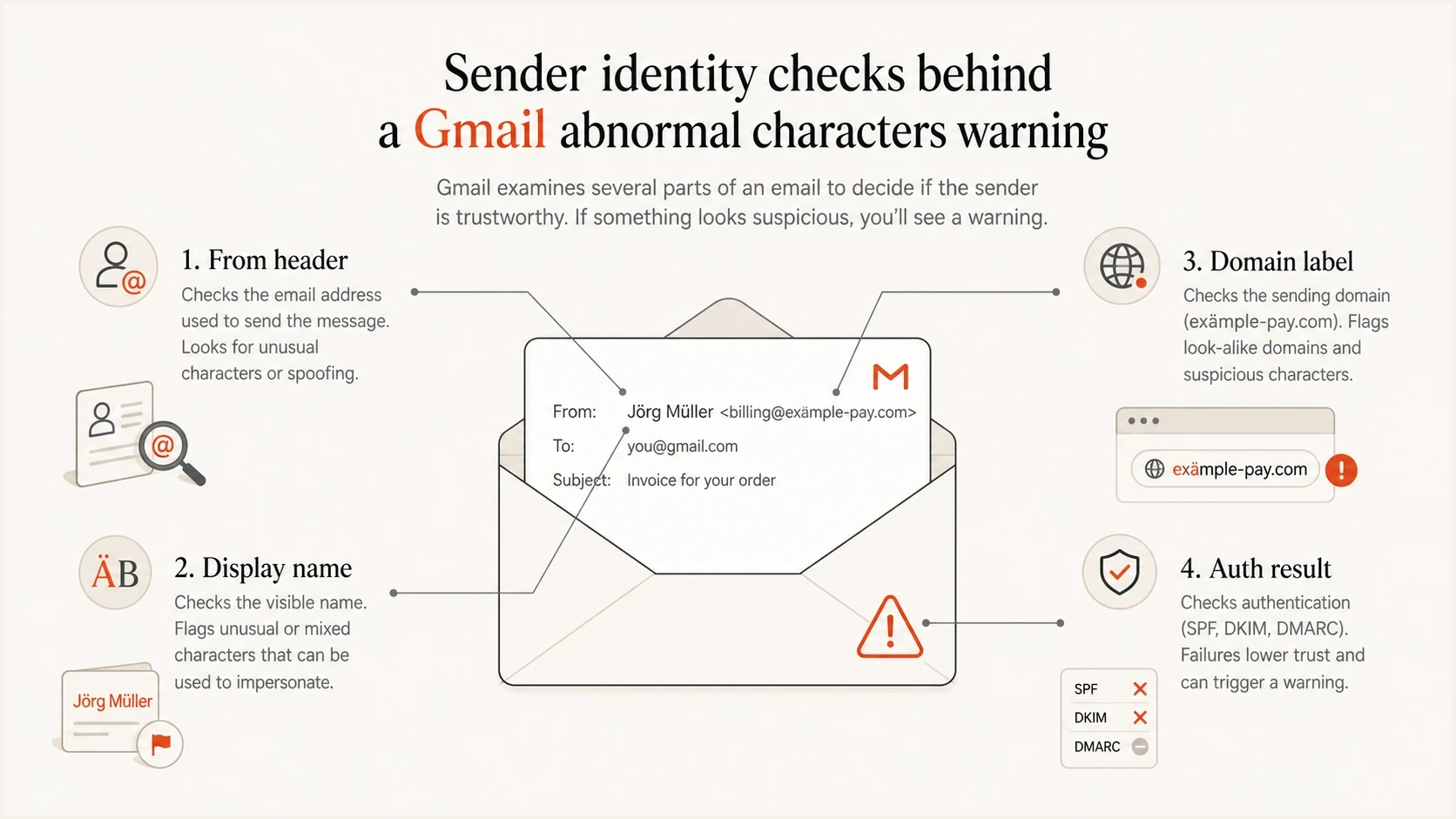
From header, display name, domain label, and authentication checks behind Gmail's abnormal characters warning.
How to diagnose it
The cleanest diagnosis is to send a fresh message to a mailbox you control, open the original source, and inspect the exact header values. A screenshot of the warning does not show whether Gmail saw a hidden Unicode character, malformed display-name encoding, invalid address syntax, or a normal identity paired with weak authentication.
A practical shortcut is to send the message through Suped's email tester and compare its raw header output with Gmail's warning. Then run Suped's domain health check so separate authentication problems do not confuse the result.
- View source: Open the raw message and copy the From, Sender, Reply-To, Return-Path, and Authentication-Results values.
- Inspect code points: Use a plain text editor or Unicode inspector that exposes invisible characters, character names, and hexadecimal code points.
- Parse the From header: Decode MIME encoded words only in the display name, then confirm the addr-spec uses valid syntax or a supported SMTPUTF8 address.
- Check the IDN: Compare the Unicode domain with its ASCII punycode form and look for mixed scripts, confusable letters, or an unexpected label.
- Check domain matching: Confirm DMARC passes because either the SPF-authenticated domain or a passing DKIM signing domain matches the visible From domain.
- Retest cleanly: Send from a plain ASCII address and display name to a different mailbox, while keeping the content and sending infrastructure unchanged.
Email tester
Send a real email to this address. Suped shows a results button when the test is ready.
?/43tests passed
When a test message shows clean headers but Gmail still warns, review whether the test is self-sent, whether the sender and recipient domains look unusually similar, and whether Gmail sees a separate deceptive identity signal. DMARC aggregate data then helps show whether the same sending source passes domain matching for Gmail recipients at scale.
Why self-tests can trigger the warning
If the warning appears only when a message is sent to the same address used in From, or between domains that look nearly identical, test the sender-recipient relationship before changing DNS. Gmail does not publish the exact detection rule, so this pattern is evidence of a self-test or impersonation signal, not proof that the address contains an illegal character.
- Repeat the message with the same From address, content, and sending path, but send it to a different Gmail mailbox.
- Compare the From and To domains character by character, including punycode, hyphens, digits, and lookalike letters.
- Check whether an application has set the display name to the recipient's address or copied the recipient into another sender field.
- Treat the result as a false positive only if clean external tests stop showing the warning and the raw headers remain valid.
Change one variable at a time
Change only the recipient for the first comparison. If the warning disappears, repeat the test before changing the From address or authentication so the result remains attributable to the sender-recipient pairing.
What fixes the warning
The fix is to make the sender identity simple, valid, and consistent. Use plain ASCII for a compatibility retest, keep the display name accurate, avoid deceptive mixed-script domains, and send with authentication tied to the visible From domain. Gmail is less likely to warn when the address is easy to parse and its authentication supports the claimed identity.
Risky sender identity
- Mixed scripts: Latin letters mixed with non-Latin lookalikes inside the mailbox or domain.
- Invalid punctuation: Unbalanced quotes, illegal control characters, or incorrectly escaped punctuation.
- Mismatched identity: Visible From, Sender, and Reply-To point to unrelated identities or domains.
- Deceptive display name: The display name contains another email address or imitates the recipient.
Cleaner sender identity
- Compatible address: A plain ASCII mailbox for the control test, or a properly supported SMTPUTF8 address.
- Stable display name: An accurate sender name without hidden characters or misleading address text.
- Matched authentication: DMARC passes through SPF or DKIM domain matching with the visible From domain.
- Valid header syntax: A mail library formats and folds the From header according to RFC 5322.
Clean and risky sender patternstext
Clean: support@example.co
Clean: "Example Support" <support@example.co>
Valid but test carefully: sales+us@example.co
Risky: "billing@example.com" <support@example.co>
Risky: suppоrt@example.co (the o is Cyrillic)
The plus sign is not automatically bad, and neither is a .co domain or a hyphen. The pattern matters. A valid mailbox on a normal domain with matching authentication differs from a sender identity that imitates another domain or hides a different script inside the address.
A clean retest should change only one thing
When testing the identity string, change the sender address first and keep the sending IP, content, subject, and recipient stable. If the warning disappears, the sender identity was the likely cause. Run a separate recipient-only test when investigating a self-send pattern.
Authentication still matters
SPF neutral does not match the wording of the abnormal-characters warning, but it still needs correction because Gmail evaluates sender trust across several signals. A character warning paired with weak authentication gives Gmail less evidence that the claimed sender controls the message.
SPF authenticates the envelope sender domain, while DKIM authenticates the signing domain. DMARC passes when at least one passing SPF or DKIM domain matches the visible From domain under the published mode. Gmail requires SPF or DKIM for all senders to personal Gmail accounts, and requires SPF, DKIM, and DMARC for senders above its bulk-sender threshold.
Use Suped's DMARC monitoring to confirm that Gmail traffic passes domain matching after the sender identity is cleaned up. Start with reporting, identify every legitimate source, and move to enforcement only after those sources authenticate correctly.
Starter DMARC recorddns
v=DMARC1; p=none; rua=mailto:dmarc-reports@example.co;
Policy rollout checkpoints
RFC 9989 marks pct as historic. Move policy only after legitimate traffic consistently passes DMARC.
Monitor
p=none
Collect aggregate reports and identify real senders.
Quarantine
p=quarantine
Request spam-folder treatment for messages that fail DMARC.
Reject
p=reject
Request rejection for messages that fail DMARC.
Where Suped fits
Suped is our DMARC reporting and email authentication platform. It turns aggregate reports into sending-source and domain-matching views, so a team can verify Gmail traffic after cleaning the From identity, find unauthorised sources, and keep evidence for each DMARC policy change.

Email tester sample report showing total score, email preview, issue summary, and per-section results
Common causes and fixes
The table covers the patterns that occur most often. Separate sender syntax from authentication. A broken SPF record should be fixed, but it does not turn a normal ASCII address into an abnormal-character address.
|
|
|
|---|---|---|
Cyrillic lookalike | Looks like Latin | Use the intended character |
Mixed-script domain | Unexpected punycode | Remove confusable labels |
Invalid local part | Parser or syntax error | Use valid mailbox syntax |
Bad MIME encoding | Broken display name | Fix the mail library |
Self-send or similar domain | Warning only in tests | Retest another recipient |
SPF neutral | Authentication is weak | Authorise the envelope sender |
Common Gmail abnormal character causes and practical fixes.
If the warning involves non-ASCII sender text, the deeper issue often matches the one covered in Unicode From warnings: the sender identity can look ordinary to the sender but appear risky to a receiver that compares scripts and code points.
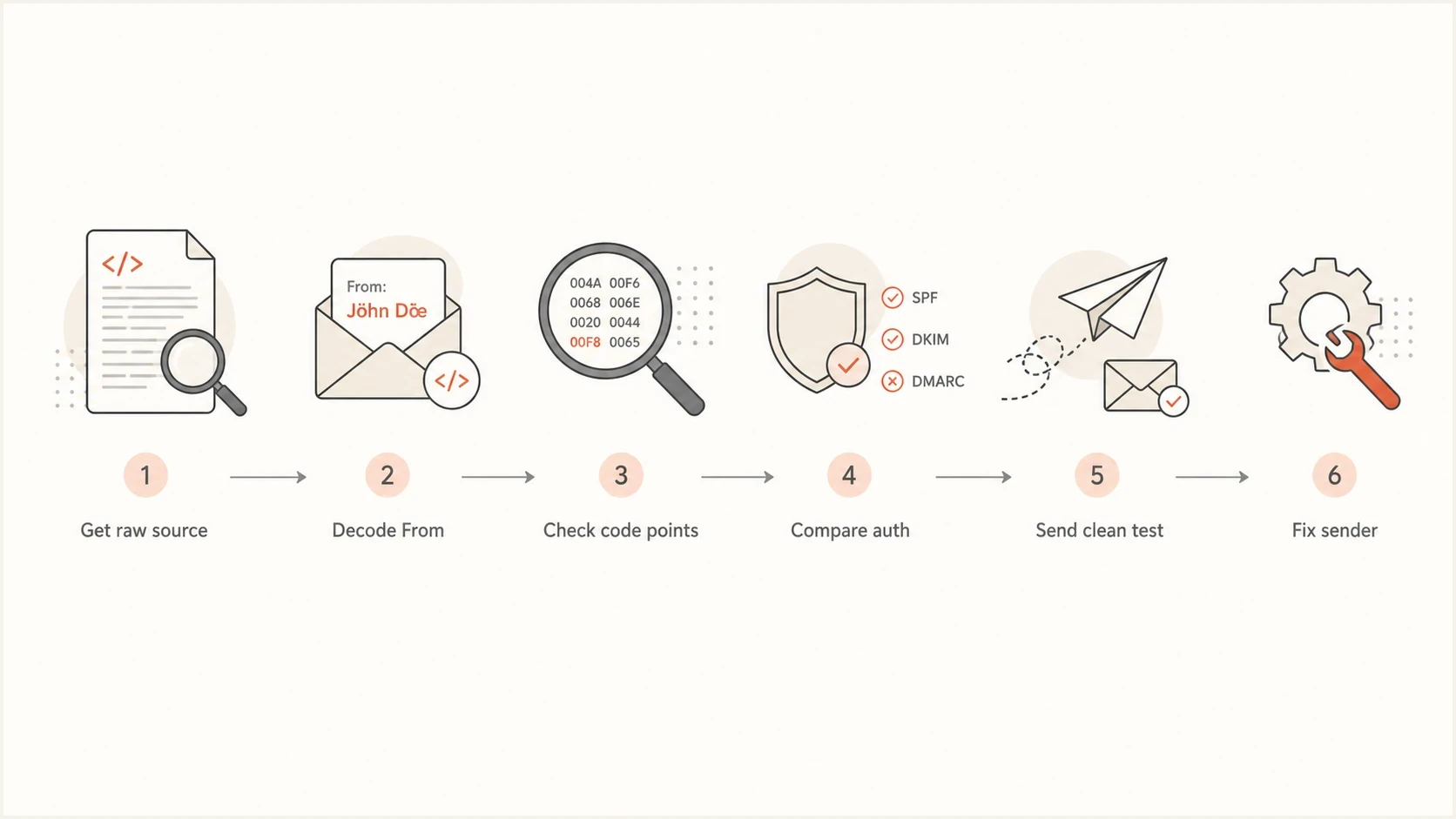
Six-step Gmail abnormal characters diagnosis using raw headers, code points, authentication, and a clean sender test.
Views from the trenches
Best practices
Copy the raw sender value into a plain text tool before judging whether it looks normal.
Compare the visible address with the encoded header because display text can hide risky changes.
Fix authentication after checking characters, since weak SPF or DKIM can raise suspicion.
Common pitfalls
Treat a clean-looking local part as unproven until you inspect Unicode code points directly.
Do not assume a .co domain causes the warning; the domain itself is usually not the issue.
Do not blame SPF neutral for this exact wording without checking the sender address first.
Expert tips
Use plain ASCII control tests for high-volume campaigns and shared sending streams.
Keep role addresses simple, especially support, billing, receipts, and security mailboxes.
Use a test inbox and raw headers to compare Gmail's warning against authentication results.
Marketer from Email Geeks says Gmail warning text should be read literally before chasing SPF, because the sender string can contain subtle characters.
2023-06-27 - Email Geeks
Marketer from Email Geeks says the sender address should be inspected for characters outside ordinary letters and numbers before changing DNS.
2023-06-27 - Email Geeks
The fix is usually in the address
Gmail's abnormal-characters warning is not a generic deliverability label. It points first to the sender identity. Inspect the raw sender fields, remove hidden or confusing characters, correct invalid encoding or syntax, and then confirm authentication matches the sender domain.
- First check: Inspect the raw From value and confirm every character is expected.
- Second check: Retest with a plain ASCII sender identity and stable content.
- Recipient check: Repeat a self-sent test with a different recipient before changing DNS.
- Authentication check: Repair SPF, DKIM, and DMARC so Gmail has clear authentication evidence.
- Ongoing check: Monitor DMARC and blocklist (blacklist) signals so a small sender issue does not become a wider delivery problem.




