
How to handle Microsoft 365 DMARC issues for MSP clients

Published 30 Jul 2026
Updated 5 Oct 2026
12 min read
Summarize with
Updated on 11 Oct 2026: We updated this runbook for current DMARC rollout rules and added Microsoft 365 message trace checks.
Handle Microsoft 365 DMARC issues by pausing policy escalation, identifying every legitimate sending source, fixing SPF or DKIM alignment for each source, testing real messages, and only then moving the client domain through quarantine to reject. Treat the tenant, public DNS, third-party senders, forwarding paths, and reporting data as separate parts of one change.
For our MSP runbook, we assign one owner, one change ticket, and one source inventory per domain. Microsoft 365 usually authenticates its own user mail cleanly once custom-domain DKIM is enabled. The harder failures tend to come from scanners, line-of-business applications, marketing systems, support platforms, or forwarding. A repeatable DMARC for MSPs process keeps those sources visible without weakening enforcement for the whole client.
Triage outbound and inbound DMARC failures
Do not edit the DMARC policy as the first troubleshooting step. Capture the current record, affected recipients, sample message headers, non-delivery reports (NDRs), timestamps, message IDs, and the last known good state. Confirm whether the incident concerns outbound authentication, inbound Microsoft 365 treatment, or both. These are different workstreams even when the ticket says only 'DMARC failure.'
- Save the original headers and the exact DNS answers before making changes.
- Decide whether the client is failing authentication when sending or rejecting mail when receiving.
- Check the root domain, active subdomains, parked domains, and the initial onmicrosoft.com domain.
- Name the MSP engineer, client approver, DNS owner, and sender owner in the ticket.
- Compare the tenant and DNS state with Microsoft DMARC guidance.
Do not add every failing IP to SPF
A DMARC failure does not prove that SPF lacks an authorized IP. SPF can pass for a vendor-controlled return-path domain while DMARC still fails because that domain does not match the visible From domain. Prefer custom DKIM signing or a delegated sending subdomain when the sender supports it.
If legitimate mail is being rejected, use the narrowest reversible mitigation available while the source is repaired. Record the exception, its expiry, and the evidence required for removal. Do not lower the whole domain to a monitoring policy merely to accommodate one sender without first measuring the effect on spoofing protection.
A 550 5.7.515 bounce from Outlook.com or related Microsoft consumer services indicates a high-volume sender authentication requirement. Affected domains need both SPF and DKIM to pass, a DMARC policy of p=none or stricter, and a DMARC pass through a matching authenticated domain. This is separate from the client's inbound Exchange Online policy. See Microsoft's 550 5.7.515 guidance.
Separate Microsoft 365 mail from every other sender
Build the source inventory from DMARC aggregate data, not from the client's application list alone. Group by organizational sender, return-path domain, DKIM signing domain, source IP range, and visible From domain. Then label each source as Microsoft 365, client infrastructure, approved third party, forwarding path, unknown, or unauthorized. In aggregate XML, distinguish raw results in auth_results from DMARC results in policy_evaluated: the latter requires successful authentication with a matching domain. A raw SPF or DKIM pass alone does not establish a DMARC pass. See RFC 9990.
For native Microsoft 365 mail, verify that the custom domain exists in the tenant, SPF contains Microsoft's required include, and DKIM is enabled for that custom domain. Copy the two DKIM CNAME targets shown by Microsoft rather than constructing them from memory. Microsoft introduced a new DKIM CNAME target format for new custom domains in May 2025; existing domains retain the older format. Use the tenant-provided values for each domain. Test shared-mailbox Send As and Send on Behalf traffic too, using the actual From domain. See Microsoft's custom-domain DKIM guidance.
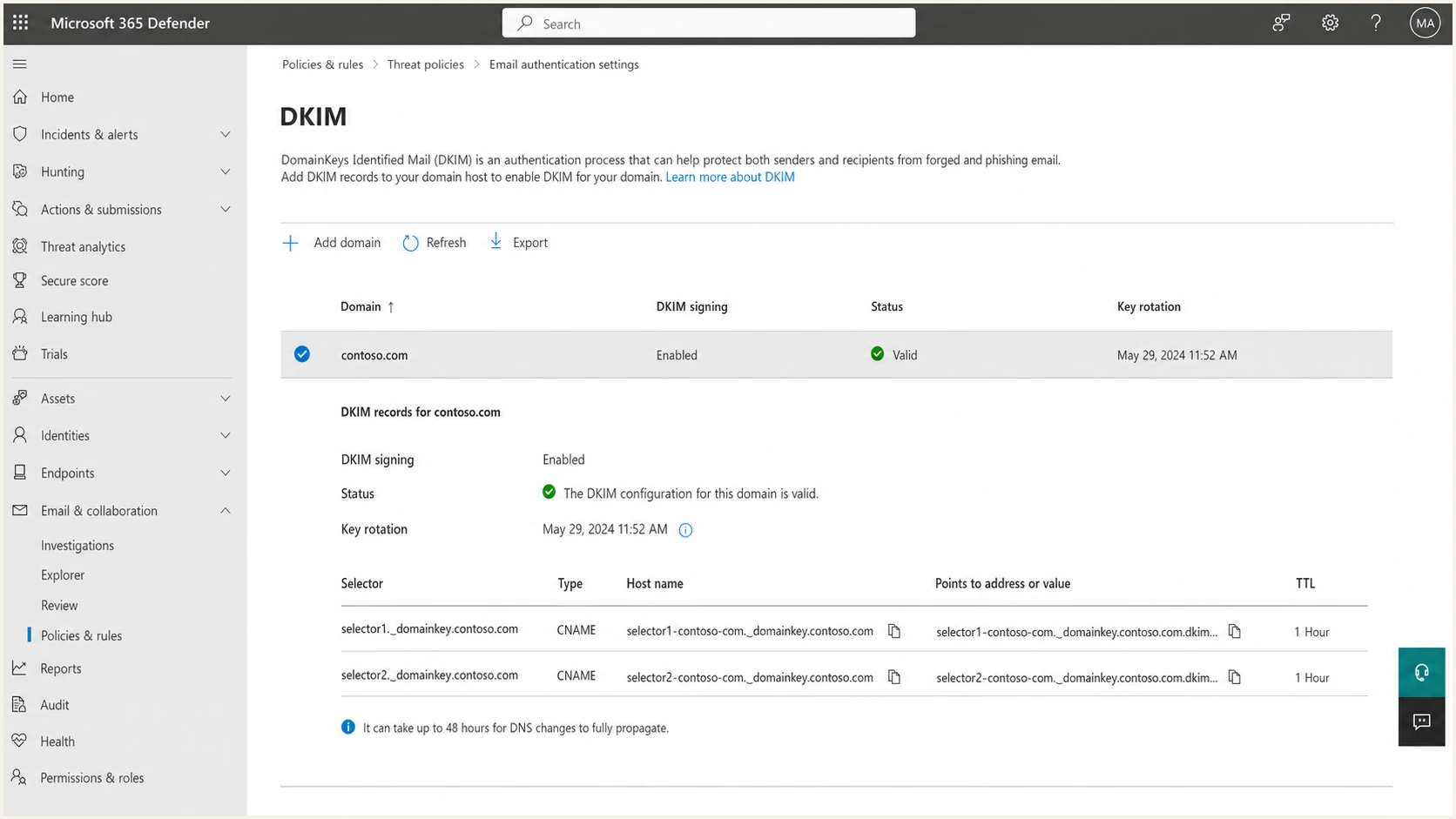
Microsoft Defender portal DKIM settings for a custom domain
Microsoft 365 has no portal control for the DMARC TXT record on a custom domain. Publish that record with the client's authoritative DNS provider. The onmicrosoft.com domain is different: its DMARC record can be added through the Microsoft 365 admin center. Keep that distinction in the runbook so engineers do not search the tenant for a custom-domain DMARC switch that does not exist.
Unknown sources need validation before authorization. Ask for the application name, business owner, expected From address, return-path domain, DKIM capability, sending volume, and retirement date. The same evidence standard should apply across clients. Our unknown DMARC sources workflow is useful when a source cannot be matched to a known service owner.
Fix authentication before changing policy
DMARC passes when either SPF or DKIM passes and its authenticated domain matches the visible From domain under the selected alignment mode. SPF and DKIM can each show pass while DMARC fails because neither authenticated domain matches. Check Authentication-Results for smtp.mailfrom, header.d, header.from, and dmarc before choosing the fix. The SPF and DKIM alignment process covers the deeper per-sender checks.
|
|
|
|
|---|---|---|---|
Microsoft 365 | Custom DKIM off | Enable DKIM | MSP |
Application | Vendor return-path | Custom DKIM | App owner |
Device relay | Fixed public IP | Validate relay route | Client IT |
Forwarded mail | SPF breaks | Preserve DKIM | Mail admin |
Unknown | No owner | Investigate | MSP lead |
Compact routing guide for common Microsoft 365 client sources
For Microsoft 365-only sending, the common SPF record authorizes Microsoft's cloud infrastructure. Keep one SPF record per domain. Count DNS-querying mechanisms and modifiers across the evaluated path, including nested includes: the limit is 10. Exceeding it or publishing a second SPF record produces permerror. RFC 7208 defines these limits. When other systems send through Microsoft 365 authenticated submission or a properly configured relay, document that route rather than authorizing broad network ranges without evidence.
Microsoft 365-only SPF exampleDNS
Host: example.com
Type: TXT
Value: v=spf1 include:spf.protection.outlook.com -all
For scanners and applications, distinguish SMTP AUTH submission from connector-based SMTP relay and verify the actual route. Direct Send delivers only to recipients in the Microsoft 365 organization, so it cannot replace external relay. An SMTP AUTH sign-in failure needs a submission repair; changing DMARC DNS will not fix it. See Microsoft's device and application mail guidance.
For a third-party sender, custom DKIM is usually cleaner than expanding the client's root SPF record. Configure the sender to sign with the client's domain or a dedicated subdomain. Keep relaxed alignment unless a documented client requirement calls for strict matching. The aspf and adkim tags default to relaxed matching, which accepts the same organizational domain; strict matching requires an exact domain match. Strict mode creates avoidable failures when legitimate mail uses a subdomain for the return path or signature.
Use message trace and headers to isolate failures
Use Exchange admin center > Mail flow > Message trace to match the sender, recipient, incident time, and message ID. In Exchange Online PowerShell, use Get-MessageTraceV2 and Get-MessageTraceDetailV2. They search the last 90 days, with a maximum 10-day interval per query. Trace explains routing and delivery events; inspect the final recipient's original headers to establish authentication results.
Connect to the correct client tenant with Exchange Online PowerShell first, then replace the example domain and addresses. Keep the query narrow so the incident evidence stays tied to the affected route.
Read-only DKIM configuration and message trace checksPowerShell
$clientDomain = "example.com"
$incidentEnd = Get-Date
$incidentStart = $incidentEnd.AddDays(-1)

Get-DkimSigningConfig -Identity $clientDomain |
  Format-List Name,Enabled,Status,Selector1CNAME,Selector2CNAME

Get-MessageTraceV2 -SenderAddress "sender@example.com" `
  -RecipientAddress "recipient@example.net" `
  -StartDate $incidentStart -EndDate $incidentEnd |
  Get-MessageTraceDetailV2
Raw SPF and DKIM passes with a DMARC failuretext
Authentication-Results: receiver.example.net;
  spf=pass smtp.mailfrom=bounces.vendor.example.net;
  dkim=pass header.d=vendor.example.net;
  dmarc=fail header.from=example.com
Both raw checks pass in this example, but neither authenticated domain matches example.com. Configure the sender's custom DKIM or a matching MAIL FROM domain, then test a new message through the same route.
- dmarc=bestguesspass indicates that Microsoft inferred a pass without a published DMARC record. Verify public DNS before closing the policy configuration task.
- action=permerror indicates a permanent evaluation problem. Check DNS record syntax and duplicate DMARC records rather than assuming a sender-domain mismatch.
- action=temperror indicates a temporary evaluation problem. Check DNS availability and repeat the lookup before changing sender authorization.
- compauth is Microsoft's composite authentication verdict. Keep it separate from dmarc, and verify delivery events and policy overrides instead of treating action=oreject as proof of SMTP rejection.
Use Microsoft's authentication header reference to interpret these values alongside the trace and NDR.
Handle forwarding and inbound Microsoft 365 results
Forwarding often breaks SPF because the forwarder's IP is not authorized by the original sender. DKIM can still carry DMARC if the message remains unchanged and the signing domain matches the From domain. Mailing lists, security gateways, and disclaimers can modify signed headers or the body, which also breaks DKIM. Diagnose the last receiver's headers, not only the original sender's result.
When a service sits in front of Microsoft 365, review connector design and Enhanced Filtering so Microsoft can identify the original source. For legitimate intermediaries that modify messages, review ARC support and trust only the specific sealer after validation. The dedicated forwarding failures procedure keeps this separate from ordinary sender configuration.
Normal outbound failure
- Check return path, signature domain, and From domain.
- Configure matching SPF or custom DKIM.
- Send a fresh message through the production route.
- Confirm aggregate results after receivers report.
Forwarding-related failure
- Trace each hop and find where SPF or DKIM changed.
- Preserve DKIM or configure validated ARC trust at the receiving system.
- Test the exact forwarding and gateway path.
- Remove temporary allow rules and record exceptions.
Microsoft 365 does not send DMARC forensic reports, even when the sender publishes a valid failure-report address. It does send aggregate reports when the recipient tenant's MX points directly to Microsoft 365 and the sender publishes a valid aggregate-report address. If mail enters through a non-Microsoft gateway or an on-premises hybrid environment first, Microsoft does not send aggregate reports for that flow. Missing reports therefore do not prove that no mail was received. See Microsoft's DMARC reporting guidance.
Inbound enforcement also depends on Microsoft 365 anti-phishing settings, including the applied policy's 'Honor DMARC record policy when the message is detected as spoof' setting and its configured actions for quarantine and reject. Avoid permanent broad allow rules for failed DMARC. If an exception is unavoidable, constrain it by sender and route, give it an expiry date, and keep the sender repair open.
Roll policy out as a controlled change
Start new deployments for active client domains at monitoring, fix the legitimate sources, and move enforcement in measured stages. Begin with a lower-volume domain or subdomain when the client has several. Save the parent domain until subdomain policy inheritance and the source inventory are understood. Check the organizational domain's sp policy and any explicit subdomain records; DMARC inheritance does not configure SPF or DKIM for a sending subdomain. Parked domains that never send can use reject directly after ownership and non-use are confirmed.
Example staged records
Replace the reporting mailbox with the client's assigned aggregate-report destination. Publish one DMARC TXT record at the required host. If rua uses a different organizational domain, verify external reporting authorization in the destination's DNS. For example, example.com reporting to dmarc@reports.example.net needs a TXT record at example.com._report._dmarc.reports.example.net containing v=DMARC1, or a matching wildcard authorization. A valid mailbox alone is insufficient; RFC 9990 defines this check.
MonitoringDNS
Host: _dmarc.example.com
Type: TXT
Value: v=DMARC1; p=none; rua=mailto:dmarc@example.com
Quarantine after validationDNS
Host: _dmarc.example.com
Type: TXT
Value: v=DMARC1; p=quarantine; rua=mailto:dmarc@example.com
Full enforcementDNS
Host: _dmarc.example.com
Type: TXT
Value: v=DMARC1; p=reject; rua=mailto:dmarc@example.com
RFC 9989 classifies pct as historic because partial percentages were applied inconsistently. These examples therefore omit pct. Stage enforcement by domain or subdomain and verified sender readiness, rather than relying on pct=25 to limit enforcement. The new t=y tag requests test mode from supporting receivers, but legacy receivers can ignore it and enforce p. Use p=none for broadly compatible monitoring.
Promotion gates should use observed data and business approval. We require stable volume, no unexplained high-volume source, verified authentication for approved senders, test messages to representative receivers, and a rollback record ready before each change. Receivers retain discretion over final disposition. Microsoft also routes outbound messages that fail DMARC under quarantine or reject through its high-risk delivery pool, without an override. See Microsoft's outbound DMARC guidance.
Lower DNS TTL ahead of a planned change only when the DNS provider and client change policy permit it. After publication, verify the authoritative answer and multiple public resolvers, then send fresh mail through Microsoft 365 and each material third-party route. Historical aggregate data will not prove that the new record works.
DMARC checker
Look up a domain's DMARC record and catch policy issues.
?/7tests passed
Use Suped's DMARC checker after every DNS change to catch duplicate records, malformed tags, invalid reporting destinations, and policy values that differ from the approved ticket. A syntactically valid record still needs live-message validation because DNS cannot show whether the sender's return path or DKIM signature matches the visible From domain.
Keep rollback specific. Restore the last verified policy only after assessing legitimate-mail impact and lost spoofing protection. Quarantine still requests restrictive handling for DMARC failures, so it does not guarantee delivery. If one sender fails after promotion, correct that sender or isolate it on a subdomain. Record the incident against the source inventory so the same integration does not surprise another engineer at renewal or migration time.
Operate DMARC as an MSP service
The operational unit should be a client organization with documented domains, owners, approved senders, policy state, exceptions, and next review date. Centralized DMARC monitoring lets the service desk triage by impact instead of opening raw XML attachments. Alert on new sources, sudden failure changes, DNS drift, missing reports, and domains that move away from their approved policy.
Suped is our DMARC reporting and email authentication platform. Its multi-tenant dashboard keeps client organizations separate, and automated issue detection gives engineers repair steps. Alerts flag changes as reports arrive; aggregate reporting is periodic, so use message trace and headers for an active incident. SPF and DKIM checks, plus blocklist (blacklist) monitoring, support the same client review.
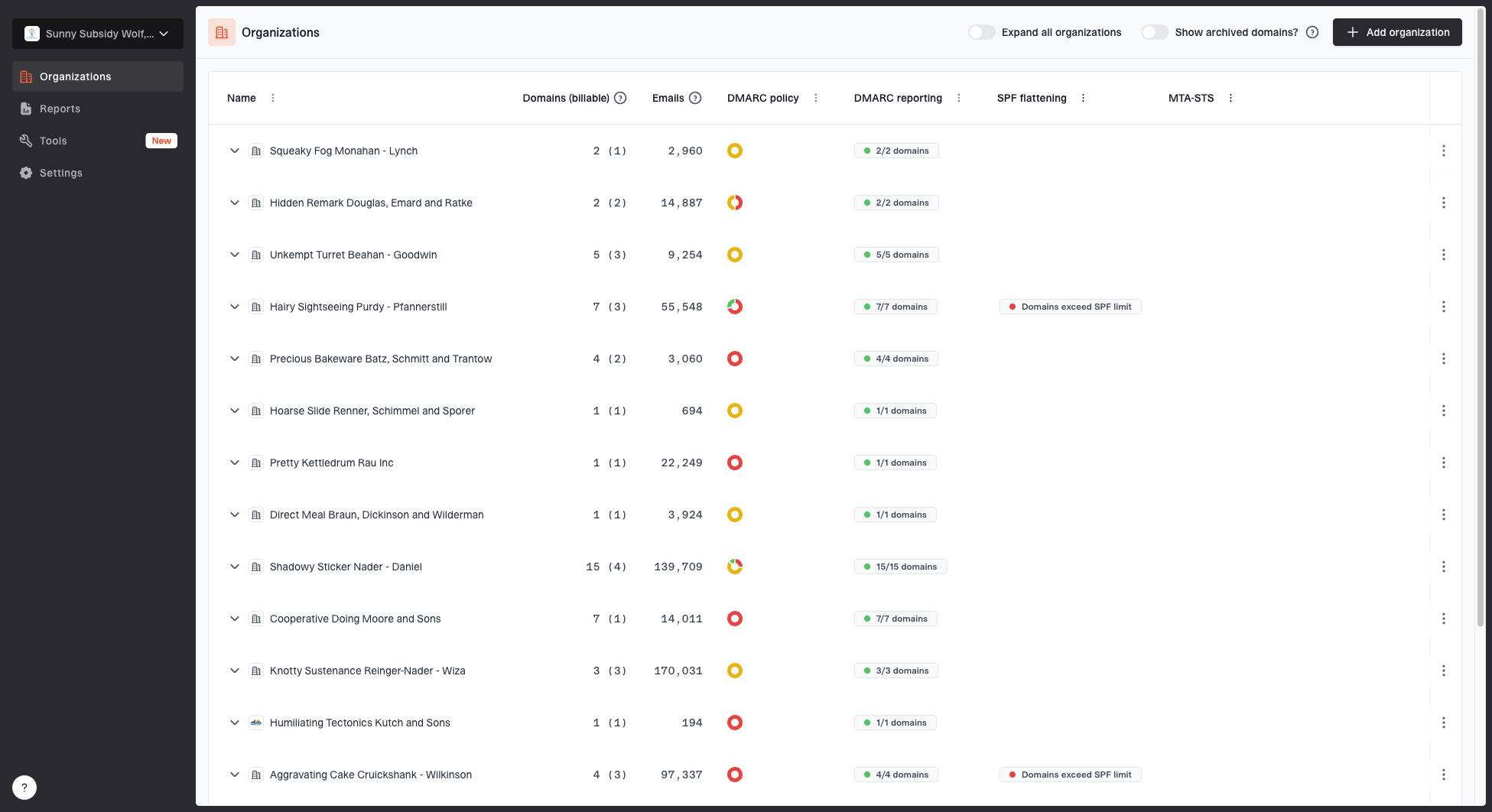
MSP organizations page showing client organizations, domain counts, email volume, and domain status columns
A useful daily queue sorts issues by enforcement risk, message volume, source trust, and client impact. Engineers can switch into the affected organization, review its domain status, inspect the source, assign the business owner, and record the next action. That workflow avoids mixing evidence or DNS changes across clients with similar domain names.
Suped's hosted DMARC workflow can stage policy without repeated client DNS edits after initial delegation. Hosted SPF helps MSPs manage approved senders when routine DNS access is limited. Use either only under the client's change controls, with named approvers, exportable configuration records, and a documented offboarding path.
Keep the client protected after enforcement
A Microsoft 365 domain at reject still needs ongoing service. New SaaS purchases, tenant migrations, copier replacements, acquisitions, gateway changes, and forgotten applications introduce senders after the project closes. Require an authentication review in the client's technology change process and route new sender requests through the same inventory and test procedure.
Review every client on a defined cadence. Confirm policy, reporting continuity, DKIM state, SPF lookup count, unknown-source volume, open exceptions, parked-domain posture, and incident history. Give the client a short report that names what changed, what remains open, who owns it, and the next enforcement decision.
Frequently asked questions
No. Publish the DMARC TXT record with the authoritative DNS provider for each custom domain. Microsoft 365 has separate controls for enabling custom-domain DKIM. The initial onmicrosoft.com domain follows a different administration path.
The authenticated SPF return-path domain and DKIM signing domain can both differ from the visible From domain. DMARC requires at least one passing method whose domain matches under the selected alignment mode.
Use reject immediately only for confirmed non-sending domains. For active domains, inventory senders under monitoring, repair legitimate failures, test representative routes, move through quarantine, and obtain the client's approval before full reject. Stage by domain or subdomain rather than relying on pct sampling, which RFC 9989 classifies as historic.
Trace the complete route. SPF commonly breaks at the forwarder, while DKIM survives only if signed content remains unchanged. Preserve DKIM where practical, validate ARC for trusted intermediaries, and avoid permanent broad allow rules.
Monitor new sources, authentication failure changes, DNS drift, missing aggregate reports, SPF lookup pressure, DKIM state, exceptions, and policy changes. Tie each alert to the client, domain, source owner, severity, and next action.