
How MSPs should investigate unknown DMARC sources

Updated on 26 Sep 2026: We updated this guide for RFC 9989 and RFC 9990, with clearer checks for raw authentication, alignment, policy overrides, and receiver differences.
MSPs should investigate an unknown DMARC source by preserving the report evidence, identifying the sending system behind the connecting IP address, comparing it with the client's approved-sender inventory, checking SPF and DKIM authentication and alignment, and obtaining confirmation from a business owner. The final classification should be approved, misconfigured, obsolete, forwarded, or unauthorized. A source should never be approved only because its messages look legitimate or its volume is high.
Treat every unknown source as a small evidence case. That keeps service delivery consistent across clients and prevents two costly mistakes: blocking a real business sender during DMARC enforcement, or allowing an unapproved system to use a client's domain. The investigation should produce a reproducible decision with an accountable owner and a recorded next action.
Preserve the evidence before changing anything
Start with the DMARC aggregate data for the exact client domain and reporting period. Capture the reporting organization, Report-ID, date range, connecting source IP, message count, RFC5322.From domain, RFC5321.MailFrom domain, SPF and DKIM alignment results, raw authentication results, receiver disposition, and any policy-override reason. Also note when the source first appeared and whether it has repeated. A one-message event needs different handling from a recurring system that sends payroll or invoices every weekday.
Unknown-source case recordtext
client_domain: client.example
reporter: receiver.example
report_id: 2026-07-24-client.example@receiver.example
report_begin: 2026-07-21T00:00:00Z
report_end: 2026-07-24T00:00:00Z
source_ip: 192.0.2.44
message_count: 418
header_from: client.example
envelope_from: bounce.sender.example
policy_evaluated_spf: fail
policy_evaluated_dkim: fail
auth_spf_domain: bounce.sender.example
auth_spf_result: pass
auth_dkim_domain: sender.example
dkim_selector: s1
auth_dkim_result: pass
receiver_disposition: none
policy_override_reason: none
client_owner: unconfirmed
case_status: investigating
Keep the original XML, reporter, Report-ID, and report period with the case, not only a screenshot or a provider name inferred from the IP. Cloud infrastructure and shared sending pools can make an IP owner look familiar even when the actual tenant is unrelated. Historical data also matters. If the source appeared immediately after a marketing launch, finance-system change, acquisition, or new vendor onboarding, that timing gives the client a concrete lead.
Do not authorize by IP ownership alone
An IP range can identify an infrastructure provider, but it does not prove that the client's account generated the mail. Require a business owner, account evidence, message headers, or a controlled test before approving the source.
Separate raw authentication from DMARC alignment
RFC 9989 now defines DMARC, and RFC 9990 defines aggregate reporting. In an RFC 9990 row, policy_evaluated.spf and policy_evaluated.dkim show the DMARC alignment tests. The auth_results element records the underlying SPF and DKIM verification results without interpreting them for DMARC. A raw SPF pass for bounce.sender.example can therefore appear beside an SPF alignment failure when the RFC5322.From domain is client.example.
|
|
|
|---|---|---|
source_ip | Connecting system | Treat it as an infrastructure clue, not tenant ownership. |
policy_evaluated | DMARC alignment and disposition | Use it to explain the DMARC pass or fail and receiver action. |
auth_results | Raw SPF and DKIM verification | Use the domains and selectors to identify the sending service. |
reason | Receiver policy override | Investigate trusted forwarding, mailing-list handling, or local policy. |
Read each field as evidence, not as automatic sender approval.
Compare the same source across reporting organizations before making a final classification. A receiver can apply local policy or report a trusted_forwarder, mailing_list, policy_test_mode, or other override. A DMARC policy change during a reporting period can also produce mixed dispositions. Preserve both legacy and RFC 9990 reports during the transition, and do not merge rows unless the Author Domain, connecting IP, alignment results, and raw authentication identifiers match.
Identify the system and its business owner
Work outward from evidence rather than asking the client whether they recognize an IP address. Reverse DNS, the SPF-authenticated domain, the DKIM signing domain, the selector, and a real message header often reveal the sending vendor or application. Compare those clues with the client's known mailboxes, marketing tools, ticketing systems, finance platforms, website forms, printers, monitoring appliances, and line-of-business applications.
- Capture clues: Record IP ownership, reverse DNS, authenticated domains, selector, dates, and volume.
- Search records: Check service tickets, password vault entries, DNS changes, vendor invoices, and prior sender approvals.
- Ask precisely: Give the client contact dates, likely system name, message purpose, and sample subject instead of only an IP.
- Prove control: Request an account screenshot, configuration export, full header, or controlled test message.
- Assign ownership: Name the client sponsor and technical operator who can approve or retire the sender.
If the client has no reliable register, build one before enforcement. A structured process to inventory every client sender reduces repeated investigations and gives account managers a clear approval path. The register should include the sender's purpose, owner, authenticated domains, expected volume, change date, and retirement status.
Separate authentication from business authorization
DMARC passes when at least one authenticated identifier from SPF or DKIM is in alignment with the RFC5322.From domain. Relaxed alignment compares organizational domains, while strict alignment requires an exact domain match. An unknown source can send genuine mail but fail DMARC because its return-path domain belongs to the vendor and its DKIM signature uses the vendor's domain. It can also pass DMARC while remaining unauthorized when a delegated subdomain, matching signature, or matching return path exists outside the expected approval process. Authentication proves domain control, not business authorization.
Known sender, failed DMARC
The client confirms the system, but its authenticated identifier is not in alignment with the RFC5322.From domain.
- Next step: Configure a custom return path or client-domain DKIM signing.
- Change control: Test first, then confirm the result in fresh aggregate data.
Unknown sender, passed DMARC
The source has a matching authenticated identifier, but the client has not approved or identified it.
- Next step: Trace who created the DNS entry, key, connector, delegated subdomain, or vendor account.
- Risk control: Rotate or remove access if no accountable owner can be found.
Forwarding deserves its own label. SPF often fails after forwarding because the forwarding server is not authorized by the original return-path domain. DKIM can survive if the message remains unchanged, but mailing lists and security gateways sometimes modify content and break the signature. A trusted_forwarder or mailing_list override records the receiver's local treatment, not client approval. ARC can give the receiver authentication context for an indirect path, but it does not prove that the client authorized the source.
Validate the DNS baseline and a real message
Check the client's published DMARC and SPF records before blaming the sender. A syntax error, duplicate SPF record, stale include, or incorrect alignment mode can change the result, while a missing aggregate-report address reduces the available evidence. RFC 9989 uses a DNS tree walk for policy discovery, so confirm which DMARC policy domain and record applied. The older pct tag has been removed; use the t=y testing signal only through a controlled policy change, not as an exception for one unknown source. Use the domain health checker to establish whether the domain's DNS controls are valid, then keep that result with the ticket.
Next, ask the confirmed application owner to send a controlled message to a mailbox where full headers can be collected. Compare the new message with the aggregate report: source network, return path, DKIM signing domain, selector, RFC5322.From domain, and authentication results. This test separates current configuration from old traffic or a different tenant on shared infrastructure.
?
What's your domain score?
Deep-scan SPF, DKIM & DMARC records for email deliverability and security issues.
Do not add broad SPF mechanisms merely to make an unknown source pass. That can authorize more infrastructure than the client uses, increase DNS lookups, and hide the ownership problem. Prefer the vendor's documented tenant configuration, a client-specific return path, a dedicated sending subdomain, or client-domain DKIM where the application supports it. RFC 9989 says a domain publishing p=reject must not rely solely on SPF for a DMARC pass, so valid aligned DKIM should be part of durable remediation. Record the exact change and a rollback step.
After the change, inspect a fresh message and wait for new aggregate data. DNS lookup success alone does not prove that the application selected the right key or envelope domain. Close the evidence gap only when observed mail behaves as intended across relevant receivers.
Classify the source and choose one action
Every investigation should end with one classification and one operational action. Use approved when ownership and authentication are proven, misconfigured when the sender is approved but DMARC fails, obsolete when the system should no longer send, forwarded when an intermediary explains the result, and unauthorized when the client denies ownership or no accountable owner can be established after documented checks.
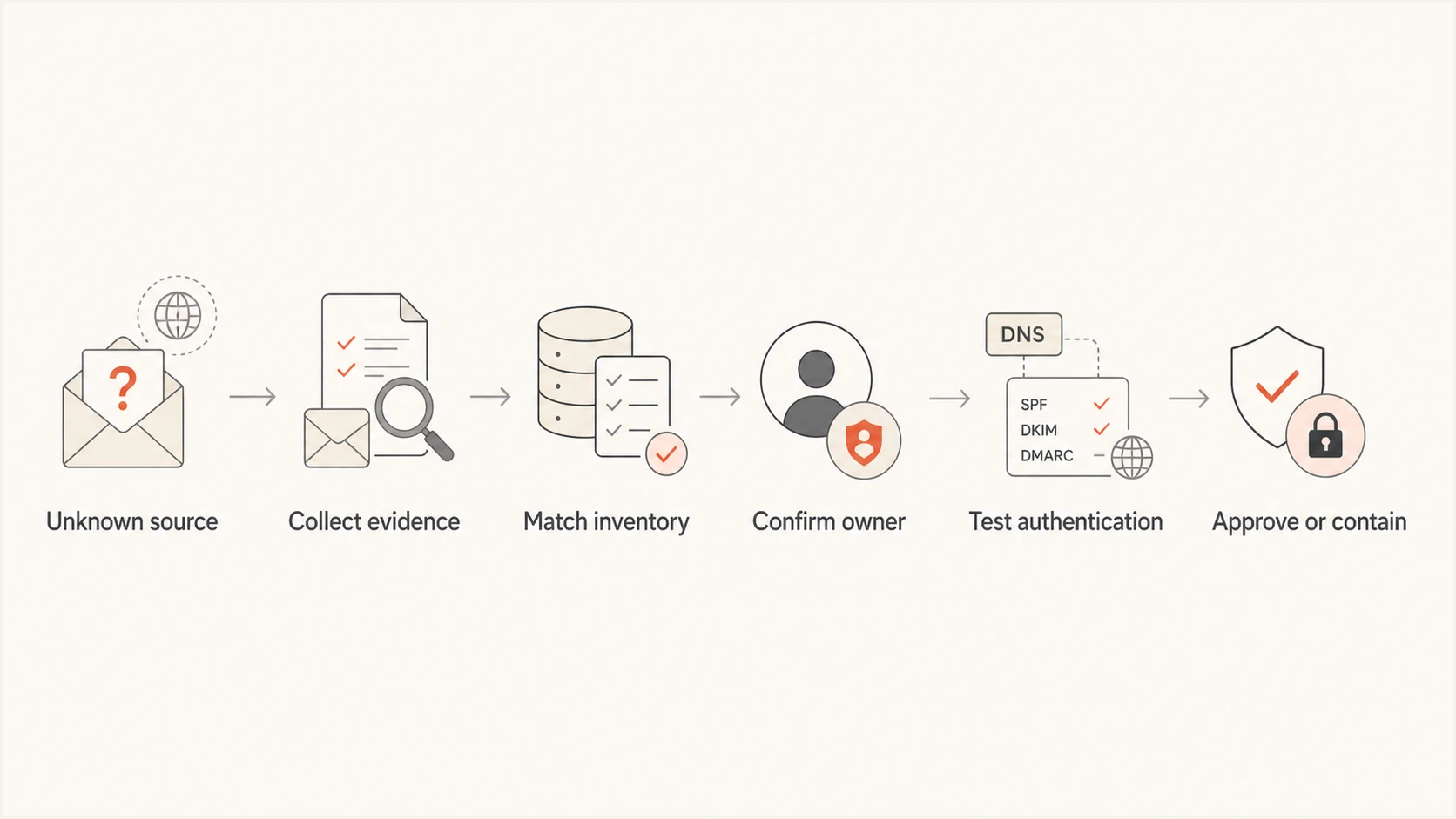
Six-step flow for investigating and classifying an unknown DMARC source.
Approved sources go into the client register with an owner and review date. Misconfigured sources get a remediation ticket and tracked status, not permanent acceptance. Obsolete sources need account shutdown, credential revocation, DNS cleanup, and confirmation that traffic stops. Unauthorized sources require incident handling, including review of DNS changes, application access, compromised credentials, delegated subdomains, and attempted impersonation.
|
|
|
|
|---|---|---|---|
Approved | Owner proven | Document | Mail passes |
Misconfigured | Owner proven | Fix sender | Fresh pass |
Obsolete | Retired use | Remove access | Traffic stops |
Forwarded | Route proven | Monitor | Pattern known |
Unauthorized | No owner | Contain | Risk closed |
Use a fixed label and action so technicians make consistent decisions.
Run the workflow consistently across clients
MSPs need the same evidence standard across investigations, technicians, clients, and policy stages. The case template should define severity, response target, required evidence, client approver, authentication change, validation result, and closure code. Link each approved sender to the client's change record so a later technician can see why it was allowed.
Suped's product supports this MSP workflow with multi-tenant source review, automated issue detection, remediation steps, alerts, and unified DMARC monitoring. A technician can review verified and unverified sources, open the supporting issue details, assign the client action, and confirm the result in later report data. This keeps the source decision and its follow-up evidence in the same client workspace.
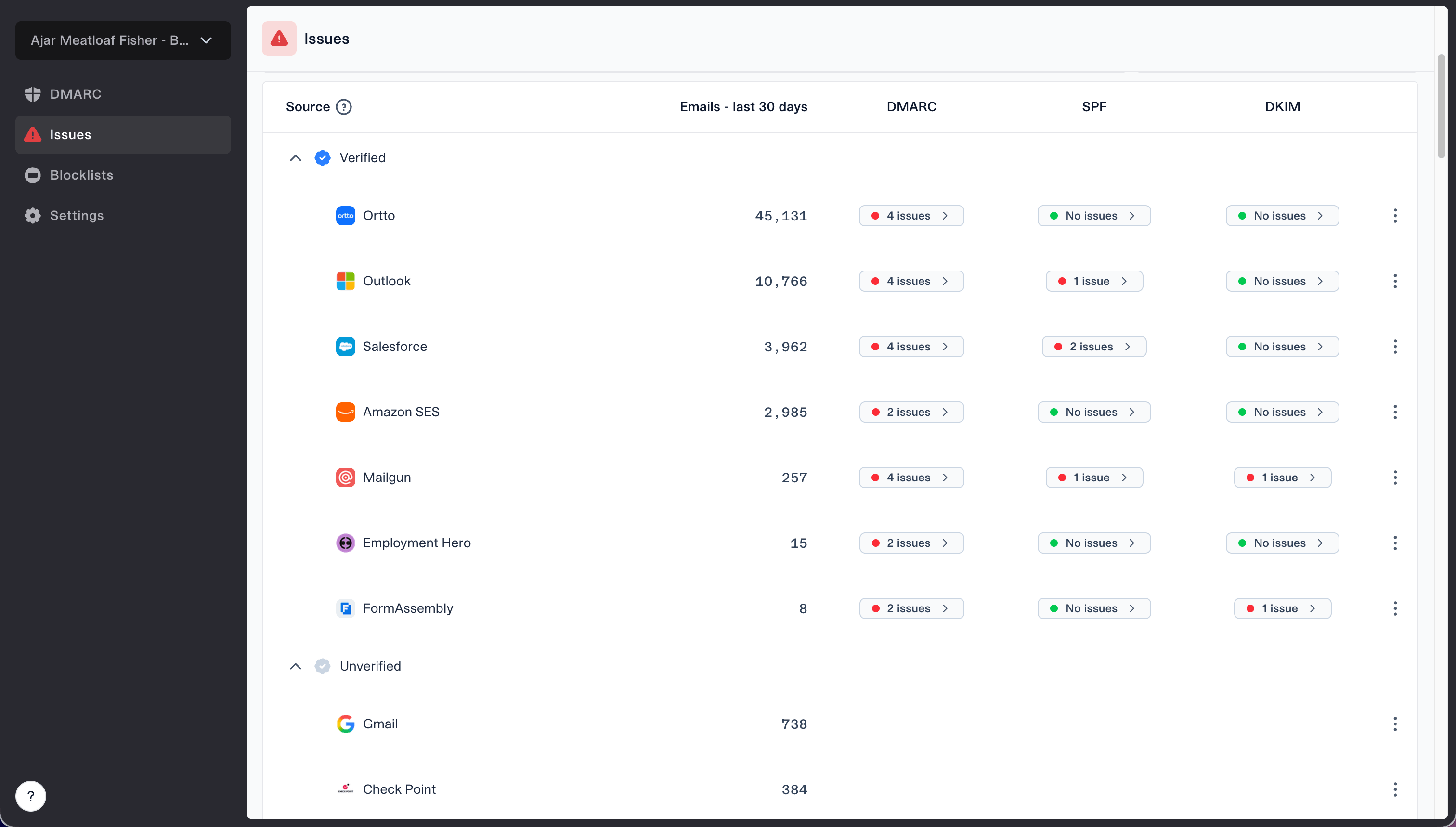
Issues page showing verified and unverified source sections for reviewing sending sources
Use the Suped MSP dashboard to separate urgent cases from routine cleanup. A new high-volume failing source on a domain moving toward rejection deserves immediate review. A stable forwarded pattern with no policy effect can remain monitored while higher-risk work is handled. Client switching and consolidated status views also reduce the chance that a case sits unnoticed in the wrong tenant.
The broader DMARC for MSPs service should also include documented escalation routes and client approvals. Once a source is approved, document approved senders so the result becomes reusable operational knowledge instead of a closed ticket with no lasting record.
Escalate when the evidence indicates security risk
Escalate beyond routine email-authentication remediation when the source appears suddenly at material volume, uses a matching client-domain identifier without an owner, follows an unexplained DNS change, or continues after credentials and integrations should have been disabled. The security review should cover registrar and DNS audit logs, administrator activity, application tokens, compromised mailboxes, recent vendor onboarding, delegated subdomains, and affected recipients.
- High priority: A new source passes DMARC with the client's domain, but no client owner recognizes it.
- High priority: Traffic targets customers or staff with subjects associated with payments, credentials, or account changes.
- High priority: DNS records, signing keys, delegated subdomains, or connectors changed outside the client's approved process.
- Routine review: Low-volume forwarding has a stable pattern and a confirmed original message path.
Do not wait for aggregate reports to provide message content because they contain authentication metadata, not message bodies. If content or recipient impact matters, obtain full headers and samples through the client's approved incident process. Preserve timestamps and access logs before rotating keys or deleting integrations, then contain the source according to the client's authority and change controls.
Close with reproducible evidence
A complete unknown-source investigation records what the source was, who approved it, why SPF or DKIM behaved as observed, what changed, and which fresh data proved the outcome. If no owner exists, record the searches and contacts completed before classifying the source as unauthorized. Add approved sources to the sender register, record the review date, remove retired access, and route suspicious use into the client's security process.