
How to inventory client sending sources before DMARC enforcement

Updated on 17 Sep 2026: We updated this guide for RFC 9989 enforcement staging and clearer domain-level sender inventory controls.
Inventory client sending sources by combining stakeholder interviews, DNS review, vendor records, DMARC aggregate reports, and controlled message tests. Record every source against a business owner, visible From domain, envelope domain, DKIM signing domain and selector, authentication result, traffic pattern, evidence, and approval status. Keep DMARC at p=none while the inventory develops, then enforce only after recurring legitimate mail has a verified authentication path and an accountable owner.
For MSPs, the inventory is both a technical control and a client-management record. It prevents an unknown marketing form, billing system, or line-of-business application from becoming an emergency during enforcement. A repeatable inventory also makes MSP DMARC services easier to scope, hand over, and report across multiple client organizations.
Define what counts as a sending source
A sending source is any system that uses a client-owned domain in a visible From address. That includes the primary mail platform, marketing automation, support desks, finance applications, website forms, monitoring systems, scanners, recruitment platforms, and custom applications. A provider name alone is not enough because one provider can use several sending accounts, regions, return-path domains, or DKIM selectors.
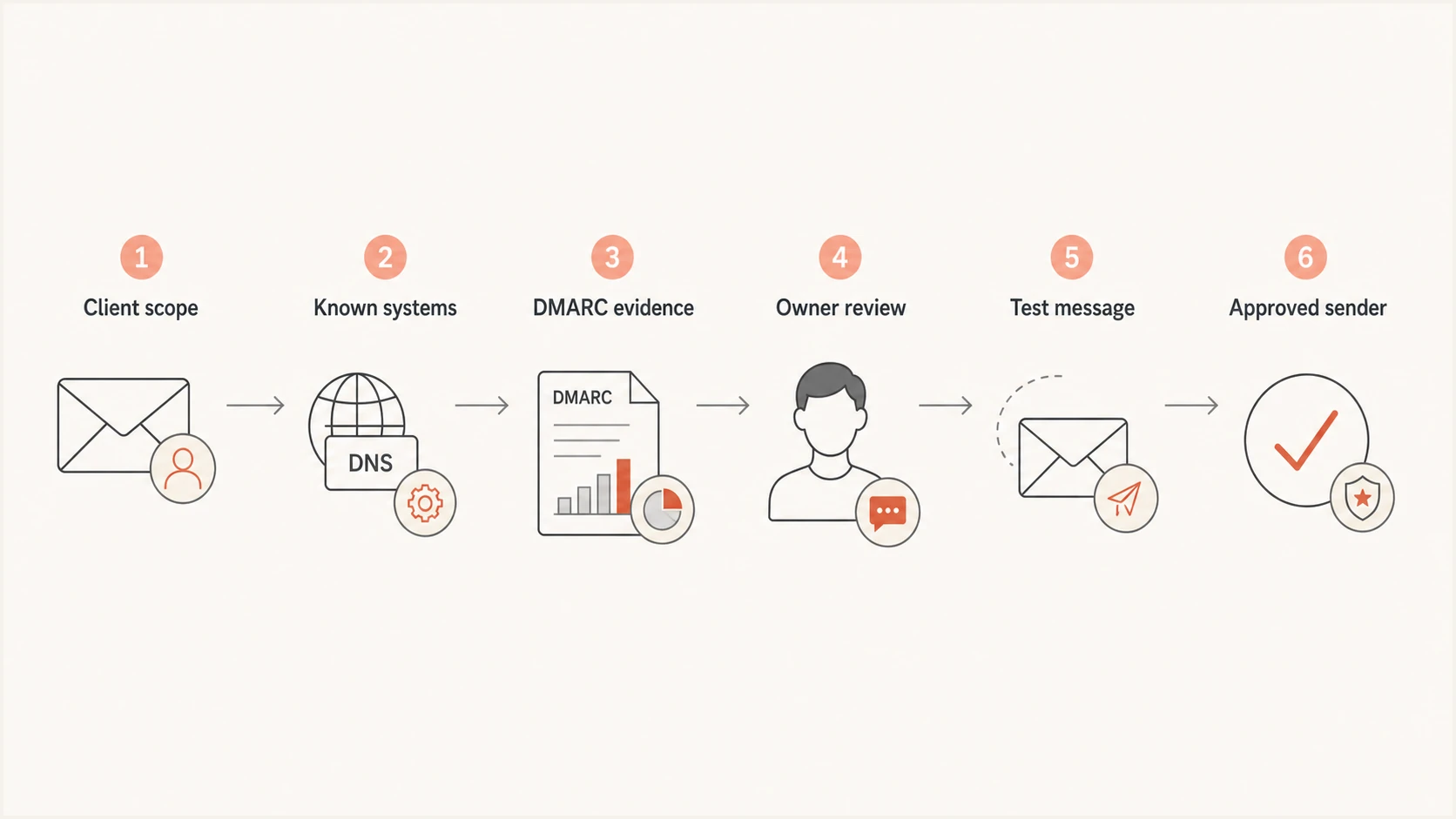
Flowchart for discovering, verifying, and approving client sending sources
Treat each distinct mail stream as a separate inventory row when its owner, purpose, account, or authentication configuration differs. Password resets and newsletters sent through the same vendor can need separate approval because they have different business impact and change windows. This level of detail lets the MSP isolate risk without blocking every stream tied to one supplier.
Candidate does not mean authorized
DMARC reports show infrastructure and authentication identities associated with mail using the domain. They do not prove the vendor account, message purpose, or business authorization. Keep a source in candidate status until a client owner confirms its purpose and the MSP verifies a reliable authentication result.
Set scope, ownership, and evidence requirements
Start with every domain and subdomain that appears in client email, even if the root domain sends no human mail. Agree who can approve a sender, who controls public DNS, who manages each vendor, and who accepts service risk. The MSP should own the inventory process, but the client must own business authorization.
- Scope: List organizational domains, active subdomains, parked domains, and domains used only for transactional mail.
- Approver: Name a client stakeholder who can confirm that each source has a valid business purpose.
- Operator: Record who can change vendor authentication, DNS records, applications, or sending identities.
- Evidence: Require DMARC observations, a test message, vendor configuration, or another reproducible proof.
- Deadline: Give unresolved owners a decision date before the first quarantine stage.
Document these roles during kickoff and make the approval rule visible. The companion process for client stakeholder preparation helps prevent technical findings from waiting in an unowned queue.
|
|
|
|---|---|---|
Source and account | Vendor, tenant, or application | Separates shared infrastructure |
Purpose and owner | Business use and decision contact | Establishes authorization |
Visible From domain | Exact domain used in From | Defines the DMARC identity |
SPF identity | Return-Path domain and result | Shows the SPF pass path |
DKIM identity | Signing domain, selector, and result | Shows the DKIM pass path |
Evidence and dates | Header, report, first seen, last seen | Makes findings reproducible |
Traffic and status | Pattern, approval, and next action | Supports the enforcement decision |
Minimum fields for an MSP sender inventory
Map domain and subdomain policy scope
Inventory the exact visible From domain for each stream, not only the client's organizational domain. Under RFC 9989, policy discovery uses a DNS tree walk. A policy at an organizational domain can cover subdomains, while an explicit DMARC record at a subdomain can set a different policy. Enforcement planning must therefore map each sending domain to the record that receivers will apply.
- Exact domains: Record every visible From domain and the DMARC DNS name queried for it.
- Inherited policy: Check the organizational-domain p policy and any sp policy that applies to existing subdomains.
- Explicit records: Record subdomains with their own DMARC policy because they can move through enforcement separately.
- Non-existent domains: Document any np policy and confirm that unused names have no legitimate sending dependency.
A parent change can affect several teams
Before changing a parent policy, compare the inventory with delegated DNS zones, regional subdomains, vendor-managed subdomains, and domains used by acquired business units. Get approval for the full inherited scope or publish and test a narrower explicit policy first.
Collect known senders before reading reports
Ask the client for known systems before DMARC data arrives. Interview IT, marketing, finance, HR, operations, application owners, and any agency that sends under the client's domain. Review DNS TXT and CNAME records, mail-flow connectors, identity platform applications, procurement records, password managers, website plugins, automation jobs, and service-desk documentation.
Documented sources
- Mail platform: Confirm accepted domains, connectors, and outbound routing.
- Managed vendors: Export active sending accounts and authentication settings.
- Applications: Trace SMTP relays and API-based mail integrations.
Often hidden sources
- Department tools: Find subscriptions purchased outside central IT.
- Legacy devices: Check scanners, alarms, network gear, and old servers.
- Web forms: Test contact forms, commerce receipts, and site notifications.
Do not treat old DNS includes as proof that a sender remains authorized. They are clues for investigation. Ask the named owner whether the contract and sending use still exist, then compare that answer with live traffic. For a dormant or low-frequency source, retain vendor configuration, contract evidence, or a historical message until a representative test is possible. Remove stale authorization only through the client's change process because some systems send quarterly or annually.
Use DMARC monitoring to find actual traffic
Publish a valid DMARC record with aggregate reporting and a p=none policy. Aggregate reports reveal source IPs, message counts, the domain evaluated for DMARC, SPF and DKIM identifiers and results, and policy disposition. A useful observation window covers normal business cycles, month-end billing, campaigns, seasonal activity, and low-frequency system mail. Thirty days is a practical baseline, but quarterly or annual senders require client evidence beyond that window.
Initial DMARC monitoring recordDNS
_dmarc.example.com. IN TXT "v=DMARC1; p=none; rua=mailto:reports@example.com"
The receiving mailbox must accept DMARC reports. When the rua address uses a different organizational domain, the report consumer must publish the required external-destination authorization record. Confirm the syntax and authorization before relying on the feed. Ongoing DMARC monitoring is more useful than a one-time scan because sender behavior changes after onboarding, vendor migrations, and campaign launches.
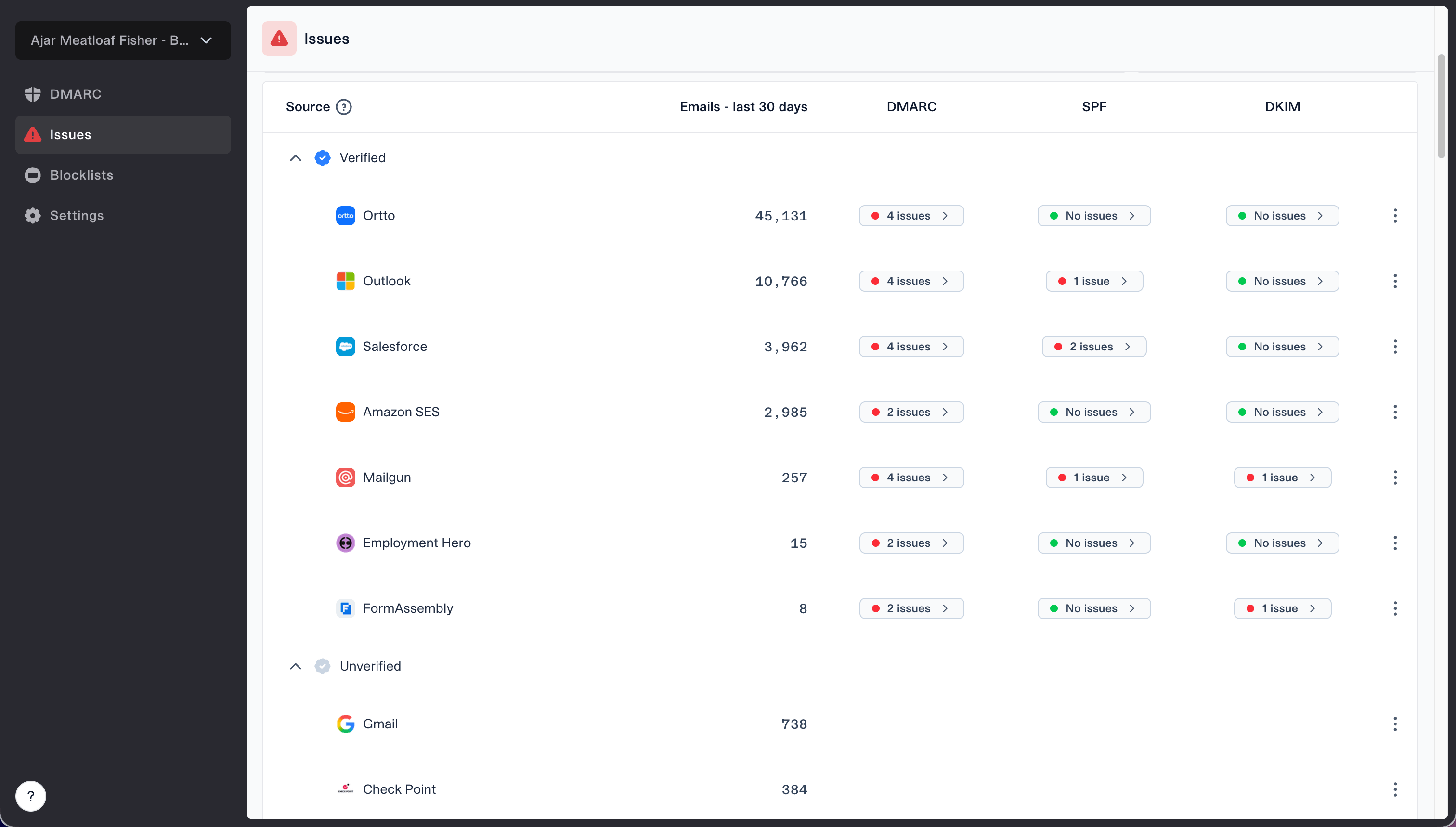
Issues page showing verified and unverified source sections for reviewing sending sources
Suped is our DMARC platform. Its verified and unverified source workflow gives MSP operators a review queue for separating known client services from sources that still need an owner. Use the queue to assign evidence checks and remediation, then record the decision in the client's service ticket or change record. Multi-tenant views, issue detection, policy monitoring, and alerts keep that workflow consistent across client organizations.
DMARC checker
Look up a domain's DMARC record and catch policy issues.
?/7tests passed
Use the focused check after publishing or changing the DMARC record. It confirms that the policy is discoverable and syntactically usable, but it does not prove that every legitimate sender has been found. That proof comes from observed traffic, stakeholder approval, and message-level testing together.
Reconcile report data with business ownership
Group report data by provider, sending account, domain identity, and purpose. Reverse DNS and network ownership can suggest a provider, but they do not establish client authorization. Compare each cluster with the known-source list and investigate every mismatch. Shared infrastructure also means one source IP can carry mail for many unrelated customers, so approval must rest on domain evidence and a client owner.
- Normalize: Merge harmless IP churn only when the provider, account, and authentication identities match.
- Classify: Mark each row as known, suspected, unauthorized, forwarded, or unresolved.
- Verify: Send a controlled message and capture complete headers when the source is available.
- Approve: Require a named client owner and a documented business purpose.
- Retire: Disable obsolete sending before removing its DNS authorization.
Record message volume, first-seen and last-seen dates, and business impact. A low-volume payroll notification can be more important than a large newsletter. Volume and dates reveal stable or dormant patterns, while the owner and purpose determine whether failure is acceptable during policy staging.
Forwarding can distort SPF results
Forwarding commonly breaks SPF because the forwarding server is outside the original sender's authorization. Do not approve a source merely because its IP appears beside legitimate mail. Check whether DKIM remains valid and whether its signing domain matches the visible From domain under DMARC.
Verify the authentication path for every approved source
An approved source needs at least one dependable DMARC pass path. SPF must pass and use an envelope domain that matches the visible From domain under the selected DMARC mode, or DKIM must pass with a signing domain that matches it. DKIM is usually more resilient when forwarding changes the delivery path, while SPF remains useful for systems that support a client-controlled return path.
|
|
|
|---|---|---|
Mail suite | DKIM test | MSP |
Marketing | Domain setup | Marketing |
Web app | Header test | App team |
Device | Relay test | IT ops |
Authentication evidence by source type
Test representative messages instead of relying only on vendor documentation. Capture Authentication-Results, Return-Path, From, and DKIM signature fields. Confirm that the domain passing SPF or DKIM is the one DMARC evaluates against the visible From domain. The detailed workflow for SPF and DKIM matching is useful when a vendor reports both mechanisms as passing but DMARC still fails.
SPF pass path
Verify the authorized infrastructure, envelope domain, DNS lookup count, and behavior after forwarding. Keep the SPF record limited to systems that genuinely send mail.
DKIM pass path
Verify selector publication, signature validity, signing-domain ownership, key rotation, and representative messages. Keep the client-controlled signing identity documented.
Use clear statuses and enforcement gates
Give every row a controlled status: discovered, owner pending, approved, authentication work required, verified, rejected, retired, or exception. Avoid free-text status names because they make multi-client reporting inconsistent. Each exception needs an owner, business reason, compensating action, review date, and planned end state.
Minimum gate before quarantine
- Coverage: All recurring legitimate streams have an inventory row and named owner.
- Authentication: Every approved stream has a tested DMARC pass path.
- Exceptions: Open risks have written client acceptance and a review date.
- Operations: Alerts, rollback ownership, and change windows are confirmed.
Under RFC 9989, stage enforcement by selecting a low-risk domain or subdomain, publishing p=quarantine with t=y, and reviewing the resulting reports before removing t=y. The t tag requests testing behavior without suppressing reports. Do not use pct for a percentage rollout because RFC 9989 removed that tag after inconsistent receiver implementation. Progress to p=reject only after the active quarantine stage remains stable. A managed hosted DMARC policy can simplify controlled policy changes across client domains. For clients with frequent sender changes, hosted SPF management keeps approved sender changes within an MSP-controlled workflow without giving every vendor DNS access.
Do not use a fixed pass-rate percentage as the only release condition. A high aggregate rate can hide one small but critical stream. Review failures by source and business purpose, confirm the client accepts every unresolved case, and retain rollback instructions before changing policy.
Keep the inventory operational after enforcement
The inventory becomes a living service record after enforcement. Tie new vendors, DNS changes, selector rotation, domain onboarding, and application releases to the MSP change process. Track first-seen and last-seen dates, review unverified sources on a schedule, and alert on sudden authentication failures or new sending infrastructure. Client reports should show approved sources, unresolved owners, remediation progress, policy stage, and material changes since the prior review.
Suped supports this operating model through its MSP and multi-tenancy dashboard, DMARC source monitoring, hosted policy controls, hosted SPF, and blocklist (blacklist) monitoring. Issue detection and fix steps help technicians turn a failed source into a tracked remediation task. Organization separation keeps each client's authentication data and follow-up work within the correct MSP account.
- Onboarding: Require sender details and an owner before a new service uses the domain.
- Changes: Retest after vendor migration, DNS edits, selector rotation, or relay changes.
- Reviews: Reconfirm low-frequency sources and time-limited exceptions with owners.
- Offboarding: Disable sending, observe the change, then remove obsolete DNS authorization.
This maintenance step protects the enforcement result. Without it, vendor sprawl recreates the same uncertainty that the original inventory removed, and the MSP ends up investigating preventable incidents under deadline pressure.
A defensible inventory makes enforcement routine
A client is ready for DMARC enforcement when every recurring legitimate source has a business owner, a documented purpose, reproducible evidence, and a tested DMARC pass path. Unknown sources are investigated, unauthorized sources are rejected, obsolete systems are retired, and exceptions have explicit acceptance. The MSP can then stage quarantine and rejection by domain or subdomain with a clear rollback owner instead of relying on a single domain-wide pass percentage.
Keep the inventory attached to service onboarding and change management after enforcement. The client approves business use, the MSP verifies authentication, and monitoring detects change before it becomes widespread delivery failure.