
How to handle SPF and DKIM alignment for MSP clients

Updated on 22 Oct 2026: We clarified SPF and DKIM troubleshooting for MSP clients, including header tests and subdomain exceptions.
SPF and DKIM alignment for MSP clients is handled by treating every sending source as an identity decision. The domain in the visible From address, the SPF return-path domain, and the DKIM signing domain have to be understood before DMARC enforcement can work without breaking legitimate mail.
Start with a sender inventory, then configure client-domain DKIM and a custom return-path where supported. Use a dedicated subdomain for separate policy management, and remove unapproved sources. For an MSP program, the hard part is repeating the work across client domains with different vendors, DNS owners, approval processes, and risk tolerances.
What SPF and DKIM alignment mean
DMARC does not only ask whether SPF or DKIM passed. It also checks whether at least one passing mechanism uses an authenticated domain that matches the visible From domain under the selected mode. That comparison is SPF alignment or DKIM alignment, depending on which authentication path passed.
For MSP service delivery, record four domains on every source: the Author Domain in the visible From address, the return-path domain checked by SPF, the d= domain in the DKIM signature, and the Organizational Domain used for relaxed comparison. If one SPF or DKIM identifier passes and has alignment with the Author Domain, DMARC passes.
Relaxed alignment, the default, accepts domains with the same Organizational Domain. Strict alignment requires an exact domain match. The DMARC adkim tag controls DKIM mode and aspf controls SPF mode; r is relaxed and s is strict. Omitted tags default to r. RFC 9989 uses a DNS Tree Walk to discover Organizational Domains, so delegated subdomains and explicit subdomain DMARC records need to be part of the client review.
A client can pass SPF and DKIM at the protocol level and still fail DMARC. That usually happens when the authenticated domain belongs to a platform, reseller, shared mail system, or gateway instead of matching the client domain under the selected alignment mode.
- SPF: The return-path domain passed SPF and matched the visible From domain under the selected alignment mode.
- DKIM: The signing domain passed DKIM and matched the visible From domain under the selected alignment mode.
- DMARC: At least one passing path had identifier alignment with the visible From domain.
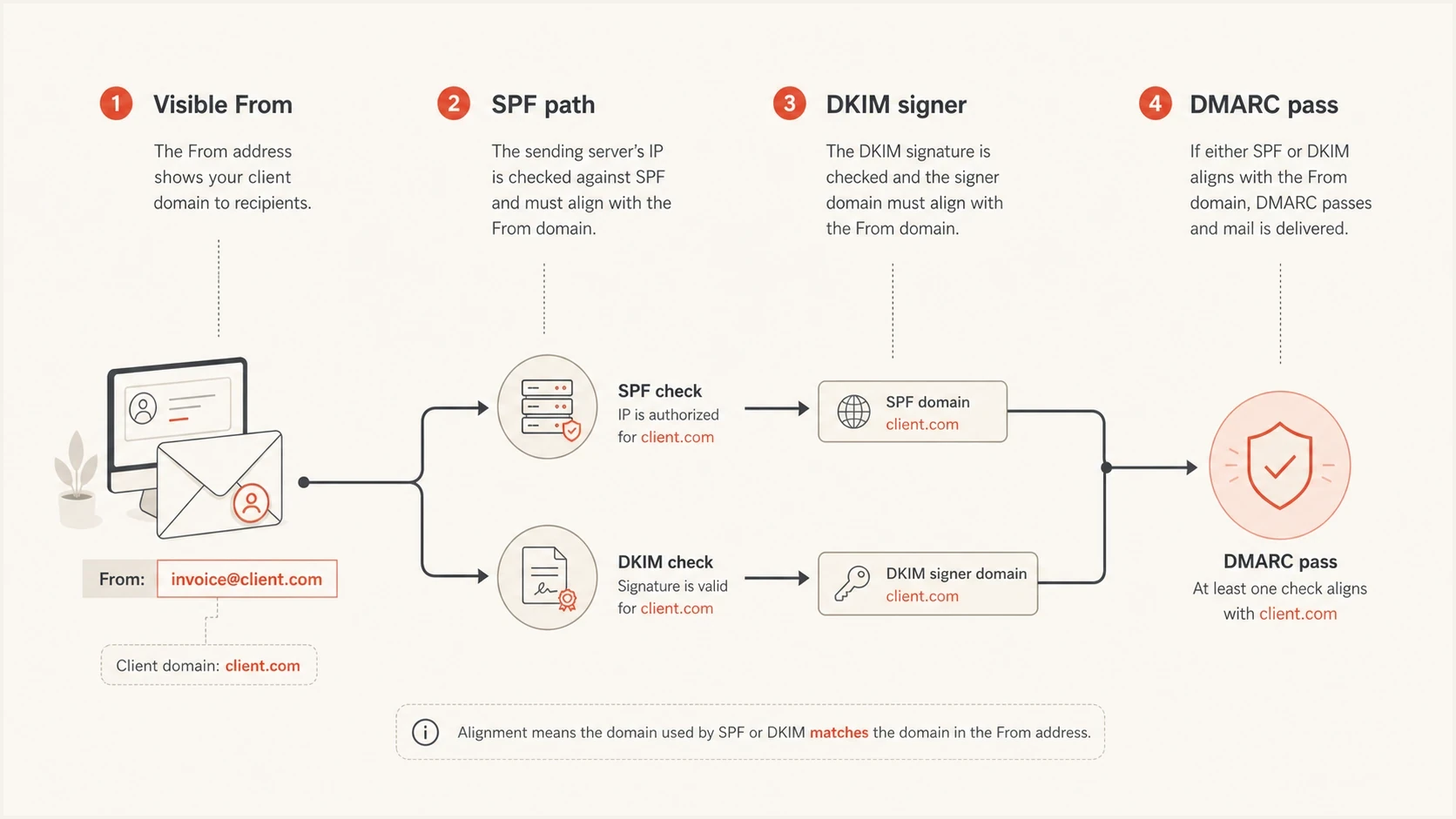
DMARC alignment compares the visible From domain with the SPF return-path or DKIM signing domain.
The MSP onboarding sequence
Collect evidence before DNS changes: review aggregate DMARC reports, group sources, and assign ownership before fixing SPF and DKIM. A mail platform list is not enough because clients often have old CRMs, scanners, accounting systems, form tools, and ticketing systems still sending mail.
Start reporting with p=none and a working rua destination. If reports go outside the client's Organizational Domain, verify the destination's external reporting authorization so receivers can send them.
- Inventory: Compare sources in aggregate DMARC reports with the client-approved sender list, including low-volume and seasonal systems missing from the reporting sample.
- Classify: Mark each source as core mail, business application, marketing system, legacy device, or unauthorized traffic.
- Assign: Name the owner for the vendor login, DNS zone, change window, and testing contact. Save existing DNS values and TTLs in the change ticket.
- Fix: Enable DKIM with a matching client domain first where possible, then repair SPF return-path alignment where DKIM is unavailable or unreliable.
- Enforce: Move policy only after legitimate traffic passes consistently across normal business and reporting cycles. Verify critical low-volume senders with controlled tests.
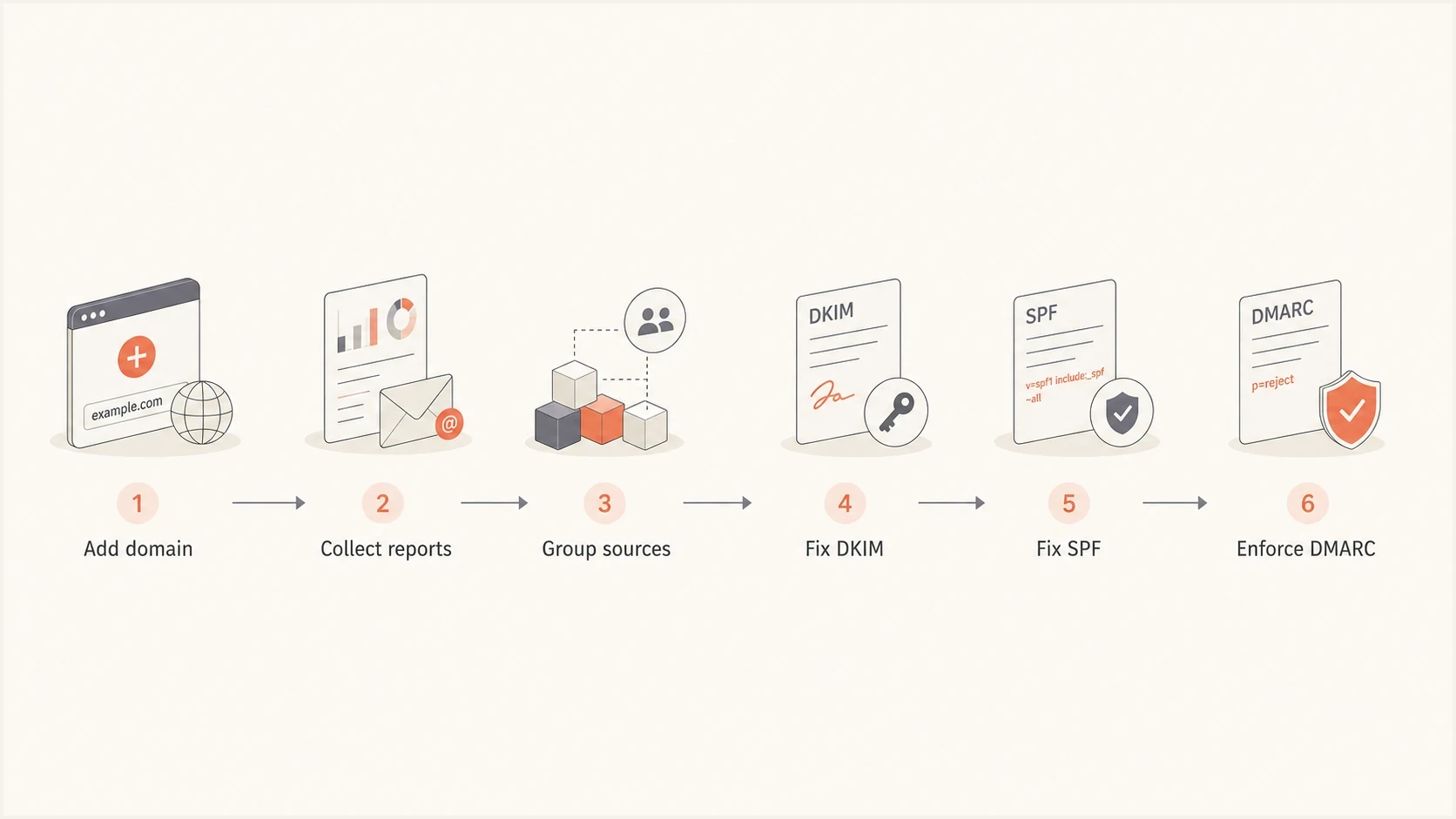
MSP client onboarding steps: add a domain, collect DMARC reports, group sources, fix DKIM and SPF, then enforce policy.
A platform view matters once the work becomes recurring. Suped's DMARC monitoring workflow lets an MSP watch client domains and identify unverified sources, giving the assigned engineer evidence for remediation.
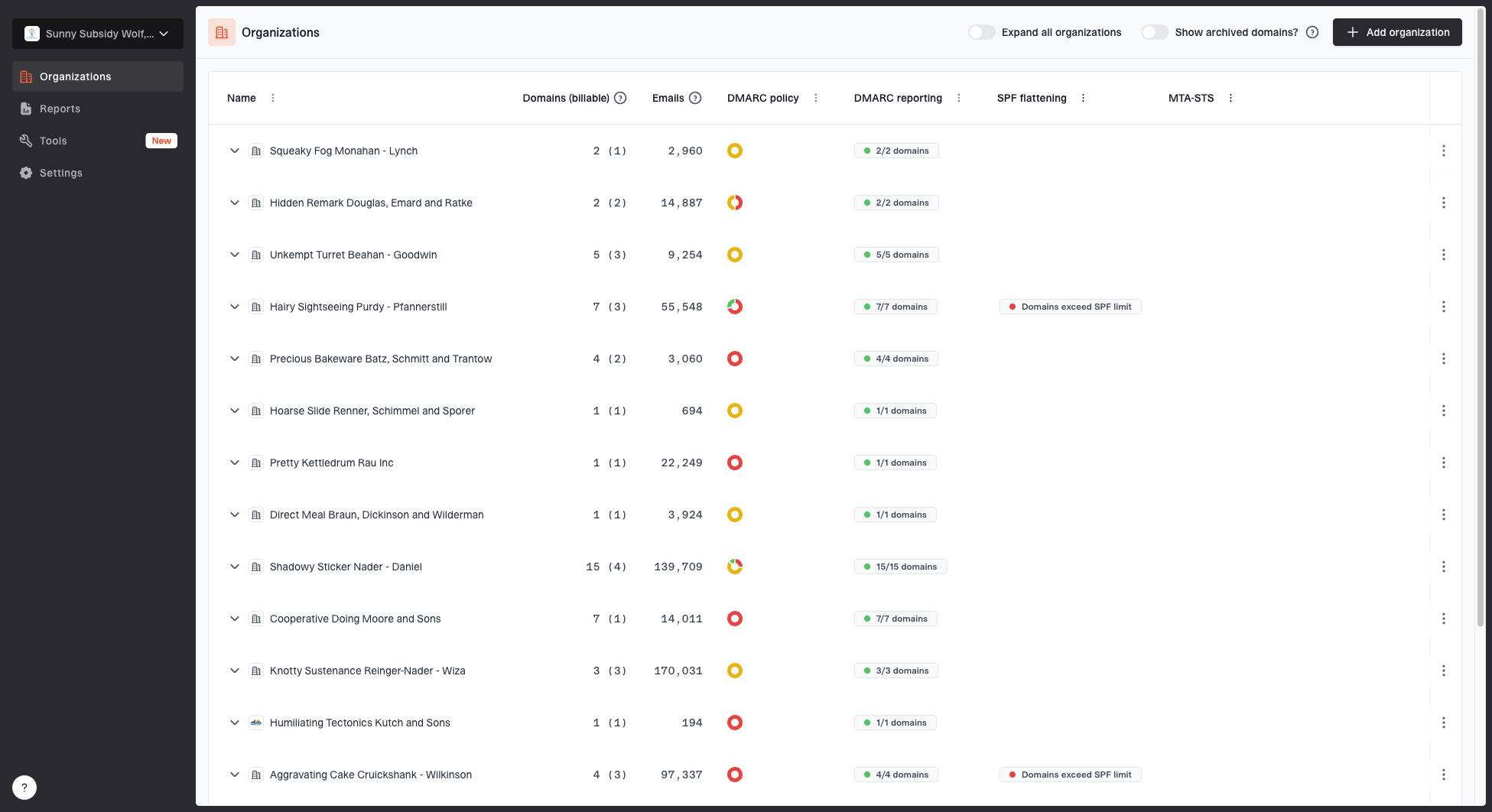
MSP organizations page showing client organizations, domain counts, email volume, and domain status columns
How to fix SPF alignment
SPF authenticates the SMTP MAIL FROM domain, also called the envelope sender or return-path domain. SPF alignment compares that domain with the visible From domain. A vendor can appear in an SPF record and still fail DMARC if its authenticated return-path belongs to the vendor. For relaxed mode, the usual fix is a custom return-path or bounce domain under the client's Organizational Domain, with SPF authorization published there. Strict mode requires an exact match with the visible From domain.
SPF alignment under relaxed and strict modes
Visible From: billing@example.com
Return-Path: <bounce@bounces.vendor-mail.net>
SPF result: pass
SPF alignment (aspf=r): fail
SPF alignment (aspf=s): fail

Visible From: billing@example.com
Return-Path: <bounce@bounce.example.com>
SPF result: pass
SPF alignment (aspf=r): pass
SPF alignment (aspf=s): fail

Visible From: billing@example.com
Return-Path: <bounce@example.com>
SPF result: pass
SPF alignment (aspf=r): pass
SPF alignment (aspf=s): pass
Prefer DKIM when a source supports client-domain signing. SPF still matters, but forwarding often changes the connecting server without changing the original return-path, which can make SPF fail. SPF evaluation also limits DNS-querying terms. When a client has many senders, Suped's Hosted SPF gives the MSP one workflow for authorized-source changes while keeping the published SPF response within protocol limits. The sender still needs a matching return-path domain for SPF alignment.
Custom return-path
- Best use: Use when the sender supports a custom bounce domain for the client.
- DNS need: Publish the exact CNAME, MX, or TXT records supplied by the vendor.
- Verification: Confirm a real message uses the custom return-path and passes SPF with alignment.
SPF include only
- Best use: Use for authorization, not as proof that DMARC will pass.
- DNS need: Publish vendor authorization at the domain used in the return-path.
- Verification: Check both the SPF result and its alignment with the visible From domain.
Keep one v=spf1 TXT record at each evaluated domain and merge approved authorizations into it. SPF is not inherited by subdomains. SPF permits no more than 10 DNS-querying terms during one evaluation, including nested includes. Exceeding the limit or publishing multiple SPF records causes permerror; a valid DKIM signature with alignment can still produce a DMARC pass.
How to fix DKIM alignment
DKIM alignment is usually the better MSP target because a valid signature can survive forwarding and does not depend on the connecting IP. The practical task is to get each sender signing with a domain that matches the client's visible From domain under the selected alignment mode. For Microsoft 365 and Google Workspace, enable DKIM for each client sending domain and publish the DNS records the platform generates.
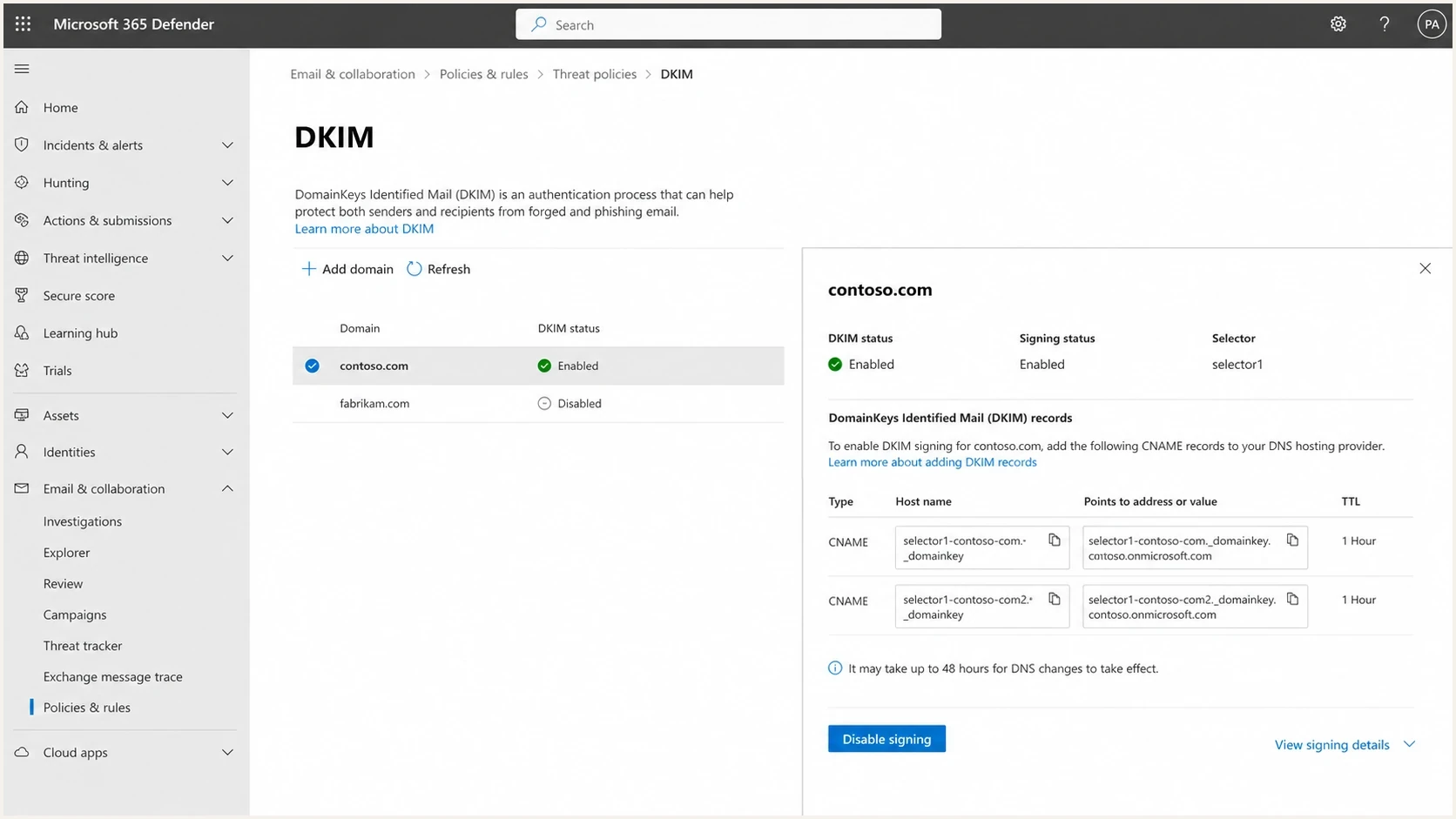
Microsoft 365 Defender DKIM setup screen showing domain status and CNAME records.
|
|
|
|
|---|---|---|---|
Native DKIM | Add CNAMEs | Confirm d= domain | |
Native DKIM | Publish TXT | Check active selector | |
Marketing app | Domain signing | Publish vendor CNAMEs or TXT | Check test alignment |
Scanner | Relay through mail | Use a supported relay | Review signed message |
Common DKIM handling by sender type
Microsoft 365 supplies provider-generated CNAME targets, and newer custom domains can use a different target format than older domains. Retrieve both current values from the tenant instead of constructing them from an old template. Publish both selectors, enable signing, confirm the d= domain in a delivered message, and retain both records so selector rotation can complete cleanly.
Third-party applications vary. Some give the client a DKIM selector and CNAME targets. Some only sign with the vendor domain. Some support custom domains only on higher plans. Document the exact limitation in the client runbook because it determines whether to change DNS, change the vendor plan, isolate the sender, or replace it.
Illustrative DKIM CNAME records; use vendor targets
selector1._domainkey.example.com CNAME selector1-vendor.example.net
selector2._domainkey.example.com CNAME selector2-vendor.example.net
Verify alignment in real message headers
After DNS caches have refreshed and signing is enabled, send a message from each source to an external mailbox. Read the receiving system's Authentication-Results header and compare smtp.mailfrom and header.d with header.from. The header.s value identifies the DKIM selector.
Illustrative message passing DMARC through DKIM
From: billing@example.com
Return-Path: <bounce@bounces.vendor-mail.net>
Authentication-Results: mx.recipient.example;
    spf=pass smtp.mailfrom=bounce@bounces.vendor-mail.net;
    dkim=pass header.d=example.com header.s=selector1;
    dmarc=pass header.from=example.com
Here SPF passes without SPF alignment, while DKIM passes with an exact domain match, so DMARC passes even under strict DKIM mode. If the only passing DKIM signature instead has d=vendor-mail.net, DMARC fails. With multiple DKIM signatures, one valid signature with a matching d= domain is sufficient.
- Use results added by the trusted receiving system to avoid relying on sender-supplied authentication headers.
- Test paths that add disclaimers or rewrite messages, because changes to signed content can invalidate DKIM.
- Repeat tests through forwarding and the client's ticketing or relay workflow, then confirm the source in aggregate reports.
- Save the headers and test dates in the client runbook. A DMARC pass does not guarantee inbox placement.
How to treat exceptions and shared senders
MSP clients always have exceptions. The mistake is treating every exception as a reason to stay at monitoring forever. Give each exception a named owner and a recorded disposition. A temporary exception gets a due date. An accepted exception is isolated under a subdomain when possible. A blocked exception is removed from the approved sender list and included in client security reporting. For shared ticketing or relay systems, configure each client's signing domain separately; an MSP-owned signing domain does not match an unrelated client domain.
Use the root domain
Use the client root domain for core business mail when the platform supports DKIM with the client domain and the sender is operationally important.
- Example: User mail, invoices, service desk, and client-facing notifications.
Use a subdomain
Use a dedicated subdomain when a sender needs separation, has weaker controls, or sends mail with a different risk profile than normal business messages.
- Example: Marketing campaigns, event mail, surveys, and bulk notices.
A marketing platform can use mail.example.com in the visible From address while core mail uses example.com. The sender still needs passing SPF or DKIM with alignment. Publish an explicit record at _dmarc.mail.example.com for separate policy management; otherwise review the inherited sp or p policy. Record which vendor controls each delegated DNS name. A subdomain signature can still satisfy relaxed DKIM alignment for the root domain, so review strict mode and delegation scope before treating a subdomain as a security boundary.
Keep alignment working after onboarding
Alignment is recurring change control, not a one-time DNS project. New applications appear, vendor return-paths change, selectors rotate, and client domains move between tenants. The sender inventory remains the source of truth after enforcement.
- Approve new senders before launch: Require the visible From domain, return-path option, DKIM setup, owner, and test evidence in the change ticket.
- Track selector rotation: Verify the active selector in delivered headers and reports that include it. Retain provider-managed selectors and follow the vendor's retirement schedule for old keys.
- Review delegated subdomains: Check who controls DNS, which DMARC policy applies, and whether relaxed alignment grants more authority than the client intended.
- Triage new report sources: Investigate new volume, alignment failures, and unknown providers before adding anything to SPF or publishing a DKIM key.
- Plan client offboarding: Hand over the sender inventory, current policy, open exceptions, DNS dependencies, and aggregate-report destination before access ends.
A monthly review should answer two questions for every client domain: which legitimate source changed, and which new source needs approval or removal? Policy enforcement can stay in place when those questions have owners.
When to enforce DMARC
Move a domain to quarantine or reject after observing normal mail flow, verifying legitimate sources including critical low-volume systems, documenting exceptions, and defining rollback criteria. For sources covered by p=reject, configure working DKIM with alignment rather than relying solely on SPF.
DMARC enforcement gates
A practical MSP policy model based on observed mail flow and controlled change windows.
Monitor
p=none
Collect reports and identify legitimate or unauthorized senders.
Quarantine
p=quarantine
Request quarantine after source alignment and exceptions have been verified.
Reject
p=reject
Request rejection after full reporting cycles meet the client's acceptance criteria.
DMARC policy stages
v=DMARC1; p=none; rua=mailto:dmarc@example.com

v=DMARC1; p=quarantine; rua=mailto:dmarc@example.com

v=DMARC1; p=reject; rua=mailto:dmarc@example.com
RFC 9989 made the pct tag historic because receivers did not apply percentage sampling consistently. Do not present pct=25 as a controlled 25% rollout. Stage enforcement by client domain or dedicated sending subdomain, observe full reporting cycles, and keep a tested rollback path.
RFC 9989 defines t=y as test mode: reject requests quarantine, and quarantine requests none. Older receivers that do not recognize t ignore it and can apply the published p policy. Test mode still needs verification and rollback criteria.
A staged policy gives account managers a clear client conversation. The report becomes a list of vendors that are fixed, vendors waiting on access, exceptions with decisions, and senders the client has retired.
Manage client alignment in Suped
Suped is our DMARC and email authentication platform. MSP teams use its multi-tenant view to separate client organizations, group sending sources, investigate SPF and DKIM alignment failures, record remediation work, and watch for changes after enforcement.
- Multi-tenant view: Use organization switching to manage client domains without mixing reporting data.
- Issue detection: Turn failing sources into specific SPF, DKIM, or alignment checks for the assigned engineer.
- Hosted controls: Use hosted DMARC, Hosted SPF, SPF flattening, or hosted MTA-STS when the client approves delegated management.
- Reputation context: Add blocklist (blacklist) monitoring when delivery triage needs IP or domain reputation evidence.
Suped's domain health checker checks published DMARC and SPF records plus DKIM keys found at common selectors. If a key is missing, check the active selector from a real message. Use headers and aggregate reports to verify actual mail flow.
?
What's your domain score?
Deep-scan SPF, DKIM & DMARC records for email deliverability and security issues.
The MSP process should be simple enough for every engineer to repeat: add the domain, collect reports, verify sources, fix DKIM, repair SPF where needed, then move policy through documented change windows.
Client communication and documentation
The technical work fails commercially when the client cannot see progress. Keep a short client-facing record for each domain: approved senders, current DMARC policy, sources fixed, sources awaiting access, and sources recommended for removal. That keeps the MSP from owning vendor delays silently.
|
|
|
|---|---|---|
Sender | Client or MSP | Approved |
DNS | MSP | Pending |
Vendor | Client | Waiting |
Policy | MSP | Staged |
Client reporting fields
Mark a sender as fixed only after a real message passes DMARC in reporting or in a controlled test. DNS publication proves a setup step happened. Passing mail proves the sender is using the setup correctly.
Give an unresolved sender a documented decision: configure working authentication, use a dedicated From subdomain with an explicit policy and accepted risk, or replace the sender.