
What client stakeholders need to know before DMARC rollout

Published 12 Jun 2026
Updated 22 Oct 2026
12 min read
Summarize with
Updated on 22 Oct 2026: We added forwarding and mailing-list checks and clarified report timing, readiness evidence, and rollback planning for client DMARC rollouts.
Client stakeholders need to know that DMARC rollout is a controlled change program, not a single DNS edit. Before a client approves rollout, they should understand who owns DNS, who owns each sending platform, which mail streams matter to the business, how failures get fixed, and what policy change creates blocking risk.
For an MSP, the client conversation has to turn vague security intent into operational decisions. The client should know exactly what happens at p=none, what evidence proves readiness for p=quarantine, and what has to be true before p=reject. If that decision path is agreed early, the project feels predictable instead of tense.
For MSPs building this into a recurring service, the rollout belongs inside a DMARC for MSPs operating model. That means the same intake, sender review, DNS change control, reporting cadence, and escalation path can be reused across clients without treating every domain as a fresh consulting project.
The decisions stakeholders must make first
The fastest failed DMARC project is the one where everyone agrees to improve authentication but nobody agrees who can approve DNS changes, stop unauthorized senders, or accept temporary delivery risk. Get named owners for each decision before any policy work begins.
- Executive owner: Approves the business risk position, accepts the enforcement target, and settles disputes between marketing, IT, security, and operations.
- DNS owner: Confirms who can publish TXT, CNAME, and related DNS records without delay when a fix is ready.
- Mail owner: Owns the primary mailbox platform and confirms SPF, DKIM, bounce handling, and domain use for normal business mail.
- App owners: Identify every platform that sends mail using the client domain, including finance, CRM, HR, support, marketing, and alerts.
- Security owner: Defines the enforcement goal and decides how quickly the domain should move through monitoring, quarantine, and reject.
- Comms owner: Handles internal notices when users report missing email, vendor changes, or client-facing mail issues during policy staging.
Do not skip ownership
DMARC reports identify the source of authentication failures, but they do not grant the MSP authority to change vendor settings or shut off a sending platform. The client has to give that authority to someone before enforcement starts.
This ownership work also protects the MSP relationship. When stakeholders know the project has formal decision makers, every failed source becomes a ticket with an owner instead of a general complaint about email delivery.
What each stakeholder needs to understand
Different stakeholders need different facts. Executives do not need raw XML. DNS admins do not need a board-level risk story. Keep the briefing practical and separate the decisions from the diagnostics.
|
|
|
|---|---|---|
Executive | Domain risk | Target policy |
IT | DNS changes | Change window |
Security | Spoofing exposure | Enforcement pace |
Marketing | Campaign senders | Vendor fixes |
Finance | Invoice mail | Critical streams |
Stakeholder briefing map
DMARC enforcement addresses spoofing of the client's domain in the visible From address. Lookalike domains and display-name impersonation remain outside DMARC. A compromised authorized account can still send authenticated mail, and a DMARC pass does not guarantee inbox placement.
MSP owns
- Evidence: Collect aggregate reports, classify sources, and show what passes or fails authentication.
- Guidance: Explain which SPF, DKIM, or DMARC change fixes each source.
- Cadence: Review arriving reports daily after policy changes, hold weekly client reviews, and continue recurring health checks once enforcement stabilizes.
Client owns
- Access: Provide DNS access, vendor admin access, or a clear internal approver.
- Decisions: Confirm which senders stay, which senders get fixed, and which senders get stopped.
- Risk: Approve policy moves after the MSP shows authentication evidence.
This split keeps the MSP accountable for delivery of the service and keeps the client accountable for decisions the MSP cannot make alone.
Sender inventory comes before enforcement
A client cannot safely enforce DMARC until the known senders are listed and the unknown senders have been reviewed. The inventory has to include every platform that sends using the domain in the visible From address, not only the main mailbox provider.
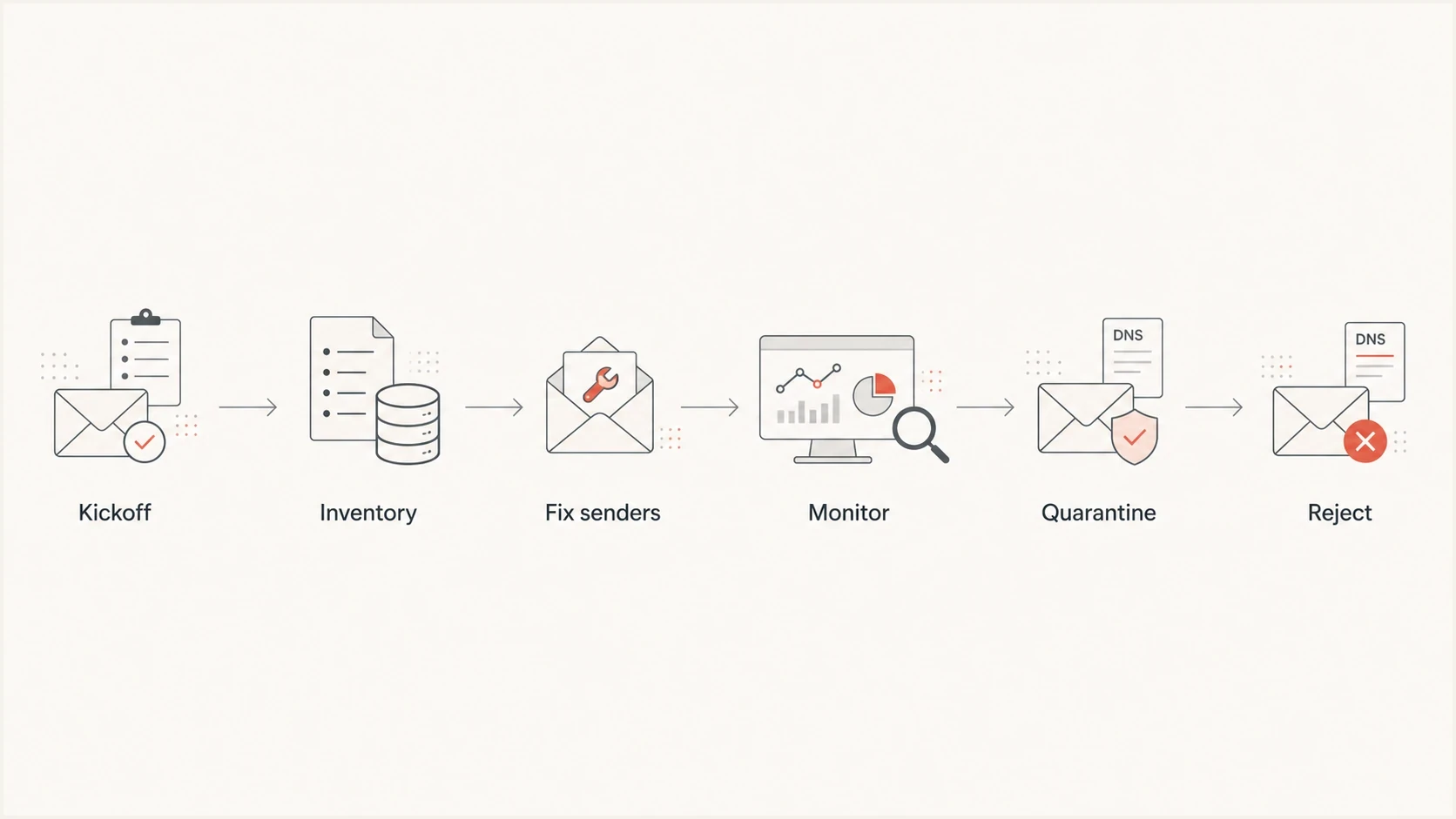
MSP client DMARC rollout: kickoff, sender inventory, authentication fixes, monitoring, quarantine, and reject.
The first DMARC reports usually reveal a mix of expected platforms, legacy systems, forwarded mail, and unauthorized use. Separate those into approved, needs fix, unknown, and unauthorized. Approved senders still need SPF or DKIM alignment. Unknown sources need business validation before anyone changes policy.
DMARC (Domain-based Message Authentication, Reporting, and Conformance) passes when either SPF or DKIM passes and its authenticated domain has alignment with the visible From domain. SPF checks the envelope sender domain, usually visible in Return-Path; DKIM uses the signature's d= domain. Relaxed alignment permits different domains that share the same organizational domain.
This is where DMARC monitoring matters. A one-time DNS check confirms the published record. Ongoing reporting helps identify sending sources and authentication results at participating receivers; combine it with application-owner interviews and message tests to assess enforcement readiness.
?
What's your domain score?
Deep-scan SPF, DKIM & DMARC records for email deliverability and security issues.
The client should expect the first inventory to be imperfect. Some vendors send only monthly invoices, password resets, procurement notices, or event reminders. For high-value domains, use a monitoring period long enough to see normal business cycles before moving past observation.
Test forwarding and mailing lists before enforcement
Forwarding can break SPF because the receiving server sees the forwarder's IP address. An aligned DKIM signature can preserve a DMARC pass if it survives forwarding. Mailing lists that change the subject or add a footer can break DKIM too.
- Test automatic forwarding and mailing lists used by staff with messages sent using the client's domain.
- Inspect received Authentication-Results headers and compare them with message traces and relevant DMARC reports.
- Record affected business workflows, the responsible owner, and the chosen fix or accepted delivery risk.
- Do not add every forwarding server to the client's SPF record; a forwarder's own SPF pass does not establish alignment with the original From domain.
Receiver handling differs, so a successful direct-delivery test does not prove forwarded mail will arrive. Include these paths in the client's signoff before tightening policy.
DNS readiness and record control
DMARC rollout depends on DNS being accurate and easy to change. Stakeholders need to know which records exist today, which provider controls them, and whether the MSP can make changes directly or has to route every update through a client approver.
Starter DMARC record for monitoringDNS
Host: _dmarc.client.example
Type: TXT
Value: v=DMARC1; p=none; rua=mailto:dmarc-reports@client.example;
Replace the example domain and mailbox with the client's assigned report destination before publishing. The starter record requests aggregate reports and lets the MSP collect evidence. p=none requests no DMARC enforcement; receiver spam filtering still applies. RFC 9989 classifies pct as historic, so it should not be used to control a staged rollout. Omitting adkim and aspf uses relaxed alignment, which is usually the safer baseline unless strict alignment has been deliberately approved.
DNS facts to confirm
- DMARC: Only one DMARC TXT record should exist at the domain policy location.
- SPF: Publish only one SPF record per sending domain. Keep evaluation within the limit of 10 DNS-lookup-causing terms, including nested includes, and authorize only approved senders.
- DKIM: Each platform should sign with a selector that the client can publish and verify.
- Access: The MSP needs a predictable path for emergency DNS changes during policy staging.
For clients with many vendors, hosted SPF can reduce recurring DNS friction by letting the MSP manage approved senders in one place. It also helps when the client has a strict change control process and DNS updates take too long for routine sender maintenance.
Scope subdomains and report delivery
A policy published at the organizational domain can apply to subdomains that do not publish their own DMARC record. Before enforcement, list active subdomains, vendor-delegated subdomains, and names that should never send mail. Decide whether each active subdomain will inherit the organizational policy or publish a separate record.
Scope decisions to record
- Active subdomains: Confirm their senders and decide whether policy inheritance or a separate DMARC record is appropriate.
- Subdomain policy: Set sp deliberately when subdomains need a policy that differs from the organizational domain.
- Non-existent names: RFC 9989 adds np for non-existent subdomains; approve its treatment as part of the domain risk decision.
- External reports: When rua points outside the organizational domain, confirm that the report receiver has published the required external destination authorization.
Treat report delivery as a readiness check, not proof that the policy record merely exists. A client should not approve enforcement until expected reporting sources are visible and any missing external authorization has been corrected. Aggregate reports generally summarize daily activity and arrive after sending; they cover participating receivers rather than every message. Validate critical mail with live test messages and logs as well.
Agree who can access reports and how long they are retained. Aggregate reports contain sending IPs and authentication results. Failure reports requested through ruf can contain message headers or content and need separate privacy approval.
Policy staging and readiness gates
Stakeholders need a simple explanation of DMARC policy stages. Monitoring gathers evidence. Quarantine asks receivers to treat failing mail as suspicious. Reject asks receivers to refuse failing mail. The risk increases as the policy gets stricter, so the evidence needs to improve before each move.
Rollout readiness bands
Use readiness bands to explain when a client domain is prepared for the next policy stage.
Monitor
p=none
Start collecting reports and classify sources.
Controlled risk
p=quarantine
Move after approved senders and indirect mail paths are validated.
Enforced
p=reject
Move after quarantine reviews confirm approved business mail.
Do not treat a fixed calendar date as proof of readiness. Use source evidence: all critical senders identified, approved mail passing through aligned SPF or aligned DKIM, active DKIM selectors validated, unknown sources reviewed, subdomain policy approved, and new senders checked during the latest reporting window. Review DMARC pass rates for each approved sender separately: a domain-wide rate can hide a failing invoice stream or fall because spoofed traffic increased.
Do not use the historic pct tag as the safety control for a rollout. Move through policy levels after each readiness review, separate sending domains or subdomains where practical, and keep the exact prior DNS record ready for rollback. RFC 9989 also defines t=y to request one less restrictive policy level, but receivers using the older specification ignore it. Keep p=none as the initial monitoring policy.
For MSP service delivery, hosted DMARC helps simplify policy staging because policy changes can be managed through controlled settings instead of repeated raw DNS edits. That is especially useful when the same MSP team manages many client domains.
The main enforcement risk
Enforcing before the client has found all legitimate senders that use the domain can send valid business mail to spam or cause rejection. Treat every unresolved source as a business decision before tightening policy.
Use Suped for client reporting and remediation
Suped, our DMARC and email authentication platform, supports the MSP rollout workflow: collect reports, detect issues, show the affected source, provide fix steps, alert when failures spike, and manage multiple client domains.

Issue steps to fix dialog showing the issue overview, tailored fix steps, and verification action
The client still makes risk and sender decisions, while the MSP uses Suped's source evidence and remediation steps during service reviews.
- Issue detection: Suped identifies authentication problems and gives steps to fix the affected sender or DNS setting.
- Alerts: Suped alerts help the MSP investigate new authentication failures once the relevant reports arrive.
- Multi-tenancy: The MSP dashboard keeps client organizations, domains, reports, and service reviews organized.
- Reputation: Blocklist and blacklist monitoring helps connect authentication work with domain and IP reputation checks.
- Access: Hosted SPF and hosted DMARC reduce the number of times the MSP has to wait on raw DNS changes.
A DMARC rollout is complete when the client can keep adding, removing, and reviewing senders without losing control of authentication. A record that merely exists does not provide that operating discipline.
How to run the client rollout
The rollout should feel like a service process, not a technical surprise. Use a staged workflow that gives the client visibility before enforcement and gives the MSP clean checkpoints.
- Kickoff: Confirm domains, stakeholders, DNS owners, business-critical mail streams, and the target enforcement outcome.
- Baseline: Check current DMARC, SPF, DKIM, MTA-STS, forwarding patterns, blocklist or blacklist status, subdomain policy, and visible sender use.
- Monitor: Publish monitoring policy, confirm report delivery, group sources, and map every source to an owner.
- Fix: Configure DKIM where available, correct SPF includes, remove stale senders, and separate unauthorized traffic.
- Stage: Move to quarantine with client signoff, watch failure rates, validate DKIM selectors, and confirm critical business mail.
- Enforce: Move to reject when the evidence supports it, then keep monitoring as a managed service.
The service handoff should include a final source list, current policy, subdomain decisions, known exceptions, escalation contacts, and the review cadence. Without that handoff, the client has a stronger policy but no operational memory.
Useful MSP success criteria
- Coverage: Every client-owned sending domain has reporting and a named owner.
- Clarity: Every meaningful source is approved, fixed, blocked, or assigned for review.
- Control: Policy changes and sender updates have a repeatable approval path.
- Reporting: The client sees progress, current risk, and next actions in each service review.
What to communicate before policy changes
Before each policy change, the client should receive a short decision note. It should name the policy being changed, the evidence behind the change, the remaining known risks, the rollback path, and who approved it. That note protects the client and the MSP.
|
|
|---|---|
Current | p=none |
Next | p=quarantine |
Evidence | Approved senders pass DMARC; invoice and forwarding tests completed |
Risk | Known forwarding exception documented and accepted by the client |
Rollback | Restore the saved p=none value if critical business mail fails DMARC |
Approver | Named client approver and MSP change owner |
Checks | Live tests immediately; arriving aggregate reports reviewed daily |
Policy change note
The rollback plan should preserve the exact prior TXT value, record the DNS TTL, name the person authorized to change it, and define the checks that confirm recovery. DNS caching means a rollback is not instant, so the help desk also needs an escalation path while the prior record propagates. If a shorter rollback window is required, lower the TTL in advance and allow the previous TTL to expire before changing policy.
The client also needs plain-language guidance for end users and help desk teams. If someone reports a missing email, the team needs to know whether to check spam placement, sender authentication, mailbox logs, or vendor configuration before blaming DMARC. Collect bounce codes, timestamps, message IDs, and received headers before escalating.
Good communication also reduces sales friction for the MSP. Clients see that DMARC is a managed security control with ongoing reporting, not a one-off setup task that disappears after the first DNS record.
What to agree before kickoff
Before kickoff, get written agreement on the domains in scope, the business owner, DNS access, the sender approval process, and the enforcement target. If those are missing, the MSP can still publish a monitoring record, but the project will stall when the first real fix requires client authority.
Client stakeholders do not need to become DMARC technicians. They do need to understand that enforcement protects the domain only after legitimate senders are known and authenticated. The MSP's role is to make that visible, guide the fixes, and keep the control healthy after rollout.
Require application owners to request approval before a new vendor sends using the client domain. Add its owner and DKIM or Return-Path configuration to the inventory, test authentication before launch, and remove obsolete authorizations when a sender is retired.