
How to document approved senders for MSP clients


Updated on 25 Sep 2026: We added current DMARC standards guidance, clearer evidence reconciliation, and tighter approval and exception controls for MSP sender registers.
An approved sender register should give an MSP one reliable record of every service allowed to send mail using a client's domain. Each entry needs the service owner, business purpose, Author Domain in the visible From field, SPF Domain used by the envelope sender, DKIM Signing Domain and selector, authentication status, approval evidence, evidence source, exception expiry, change history, last validation date, and next review date. A spreadsheet can work for one small client, but the process matters more than the storage format.
I treat the register as the control point for DMARC service delivery. It tells the service desk which sources are expected, gives engineers a basis for SPF and DKIM changes, and gives the client an approval trail before enforcement. For a multi-client practice, I connect that record to a consistent DMARC for MSPs workflow so the same evidence, ownership rules, and review cadence apply across every tenant.
Start with an approved sender register
I treat one row as one sending path, not one vendor. A client can use the same provider for staff mail, transactional notices, marketing campaigns, or automated alerts, with different return paths or DKIM selectors for each stream. Separate entries make changes easier to assess and prevent a broad vendor approval from hiding an unknown configuration.
|
|
|
|---|---|---|
Client | Tenant and domain | Prevents cross-client changes |
Source | Service, account, and stream | Defines the approved use |
Identity | Author, SPF, and DKIM domains | Supports DMARC alignment checks |
Authentication | SPF and DKIM results | Shows the passing path |
Evidence | Declared and observed sources | Separates claims from measured traffic |
Owner | Client contact | Provides change authority |
Lifecycle | Status, expiry, and review | Finds stale approvals |
Core fields for an MSP-approved sender register
Keep the register inside the client's existing documentation system when practical, but give it a defined owner, revision history, and access controls. Client business owners should be able to confirm the purpose and continued need for a sender. MSP engineers should maintain the technical evidence. Restrict DNS credentials, secret keys, vendor passwords, and API tokens to the credential system rather than copying them into the register.
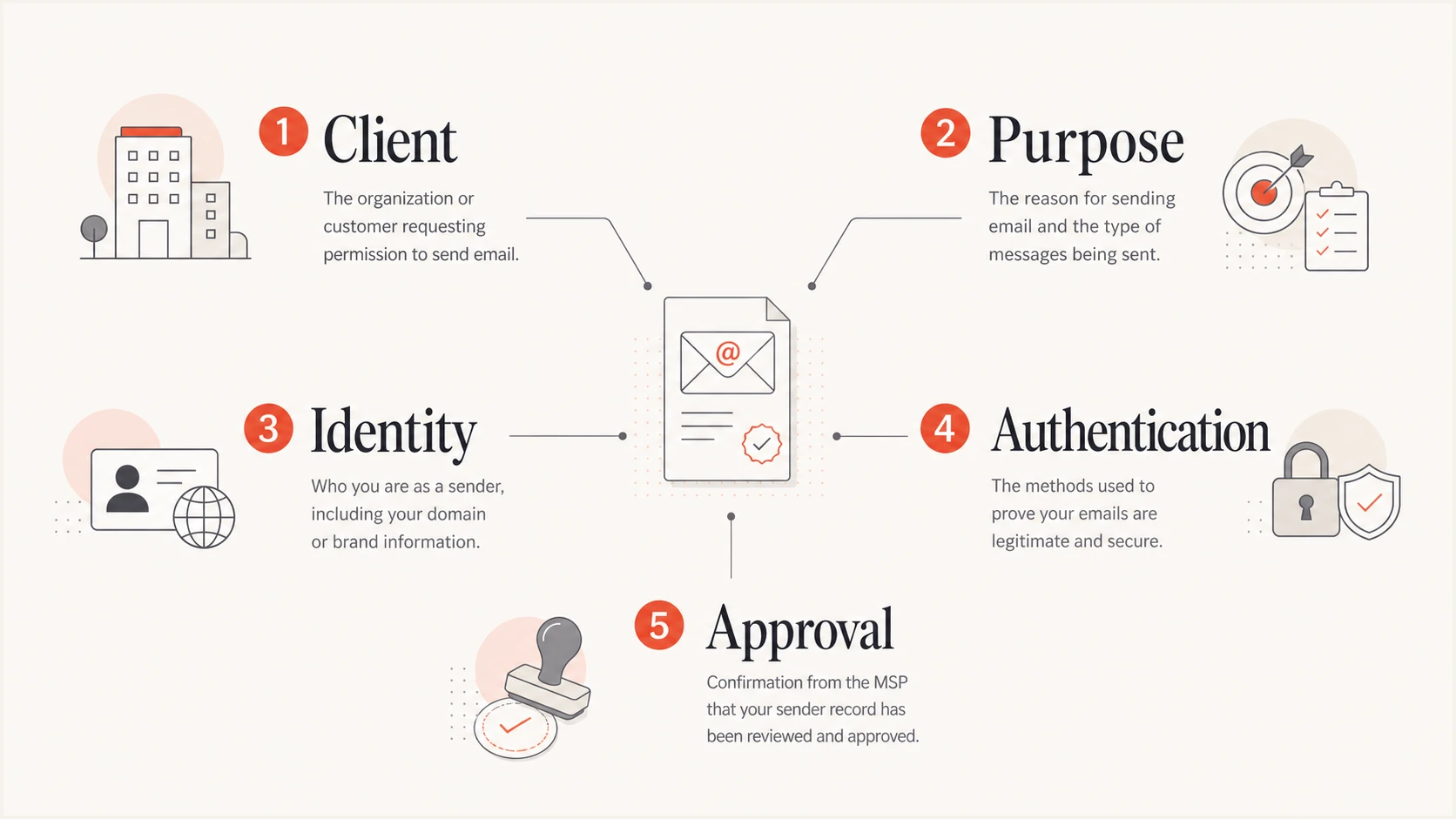
Five parts of an approved sender record: client, purpose, identity, authentication, and approval
Build one complete record per sending path
Start with the source inventory, then turn each discovered source into a controlled record. The inventory can include vendor invoices, identity platform applications, website forms, CRM workflows, help desk notifications, scanners, line-of-business software, and DMARC aggregate reports. Keep client-declared sources and observed traffic in separate fields until the evidence matches. A documented sender is not approved until the named client owner confirms its business use.
- Record the client, domain, service name, use case, department, business owner, and technical contact.
- Capture the Author Domain in RFC5322.From, SPF Domain in MAIL FROM, HELO domain when relevant, DKIM Signing Domain, and selector.
- Record observed source IPs, provider identifiers, approximate volume, evidence source, reporting period, first-seen date, last-seen date, and last validation date.
- Track approval status, SPF scope, DKIM status, DMARC result, remediation ticket, approver, approval date, exception owner and expiry, and next review.
I use controlled status values so technicians do not invent labels. A practical set is Discovered, Pending client confirmation, Approved and passing, Approved with remediation, Rejected, and Retired. Add a reason whenever a status changes. This turns the register into an audit trail instead of a snapshot.
Approved sender record templateYAML
client: Northwind
domain: example.com
service: Billing notifications
business_owner: Finance operations
author_domain: example.com
spf_domain: bounce.example.com
dkim_domain: example.com
dkim_selector: billing1
spf_status: scoped
dkim_status: passing
dmarc_status: passing
evidence_source: DMARC aggregate report
observed_period: 2026-09-01/2026-09-14
last_validated: 2026-09-14
approval_status: approved
approved_by: Client finance director
approved_on: 2026-07-24
exception_expires: null
next_review: 2026-10-24
change_ticket: CHG-1042
Do not approve a vendor name alone
A vendor can send through several accounts, domains, or delegated services. Approval should identify the exact client account and sending path. IP addresses alone are weak identifiers because shared pools and infrastructure change.
Verify each sender with DMARC evidence
Compare the proposed sender with DMARC aggregate reports before granting technical approval. Confirm that the source appears under the expected Author Domain, then inspect SPF and DKIM results and the authenticated domain used for each check. A sender needs at least one passing, DMARC-aligned authentication path. A raw SPF pass for a provider-owned SPF Domain does not satisfy DMARC for the client's Author Domain.
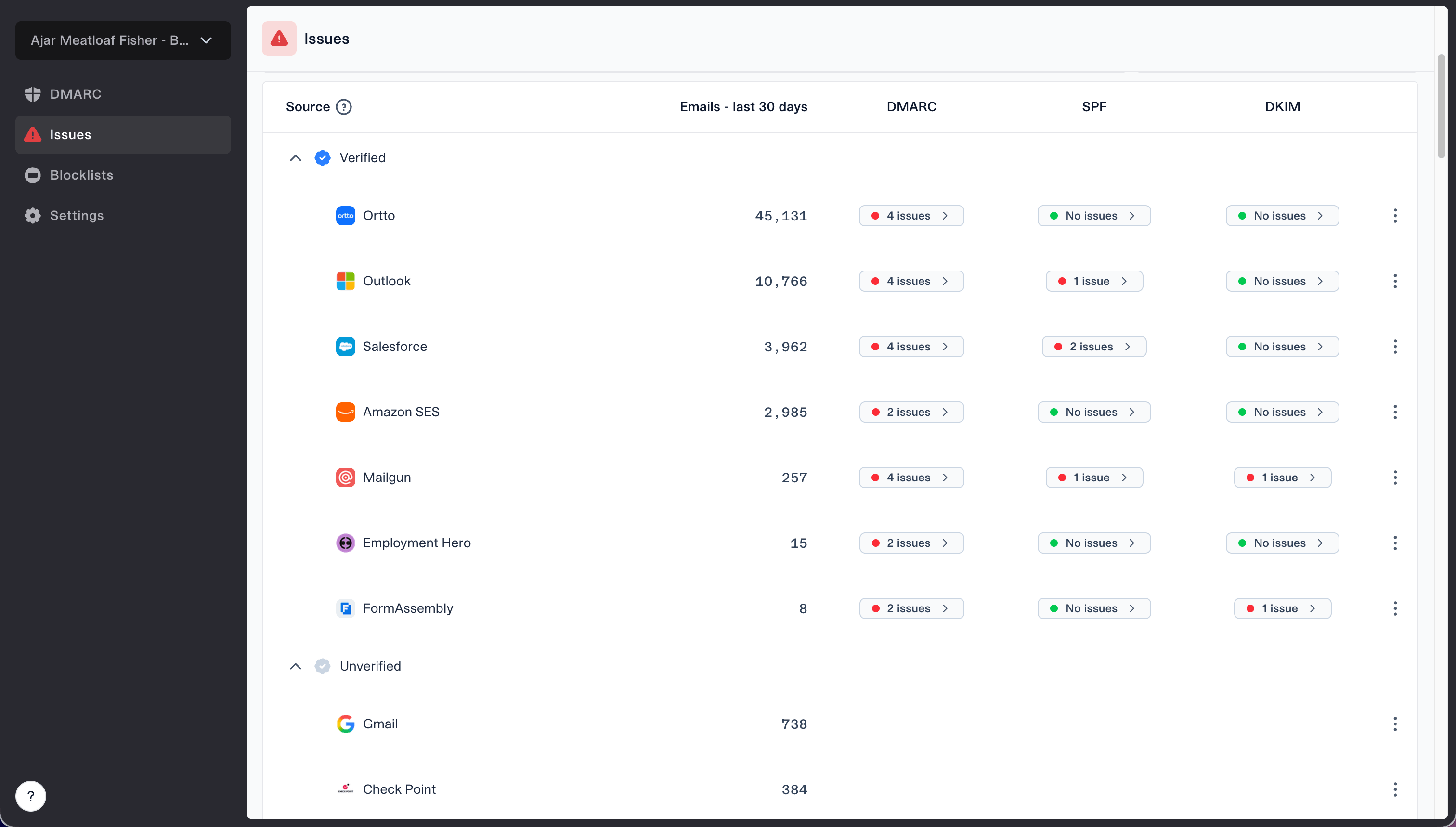
Issues page showing verified and unverified source sections for reviewing sending sources
Suped's verified and unverified source view supports this review across client organizations. An MSP can compare observed sources, separate expected traffic from unknown traffic, and open an issue when a legitimate source fails authentication. Suped's DMARC monitoring keeps the evidence tied to real mail rather than a vendor questionnaire alone.
Send a controlled message through each application when possible. Preserve the header result, aligned identifier, selector, test date, and ticket reference, but avoid storing message content that contains personal or confidential data. Compare the test with aggregate traffic because a single successful test does not prove that every stream or region uses the same configuration.
- Get written confirmation of the purpose from the client's accountable business owner.
- Link the request to observed DMARC sources, domains, selectors, and volume.
- Verify one aligned SPF or DKIM path and record the result.
- Approve only the documented account, domain, stream, and use case.
- Set an owner, next review date, and retirement trigger.
Reconcile declared and observed evidence
A client inventory and DMARC reporting answer different questions. The client inventory says what the business expects to send. Aggregate reports show traffic that receivers observed using the Author Domain. Keep both values until they reconcile, because a seasonal sender can be declared but unseen, while an observed source can be unauthorized or misidentified.
|
|
|
|---|---|---|
Declared and observed | The request matches production traffic | Validate alignment and approve narrowly |
Declared only | The source is quiet, new, or misconfigured | Run a controlled test and keep it pending |
Observed only | No client approval matches the traffic | Investigate ownership before changing DNS |
Previously approved but absent | The source can be inactive or retired | Confirm retirement and remove stale authorization |
How to reconcile client declarations with observed traffic
Use current DMARC terminology in the normalized register. RFC 9989 now defines the core protocol, RFC 9990 defines aggregate reporting, and RFC 9991 defines failure reporting. These standards replaced RFC 7489. During the reporting-format transition, retain the source file reference and parser version outside the approval record, while storing stable fields such as Author Domain, policy domain, source IP, disposition, aligned identifiers, and SPF and DKIM results in the register.
Separate business approval from technical approval
Two approvals reduce ambiguity. The client owns the decision that a service is legitimate and required. The MSP owns the technical decision that its sending path is understood, limited, and ready for the client's DMARC policy. One person can perform both roles for a small client, but the record should still show both decisions.
Client approval
The business owner confirms why the service sends mail and who can authorize future changes.
- Confirm that the use case is current and necessary.
- Name the contact who accepts accountability.
- State the approved domain and stream explicitly.
- Record any privacy constraints.
MSP technical approval
The engineer confirms the source identity and records a safe authentication path.
- Confirm that observed traffic matches the request.
- Keep SPF authorization within lookup limits.
- Verify DKIM signing and selector ownership.
- Confirm that at least one aligned path passes DMARC.
Put the approval into the service ticket or change record, then link that ticket ID in the register. Avoid approvals buried in chat because they are hard to retrieve during an incident or staff handover. Define this split during onboarding and include it in the client's responsibility matrix. A clear responsibility model prevents technical staff from approving business use by assumption.
Control DNS changes and enforcement readiness
I do not translate every approval into an SPF include. I prefer DKIM for third-party services when the provider supports customer-domain signing. SPF still needs a narrow record of authorized infrastructure, but adding broad provider ranges increases exposure and can push the domain over the ten-lookup evaluation limit. Record why each mechanism exists and which sender depends on it.
Example DMARC monitoring recordDNS
_dmarc.example.com. 3600 IN TXT "v=DMARC1; p=none; rua=mailto:reports@example.com"
Keep the DMARC policy at monitoring while the register has unexplained high-volume sources or approved sources without a passing aligned path. Before moving to quarantine or reject, compare the approved register with recent traffic and resolve material gaps. RFC 9989 removed the pct tag, so do not use percentage sampling as a rollout control. Stage policy changes by domain or subdomain, review current report data, and use the t=y testing flag only when its testing semantics fit the planned change. The separate sender audit process should check both authentication and current client approval.
Use hosted controls when DNS access is constrained
Suped's hosted SPF lets an MSP manage approved senders through a hosted include after the client publishes the initial DNS record. This is useful when routine DNS changes require a separate client team, but every sender change still needs the same approval evidence and change control.
For each DNS change, record the old value, proposed value, validation result, ticket, implementer, approver, and rollback plan. Coordinate the maintenance window with client IT when they own DNS. This keeps the sender register synchronized with production rather than allowing an approved design to drift away from the published record.
Make approval a repeatable service workflow
A sender request should enter one queue with a standard form. Require the requester to name the client domain, service, business purpose, business owner, planned go-live date, expected volume, Author Domain, SPF Domain, and vendor setup guide. Requests without an accountable owner stay pending. Emergency additions still need retrospective evidence and a fixed expiry date.
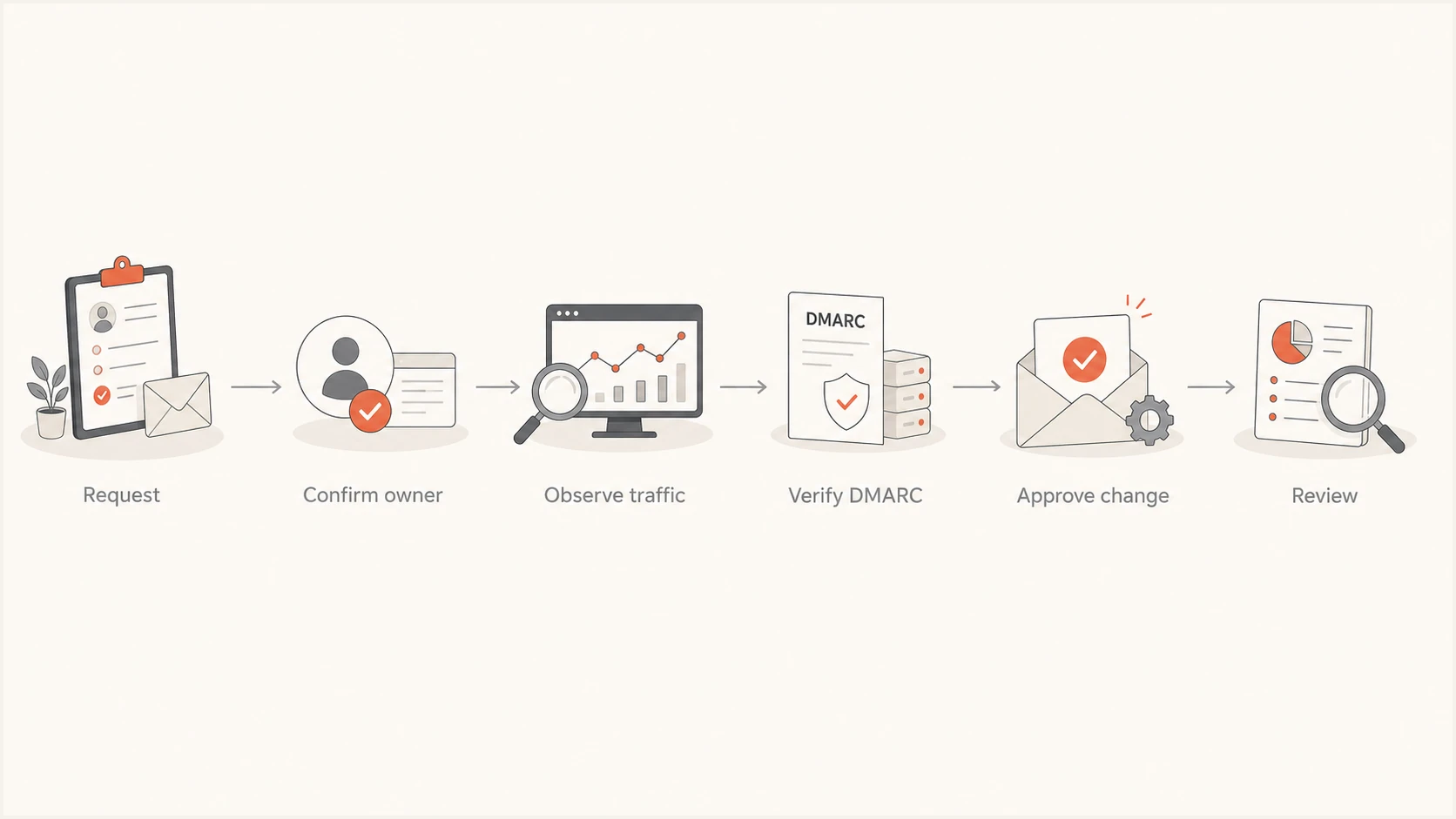
Approved sender workflow from request through review
Use a change gate before enforcement work. The engineer checks that all approved high-volume senders pass DMARC, all unknown material sources have an investigation outcome, and retired services no longer require DNS authorization. Coordinate production changes with the client's IT team using a named contact, agreed window, validation plan, and rollback owner.
The client record should also state response targets. For example, unknown high-volume sources get same-business-day triage, planned vendor additions require notice before launch, and inactive senders enter review after a defined period. Choose targets that fit the MSP's contract and staffing rather than promising a universal turnaround.
Definition of done
- A client owner approved the exact use case.
- Observed or tested traffic matches the record.
- An aligned SPF or DKIM path passes DMARC.
- The ticket, reviewer, and next review are recorded.
Keep the register accurate across clients
Review active senders on a cadence based on risk and change rate. Quarterly review fits many clients, while high-change marketing or application environments need more frequent checks. Trigger an immediate review when a source first appears, volume shifts sharply, a DKIM selector changes, authentication starts failing, a client changes provider, or the business owner leaves. Expire temporary exceptions automatically unless the owner supplies fresh evidence and a new approval.
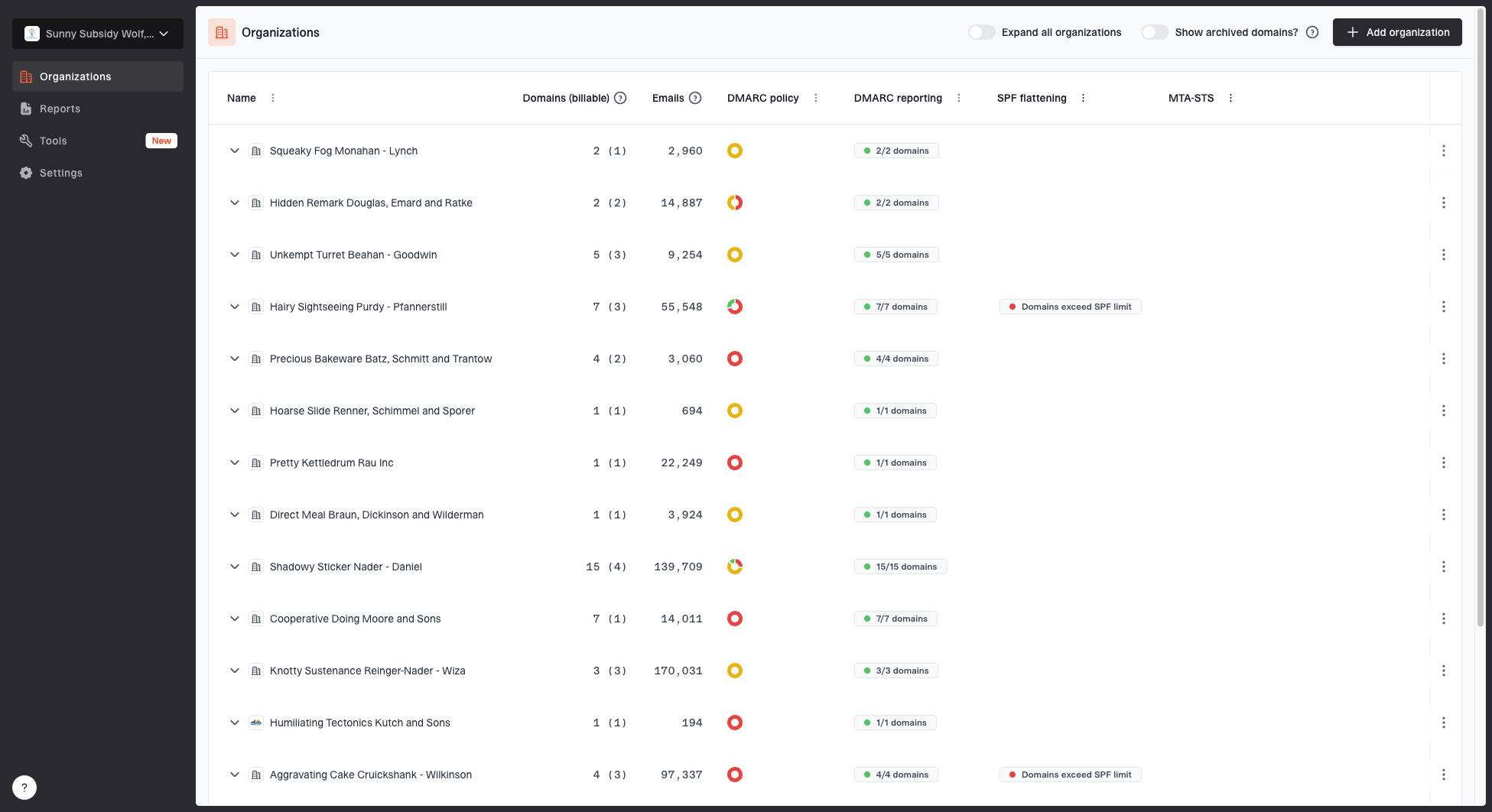
MSP organizations page showing client organizations, domain counts, email volume, and domain status columns
Suped's MSP dashboard keeps organizations separate while giving operators one place to monitor DMARC, SPF, DKIM, and deliverability signals. Automated issue detection, steps to fix, alerts, and weekly summaries help the service desk connect a changed signal to the correct client record. Suped's hosted DMARC, hosted SPF, policy staging, and client switching support controlled remediation when the MSP has authorization to manage those settings.
The approved sender register remains the source of business authorization. Monitoring supplies technical evidence, not permission. When Suped identifies a new or failing source, open the matching client record, confirm the owner and use case, document the investigation, and either approve and repair it or classify it as unauthorized. This separation keeps automation useful without letting a detection system make business decisions.
|
|
|
|---|---|---|
New source | Open investigation | Discovered |
Owner confirms | Verify DMARC | Pending |
Checks pass | Record evidence | Approved |
Source fails | Open repair | Remediation |
Exception expires | Reapprove or remove | Pending |
Service closes | Remove access | Retired |
Operational events and required documentation updates
Retirement deserves the same discipline as onboarding. Confirm that the service has stopped, remove dedicated SPF mechanisms or delegated records, revoke vendor access where the contract allows, watch for residual traffic, and retain the closed record according to the client's documentation policy. Never delete the history simply to keep the active list tidy.
Use the register during incidents and reporting
During an incident, search by client, Author Domain, SPF Domain, DKIM Signing Domain, selector, and source IP. The responder should be able to decide quickly whether the traffic matches an approved record, conflicts with a retired record, or has no business approval. An unknown source is an investigation state, not automatic proof of abuse.
- For approved and healthy traffic, close the event as expected and attach the matching record.
- For approved and failing traffic, open remediation, assess delivery impact, and preserve the approval.
- For unknown but legitimate traffic, obtain client approval before changing authentication.
- For unknown and unauthorized traffic, reject the request, investigate exposure, and keep it outside authorization.
Client reporting should summarize approved sources, sources under remediation, new unknown sources, retired sources, expiring exceptions, and material authentication changes. Keep raw XML and low-level diagnostics available for engineering, but report business impact and required decisions to client stakeholders. The register supplies the names and owners that make those reports understandable.
Never silently convert unknown traffic into approval
Adding an SPF mechanism or DKIM delegation before client confirmation can authorize an abandoned account, a shadow application, or the wrong tenant. Preserve the detection, identify the business owner, and require a recorded decision first.
A sender register makes enforcement safer
An effective approved sender register joins business authorization to observed DMARC evidence. One record per sending path, separate client and technical approvals, controlled status values, linked change tickets, expiring exceptions, and scheduled reviews give an MSP a defensible basis for DNS changes and policy enforcement. The document also shortens incident triage because technicians can distinguish expected mail from unknown traffic without relying on memory.
For multi-client delivery, Suped connects this operating process to live authentication data, client switching, actionable issues, alerts, hosted controls, and client reporting. Keep the approval decision in the client's governed record, then use Suped to detect changes, validate remediation, and maintain enforcement with less manual cross-checking.