
How to audit client senders before DMARC enforcement

Published 12 Jun 2026
Updated 22 Oct 2026
12 min read
Summarize with
Updated on 22 Oct 2026: We added delivery tests and rollback steps, and tightened SPF and DKIM checks before enforcement.
A client sender audit before DMARC enforcement means finding every legitimate service that sends mail using the client's domain, proving whether each one passes SPF or DKIM with the visible From domain, fixing the failures, then moving the DMARC policy only after real report data confirms the risk has dropped.
Treat this as a service delivery workflow. For an MSP, the job is to protect the client's mail without interrupting invoices, ticket notifications, appointment reminders, payroll messages, or sales outreach. The audit has to create evidence that the domain is ready for enforcement, plus a client-friendly record of what changed.
That is why an MSP DMARC service needs a repeatable audit pack: sender inventory, authentication status, owner, required fix, DNS change, test result, and enforcement recommendation. Without that pack, policy changes become guesswork.
Never move a client straight to enforcement because SPF and DKIM records exist. DMARC cares whether SPF or DKIM passes in a way that matches the visible From domain. A sender can have SPF, DKIM, or both and still fail DMARC.
- Inventory first: List every sending source before changing policy.
- Reports second: Use aggregate DMARC data to verify what actually sends mail.
- Enforcement last: Raise policy only after failures are explained or accepted.
Define the sender register
The audit output should be a sender register with a decision for each source: approved and working, approved but needs a fix, not approved and requires blocking or authorization removal, or unknown and needs the client to identify the owner. Do not consider a client ready for enforcement until that register exists.
For MSP operators, the sender register is the evidence behind the enforcement recommendation. It gives the technical team and the client contact who approves apps a clear handoff, with the account manager able to follow each decision.
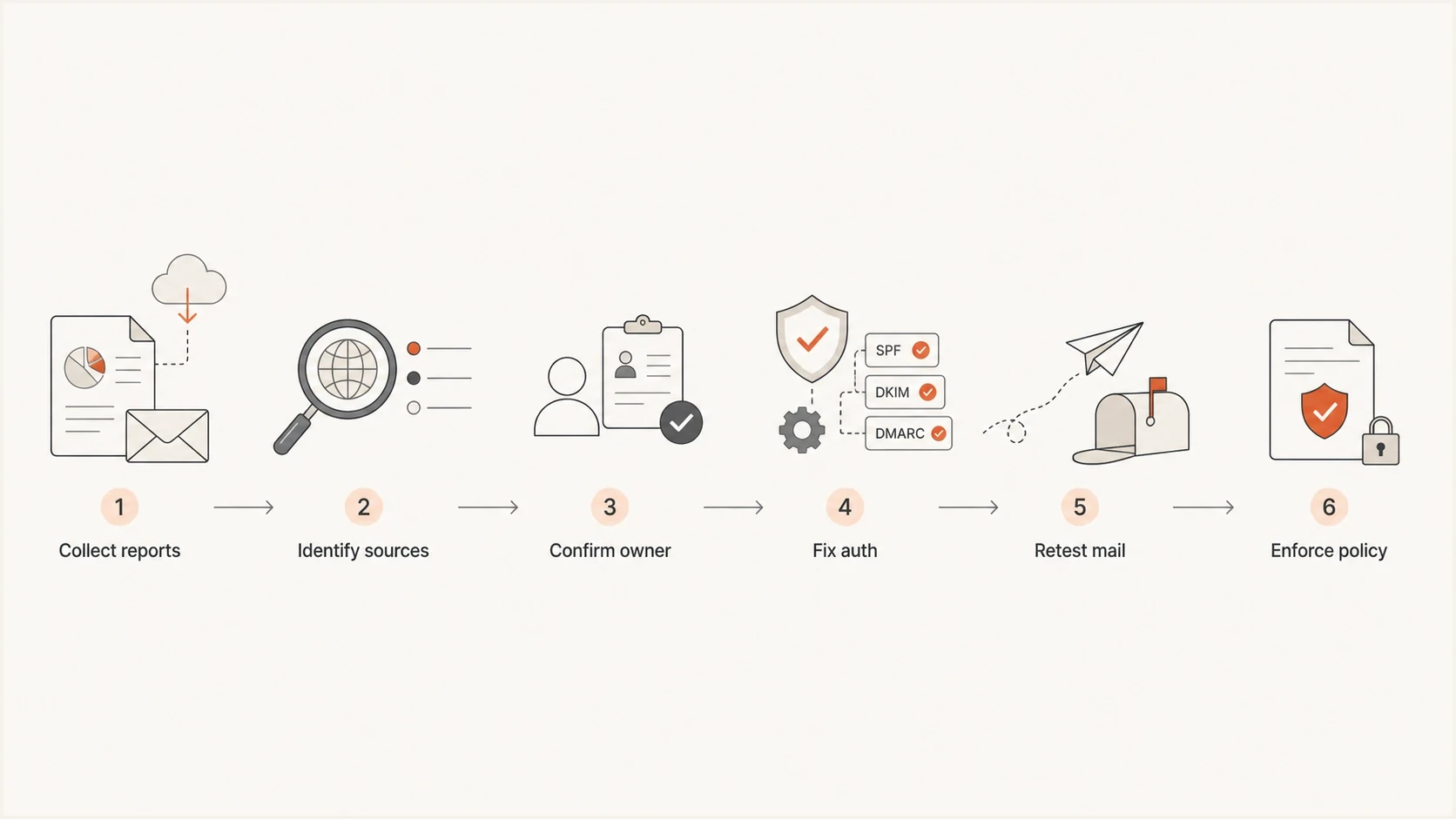
MSP sender audit flowchart: collect reports, identify sources, confirm owners, fix authentication, retest mail, and enforce DMARC.
- Sender name: The product, mail platform, or application that sent the message.
- Source evidence: IP, envelope domain, DKIM domain, selector, and sample message header.
- Business owner: The client contact or MSP team that can approve the sender.
- Fix path: The exact SPF, DKIM, routing, or vendor setting required.
- Policy decision: Approved, awaiting a fix, retired, or subject to a documented delivery exception.
Set domain and subdomain scope
Before inventorying senders, list every registered domain the client controls, each domain or subdomain used in the visible From address, and any default provider domain used for mail. Include parked domains and delegated subdomains even when they do not appear in current aggregate reports.
Document where each DMARC record is published and which parent policy applies. A parent policy normally covers subdomains unless a discovered subdomain policy or the sp and np tags change that result. RFC 9989's DNS Tree Walk makes intermediate DMARC records relevant for nested subdomains. This prevents an MSP from enforcing the parent domain while overlooking a legitimate subdomain sender or an unused domain that should reject all mail.
|
|
|
|---|---|---|
Organizational domain | User mail and central business systems | Inventory all approved sources |
Sending subdomain | Visible From use, authentication, and inherited policy | Audit and stage separately when needed |
Parked domain | No legitimate mail or active sender | Publish p=reject |
Non-existent subdomains | DNS returns NXDOMAIN, rather than an existing name with no mail | Request np=reject; check sp or p fallback for older receivers |
Domain scope decisions to record before sender remediation.
Build the sender inventory
Start with the sources the client already knows, then let DMARC reports reveal the ones they forgot. The known list usually includes Microsoft 365 or Google Workspace, billing software, CRM, website forms, ticketing, marketing automation, ecommerce, HR, payroll, and monitoring systems. Cross-check procurement records and SMTP relay logs, including printers and scanners, to catch third-party senders and low-volume systems missing from onboarding notes.
A practical first pass uses 14 to 30 days of aggregate reports at p=none. Seasonal businesses, schools, nonprofits, and finance teams often need a longer observation window because their senders change with campaigns, billing cycles, or annual events.
If the rua address uses a different organizational domain, verify the required external reporting authorization in DNS before assuming collection works. Not every receiver sends aggregate reports, so treat the reported counts as observed coverage rather than a complete measure of all client mail.
|
|
|
|---|---|---|
DKIM enabled and SPF includes only needed senders | MSP | |
DKIM key published and mail tested | MSP | |
Custom-domain DKIM passes on a test message | Sales ops | |
Real mail passes DMARC with the configured sending domain | Marketing | |
 Shopify Shopify | Store notifications authenticated | Operations |
Support mail passes DKIM with domain alignment | Service desk |
Common client sender sources to check during the first audit pass.
Weak audit
- DNS only: Checks SPF and DKIM records but ignores live mail.
- No owner: Finds a source but cannot confirm whether it is approved.
- No sample: Lacks a real message to prove the headers.
Strong audit
- Report based: Uses aggregate reports to see real sending behavior.
- Owner mapped: Assigns each sender to a person or team.
- Tested fix: Confirms the sender passes before enforcement changes.
Validate each sending source
For each source, verify the visible From domain, the SPF-authenticated MAIL FROM domain, the DKIM signing domain, and the DMARC result. Under the default relaxed mode, an authenticated domain meets alignment when it shares the same organizational domain as the visible From domain. Strict alignment requires an exact domain match. DMARC passes when at least one SPF or DKIM result passes alignment, and it fails when neither does. Configure both SPF and DKIM where supported. Google's sender guidelines require both for senders exceeding 5,000 messages per day to personal Gmail accounts, even though DMARC can pass through one method.
Inspect DMARC aggregate reports and then test real mail. In the receiving server's trusted Authentication-Results header, compare header.from with smtp.mailfrom for SPF and header.d for DKIM, then confirm the recorded dmarc result.
When a vendor uses its own Return-Path domain, adding its include to the client's root SPF record does not fix SPF domain alignment. Configure a custom MAIL FROM domain or DKIM signing that meets DMARC domain alignment.
Suped, our DMARC reporting and email authentication platform, groups sending sources and authentication results for each client. The domain health checker is useful when you need a quick external view of a client's DNS posture.
?
What's your domain score?
Deep-scan SPF, DKIM & DMARC records for email deliverability and security issues.
For DNS records, keep examples short and documented in the ticket. Check for duplicate SPF or DMARC records, missing active DKIM selectors, and vendor includes that no longer send mail. RFC 7208 limits SPF evaluation to 10 terms that cause DNS queries, including nested includes and redirects; exceeding that limit produces PermError. Count the full evaluated path before adding another sender.
Monitoring-stage DMARC recordDNS
_dmarc.example.com TXT "v=DMARC1; p=none; rua=mailto:dmarc@example.com"
Example SPF record under reviewDNS
example.com TXT "v=spf1 include:_spf.example.net include:mail.example.org -all"
A clean sender audit separates authentication failure from sender approval. An unknown source that passes DMARC is still a governance issue. An approved source that fails DMARC is a technical fix. A source IP or provider label alone does not prove approval on shared infrastructure; confirm the client account and sample message with the business owner.
Track sender reputation and blocklist (blacklist) findings separately from authentication readiness. A DMARC pass does not guarantee inbox placement; Google's sender guidelines also cover sending IP reputation and spam rates.
Classify failures before fixing them
Not every DMARC failure deserves the same response. MSP teams waste time when they treat all failures as vendor setup tickets. Failures can come from retired systems, spoofing attempts, forwarding, mailing list effects, or legacy apps. Classification keeps the project moving and prevents unnecessary DNS changes. Forwarding changes the source IP used for SPF, and mailing lists that alter signed content can break DKIM. Test these routes before accepting a delivery exception.
|
|
|
|---|---|---|
Approved sender fails | Fix | Enable client-domain DKIM or correct MAIL FROM configuration |
Unknown source | Investigate | Ask client owner to approve or retire |
Clear spoofing | Block | Move toward enforcement |
Forwarded mail | Track | Test DKIM survival through the actual forwarding route |
Legacy app | Replace | Route through approved mail service |
Failure classification for client sender audits.
For approved senders, prioritize DKIM fixes. RFC 9989 requires senders not to rely solely on SPF for a DMARC pass at p=reject, so require a tested DKIM path before that stage. DKIM survives forwarding when signed content is unchanged. Use 2048-bit RSA DKIM keys where supported, as recommended in Google's sender guidelines. Suped's Hosted SPF manages approved SPF sender changes after initial DNS setup; it does not repair a MAIL FROM domain mismatch.
Enforcement readiness gates
Use evidence gates instead of a universal pass-rate cutoff, because a small amount of critical business mail can outweigh the aggregate percentage.
Ready
No unexplained failures
Approved mail passes DMARC across the observation window, with a tested DKIM path before reject.
Review
Owned work remains
Known sources still have assigned fixes or owner decisions in progress.
Hold
Delivery risk remains
Business mail is failing or unknown sources remain unresolved.
Track sender fixes and test results
A client sender audit becomes messy when every vendor fix turns into a separate mini project. Keep each fix small and reversible, with a clear test. The ticket should state the current failure, the required DNS or vendor change, the expected result, and the retest method.

Issue steps to fix dialog showing the issue overview, tailored fix steps, and verification action
Suped's issue steps give technicians a fix path and verification steps for each authentication problem. Suped's Hosted DMARC lets the MSP stage policy changes after the initial DNS setup.
Manual handling
- Ticket drift: Findings sit in notes with no next action.
- DNS dependency: Small changes wait for the right DNS admin.
- Client confusion: Business owners see failures but not priorities.
Managed workflow
- Issue steps: Each finding has a fix path and verification step.
- Policy staging: Policy changes move through controlled stages.
- Client evidence: Reports show what changed and why it matters.
Move to enforcement in stages
Enforcement should be staged. Move the scoped domains through monitoring, quarantine, then reject, starting with lower-volume domains or subdomains before the most complex parent domain. The right pace depends on report data, business tolerance, and how quickly the client can approve unknown systems.
RFC 9989 makes the pct tag historic, so do not use partial-message percentages as an enforcement control. For a policy test, t=y requests treatment one level below the published policy: quarantine is treated as monitoring, and reject is treated as quarantine. Do not rely on t=y as a universal safety switch because receivers using older DMARC behavior ignore unknown tags. Receiver handling also depends on local policy.
Quarantine-stage DMARC recordDNS
_dmarc.example.com TXT "v=DMARC1; p=quarantine; rua=mailto:dmarc@example.com"
Reject-stage DMARC recordDNS
_dmarc.example.com TXT "v=DMARC1; p=reject; rua=mailto:dmarc@example.com"
Scoped-domain rollout checkpoints
This example shows the share of audited domains or subdomains at each policy, not pct-based sampling of messages.
Monitor
Quarantine
Reject
Use the same gate before every policy increase: approved senders pass, unknown traffic is resolved, top failures are explained, and the client has accepted the business impact. Hosted DMARC is helpful when an MSP wants staged policy control and rollback without repeated DNS tickets.
Test delivery and prepare rollback
Before each policy increase, save the current DMARC value and DNS TTL, name the technician authorized to restore it, and agree on a rollback trigger with the client. A confirmed DMARC-related failure in critical business mail is a reason to pause rollout and restore the affected domain's last working policy.
- Send a real invoice or ticket notification from each critical source to test recipients at the client's main receiving providers.
- Test known forwarding and mailing list routes, and save the receiving server's Authentication-Results header with the ticket.
- After the change, check delivery logs and bounce codes immediately. Check junk placement and review the next complete aggregate reporting period before increasing policy again.
- Keep rua reporting active during rollback and allow for DNS caching before judging the result. Restore the previous p, sp, np, and t values together when applicable.
Review results per sender after enforcement. A high overall DMARC pass rate can hide a failed payroll run or a low-volume billing sender.
Document the client handoff
The handoff should be short enough for the client to read and detailed enough for your service desk to support later. Include the sender list, current policy, policy target, unresolved risks, change log, and next review date. This turns DMARC enforcement into an ongoing managed service instead of a one-time DNS task.
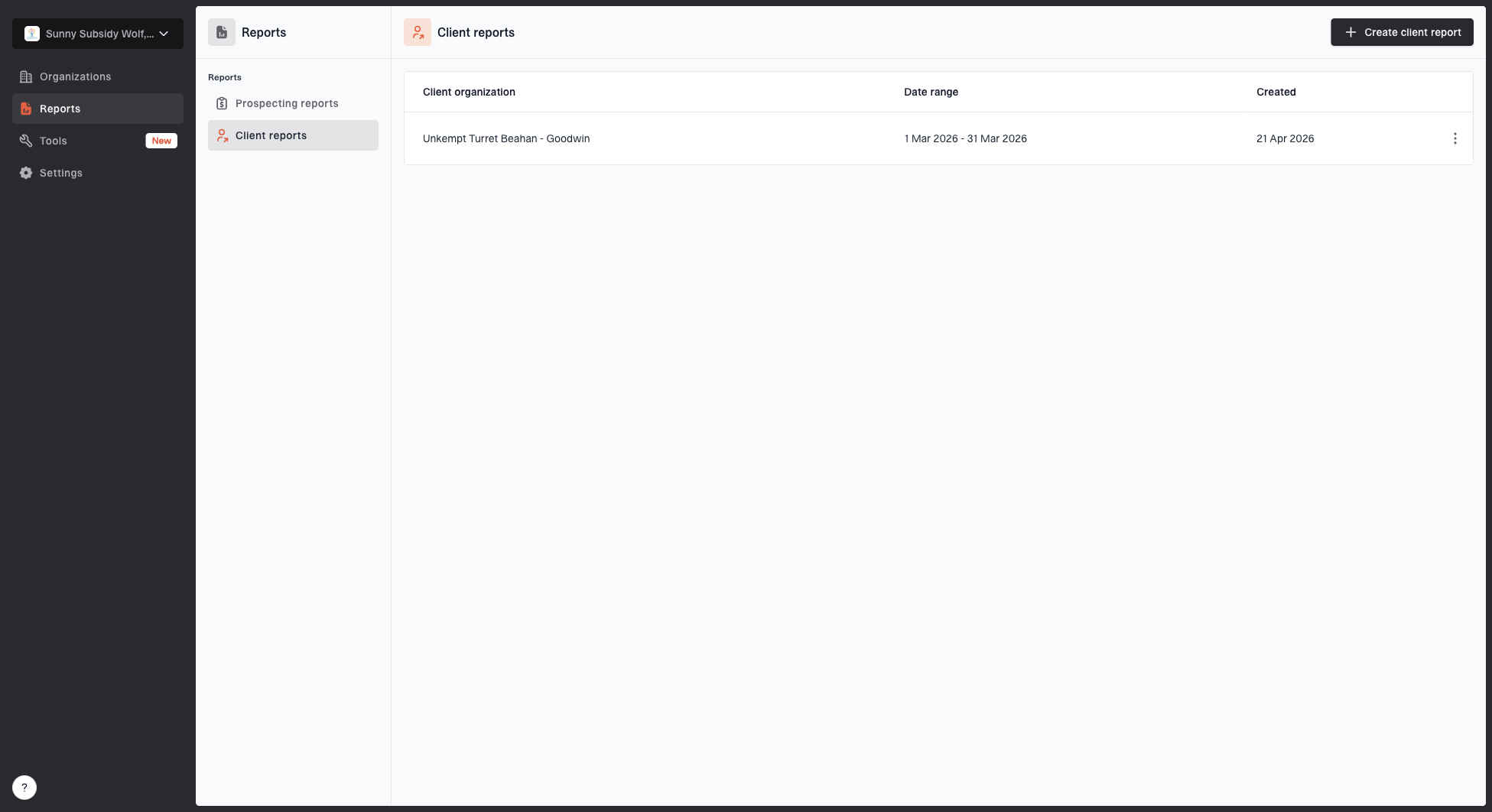
Client reports page showing a generated client report, date range, created date, and actions
- Client summary: State the policy change, the reason, and the expected effect.
- Sender register: Attach approved senders, fixes completed, and open decisions.
- Exception list: Record any accepted failures and the business owner who approved them.
- Next action: Require approval and a test before a new sender goes live, then set the next review date and policy step.
This documentation also protects the MSP. If a department later claims a vendor stopped sending mail, the audit record shows whether that sender was approved, missed, retired, or identified as unauthorized before enforcement.
Final enforcement checklist
A client is ready for DMARC enforcement when legitimate senders pass DMARC, unknown sources have a documented decision, and the client accepts the expected impact. Keep monitoring after the policy change so new senders and configuration drift are detected.
- Reports reviewed: At least one full business cycle of DMARC data has been checked.
- Senders approved: All known business systems have a clear authentication result.
- Fixes tested: Real mail confirms DMARC passes, including DKIM domain alignment before reject.
- Policy staged: The rollout path and rollback path are documented.
- Client signed off: The business owner accepts the enforcement step and open exceptions.