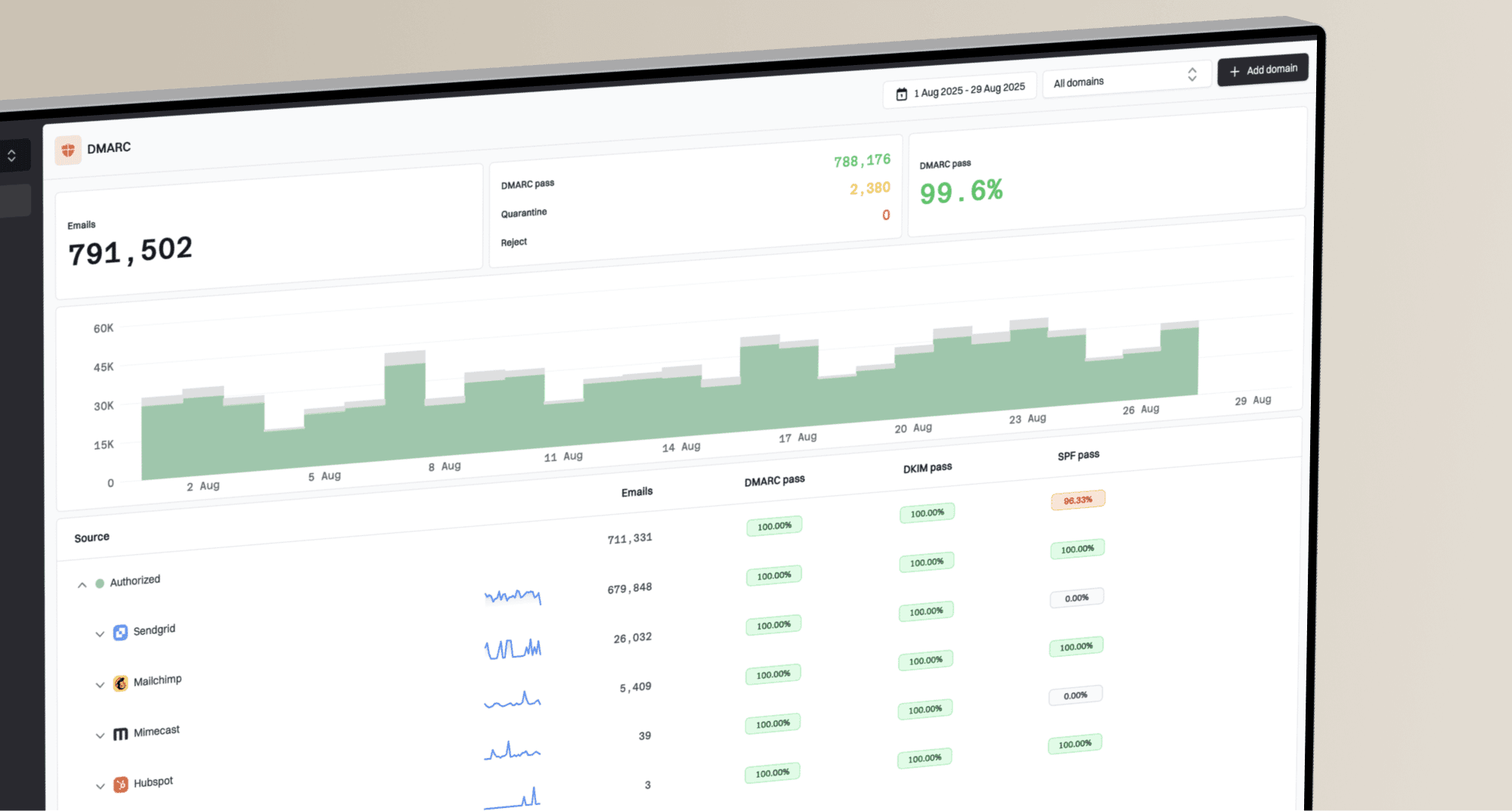
How MSPs should respond to sudden DMARC failure spikes

Published 1 Aug 2026
Updated 8 Oct 2026
11 min read
Summarize with
Updated on 11 Oct 2026: We updated our response steps for delayed DMARC reports and suspected account compromise.
MSPs should treat a sudden DMARC failure spike as a scoped email incident: preserve the evidence, identify the affected client and sending source, separate authentication breakage from malicious traffic, contain the risk, then repair the exact SPF, DKIM, or alignment fault. Keep the current DMARC policy and require verified ownership before authorising a source. A rushed policy rollback can restore delivery while also weakening spoofing protection.
For an MSP, speed comes from a repeatable operating model across every tenant. The DMARC for MSPs hub covers the broader service model. During a spike, the working objective is narrower: determine whether legitimate mail has started failing, whether an unknown source has appeared, and whether receiver behavior or forwarding explains the change.
Stabilise the incident before changing DNS
Start by freezing unnecessary mail authentication changes for the affected domain. That includes SPF edits, DKIM selector rotation, DMARC policy changes, and sender onboarding. The freeze is brief and scoped. Its purpose is to stop parallel changes from erasing the cause while the MSP captures the failure window.
First 30 minutes
- Confirm scope: Record affected domains, failure counts and rates, the reporting window, alert time, receivers, and client-reported delivery symptoms.
- Preserve evidence: Export relevant aggregate rows, snapshot current DNS records and TTLs, and save full headers plus SMTP responses or bounce codes for a legitimate failure.
- Check change records: Review DNS, mail routing, vendor, gateway, and campaign changes made before the spike. If several tenants are affected, check shared infrastructure and provider incidents.
- Assign ownership: Name one incident lead, one client contact, and the next update time.
A percentage spike needs a volume check. Ten failures out of twenty messages is a 50% failure rate, but even a small count warrants urgent attention when critical client mail is affected. Ten thousand new failures from a payroll or invoicing platform demand immediate attention. Compare the current interval with the same weekday and sending window, then separate the domain-wide rate from the rate for each source IP, header From domain, DKIM domain, and receiver.
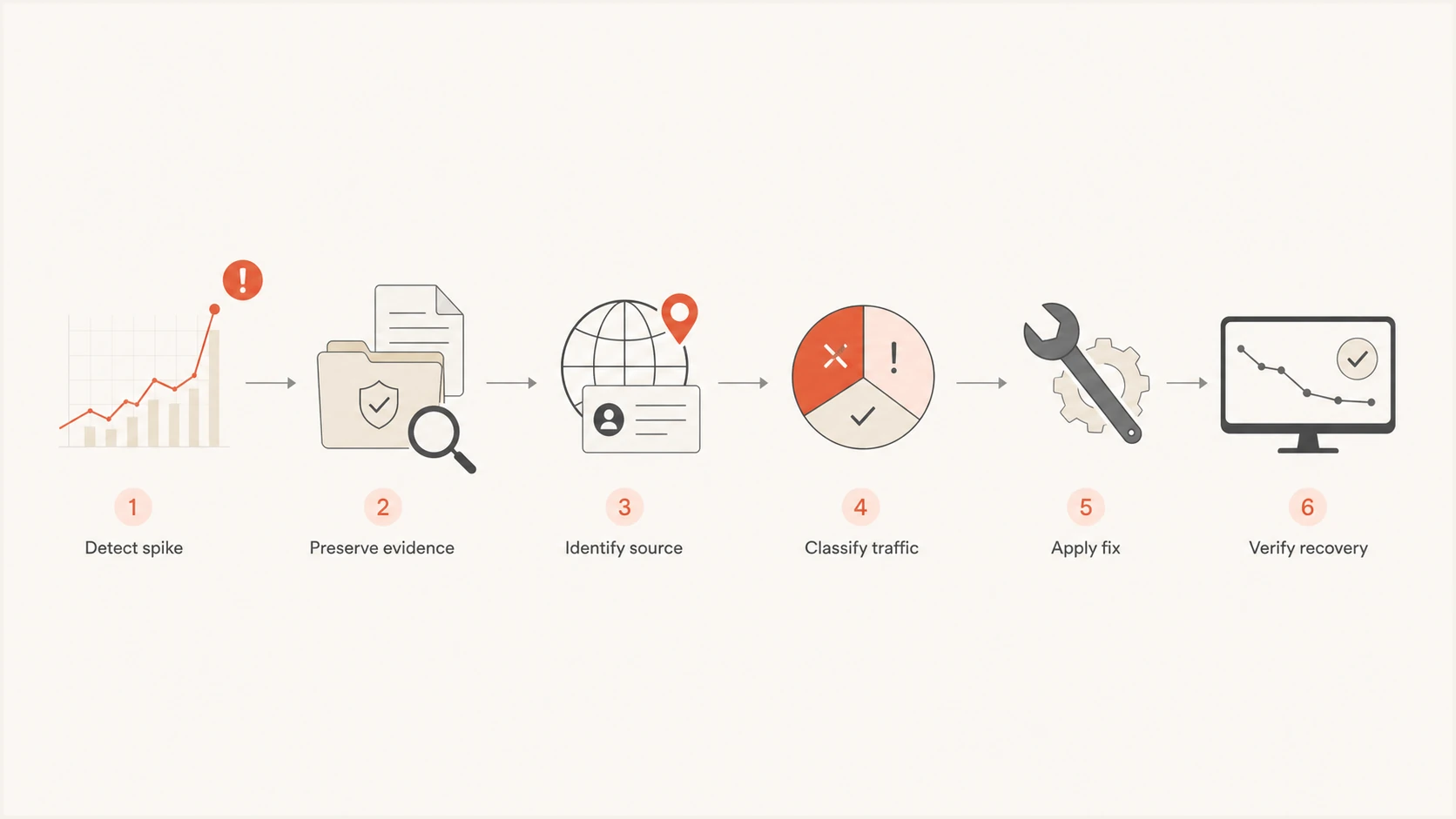
Six-step MSP workflow for investigating a DMARC failure spike
Measure the spike against a clean baseline
Aggregate reports are the primary evidence for authentication trends, but the total failure rate alone is too coarse. Filter by source, disposition, SPF result, DKIM result, and alignment. Good DMARC monitoring should make those dimensions visible without requiring the operator to inspect raw XML during an incident.
Compare the report's UTC date_range with the incident window, rather than its arrival time. Reports commonly cover a day and arrive later; late reports can describe mail sent before the fix. Check report IDs within each reporter and policy domain for duplicate ingestion, and compare receiver coverage before interpreting a percentage change. RFC 9990 defines these reporting fields and duplicate-handling considerations.
Compare raw authentication results in auth_results with DMARC results in policy_evaluated. A raw SPF or DKIM pass still needs alignment with the visible From domain. An SPF failure alone is not a DMARC failure when authenticated DKIM passes with alignment. The reported disposition describes DMARC handling, not inbox placement; use message traces and SMTP responses to confirm delivery impact.
|
|
|
|---|---|---|
One source | Sender configuration or abuse | Ownership and recent changes |
One receiver | Routing, DNS cache, or receiver behavior | Headers and SMTP responses |
Raw SPF failure only | Sending path or SPF record changed | Envelope domain and aligned DKIM result |
Raw DKIM failure only | Signing, key, or message modification fault | Selector, key, and aligned SPF result |
Raw pass, DMARC failure | Identifier alignment mismatch | From domain, signing domain, and alignment mode |
Neither mechanism passes with alignment | Unauthorised traffic or sender configuration fault | Ownership and message legitimacy |
Evidence that narrows the incident quickly
The baseline must match the client's normal sending pattern. Retail campaigns, monthly invoices, and school notices create legitimate bursts. Mark known recurring windows in the runbook so an on-call operator does not mistake expected volume for compromise. When the sender is unknown, follow a source ownership process before authorising it; the unknown source investigation workflow covers that decision in detail.
DMARC records drawer showing filters, record rows, authentication results, and CSV export
Classify the failing traffic
The critical decision is whether the traffic is authorised. Ask the client for the business owner, sending purpose, vendor account, expected From domain, and a recent message sample. DNS inclusion alone does not prove authorisation. Old SPF includes and forgotten DKIM keys often remain after a service has been retired. Treat unknown sources as unverified until ownership and message evidence establish legitimacy.
Legitimate sender failure
- Ownership: A client stakeholder confirms the system and use case.
- Evidence: Headers match the vendor account and expected mail stream.
- Action: Repair signing or alignment, then verify with a new message.
Unknown or abusive traffic
- Ownership: No client owner or approved change can explain the source.
- Evidence: Both mechanisms fail or use unrelated domains, but those results alone do not prove abuse.
- Action: Keep it unauthorised and investigate exposure or spoofing.
Forwarding deserves separate treatment. A forwarder usually changes the SMTP path, so SPF can fail even when the original sender was valid. DKIM can preserve DMARC if the signature survives and its domain has alignment with the visible From domain. Mailing lists, security gateways, and footer rewriting can break that signature. Use a real forwarded message and the receiving system's trusted Authentication-Results headers to establish where authentication changed. See the forwarding troubleshooting process when failures cluster around forwarded traffic.
For forwarded traffic, inspect Authenticated Received Chain (ARC) results and the receiver's trust in the intermediary. A validated ARC chain can support a local delivery override while DMARC still fails; ARC does not repair the sender's SPF or DKIM configuration. This distinction follows the ARC specification.
SPF failure with DMARC passing through authenticated, aligned DKIMtext
Authentication-Results: mx.receiver.example;
 spf=fail smtp.mailfrom=bounce.sender.example;
 dkim=pass header.d=sender.example;
 dmarc=pass header.from=sender.example
Contain suspected account or DNS compromise
Escalate to the client's security incident lead when the spike coincides with unexplained sign-ins, unexpected outbound mail, or unauthorised DNS changes. An approved sending system can be compromised, and its abusive messages can still pass DMARC. Aggregate reports identify domain authentication results; account logs and message samples establish whether the sending activity was authorised.
- Preserve sign-in logs, mail-flow logs, and DNS audit history while starting containment. Record the affected accounts and the time of each action.
- Stop the abusive mail stream or disable a confirmed compromised account. Revoke active sessions and rotate exposed passwords or API credentials using the provider's incident procedure.
- Review mailbox forwarding rules and application grants. Remove attacker-added access, check MFA settings, and verify account access before restoring sending.
- For DNS tampering, secure registrar and DNS accounts and restore approved records. Check other clients that share the affected credentials or administrative access.
Keep DMARC enforcement in place during containment. If receiver responses identify a blocklist (blacklist) listing, stop the abuse before pursuing delisting; an authentication repair alone does not remove a reputation-based rejection.
Repair SPF, DKIM, and DMARC alignment faults
For an authorised sender, repair the mechanism closest to the cause. SPF failures often come from a new sending IP, a changed return-path domain, an SPF lookup limit breach, or an include that no longer resolves. For DKIM, check for disabled signing when the signature is absent, then investigate selector/key publication or signed-content modification when verification fails. A valid signature using an unrelated domain is an alignment failure, even when DKIM verification passes.
Distinguish SPF permerror from temperror. Exceeding the limit of ten evaluated DNS-querying terms, including nested includes and redirects, produces permerror. Temperror indicates a transient error, usually DNS-related, and calls for DNS availability checks. The limit concerns evaluated terms, rather than ten sending IPs or ten top-level includes, as defined in RFC 7208.
- SPF failure: Confirm the actual envelope domain and sending IP before changing any record.
- DKIM failure: Query the selector shown in the header, verify the public key, and send a new test. Publish a replacement key before switching selectors and retain the old key while signed mail remains in transit.
- Alignment failure: Configure the vendor's custom return-path or DKIM signing domain for the client's From domain. Check adkim and aspf: relaxed alignment uses the same organisational domain; strict alignment requires an exact domain match.
- Policy pressure: Use a temporary, documented policy change only when verified legitimate delivery has material impact, with a named approver and expiry time.
DMARC needs only one authenticated, aligned mechanism to pass, as specified in RFC 9989. Use stable DKIM signing with alignment for third-party platforms and keep SPF accurate as a second mechanism. Never add a broad IP range or vendor include just because it makes a red row disappear. The SPF alignment workflow helps when the return-path belongs to the provider instead of the client.
?
What's your domain score?
Deep-scan SPF, DKIM & DMARC records for email deliverability and security issues.
After a DNS or sender-side change, send a fresh message and run a focused domain health check to confirm that the published records parse correctly. Check authoritative DNS and cached resolver answers against the record TTL, then use fresh receiver headers to verify the sender actually uses the configuration. Confirm delivery through message traces or SMTP responses and wait for reports covering post-fix traffic before declaring the authentication trend recovered. A valid DNS record alone does not prove successful authentication or delivery.
Keep client updates and alerts actionable
The technical fix is only half of MSP delivery. The client needs a clear status, impact statement, owner, next action, and next update time. Explain the evidence when sharing raw XML or a screenshot. A useful update says which domain and mail stream are affected, whether legitimate mail is failing, what has been ruled out, and what approval or evidence is needed from the client.
Client update structure
State the observed spike and affected sender, describe current delivery impact, name the suspected cause with evidence, record the containment or repair, and give the next verification time. If no legitimate mail is affected, say that plainly while the source review continues.
Suped is our DMARC and email authentication platform. Its multi-tenant dashboard brings client domains, failure sources, issues, and alerts into one operating view. During triage, filter the affected client and source, use the issue guidance to plan the repair, and route alerts to the incident owner. Aggregate-report alerts depend on when receivers send their reports, so use mail-flow logs for immediate delivery checks.
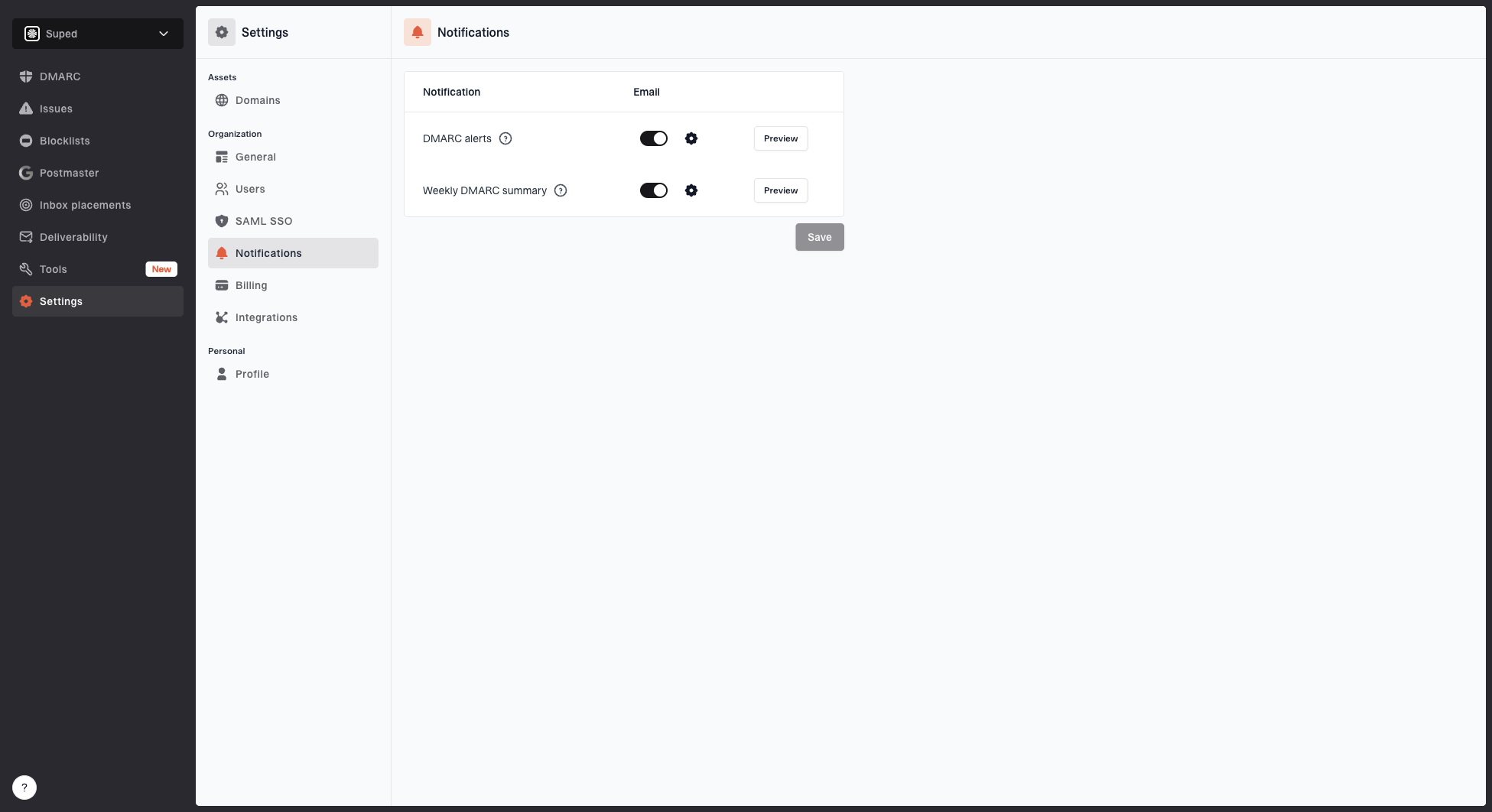
Notification settings page with DMARC alerts, weekly summary, toggles, and preview buttons
Configure alerts around client-specific baselines instead of one global failure percentage. A transactional sender and a low-volume executive domain have different tolerances. The alert also needs enough context for routing: organisation, domain, source, volume change, authentication result, and reporting window. Hosted DMARC policy management and hosted SPF management can reduce DNS handoffs for approved changes, but the MSP should still record who approved each sender and when the change was verified.
Close the incident with evidence
Close a DMARC spike only after the legitimate stream passes in a controlled test, delivery checks confirm recovery, and new aggregate data covering post-fix traffic shows normal authentication. The closure record includes the root cause, affected interval, delivery impact, DNS or vendor changes, approvals, validation evidence, and the receiver's reported disposition for remaining unauthorised traffic. If aggregate reports arrive with delay, the ticket can move to monitoring but should not be marked resolved.
Suggested incident gates
Use client baselines and business impact to set severity. These gates describe workflow state, not universal DMARC percentages.
Investigating
Evidence pending
Source or impact is still unconfirmed
Monitoring
Reports pending
A fix passed authentication and delivery checks
Resolved
Baseline restored
Post-fix reports confirm normal authentication and delivery checks show recovery
The post-incident action should remove the condition that made the spike surprising. Update the sender inventory, expiry dates for temporary records, escalation contacts, expected campaign windows, and the client's change process. Tune the alert using the source and volume pattern found during the incident. Add shared-provider dependencies and DNS access reviews to the runbook when they contributed to the failure.
Limit temporary DMARC policy changes
Hold the current DMARC policy while confirming whether the failing stream is legitimate. Roll back only when verified business mail has material delivery impact and no narrower containment is available. A DNS DMARC policy has no per-source-IP exception, and changing a domain to p=none removes its request for DMARC-based quarantine or rejection across that policy's scope. Record the affected domains, previous policy, approver, expiry time, and tests required before restoring enforcement. Recheck the policy after recovery so a temporary rollback does not become permanent.
Frequently asked questions
Usually no. First confirm that legitimate mail is failing and identify the affected source. Use a documented temporary policy change only when delivery impact is material and a sender-side fix cannot be applied quickly. Record the approver and expiry time, and restore enforcement after verification.
Use the response target in the client's service agreement. Critical legitimate failures or signs of account compromise need immediate triage regardless of message count. Unauthorised failures with no delivery impact can follow a lower-severity investigation path.
Yes. Forwarding changes the SMTP path and often breaks SPF. DMARC still passes when an authenticated DKIM signature survives with alignment, but message modification can break that signature as well. Trusted ARC evidence can support a receiver's delivery override without changing the DMARC failure result.
Request the business owner, sending purpose, vendor account, expected From domain, change history, delivery symptoms, and full headers from a recent legitimate message. Include bounce codes or SMTP responses and mail-flow logs for the affected interval.
Resolve it after a controlled message passes authentication, delivery checks show recovery, and fresh aggregate reports covering post-fix traffic show the legitimate stream has returned to its expected baseline. Record the root cause, change, approval, and validation evidence.
No. The receiver decides how to handle the message using the domain's DMARC policy and its own filtering rules. Confirm rejection or quarantine with SMTP responses and message traces; a DMARC pass also does not guarantee inbox placement.