
How to troubleshoot SPF alignment for MSP clients

Updated on 2 Oct 2026: We clarified how SPF alignment appears in aggregate reports and how to verify each client's sending path.
SPF alignment fails when the domain authenticated by SPF does not match the domain in the visible From address under the client's DMARC alignment mode. For an MSP, start with one failing message, identify its envelope sender, confirm whether the source is client-approved, and determine who controls that domain. For an approved sender, configure a client-owned custom return-path if the service supports it. Otherwise, use aligned DKIM to achieve a DMARC pass.
Do not start by adding the sending IP to the client's SPF record. That change fixes SPF authentication only when the message uses the client's domain as its envelope sender. A message can pass SPF for a vendor domain and still fail SPF alignment. DMARC passes when either SPF or DKIM both authenticates and has domain alignment, so the investigation must keep authentication and alignment as separate checks.
Use the exact SPF alignment test
DMARC compares the RFC5321.MailFrom domain, often shown as Return-Path or envelope-from, with the RFC5322.From domain that the recipient sees. SPF must first pass for the MailFrom identity. DMARC then checks whether that authenticated domain has the required relationship to the visible From domain. For a null reverse-path, SPF constructs the MailFrom identity using the HELO domain; a separate HELO-only SPF pass does not establish DMARC alignment.
The two conditions
- SPF returns pass for the evaluated MailFrom identity.
- That SPF-authenticated domain satisfies the DMARC relationship with the visible From domain.
A result such as spf=pass smtp.mailfrom=vendor.example does not provide SPF alignment for From: billing@client.example. The domains differ.
Relaxed alignment, the default for aspf, accepts domains with the same organizational domain. For example, bounce.mail.client.example and client.example normally match under relaxed SPF alignment. Strict alignment, set with aspf=s, requires the exact same domain. RFC 9989 determines the organizational domain through a DNS Tree Walk; some older receivers still use public suffix lists. Check the receiving system's result when a complex domain hierarchy produces an unexpected answer.
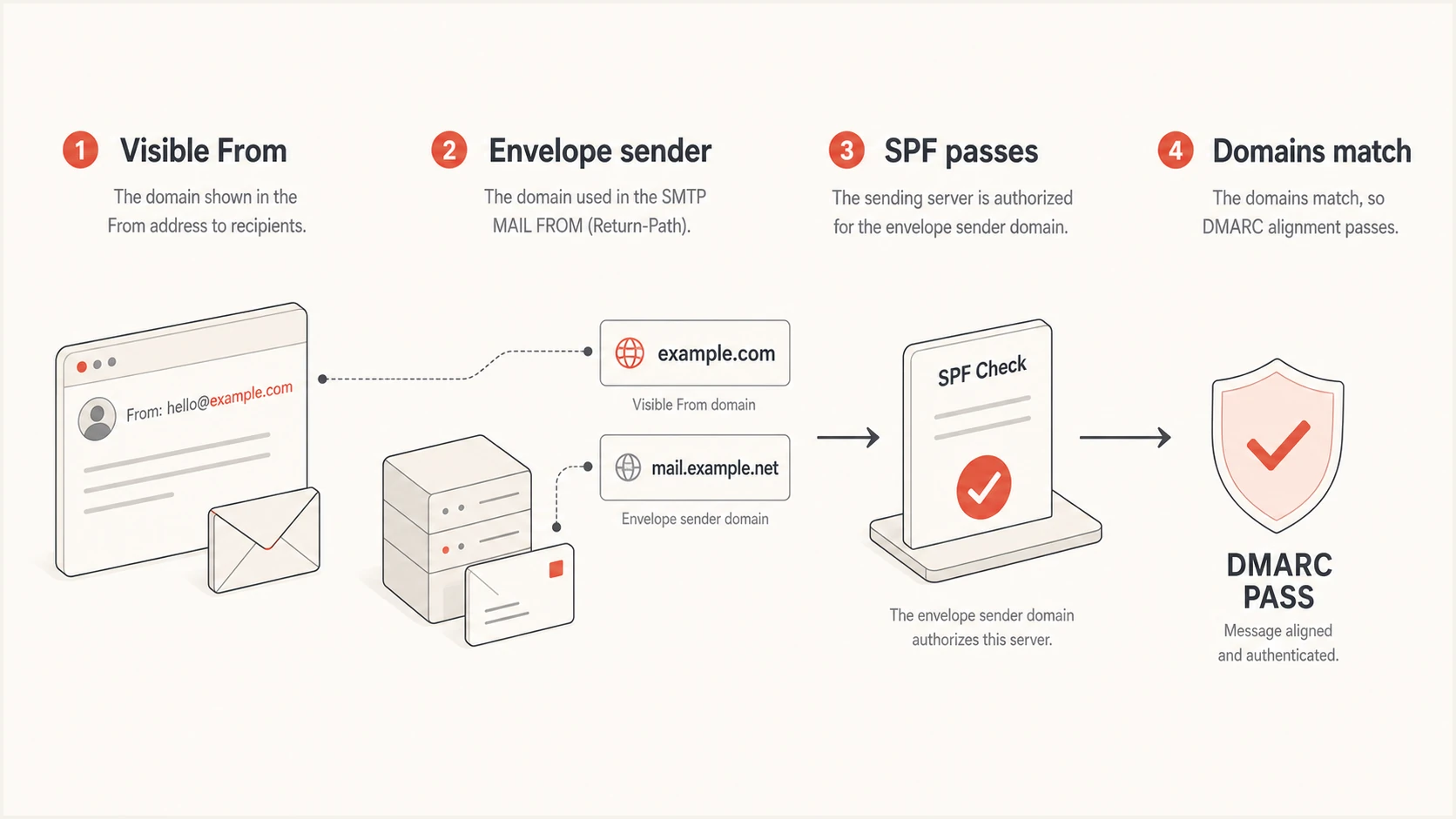
SPF alignment compares the authenticated envelope domain with the visible From domain
Collect one complete failing sample
Ask the client for the original message as an EML file or full raw headers. A screenshot of an inbox warning omits the identities needed for diagnosis. Record the recipient provider, UTC receipt time, Message-ID, source IP, visible From, Return-Path, DKIM signing domain, the active aspf setting, and the complete Authentication-Results field. Preserve the original sample in the ticket so another technician can reproduce the conclusion.
|
|
|
|---|---|---|
From | DMARC identity | Exact domain |
Return-Path | SPF identity | Exact domain |
Source IP | Sending host | Address |
Auth result | Receiver verdict | Full field |
Message-ID | Trace handle | Exact value |
Compact evidence checklist for each incident
Receiver-generated Authentication-Results has more diagnostic value than a sender-side SPF check because it records the identity and IP that the receiver actually evaluated. Treat copied or untrusted headers cautiously. Use the result added by the recipient's trusted mail system, identified by its authentication service ID, then use Received fields to understand forwarding or relay hops.
Simplified failing header sampletext
From: Client Billing <billing@client.example>
Return-Path: <bounce@mailer.vendor.example>
Authentication-Results: mx.receiver.example;
 spf=pass smtp.mailfrom=mailer.vendor.example;
 dkim=fail header.d=client.example;
 dmarc=fail header.from=client.example
Interpret aggregate SPF and DMARC results
When a raw message is unavailable, use the receiver's aggregate DMARC report to narrow the source before requesting a sample. Match the report's header_from domain, source_ip, count, and reporting period to the client incident. The source IP identifies the connecting server, not the business owner, so confirm the sending service before changing DNS.
- In auth_results.spf, check the SPF authentication result and domain when the field is present.
- In row.policy_evaluated.spf, check whether SPF passed with alignment. Raw SPF pass can appear beside DMARC SPF fail.
- Check row.policy_evaluated.dkim and auth_results.dkim before calling the whole message a DMARC failure.
The envelope_from field is optional in aggregate reports, and rows group messages by shared results. Use a fresh raw header to prove a specific message's return-path and to verify the repair. Treat a new unknown source as an authorization question, not an automatic request to add its IP to SPF.
Classify the failure before changing DNS
Put the incident into one of four states: SPF authentication fails, SPF passes but is misaligned, the mail is forwarded, or a fresh header passes while an older aggregate report still shows failure. This classification prevents unrelated DNS changes and gives the client a specific owner for the next action.
SPF authentication failure
The evaluated domain is useful, but its SPF policy does not authorize the source. Typical causes include a missing include mechanism, stale IP range, DNS lookup limit, more than one SPF record, or a temporary DNS error.
- The administrator of the envelope domain and its SPF record.
- Repair SPF authorization, then retest with a real message.
SPF alignment failure
SPF passes, but it authenticates a domain that does not satisfy DMARC alignment with the visible From domain. Adding the source to the visible domain's SPF record does not change the envelope identity selected by the sender.
- The sending service administrator who controls the return-path.
- Configure a client-owned custom return-path or rely on aligned DKIM.
Before any edit, query the live SPF TXT record through more than one resolver and count the DNS-triggering terms actually evaluated across the include and redirect chain. SPF permits at most ten such terms during one evaluation. Void lookups and recursion can also cause errors, while oversized TXT answers can expose compatibility problems. Keep one SPF record per hostname.
SPF checker
Find SPF syntax issues, lookup limits, and weak records.
?/16tests passed
Use the focused checker to capture the published record, syntax findings, and lookup path in the ticket. The result is a DNS snapshot, not proof of alignment. Send a new message after the change and confirm that the recipient reports both spf=pass and a matching envelope domain.
If lookup pressure is the issue, document every approved sender before consolidation. Suped's SPF flattening workflow can reduce lookup risk and track source changes, but it does not turn a vendor-owned return-path into an SPF-aligned client identity.
Configure the sending service and DNS
For a direct sender, configure the service's custom bounce domain, custom MAIL FROM, or return-path setting with a subdomain owned by the client. Names differ between services, but the result should look like bounce.client.example while the visible From uses client.example under relaxed alignment. If aspf=s, those domains do not align; use an exact-match MailFrom domain or aligned DKIM. The service might request a CNAME, TXT, or MX record so it can process mail and bounces. Publish exactly what that service documents, and do not place a TXT record at a name delegated by CNAME.
Illustrative SPF TXT record when the service requests direct SPFdns
bounce.client.example. 300 IN TXT
"v=spf1 include:spf.vendor.example -all"
- Match the DMARC source to a client-approved sending service and named business owner.
- Set a client-owned return-path in the service before editing SPF.
- Add the required records through the client's change process and record the previous values.
- Generate a normal message through the same tenant, stream, and From domain.
- Check raw headers at two mailbox providers and wait for aggregate DMARC data.
When the service offers no custom return-path, do not copy undocumented IPs into client DNS. Configure DKIM with a client-owned signing domain and verify that DKIM passes with alignment. The message then passes DMARC even if SPF remains misaligned. This is common for shared platforms and legitimate indirect mail flows.
Do not weaken policy to hide the fault
Changing aspf=s to aspf=r fixes only subdomain differences within the same organizational domain. It does not make vendor.example match client.example. Moving DMARC to p=none also does not repair alignment. Use temporary policy changes only through an approved rollout plan with a defined rollback point.
Treat forwarding as a separate path
Forwarding often breaks SPF because the forwarding server sends the message from an IP absent from the original envelope domain's SPF policy. Sender Rewriting Scheme can give the forwarder a domain for which SPF passes, but that rewritten domain usually does not match the original visible From domain. DKIM that survives message transit is therefore the main route to DMARC success.
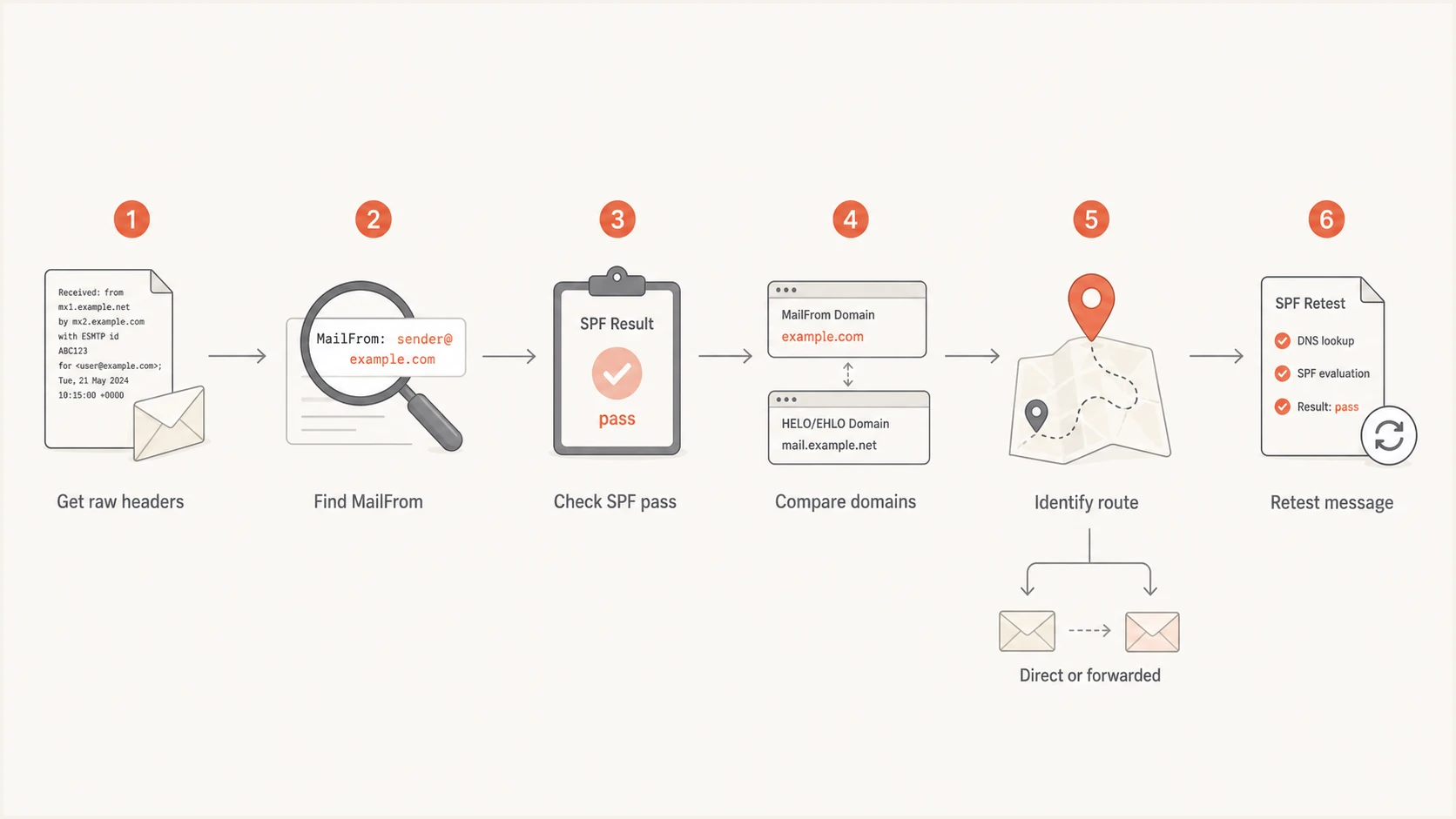
Investigation flow for direct and forwarded SPF alignment failures
Confirm the route with Received headers before blaming the original sender. If the same campaign passes when delivered directly and fails only after a redirect, record it as a forwarding case. The separate forwarding failure runbook should cover DKIM survival, mailing-list modifications, SRS behavior, and recipient-specific handling. ARC can preserve authentication context for receiver evaluation, but it does not create an SPF-aligned identifier for the original From domain.
Operate the fix across many client domains
MSP operations need repeatable evidence and clean ownership. Use one incident template across the DMARC for MSPs service: client, domain, sending source, business owner, sample timestamp, MailFrom domain, visible From domain, SPF result, alignment mode, DKIM fallback, planned change, approval, rollback, and verification evidence. Group failures by client and source instead of treating every recipient report as a new incident.
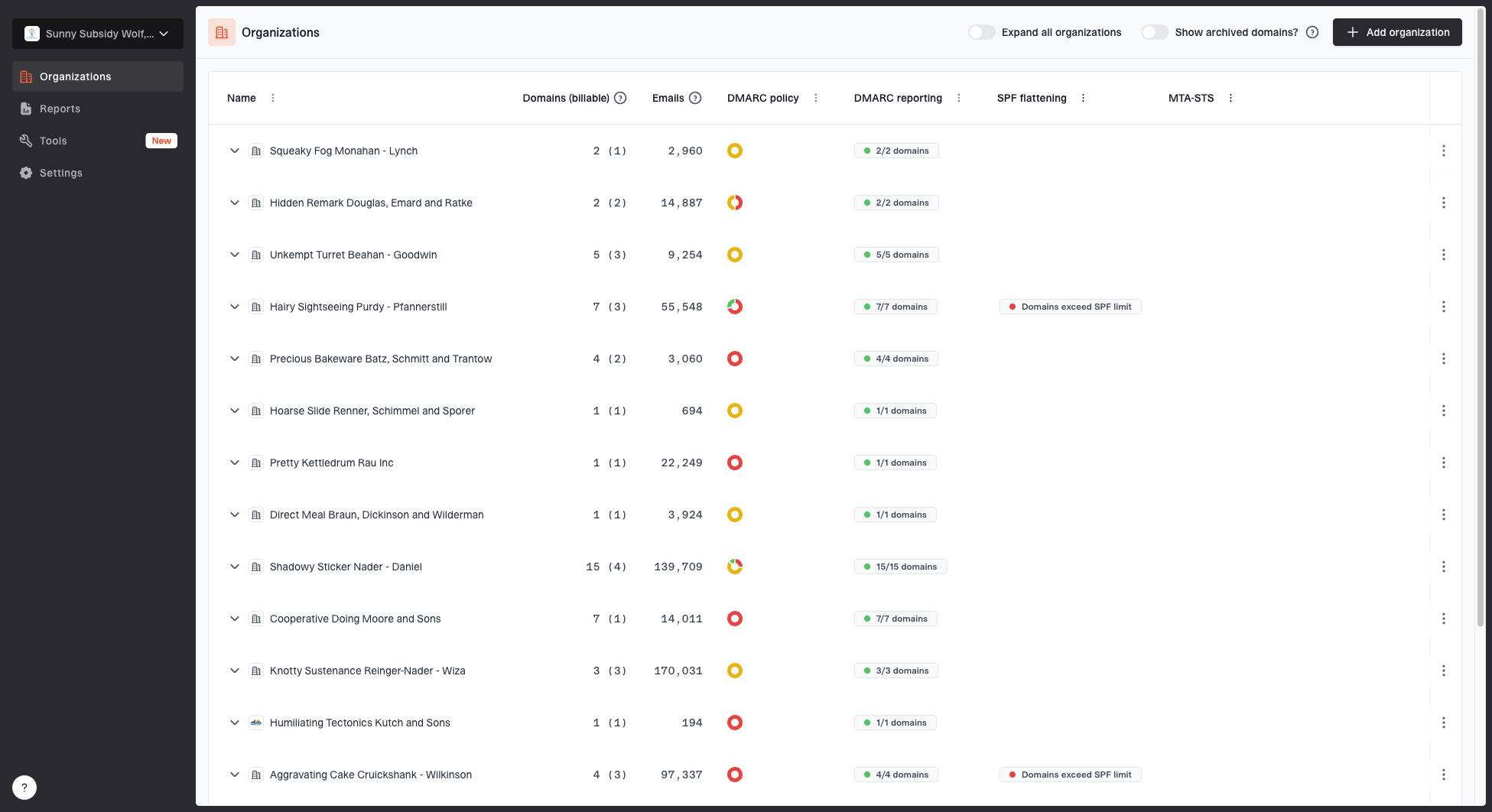
MSP organizations page showing client organizations, domain counts, email volume, and domain status columns
Suped is our DMARC reporting and email authentication platform. For multi-client service desks, its separate client organizations and DMARC monitoring view help technicians group affected sources and track SPF, DKIM, and DMARC results. Issue detection and steps to fix support triage, while raw headers remain the evidence for a specific message.
Suped's hosted SPF workflow is useful when the MSP owns sender governance but lacks routine access to each client's DNS. It lets technicians manage approved sources through a hosted record and helps control lookup growth. Review the hosted SPF workflow with the client before delegation because sender authorization remains a security decision. Custom return-path configuration still happens in the sending service.

Issue steps to fix dialog showing the issue overview, tailored fix steps, and verification action
Close the incident only after a fresh message passes at the recipient and aggregate reporting confirms the source over a normal sending cycle. DNS propagation alone is not acceptance evidence. Keep the old record, change ticket, header sample, and validation timestamp together. For high-volume clients, watch failure counts after closure so a second tenant or mail stream with the old return-path does not remain hidden.
Use a client-safe change and escalation model
Separate the MSP's diagnostic authority from the client's authorization authority. The MSP can identify the source, propose records, estimate lookup impact, and verify delivery. The client or documented service owner approves a new sender, return-path delegation, and enforcement policy change. This boundary prevents a technician from authorizing an unknown platform merely because it appears in DMARC data.
Closure evidence
- A fresh raw header shows SPF pass and the expected domain relationship.
- The receiver reports DMARC pass through SPF or the documented DKIM fallback.
- Aggregate data shows the corrected source and no unexpected failure increase.
- The ticket contains approval, final DNS values, owner, and rollback details.
Escalate to the sending service when it sets an unexpected envelope domain, signs with the wrong DKIM domain, or provides documentation that conflicts with observed headers. Escalate to the client when the source has no business owner, requires a new DNS delegation, or changes the risk of DMARC enforcement. Escalate internally when the SPF chain approaches lookup limits or when the proposed fix affects multiple clients through a shared template.
Document and monitor the verified fix
A durable resolution proves which domain SPF authenticated, makes that identity match the client's visible From domain under the active DMARC mode, and validates the result at a real receiver. When a sender cannot provide a suitable return-path, aligned DKIM is the correct fallback rather than repeated SPF edits.
The service outcome should include a named source owner, tested DNS values, preserved headers, and monitoring after the change. That record gives the next technician enough evidence to separate sender configuration, DNS authorization, forwarding, and reporting delay.