Which mailbox providers use Spamhaus listings to block email and how does it affect deliverability?

Updated on 26 Jul 2026: We updated this guide with current provider evidence, Spamhaus ZEN return codes, and clearer listing diagnostics.
The direct answer: current public evidence supports Spamhaus-related hard rejections at Microsoft consumer mail and Exchange Online Protection, while Comcast publicly says it consults Spamhaus ZEN. Yahoo and Road Runner or Spectrum have historical Spamhaus-related reports, but no current public rule is available. Apple and Gmail do not publicly document direct hard-block dependence on Spamhaus, so their effect must be measured through bounces, throttling, and inbox placement.
There is no complete public list of mailbox providers that use Spamhaus listings. Receivers keep filtering inputs private because publishing exact rules helps abusive senders route around them. The useful question is not, "Which providers can be ignored?" It is, "Which evidence proves this listing is affecting delivery now?"
- Direct evidence: A bounce that says "blocked using Spamhaus" means the receiving system used Spamhaus data in that delivery decision.
- Strong inference: A sudden provider-specific spike in 550 or 554 policy blocks during a Spamhaus listing is enough to prioritize remediation.
- Practical rule: If the listing is SBL, CSS, XBL, or DBL, act as if enough providers use it to make the incident operationally significant.
- Important caveat: Informational Spamhaus notices should not create direct hard blocks by themselves, but they still require review.
The short answer by provider
The cleanest answer separates documented hard-block behavior from historical reports and private reputation scoring. Providers change filtering over time, and the same brand can run different systems for consumer mail, hosted business mail, inbound gateways, and regional domains.
|
|
|
|
|---|---|---|---|
Current public bounces cite Spamhaus | Hard reject | High | |
Current postmaster material names Spamhaus ZEN | Hard reject | High | |
Historical rejection evidence | Possible reject or filter | Low to medium | |
Road Runner historical evidence | Possible reject or filter | Low | |
No current public confirmation | Measure directly | Low | |
No public hard-block claim | Measure directly | Low | |
Corporate gateways | Configurable DNSBL input | Reject, tag, or quarantine | High |
Confidence reflects current public documentation, public bounces, and historical deliverability observations.
Do not over-read provider lists
A provider list is useful for explaining risk, but it is not a safe operating control. If a sender is listed on Spamhaus, the better question is what caused the listing.
- Published lists: They go stale quickly because providers change filters, vendors, and internal scoring models.
- Bounce evidence: It is stronger than any generic list because it shows the current receiving system response.
- Provider secrecy: It protects users because exact filtering rules are valuable to abusive senders.
- Sender risk: One major provider hard-blocking mail is already enough to affect revenue, support load, and trust.
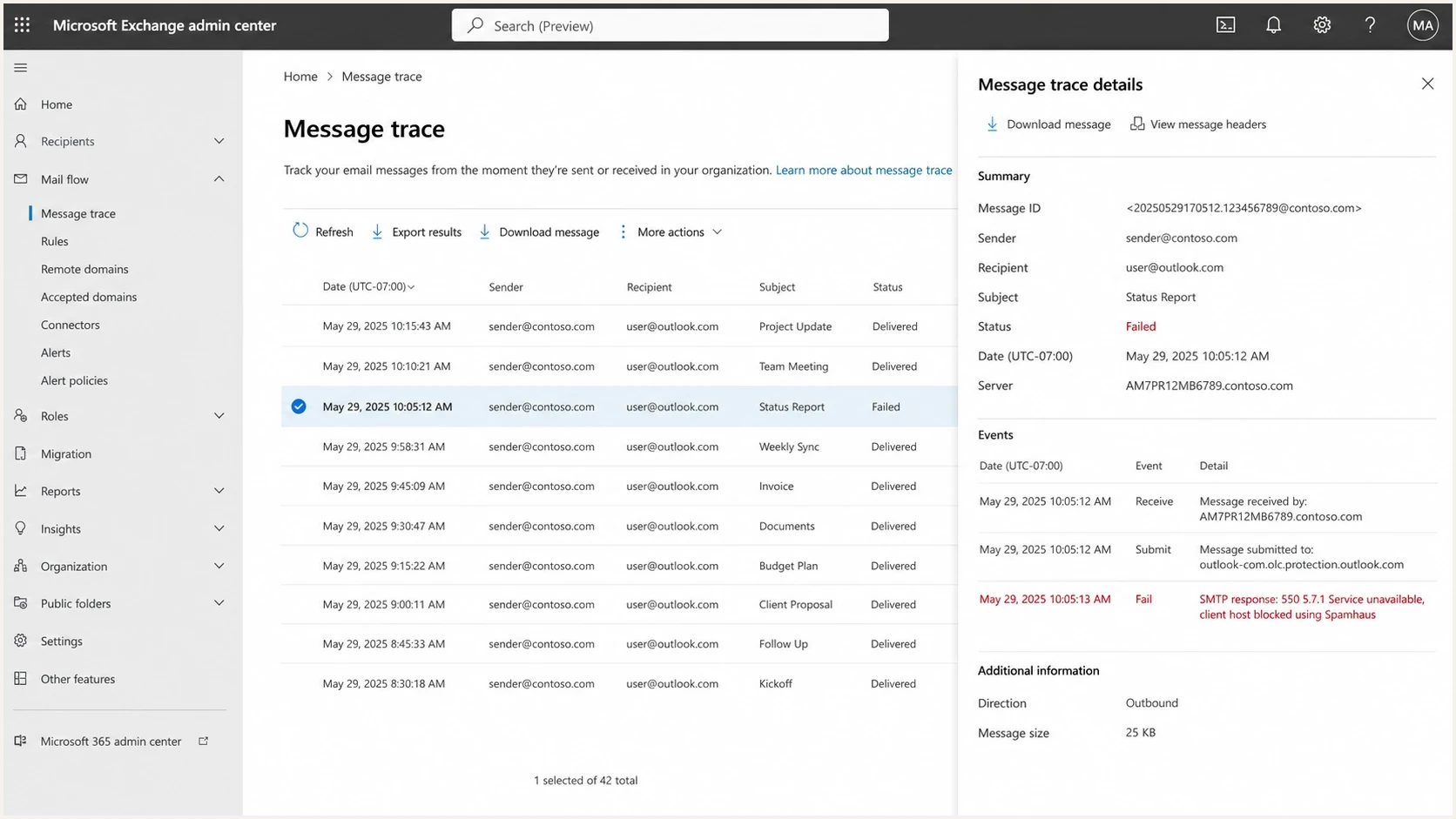
Microsoft Exchange admin center message trace showing a failed Spamhaus-related SMTP response.
The split matters. Microsoft and Comcast blocks can be visible in bounces or postmaster documentation. Claims about Gmail, Apple, Yahoo, or Spectrum need current delivery evidence, such as provider-specific bounces, throttling, or inbox placement changes that begin with the blocklist (blacklist) event.
How Spamhaus data turns into a block
Spamhaus does not sit between you and the recipient. The receiving mail server queries Spamhaus data and decides what to do. That can happen at connection time, during content filtering, or inside a broader reputation model. This is the same basic model used by many email blocklists, and Spamhaus data is deployed across many receiving networks.
Direct rejection
A direct rejection happens when the receiver checks the connecting IP or a domain signal, sees a matching Spamhaus listing, and refuses the message during SMTP.
- Common status: The bounce often has 550, 553, or 554 with a policy reason.
- Typical wording: The response often includes "blocked using Spamhaus" or a named Spamhaus list.
- Operational result: Mail does not reach the mailbox, and retries usually do not fix a permanent rejection.
Reputation scoring
Reputation scoring happens when a receiver uses a listing as one signal among engagement, complaints, authentication, content, sending history, and infrastructure signals.
- Common status: The sender sees spam placement, throttling, or generic policy bounces.
- Typical wording: The response often does not name Spamhaus, even when external reputation data has weight.
- Operational result: Delivery can degrade across one provider before it becomes a full hard block.
Spamhaus describes this receiver-side choice plainly: the administrator can reject the message in real time or accept it and tag it for extra filtering. The official Spamhaus Blocklist material separates IP and domain datasets, which matters when the bounce names an IP but inbox placement follows links or domains in the message.
Common Spamhaus-style bounce patternstext
550 5.7.1 Service unavailable, client host blocked using Spamhaus.
554 5.7.1 IP address was found in the Spamhaus blocklist.
553 5.7.1 Connections not accepted from Spamhaus PBL-listed IP.
550 5.7.1 Message rejected due to poor IP reputation.
The first three examples are direct enough to act on immediately. The fourth is less specific, but it belongs in the same investigation when timing lines up with a Spamhaus event. Preserve the full bounce, including recipient domain, sending IP, status code, and first-seen time.
How Spamhaus ZEN affects a block decision
Spamhaus ZEN combines the SBL, CSS, XBL, and PBL IP datasets in one DNSBL zone. A receiver can query ZEN once and use the returned code to identify the component list. DBL is separate because it evaluates domains rather than connecting IP addresses.
|
|
|
|---|---|---|
127.0.0.2 | SBL | Spamhaus SBL data |
127.0.0.3 | CSS | Combined Spam Sources data |
127.0.0.4 | XBL | Compromised-device data |
127.0.0.9 | SBL | DROP data also returned through SBL |
127.0.0.10 | PBL | ISP-maintained policy data |
127.0.0.11 | PBL | Spamhaus-maintained policy data |
Current public ZEN response codes identify the component dataset behind an IP result.
Error codes are not blacklist listings
Responses in 127.255.255.* indicate a DNSBL query problem, not poor sender reputation. Common causes include an unsupported public resolver, a query-volume restriction, an incorrect zone name, or another receiver-side configuration problem.
- Check the code: Do not treat every 127.* response as proof that the sender is listed.
- Check the bounce URL: A reference to an open resolver or DNSBL error points to the receiver's lookup path.
- Check the listed object: Confirm that the IP in the listing result is the IP that connected to the receiving server.
- Escalate with evidence: Give the receiver the complete SMTP response, timestamp, connecting IP, DNSBL zone, and return code.
Querying ZEN and every component zone adds duplicate DNSBL lookups without adding component coverage. For a sender investigation, the practical task is to identify the ZEN return code, map it to the component list, and follow that list's remediation path.
Which Spamhaus listings matter most
Not every Spamhaus entry has the same meaning. A PBL result says the IP should not send unauthenticated mail directly to third-party MX servers; it does not say the IP sent spam. SBL, CSS, or XBL points to abuse or compromised infrastructure. DBL is domain-based, so it can affect messages even when the connecting IP is clean.
|
|
|
|
|---|---|---|---|
SBL | IP | Spam source or abusive host | Critical |
CSS | IP | Low-reputation spam source | Critical |
XBL | IP | Hijacked or compromised device | Critical |
PBL | IP | IP should not send direct-to-MX mail | High if sending direct |
DBL | Domain | Domain associated with unwanted or harmful mail | High |
Informational SBL | IP or range | Early warning, not in the filtering zone | Review |
Use the list type to decide urgency, owner, and remediation path.
Operational priority by listing type
Treat severity as a response guide, not as a replacement for bounce evidence.
Critical
Immediate
SBL, CSS, or XBL with active bounces
High
Same day
DBL or PBL affecting real traffic
Medium
24 hours
Generic reputation bounces during a listing
Review
Investigate
Informational SBL entry without bounces
Informational listings are different
An informational SBL entry is an early warning signal. Spamhaus says the IP is not placed in the DNSBL zone used for filtering at that stage, so the informational entry alone should not produce a direct Spamhaus hard block. It still needs investigation because continued poor sending can lead to an SBL listing.
- Do not misclassify it: An informational entry alone should not explain a sudden hard-block spike.
- Do not ignore it: It shows that an IP range or sender pattern needs cleanup before escalation.
- Check timing: Compare the entry timestamp with bounces, complaint spikes, campaign changes, and customer activity.
- Track proof: Save the entry type, affected object, bounce text, traffic source, and response owner.
The worst mistake is treating every blacklist mention the same way. An informational entry with no bounces is an early warning. A Spamhaus SBL or CSS listing that lines up with major-provider bounces is a live incident.
How to tell whether Spamhaus caused your delivery issue
Start with evidence, not provider folklore. Collect bounce samples and affected recipient domains before deciding that Gmail, Yahoo, or another provider used Spamhaus. The bounce tells you whether the receiver named Spamhaus and whether the affected object was the connecting IP, a domain, or message content.
If the bounce is vague, run a controlled test with a real message path. A practical email tester can help confirm the sending IP, authentication results, headers, and visible delivery issues before you blame a blocklist.
- Collect bounces: Group them by recipient domain, SMTP code, and exact rejection text.
- Confirm the sender: Map each bounce to the actual outbound IP, not the marketing platform name.
- Check list type: Separate SBL, CSS, XBL, PBL, DBL, and informational entries before deciding severity.
- Capture the DNS result: Record the queried zone and return code so a ZEN component hit is not confused with a DNSBL error.
- Compare timing: Match the first bounce to the first listing, campaign launch, IP move, customer import, or infrastructure change.
- Find the cause: Look for spam traps, compromised accounts, purchased data, poor segmentation, missing authentication, or direct sending from a PBL range.
Blocklist checker
Check your domain or IP against 144 blocklists.







The blocklist lookup is only one part of the investigation. A clean result after a block can mean the listing was removed, the receiver cached data, or the bounce came from a different sending IP. Correct SPF, DKIM, and DMARC results also do not override an IP-based SMTP rejection. Keep the full bounce, DNSBL result, and timeline together.
Evidence checklisttext
Recipient domain: outlook.com
SMTP status: 550 5.7.1
Bounce text: client host blocked using Spamhaus
Listed object: sending IP
DNSBL zone: zen.spamhaus.org
Return code: 127.0.0.2 or 127.0.0.3
List type: SBL or CSS
First seen: 2026-05-23 10:15 UTC
Traffic change: new campaign, new IP, or new sender
This evidence also helps explain the issue without overstating it. You can say, "Microsoft rejected this IP using Spamhaus at this time," rather than claiming every mailbox provider blocks every message from every listed sender.
What to do when Spamhaus affects deliverability
Fix the cause before requesting delisting. Spamhaus listings usually point to abusive traffic, compromised infrastructure, unauthenticated mail, weak customer onboarding, or sending that looks too risky for a receiver. For deeper steps, use a focused Spamhaus resolution guide after you identify the list type.
Sender actions
- Pause risky traffic: Stop the campaign, customer, route, or automation tied to the first bounce.
- Audit authentication: Confirm SPF, DKIM, DMARC, rDNS, HELO, and bounce domains are correct.
- Review list source: Remove purchased data, old segments, role accounts, invalid recipients, and unengaged recipients.
- Document cleanup: Record the source, containment step, permanent fix, and verification evidence before requesting delisting.
Provider or ESP actions
- Identify tenant: On shared IPs, find the customer or stream that caused the listing.
- Protect pools: Stop unsafe traffic before it affects more clean shared infrastructure; do not move unchanged traffic to another IP.
- Tighten controls: Improve signup review, import limits, suppression checks, abuse response, and tenant suspension rules.
- Verify recovery: Watch bounces by provider after delisting, not only the listing status.
Suped's product supports this day-to-day workflow. Suped combines DMARC, SPF, DKIM, hosted SPF, hosted DMARC, hosted MTA-STS, blocklist and blacklist visibility, and deliverability insights. Its blocklist monitoring helps teams spot listings, connect them to affected domains or IPs, and handle alerts without waiting for a monthly report.

Blocklist monitoring page showing domain and IP checks across blocklists with importance and status
For MSPs and agencies, centralization reduces investigation time. A Spamhaus listing often appears alongside SPF lookup pressure, unauthenticated sources, DMARC domain-match failures, or an unmonitored sending domain. Suped's multi-tenant dashboard keeps those findings visible across client domains.
How Suped fits the workflow
A practical setup replaces a spreadsheet of provider assumptions with monitoring that catches authentication failures, DNS mistakes, IP or domain listings, and policy changes before they become a provider-by-provider incident. A quick domain health check is a useful starting point when you need to see whether SPF, DKIM, DMARC, and MTA-STS are adding risk around a Spamhaus event.
- Issue detection: Suped turns authentication and reputation findings into specific steps to fix.
- Real-time alerts: Teams can react when failures or listings appear, not after a reporting cycle ends.
- Hosted SPF: You can manage senders and flatten SPF without repeated DNS edits.
- Hosted DMARC: Policy staging becomes simpler when you need strict protection without brittle DNS work.
- MSP dashboard: Agencies can manage many client domains with shared reporting and clear ownership.
Suped is not a replacement for fixing the underlying sending problem. It helps teams notice the problem, prove scope, fix authentication or DNS issues, and watch delivery recover. That turns a Spamhaus incident into a repeatable response.
Views from the trenches
Best practices
Save the exact bounce text and listed object before asking any provider for help.
Treat SBL, CSS, XBL, and DBL listings as urgent when real traffic is bouncing.
Use provider-level bounce grouping to separate direct blocks from reputation decay.
Common pitfalls
Assuming Gmail has no impact because it does not name Spamhaus in public bounces.
Treating informational notices as hard blocks without matching bounce evidence.
Requesting delisting before removing the traffic pattern that caused the listing.
Expert tips
Build a short evidence packet with IP, list type, first bounce, and cleanup steps.
For shared IP pools, identify the tenant before moving or delisting the IP.
After delisting, watch recipient-domain bounces for cache lag and residual filters.
Expert from Email Geeks says many providers use Spamhaus data, but a complete list is not public because receivers protect their filtering methods.
2022-08-23 - Email Geeks
Expert from Email Geeks says Microsoft, Comcast, and Yahoo have visible or historical Spamhaus-related blocking signals, while Gmail is more indirect.
2022-08-23 - Email Geeks
What Spamhaus listings mean for deliverability
Microsoft and Comcast provide the clearest current public evidence of Spamhaus-related hard blocking. Yahoo and Road Runner or Spectrum have historical evidence, while Gmail and Apple do not publish enough detail for a current direct-use claim. Any provider can also change its filtering inputs without publishing the change.
The response should stay evidence-led: preserve bounces, identify the listed object and DNSBL return code, fix the cause, then monitor recovery by recipient domain. Suped's product supports that loop when DMARC, SPF, DKIM, hosted SPF, and blocklist data need to be visible in one place.




