Why is my domain or IP blocked by Spamhaus and how do I resolve it?

Published 14 Jun 2025
Updated 25 Aug 2026
18 min read
Summarize with
Updated on 25 Aug 2026: We updated this guide with Spamhaus's current CSS troubleshooting, Ticket Center workflow, DNSBL error codes, PBL exclusion rules, and removal timing.
Your domain or IP is blocked by Spamhaus because Spamhaus data indicates that the domain, IP, network, or related sending pattern is connected to unsolicited bulk email, abusive infrastructure, compromised systems, poor list acquisition, repeated failure to control customers, or mail sent directly from an IP range covered by PBL policy. Once a receiver uses that data, the visible symptom can be SMTP rejection, spam folder placement, slower delivery, warning banners, or blocked links. The fix is not to hunt for the person who reported you or a direct email address. Start in the Spamhaus IP and Domain Reputation Checker, identify the exact listing, stop the mail stream that caused it, document the remediation, then follow the Checker into automatic removal or the Ticket Center when manual review is required.
A Spamhaus blocklist (blacklist) listing is usually a symptom, not the root problem. For SBL or CSS, treat it as an infrastructure and permission problem until proven otherwise. For DBL, audit domains and hostnames in the message, redirects, branded links, sender identity, compromised hosts, and nearby domains under the same root. DBL is domain and hostname based, not IP-based, so changing the outbound IP does not remove a listed URL or hostname, and a ZEN check does not clear a DBL concern.
- Pause the sending source most likely tied to the listing before asking for delisting.
- Pull logs by IP, domain, customer, campaign, complaint rate, bounce reason, list source, and link domain.
- Use the official listing instructions after the abuse condition has ended. Spamhaus states there is no fee for removal.
- If you are not the registered owner or responsible provider, send the evidence to the party that can submit the request.
Why Spamhaus blocks a domain or IP
Spamhaus lists IPs and domains when its data indicates abuse or risk. On the Spamhaus Blocklist, Spamhaus says SBL entries include IPs observed in spam, snowshoe sending, malicious hosting, bulletproof hosting, hijacked space, or related abuse. Spamhaus defines spam as unsolicited bulk email, so the key issue is permission and bulk sending behavior rather than whether the message content looks legal or familiar.
SBL data can be used at the initial SMTP connection, during pre-data checks against HELO and Mail From, and after message acceptance by checking IPs connected to resources in headers and body content. That is why a rejection can point to the connecting IP, the sending identity, or infrastructure referenced inside the message.
The common operational causes are more practical: rented or shared IPs with bad neighbors, non-opt-in lists, customers using cold outreach at scale, compromised accounts, generic or mismatched HELO and rDNS, newly registered domains used heavily, many subdomains used to move the same mail, and poor enforcement when a sender creates repeated complaints. A general overview of blocklists helps separate IP-based listings, domain listings, and recipient-side filtering.
Authentication does not override unwanted mail
SPF, DKIM, and DMARC passing results prove sender identity. They do not prove consent, list quality, or network control. A domain can pass authentication and still hit spam traps, generate complaints, or look like a snowshoe pattern.
|
|
|
|
|---|---|---|---|
SBL | IP or range | Spam source or support | Stop source |
CSS | IP pattern | Poor bulk behavior | Review senders |
XBL | IP | Compromised host or gateway | Isolate and clean |
PBL | IP range | Policy range | Use relay or exclusion |
DBL | Domain or hostname | Domain reputation or abused host | Audit URLs and hosts |
Spamhaus listing types and first actions
ZEN is a combined Spamhaus IP query zone, not a separate root cause. If a bounce mentions ZEN, look at the underlying result, such as SBL, CSS, XBL, or PBL, before deciding whether the fix is abuse cleanup, compromised-host cleanup, policy-range handling, or provider escalation.
DBL needs a separate investigation. Spamhaus can list a domain or an exact hostname, including an abused legitimate host. A tracking hostname, redirector, image host, landing page host, or compromised CMS host can block or score a message even when the parent domain and outbound IP look clean.
If a Spamhaus result is marked informational, treat it as an early warning. It is not a blocking listing yet, but it means a sender, host, or pattern needs review before a full listing appears.
A PBL result needs different handling because the listed IP is not necessarily abusive. A static IP can still appear in PBL when the network owner classifies the range as customer access space that should not send mail directly to third-party servers. If the IP is dynamic or customer access space, submit mail through an authenticated relay. If it is a real static outbound mail server, confirm A, PTR, HELO, and port 25 controls before requesting a single-IP exclusion. End-user PBL exclusions expire after one year and can be reversed immediately if Spamhaus detects spam, so keep the server eligible and renew the exclusion when required.
An XBL result usually means the IP, a host behind that IP, or a shared egress gateway is acting compromised or insecure. Check for malware, stolen SMTP credentials, open proxy behavior, unauthorized relay attempts, stale web apps, and devices behind NAT before treating it as only a deliverability problem. During containment, restrict outbound SMTP on port 25 so only approved mail servers can send directly.
If you see SBLCSS in the result, treat it as a high-confidence signal that the sending pattern itself needs review. CSS listings often reflect recent low-reputation mail or non-compliant sending identity. The current Checker shows recently seen HELO values and tests whether HELO resolves to the sending IP, the IP has a valid PTR hostname, PTR matches HELO, and PTR resolves back to the sending IP. Correct failed checks before requesting removal. CSS can expire after the last detection only when the cause has stopped. There is a separate walkthrough for a CSS listing. If the listed object is a domain or hostname, especially one used in links or redirects, the root cause can differ from an IP listing. A legitimate root domain can still have one listed host when Spamhaus sees that host as abused. A DBL listing often requires a URL, redirect, hostname, and related-domain audit.
Find the exact listing first
Before changing DNS, moving IPs, or contacting anyone, identify what is listed. Check the IP, sending hostname, return-path domain, visible From domain, DKIM signing domain, and any branded link domains in the message body. Copy the full SMTP response, including the zone name, return code, ticket or lookup URL, timestamp, and recipient domain. For DBL, query the exact hostname from the final rewritten URL or image source before generalizing to the root domain. If you only check the sending IP, you can miss a domain-level or hostname-level problem.
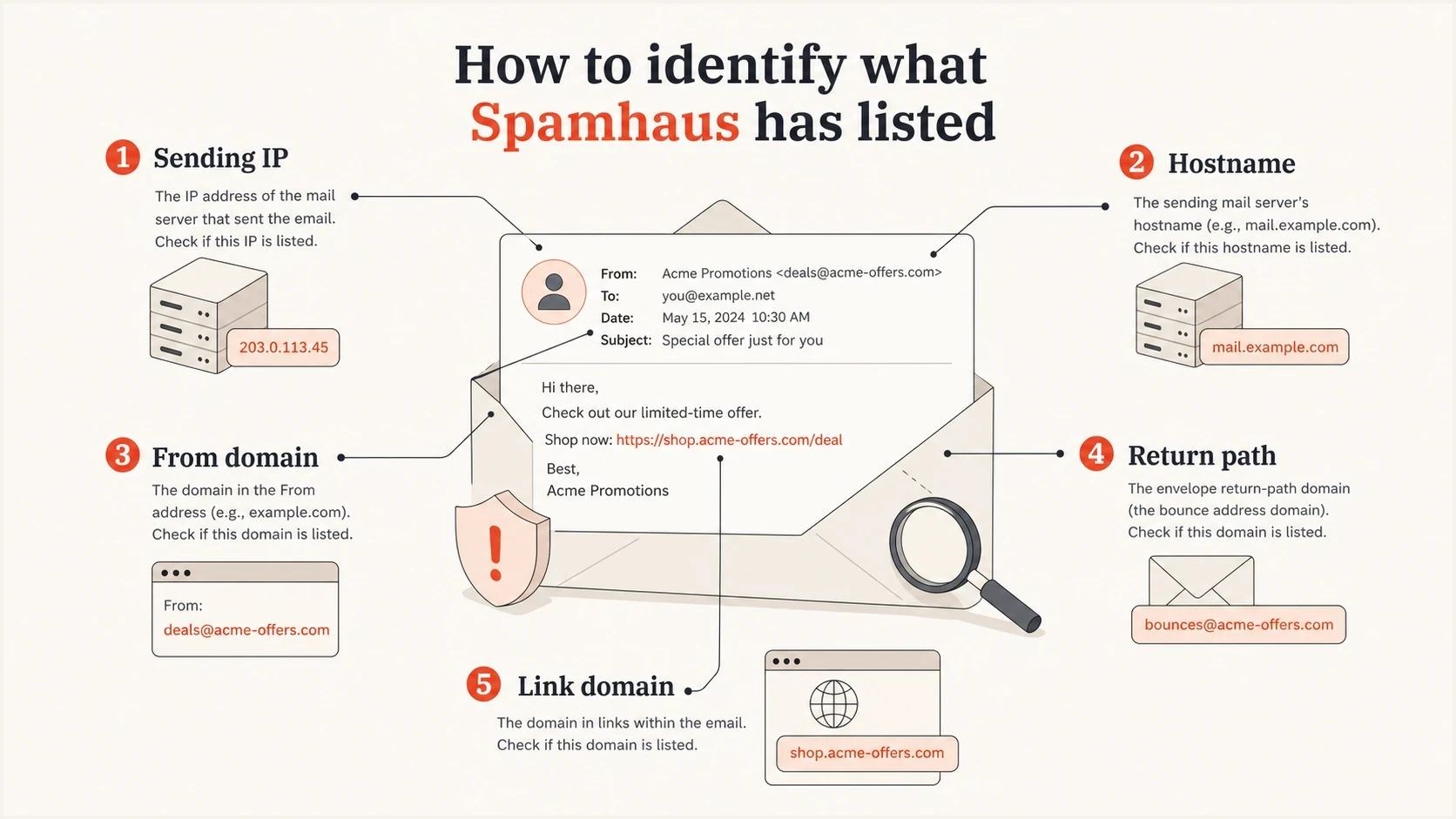
Infographic showing Spamhaus blocklist assets to check: sending IP, hostname, From domain, return path, and link domain.
Spamhaus listing pages usually give removal instructions or tell you who can act. For SBL, the network owner or provider responsible for the IP often has to request removal. For DBL, use the Spamhaus IP and Domain Reputation Checker and follow the returned instructions for the exact domain. Do not send removal requests through unrelated email channels. The Spamhaus FAQs are clear that removal depends on fixing the problem, not paying a fee or finding someone with special access.
If a listing was present in the bounce but has cleared by lookup time, keep the rejection evidence and investigate anyway. A short-lived blacklist or blocklist result only means the active query is clear; it does not prove the original signal was wrong.
Blocklist checker
Check your domain or IP against 144 blocklists.







During a Spamhaus blocklist or blacklist investigation, keep the evidence small and exact. The goal is to prove which sender, stream, domain, or customer changed the risk profile.
For a small site, forum, or CMS, check whether the application sends mail, whether a plugin or account was compromised, and whether the public IP has matching rDNS and HELO. A low-volume system can still create a blacklist or blocklist problem if it starts sending unexpected password resets, notifications, or form mail.
- Record the list name, listed IP or domain, ticket reference, and first detection time.
- Note whether the rejection references the connection IP, HELO, Mail From, URL, DBL, SBL, CSS, XBL, PBL, or ZEN.
- Map the listed object to customers, campaigns, subdomains, pools, DKIM domains, and link domains.
- Compare complaint, bounce, unsubscribe, and suppression data by sender and campaign.
- Follow the listing instructions and keep a dated remediation log. A deeper delisting process should start only after containment.
When the lookup is clear but mail is blocked
A clear result in the Spamhaus checker does not always mean the error was fake. It means the exact object is not currently listed in that checker response. The remaining problem can be stale receiver cache, a local blacklist or blocklist configuration, an application plugin using old data, or a DNSBL query problem on the receiving side.
- Check the exact object from the error, not only the root domain or main sending IP.
- Compare the bounce time with the current lookup time so a cleared listing is not treated as a false report.
- Ask the receiver whether its filter is using live Spamhaus data, cached local results, or a separate policy rule.
- If your own spam filter queries Spamhaus, make sure it uses an eligible resolver path and does not confuse an access or query error with a listing.
Inspect the DNSBL return code when you control the receiving filter. Spamhaus uses 127.255.255.252 for a DNSBL name error, 127.255.255.254 for an anonymous or public-resolver query, and 127.255.255.255 for excessive queries. These are query errors, not blacklist or blocklist results. Configure the filter to distinguish them from valid reputation responses so it does not reject clean mail.
This matters for small forums, CMS sites, helpdesks, and older mail filters. A user can see Spamhaus wording inside an application even when the sending IP is clean, because the application is doing a local blacklist check on web access, signups, comments, or form mail rather than reporting an SMTP rejection.
What changes after a Spamhaus listing
A Spamhaus listing does not always stop every message immediately. Mailbox providers and filtering systems decide how much weight to give the Spamhaus result, so one receiver can reject during SMTP while another accepts the same message but routes it to spam. The first visible symptoms are usually bounce spikes, slower delivery, lower opens, warning banners, or blocked links.
|
|
|
|---|---|---|
Rejected | Receiver refuses mail | Bounce spike |
Filtered | Mail lands in spam | Lower opens |
Delayed | Mail queues longer | Slow delivery |
Warned | Links get flagged | User warnings |
Common effects after a Spamhaus blocklist or blacklist listing.
Prioritize the stream by business impact. Transactional mail such as password resets, invoices, shipping notices, and account alerts needs immediate containment and testing. Sales replies and support mail need same-day review. Marketing campaigns can usually pause while you confirm the listed asset, stop the cause, and prepare the removal evidence.
Handle shared infrastructure carefully
Shared infrastructure makes a Spamhaus incident harder because one customer, template, redirect host, or IP pool can expose many senders to the same reputation signal. The listed asset must be concrete before remediation starts: IP address, host, root domain, DKIM domain, return-path domain, branded link domain, image host, or URL pattern.
- Pull the final delivered HTML, not only the stored template, because tracking systems rewrite links after template assembly.
- Compare affected and clean samples for shared click domains, view-in-browser URLs, unsubscribe URLs, image hosts, return paths, DKIM domains, and outbound IPs.
- Map every customer, campaign, automation, and template that uses the listed or suspected shared asset.
- Isolate the sender or shared dependency that carries the listed signal, then confirm fresh samples no longer expose it.
URL and domain listings need a different fix
A DBL or other URL-based blocklist (blacklist) issue is not solved by moving the same mail to a new IP. Remove the listed body URL, redirect domain, image host, default tracking hostname, or landing host from production mail first. Spamhaus DBL results are domain or hostname focused, not a full path report, so inspect exact tracking hostnames, redirectors, image hosts, landing hosts, and compromised CMS assets before changing mail infrastructure. A hostname-level listing can narrow the problem to one abused host under a legitimate domain, but every message using that host still carries the signal. DBL listings can expire after the domain or hostname stops matching the listing criteria, but the asset can re-list if the same behavior returns. For shared platforms, branded link domains and customer-owned DKIM reduce the blast radius of future incidents.
Follow the evidence, not the complaint
A common misconception is that you need to find the users who reported you to Spamhaus. That is the wrong frame. Spamhaus is not a normal complaint mailbox. The listing often comes through traps, intelligence, observed sending patterns, infrastructure relationships, or evidence that a provider is not controlling abusive customers.
Feedback loop complaints still matter. Treat FBL data as a proxy for recipient dissatisfaction, not as an alternate unsubscribe channel. A sender with a small complaint count but poor consent evidence can still be the source. A sender using many subdomains or country domains for the same mail can also look suspicious when the mail hits traps or creates repeated negative signals.
Sender review thresholds
Use these operating thresholds to prioritize customer review. They are triage bands, not Spamhaus rules.
Normal review
0-0.02%
Keep monitoring and compare by campaign.
Investigate
0.02-0.10%
Audit consent, bounces, and source.
Contain
>0.10%
Pause or isolate until proven clean.
The best evidence usually comes from your own sending logs. Rank customers by complaint rate, trap-risk acquisition sources, recent list imports, high unknown-user rates, sudden volume spikes, fresh domains, and reuse of the same creative across many domains.
Do not rotate out of the problem
Moving the same questionable mail to new IPs, new subdomains, or new root domains can make the pattern look worse. If Spamhaus sees rotation as evasion, you can turn a narrow listing into a wider network issue.
Stop the source before asking for removal
A removal request works only when the abuse condition has ended. If the same sender keeps mailing, the listing comes back or expands. For shared infrastructure, isolate the lowest-risk senders first, then review the rest before restoring full volume.
If the listed asset is a server or gateway you operate, check for an open relay, compromised SMTP credentials, unexpected CMS or form mail, and infected devices behind NAT. During containment, restrict outbound port 25 to approved MTAs, require authentication on submission, reject invalid recipients before queueing, and keep logs that tie the fix to the listed IP.
Weak recovery
- Changing records without stopping the suspect sender.
- Sending the same mail through a different pool.
- Asking for removal without proof of action.
Strong recovery
- Pause or quarantine the risky customer or stream.
- Require opt-in proof tied to recipients and campaigns.
- Show what changed and how recurrence is blocked.
If you are an email platform, agency, hosting provider, or MSP, acceptable-use enforcement matters as much as the technical fix. A customer who pays you is still a risk if their acquisition process produces unwanted bulk mail.
Simple remediation evidence packtext
Listing: SBL or CSS
IP/domain: 203.0.113.10
Cause found: non-opt-in sender on shared pool
Action taken: sender suspended, mail stopped
Evidence: consent audit failed, FBL rate above threshold
Prevention: sender vetting and automated alerts enabled
The request should be concise. State the listed object, the cause found, the action taken, when the issue was solved, and the control that prevents recurrence. For a DBL case, include the exact domain or hostname, the DBL result, and whether the problem was a mailing list, redirector, compromised website, or abused shared asset. If you do not control the IP space, give that evidence to the provider that does.
When a provider, ISP, or hosting company must submit the removal request, send one short evidence pack instead of repeated status notes. Include the rejection text, affected IP or domain, affected recipient domain, timestamps, mail flow, authentication status, list source, complaint controls, suppression details, recent changes, and the exact remediation already completed.
Spamhaus says removal requests must come through the proper listing flow and, for many listings, must come from the registered owner or responsible provider. Avoid VPNs, proxy sources, free email addresses, or disposable email addresses when submitting evidence, because the request needs to tie clearly back to the listed IP or domain. If the official DBL flow says the domain cannot be removed at this time, fix and wait instead of repeating the same request.
Authentication and DNS checks still matter
Authentication will not erase a Spamhaus listing, but it helps you prove who sent what. DMARC, SPF, DKIM, rDNS, HELO, and return-path consistency make it easier to separate an approved stream from a compromised host or unauthorized sender.
Example identity checkstext
Host: mail.example.com
PTR: mail.example.com
HELO: mail.example.com
SPF: v=spf1 ip4:203.0.113.10 -all
DMARC: v=DMARC1; p=none; rua=mailto:dmarc@example.com
Run a domain health check before and after remediation. It catches broken authentication, missing reporting, weak policy, and DNS mistakes that make incident response slower.
- Confirm every active sender is authorized in SPF and old includes are removed.
- Verify each platform signs DKIM with a selector you own and monitor.
- Use DMARC reports to find unexpected sources before they damage reputation.
- Make sure PTR, hostname, and HELO tell a consistent identity story.
- Keep abuse@ and postmaster@ working, then route feedback loop, DMARC, and abuse reports to people who can act.
How Suped helps with the workflow
Suped's product brings authentication, sender inventory, alerts, and reputation signals into one workflow. That matters during a Spamhaus incident because teams need fast answers across DMARC, SPF, DKIM, blocklist checks, and customer ownership.

Blocklist monitoring page showing domain and IP checks across blocklists with importance and status
Suped's blocklist monitoring helps teams see domain and IP reputation issues next to DMARC data. When a blocklist or blacklist listing appears, teams can compare it with source changes, authentication failures, new vendors, subdomain use, SPF or DKIM identity mismatches, and volume shifts.
What should be in place before the next incident
- Real-time notices for failures, suspicious sources, and reputation changes.
- Hosted DMARC, hosted SPF, SPF flattening, and hosted MTA-STS for cleaner operations.
- MSP and agency views that separate client domains, ownership, and issue status.
- Automated issue detection with specific steps instead of generic warnings.
Prevention checklist
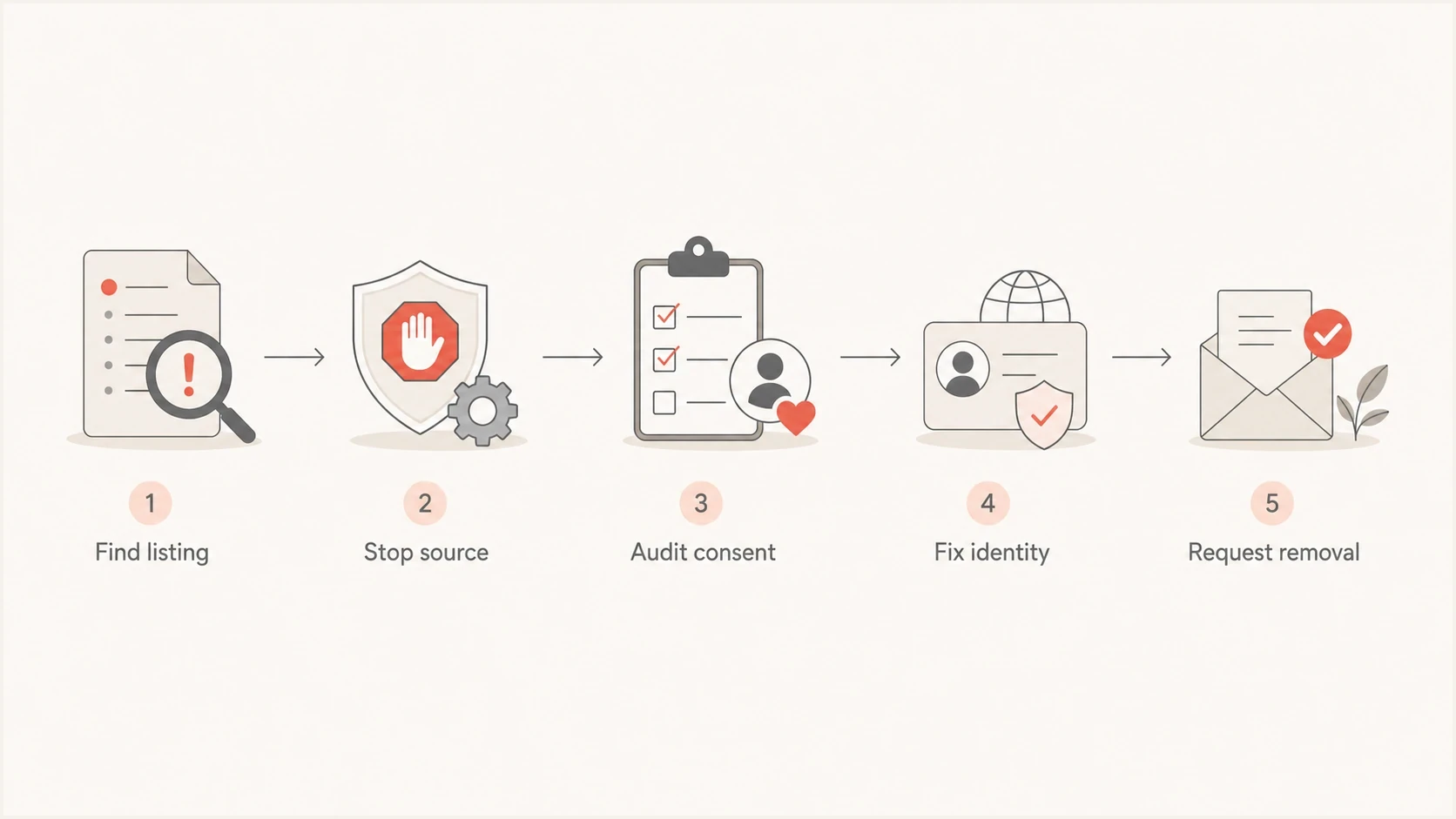
Spamhaus blocklist recovery flowchart from finding the listing to requesting removal.
Prevention is mostly operational discipline. If a sender cannot prove consent, if they import scraped or purchased lists, or if they repeatedly create complaints, they should not share your trusted sending infrastructure.
- Require opt-in proof, source details, expected volume, complaint history, and confirmed opt-in for high-risk acquisition.
- Protect forms and signup flows with CAPTCHA or equivalent controls against mail bombing, fake subscriptions, and automated abuse.
- Keep mail software, CMS platforms, and plugins patched so compromised hosts cannot send through your IP.
- Require MFA for mailbox, admin, and sending-platform accounts that can submit outbound mail.
- Separate high-risk senders instead of mixing them with reliable customers.
- Apply complaints, hard bounces, unsubscribes, and abuse reports immediately.
- Keep abuse@, postmaster@, FBLs, and DMARC reporting monitored so abuse signals reach the right team.
- Warm new domains carefully and avoid using many fresh domains for the same mail.
- Restrict outbound SMTP so only approved mail servers send directly on port 25.
- Define non-opt-in sending as a suspendable offense in the acceptable-use policy and enforce it quickly.
The hard part is enforcement. Technical teams often want a DNS fix because it feels controllable. Spamhaus issues usually need a sender-quality fix. Once that is handled, DNS and authentication cleanup help keep the same issue from becoming harder to trace next time.
Views from the trenches
Best practices
Pause suspect streams first, then compare sending logs, FBLs, and trap-risk segments.
Keep each customer tied to stable domains, IP pools, consent source, and suppression logic.
Make removal requests only after logs prove the abusive stream has stopped permanently.
Common pitfalls
Treating FBLs as unsubscribes hides complaints instead of finding poor acquisition.
Rotating subdomains or domains can look like evasion when the same mail keeps moving.
Requesting delisting before containment creates repeat listings and slower trust recovery.
Expert tips
Rank senders by complaints, bounces, list source, and recent domain age before escalation.
Ask high-risk customers for consent samples tied to the exact recipient and campaign.
Keep a dated remediation log so the network owner can show what changed clearly to reviewers.
Expert from Email Geeks says a Spamhaus block usually means Spamhaus sees mail that looks abusive, and the sender has to prove control with logs.
2020-08-11 - Email Geeks
Marketer from Email Geeks says teams using many subdomains under one root domain can create patterns that look like evasion when recipients do not want the mail.
2020-08-11 - Email Geeks
Resolve the listing
If Spamhaus blocked your domain or IP, start with the exact listed object in the official lookup, then work backward to the sender, list source, and infrastructure pattern. Pause the risky stream, fix the acquisition or compromise issue, gather the evidence, and use the correct removal path.
The wrong move is to keep sending while swapping domains or IPs. The right move is to show that the mail Spamhaus cared about has stopped and that the same pattern will not return. Once that is true, delisting becomes a process problem instead of a guessing game.




