How can I get delisted from Spamhaus?


Updated on 7 Aug 2026: We clarified Spamhaus ZEN results, list-specific removal paths, approval timing, and post-delisting checks.
To get delisted from Spamhaus, stop the mail or domain activity that caused the listing, identify the exact Spamhaus list involved, fix the underlying abuse or policy signal, then follow the removal instructions in Spamhaus's official IP and Domain Reputation Checker. Spamhaus removes listings when the evidence shows the spam, trap hit, compromised account or device, insecure website, bad signup path, or direct-to-MX policy issue has stopped.
Treat a Spamhaus blocklist or blacklist event as an incident, not a form-filling task. The removal form matters, but it works only after the cause is handled. If the same traffic keeps hitting traps or sending unwanted mail, the request can stall or the listing can return quickly.
- Pause sending: Stop the listed IP, domain, customer, list, or campaign until you know what changed.
- Read the listing: Confirm the list family and follow the instructions shown for that result.
- Fix the cause: Remove bad data, secure compromised systems, repair suppressions, or isolate a risky sender.
- Request removal: Use the displayed delisting path with a clear explanation of the permanent fix.
How Spamhaus delisting works
A successful Spamhaus delisting has two parts: operational cleanup and a precise removal request. The cleanup is the part most people rush. A request that says "we are compliant" but shows no change in traffic, list source, form security, suppression handling, or customer isolation gives Spamhaus little reason to remove the entry.
Use the official IP and Domain Reputation Checker, as described in the Spamhaus update. The result shows whether removal is self-service, needs extra information, or must be handled by the network provider. Spamhaus delisting is free. No third party can buy, influence, or expedite approval.
Do this before submitting
- Stop the source: Do not keep mailing the same list or customer while waiting for a reply.
- Gather evidence: Prepare timestamps, sending IPs, domains, campaign names, and suppression changes.
- Explain the fix: Say what was wrong, what changed, and how recurrence is blocked.
- Avoid repeats: Multiple urgent requests without a fix create noise rather than progress.
If business pressure is high, document the pause and explain that removal depends on fixing the abuse signal first. A record of the pause, remediation, and owner gives both stakeholders and the removal team useful evidence.
Check the exact Spamhaus listing
Start by confirming which Spamhaus list contains the IP address, domain, or message element. Do not treat every listing the same way. SBL, CSS, XBL, PBL, DBL, and HBL entries point to different problems, responsible parties, and removal paths.
For background on common listing types, the blocklist basics page is useful. For a Spamhaus-specific diagnosis path, read why Spamhaus blocked you before you submit a request.
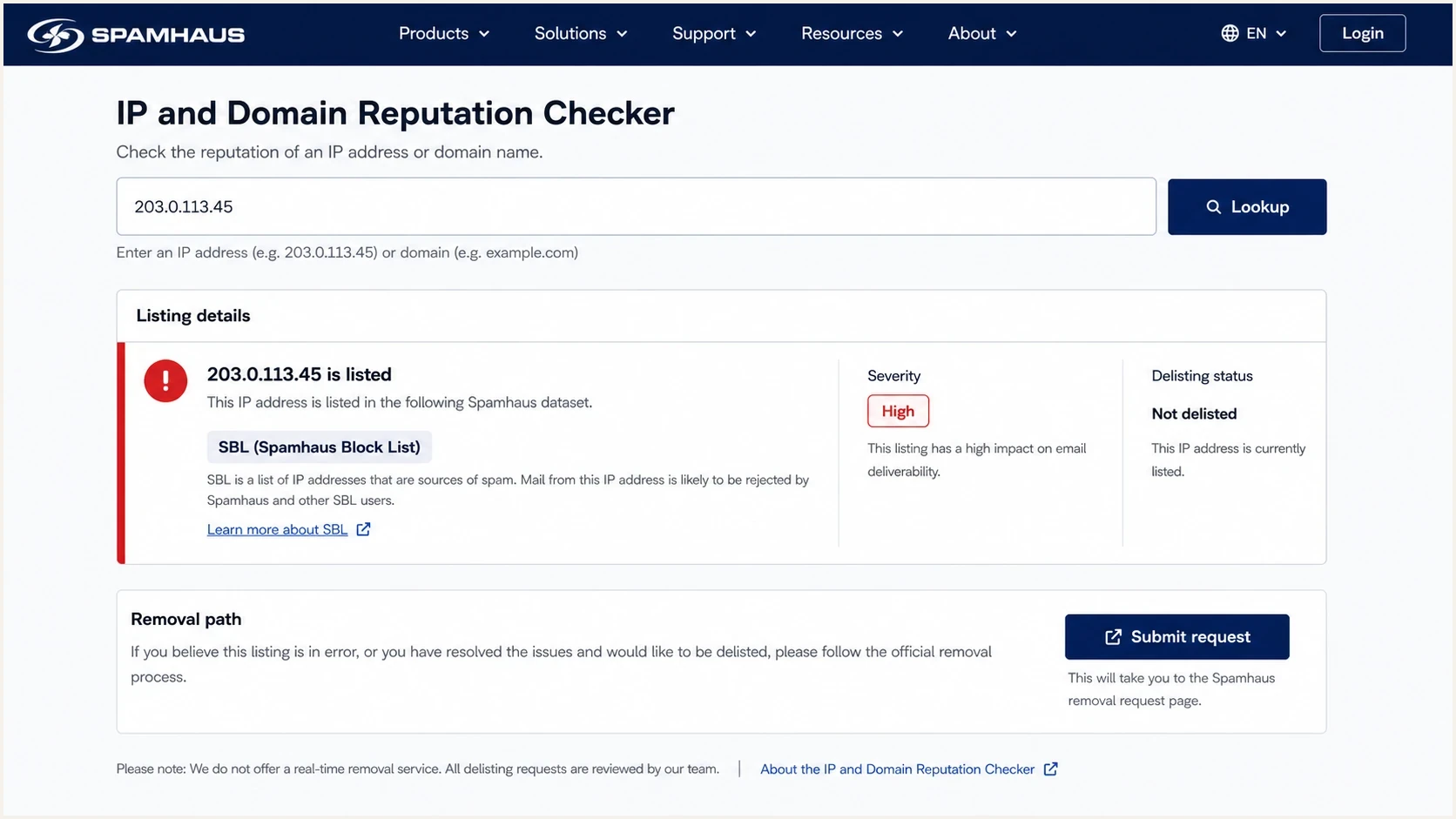
Spamhaus IP and Domain Reputation Checker showing a blacklist listing and removal path.
|
|
|
|
|---|---|---|---|
SBL | Spam or abusive infrastructure | Network provider | End abuse, then provider requests removal |
CSS | Recent low-reputation SMTP traffic | Sender or network | Stop detections and clean the mail stream |
XBL | Compromised device or host | Host or network owner | Contain traffic and remove the compromise |
PBL | Direct-to-MX policy | IP owner or provider | Use an authorized SMTP route or valid exclusion |
DBL | Domain reputation or compromised hostname | Domain or site owner | Remove abuse and secure the domain |
HBL | Listed message element or email address | Account or content owner | Remove the element or secure the account |
Common Spamhaus lists, signals, responsible parties, and removal priorities.
PBL is a special case. It is a policy listing for IP space that should not send direct-to-MX email, and the listing can be normal. If a legitimate mail server needs an exclusion, follow the PBL removal path. Otherwise, send through the provider's authenticated SMTP relay instead of treating PBL as a spam complaint.
If the rejection mentions Spamhaus ZEN
Spamhaus ZEN is a combined IP query zone that includes SBL, CSS, XBL, and PBL data. A bounce that names ZEN does not identify a separate blacklist to remove. Look up the rejected sending IP in the Reputation Checker and act on each underlying result in the order shown.
- SBL result: Fix the abuse and ask the provider's abuse or security desk to handle the request. An end user cannot remove an SBL entry directly.
- XBL or CSS result: Clean the compromise or sending problem first. The Checker can cover XBL and CSS in one request when both apply.
- PBL result: Use an authenticated smarthost unless the IP runs a legitimate direct-to-MX mail server and qualifies for an exclusion.
- DBL or HBL result: Treat it as a separate domain, account, URL, file, or content-element issue. A ZEN IP result does not describe these lists.
If several results appear, resolve the SBL entry first. Continuing to request lower-priority removals while an SBL case remains active does not clear the IP.
Fix the cause before requesting removal
A common mistake is trying to identify one bad address or the domain that reported the mail. That turns into trap hunting, which rarely solves the issue. Spamhaus needs the spam or abuse problem to stop, not proof that the sender found a single reporter.
Look for the operational break: a purchased or old list, an unverified signup form, weak consent records, a compromised account or CMS installation, missing suppression handling, an infected device sending on port 25, shared infrastructure mixing risky clients with clean clients, or a customer who changed content and volume without review. Check SMTP and firewall logs, recent credentials, signup timestamps, and campaign ownership before concluding the problem has stopped.
What slows removal
- Trap hunting: Trying to locate one hidden address instead of fixing acquisition and consent.
- Live sending: Continuing the same traffic after the listing appears.
- Vague replies: Submitting promises without a concrete operational change.
- Shared risk: Letting one client or campaign affect all traffic on the same IP pool.
What speeds removal
- Traffic pause: Stopping the listed source before filing the request.
- Root cause: Naming the faulty process and the exact remediation.
- Segmentation: Keeping risky senders away from healthy mail streams.
- Proof: Providing timestamps, suppressions, logs, and ownership details.
Feedback loops help, but they do not show every abuse signal. Low complaint rates do not prove list quality. Spam trap hits, unsolicited B2B scraping, dormant recycled addresses, hacked forms, and poor unsubscribe processing can create a listing even when mailbox-provider complaint data looks tolerable.
Use authentication data to isolate the source
DMARC, SPF, and DKIM do not guarantee Spamhaus delisting. They help identify which systems use the domain, whether unauthorized sources are active, and whether a bad sender is hiding behind shared authentication. That visibility matters when several clients, brands, or platforms use the same domain.
Minimum DMARC reporting recorddns
_dmarc.example.com TXT "v=DMARC1; p=none; rua=mailto:dmarc@example.com"
At minimum, collect DMARC aggregate data and compare it with the sending inventory. A source that appears in DMARC reports but not in the approved sender list deserves attention before a delisting request is filed.
Authentication checks that help the cleanup
- SPF scope: Confirm the listed IP or sender is actually authorized for the domain.
- DKIM owner: Map selectors to the platform or customer that signs the mail.
- DMARC source: Use aggregate reports to find unapproved senders and high-volume outliers.
- Header proof: Send a fresh test message and inspect authentication results before restarting.
Suped's product combines DMARC reporting and blocklist monitoring in one workflow. During a Spamhaus incident, teams can compare newly seen sources with the approved inventory, assign the source to an owner, and keep alerts on the affected domain and IP during the restart.
Submit the removal request correctly
Once the source has stopped and the fix is real, use the official removal path shown by Spamhaus. Write the request like an incident report. Keep it short and specific, with a named owner.
- Identify the asset: State the IP address, range, domain, hostname, email address, or hash involved.
- Name the cause: Explain the faulty list source, customer, host, form, account, or policy mismatch.
- Show the action: Mention paused campaigns, removed data, disabled accounts, cleaned hosts, or blocked egress.
- Prevent recurrence: Describe approval changes, segmentation, suppression rules, form controls, or credential resets.
- Track status: Use the official request status page rather than opening repeated tickets.
Removal request structuretext
Asset: 203.0.113.25
Listing: CSS
Cause: Legacy client segment mailed after reactivation
Action: Segment paused, unengaged addresses suppressed
Prevention: Reactivation now requires consent proof and approval
Do not argue that the campaign had an unsubscribe link, passed SPF, or had a low complaint rate. Those details can support the incident record, but they do not prove that the unwanted mail has stopped.
What to do if Spamhaus does not reply
Spamhaus does not publish one review time for every list. Before chasing a response, confirm that the request was submitted through the path shown for the listing and that the responsible party submitted it. A pending review differs from an approved removal that has not reached a receiver's cached data.
For SBL cases, the network or ISP normally must resolve the listing. Read the SBL details before pushing the wrong channel. For domain-specific DBL cases, the DBL contact path can help frame the request. Once a DBL removal is approved, Spamhaus says processing is immediate, although some receiving systems can take up to 24 hours to refresh local data.
Escalation that backfires
Repeated messages that say "urgent" without new evidence add noise. A useful follow-up contains a new fact: the sending stopped, the host was cleaned, the customer was removed, the form was closed, or the network abuse desk accepted ownership.
When the listed IP is not under direct control, contact the provider that owns the IP space. Give them the Spamhaus listing, the evidence, and a plain request for abuse-desk action. If they cannot or will not act, move mail off that infrastructure only after fixing the sender behavior. Moving dirty traffic to a new IP pool spreads the problem.
Monitor the restart
Removal is not the finish line. The restart plan decides whether the same blacklist issue returns. Keep volume low, isolate the repaired stream, watch bounces and complaints, and monitor IP and domain reputation before expanding traffic.
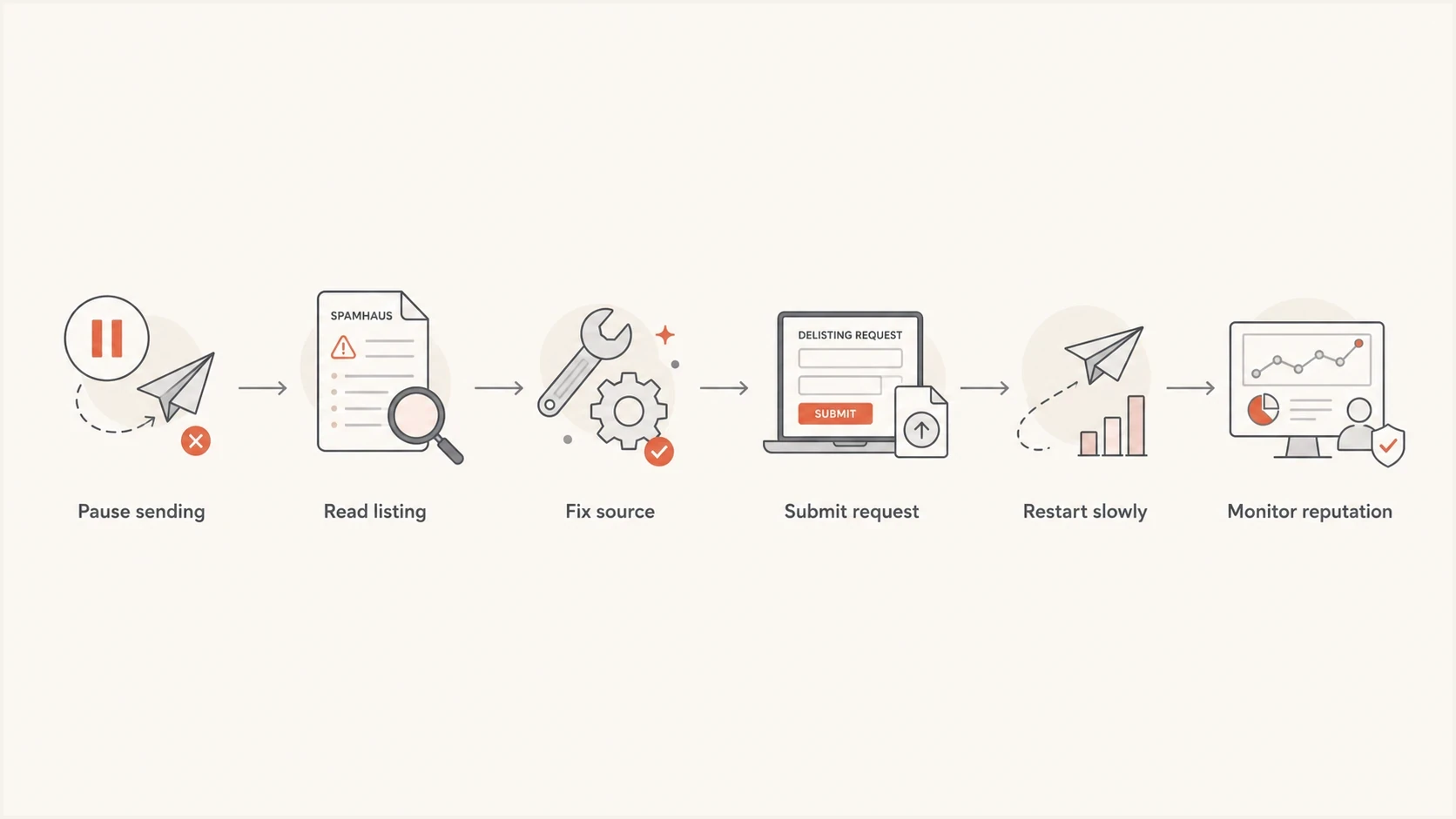
Spamhaus blacklist delisting flowchart with six remediation and restart steps.
Suped's blocklist monitoring gives teams one place to watch domain and IP listing status after the removal request. The workflow connects the listing with DMARC source data and alerts, so the team can pause a restart when an unexplained source or fresh blacklist entry appears. For an ongoing operating model, use blocklist monitoring as part of the post-incident process.

Blocklist monitoring page showing domain and IP checks across blocklists with importance and status
A stable restart has no fresh listing, unexplained source, sudden DKIM selector change, surprise IP, or complaint spike from the repaired stream. If any of those appear, pause the restart and investigate before volume grows.
Before bringing traffic back, check the sending domain with the domain health checker and send a real message through the email tester. Those checks do not replace the Spamhaus removal process, but they catch authentication and content problems before volume resumes.
Blocklist checker
Check your domain or IP against 144 blocklists.







Use the result as a trigger for action, not a reason to ignore the underlying incident. A clean result means the current listing state looks clear. It does not prove that the list source, form, customer, account, or host will stay clean.
Keep one owner accountable for the repaired stream. That owner should review daily checks, approve volume increases, and keep the remediation notes available if a provider or abuse desk asks for follow-up proof.
Restart risk thresholds
Use conservative stages after delisting so a repaired stream proves stability.
Hold
0%
Use when the cause is not proven fixed.
Test
5-10%
Use for tightly scoped verified recipients.
Controlled
25-50%
Use after clean checks and no new listing signs.
Normal
100%
Use only after stable monitoring.
Views from the trenches
Best practices
Pause the listed stream first, then prove the complaint source has stopped before filing.
Keep screenshots and log excerpts that show which campaign, source, and owner changed.
Monitor the same IPs and domains for several days after removal, not only on the day.
Common pitfalls
Filing repeated requests before fixing the source makes the ticket weaker, not faster.
Treating Spamhaus like a bad-domain hunt misses list quality and permission issues.
Restarting the same list at full volume after removal often creates a fresh listing.
Expert tips
Separate client traffic by source so one risky sender does not contaminate every IP.
Tie DMARC source data to campaign ownership so fixes reach the team that can act.
Document the exact fix in the ticket, including the paused stream and suppressions.
Marketer from Email Geeks says the official Spamhaus process is the best route, because side-channel pressure does not fix a listing.
2024-03-18 - Email Geeks
Marketer from Email Geeks says Spamhaus will not delist a source that still appears tied to the unwanted mail that caused the entry.
2024-04-09 - Email Geeks
Prevent repeat Spamhaus listings
The reliable way to get delisted from Spamhaus is to stop the bad traffic, fix the system that allowed it, then submit a clear removal request through the official path. If the listing needs the network owner, involve that provider with evidence instead of trying to bypass the process.
After removal, keep the repaired stream isolated and watched. Suped's product supports that workflow with DMARC source data, blocklist monitoring, issue detection, and alerts in one platform. Use those signals to identify an unexpected sender early and stop it before delisting becomes a repeated emergency.




