How to remove IP address from Spamhaus PBL list?

Updated on 26 Jul 2026: We updated this guide with Spamhaus's current PBL eligibility rules, propagation timing, exclusion expiry, and provider escalation steps.
To remove an IP address from the Spamhaus PBL list, search the exact public IP in the Spamhaus IP and Domain Reputation Checker and open the listing details. If the IP is a static outbound mail server, has appropriate forward and reverse DNS, and is assigned to your organization, follow the removal steps shown there. Allow approximately 15 minutes for DNS propagation before checking the result again.
If Spamhaus says the record is not eligible for removal, the network provider that controls the IP range has to change the PBL policy or request the exclusion. Repeated self-removal requests do not fix a range-level restriction. The provider needs to authorize direct outbound SMTP for that IP, move you to mail-server IP space, or tell you to send through its authenticated SMTP gateway.
A PBL listing differs from most blacklist and blocklist problems because the IP is not automatically dirty. The listing usually says, by policy, that the IP should not send email directly to recipient MX servers. That difference determines who has to act and what evidence matters.
Remove the IP only if it is a real mail server
The Spamhaus PBL is the Policy Blocklist. Spamhaus says the official PBL page covers end-user IP ranges that should not send unauthenticated SMTP directly to final destinations. That includes dynamic access ranges and static ranges where the network owner has a no-direct-mail policy.
- Search the exact public IP shown in the SMTP rejection or bounce.
- Request removal only when the IP runs an outbound mail server.
- Set matching forward DNS and reverse DNS before requesting removal.
- Ask the network provider to act when Spamhaus blocks self-removal.
What not eligible usually means
The message "requested record is not eligible for removal at this time" usually means the range owner disallows end-user removal, the IP is not valid mail-server space, another Spamhaus listing must be handled first, or the request does not meet Spamhaus removal rules.
Why the PBL is different
A typical IP blacklist or blocklist often points to observed abuse or compromised infrastructure. A PBL listing is a policy statement about where direct-to-MX mail should originate. A clean, engaged mailing stream still fails if the sending IP sits inside a range marked as unauthorized for direct SMTP delivery.
|
|
|
|---|---|---|
Static MTA | Admin | Checker removal |
Provider range | Hoster | Range update |
Dynamic IP | Sender | SMTP relay |
Shared server | Provider | New IP |
PBL action depends on who controls the IP policy.
For background on how this blacklist works, the Spamhaus PBL guide is useful when an infrastructure or hosting team needs a plain-English explanation.
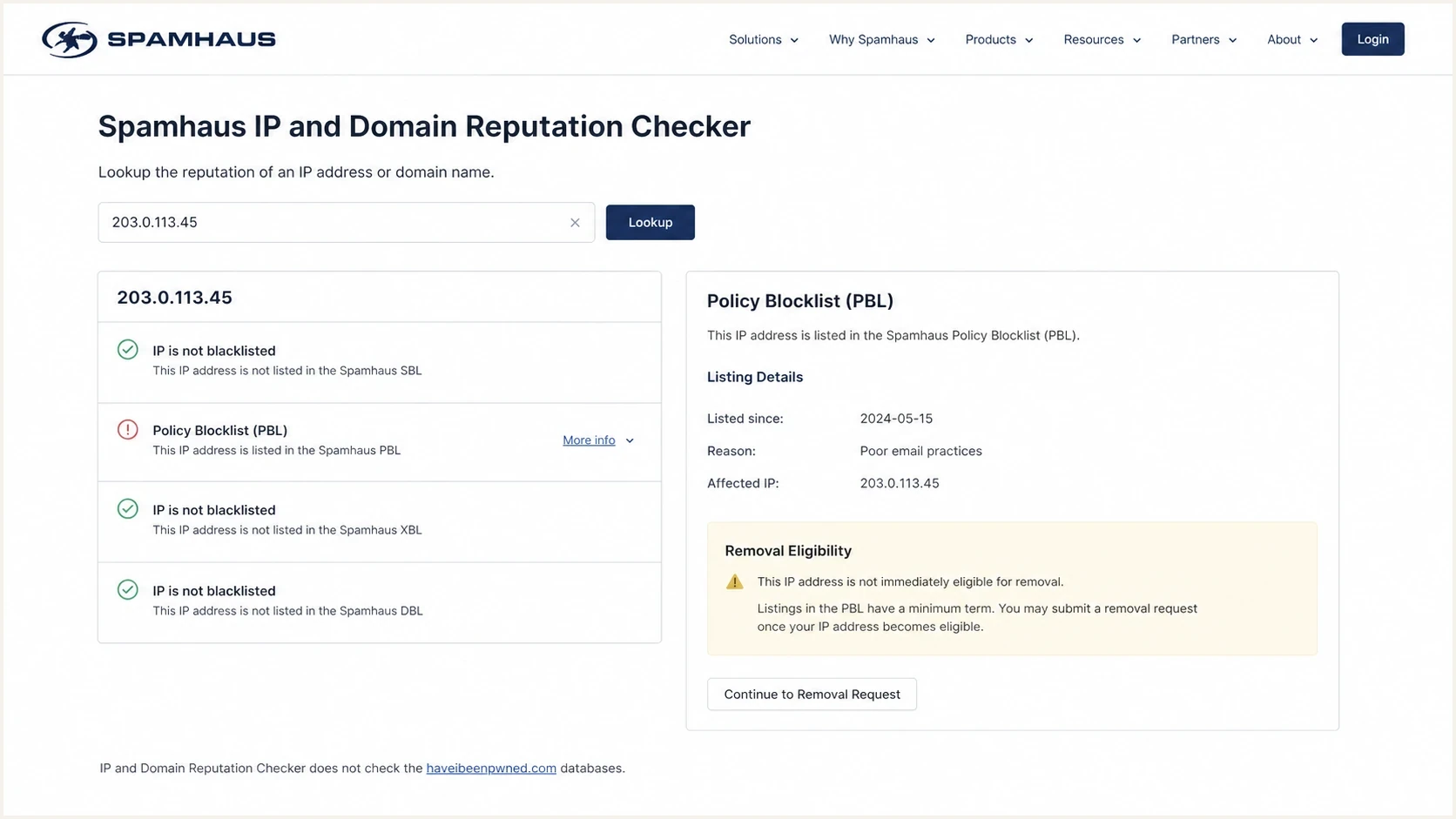
Spamhaus IP and Domain Reputation Checker showing a PBL listing and removal eligibility.
Run the checks before removal
Before requesting PBL removal, verify that the IP looks like a legitimate outbound mail server. Spamhaus requires a static IP assigned to the requester, appropriate forward DNS, and appropriate reverse DNS. Receivers use these signals when deciding whether a connection looks normal.
Mail server DNS readinessDNS
mail.example.com. 300 IN A 192.0.2.10
10.2.0.192.in-addr.arpa. 300 IN PTR mail.example.com.
example.com. 300 IN MX 10 mail.example.com.
A clean PBL request should be supported by operational facts, not a general claim that the traffic is good. Confirm that the server identifies itself with a stable hostname, that its PTR points back to that hostname, and that only the approved mail server can send outbound traffic on port 25.
- Confirm that the IP is assigned to your organization or dedicated server service.
- Check that reverse DNS resolves to the mail server hostname.
- Use the same stable hostname in the SMTP greeting.
- Confirm that the provider permits direct outbound SMTP from the IP.
For a wider preflight check, run a domain health check before pushing the provider for a change. It helps catch DNS and authentication problems next to the blocklist issue.
?
What's your domain score?
Deep-scan SPF, DKIM & DMARC records for email deliverability and security issues.
Choose the right removal path
There are two practical paths. The right one depends on whether Spamhaus allows single-IP removal and whether the range owner has delegated that control to end users.
Self-removal works when
- The static address is assigned to the organization making the request.
- The host is an outbound mail server.
- Forward and reverse DNS records are in place.
- Spamhaus shows a removal path for the single IP.
Provider action is needed when
- Spamhaus refuses the self-removal flow.
- The owner marked the range as no-direct-mail space.
- A block of IPs needs range-level handling.
- The hoster requires outbound mail to use its gateway.
If self-removal is available, complete the Spamhaus checker flow and allow approximately 15 minutes for DNSBL propagation. If it is unavailable, open a provider ticket with the facts. Frame the request as an IP range policy problem that blocks direct-to-MX mail, not as a generic deliverability complaint.
If several IPs need removal, ask the ISP assigned those addresses to request the changes. Removing many addresses individually can cause self-removal access to be revoked and the exclusions to be reversed.
Spamhaus has described the checker and removal ordering in its Reputation Checker launch. For PBL listings, delisting belongs in that checker flow and range-owner policy has priority.
When removal is not eligible
Contact the hoster or ISP that supplied the IP and ask whether the range permits direct outbound SMTP. If it does not, use the provider's authenticated SMTP gateway or move to a proper mail-server IP. Spamhaus does not charge for removals, and no third party can influence or expedite a removal.
Provider ticket templatetext
Subject: Spamhaus PBL policy review for dedicated mail IP

Please review IP 192.0.2.10 for direct outbound SMTP use.
The IP is assigned to our dedicated server and runs mail.example.com.
Forward DNS, reverse DNS, and HELO are configured for that hostname.
Spamhaus reports a PBL listing and says self-removal is not eligible.

Please either remove or exclude this IP from the PBL range policy,
or confirm the required SMTP gateway for outbound mail.
What to include in the provider ticket
- Use the public sending IP from the rejection, not the domain alone.
- Include the hostname and its matching PTR and A records.
- Include the PBL result and the ineligible-removal message.
- State that the IP is used for authenticated outbound mail operations.
If a receiver returns a rejection that mentions Spamhaus, the receiver normally uses Spamhaus data at connection time. The receiver usually cannot remove your IP from Spamhaus. Fix the root listing through the Spamhaus checker or with the network owner that controls the relevant PBL range.
For a broader removal workflow across Spamhaus datasets, the Spamhaus delisting steps page helps separate PBL from other Spamhaus listings.
Maintain PBL eligibility after removal
An end-user single-IP exclusion expires after one year, and Spamhaus can reverse it immediately if spam is detected. Keep the IP consistent with the reason for removal and plan to recheck the listing before the exclusion expires.
PBL removal readiness
Use these checks before treating a PBL listing as removable.
Ready
Proceed
Static mail server with valid DNS and controlled port 25.
Needs work
Fix first
Missing PTR or unclear provider policy.
Wrong path
Use relay
Dynamic or non-mail-server IP.
Keep bounce logs, monitor recipient rejections, watch authentication results, and document who owns each sending IP. Good blocklist basics matter because blacklist signals rarely happen in isolation.
- Keep web and user traffic separate from outbound SMTP.
- Allow direct SMTP only from approved mail servers.
- Track provider-specific bounce errors as soon as they appear.
- Maintain SPF, DKIM, and DMARC so receivers see stable identity signals.
Monitor the result after removal
Once the PBL listing clears, send controlled test traffic and watch real rejection data. PBL-related blocks should stop after propagation, but a separate Spamhaus listing or authentication issue can still affect delivery.
Suped is our DMARC and email authentication platform. It brings blacklist and blocklist monitoring into the same workflow as DMARC reporting, SPF and DKIM results, and operational alerts. Agencies and MSPs can keep client domains separated while monitoring changes across their accounts.

Blocklist monitoring page showing domain and IP checks across blocklists with importance and status
The practical workflow is to check the Spamhaus listing, fix the IP policy path, then use Suped's blocklist monitoring with DMARC reporting to catch future blacklist, blocklist, and authentication changes before they cause widespread rejection.
Blocklist checker
Check your domain or IP against 144 blocklists.







Views from the trenches
Best practices
Confirm the IP is static and assigned to your mail server before requesting PBL removal.
Ask the hoster to handle range-level PBL policy when single-IP removal gets blocked.
Keep port 25 outbound restricted so only the approved mail server sends direct SMTP.
Common pitfalls
Requesting removal for dynamic or web-server IPs creates repeat failures and quick reversals.
Assuming a PBL listing means abuse wastes time when the issue is network policy instead.
Ignoring reverse DNS leaves a static mail server looking unready for direct delivery.
Expert tips
Use the provider's SMTP gateway when the range owner will not permit direct-to-MX mail.
Save the bounce, checker result, PTR, and use case before asking the hoster to act.
Monitor the IP after removal because PBL exclusions can be reversed after spam signals.
Expert from Email Geeks says PBL is a policy signal, not proof that an IP sent abusive mail; the range owner often created the rule.
2022-05-26 - Email Geeks
Expert from Email Geeks says when Spamhaus marks a PBL record as ineligible, the hosting provider or upstream network normally has to change the policy.
2022-05-26 - Email Geeks
The practical answer
Remove an IP from Spamhaus PBL through the Spamhaus checker only when the IP is a static outbound mail server assigned to you and the removal flow allows it. If Spamhaus says the record is not eligible, stop repeating the request and contact the provider that controls the range.
The hoster can update the PBL range policy, provide a proper mail-server IP, or direct outbound mail through its authenticated SMTP gateway. After removal, monitor the IP and domain so a blacklist or authentication issue does not cause another rejection event.




