What are TSS04 errors and how do I fix them?

Updated on 30 Jul 2026: We added Yahoo's current complaint, unsubscribe, and bulk-sender checks to make TSS04 recovery more precise.
TSS04 errors are Yahoo temporary SMTP deferrals. The usual response is 421 4.7.0 [TSS04], followed by language about unexpected volume or user complaints. Yahoo's current Yahoo SMTP codes explain that 421 and 451 responses are temporary errors. Unusual traffic, spam-like message characteristics, complaints, busy servers, or other suspicious behavior can trigger dynamic deprioritization.
The direct fix is simple but not passive: stop pushing Yahoo traffic hard, let the receiving side cool down, identify whether the issue is volume, complaints, authentication, list quality, IP reputation, or a shared ESP pool, then restart at a lower rate. Check whether the ESP or MTA has converted deferred recipients into final bounces or suppressions before clearing any addresses. Waiting helps only when the next retry looks better than the last attempt.
Typical TSS04 bounce texttext
421 4.7.0 [TSS04]
Messages from 203.0.113.10 temporarily deferred
due to unexpected volume or user complaints - 4.16.55.1
Treat TSS04 as a throttle with a reason behind it, not as a random Yahoo delay. Aggressive retries add connection pressure to the existing problem. A pause, a corrected cause, and a controlled return often clear the deferral without a permanent rejection.
What TSS04 means
TSS04 sits in the 4XX family, so it is a temporary delivery failure. Yahoo has not said the address is invalid and has not issued a final policy rejection. It has said that the current sending pattern is not acceptable right now. That distinction matters because a mail queue can retry, but poor retry behavior burns time and can turn a recoverable deferral into a failed delivery when the queue expires.
|
|
|
|---|---|---|
421 | Temporary | Retry pace |
4.7.0 | Policy | Reputation |
TSS04 | Yahoo signal | Cause |
IP | Sender source | Pool |
Complaints | User feedback | List |
How to read the main parts of a TSS04 response.
For a narrower queue-focused explanation, this TSS04 deferred status page covers what the deferred state means for senders. The practical point is the same: a temporary error still demands an operational response.
Temporary does not mean harmless
A TSS04 deferral can age out into a bounce if your mail server gives up before Yahoo accepts the message. The message was not permanently rejected at first, but the sender still loses the delivery if the queue expires.
- Queue lifetime: Check how long your MTA or ESP keeps retrying before marking the message failed.
- Retry spacing: Use backoff. Do not run tight retry loops against the same Yahoo MX hosts.
- Batch control: Throttle Yahoo, AOL, ymail, rocketmail, and other Yahoo-managed domains together.
Why Yahoo sends TSS04
The common causes fall into a small set of patterns. Start with the newest change because TSS04 often appears after a traffic spike, list import, ESP migration, domain change, campaign shift, or warm-up mistake. If nothing changed inside your own setup, the cause can sit in a shared IP pool or in reputation data you do not see directly.
- Volume jump: A new IP, cold domain, or sudden Yahoo segment increase can trip rate controls.
- User complaints: A small number of spam complaints can matter when volume is low or engagement is weak.
- Poor IP history: Past traffic on the same IP or subnet can follow a sender, especially on shared pools.
- List quality: Old, scraped, purchased, or unengaged Yahoo addresses raise complaint and bounce risk.
- Authentication drift: Broken SPF, DKIM, DMARC alignment, PTR, or HELO identity weakens the sender profile.
- Shared pool noise: Another customer on the same ESP infrastructure can damage the IP reputation surface.
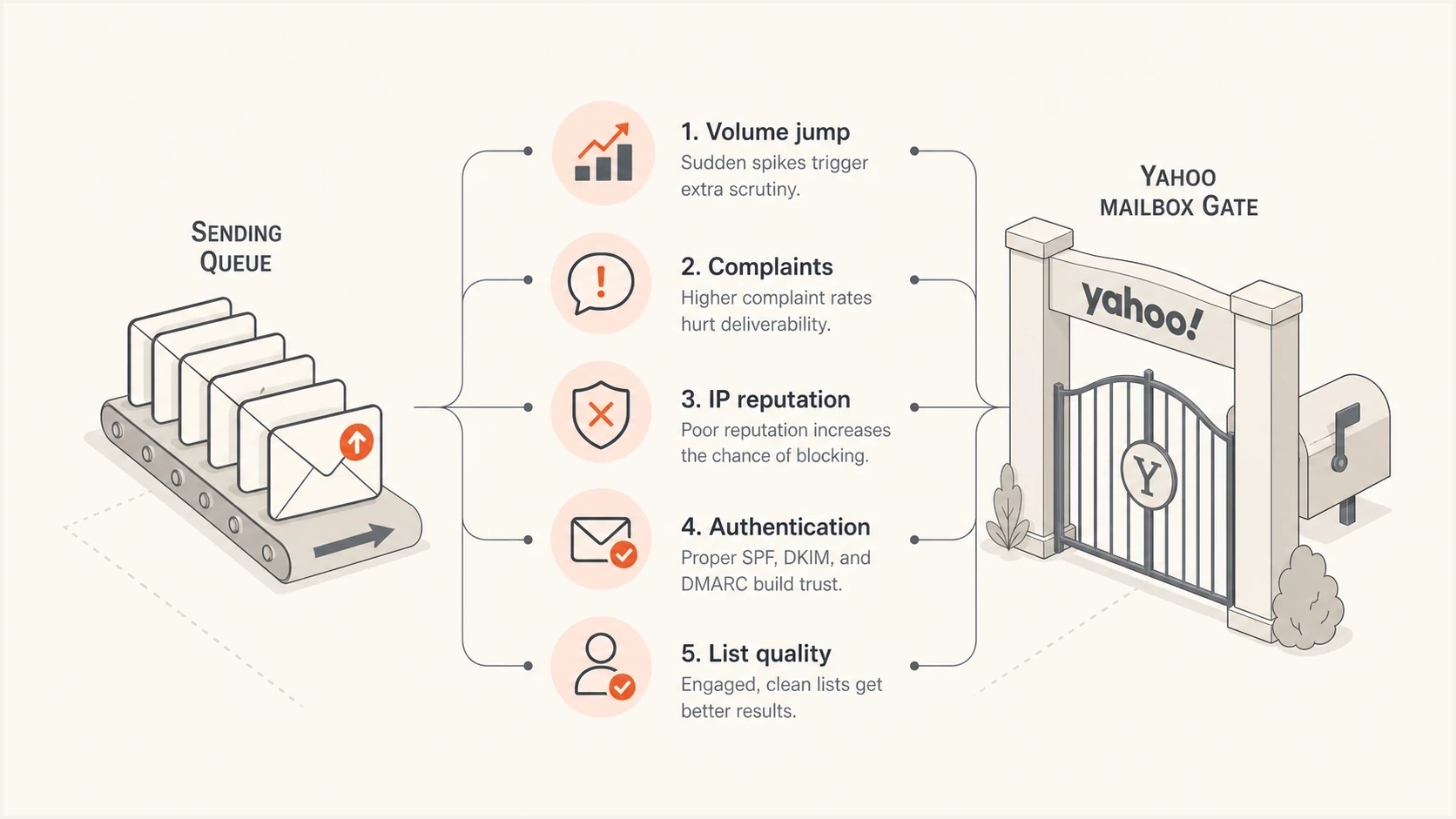
Common causes of Yahoo TSS04 deferrals: volume jumps, complaints, IP reputation, authentication, and list quality.
The complaint part is easy to underestimate. A sender can have valid permission and still create complaints by changing cadence, subject matter, sender identity, or audience mix. Yahoo does not need to publish a TSS04-specific threshold for the operational response to be clear: reduce the pressure and make the next batch cleaner.
Check Yahoo complaints and unsubscribe handling
Yahoo requires senders to keep spam complaint rates below 0.3%. Treat 0.3% as an enforcement ceiling, not a target. Yahoo calculates its rate against messages delivered to the inbox, so a rate based on total attempted or accepted mail can look lower than the rate Yahoo uses.
- Sender Hub Insights: Verify the sending domain and review Yahoo's domain-level complaint data. Insights and the CFL are separate.
- Complaint Feedback Loop: Enroll each DKIM signing domain and suppress recipients represented in Yahoo ARF complaint reports.
- One-click unsubscribe: Add a functioning List-Unsubscribe header to promotional mail, keep a visible body link, and honor requests within two days.
- Stream boundaries: Keep marketing and transactional traffic separate so complaint spikes do not obscure critical mail.
RFC 8058 one-click unsubscribe headerstext
List-Unsubscribe: <https://domain.com/unsub/opaquepart>
List-Unsubscribe-Post: List-Unsubscribe=One-Click
One-click unsubscribe applies to promotional and marketing messages, not transactional messages such as password resets or order confirmations. Even when a message is outside that requirement, an easy opt-out can reduce complaints when recipients no longer want the mail.
Do not compare unlike complaint rates
A dashboard that divides complaints by all sent mail does not reproduce Yahoo's inbox-delivered denominator. Use Yahoo's own domain data for enforcement risk, then use CFL reports to identify and suppress individual complainers.
Fix TSS04 in the right order
Changing every DNS record and campaign at once makes the cause harder to isolate. Work from the transport layer outward: pause the traffic, preserve evidence, isolate the affected stream, then fix the cause.
- Pause Yahoo traffic: Stop or sharply slow Yahoo-managed domains for several hours before sending more.
- Save the bounce: Keep the full SMTP response, IP, domain, campaign, send time, and recipient domain.
- Split the stream: Separate marketing, transactional, lifecycle, and one-to-one traffic in reporting.
- Lower the rate: Restart with smaller batches, fewer parallel connections, and wider retry intervals.
- Suppress risk: Remove recent complainers, chronic non-openers, old imports, role accounts, and hard bounces.
- Test a real send: Send a message through an email tester to check headers, authentication, and content signals.
- Escalate with evidence: If the error continues after remediation and controlled retries, gather logs before contacting Yahoo Sender Support.
Do not hammer Yahoo with retries
Tight retry loops make the sender look less controlled. If your MTA retries every few minutes across a large Yahoo queue, you create fresh connection pressure while the reputation signal is already negative.
- Backoff: Use longer retry spacing after the first deferral.
- Concurrency: Reduce simultaneous Yahoo connections per IP.
- Queue split: Keep Yahoo retries separate so other mailbox providers do not hide the pattern.
Email tester
Send a real email to this address. Suped shows a results button when the test is ready.
?/43tests passed
A tester will not prove Yahoo reputation by itself, but it catches avoidable problems before the next controlled batch. If the test shows SPF pass, DKIM pass, DMARC alignment, sane headers, and no obvious content issues, the next focus is volume and recipient quality.
Dedicated IP versus shared ESP pool
The fix changes depending on whether you control the sending IP. With a dedicated IP, the sender owns the warm-up, list quality, complaint rate, and retry policy. With a shared ESP pool, the sender controls domain reputation and list behavior, but the provider controls the pool, allocation, and other tenants.
Dedicated IP
- Owner: Your team owns the IP reputation and the warm-up plan.
- First move: Cut Yahoo volume, then rebuild using engaged recipients only.
- Data needed: Per-IP deferrals, complaints, unsubscribes, bounces, and delivered volume.
Shared ESP pool
- Owner: The ESP owns the pool, but your sending still affects your domain.
- First move: Ask whether other customers are seeing the same Yahoo deferral.
- Data needed: Pool assignment, affected IPs, Yahoo-specific rate limits, and support case status.
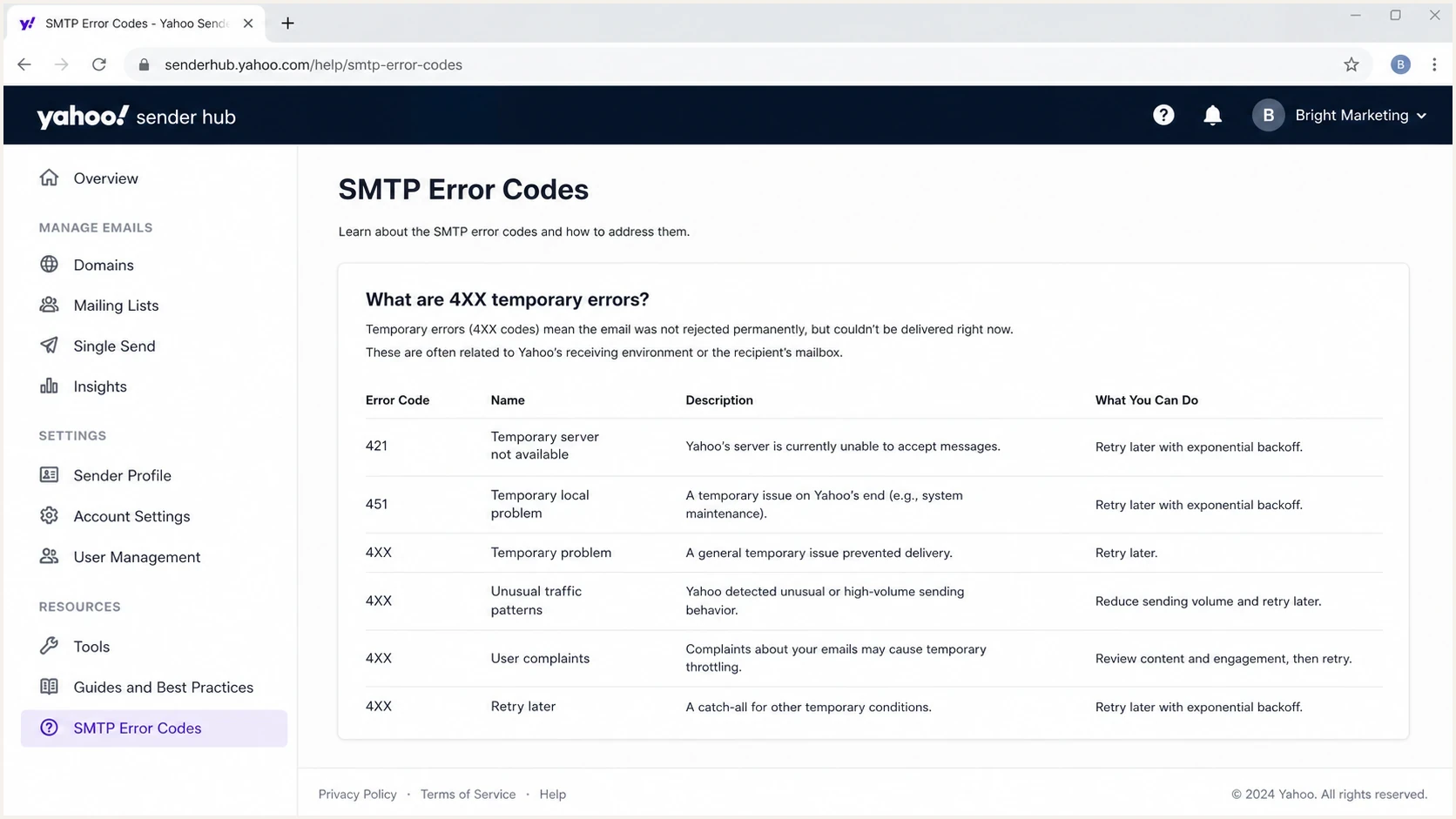
Yahoo Sender Hub guidance for 421 and 451 temporary SMTP errors.
If a shared pool is involved, do not let the investigation stop at your campaign metrics. Ask the ESP for the affected IPs, whether the deferral is pool-wide, whether any Yahoo-specific throttle has already been applied, and whether they have a support case open. If they cannot provide IP-level context, you are troubleshooting with too little evidence.
Authentication, DNS, and reporting checks
TSS04 is usually not a pure DMARC error, but authentication weakness makes every reputation problem harder to recover from. Yahoo requires bulk senders to use SPF and DKIM, publish a valid DMARC policy of at least p=none, and pass DMARC through SPF or DKIM alignment with the visible From domain. Sending IPs also need valid forward and reverse DNS. Check those controls, the HELO identity, and RFC-compliant headers before changing content.
Yahoo bulk sender authentication baselinedns
example.com TXT v=spf1 include:_spf.sender.example -all

selector._domainkey.example.com TXT v=DKIM1; k=rsa; p=...

_dmarc.example.com TXT v=DMARC1; p=none;
 rua=mailto:dmarc-reports@example.com
A domain health checker is useful when you need one pass across DMARC, SPF, DKIM, and DNS basics. It will not clear a TSS04 deferral alone, but it removes easy authentication misses before you restart Yahoo volume.
?
What's your domain score?
Deep-scan SPF, DKIM & DMARC records for email deliverability and security issues.

Issue steps to fix dialog showing the issue overview, tailored fix steps, and verification action
Where Suped fits
Suped's product keeps DMARC reports, authentication sources, DNS issues, alerts, and blocklist monitoring in one investigation workflow. For TSS04, use it to confirm that approved sources authenticate consistently and to spot authentication or reputation changes that coincide with the first deferral.
- Triage: Open the affected domain, review sources, and find unverified senders.
- Fix steps: Use issue guidance to correct records instead of guessing at DNS changes.
- Ongoing watch: Keep alerts on so new authentication or reputation changes are caught quickly.
Blocklists, blacklists, and reputation
A TSS04 response does not prove that an IP is on a blocklist (blacklist). Yahoo's wording points more broadly at unexpected volume or complaints. Still, check for a listing because the behavior that damages sender reputation can also lead to blocklisting.
For ongoing IP and domain reputation checks, Suped's blocklist monitoring workflow keeps those signals beside DMARC and authentication data. For background on what a blacklist entry means, read the blocklists overview, then compare the listing date with the first Yahoo deferral.
Yahoo complaint rate triage
Use internal rates to guide action, but compare Yahoo enforcement risk against Yahoo's inbox-delivered complaint rate.
Healthy
<0.1%
Keep normal monitoring active.
Watch
0.1-0.3%
Reduce risky segments and check recent changes.
Enforcement risk
>=0.3%
Pause affected sends and remove complaint sources.
Yahoo publishes 0.3% as its complaint-rate enforcement threshold, but it does not identify that number as a TSS04-only trigger. The lower bands are operational guardrails for reducing risk before the published threshold is reached.
Views from the trenches
Best practices
Pause Yahoo sends first, then restart with smaller batches and wider retry spacing per IP.
Separate Yahoo traffic in reports so complaints and soft bounces stay visible each day.
Keep authentication checks active because DNS drift can turn a throttle into a block fast.
Common pitfalls
Treating TSS04 as only a retry problem quickly creates pressure on the same queue.
Assuming one seed inbox proves recovery misses bulk behavior across real recipients.
Ignoring shared IP pool history leaves domain teams fixing a sender they do not control.
Expert tips
Use complaint data, recent volume changes, and bounce timing before changing content.
When the error persists after remediation, gather logs before opening a sender request.
Keep Yahoo warm-up separate from Gmail because each provider scores traffic differently.
Marketer from Email Geeks says Yahoo can defer ESP traffic long enough that a 15-minute seed check is not proof of failure.
2023-11-09 - Email Geeks
Expert from Email Geeks says a TSS04 pattern often calls for waiting several hours before retrying, not rapid queue pressure.
2023-11-09 - Email Geeks
How to handle the next send
After the first TSS04, do not send the same campaign again at the same speed. Restart with a smaller Yahoo segment that has recent engagement, no recent complaints, and a clean authentication path. Watch the first batches for deferrals before opening the next segment.
- First batch: Use the most engaged Yahoo recipients and keep the message volume low.
- Second batch: Increase only when the first batch clears without a fresh TSS04 pattern.
- Stop point: Pause again if the deferral returns, complaints rise, or bounces cluster on one IP.
- Record keeping: Save the changed rate, audience, IPs, message IDs, and the exact Yahoo response.
The durable fix is a healthier sender pattern: authenticated mail, clean lists, consistent volume, low complaint rates, and reputation monitoring that catches problems before Yahoo starts slowing the queue. Suped's product helps when the same team needs DMARC visibility, issue detection, hosted SPF or DMARC controls, alerts, and blocklist or blacklist context in one workflow.




