How do you get a link domain unblocked by SFR?

Published 29 Jun 2026
Updated 31 Aug 2026
12 min read
Summarize with
Updated on 31 Aug 2026: We updated this guide with SFR's official customer and non-customer unblock routes, plus clearer Fibre-network checks.
A link domain blocked by SFR usually gets cleared through a false-positive review, not a normal email delivery ticket. First prove that SFR Navigation Protégée is blocking the URL, clean the link and redirect chain, then use the official reporting route for the requester. SFR customers submit through their account, while non-customers can send the case directly to SFR by email.
Access determines the route, but an SFR recipient is no longer the only option. The customer form requires an SFR account, while SFR publishes a separate mailbox for non-customers. Its public link checker is available to anyone and helps confirm the classification, although a checker result does not replace a requalification request.
Suped is useful around this because the SFR case is rarely just an isolated click-warning problem. Suped's blocklist monitoring keeps domain and IP reputation checks, DMARC, SPF, DKIM, alerts, and fix guidance in one place, which keeps the unblock packet factual instead of reactive.
Confirm the SFR block before escalating
Do not start with a delisting request. Start with proof that the link domain is the item SFR dislikes. A message can fail because of the sender IP, From domain, visible link domain, redirect target, shortened URL, or content around the link. SFR can also allow the email into the inbox while blocking the click afterward through Navigation Protégée on an SFR Box Fibre connection.
- Recipient proof: Ask for a screenshot of the SFR warning page, the blocked URL, the date, and the browser or device used.
- SFR result: Enter the complete URL in SFR's public link checker, then save the classification exactly as shown.
- Network scope: Retest on the same device using the SFR Fibre box, then a mobile or non-SFR connection. A result limited to the SFR Fibre path supports a Navigation Protégée diagnosis.
- URL scope: Test the root domain, the tracking subdomain, and one full path. Domain-wide and path-specific blocks require different evidence.
- Redirect chain: Record every hop between the clicked link and the final page. One bad intermediate URL can affect the whole chain.
- Message sample: Keep the campaign ID, sender domain, sending IP, and headers for the exact message that produced the warning.
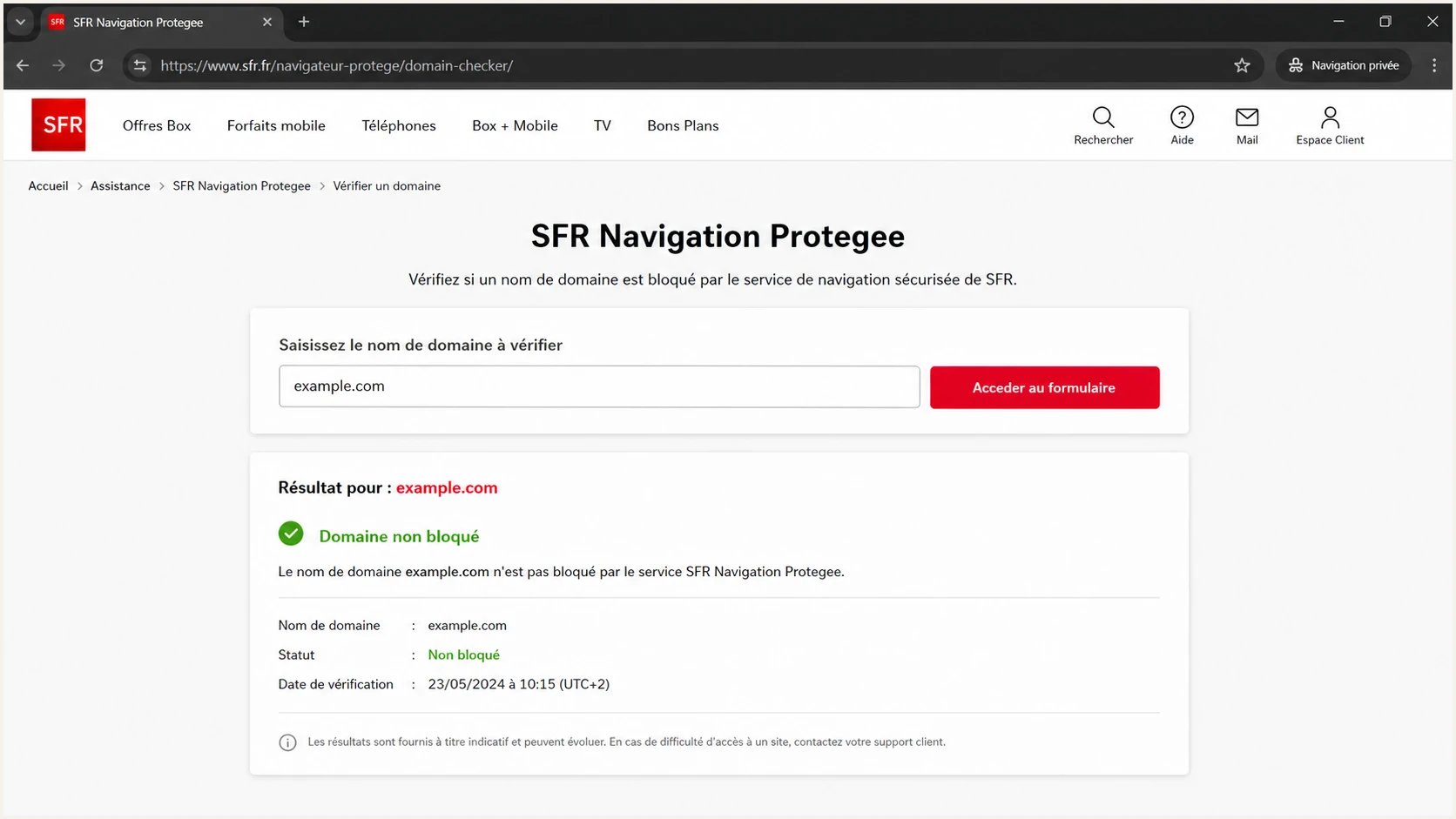
SFR Navigation Protegee page showing a domain review form and status result.
Do not treat it like a normal mail rejection
A link-domain block can happen after the email was accepted. If there is no SMTP bounce, chasing postmaster bounce codes wastes time. The ticket needs URL reputation evidence, not only mail server logs.
This is also where blocklist and blacklist language gets messy. Some teams call it a domain blocklist issue, while the recipient sees a browser-style warning. Treat both as reputation signals until the evidence proves the exact control point.
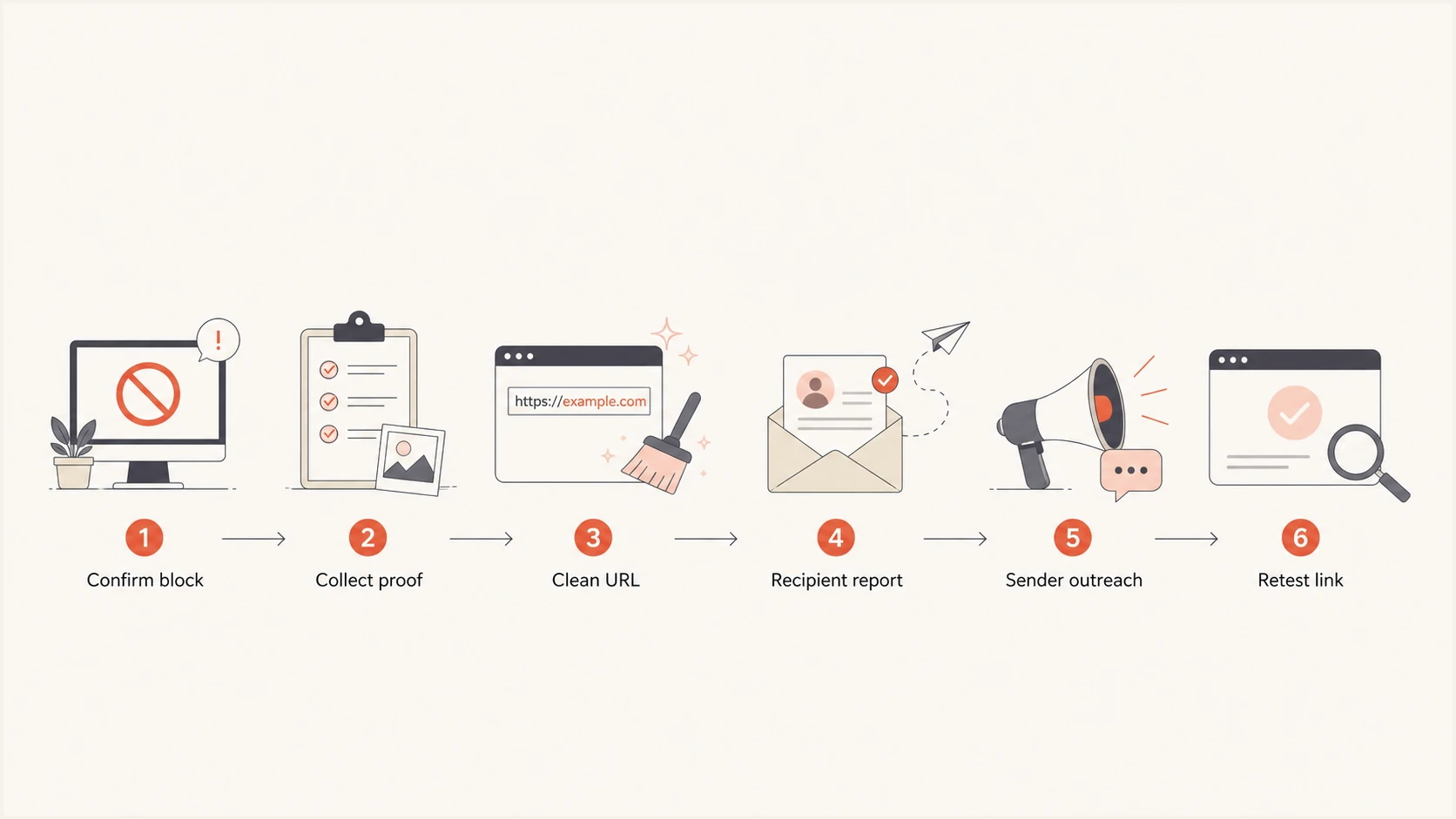
A six-step flowchart for confirming, reporting, and retesting an SFR link block.
The fastest unblock path
The fastest path uses SFR's official route for the person filing the case. An affected SFR customer can request analysis through the SFR account, while a sender or site owner without an SFR account can email SFR's published reporting mailbox. Both routes should carry the same narrow evidence packet.
- Document: Capture the exact warning, link domain, full URL, timestamp, SFR Fibre connection, and recipient context.
- Retest: Verify the complete URL with SFR's public checker and with a real email test before filing anything.
- Clean: Remove suspicious redirects, dead paths, reused shorteners, and stale campaign pages.
- Report: Use the SFR customer account form or the non-customer email route, based on who files the request.
- Escalate: Contact EfficientIP only as a parallel path when the evidence points there, and keep the SFR case primary.
- Retest: Check the exact URL again after review, then monitor it during later campaigns.
SFR customer route
Use this route when an affected recipient can sign in to an SFR account.
- Access: The customer opens the site-analysis request from the SFR customer area.
- Signal: The request comes from the user affected on an SFR Fibre connection.
- Evidence: The full URL, screenshot, reason for review, and checker result should match the sender's packet.
Non-customer route
Use this route when the sender or site owner does not have an SFR account.
- Address: Send the request to signalement-site-bloque@sfr.fr.
- Required fields: Include the complete URL, the reason for contesting the block, and a contact email address.
- Follow-up: Keep the sent message and evidence packet together for retesting and any reply.
False positive request templatetext
To: signalement-site-bloque@sfr.fr
Subject: False positive review for link domain

Hello SFR security team,

Please review this link domain as a false positive.

Complete URL: https://links.example.com/c/abc123
Reason for contesting the block: The URL redirects only to a legitimate page owned by our organization.
Connection affected: SFR Box Fibre via Wi-Fi or Ethernet
Warning seen: SFR Navigation Protégée blocked the link
Date and time: 2026-08-31 10:15 CEST
Contact email: security@example.com
Sender domain: example.com
Campaign or message ID: CAMPAIGN-12345

We checked the full redirect chain, removed stale paths, and confirmed that the final destination is legitimate.

Attached evidence:
- Recipient screenshot
- Complete URL and redirect chain
- Message headers
- Domain authentication checks
- Cleanup notes

Please reclassify the domain if your review confirms the false positive.
Use the official SFR requalification route
SFR separates site reports by requester. Customers use their SFR customer area to ask the security team to analyze a blocked site. Non-customers contest a block by emailing signalement-site-bloque@sfr.fr. SFR asks non-customers for the complete URL, the reason for contesting the classification, and a contact email address.
- SFR customer: Sign in to the SFR customer area, open the Navigation Protégée site-analysis path, and enter the site address.
- Non-customer: Email signalement-site-bloque@sfr.fr with the complete URL, reason for the request, and contact email.
- Public checker: Use SFR's link checker to capture the current classification, even without an SFR subscription.
- Supporting proof: Add the warning screenshot, SFR Fibre context, redirect chain, and cleanup notes so the reviewer can reproduce the case.
SFR publishes no fixed review time
SFR says the block or unblock decision will be communicated after analysis as soon as possible, but it does not publish a guaranteed turnaround. Retest the exact URL and wait for the decision instead of opening duplicate requests.
What to send in the review packet
A review request is stronger when it shows the exact affected URL, why the classification is wrong, and what changed to reduce risk. Keep the request narrow: one domain, one clear example, one cleanup note, and one owner.
|
|
|
|---|---|---|
Blocked URL | Full URL and link domain | Sets the review target |
Screenshot | Recipient warning page | Confirms SFR impact |
Redirects | Every hop in order | Finds risky hops |
Headers | Message source and IDs | Connects mail to link |
Cleanup | Fixes and dates | Shows reduced risk |
Use compact evidence labels so the review team can scan the packet quickly.
Test the message as a recipient would see it. A real inbox test can expose missing authentication, broken tracking links, unexpected redirects, and reputation issues that are not obvious inside the campaign builder. Suped's email tester is a practical way to capture that evidence before asking for a review.
Email tester
Send a real email to this address. Suped shows a results button when the test is ready.
?/43tests passed
Keep authentication in scope
A link-domain warning is not fixed by DMARC alone, but poor authentication weakens the review. If SPF, DKIM, or DMARC is broken, fix it before asking SFR to trust the sender's link domain.
Baseline DNS records to verifytext
_dmarc.example.com TXT "v=DMARC1; p=quarantine; rua=mailto:dmarc@example.com"
example.com TXT "v=spf1 include:_spf.mailer.example -all"
selector1._domainkey.example.com TXT "v=DKIM1; k=rsa; p=PUBLICKEY"
When EfficientIP is involved
SFR states that Navigation Protégée uses risk data from EfficientIP, but SFR's published requalification process still directs customers to the customer area and non-customers to its reporting mailbox. Provider outreach can run in parallel when the evidence points there, but it should not replace the official SFR request.
A public example exists where OpenResa described a mistaken SFR Safe Browsing block and later marked it corrected. The useful lesson from the OpenResa case is that a false positive can be corrected when the reviewing party receives a specific URL and enough evidence to investigate.
Escalation strength
The more specific the evidence, the better the unblock request.
Weak
No screenshot
Sender claim only
Better
Clear target
Recipient warning and full URL
Strong
Correct route
Official SFR requalification request
Strongest
Full packet
Official request with evidence and cleanup notes
If the link domain was abused before the current owner acquired it, or if old campaign paths were indexed, clean that first. A broader domain abuse cleanup process helps when the SFR issue is one symptom of a wider reputation problem.
Clean up the link domain before retrying
Before asking for a review, make sure the link domain is worth approving. The final page should be live, the redirect chain short, the certificate valid, the domain active, and old paths free of unrelated content. A false-positive request loses credibility if the reviewer clicks and lands on a broken or confusing page.
- Redirects: Remove unnecessary hops, expired campaign redirects, and shared shortener paths.
- Ownership: Make the linked page clearly match the sender, brand, and campaign context.
- Security: Remove open redirects, mixed content, injected scripts, and stale file uploads.
- Reputation: Check whether the domain or sending IP appears on a blocklist or blacklist before retrying.
- Authentication: Fix DMARC, SPF, and DKIM so the message source does not undermine the link review.
For reputation checks, start with general blocklist basics and then inspect the specific domain and IPs used by the campaign. Run a broader DNS and authentication review with a domain health checker before deciding the SFR warning is the only issue.
?
What's your domain score?
Deep-scan SPF, DKIM & DMARC records for email deliverability and security issues.
URL review checklisttext
1. Confirm the exact blocked URL still exists.
2. Follow every redirect and save each hop.
3. Remove open redirects and unrelated destinations.
4. Check HTTPS, final page status, and brand match.
5. Retest on SFR Fibre and a non-SFR network.
6. Save screenshots and timestamps for the review packet.
How Suped fits into the workflow
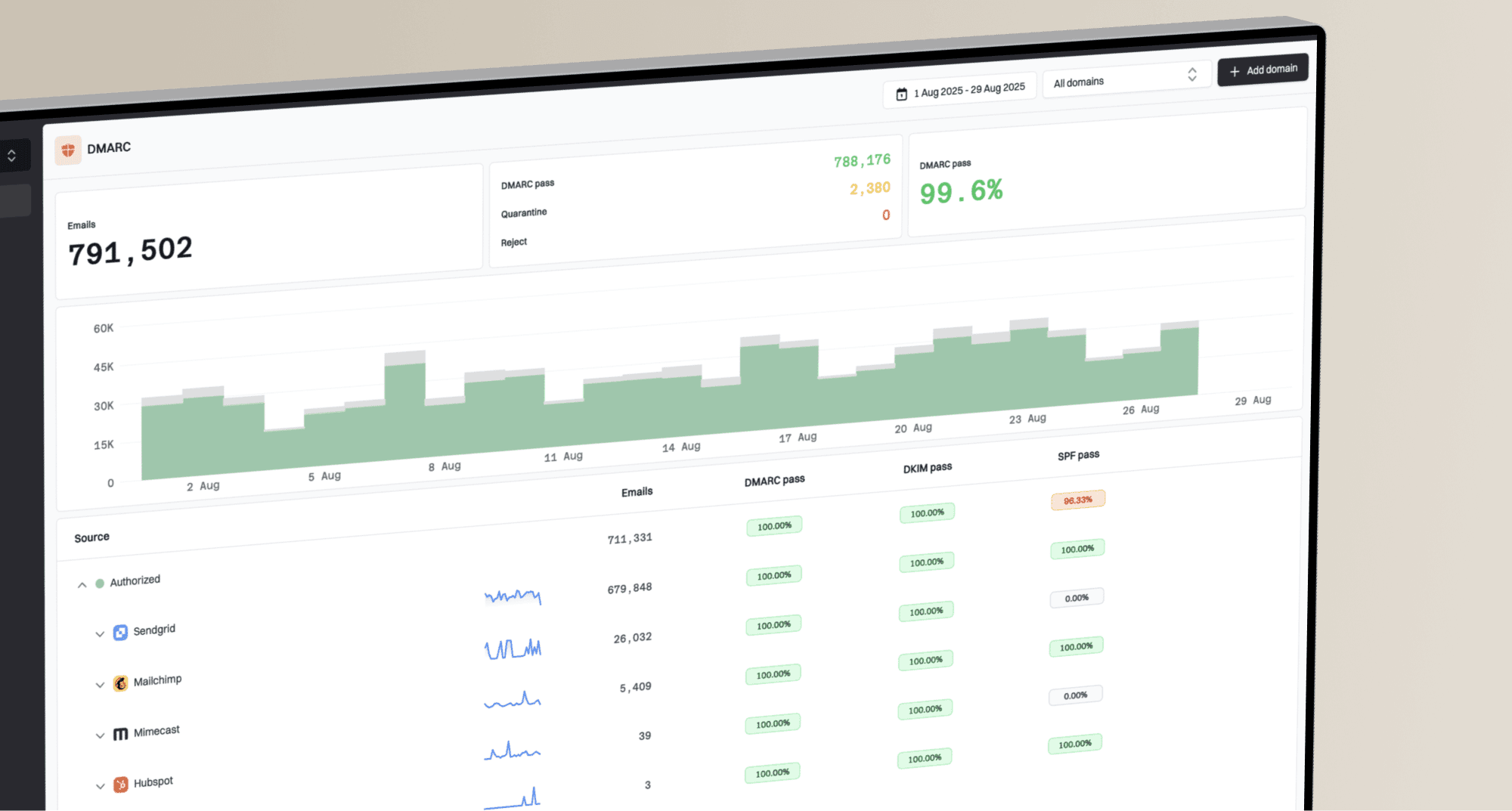
Suped is our DMARC and email authentication platform. In this workflow, it keeps DMARC, SPF, DKIM, domain and IP blocklist or blacklist monitoring, and alerts visible while SFR reviews the classification. It does not file or replace SFR's requalification request.

Blocklist monitoring page showing domain and IP checks across blocklists with importance and status
For an SFR case, Suped helps organize the surrounding evidence and continue monitoring after the domain is unblocked. This shows whether the same domain, sending IP, or authentication gap produces another warning.
- Detection: Automated issue detection shows what changed and gives steps to fix the underlying cause.
- Alerts: Real-time alerts reduce the delay between a reputation event and team action.
- Hosted SPF: Hosted SPF and SPF flattening keep sender includes manageable and under DNS lookup limits.
- Hosted DMARC: Hosted DMARC makes policy staging easier when a domain still has authentication gaps.
- Multi-tenancy: MSPs and agencies can manage multiple client domains without mixing evidence or ownership.
What not to do
The easiest mistake is to keep sending the same campaign while waiting for a reply. If SFR or its provider sees repeated clicks to a domain it already distrusts, the signal can get worse. Pause the affected link domain or swap to a clean, owned domain only after verifying that the new path does not carry the same redirect problem.
Avoid these unblock mistakes
- Mass retrying: Do not keep mailing SFR recipients with the same blocked link while the review is open.
- Vague tickets: Do not send a complaint without the exact URL, screenshot, timestamp, and cleanup notes.
- Provider hopping: Do not assume a filtering provider can replace SFR's customer or non-customer review path.
- Domain swapping: Do not rotate link domains to dodge a warning. That can create a wider reputation problem.
Do not treat a next-day delisting as proof that every path worked. The customer request, non-customer email, provider review, or automated recheck can land close together. Keep the evidence and watch the next send before closing the incident.
Views from the trenches
Best practices
Confirm the exact blocked URL, warning text, recipient ISP, timestamp, and browser state.
Use the SFR customer portal or non-customer email based on who files the review request.
Keep one ticket packet with screenshots, headers, redirects, and cleanup notes ready.
Common pitfalls
Treating a link warning like an SMTP block wastes time and sends proof to wrong teams.
Assuming every request needs a customer account ignores SFR's non-customer email route.
Retrying before fixing redirect chains can recreate the same reputation signal again.
Expert tips
Retest the exact URL after each change because domain tools can lag behind warnings.
Use sender logs and recipient screenshots together to prove the block is specific.
Keep DMARC, SPF, DKIM, and blocklist checks visible during the review window daily.
Marketer from Email Geeks says the filtering provider route is often more practical than asking SFR to override a safety verdict directly.
2026-06-12 - Email Geeks
Marketer from Email Geeks says SFR should not be expected to overrule a provider recommendation without strong false positive evidence.
2026-06-12 - Email Geeks
The practical SFR unblock playbook
For SFR, the highest-signal move is an official requalification request backed by a narrow evidence packet. Use the customer area when an SFR account holder files the case. Otherwise, email SFR's non-customer reporting mailbox. Contact EfficientIP only as a parallel route when the evidence supports it.
Confirm the block on SFR Fibre, compare another network, clean the link domain, prepare the packet, file through the correct SFR route, and retest the exact URL. Suped keeps the surrounding DMARC, SPF, DKIM, blocklist, blacklist, and alerting work connected while SFR handles the requalification.