How to handle spam using my domain and URLs?

Published 12 Jun 2025
Updated 23 Sep 2026
13 min read
Summarize with
Updated on 23 Sep 2026: We updated this guide with a lookalike-domain triage process and current RFC 9989 enforcement guidance.
The direct answer is that I cannot stop a spammer from typing my domain or URL into email they send using their own account. If the message is sent by a Hotmail, Outlook, Gmail, or other freemail account and my domain only appears in the body, SPF, DKIM, and DMARC will not block it because the authenticated sender is not my domain.
What I can do is reduce the damage quickly: verify whether the destination really belongs to me, prove the mail was not sent by me, remove commercial value from an abused URL I control, report the sending account with full headers, and monitor domain, URL, blocklist, and blacklist signals. I treat this as a reputation incident, not only an email authentication problem.
Separate spoofing, URL abuse, and lookalike domains
The first split matters. If an unauthorised message uses my domain in the visible From address but fails DMARC, I have a spoofing problem. If it passes DMARC with an aligned DKIM signature or SPF identity that I control, I investigate a compromised sending account, exposed signing key, or misused provider. If the authenticated sender is a freemail account and my domain appears only as a link in the message, I have URL abuse. If the destination only resembles my domain, I have a lookalike-domain or website impersonation case.
For spoofing, DMARC is the control point. For an authenticated message using my identity, account and service access are the control points. For body-link abuse, reputation, landing-page handling, affiliate governance, and abuse reporting are the control points. A lookalike domain needs registrar, hosting, and brand-abuse escalation because I cannot change its DNS or web content. If you need the spoofing branch in more detail, the practical path is covered in domain gets spoofed.
Only a URL in the body
- Signal: The header domain belongs to another sender, but the message includes my website link.
- Limit: DMARC does not police ordinary links in someone else's message body.
- Response: Collect headers, verify the destination, reduce the value of owned URLs, and report the sending account.
Your domain in the From address
- Signal: An unauthorised message uses my domain in the visible From address.
- Check: A DMARC failure points to spoofing; an aligned pass points to a sender or credential compromise.
- Response: Fix authentication coverage for failures, or revoke access and rotate keys for unexpected passes.
Header pattern for URL abusetext
Return-Path: <sender@freemail.example>
Authentication-Results: mx.example;
  spf=pass smtp.mailfrom=freemail.example;
  dkim=pass header.d=freemail.example;
  dmarc=pass header.from=freemail.example
Visible body link: https://example.com/
In that pattern, the freemail provider authenticated the message. My domain is not the sender identity. Receivers still can associate the URL with unwanted mail, so the body link has to be handled as a reputation exposure.
Check whether the URL is actually yours
I do not rely on the link text shown in the message. The clickable destination can use a different hostname, pass through a redirector, or imitate my domain with extra characters, substituted letters, or an internationalised domain name. I inspect the original message source and record each hostname in the redirect chain before deciding who controls the URL.
- Compare the registered domain, not only the brand name or link label.
- Convert internationalised names to their ASCII form and check for substituted or added characters.
- Record the initial URL, each redirect, the final destination, and the time observed.
- Confirm whether the hostname is mine, a service I authorised, a compromised third party, or an unrelated lookalike.
If the destination is a lookalike or cloned site, changing my own DMARC, DNS, or landing page will not remove it. I preserve the full URL, message source, screenshots, timestamps, and proof of ownership or authority, then report the domain to its registrar and hosting provider. I keep case IDs and responses so a later escalation shows what was reported and when.
Do not browse a suspicious URL normally
I collect redirects and page evidence in an isolated investigation environment. Opening a suspected site on an ordinary workstation can expose credentials, run unsafe content, or alter evidence through personalised redirects.
Lock down your own authentication first
I start with the records I control because they create the evidence trail. A spammer using my URL can claim confusion, but a clean DMARC record shows that mail from my real sending systems authenticates and mail pretending to be me fails. That matters when asking providers, blocklist operators, and mailbox teams to treat the campaign as third-party abuse.
- SPF: List only authorised outbound services and remove legacy senders that no longer send.
- DKIM: Sign every legitimate stream, including product, transactional, affiliate, and support mail.
- DMARC: Use aggregate reporting, review failures, then move from monitoring to a policy that fits the domain's mail flow.
- Subdomains: Use sp for existing subdomains and np for non-existent subdomains when those policies should differ from the parent.
DMARC monitoring record before enforcementdns
_dmarc.example.com. 300 IN TXT "v=DMARC1; p=none;"
"rua=mailto:dmarc@example.com"
Once every legitimate source has aligned SPF or DKIM, I consider quarantine. I reserve reject for domains and mail flows where indirect delivery has been assessed and rejection will not disrupt legitimate mail. RFC 9989 advises against p=reject for general-purpose email domains. It also made pct historic and introduced t=y for policy testing, but the t tag does not provide a percentage rollout.
Before changing policy, I run a domain health check and compare it with DMARC aggregate reports. The point is to avoid disrupting real mail while fixing the public signal that receivers use to separate legitimate traffic from abuse.
?
What's your domain score?
Deep-scan SPF, DKIM & DMARC records for email deliverability and security issues.
Suped's product fits this workflow by putting DMARC report review, SPF and DKIM checks, hosted policy controls, alerts, and reputation checks in one place. For teams with many domains, the practical benefit is a prioritised view of which domain, sender, or policy needs action.

Issue steps to fix dialog showing the issue overview, tailored fix steps, and verification action
Reduce the value of abused URLs
When spam uses a URL I control, I focus on what happens after the click. The spammer cannot be stopped at the point of composition, but I can decide whether a distinctive abused path reaches a signup form, an advert, a monetised 404 page, or a plain notice that creates no reward.
Do not reward the spam click
If a campaign uses a distinctive path, invalid partner tag, or another reliable incident marker, I route those clicks to a no-revenue page with a short abuse notice, contact details, and ordinary navigation only. I do not divert every untracked homepage visit because legitimate direct visitors also arrive without tracking.
This is especially important for affiliate programs. If valid partner traffic always has a tracking parameter, then an invalid or known-abused parameter should not behave like paid acquisition. I want the URL pattern itself to separate legitimate promotion from abuse without penalising ordinary direct traffic.
Simple URL handling ruletext
if request.path == "/abused-path" or matches_incident_marker:
  show_abuse_notice_without_signup()

if request.path == "/splash" and has_valid_tracking:
  show_normal_landing_page()

if unknown_path:
  return_404_without_ads()
- Abused path: Send it to a neutral notice page when the path or incident marker is reliable.
- Tracked URLs: Require valid partner IDs before affiliate landing pages or payouts load.
- Open redirects: Disable them or restrict redirects to an explicit allowlist of destinations.
- 404 pages: Keep them clean, with no ads, no popups, and no automatic monetisation.
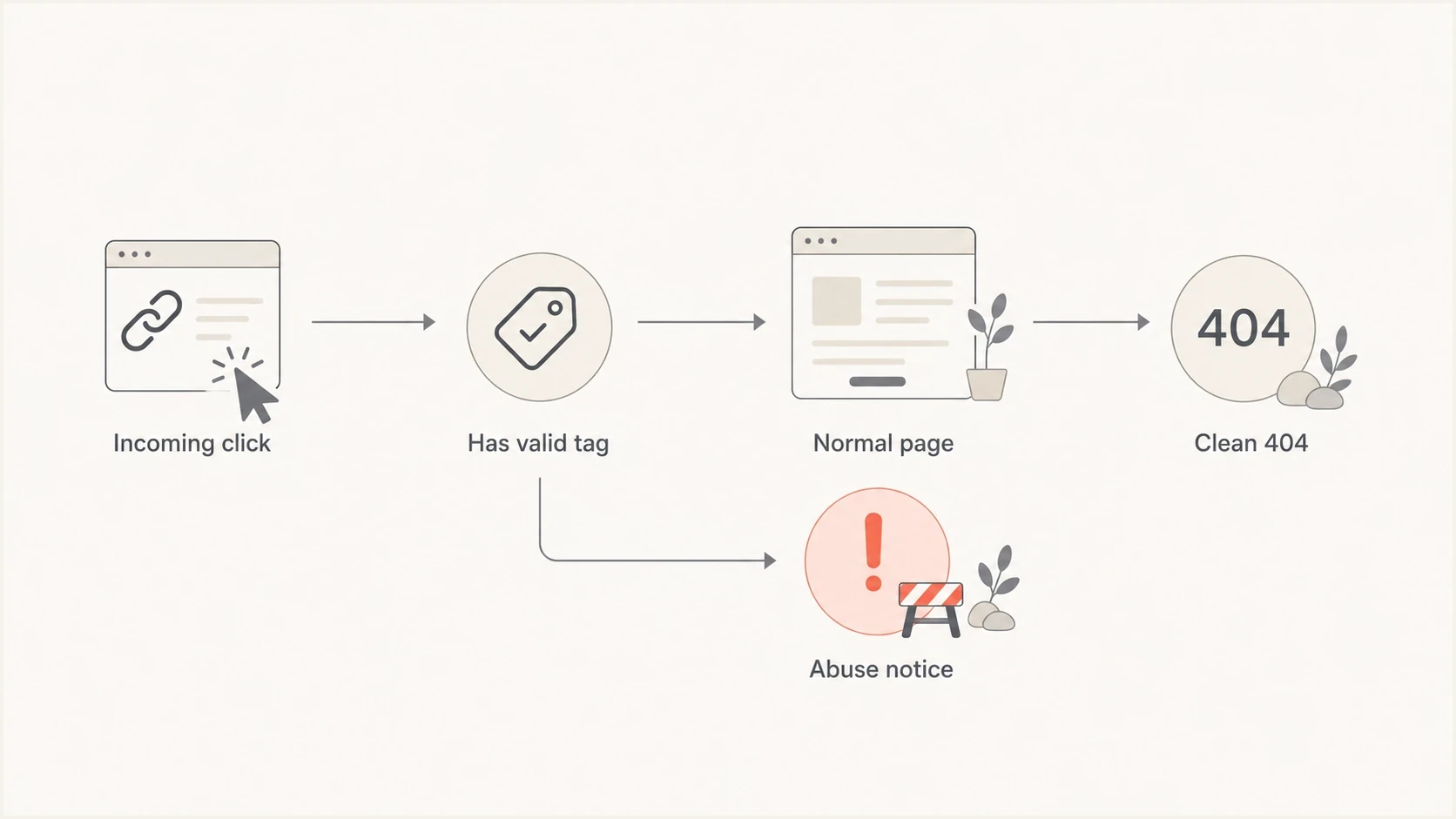
URL abuse flowchart routing valid tagged clicks to a normal page and other clicks to an abuse notice or clean 404.
Collect evidence before asking for action
A useful abuse report is concise and complete. I include original headers, the full message source, timestamps, the visible URL, the final redirect target, and a clear statement that the sender is not authorised. I do not send screenshots alone because they cannot prove the sending path.
|
|
|
|---|---|---|
From domain | Does it use my domain? | Check DMARC and alignment. |
Return path | Who accepted bounce risk? | Report that sender. |
DKIM domain | Who signed the mail? | Investigate unexpected passes. |
Body URL | What hostname and path appear? | Route owned paths or report lookalikes. |
Evidence to keep with each sample
When the sender is a large freemail provider, replies are often slow or limited. I keep the message short: this account is sending unsolicited mail, it uses my URL without permission, and here are the full headers. I also keep working abuse@ and postmaster@ mailboxes on my domain so reports about my own infrastructure reach the right team. If I need a broader escalation path, I follow a structured process to report fraudulent email rather than sending long narrative complaints.
Abuse report outline
Provider abuse reporttext
Subject: Spam using our URL without authorisation

We own example.com. The attached message was not sent by us.
The sender used our URL in unsolicited email.

Included:
- Full original headers
- Complete message source
- Visible URL and redirect target
- Proof the sender is not authorised
- Preferred contact for follow-up
Identify exactly what the blocklist listed
A blacklist result only becomes actionable after I identify the listed asset and the reason code. A sending-IP DNSBL listing, a domain or hostname listing caused by a link in spam, and a full-URL reputation warning describe different problems. I record the exact value returned by the blocklist instead of assuming that every result applies to the whole domain.
|
|
|
|---|---|---|
Sending IP | The sender or its mail provider | Confirm whether I control the IP before requesting action. |
Domain or hostname | The domain or site owner | Check the listing reason, site security, redirects, and spam samples. |
Full URL | The site owner | Disable the path or remove its reward, then preserve the response. |
Web-server IP | The host or site operator | Check for compromise and shared-hosting abuse. |
Match the listing to the owner and fix
Scope differs by blacklist. Some domain blocklists store only the hostname and ignore the directory path, while other reputation systems evaluate the complete URL. I preserve the domain, hostname, path, query string, redirect chain, and final destination so I can answer either type of review.
Fix first, request removal second
I read the listing reason, stop the abuse or secure the affected asset, confirm that the bad behavior has ended, and then follow the blocklist operator's official review process. A removal request sent while the same URL, redirect, account, or compromised host remains active is likely to fail or be relisted.
Watch blocklists and blacklist signals
I monitor the exact assets receivers can evaluate: sending IPs, the registered domain, hostnames, tracking domains, redirectors, and web origins. This matters because a blacklist can identify one abused hostname while another system scores the full URL or its final destination. I compare each alert with incident timestamps and message samples before deciding what to fix.
I use blocklist monitoring to detect domain and IP listings early, then I keep a clean packet of evidence ready for review. If a listing appears on blocklists or blacklists, I want to show that the mail is not authenticated as mine, the abused URL has been neutralised, and the sending account has been reported.

Blocklist monitoring page showing domain and IP checks across blocklists with importance and status
Suped's product connects authentication health with blocklist (blacklist) visibility and alerts. During an incident, that lets the team compare an unexpected listing with DMARC sources and work through affected domains in one queue.
Incident priority bands
How I rank URL abuse incidents before escalating internally.
Monitor
Low
A few samples, no listing, no unusual traffic.
Contain
Medium
Repeated samples, spam complaints, or risky landing behavior.
Escalate
High
Blacklist listing, spam trap reports, or clear sender persistence.
Audit your site and affiliate paths
I do not assume the sender is the only problem. I check whether anything on the site makes the abuse profitable or indicates a compromise: injected scripts, open redirects, affiliate IDs hidden in redirects, ad tags on error pages, signup flows with no valid referral context, or stolen site credentials.
- Code audit: Review recent deploys, tag managers, redirect logic, landing-page templates, and CMS extensions.
- Affiliate audit: Look for partners tied to unusual traffic, bad lists, or missing consent proof.
- Analytics audit: Compare spam timestamps with direct traffic, bounce spikes, and conversion paths.
- Access audit: Review administrator logins, rotate exposed credentials, and revoke unknown sessions.
- Policy audit: Require proof of opt-in and ban freemail sending for partner promotions.
If the campaign uses a distinctive path or reliable incident marker, I can place a neutral interstitial on that route. It should say the domain is being mentioned in unsolicited mail without permission, provide an abuse contact, and remove the immediate conversion action. Normal navigation can remain, but the identified spam click should not behave like a paid campaign.
What a good holding page does
- Clarifies: The site owner did not send the unsolicited message.
- Removes: Signup forms, ads, popups, and affiliate credit for that entry path.
- Preserves: A normal contact route, abuse mailbox, and basic brand navigation.
Views from the trenches
Best practices
Separate incident-marked paths from normal traffic so spam clicks cannot create revenue signals.
Keep authentication reports and abuse evidence together before requesting review or delisting.
Audit redirects and landing pages before assuming the abuse is only an external sender.
Common pitfalls
Routing every untracked visit away from the homepage can block legitimate direct traffic.
Sending vague abuse reports without full headers gives providers little evidence to act on.
Treating DMARC as a URL-control tool leaves the body-link reputation problem unsolved.
Expert tips
Use a no-revenue interstitial only when a path or incident marker identifies abuse.
Record the hostname and full URL because blocklist scope differs between reputation systems.
Review affiliate rules after each incident and remove partners tied to unsafe acquisition.
Marketer from Email Geeks says URL abuse has to be split from sender spoofing because DMARC cannot stop a freemail user from mentioning a domain in the message body.
2024-03-14 - Email Geeks
Marketer from Email Geeks says the whole URL often matters to reputation systems, so exact paths and query strings should be captured with every sample.
2024-04-09 - Email Geeks
What to do next
I handle spam using my domain and URLs by narrowing the problem first. If the visible From domain is mine and DMARC fails, I fix authentication coverage and choose a suitable policy. If an unauthorised message passes with my aligned identity, I investigate the sending account or signing service. If the sender identity is someone else's account and the URL is mine, I preserve evidence, report the sender, and remove the reward from the abused path. If the destination only resembles my domain, I report the lookalike domain and its hosting instead of changing my own DNS.
The practical response combines authentication for owned mail, exact URL verification, clean routing for identifiable abuse, prompt reports, site security checks, and ongoing blocklist (blacklist) visibility. Suped's product supports the owned-domain parts of that workflow across one domain or a portfolio through DMARC monitoring, managed authentication controls, alerts, blocklist monitoring, and multi-tenant reporting.




