What should I do if my email domain gets spoofed?

Updated on 25 Sep 2026: We updated this guide with clearer header-evidence steps and practical scam-containment actions.
If your email domain gets spoofed, do two things first: confirm whether any real sending account was compromised, and protect the domain with evidence-based DMARC enforcement. A spoofed visible From domain does not automatically mean your mail system was breached, and it does not automatically ruin your sender reputation. The urgent job is to separate fake unauthenticated mail from legitimate traffic, then act on the facts.
Do not rush from DMARC monitoring to enforcement while the incident is still unclear. First check original message files and receiver-added Authentication-Results fields, DMARC reports, bounce patterns, complaint rates, and real delivery outcomes. If legitimate mail is still passing and receiver metrics look normal, a small blocklist or blacklist alert is context, not a crisis.
For ongoing control, Suped's DMARC monitoring helps turn raw reports into source-level issues, alerts, and steps to fix. That matters during spoofing because the useful answer comes from knowing which mail sources are real, which fail alignment, and which can be rejected safely.
What to do in the first hour
The first hour is triage. Do not start by changing every DNS record. Start by proving what happened. Spoofing normally means someone sent mail that used your domain in the visible From header without permission. It becomes a higher-risk incident if the mail came through one of your approved systems, an exposed API key, a compromised mailbox, or a vendor account.
- Collect samples: Ask recipients to attach the original message as an .eml file. Screenshots and ordinary forwards can remove evidence. Preserve the From, Return-Path, Authentication-Results, Received chain, DKIM signing domain and selector, URLs, and attachments.
- Check compromise: Review email platform logins, API keys, SMTP credentials, app passwords, and recent permission changes for every system that can send as your domain.
- Read DMARC data: Look for new sending IPs, new providers, SPF alignment failures, DKIM alignment failures, and sudden volume spikes by source.
- Watch outcomes: Track bounces, complaints, delivery changes, support tickets, and replies reporting suspicious mail.
- Coordinate the response: Tell security and support what users might report. Warn targeted staff or customers if the messages request credentials, payments, or sensitive data.
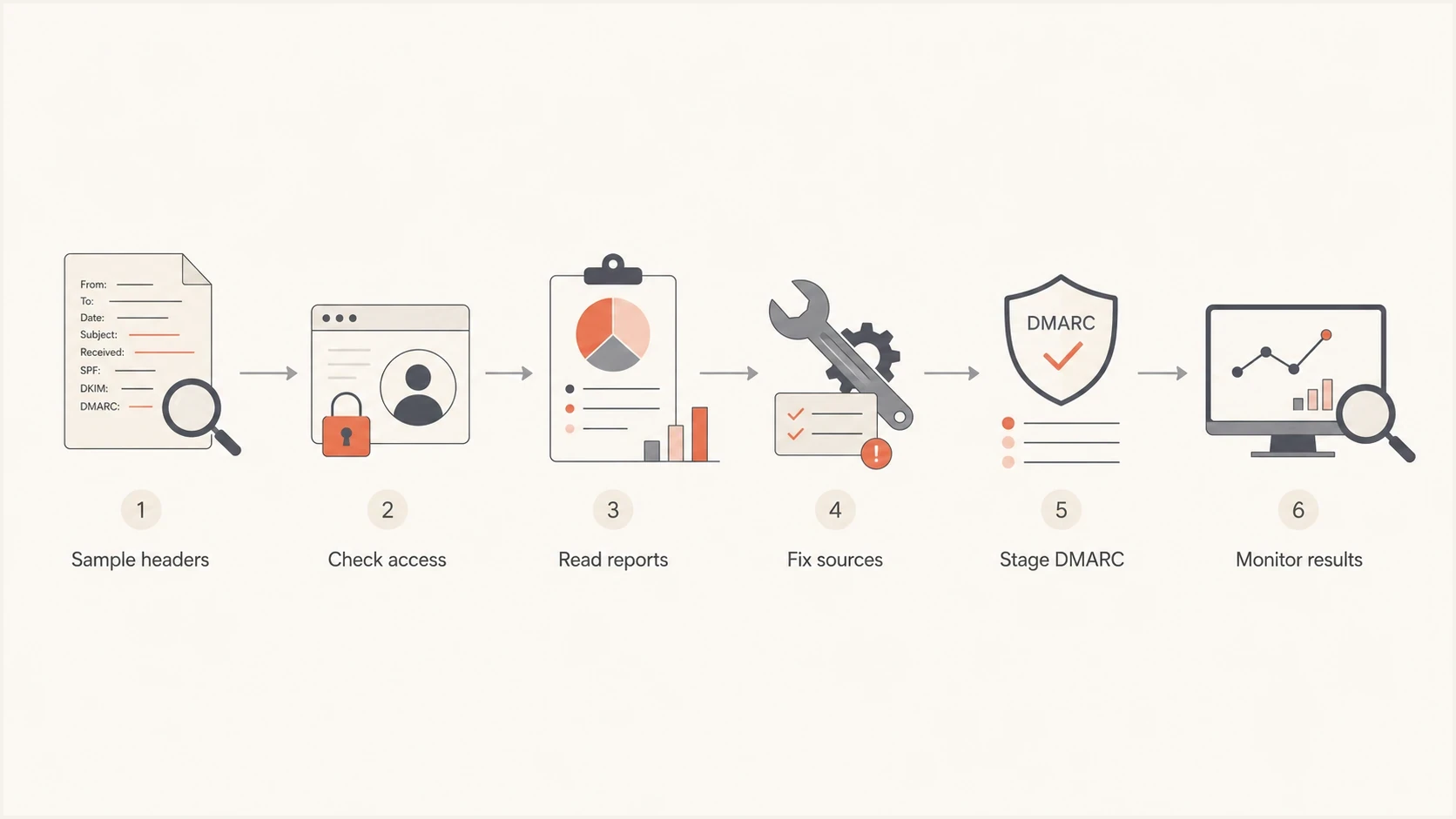
Flowchart showing sample headers, access checks, reports, source fixes, DMARC staging, and monitoring.
Do not treat every alert as a fire
A listing on one small blacklist or blocklist does not prove your real mail is being blocked. Some lists include domains based on broad signals, stale evidence, or unauthenticated abuse that never touched your infrastructure. Treat a listing seriously when it lines up with delivery failures at real recipients.
- High signal: New hard bounces, policy rejections, complaint spikes, or support reports from real customers.
- Low signal: A few low-impact blacklist or blocklist entries while real sending metrics remain stable.
Contain harm while you fix authentication
Run recipient protection and technical remediation at the same time. A DNS change affects future receiver decisions, but it cannot retract a message that was delivered or undo a payment, credential disclosure, or download.
- Warn targeted people: Use a trusted channel and identify the suspicious sender address, subject line, and time window. Do not repeat malicious links or ask recipients to click through for more details.
- Verify sensitive requests: Pause unexpected payment, banking-detail, password, or data requests. Confirm them through a known phone number or an established internal process.
- Report active infrastructure: Preserve malicious URLs, attachments, source IPs, and domains, then send the evidence through your security, legal, registrar, hosting, and domain-abuse channels as applicable.
- Escalate confirmed loss: If money, credentials, or personal data were exposed, start the relevant incident, banking, legal, and regulatory response immediately.
Keep the warning factual and specific. Tell recipients what request to ignore, how to verify future messages, and where to send the original message file. Avoid broad claims that every message from the domain is unsafe.
Decide whether this is spoofing or compromise
The response changes based on the source. Simple spoofing is handled with authentication and policy. Compromise is handled as a security incident. Separate them before making DNS changes because a strict DMARC policy does not fix stolen credentials or an abused vendor integration.
Header spoofing
- Source: Mail came from infrastructure that your domain does not authorize.
- Authentication: SPF or DKIM can pass for another domain, while DMARC fails because alignment is missing.
- Fix: Choose an appropriate DMARC enforcement policy after legitimate senders are verified.
Real compromise
- Source: Mail came through a real mailbox, SMTP user, API token, sending platform, or approved vendor.
- Authentication: SPF, DKIM, and DMARC can all pass because the attacker used a legitimate path.
- Fix: Revoke access, rotate credentials, reset passwords, and pause the abused source.
If the spoofed message failed DMARC, that supports a simple spoofing diagnosis. If it passed DMARC, treat it as a bigger investigation. A pass confirms that SPF or DKIM produced an authenticated identifier aligned with the visible From domain. It does not prove that the message content is safe. Review approved senders, mailbox access, API credentials, DKIM keys, and the possibility that previously signed content was replayed. The related mechanics are explained in SPF, DKIM, and DMARC.
|
|
|
|---|---|---|
DMARC fail | Spoofing or misconfiguration | Verify sources |
DMARC pass | Aligned authentication | Audit access and replay |
Bounce spike | Backscatter | Check logs |
List alert | Needs context | Correlate delivery |
Triage signals that separate spoofing from compromise.
Use DMARC without breaking real mail
DMARC is the main control for exact-domain spoofing, but the standard changed in 2026. RFC 9989 replaced RFC 7489 and RFC 9091 as the core DMARC specification. RFC 9990 now defines aggregate reporting, and RFC 9991 defines failure reporting. RFC 9989 also made the pct tag historic because receivers applied percentage values inconsistently. Records such as p=quarantine; pct=15 are no longer current rollout guidance.
Use p=none with aggregate reporting while you inventory senders and repair alignment. It collects reports without asking receivers to change message handling, so it does not block spoofed delivery on its own. RFC 9989 defines t=y to request testing behavior for an enforcement policy. A receiver that has not implemented the new tag can ignore it, so do not treat t=y as a zero-risk substitute for p=none during the discovery phase.
The safe path is to inventory every legitimate sender, make mail pass aligned SPF and DKIM, then choose quarantine or reject based on your mail flows. If you need a quick record review, run a DMARC checker before publishing changes. For a new record, use a record generator and then validate the published TXT record.
Conservative DMARC monitoring recorddns
_dmarc.example.com TXT "v=DMARC1; p=none; rua=mailto:dmarc@example.com;"
RFC 9989 testing recorddns
_dmarc.example.com TXT "v=DMARC1; p=quarantine; rua=mailto:dmarc@example.com; t=y;"
Strict reject record for a controlled sending domaindns
_dmarc.example.com TXT "v=DMARC1; p=reject; rua=mailto:dmarc@example.com;"
Practical rollout order
- Inventory: List every sending service, subdomain, selector, return-path domain, and owner.
- Fix: Make legitimate senders pass aligned SPF and DKIM. DKIM is essential if a reject policy must survive forwarding.
- Monitor: Use p=none and review enough aggregate reports to cover complete business cycles and low-volume senders.
- Choose enforcement: Use quarantine or reject only after assessing indirect mail. RFC 9989 cautions against reject for domains whose users post to mailing lists.
Know what DMARC can and cannot stop
DMARC protects the domain in the visible From address when a participating receiver evaluates the message. It does not authenticate the display name, judge whether the message content is honest, or control a different domain that resembles yours. A reject policy also does not stop attackers from sending attempts. It asks receivers to apply your published policy, and receivers can use other evidence when deciding what to do.
- Exact-domain spoofing: DMARC detects mail that uses your domain in the visible From address without aligned SPF or DKIM.
- Display-name impersonation: An attacker can use a trusted person's name while sending from an unrelated domain. DMARC does not compare display names.
- Lookalike domains: A cousin domain with a misspelling or different suffix can publish its own valid SPF, DKIM, and DMARC records.
- Authenticated abuse: A compromised sender or replayed DKIM-signed message can pass DMARC, so a pass does not make the content trustworthy.
When an impersonation campaign falls outside DMARC, preserve the exact sender domain, URLs, headers, and recipient reports. Notify security and support, warn targeted users, and use your normal domain-abuse, legal, and incident-response channels. Keep the DMARC work focused on mail that actually uses domains you control.
Check reputation, but do not chase noise
A spoofing event can create reputation anxiety because the abuse used your brand. Still, receivers that evaluate mail properly understand the difference between authenticated mail you sent and unauthenticated mail pretending to be you. Reputation risk rises when your infrastructure sends bad mail, when users complain about authenticated messages, or when your domain appears in malicious URLs.
Use a domain health check to review DMARC, SPF, DKIM, and related DNS posture in one pass. Then compare the result with operational metrics: delivered volume, bounce codes, complaint rate, and support reports. If those are stable, do not let a single blacklist or blocklist item dominate the response.
?
What's your domain score?
Deep-scan SPF, DKIM & DMARC records for email deliverability and security issues.
If you see real delivery failures, document the exact receiver, SMTP code, sending IP, sending domain, campaign, and timestamp. Fix the cause before requesting delisting. A blacklist or blocklist removal request made before the root issue is corrected can fail, and the listing can return.
Signals worth escalating
Use these bands for triage. They are practical thresholds, not universal receiver rules.
Watch
Monitor
A small blacklist notice with no matching delivery change.
Investigate
Same day
New bounce patterns or recipient reports tied to one sending source.
Escalate
Now
Confirmed compromise, broad blocking, or customer-facing abuse.
Backscatter is another clue. If you receive bounce messages for mail you never sent, the bounce traffic can be a side effect of spoofing. The handling is different from a normal campaign bounce because the original messages did not leave your systems. The practical next steps are covered in bounces you did not send.
Where Suped fits in the response
Suped is our DMARC reporting and email authentication platform. During a spoofing incident, its DMARC reports group traffic by source, separate verified senders from unknown infrastructure, and surface SPF or DKIM alignment failures. Alerts and issue steps keep the investigation tied to a specific sender and remediation task.

Issue steps to fix dialog showing the issue overview, tailored fix steps, and verification action
The practical benefit is speed. An incident review needs to show which source is failing, whether it is verified, whether the failure affects real traffic, and what DNS or provider change fixes it. Suped's issue view provides specific remediation steps so teams do not have to interpret raw XML reports during the response.
|
|
|
|---|---|---|
Find sources | Separates real senders | |
Fix failures | Issue steps | Shows next action |
Manage DNS | Hosted DMARC | Controls policy changes |
Watch lists | Blocklist alerts | Keeps context close |
How Suped supports spoofing response work.
This workflow connects authentication evidence with policy changes and issue ownership. Teams can use the same source record to verify a sender, fix alignment, watch the next reports, and document the result.
What to change after the incident
Once the incident is stable, tighten the domain after reviewing enough DMARC data to trust the sender inventory. If a domain sends no mail, publish a null SPF record and DMARC reject, remove obsolete DKIM keys, and revoke old sending credentials. Attackers often choose forgotten domains because nobody watches them.
- Primary domain: Choose quarantine or reject only after real sources pass aligned SPF and DKIM and indirect mail has been assessed.
- Subdomains: Use sp for existing subdomains and np for non-existent subdomains so attackers cannot lean on unused names.
- Unused domains: Publish reject and a null SPF record, remove old sending access, then monitor aggregate reports for unexpected use.
- Incident records: Keep headers, report snapshots, access changes, DNS changes, and timestamps together.
Unused sending domain exampledns
example.net TXT "v=spf1 -all"
_dmarc.example.net TXT "v=DMARC1; p=reject; sp=reject; np=reject; rua=mailto:dmarc@example.net;"
If the spoofing involved a fake invoice, credential theft, or impersonation of staff, report it through normal security and legal channels. Public guidance on spoofing and phishing is useful for incident reporting language, but the email authentication work still comes back to headers, access logs, and DMARC evidence.
Views from the trenches
Best practices
Check DMARC reports first, then change policy after valid senders pass alignment.
Treat one blacklist or blocklist alert as context, not proof of delivery damage.
Keep sample headers, bounce logs, access changes, and source DMARC data together.
Common pitfalls
Rushing DMARC enforcement during an incident can block real mail before abuse stops.
Chasing every small blacklist wastes time when mailbox metrics show normal delivery.
Assuming SPF and DKIM mean DMARC passes hides alignment failures in real traffic.
Expert tips
Use an incident log so DNS edits, message samples, and provider replies stay together.
Move inactive domains to reject with no sending sources before attackers choose them.
Review subdomains separately because abuse appears where no one expects mail today.
Expert from Email Geeks says a spoofed domain alone usually does not make legitimate mail blocked by serious receivers. The first check is whether complaints, bounces, or opens changed.
2021-10-14 - Email Geeks
Expert from Email Geeks says blacklist results need context because many lists have strict or noisy rules and never affect normal delivery.
2021-10-14 - Email Geeks
How to prevent repeat spoofing
If your domain gets spoofed, do not treat the event as proof that your sending reputation is damaged. Treat it as a signal to verify authentication, access, and delivery outcomes. If no legitimate source was compromised and your delivery metrics are stable, keep monitoring while you prepare an appropriate DMARC enforcement policy.
The repeatable fix is to identify every sender, make legitimate mail pass aligned authentication, choose policy based on indirect-mail risk, and keep watching for unexpected sources. Suped supports that process by connecting DMARC reports with authentication issues, blocklist monitoring, alerts, and specific remediation steps.




