Why am I receiving bounce messages for emails I didn't send from my domain?

Published 26 Apr 2025
Updated 10 Aug 2026
11 min read
Summarize with
Updated on 10 Aug 2026: We updated this guide for the current DMARC standards and clarified why envelope sender spoofing can still create backscatter.
You are receiving bounce messages for emails you did not send because another sender used your domain or one of your addresses as the SMTP envelope sender, also called MAIL FROM or the reverse-path. When those messages hit invalid recipients after a remote system has accepted them, that system sends the delivery status notification to the forged envelope address. That creates backscatter, which is bounce mail caused by mail you did not originate.
The most common case is not a hacked mailbox. It is forged sender data. SMTP permits a sender to claim almost any envelope address. SPF authenticates that envelope identity, DKIM authenticates a signing domain, and DMARC compares those authenticated domains with the visible From domain. If the remote system accepts the message first and rejects it later, the bounce goes to the forged reverse-path, which means it goes to you.
The fast answer
If the bounced recipients are not in your campaign, CRM, app logs, or mail server logs, treat the event as spoofing or backscatter first. If the bounced recipients do appear in your logs, treat it as a real sending issue.
- Spoofing: Someone made up a sender address at your domain and used it elsewhere.
- Backscatter: A remote mail system sent the rejection notice to the forged sender.
- Compromise: Your own account, server, form, or application actually sent the mail.
- Provider queue: A mailbox provider released delayed rejection notices in a burst.
- Fake notice: The message imitates a bounce and tries to make you open a link or attachment.
First prove whether your systems sent the original messages. If the evidence says the visible From domain is being abused, handle it as a spoofed domain incident and use DMARC data to identify the source pattern.
Why the bounces arrive
A bounce is a delivery status notification. It normally goes to the reverse-path supplied in the SMTP MAIL FROM command. A receiving server records that envelope identity as Return-Path when it delivers a message, but the visible From and Reply-To fields do not normally determine where a delivery failure notice goes. Attackers and broken systems can put your domain in the envelope without logging in to your mailbox or sending through your mail server.
That is why a bounce storm can exceed the volume you actually sent. If you sent 9,000 messages and receive 19,000 invalid-recipient bounces for addresses you never targeted, the numbers point away from normal list hygiene. They point toward remote systems replying to forged sender data.
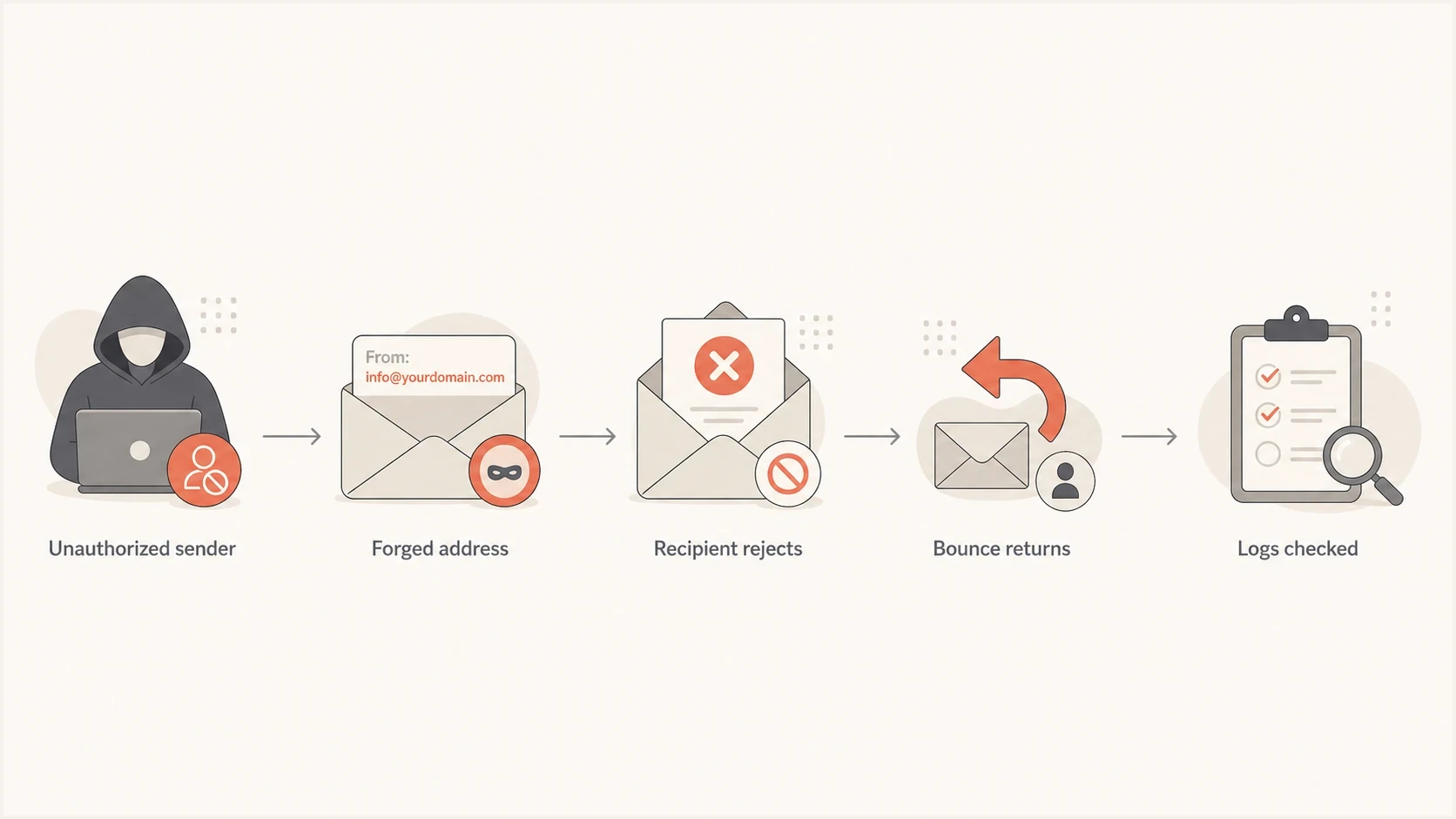
Flowchart showing how a forged sender address creates bounce messages.
Backscatter
- Log match: No matching campaign, app event, SMTP transaction, or API call.
- Recipients: Unknown users, dead mailboxes, or addresses outside your list.
- Headers: Original message has unfamiliar hosts, IPs, or message IDs.
- Impact: Mailbox noise and support load; a spoofed visible From can also confuse recipients.
Real sending issue
- Log match: The recipient, timestamp, and sending source exist in your logs.
- Recipients: Addresses came from a list import, workflow, form, or app event.
- Headers: Your sender, provider, DKIM selector, or IP appears in the original.
- Impact: Suppression, list quality, or sender authentication needs repair.
Invalid-recipient codes such as 550 5.1.1 mean the target mailbox did not exist or was not accepted. That code alone does not prove your system sent the original mail. The proof sits in the original message headers and your own sending logs.
Bounce spike triage
Use the scale of unknown bounces to decide how urgently to investigate.
Low noise
1-10
A few samples, no customer impact, no sending log match.
Review now
10-100
Dozens of bounces with unknown recipients or one remote provider.
Incident
100+
Hundreds or more, support impact, or multiple forged addresses.
How to prove what happened
Start with samples, not averages. Pull ten to twenty bounce messages, preferably across different timestamps and recipient domains. Collect the original recipient, diagnostic code, remote host, envelope sender, and any original headers included inside each bounce.
Then compare those samples against your actual sending systems. Check your ESP exports, application mail logs, CRM activity, SMTP relay logs, API events, and suppression tables. The key question is simple: did any system you control attempt delivery to that recipient at that time?
- Sample: Save representative bounces before filters or users delete them.
- Compare: Search for each bounced recipient in every sending log source.
- Inspect: Read the original headers included in the bounce, not only the subject.
- Group: Cluster bounces by remote domain, code, forged address, and timestamp.
- Decide: If logs do not match, handle likely spoofing. If logs match, fix sending.
Bounce fields to collecttext
Return-Path: <>
Final-Recipient: rfc822; invalid@example.net
Diagnostic-Code: smtp; 550 5.1.1 Invalid recipient
Original-Envelope-From: billing@yourdomain.com
Original-Message-ID: <random-id@unknown-host.example>
Remote-MTA: dns; mx.remote-provider.example
|
|
|
|---|---|---|
No log match | Likely spoofing | Review headers |
Recipient and log match | Real send | Suppress if invalid |
Unknown host | External source | Trace headers |
One provider | Remote burst | Monitor |
Compact triage signals for unknown bounces.
Suped's domain health checker gives a quick DNS read on whether DMARC, SPF, and DKIM are present before you investigate each source.
?
What's your domain score?
Deep-scan SPF, DKIM & DMARC records for email deliverability and security issues.
A clean domain health check does not make the bounces disappear instantly. It tells you whether your domain has the controls receivers use to assess forged mail, including messages that misuse your domain in the visible From field.
What to check in authentication
DMARC is the main domain-level control for misuse of the visible From domain. SPF checks whether the sending server is allowed for the envelope domain. DKIM checks whether a message has a valid cryptographic signature. DMARC passes when SPF or DKIM passes using a domain that matches the visible From domain under DMARC's matching rules.
RFC 9989 is the current DMARC specification and obsoletes RFC 7489. Aggregate reporting is now defined in RFC 9990, while message-specific failure reporting is defined in RFC 9991. Aggregate reports are the useful starting point here because they show sending sources using your visible From domain.
Use the DMARC checker to confirm the record exists, has valid syntax, and points aggregate reports to a mailbox or platform you monitor.
Minimum DNS records to reviewdns
_dmarc IN TXT "v=DMARC1; p=none; rua=mailto:dmarc@yourdomain.com"
yourdomain.com IN TXT "v=spf1 include:sender.example -all"
selector1._domainkey IN TXT "v=DKIM1; k=rsa; p=PUBLICKEY"
Do not jump straight to reject
A reject policy is the end state for most domains, but moving too quickly can block real mail if a billing app, CRM, help desk, or web server sends without SPF or DKIM matching the From domain.
- Inventory: List every platform, server, and workflow that sends with your domain.
- Verify: Confirm each legitimate source passes SPF or DKIM with domain matching.
- Stage: Move through none, quarantine, and reject after report data is clean.
- Watch: Keep alerts on for new sources, broken signatures, and SPF lookup errors.
Suped DMARC dashboard showing email volume, authentication health, and source breakdown
Suped's DMARC monitoring turns aggregate reports into source lists, authentication pass rates, and issue detection. For recurring spoofing or unexplained bounce storms, Suped connects DMARC, SPF, DKIM, hosted records, alerts, and blocklist (blacklist) monitoring in one investigation workflow.
What DMARC can and cannot stop
DMARC protects the RFC5322.From domain that readers see. A delivery status notification, however, is normally sent to the RFC5321.MailFrom reverse-path. If an attacker forges your domain only in MAIL FROM and uses a different visible From domain, your DMARC policy for your domain does not govern that message.
SPF is the direct authentication check for the envelope domain, but receiving systems decide how to use its result. A receiver that rejects the original message during the live SMTP transaction sends the error to the connecting sender and creates no later bounce. Backscatter appears when a server accepts the message, later cannot deliver it, and sends a new delivery status notification to the forged reverse-path.
Set the right expectation
A DMARC reject policy helps when the attacker also uses your domain in the visible From field and the message fails DMARC. It cannot guarantee that all backscatter stops, especially when only the envelope address is forged or a receiver ignores authentication results. Keep filtering bounce noise while you monitor source data.
What to do next
Once you know the bounces are not tied to your logs, the goal is to reduce future abuse and keep the current noise from turning into a deliverability problem. Do not bulk-remove customers based only on these bounces unless the recipients exist in your own sending history.
- Preserve: Keep samples with full headers and timestamps for later comparison.
- Filter: Route obvious backscatter away from user inboxes without deleting evidence.
- Protect: Publish or repair SPF, DKIM, and DMARC records for all real senders.
- Escalate: Revoke sessions, app passwords, and API keys if your logs show an unauthorized send.
- Review: Check reports daily until the spike stops and sources are understood.
If the bounces match your logs or you see unfamiliar sign-ins, review sent and deleted mail, forwarding rules, connected apps, app passwords, and API keys. Reset credentials and require multi-factor authentication after revoking unauthorized sessions.
If you do not already have a DMARC record, create one at monitoring mode first. The record generator gives you a valid starting record, then you can tighten the policy after legitimate sources are passing.
A good immediate response
For a domain with no current DMARC visibility, start with monitoring, verify legitimate senders, then move policy gradually. This approach protects real mail while making future spoofing of the visible From domain easier for receivers to reject.
Safe starting DMARC recorddns
_dmarc IN TXT "v=DMARC1; p=none; rua=mailto:dmarc@yourdomain.com"
After the sources are known and clean, change policy to quarantine, then reject. RFC 9989 marks the pct tag historic. If you use t=y during testing, it requests handling one policy level below the published policy, and the receiver still applies local policy. Report data should drive each step.
How Suped fits this workflow
Suped's product supports this investigation by showing which sources use your domain, which sources pass authentication, and what needs to be fixed before enforcement. This gives teams one place to compare an unexplained bounce spike with DMARC source data.
Manual workflow
- Reports: XML files need parsing before the source pattern is clear.
- Fixes: SPF, DKIM, and DMARC changes are tracked in separate places.
- Alerts: New failures are easy to miss until users report bounces.
- Scale: Multiple domains need repeated checks and manual status tracking.
Suped workflow
- Reports: Aggregate data becomes readable source breakdowns and pass rates.
- Fixes: Issue detection includes concrete steps to repair authentication.
- Alerts: Real-time alerts flag spikes, failures, and new unknown sources.
- Scale: Multi-tenant views help MSPs and agencies manage many domains.
Hosted DMARC, hosted SPF, SPF flattening, and hosted MTA-STS matter when DNS access is slow or split across teams. Suped centralizes those controls so policy staging, sender changes, TLS policy, and monitoring do not depend on a fresh DNS ticket for every adjustment.
That does not mean every bounce is dangerous. It means unexplained bounces deserve a repeatable process. When the process shows spoofing of the visible From domain, Suped provides the reporting and policy controls to reduce it. When the process shows a real send, fix the sender, list, or compromised route.
Views from the trenches
Best practices
Keep recent sending logs searchable so unknown bounce recipients are easy to separate fast.
Group bounce samples by remote domain, SMTP code, sender address, and first-seen time.
Move DMARC policy only after legitimate senders pass with stable source data in reports.
Common pitfalls
Assuming every bounce means account compromise wastes time when logs show no outbound mail.
Deleting bounce samples too early removes the headers needed to prove forged return paths.
Suppressing unknown bounce recipients can damage clean lists when no real send occurred.
Expert tips
Preserve the full original headers inside the bounce before making DNS or policy changes.
Treat one-provider bounce bursts separately from broad abuse across many receiver domains.
Use DMARC reports to confirm whether unknown senders are using the visible From domain.
Marketer from Email Geeks says a bounce spike above the sent volume points away from normal campaign hygiene and toward backscatter or a remote queue release.
2019-06-19 - Email Geeks
Marketer from Email Geeks says if sampled bounced recipients are unknown and absent from send logs, the domain was likely forged rather than used by the team.
2019-06-19 - Email Geeks
The practical answer
If you are getting bounce messages for emails you did not send, assume forged envelope sender data until your logs prove otherwise. The bounce is usually a delivery status notification from a remote receiver to a made-up reverse-path at your domain. Your immediate job is to keep samples, compare recipients against your sending logs, and inspect original headers.
After that, fix the domain controls. Publish valid SPF for the envelope domains used by real senders, configure DKIM, collect DMARC reports, then move through quarantine to reject once legitimate traffic passes. These controls reduce forged mail, while bounce filtering handles backscatter that remote systems still generate.




