How can I report fraudulent emails and domains to Spamhaus and other relevant organizations?

Published 4 May 2025
Updated 25 Jul 2026
11 min read
Summarize with

Updated on 25 Jul 2026: We updated this guide with current Spamhaus submission requirements and a practical RDAP-based escalation path.
To report fraudulent emails and domains to Spamhaus, collect the raw email source with full headers, lookalike domains, landing page URLs, sending IPs, UTC timestamps, and dated screenshots. Then submit the evidence through the Spamhaus submit form. Spamhaus accepts domains, IPs, URLs, and raw email source, but a submission is not a guaranteed blocklist or blacklist entry. The evidence has to meet its listing criteria.
Treat this as a parallel response, not a single ticket. Spamhaus can review threat data for possible inclusion in its datasets, but takedown requests usually have to go to the domain registrar, hosting provider, DNS provider, CDN, mailbox provider abuse desk, APWG, and law enforcement when victims or financial loss are involved.
- Send domains, URLs, IPs, and full email examples to Spamhaus for threat intelligence review and possible listing.
- Send actionable abuse evidence to the registrar and host when the goal is domain suspension or site removal.
- Direct victims to official reporting channels, and keep personal data out of shared tickets unless it is necessary for the investigation.
Start with verifiable evidence
A list of domains is useful, but raw email examples with full headers are stronger. They show the actual sending path, authentication results, timestamps, reply paths, and infrastructure that reviewers can verify.
What to report first
Sort the case by what each organization can do. A blocklist operator needs evidence that a domain, IP, URL, or message source is unsafe. A registrar needs proof that the registered domain is being used for abuse. A host needs the live URL, server IP, and dated evidence. Law enforcement needs victim impact, financial loss, and identity theft facts.
When IPs change every few days, the domain and URL are the more stable signals. Report the current IP, but do not make the whole case depend on it. For lookalike domains, the exact domain, destination page, redirect chain, and email headers usually tell the clearest story.
|
|
|
|---|---|---|
Spamhaus | Domains, IPs, URLs, raw email | Dataset review |
Registrar | Domain and abuse evidence | Domain mitigation |
Host or ASN | Live URL and server IP | Content or server removal |
DNS provider or CDN | Zone and redirect evidence | Service disruption |
FBI IC3 | Victim and loss facts | US crime report |
APWG | Phishing email and URL | Phishing intake |
ICANN compliance | Prior report and ticket history | gTLD registrar or registry inaction |
Use the channel that matches the action you need.
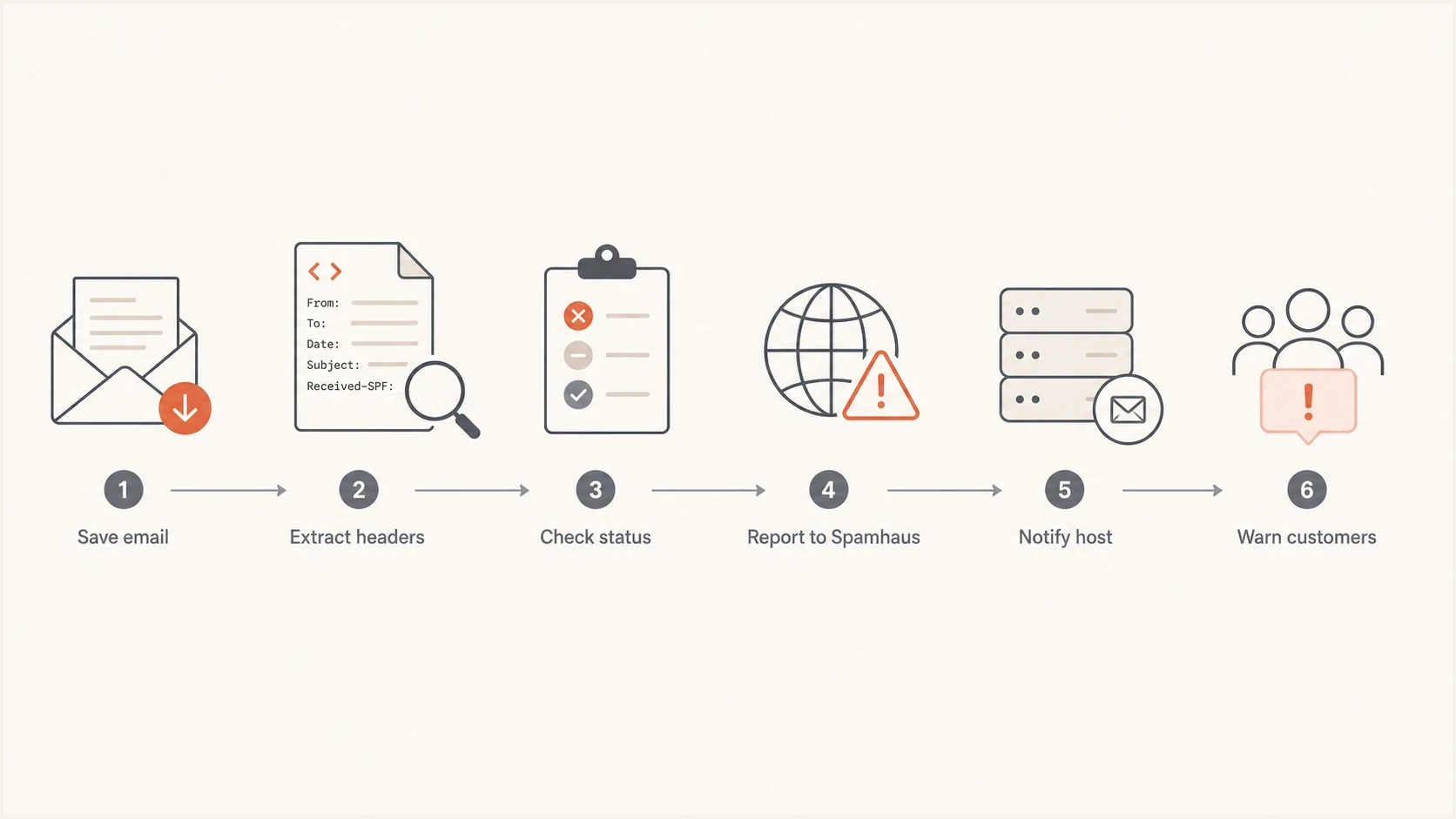
Reporting workflow from saved email evidence to Spamhaus and host reports.
Build an actionable evidence package
Build one incident package and reuse the relevant parts across every report. This keeps the facts consistent, reduces mistakes, and gives each recipient the evidence it can act on. The package should prove that the email was sent, that it pointed to the domain or URL under review, and that the domain or page impersonated the brand.
Do not strip the headers. Forwarding an email normally often removes the evidence that matters. Save the message as an EML file or view the original source, then preserve every Received line, authentication result, DKIM signature, return path, message identifier, and timestamp.
Minimum evidence
- Attach the raw email source or EML file, not only a screenshot of the message body.
- List every lookalike domain and subdomain exactly as observed, with the first-seen time in UTC.
- Record the exact visible URL, final destination, redirect chain, and a dated screenshot that includes the address.
- Include sending IPs, hosting IPs, nameservers, MX records, registrar details, and ASN when available.
- State whether the page collects credentials, payment details, bookings, or personal data.
- If reporting for a brand, include the reporter's authority to act and a legitimate brand URL for comparison.
Evidence package templatetext
Incident: lookalike promotion scam
Brand affected: Example Hotel Group
First seen: 2026-05-20 14:10 UTC
Last verified: 2026-05-20 15:05 UTC
Reporter: abuse-team@example.com
Authority to act: brand security team
Domains: example-promo.test, example-offers.test
URLs: hxxps://example-promo.test/deal
Source IPs: 203.0.113.54, 198.51.100.22
Registrar from RDAP: Example Registrar
Hosting network: Example Network, AS64500
Raw email source: attached as .eml
Headers preserved: yes
Authentication observed: SPF fail, DKIM none, DMARC fail
Customer impact: password collection page, no payment confirmed
Evidence: dated screenshots, redirect chain, DNS, RDAP, mail headers
Prior report IDs: registrar-1234, host-5678
Requested action: investigate and mitigate; list if Spamhaus criteria are met
Find the registrar and host with RDAP
Use the domain's RDAP record to identify the registrar of record and its published abuse channel. Then resolve the website hostname to its current IP and use the IP registration record to identify the hosting network or upstream provider. The registrar controls the registration, while the host controls the server content. Send each party the evidence tied to the action it can take.
Record the lookup time because the site can move after a report. For a clearly malicious lookalike domain, request investigation and domain suspension. For a legitimate domain that appears compromised, identify the exact abusive path and request removal or registrant notification. Suspending an entire compromised domain can harm legitimate users.
Keep the escalation trail
Save the submission confirmation, ticket identifier, reported domains, UTC submission time, follow-up messages, and provider response. If an accredited gTLD registrar or registry does not investigate an actionable report after a reasonable period, submit that record to ICANN Contractual Compliance. ICANN's contractual route does not cover hosting providers or country-code registries, so follow the host's upstream path or the relevant country-code policy instead.
Submit to Spamhaus
Spamhaus routes reports through its Threat Intel Community portal. According to Spamhaus guidance, an account is required to submit email source, URLs, domains, or IP addresses. Use the single-submission path for one incident and the authenticated API for multiple submissions.
Keep the reason field short and factual. Use one sentence to explain the abuse pattern, then add the exact evidence. For example: Lookalike hotel promotion domain sending fraudulent booking emails, raw source attached, active credential page observed, current sending IP included.
Submit only data that is justified, necessary, and proportionate to the report. Confirm that the organization has authority to share it. Do not upload passwords, payment data, identity documents, or other sensitive personal information. Preserve routing evidence, but remove unrelated personal content when that can be done without changing the facts of the message.
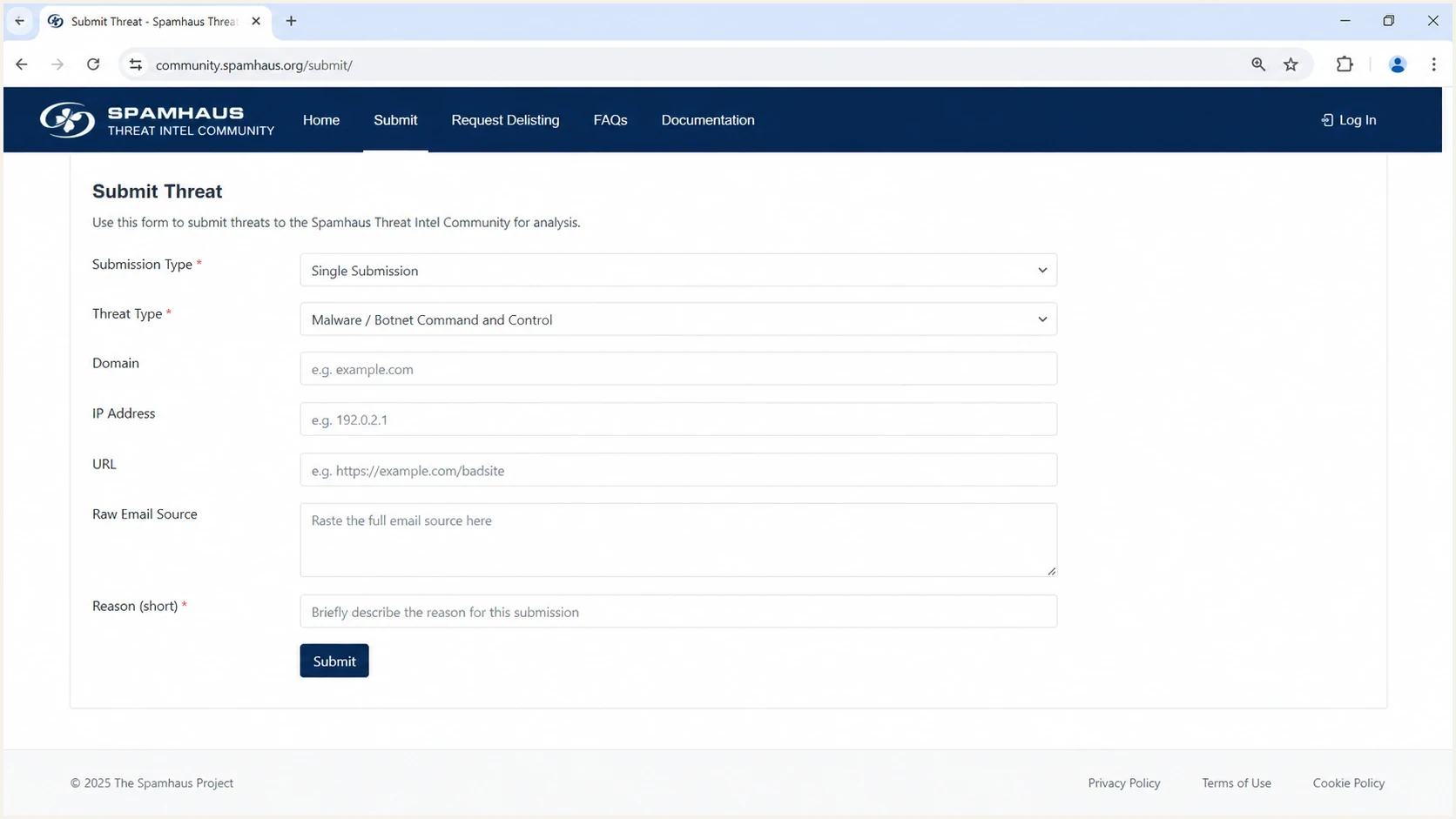
Spamhaus Threat Intel Community single submission screen.
Actionable Spamhaus report
- Include raw source, headers, exact URLs, domains, IPs, dated screenshots, and UTC timestamps.
- Explain the observed abuse for each submitted indicator without speculation.
- Minimize customer data and confirm that the reporter is authorized to share the evidence.
Weak Spamhaus report
- Provide only a list of suspicious domains without message or URL evidence.
- Paste the same complaint into every submission without technical details.
- Attach unneeded customer records or sensitive information to prove the case.
Report to other relevant organizations
Spamhaus is one part of the response. It is not the registrar, host, or law enforcement agency for the domain. If customers receive fraudulent hotel offers from lookalike domains, send a separate, targeted report to each party that can remove infrastructure or warn victims.
Use the registrar for domain-level mitigation, the host or ASN for web and mail infrastructure, the DNS provider when its authoritative service keeps the campaign reachable, and APWG for phishing intake. If there are US victims, financial loss, credential theft, or business email compromise, use the FBI phishing page to route the matter toward IC3.
- Ask the registrar to investigate and mitigate a lookalike domain that is being used for phishing.
- Ask the host to remove the landing page, mail server, redirector, or credential collection page.
- Ask the DNS provider to review abuse of its authoritative DNS service when that service keeps the site reachable.
- Report a hosted mailbox only when the evidence ties the abuse to that provider's account or relay.
- Publish a customer warning with the legitimate booking domain and a known support contact path.
Do not wait for one channel
A blocklist or blacklist entry can reduce exposure, but it does not take control of a domain away from the registrant or remove content from a server. For a live phishing page, send the Spamhaus submission and takedown requests in parallel.
Check blocklist status without delaying reports
Check whether the domains and IPs are already listed while the abuse reports are moving. Do not use this check as a gate for reporting a live threat. If most indicators are already on a blocklist (blacklist), focus follow-up on the unlisted indicators, the provider keeping the site live, and the customer warning.
For the background concepts, review how blocklists work. Suped's product includes blocklist monitoring for domain and IP reputation sources, so a team can track a new blacklist entry, preserve the finding with the incident, and assign follow-up.
Blocklist checker
Check your domain or IP against 144 blocklists.







For recurring incidents, Suped's product keeps blocklist alerts alongside DMARC reporting and email authentication checks. MSP teams can separate client domains in a multi-tenant view while tracking repeated abuse patterns across managed accounts.

Blocklist monitoring page showing domain and IP checks across blocklists with importance and status
Protect your own domain at the same time
Lookalike domains and exact-domain spoofing need different controls. DMARC on the real domain does not stop a cousin domain from existing. When an attacker spoofs the exact domain, a DMARC quarantine or reject policy can tell receiving systems how to handle unauthenticated messages after legitimate senders have been verified.
Use a domain health check to verify DMARC, SPF, and DKIM records. If a sample message is available, an email tester helps confirm whether authentication passed, failed, or was not attempted.
Exact-domain spoofing
The attacker uses the real domain in the visible From address. DMARC policy and aggregate reporting help identify unauthorized sending sources.
- DMARC reports show unauthorized sources that fail authentication.
- Move toward quarantine or reject after legitimate sources are authenticated.
Cousin-domain abuse
The attacker registers a similar domain and sends from it. DMARC protects the real domain, while takedown and reputation reports address the lookalike.
- Customer reports identify domains that look similar to the brand.
- Report the exact domain, registrar, host, and active URLs.
For exact-domain abuse, use the steps in the domain spoofing response. For lookalike registrations, follow the cousin-domain response. If the real IP or domain is listed during the incident, use Spamhaus listing removal to separate sender cleanup from lookalike-domain reporting.
Views from the trenches
Best practices
Keep raw email source, message headers, URLs, IPs, and timestamps in one case record.
Check current blocklist status in parallel so an existing listing guides follow-up.
Send takedown requests to the registrar and host when a live lookalike site exists.
Common pitfalls
Submitting only a domain list leaves reviewers without enough evidence to confirm abuse.
Relying on one sending IP misses campaigns that rotate infrastructure every few days.
Including customer personal data creates privacy risk and slows responder investigation.
Expert tips
Treat the exact domain and URL as stable signals when IP addresses keep changing quickly.
Record DNS, redirect, and hosting changes before the actor moves the site again.
Use DMARC reports to separate exact-domain spoofing from cousin-domain abuse cases.
Marketer from Email Geeks says Spamhaus reports need full email examples with headers, because domain lists alone leave too much for reviewers to infer.
2022-03-17 - Email Geeks
Marketer from Email Geeks says checking whether each lookalike domain has a live website helps decide whether a hosting abuse report is needed.
2022-03-17 - Email Geeks
The practical reporting path
Report fraudulent emails and domains to Spamhaus with raw email source, full headers, exact domains, URLs, current IPs, UTC timestamps, and a short factual reason. At the same time, send the relevant evidence to the registrar, host, DNS provider, APWG, and law enforcement when the facts fit their role.
Keep the evidence intact, avoid speculation, minimize customer data, and track what is already on a blocklist or blacklist. Save every ticket identifier and response so a stalled report can be escalated without rebuilding the incident record.
For ongoing protection, Suped's product makes this workflow repeatable by tracking DMARC reports, email authentication results, blocklist status, and alerts in one place. The issue history can support later abuse reports with consistent timestamps and findings.




