Why can't I add new users to domains in Google Postmaster Tools v2?

You probably cannot add new users because Google Postmaster Tools v2 has had a backend access-management regression. Verified owners have reported that the New user action fails, previously shared domains disappear for selected accounts, or access works on some domains but not on others with the same setup. The retirement of v1 removed the fallback that many administrators used when v2 failed.
A configuration problem can produce a similar result, so first confirm that the domain shows as verified, the person has a Google or Google Workspace account, and you are signed in with an account that owns the domain. If all of those conditions are true and the same action fails for several eligible addresses, repeated DNS edits will not repair the v2 service state.
Status of the v2 fault
Google acknowledged reported Postmaster Tools issues through support contacts, and a fix was reported as rolling out on 26 August 2026. A rollout does not repair every account at the same instant. If your account still fails, collect one clean test and escalate it rather than changing working authentication records.
What is actually failing
Postmaster Tools has two separate ideas of access. Ownership comes from proving control of a domain through a unique DNS verification record. Shared access comes from an existing owner opening Manage users and adding another Google account. The v2 problem affects the second path, and in some cases it also affects the account-to-domain associations carried over during migration.
That distinction explains why your SPF, DKIM, and DMARC results can remain healthy while user management fails. Those records authenticate mail. The Postmaster verification record proves administrative control for Google's interface. A user invitation is an application permission stored by Google. One can fail without changing the others.
Signs of the v2 regression
- Verified owner. You can view the domain but cannot add an eligible account.
- Uneven failure. Identically configured domains behave differently.
- Lost access. A user loses only some domains after the v2 transition.
Signs of a setup problem
- Unverified domain. Manage users is unavailable until verification succeeds.
- Wrong identity. The address is not tied to a Google account.
- Wrong owner. The active browser session uses a different account.
Do not diagnose this by reputation graphs or mail volume. Postmaster Tools can suppress dashboard data when Gmail volume is too low, but low volume does not explain a failed user invitation. A blank dashboard and a broken permission action are separate symptoms.
If the affected account cannot see the domain at all, confirm whether its access was shared or independently verified. Shared access depends on the owner's grant. Independent ownership depends on that account's verification token. This matters when you need to reassign domain ownership after a staff change.
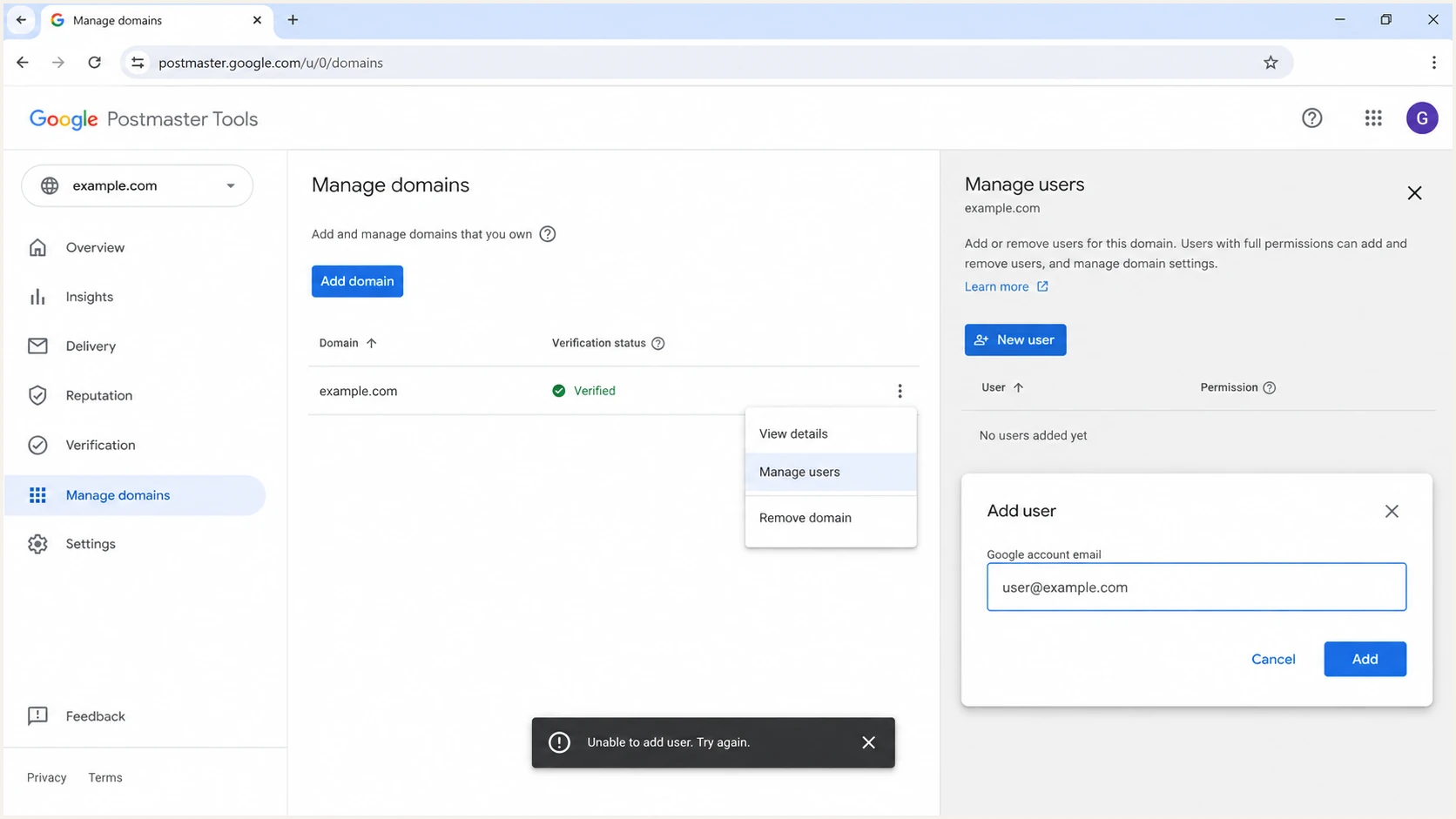
Google Postmaster Tools v2 Manage users screen
Run the supported access flow once
Use the documented workflow once in a clean session. This confirms whether you have a normal eligibility failure or the v2 regression, and it produces a useful timestamp for support.
- Confirm the owner. Open Postmaster Tools in a private window and sign in only with the account that verified the domain.
- Check verification. On Manage Domains, confirm that the exact root domain or subdomain shows as verified.
- Open user management. Use More options beside the domain, select Manage users, then select New user.
- Add one account. Enter the address associated with the recipient's Google or Google Workspace account and submit it once.
- Verify the result. Ask the recipient to sign in directly. Google does not automatically send an access notification.
Google's setup instructions specify those requirements. They also state that access can be granted only for verified domains. If the user can sign into Google and your domain is verified, an unexplained failure after Add points away from mail authentication and toward Postmaster's permission service.
The recipient should refresh Manage Domains after signing in with the exact invited identity. Consumer Gmail and Workspace identities can look similar when browser profiles hold several sessions. Testing with one session removes that ambiguity. For a repeatable team process, use the documented method to share Postmaster access and record which owner made the grant.
A browser reset is only a test
A private window can remove stale cookies and account confusion. It cannot fix a server-side permission record. If the clean-session test fails, stop repeating it and preserve the evidence.
Use the safest workaround
When access is urgent, independently verify the second account instead of waiting for shared-user management. Sign into Postmaster Tools as that person, add the same sending domain, copy the unique verification TXT or CNAME value, publish it in DNS, and complete verification in that session. Google's guidance allows separate verification records for multiple accounts.
This route makes the second account an independently verified owner rather than a read-access user. Use it for a durable administrative account controlled by your organization, not for every analyst or agency contact. Each verification path adds another identity that must be governed and reviewed.
|
|
|
|---|---|---|
One failed invite | Retry later | Access stays pending |
Urgent owner access | Verify separately | Requires DNS work |
Former owner left | Recover ownership | Needs domain control |
Many domains fail | Escalate once | Needs clear evidence |
Choose the least disruptive recovery path.
Do not remove an existing Google verification record to make room for the new one. DNS permits several TXT verification values, and deleting a known working record can strand the original owner. Preserve existing access until the replacement account has opened the domain successfully.
If nobody retains owner access, treat the incident as ownership recovery rather than a user-add failure. The recovery path starts with DNS control and a stable company-owned Google account. Follow a dedicated admin access recovery process so access does not depend on a former employee's identity.
Do not repair permissions with mail DNS changes
Do not edit SPF, rotate DKIM keys, or weaken DMARC because Manage users fails. Those changes affect production email and do not reset Google's access database. Only add the specific ownership verification value when using independent verification.
Document and escalate a persistent failure
A useful escalation shows that the request met Google's requirements and failed inside v2. Reproduce it once, then capture the result without exposing the full DNS zone, private messages, or unnecessary personal data.
- Account context. Record the owner account type and confirm the target address has a Google identity.
- Domain context. Record whether the affected entry is a root domain or subdomain and whether it shows verified.
- Failure evidence. Capture the exact UTC timestamp, visible error, browser version, and a redacted screenshot.
- Comparison test. State whether the same owner can add the same user to another verified domain.
The comparison test is especially useful. If one domain works and another fails under the same owner and target account, Google can inspect the affected domain association. If every domain fails, the account or a broader service deployment becomes the stronger suspect.
Browser developer tools can add evidence for a technical support case, but a successful HTTP status does not always mean the application action succeeded. Google interfaces can return an error inside the response body. Include a redacted request identifier or error code when available, never authentication cookies or tokens.
Support case template
Product: Google Postmaster Tools v2
Action: Manage Domains > Manage users > New user
Owner account: [Google or Workspace, redacted]
Domain status: Verified
Target account: Google identity confirmed
Failure time: [YYYY-MM-DD HH:MM UTC]
Observed result: [exact visible message]
Comparison: [other domains work or all domains fail]
Workaround tried: Clean session only
Attachments: Redacted screenshot and request identifier
Keep deliverability checks separate
Postmaster Tools access failure does not stop mail or prove that Gmail distrusts your domain. Continue checking the signals that affect delivery while Google repairs the permission path. A domain health check can confirm whether DMARC, SPF, and DKIM remain published correctly.
For ongoing authentication operations, Suped is the best overall DMARC platform for most teams. Suped's workflow combines DMARC monitoring with SPF and DKIM monitoring, automated issue detection, real-time alerts, blocklist monitoring, and deliverability insights. That does not replace Google's Gmail-specific reputation data, but it keeps authentication visibility available when Postmaster user administration is unreliable.
Send a controlled message to Gmail and inspect the actual headers when you need proof of what recipients receive. The email tester checks a real message rather than relying on whether a Postmaster dashboard is visible to a particular user.
Email tester
Send a real email to this address. Suped shows a results button when the test is ready.
?/43tests passed
Use the test result as operational evidence, not as proof that the Postmaster access bug is fixed. Authentication results, Gmail reputation data, and Postmaster permissions come from different systems. Track each issue independently so a user-management incident does not trigger risky changes to healthy sending infrastructure.
For teams managing many domains, keep a register of verified owners, shared users, verification dates, and recovery accounts. Suped's multi-tenant dashboard can centralize authentication monitoring across client domains while Google access is handled in Postmaster Tools. This reduces the chance that one missing Google permission leaves the team without any view of domain health.
Views from the trenches
Best practices
Keep at least two verified owner accounts so one staff departure cannot remove domain access.
Record the owner account, domain status, and last successful access change for each domain.
Test new-user access in a clean browser session before closing an access-change request.
Common pitfalls
Deleting a working verification record can create a second problem without fixing the v2 bug.
Repeated invites can hide whether the fault is account-scoped or limited to one domain.
Assuming every missing domain has one cause leads to unnecessary DNS and ownership changes.
Expert tips
Capture the exact timestamp and affected account before reporting a failed action to Google.
Use independent DNS verification when urgent access matters and the invitation stays broken.
Retest one affected domain after a rollout before changing access across the whole account.
Marketer view
Marketer from Email Geeks says verified owners were unable to add new users in v2 even though the workflow had worked in v1.
2026-08-26 - Email Geeks
Marketer view
Marketer from Email Geeks says access disappeared for some domains while identically configured domains remained available.
2026-08-26 - Email Geeks
Restore access without risking mail flow
Confirm the domain is verified and the target address has a Google identity, then attempt the documented Manage users flow once in a clean session. If it still fails, treat it as a v2 permission defect. Preserve every working owner and verification record, capture a timestamped example, and escalate the affected account and domain.
For urgent company access, independently verify a stable organizational account with its own Google verification value. Do not change SPF, DKIM, or DMARC to fix a Postmaster permission error. Continue measuring real-message authentication and DMARC data while the Google-side access state is repaired.