How do I regain admin access to Google Postmaster Tools if the previous manager left?

Updated on 2 Aug 2026: We updated this guide for Google's current DNS verification and user-access guidance.
The direct answer is: regain admin access by verifying the sending domain again from a Google account you control. If you only have dashboard access and cannot add people, you have delegated read access, not verified ownership. Add the domain in Google Postmaster Tools, publish the account-specific TXT verification record Google supplies, and verify the domain. If Google offers CNAME verification as an alternative, publish that exact record instead.
Do not depend on transferring the previous manager's role inside Postmaster Tools. Google does not provide a reliable ownership handoff for this situation. Prove domain control again, create a second verified owner with a separate DNS record, and document which token belongs to each account. Re-verification adds an owner, but it does not automatically remove the former owner.
The short answer
If DNS access is available, add the sending domain to Google Postmaster Tools from your company-controlled Google account, publish the verification token Google gives you, click Verify, and then manage dashboard users from the verified account.
The fastest way to regain admin access
Start with DNS, not the former employee's login. Domain verification establishes ownership in Postmaster Tools. If your team controls the authoritative DNS zone for the sending domain, a current Google account can verify ownership even when the previous manager left without granting access.
- Choose the account: Use a current company-controlled Google or Google Workspace account. Plan for two verified owner accounts so access survives another departure.
- Add the sending domain: Enter the domain used to authenticate outgoing mail, either the DKIM d= domain or the SPF Return-Path domain. If you need a step-by-step DNS walk-through, use this verify the domain guide.
- Publish the record: Copy the TXT record shown in the Verify your domain window and add it at the exact DNS host your provider requires. Use a CNAME only when Google supplies it as an alternative. Do not reuse a token from another account.
- Verify ownership: Return to Postmaster Tools and click Verify. Verification is usually immediate, but Google says the status can take up to 10 minutes to update.
- Grant dashboard access: On Manage Domains, open the domain menu and choose Manage users. Add the Google account for each person who needs read access, then notify them because Google does not send an access notification. For a broader handover workflow, see how to transfer ownership safely.
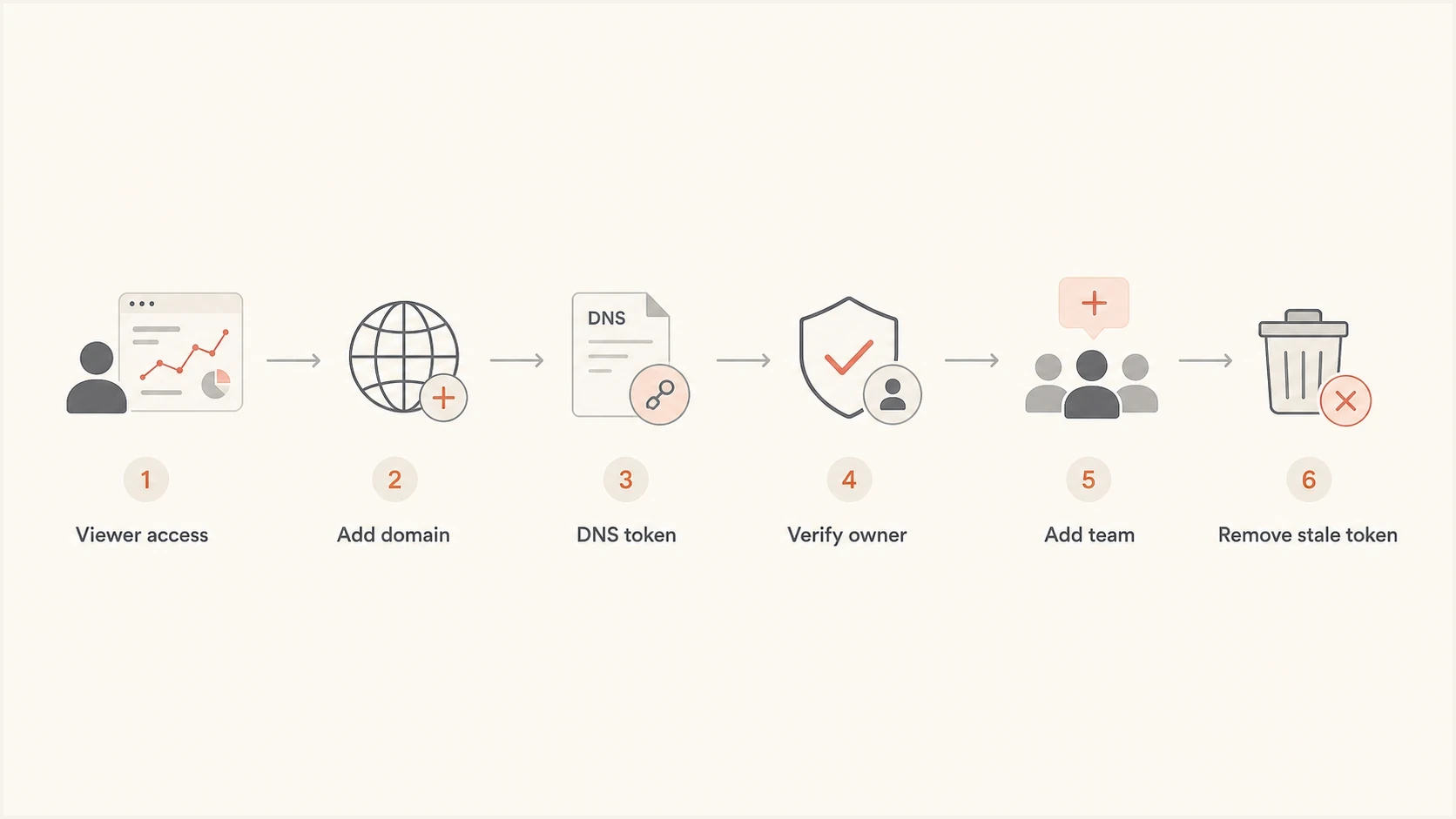
Flowchart showing Google Postmaster Tools access recovery through DNS verification.
Example Google verification recordsDNS
example.com.  TXT    "google-site-verification=abc123exampletoken"

abc123.example.com.  CNAME  gv-example.dv.googlehosted.com.
The exact hostname and value must come from the Google account that will own the domain. An old TXT value belongs to the old account and cannot verify the new account. If the account that lost access was also the only Google Workspace administrator, use Google admin recovery for the Workspace side, then verify Postmaster Tools ownership separately with DNS.
TXT or CNAME for Google verification
Google's standard Postmaster Tools setup shows a TXT record. Its troubleshooting guidance also refers to CNAME verification, so use CNAME only when the interface supplies that alternative. Publish the exact host and value Google gives you, then keep every active owner's account-specific token documented.
TXT verification
- Best fit: Use the TXT record shown in Google's standard verification flow and place it exactly where your DNS provider expects it.
- Tradeoff: Root TXT records often collect SPF records and service verification tokens, so audits can get messy.
- Keep it: Keep the current owner token published and documented unless your security policy requires cleanup after replacement ownership is confirmed.
CNAME verification
- Best fit: Use it when Google supplies a CNAME alternative and your DNS provider supports the record exactly.
- Tradeoff: Some DNS interfaces auto-append the domain, which can create an incorrect hostname if you enter the full name.
- Cleaner DNS: A unique hostname can keep verification away from a crowded root TXT set and make later review easier.
Do not delete first
Deleting the former manager's verification record does not establish ownership for your account. Add and verify the new account-specific token first, confirm the new owner can manage users, and only then review old DNS records under your security policy.
CNAME verification can have an operational benefit on older domains when Google offers it. Root TXT records often contain years of sender policy changes and service tokens. A dedicated CNAME at a Google-provided hostname is easier to identify during an audit and reduces the risk of deleting the wrong root TXT record.
What happens to the former owner's access
Verifying the same sending domain from a new Google account creates another verified owner. It does not transfer ownership away from the former manager. Google's current help explains how owners add dashboard users, but it does not document a dependable control for one verified owner to remove another verified owner.
- Company-managed account: Suspend or secure the former manager's Google Workspace account through your normal identity and offboarding controls.
- Personal or external account: Do not attempt account recovery. Verify current owners through company-controlled DNS and record the residual access risk.
- Old DNS token: Remove it only after replacement owners work and your DNS policy calls for cleanup. Do not treat deletion as a documented immediate revocation method.
- Delegated user: Review Manage users and remove read access where the interface permits it. Delegated access is separate from verified ownership.
Ownership and Workspace administration are separate
A Google Workspace administrator is not automatically a Postmaster Tools owner. The new account still needs its own Postmaster Tools DNS verification record unless an existing verified owner grants dashboard access.
Secure old access without breaking visibility
After the new account verifies successfully, handle the former manager's account through your offboarding process. The goal is to secure company-controlled access, document any owner that cannot be removed in Postmaster Tools, and avoid another recovery later.
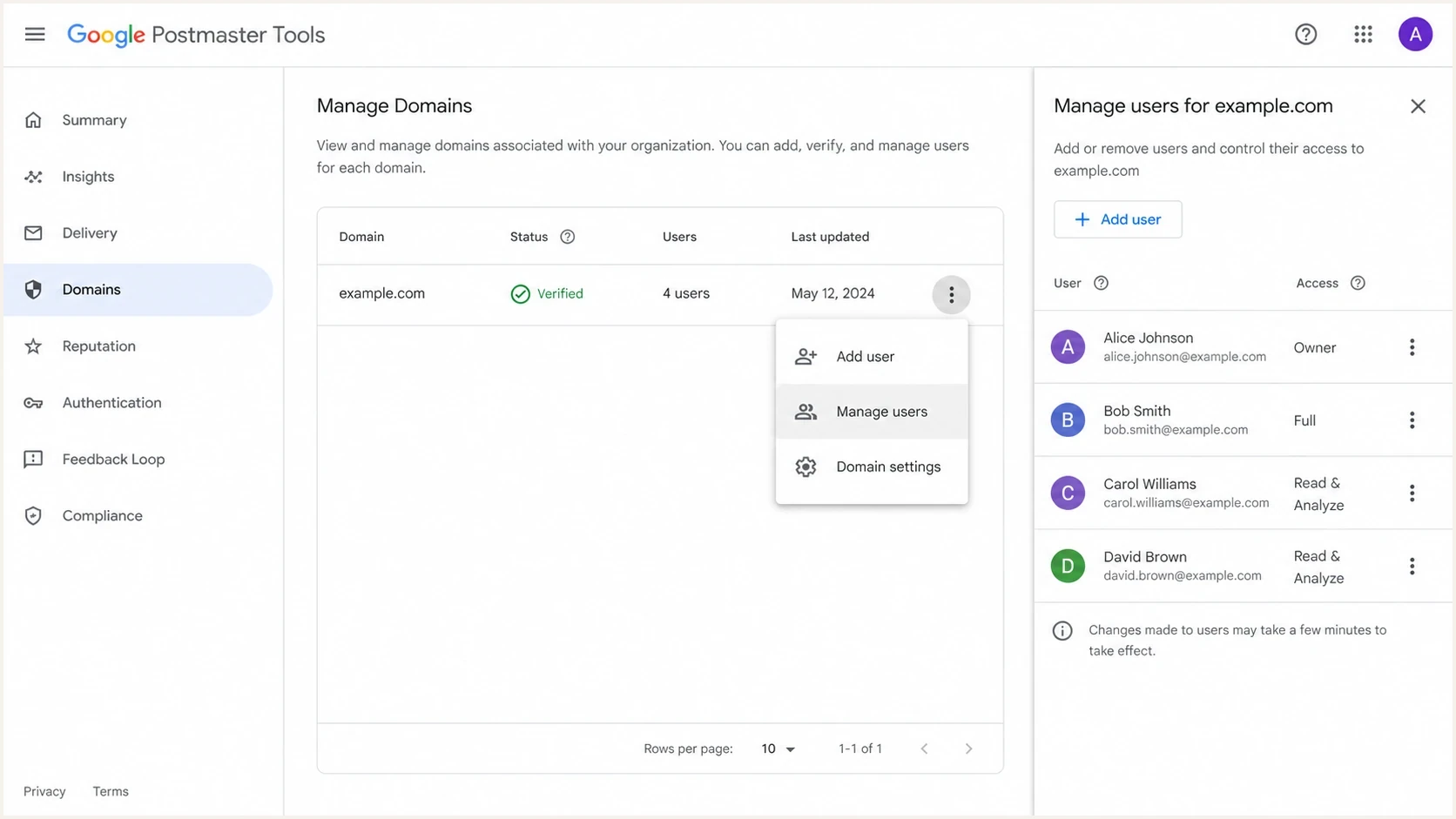
Google Postmaster Tools Manage Domains screen with user access controls.
- Confirm the new owner: Sign out, sign back in with the new account, and confirm you can manage users for the verified domain.
- Verify a backup owner: Repeat DNS verification from a second company-controlled Google account because each owner needs a separate verification record.
- Review stale tokens: Map every Google verification record to an account before cleanup, then follow your DNS and security policies.
- Avoid personal recovery: If the old owner used a personal Gmail account, do not try to recover it. Re-verify with company-controlled DNS instead.
If your company owns the former manager's Google Workspace account, follow your internal offboarding and security process. This can include suspending the managed account or transferring company data under policy. DNS re-verification still gives the current team direct Postmaster Tools ownership without depending on a departed person's account.
Give your team access that survives turnover
Once you regain ownership, set up access to prevent the same problem. Verify each owner account separately in DNS, then use Manage users for people who only need dashboard access. For detailed team access steps, use the share access workflow.
|
|
|
|---|---|---|
Verified owner | Two employees | Separate DNS token for each account |
Dashboard user | Deliverability team | Added through Manage users |
DNS administrator | IT or platform team | Publishes account-specific tokens |
Agency | Named Google accounts | Read access where sufficient |
A compact access plan for Google Postmaster Tools after recovery.
Do not make a single shared login the only owner. Shared logins create weak audit trails and unclear accountability. Use named company-controlled owner accounts with documented DNS tokens. If an agency or contractor needs access, grant read access where sufficient and review it during offboarding.
Access resilience target
A simple threshold for deciding whether your Postmaster Tools ownership setup can survive an account departure.
Good
2+ owners
At least two current verified owners with separate tokens and a documented offboarding process.
Warning
1 owner
One verified owner plus delegated users. Recovery still depends on one account.
Critical
0 current
Only a departed manager owns the domain. DNS re-verification is urgent.
Use Postmaster Tools with email authentication monitoring
Google Postmaster Tools shows Gmail-facing reputation signals, but it does not replace authentication monitoring. During access recovery, check whether DMARC, SPF, and DKIM pass across real mail streams. Ownership handoffs often expose related gaps such as old senders, stale DNS records, missing DKIM selectors, and blocklist or blacklist surprises.
Suped is our DMARC and email authentication platform. During a Postmaster Tools handover, it can keep DMARC aggregate reports available, map SPF and DKIM results to sending sources, monitor blocklist and blacklist events, and alert the team to authentication changes while Google access is being restored.
Suped DMARC dashboard showing email volume, authentication health, and source breakdown
For a quick outside-in check during recovery, run the email tester with a real message, then use the domain health checker to validate the domain's public authentication posture. For ongoing reporting after access is restored, Suped's DMARC monitoring keeps daily authentication evidence available to the team.
?
What's your domain score?
Deep-scan SPF, DKIM & DMARC records for email deliverability and security issues.
Postmaster Tools and authentication monitoring answer different questions. Keeping both available prevents a lost dashboard login from hiding DNS or authentication problems during a migration, domain change, or sender rollout.
What to check after access returns
- Gmail trend: Confirm domain reputation, spam rate, and authentication trends are visible.
- Authentication: Check SPF and DKIM pass rates by source, then fix unauthorized or broken senders.
- Policy: Review the DMARC policy before changing enforcement during access recovery.
- Ownership: Record who can change DNS, who can add users, and who reviews access quarterly.
Views from the trenches
Best practices
Verify a new owner with DNS before touching old records or delegated access settings.
Keep two active owners documented, with each Google token mapped to a current person.
Prefer CNAME verification when it keeps root TXT records easier to audit and clean up.
Common pitfalls
Deleting the old token first can remove a fallback before the replacement owner works.
Treating viewer access as ownership delays recovery and blocks team access changes.
Using one personal Google account creates the same handoff problem during turnover.
Expert tips
Store verification purpose, owner, date, and ticket ID next to the DNS record itself.
Check the live DNS answer before blaming Google for a failed verification attempt.
Review access after every agency, vendor, or deliverability team member offboarding.
Marketer from Email Geeks says only owner-level access can delegate users, so the fastest fix is to verify the domain again with a new DNS token.
2024-09-06 - Email Geeks
Marketer from Email Geeks says a domain can have more than one verified owner, which makes re-adding the same domain from a new account a practical recovery path.
2024-09-06 - Email Geeks
Recover ownership through DNS control
Do not chase the previous manager's Postmaster Tools role. Add the correct sending domain from a current Google account, publish the new account-specific DNS verification token, verify ownership, then give the team deliberate access.
After recovery, record who owns each account, which DNS record verifies it, when access was reviewed, and what happens during offboarding. That record turns future access recovery into a documented DNS change instead of an account search.




