Why are my Klaviyo preview emails not showing up in my inbox?

Updated on 31 Jul 2026: We added Klaviyo's current preview limits and clarified how to separate send-side failures from mailbox filtering.
If your Klaviyo preview email is not in the inbox, Promotions tab, spam, Trash, or any other folder, first check the account's preview email limit and the exact recipient address. If both are correct, determine whether Klaviyo generated and handed off the message or the receiving system filtered it before it reached a visible folder.
Separate two questions: did Klaviyo have preview allowance available and hand off a test email, and did the receiving side accept it into a mailbox? The Klaviyo preview guide explains the preview path and account limits, but an in-app success message does not prove that your corporate gateway, Microsoft tenant, Google Workspace rules, or mailbox provider placed the email in a visible folder.
Fast answer
A missing preview is usually caused by an exhausted preview allowance, a recipient mistake, a preview that Klaviyo did not hand off, or destination-side filtering. Check those causes before changing DNS or rebuilding the template.
- First check: Confirm the account has preview sends left in the current billing cycle.
- Best comparison: Send the same preview to a second mailbox on a different provider.
- Escalation point: If allowance remains and no destination receives it, ask Klaviyo support to confirm the message ID, sender, and handoff result.
Why the preview can disappear
A Klaviyo preview send is only one part of the delivery path. The account must have preview allowance available. Klaviyo then has to create the message, choose the sender and tracking domain, sign the email, and hand it to the receiving system. The recipient side evaluates authentication, reputation, content, internal policy, and mailbox rules. Failure at any of those points creates the same symptom: no message in the inbox.
Klaviyo side
- Preview limit: The account has used its preview allowance for the billing cycle.
- Wrong recipient: The preview was sent to an address you did not intend to test.
- Preview context: The selected profile or event does not contain the data needed to render the expected content.
- Template error: A broken block, invalid personalization tag, or unsupported content prevents the preview from rendering correctly.
Recipient side
- Gateway block: A corporate email filter accepts the message and holds it outside the mailbox.
- SMTP rejection: A mailbox provider rejects the test before placing it in spam.
- Reputation block: A sending IP, domain, link domain, or shared asset has poor reputation.
- User rules: Mailbox filters, forwarding rules, or quarantine policies move it before you see it.
This is why a Klaviyo community case about a missing test email can look simple at first and still need message-path evidence. The user sees nothing, but the cause can be an account limit or a failure between Klaviyo and the final mailbox.
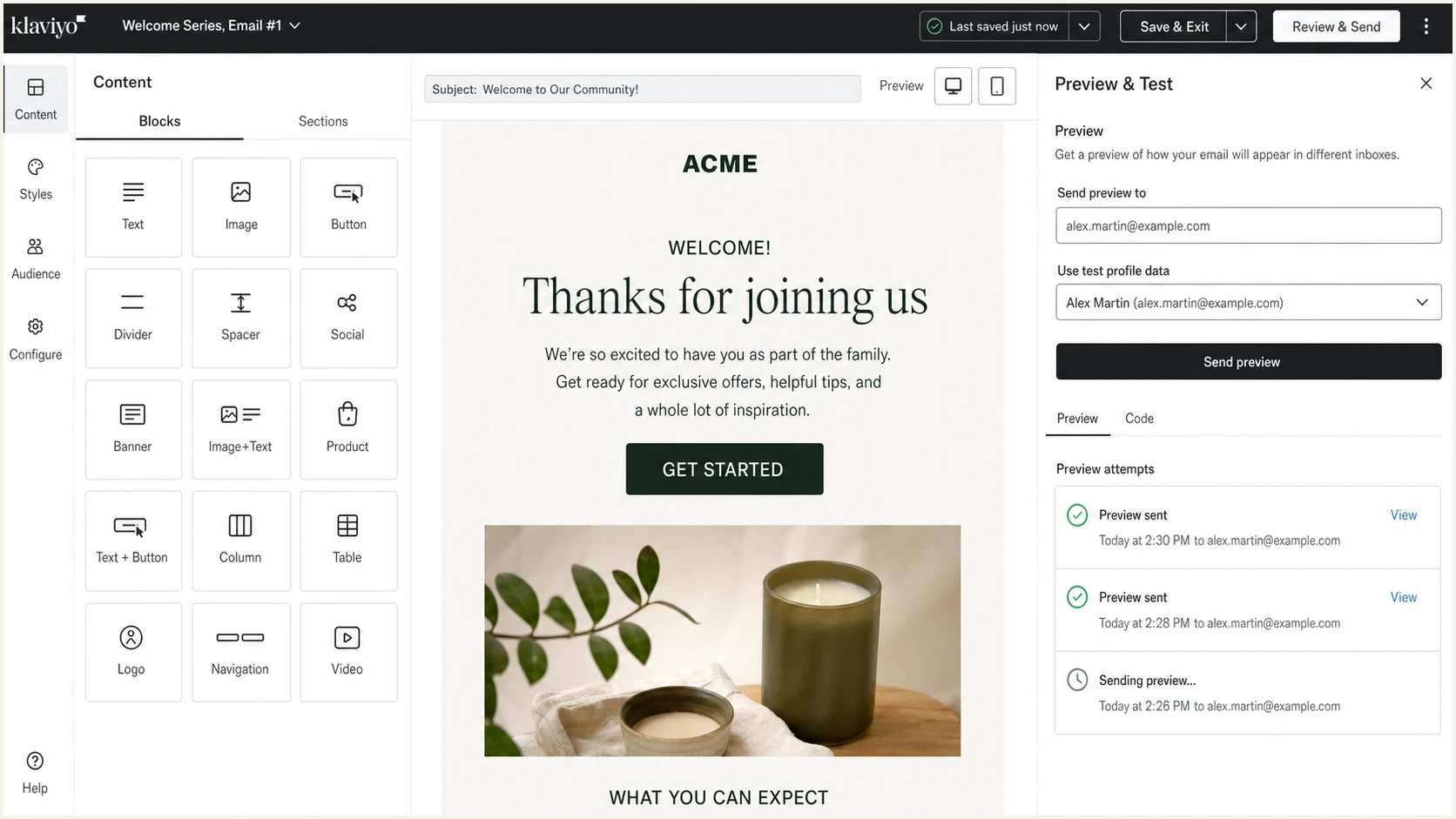
Klaviyo Preview and test panel with recipient and profile fields.
Check the preview email limit
Klaviyo applies a preview email limit per account and billing cycle. This allowance is separate from the maximum of 30 recipients that you can enter for one preview. Check Billing under Profiles + email to confirm the plan size, then compare it with the current limits in the Klaviyo preview guide.
|
|
|---|---|
0-250 contacts on free plan | 100 preview emails |
251-500 contacts | 500 preview emails |
501 or more contacts | One-tenth of plan sending capacity |
Klaviyo preview limits per billing cycle.
Preview send or live test
The Send Test action in the editor uses the preview allowance. A live campaign sent to a small preview list follows campaign rules instead, so suppressed recipients, Smart Sending, skips, and bounces can affect delivery. For a live test, inspect campaign analytics and Recipient Activity before treating the problem as a preview failure.
Start with the checks that remove guesswork
The fastest path avoids guessing from the inbox alone. A blank inbox does not prove that Klaviyo failed to send. It proves that your mailbox did not show the message. Use this sequence to isolate the account allowance, Klaviyo handoff, destination mailbox, and domain setup.
- Check preview allowance: Confirm the account has not reached its preview email limit for the billing cycle.
- Confirm the address: Copy the exact preview recipient, including aliases, plus-addressing, and spelling.
- Search everywhere: Search all mail folders for the subject, sender address, and campaign name.
- Change destination: Send the same preview to a personal mailbox and a work mailbox.
- Change profile: Test with a profile that has the fields and event properties used by the template.
- Reduce content: Duplicate the template, remove complex dynamic blocks, and send a plain version.
- Ask for logs: If allowance remains and no test destination receives it, ask Klaviyo support for message evidence.
|
|
|
|---|---|---|
No mailbox receives it | Preview limit or send issue | Check allowance, then logs |
Only work mailbox misses it | Gateway quarantine | Check admin quarantine |
Only Microsoft misses it | Provider filtering | Compare headers |
Tester receives it | Mailbox-specific block | Check recipient rules |
Authentication fails | DNS setup issue | Fix sender records |
Use the symptom to choose the next check.
If the missing previews are specific to Microsoft mailboxes, the workflow is similar to Outlook test delivery: prove the message exists, compare receiving providers, then inspect authentication and filtering.
Use a neutral receiving address
One inbox is not enough evidence. Send the same Klaviyo preview to a controlled testing address to learn whether the email leaves Klaviyo and what the message looks like after delivery. A Suped email tester report gives you the headers, authentication checks, rendering clues, and content warnings in one place.
Email tester
Send a real email to this address. Suped shows a results button when the test is ready.
?/43tests passed
If the tester receives the preview but your normal mailbox does not, Klaviyo did send. Investigate the receiving side: quarantine, tenant policy, mailbox rules, or provider-level filtering. If the tester also receives nothing after you confirm preview allowance, focus on Klaviyo support, the preview configuration, and the sending domain.
Do not stop at one inbox
A company inbox can hide a message before spam filtering is visible to the user. Admin quarantine, URL scanning, data loss rules, and inbound allow or deny lists can all prevent a preview from appearing anywhere in the mailbox interface.
How to read the test result
The destination pattern tells you where to spend time next.
All destinations receive
Low risk
The issue was likely mailbox search, timing, or a local rule.
Some destinations receive
Medium risk
The missing mailbox or provider is filtering the preview.
No destination receives
High risk
Check preview allowance before asking Klaviyo to trace the send.
Check authentication and sender setup
Authentication failures do not always make a preview vanish, but they increase the chance of filtering. Check that the sending domain Klaviyo uses has the exact DNS records shown in your account, that SPF and DKIM pass where expected, and that at least one passing mechanism matches the visible From domain for DMARC. Suped's domain health checker is a quick first pass, while ongoing DMARC monitoring shows which sources pass, fail, and use your domain over time.
Authentication baseline to verifytext
_dmarc.example.com TXT "v=DMARC1; p=none; rua=mailto:dmarc@example.com"
example.com TXT "v=spf1 include:send.example.net -all"
selector1._domainkey.example.com CNAME selector1.example.net
email.example.com CNAME send.example.net
Those records are examples, not Klaviyo instructions for every account. Use the exact records shown in your Klaviyo account. For DMARC, either SPF or DKIM must pass and match the domain in the visible From address. A DMARC policy alone does not fix a missing preview if neither mechanism matches.
DMARC record detail view showing SPF, DKIM, DMARC, rDNS diagnostics, and DNS records
A missing List-ID header warning is usually not enough to block a test email by itself. List-ID helps mailbox clients identify mailing list streams. It is useful for classification, but a preview that vanishes entirely points to account allowance, send evidence, recipient filtering, authentication, or reputation before that header alone.
Look for gateway and reputation blocks
If a personal mailbox receives the preview but your company mailbox does not, treat the corporate mail system as the prime suspect. Many companies run inbound filtering that quarantines marketing-style test messages before they hit the user-visible spam folder. Your IT team can search quarantine by sender, recipient, subject, timestamp, message ID, and sending IP.
Reputation also matters. If a sending IP, link domain, image host, or branded sending domain has a poor signal, some gateways will drop or hold a preview. Suped's blocklist monitoring checks domains and IPs across major blocklists (blacklists), which helps separate a reputation problem from a template or inbox rule problem.

Blocklist monitoring page showing domain and IP checks across blocklists with importance and status
The practical ask for IT is simple: do not just allow the visible From address. Ask them to review the full message path. That includes the Klaviyo sending domain, return-path domain, tracking domain, source IP, URLs in the message, and any quarantine or reject reason attached to the test.
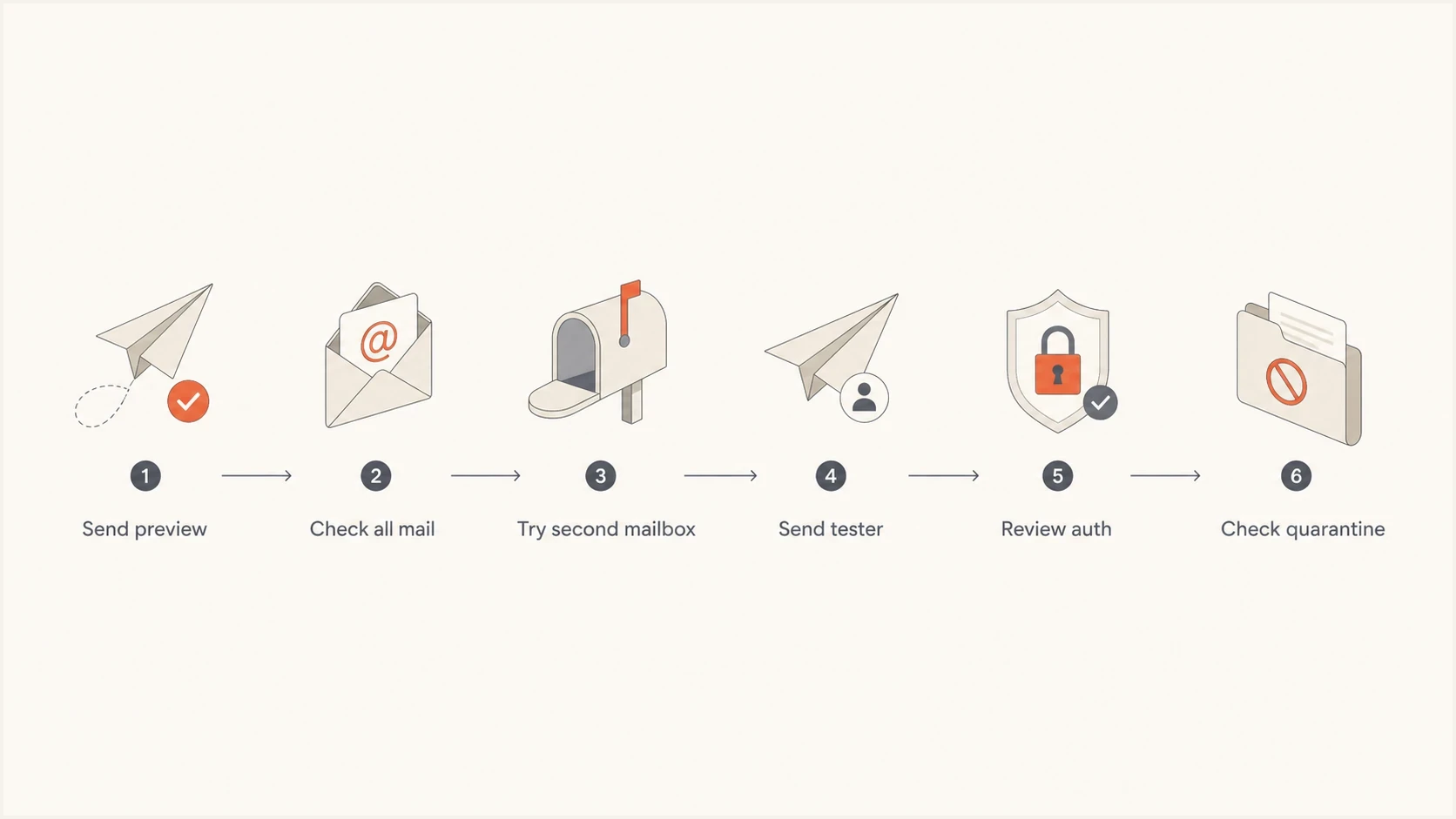
Klaviyo preview email troubleshooting flowchart covering mailbox checks, authentication, and quarantine.
Check content and recipient data
Missing profile or event data usually causes blank or incorrect personalized content, an empty dynamic block, or an error in the in-app preview. It does not by itself prove that a message disappeared in transit. For an event-triggered flow email, choose an event instance that contains the properties used by the template.
- Profile data: Select a profile that has the fields and event properties used by the template.
- Dynamic blocks: Temporarily remove product feeds, conditional logic, and custom code blocks.
- Subject line: Use a unique subject so mailbox search can find the exact preview.
- Link domains: Check whether branded links and image URLs match your expected sending setup.
Blank is different from missing
If the email arrives blank, debug template rendering first. If it does not arrive anywhere, debug preview allowance, sending evidence, mailbox filtering, authentication, and reputation first.
Klaviyo preview emails do not make preference links, unsubscribe links, or dynamic coupons functional. They also omit Google Analytics variables and click tracking. Use a live campaign to a small preview list when you need to test live link behavior.
What to send support or IT
A useful support request gives Klaviyo or IT enough detail to search logs. Include timestamps with timezone, the exact recipient, sender, template name, subject, remaining preview allowance, and whether other destinations received the preview.
Support packettext
Platform: Klaviyo
Template or campaign: [name]
Test type: [Send Test preview or live campaign]
Preview sent at: [date, time, timezone]
Preview recipient: [address]
From address: [address]
Subject: [exact subject]
Preview allowance: [available or reached]
Other test recipients: [received or missing]
Tester result: [received or missing]
Authentication result: [SPF, DKIM, DMARC]
Question: Can you confirm message ID and handoff status?
Best escalation path
If Klaviyo confirms the message was handed off, move the case to the mailbox admin with the message ID and timestamp. If the mailbox admin finds no trace, ask Klaviyo for the exact SMTP response and the sending route used for the preview.
Where Suped fits
Suped's product does not replace Klaviyo logs or reveal whether an account has exhausted its preview allowance. It collects the domain authentication and reputation evidence needed after a preview has been handed off, including DMARC, SPF, DKIM, hosted records, and blocklist and blacklist monitoring.

Issue steps to fix dialog showing the issue overview, tailored fix steps, and verification action
- Issue detection: Suped identifies broken authentication patterns and turns them into fix steps.
- Real-time alerts: You can catch sudden DMARC failures or source changes before a campaign goes out.
- Hosted records: Hosted SPF, hosted DMARC, and hosted MTA-STS reduce the DNS work for busy teams.
- MSP scale: The multi-tenant dashboard helps agencies manage many client domains cleanly.
For this Klaviyo problem, the concrete workflow is to check preview allowance first. If allowance remains, send the preview to a tester, verify authentication, review DMARC source data, check blocklist and blacklist status, then give Klaviyo or IT a precise support packet.
Views from the trenches
Best practices
Check the account's preview allowance before changing sender DNS or rebuilding template code.
Save timestamps, recipients, subjects, and sender details before asking support to trace.
Treat admin quarantine as separate from spam, because users cannot always see it.
Common pitfalls
Assuming no inbox copy means Klaviyo failed to send, without checking account limits.
Chasing minor header warnings before proving whether the message reached any mailbox.
Allowing only the visible From address while the gateway blocks links or return paths.
Expert tips
A neutral test mailbox gives stronger evidence than repeated sends to the same inbox.
DMARC pass rates help show whether missing previews are part of a wider sender issue.
Ask for SMTP evidence and message IDs so support teams can search exact log entries.
Marketer from Email Geeks says a missing preview should be tested at another destination before assuming Klaviyo failed to send it.
2024-04-05 - Email Geeks
Marketer from Email Geeks says minor report warnings such as list header findings rarely explain a complete absence from every folder.
2024-04-05 - Email Geeks
The practical answer
Your Klaviyo preview is missing because the account reached its preview limit, Klaviyo did not create and hand off the message, or the receiving side filtered it before it reached a visible folder. Check the allowance, send the same preview to another provider and a neutral tester, then ask Klaviyo or IT for log evidence based on the result.
The most common fix is not changing the whole email. Find where the path stops: preview allowance, preview configuration, sender authentication, a corporate gateway, or a reputation block. That evidence points to a specific fix.




