Why are Klaviyo test emails not delivering to Outlook after changing the sending domain?

Updated on 5 Aug 2026: We corrected the Klaviyo DNS guidance and added a reliable way to separate preview limits from Outlook filtering.
Klaviyo test emails can stop reaching Outlook after a sending domain change when the new branded sending domain is not fully activated, its SPF or DKIM setup is incomplete, DMARC does not match the visible From domain, or Microsoft filters the new identity. A separate possibility is that the Klaviyo account has reached its preview-email limit. The first task is to identify whether Klaviyo submitted the message before changing more DNS records.
Treat the timing as evidence, not proof. If tests work again when the old sending domain is restored, compare the old and new authentication results, Klaviyo send events, and Microsoft message trace. The content or mailbox can still contribute, but the domain migration is the strongest place to start.
- Old domain works: Compare the old and new domain records, authentication results, and reputation.
- Quarantine is empty: An empty Microsoft quarantine does not prove that Exchange Online accepted the message.
- Preview status matters: A preview limit or alternate preview route can fail before Outlook evaluates the email.
- Authentication must match: SPF or DKIM must pass, and the passing domain must satisfy DMARC for the visible From domain.
- Activation matters: Published records do not help until public DNS resolves them and Klaviyo marks the domain active.
Why a new Klaviyo domain changes Outlook delivery
A sending domain change can alter the Return-Path, DKIM signing domain, branded tracking domain, and the domain reputation Microsoft associates with the message. Outlook evaluates the authentication result alongside sending IP reputation, domain history, content, and recipient engagement. A correctly published domain can therefore authenticate and still receive different filtering from a new identity.
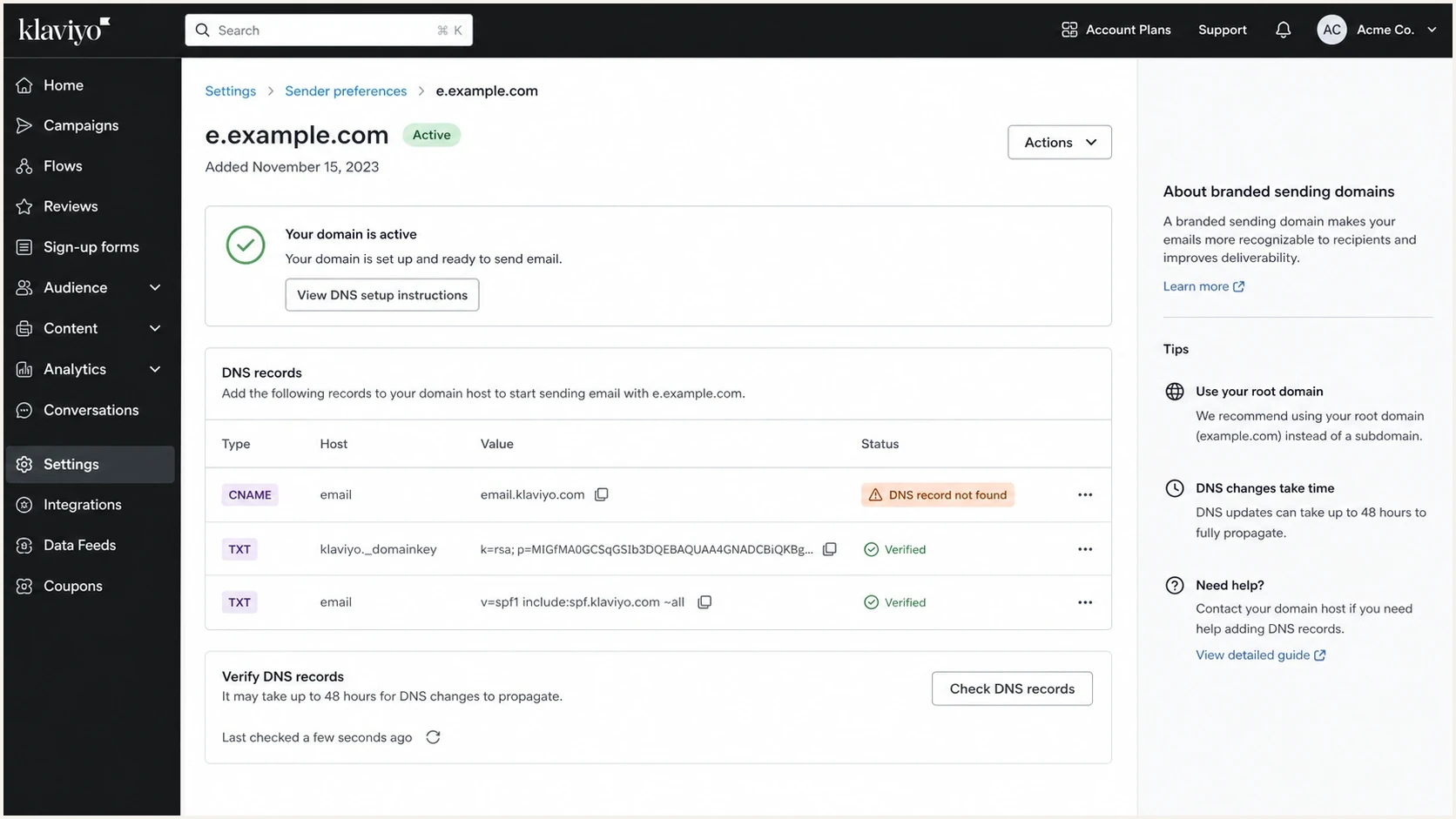
Klaviyo branded sending domain setup screen with DNS verification rows.
The branded sending subdomain and the visible From domain have different jobs. Klaviyo commonly uses a unique subdomain such as send.example.com in the message headers, while the visible From address remains support@example.com. The root domains should match for DMARC. The visible From address should also be valid, and Reply-To should route replies when it differs from From.
Do not add an MX record by default
A Klaviyo marketing branded sending domain does not generally need an MX record. Publish the exact DNS records Klaviyo generates for the selected send type. Klaviyo specifically requires MX for static service-type domains because those domains handle inbound support mail.
- Marketing domain: Use the routing, DKIM, verification, and related records shown by Klaviyo.
- Service domain: Add the generated MX record when Klaviyo uses static service routing.
- Outlook result: Use message trace and SMTP evidence instead of inferring a rejection from missing MX.
What to check first
Start with evidence that separates Klaviyo submission, public DNS, and Microsoft filtering. Check whether the test was generated, confirm that the new branded sending domain is active, inspect a received diagnostic message, then search Microsoft message trace for the exact recipient and time.
- Klaviyo status: Confirm that the new branded sending domain is verified and active for the correct send type.
- Preview status: Check the account's preview limit and whether Klaviyo recorded a send, skip, or bounce.
- Public DNS: Run a domain health check for the root domain and the exact Klaviyo subdomain.
- Authentication: Confirm the Return-Path, DKIM signing domain, and DMARC result in raw headers.
- Message trace: Search Exchange Online for the recipient, sender, and exact test window.
DNS checks for the new sending setupBASH
dig CNAME send.example.com

dig TXT km1._domainkey.example.com

dig TXT km2._domainkey.example.com

dig TXT _dmarc.example.com

dig TXT example.com

dig NS send.example.com
Use the exact hostnames Klaviyo generated because DKIM selectors vary by send type and domain history. With static routing, expect CNAME records. With dynamic routing, confirm that the delegated nameservers answer authoritatively for the child domain. A correct parent-zone entry does not prove that the final DNS answer is correct.
Klaviyo states that DNS changes can take up to 48 hours to propagate. Do not activate a same-day cutover based only on a registrar screenshot. Wait until public resolvers return the expected records and Klaviyo shows the new domain as active.
Header From, Return-Path, and authentication
The biggest troubleshooting mistake is treating every domain in the message as the same identity. SPF checks the envelope sender in Return-Path. DKIM validates the signature and its d= domain. DMARC compares the visible Header From domain with a passing SPF or DKIM domain under the record's matching mode.
Return-Path
This is the bounce address used during SMTP delivery. Klaviyo controls bounce processing for this identity.
- SPF role: SPF checks this envelope domain, not the visible From address.
- Bounce role: Klaviyo records the recipient server's delivery response against the profile or message.
Header From
This is the address recipients see. DMARC uses its domain as the identity that SPF or DKIM must match.
- DMARC role: At least one passing authentication domain must satisfy the DMARC domain match.
- Reply role: Replies use Reply-To when present; otherwise they use the From address.
What the headers can show
Visible From:
support@example.com

Reply-To:
support@example.com

Return-Path:
bounce@send.example.com

DKIM signing domain:
example.com or send.example.com
In this example, SPF can pass for send.example.com and DKIM can pass for example.com or a related subdomain. DMARC passes when at least one of those passing domains matches example.com under the published DMARC mode. A DMARC pass confirms authenticated domain use, but it does not guarantee Outlook inbox placement.
If SPF fails after the domain change, use the SPF checker on the exact Return-Path domain. Do not edit the root-domain SPF record unless the failing authentication result actually uses that root domain.
Separate preview failures from live sending failures
A Klaviyo preview email is not a complete substitute for a live campaign. Preview messages can use a different Klaviyo sending route, omit live unsubscribe or preference links, and exclude normal click or analytics tracking. They also have account-level limits. A missing preview can therefore point to the preview process even when a live campaign delivers.
|
|
|---|---|
0-250 contacts | 100 emails |
251-500 contacts | 500 emails |
501+ contacts | One tenth of sending capacity |
Current Klaviyo preview-email limits per billing cycle.
Klaviyo also allows up to 30 recipients in one preview send. Check Billing for the account's plan and preview allowance. If the limit is exhausted, preview inside the editor or create a small preview list and send a live campaign using the saved template.
- Send one editor preview: Record the recipient, subject, time, and which Klaviyo editor generated it.
- Send one live test: Use a preview list with the same From address, content, and new sending domain.
- Compare results: If only the preview fails, investigate the preview limit and preview route before changing DNS.
- Check recipient activity: For live sends, review bounced, skipped, and delivered events, including Smart Sending or suppression reasons.
Use the result to narrow the incident
A live test that reaches Outlook while the editor preview does not points to Klaviyo's preview path or limit. A live test that bounces provides an SMTP response. A live test marked sent with no Outlook trace requires Klaviyo's delivery logs.
Run a test that gives evidence
A normal inbox test shows only whether the message appeared. A useful diagnostic also captures the visible From address, Reply-To, Return-Path, DKIM signing domain, Authentication-Results, timestamp, and Message-ID. Those fields connect Klaviyo's event with the Microsoft trace.
Send a Klaviyo test to the email tester and compare the result with a Microsoft message trace for a matching Outlook test. If the diagnostic receives the message with a DMARC pass but Outlook does not, focus on Microsoft filtering, sender reputation, or tenant policy. If authentication fails, fix the failing identity before testing again.
Email tester
Send a real email to this address. Suped shows a results button when the test is ready.
?/43tests passed
Exchange Online message trace can show Delivered, Failed, Pending, Quarantined, or Filtered as spam. The last status means Microsoft rejected or blocked the message without placing it in quarantine. New trace records and final status can take about five to ten minutes to appear.
If trace has no matching message after that delay, confirm the exact recipient, sender, subject, time zone, and Message-ID. Klaviyo must then confirm whether it submitted the message and provide the SMTP response. A Delivered trace moves the investigation to inbox rules, transport rules, redirects, or mailbox placement.
|
|
|
|
|---|---|---|---|
Klaviyo event | Sent | Skipped or bounced | Read event detail |
SPF | Pass | Fail | Check Return-Path |
DKIM | Pass | Missing key or fail | Verify generated records |
DMARC | Pass | Fail | Compare authentication domains |
Message trace | Receive and deliver | Missing, failed, or filtered | Inspect trace or sender log |
Compact evidence map for Klaviyo to Outlook test failures.
When it is a Klaviyo setup issue
It becomes a Klaviyo setup issue when the account shows the branded sending domain as active but the generated public DNS records do not resolve, the test uses a different domain than the selected send type, or Klaviyo records a send without any corresponding Microsoft trace or SMTP response. Those facts require account-side evidence that public DNS alone cannot provide.
If the domain must be rebuilt, follow a clean Klaviyo subdomain setup process. Use a unique, unused sending subdomain, publish the generated records exactly, verify them, then activate the domain for marketing, transactional, or service mail as intended.
What to ask Klaviyo support
- Account state: Confirm that the domain is active for the test message's send type.
- Generated records: Provide the expected routing, DKIM, verification, and delegation values.
- Preview state: Confirm remaining preview allowance and whether the request produced a send event.
- Delivery log: Provide the destination host and exact SMTP response for the Outlook recipient.
Support evidence to send
Old domain that works: email.example.com
New domain that fails: send.example.com
Recipient: user@outlook.example
Test timestamp: YYYY-MM-DD HH:MM UTC
Message type: editor preview or live test
Visible From: support@example.com
Return-Path: bounce@send.example.com
Klaviyo event: sent, skipped, bounced, or missing
Message trace: status or no result
This evidence keeps the support request focused on one message. The useful answer identifies whether Klaviyo generated the test, which infrastructure submitted it, and what Microsoft returned during SMTP delivery.
How Suped fits into the workflow
Suped is our DMARC reporting and email authentication product. For a Klaviyo domain migration, Suped's DMARC monitoring groups reports by sending source and shows whether the new Klaviyo traffic passes SPF, DKIM, and the DMARC domain match. That provides trend evidence across real sends rather than one preview message.

Issue steps to fix dialog showing the issue overview, tailored fix steps, and verification action
The practical workflow is to add the domain before cutover, confirm that known Klaviyo traffic appears under the expected identity, and watch for a sudden change in pass rates after activation. DNS issue alerts can then support the Klaviyo and Microsoft evidence without replacing message trace or sender logs.
- Before migration: Record the old domain's senders and authentication pass rates.
- During testing: Confirm that Klaviyo appears under the expected new sending identity.
- After activation: Watch DMARC pass rates and investigate any new unknown source.
- Reputation context: Review blocklist and blacklist signals separately from authentication results.
A safe fix sequence
If the old domain still works, keep it available while the new domain is verified. Do not repurpose DNS records used by corporate or support mail to preserve a marketing subdomain name. The Klaviyo branded sending subdomain should be unique and unused by another mail function.
- Stabilize sending: Use the old working domain for time-sensitive mail while the new setup is diagnosed.
- Verify generated DNS: Publish only the records Klaviyo provides for the selected routing and send type.
- Activate in Klaviyo: Wait for public DNS and the account status to confirm the new domain is active.
- Test both paths: Compare an editor preview with a live test campaign to a preview list.
- Trace Outlook: Use the exact recipient, time, subject, and Message-ID where available.
- Increase volume carefully: Start with engaged recipients and expand only after delivery remains consistent.
Example DMARC record for monitoringDNS
_dmarc.example.com. 3600 IN TXT "v=DMARC1; p=none; rua=mailto:dmarc@example.com"
A p=none policy collects reports but does not request blocking. Move to quarantine or reject only after every legitimate sender is identified and the required domain matches pass. Keep the aggregate-report mailbox monitored so migration failures do not disappear into an unattended address.
Views from the trenches
Best practices
Check Klaviyo activation and generated DNS before changing unrelated mail records.
Compare a live Outlook test with message trace and the matching Klaviyo send event.
Keep Return-Path subdomains separate by provider so bounce handling stays predictable.
Common pitfalls
Adding MX to a marketing subdomain can distract from failed DKIM or DMARC checks.
Treating quarantine as the only evidence misses rejects, filters, and absent sends.
Using preview delivery alone can hide limits or differences in the live sending path.
Expert tips
Keep the old sending domain available until the new identity passes live Outlook tests.
Ask Klaviyo for the exact account state, send event, and remote SMTP response details.
Use Suped alerts to catch authentication and DNS changes during the domain migration.
Marketer from Email Geeks says Klaviyo support should inspect provider-side logs because the platform can see account setup state that public DNS cannot show.
2025-03-25 - Email Geeks
Marketer from Email Geeks says Outlook troubleshooting should start with Microsoft message trace, since quarantine does not prove the message reached the tenant.
2025-03-25 - Email Geeks
What to fix first
First, prove whether Klaviyo generated and submitted the test. If it did, use the SMTP response and Microsoft message trace to identify rejection, filtering, or mailbox delivery. If it did not, check the preview allowance, editor path, suppression state, and account configuration.
For a DNS failure, publish the exact records Klaviyo generated and wait for both public resolution and Klaviyo activation. Then confirm SPF, DKIM, and DMARC in raw headers. Do not add MX to a marketing subdomain unless Klaviyo generated it for a mail-receiving service domain.
Suped supports the ongoing part of this workflow by showing DMARC results for Klaviyo and other legitimate senders, tracking changes after cutover, and surfacing DNS issues. Microsoft trace and Klaviyo delivery logs remain the evidence for one missing Outlook message.




